ECO mode Lexus GS250 2012 Owner's Guide
[x] Cancel search | Manufacturer: LEXUS, Model Year: 2012, Model line: GS250, Model: Lexus GS250 2012Pages: 914, PDF Size: 53.04 MB
Page 192 of 914
1884-1. Before driving
GS350/250_EE (OM30C36E)Make sure that the parking brake is set and shift the shift lever to
D.
Gently depress the accelerator pedal.
Release the parking brake.
When starting off on a uphill
The hill-start assist control is available. (P. 339)
Driving in the rain
Drive carefully when it is raining, because visibility will be reduced, the
windows may become fogged-up, and the road will be slippery.
Drive carefully when it starts to rain, because the road surface will be espe-
cially slippery.
Refrain from high speeds when driving on an expressway in the rain,
because there may be a layer of water between the tires and the road sur-
face, preventing the steering and brakes from operating properly.
Engine speed while driving
In the following conditions, the engine speed may become high while driv-
ing. This is due to automatic up-shifting control or down-shifting implemen-
tation to meet driving conditions. It does not indicate sudden acceleration.
The vehicle is judged to be driving uphill or downhill
When the accelerator pedal is released
When sport mode is selected (P. 3 2 6 )
Starting off on a steep uphill
1
2
3
Page 197 of 914
1934-1. Before driving
4
Driving
GS350/250_EE (OM30C36E)
CAUTION
If you hear a squealing or scraping noise (brake pad wear indicators)
Have the brake pads checked and replaced by any authorized Lexus dealer
or repairer, or another duly qualified and equipped professional as soon as
possible.
Rotor damage may result if the pads are not replaced when needed.
Moderate levels of brake pad and disc wear allow enhanced front braking
power. As a result, the discs may wear more quickly than conventional
brake discs. Therefore, when replacing the brake pads, Lexus recommends
that you also have the thickness of the discs measured.
It is dangerous to drive the vehicle when the wear limits of the brake pads
and/or those of the brake discs are exceeded.
When the vehicle is stopped
Do not race the engine.
If the vehicle is in any gear other than P or N, the vehicle may accelerate
suddenly and unexpectedly, causing an accident.
In order to prevent accidents due to the vehicle rolling away, always keep
depressing the brake pedal while the engine is running, and apply the
parking brake as necessary.
If the vehicle is stopped on an incline, in order to prevent accidents caused
by the vehicle rolling forward or backward, always depress the brake
pedal and securely apply the parking brake as needed.
Avoid revving or racing the engine.
Running the engine at high speed while the vehicle is stopped may cause
the exhaust system to overheat, which could result in a fire if combustible
material is nearby.
Page 213 of 914
207
4 4-2. Driving procedures
Driving
GS350/250_EE (OM30C36E)
Engine (ignition) switch
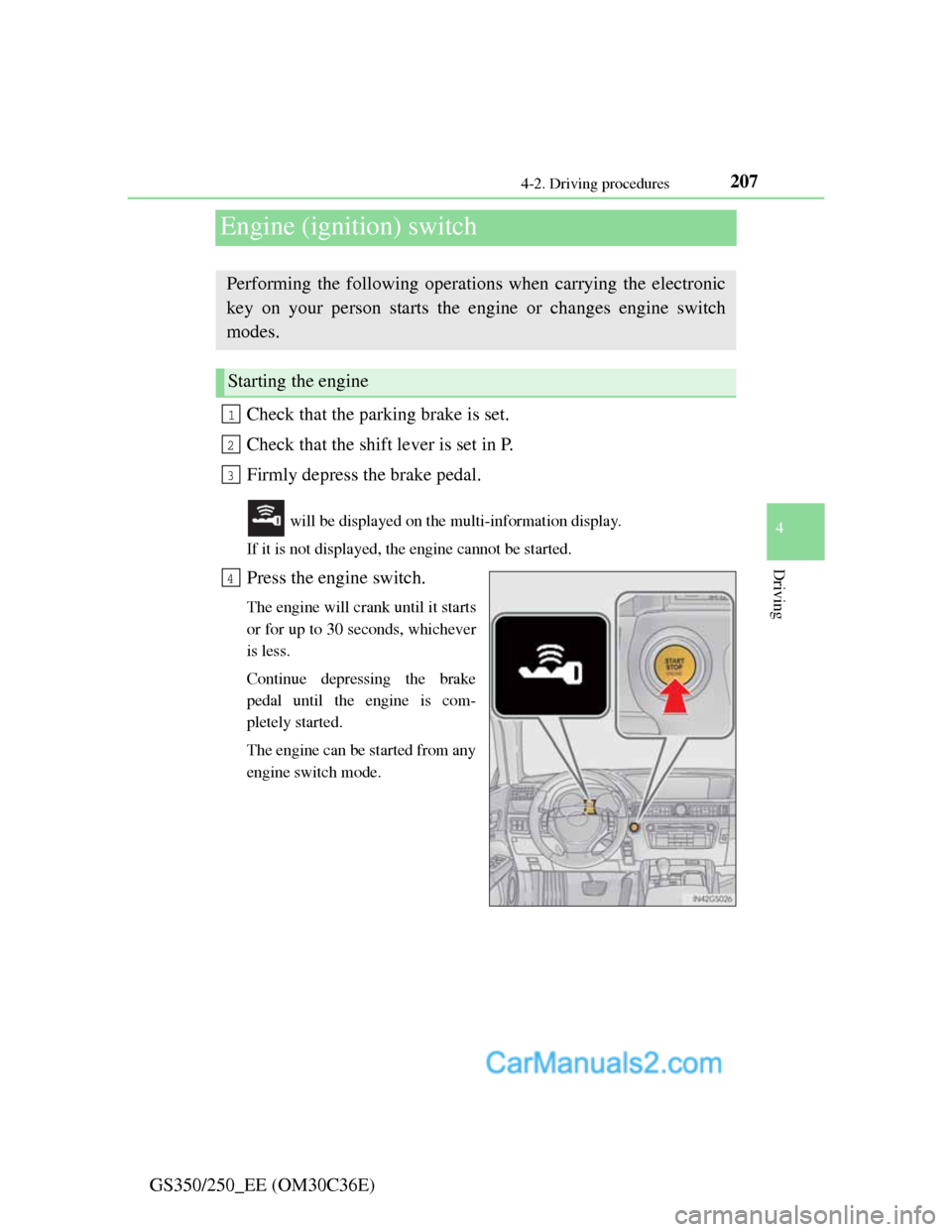
Check that the parking brake is set.
Check that the shift lever is set in P.
Firmly depress the brake pedal.
will be displayed on the multi-information display.
If it is not displayed, the engine cannot be started.
Press the engine switch.
The engine will crank until it starts
or for up to 30 seconds, whichever
is less.
Continue depressing the brake
pedal until the engine is com-
pletely started.
The engine can be started from any
engine switch mode.
Performing the following operations when carrying the electronic
key on your person starts the engine or changes engine switch
modes.
Starting the engine
1
2
3
4
Page 218 of 914
2124-2. Driving procedures
GS350/250_EE (OM30C36E)
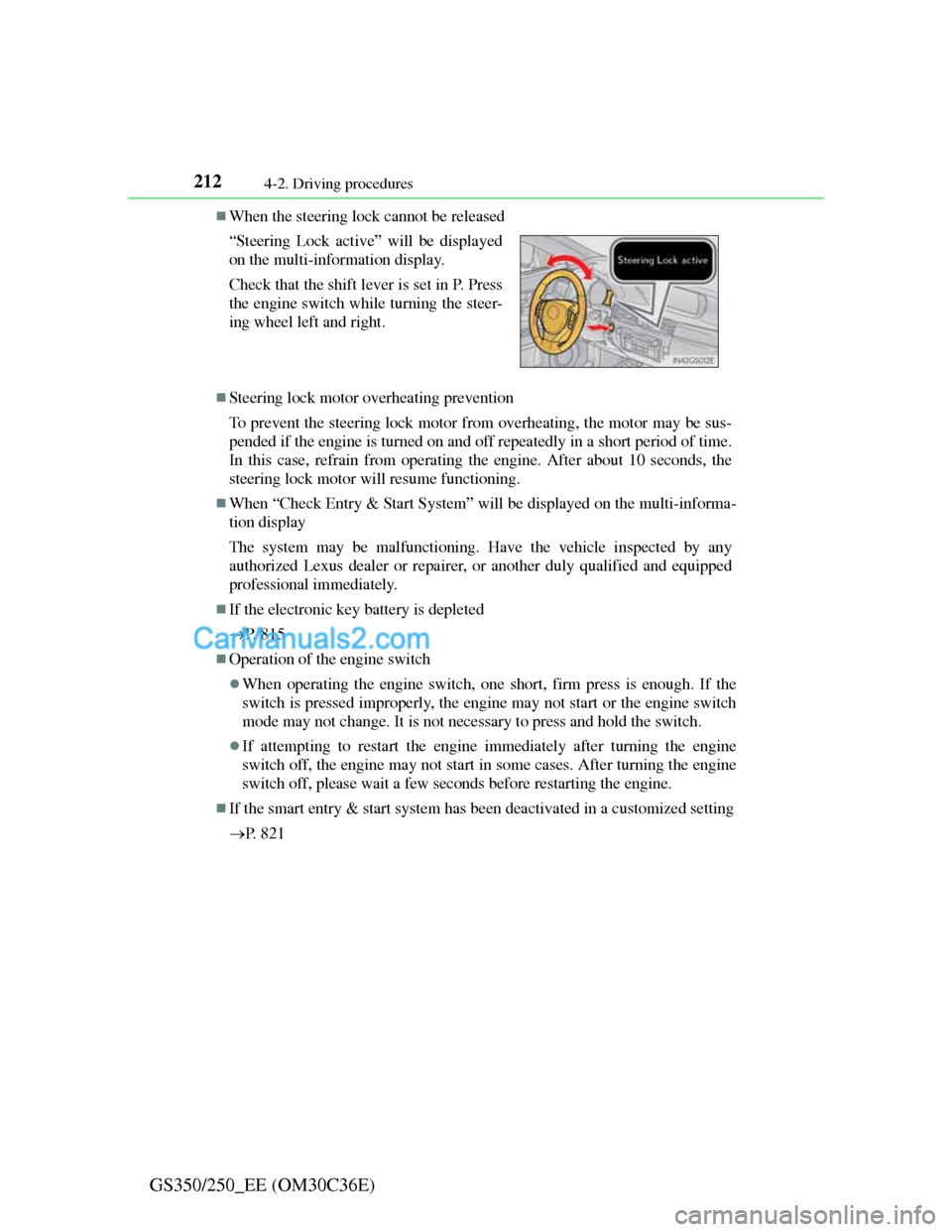
When the steering lock cannot be released
Steering lock motor overheating prevention
To prevent the steering lock motor from overheating, the motor may be sus-
pended if the engine is turned on and off repeatedly in a short period of time.
In this case, refrain from operating the engine. After about 10 seconds, the
steering lock motor will resume functioning.
When “Check Entry & Start System” will be displayed on the multi-informa-
tion display
The system may be malfunctioning. Have the vehicle inspected by any
authorized Lexus dealer or repairer, or another duly qualified and equipped
professional immediately.
If the electronic key battery is depleted
P. 8 1 5
Operation of the engine switch
When operating the engine switch, one short, firm press is enough. If the
switch is pressed improperly, the engine may not start or the engine switch
mode may not change. It is not necessary to press and hold the switch.
If attempting to restart the engine immediately after turning the engine
switch off, the engine may not start in some cases. After turning the engine
switch off, please wait a few seconds before restarting the engine.
If the smart entry & start system has been deactivated in a customized setting
P. 8 2 1 “Steering Lock active” will be displayed
on the multi-information display.
Check that the shift lever is set in P. Press
the engine switch while turning the steer-
ing wheel left and right.
Page 220 of 914
2144-2. Driving procedures
GS350/250_EE (OM30C36E)
NOTICE
To prevent battery discharge
Do not leave the engine switch in ACCESSORY or IGNITION ON mode
for long periods of time without the engine running.
If “POWER ON” is displayed on the multi-information display, the
engine switch is not off. Exit the vehicle after turning the engine switch
off.
Do not stop the engine when the shift lever is in a position other than P. If
the engine is stopped in another shift lever position, the engine switch will
not be turned off but instead be turned to ACCESSORY mode. If the vehi-
cle is left in ACCESSORY mode, battery discharge may occur.
When starting the engine
Do not race a cold engine.
If the engine becomes difficult to start or stalls frequently, have your vehi-
cle checked by any authorized Lexus dealer or repairer, or another duly
qualified and equipped professional immediately.
Symptoms indicating a malfunction with the engine switch
If the engine switch seems to be operating somewhat differently than usual,
such as the switch sticking slightly, there may be a malfunction. Contact
any authorized Lexus dealer or repairer, or another duly qualified and
equipped professional immediately.
Page 223 of 914
2174-2. Driving procedures
4
Driving
GS350/250_EE (OM30C36E)
Sport mode/Eco drive mode
P. 326
Snow mode
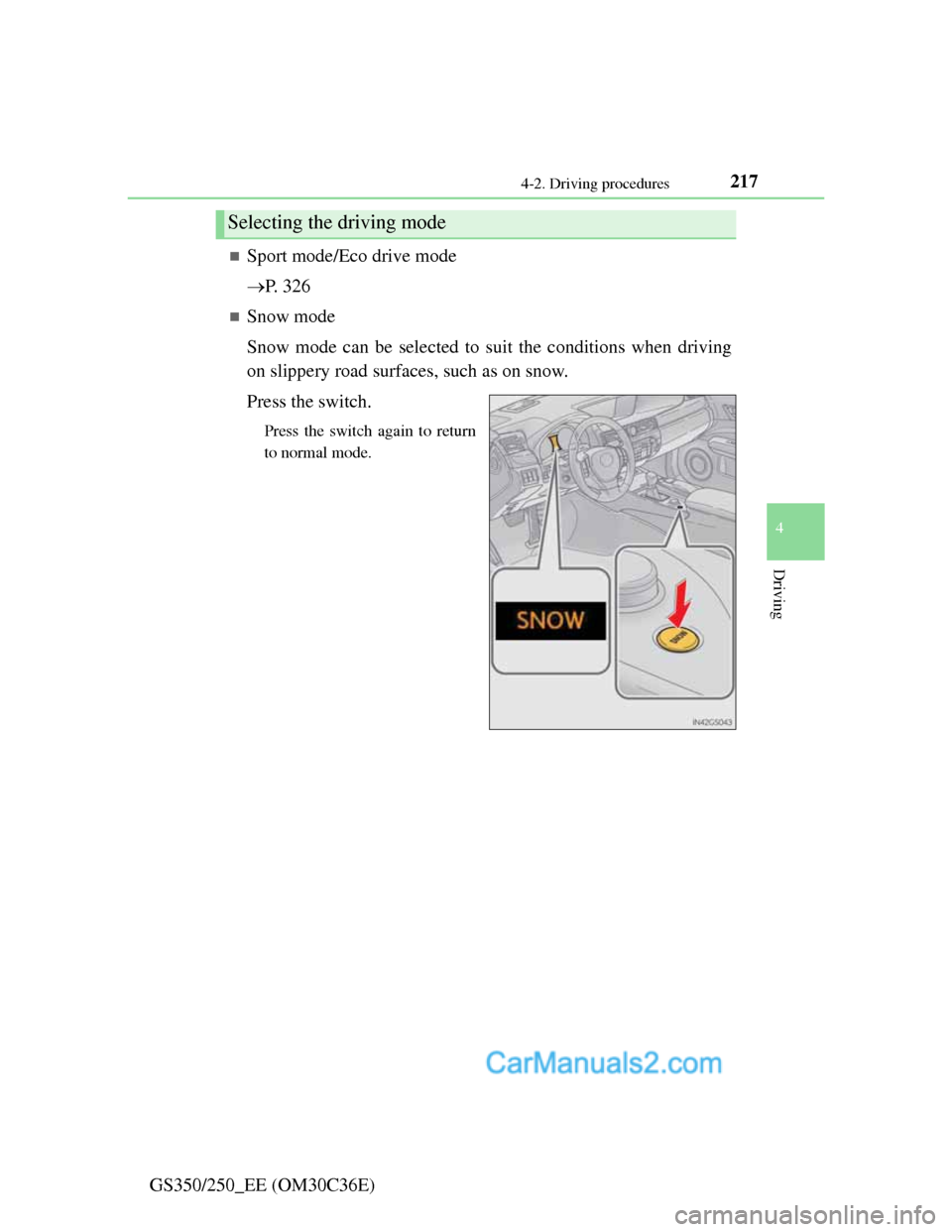
Snow mode can be selected to suit the conditions when driving
on slippery road surfaces, such as on snow.
Press the switch.
Press the switch again to return
to normal mode.
Selecting the driving mode
Page 232 of 914
2264-2. Driving procedures
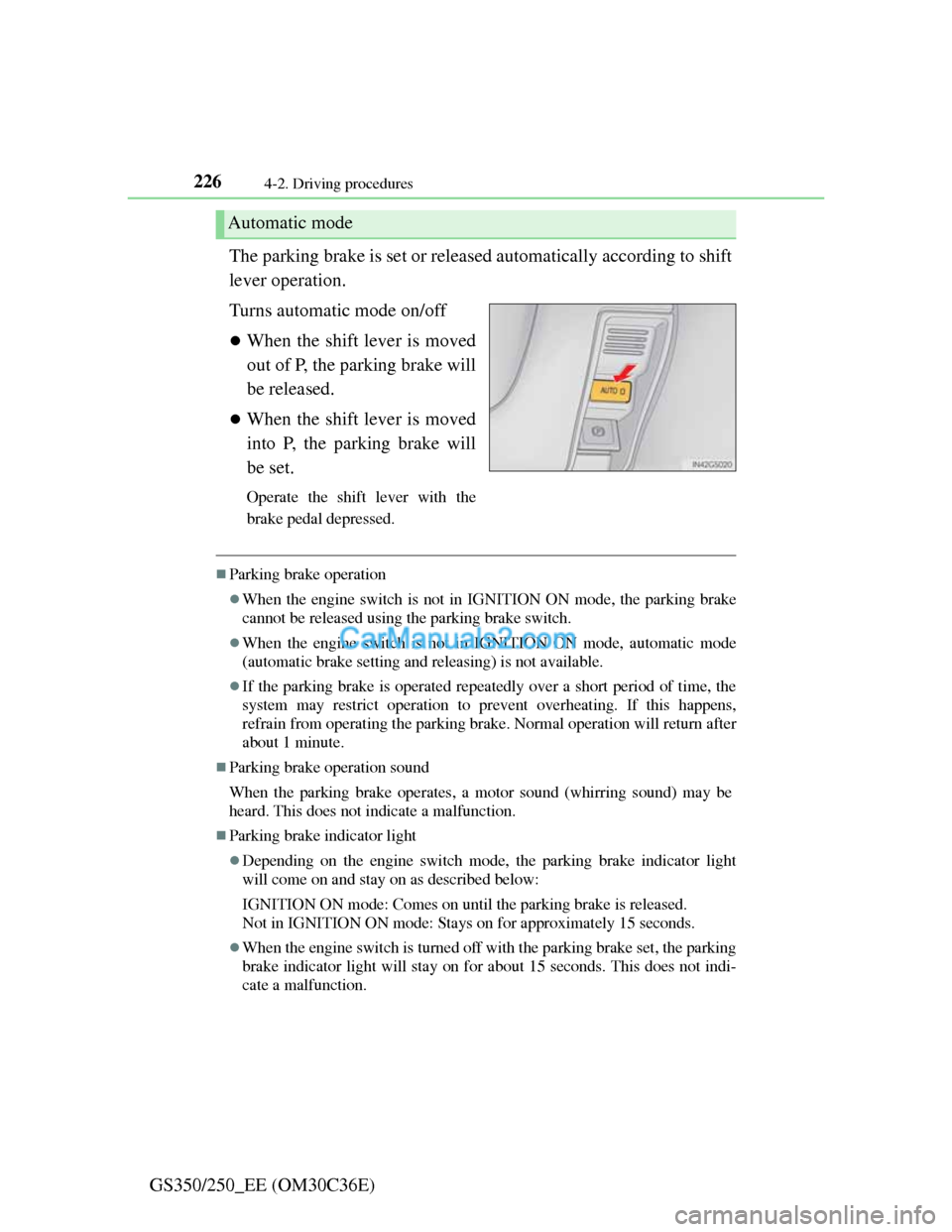
GS350/250_EE (OM30C36E)The parking brake is set or released automatically according to shift
lever operation.
Turns automatic mode on/off
When the shift lever is moved
out of P, the parking brake will
be released.
When the shift lever is moved
into P, the parking brake will
be set.
Operate the shift lever with the
brake pedal depressed.
Parking brake operation
When the engine switch is not in IGNITION ON mode, the parking brake
cannot be released using the parking brake switch.
When the engine switch is not in IGNITION ON mode, automatic mode
(automatic brake setting and releasing) is not available.
If the parking brake is operated repeatedly over a short period of time, the
system may restrict operation to prevent overheating. If this happens,
refrain from operating the parking brake. Normal operation will return after
about 1 minute.
Parking brake operation sound
When the parking brake operates, a motor sound (whirring sound) may be
heard. This does not indicate a malfunction.
Parking brake indicator light
Depending on the engine switch mode, the parking brake indicator light
will come on and stay on as described below:
IGNITION ON mode: Comes on until the parking brake is released.
Not in IGNITION ON mode: Stays on for approximately 15 seconds.
When the engine switch is turned off with the parking brake set, the parking
brake indicator light will stay on for about 15 seconds. This does not indi-
cate a malfunction.
Automatic mode
Page 253 of 914

2464-3. Operating the lights and wipers
GS350/250_EE (OM30C36E)
Raindrop sensor (vehicles with rain-sensing windshield wipers)
If the wiper is turned to AUTO mode while the engine switch is in IGNI-
TION ON mode, the wipers will operate once to show that AUTO mode is
activated.
If the temperature of the raindrop sensor is 85°C (185°F) or higher, or -
30°C (-22°F) or lower, automatic operation may not occur. In this case,
operate the wipers in any mode other than AUTO mode.
When the windshield wipers are in temporary operation
AUTO mode cannot be activated even if is pressed.
If no windshield washer fluid sprays
Check that the washer nozzles are not blocked if there is washer fluid in the
windshield washer fluid reservoir.
The raindrop sensor judges the amount
of raindrops.
An optical sensor is adopted. It may not
operate properly when sunlight from
the rising or setting of the sun intermit-
tently strikes the windshield, or if bugs
etc. are present on the windshield.
CAUTION
Caution regarding the use of windshield wipers in AUTO mode
The windshield wipers may operate unexpectedly if the sensor is touched
or the windshield is subject to vibration in AUTO mode. Take care that
your fingers or anything else do not become caught in the windshield wip-
ers.
Caution regarding the use of washer fluid
When it is cold, do not use the washer fluid until the windshield becomes
warm. The fluid may freeze on the windshield and cause low visibility.
This may lead to an accident, resulting in death or serious injury.
Page 266 of 914
2594-5. Using the driving support
4
Driving
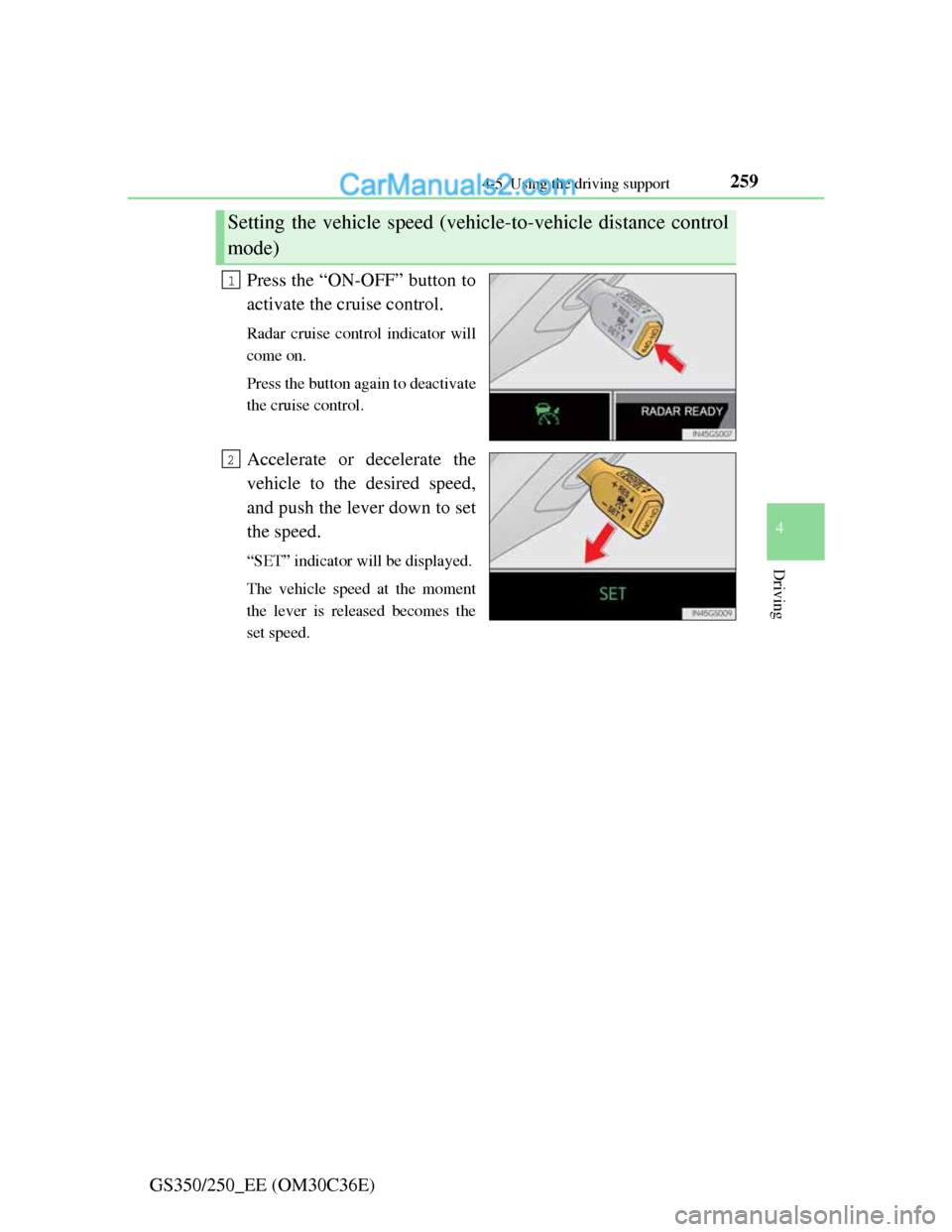
GS350/250_EE (OM30C36E)Press the “ON-OFF” button to
activate the cruise control.
Radar cruise control indicator will
come on.
Press the button again to deactivate
the cruise control.
Accelerate or decelerate the
vehicle to the desired speed,
and push the lever down to set
the speed.
“SET” indicator will be displayed.
The vehicle speed at the moment
the lever is released becomes the
set speed.
Setting the vehicle speed (vehicle-to-vehicle distance control
mode)
1
2
Page 272 of 914
2654-5. Using the driving support
4
Driving
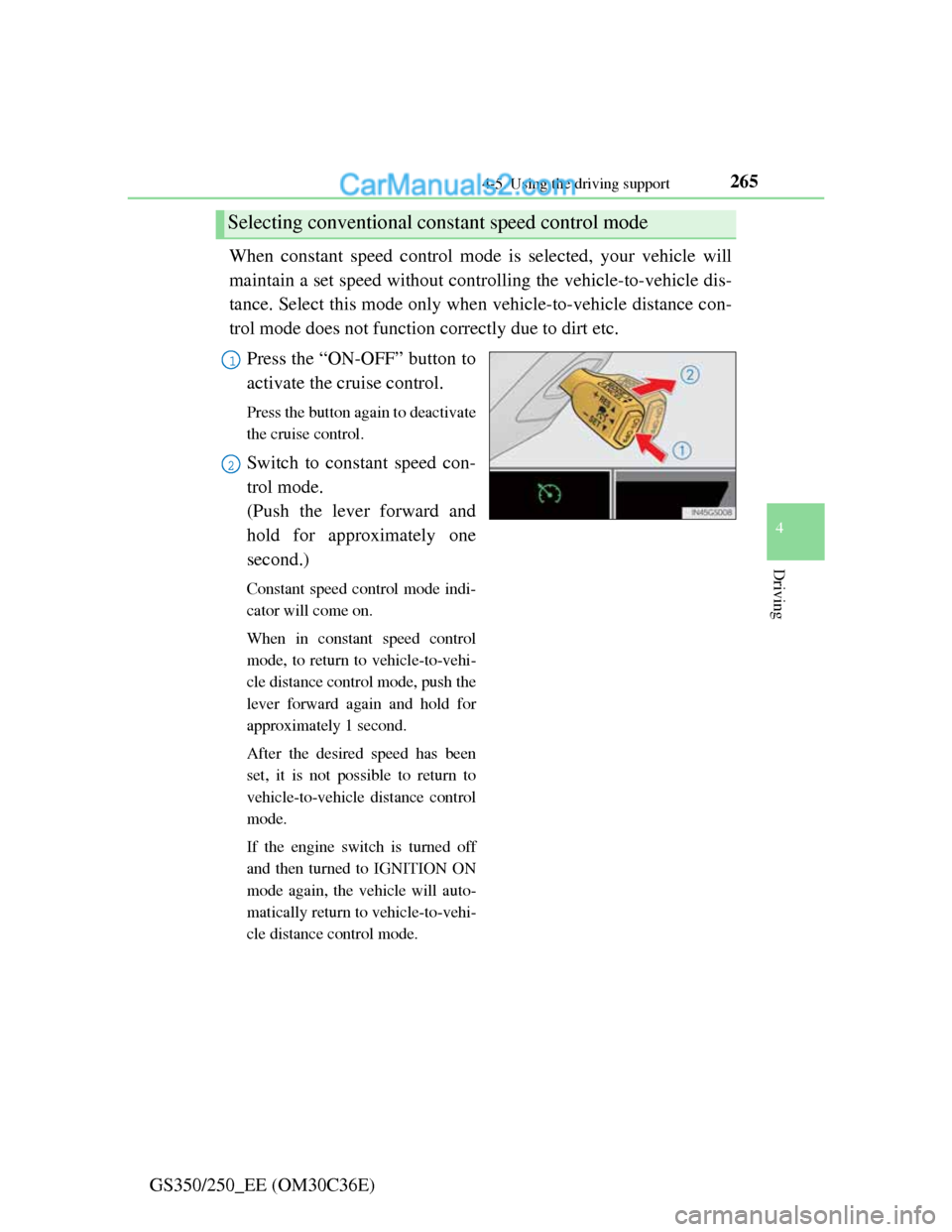
GS350/250_EE (OM30C36E)When constant speed control mode is selected, your vehicle will
maintain a set speed without controlling the vehicle-to-vehicle dis-
tance. Select this mode only when vehicle-to-vehicle distance con-
trol mode does not function correctly due to dirt etc.
Press the “ON-OFF” button to
activate the cruise control.
Press the button again to deactivate
the cruise control.
Switch to constant speed con-
trol mode.
(Push the lever forward and
hold for approximately one
second.)
Constant speed control mode indi-
cator will come on.
When in constant speed control
mode, to return to vehicle-to-vehi-
cle distance control mode, push the
lever forward again and hold for
approximately 1 second.
After the desired speed has been
set, it is not possible to return to
vehicle-to-vehicle distance control
mode.
If the engine switch is turned off
and then turned to IGNITION ON
mode again, the vehicle will auto-
matically return to vehicle-to-vehi-
cle distance control mode.
Selecting conventional constant speed control mode
1
2