Park Lexus GS250 2012 Owner's Guide
[x] Cancel search | Manufacturer: LEXUS, Model Year: 2012, Model line: GS250, Model: Lexus GS250 2012Pages: 914, PDF Size: 53.04 MB
Page 231 of 914
2254-2. Driving procedures
4
Driving
GS350/250_EE (OM30C36E)
Parking brake
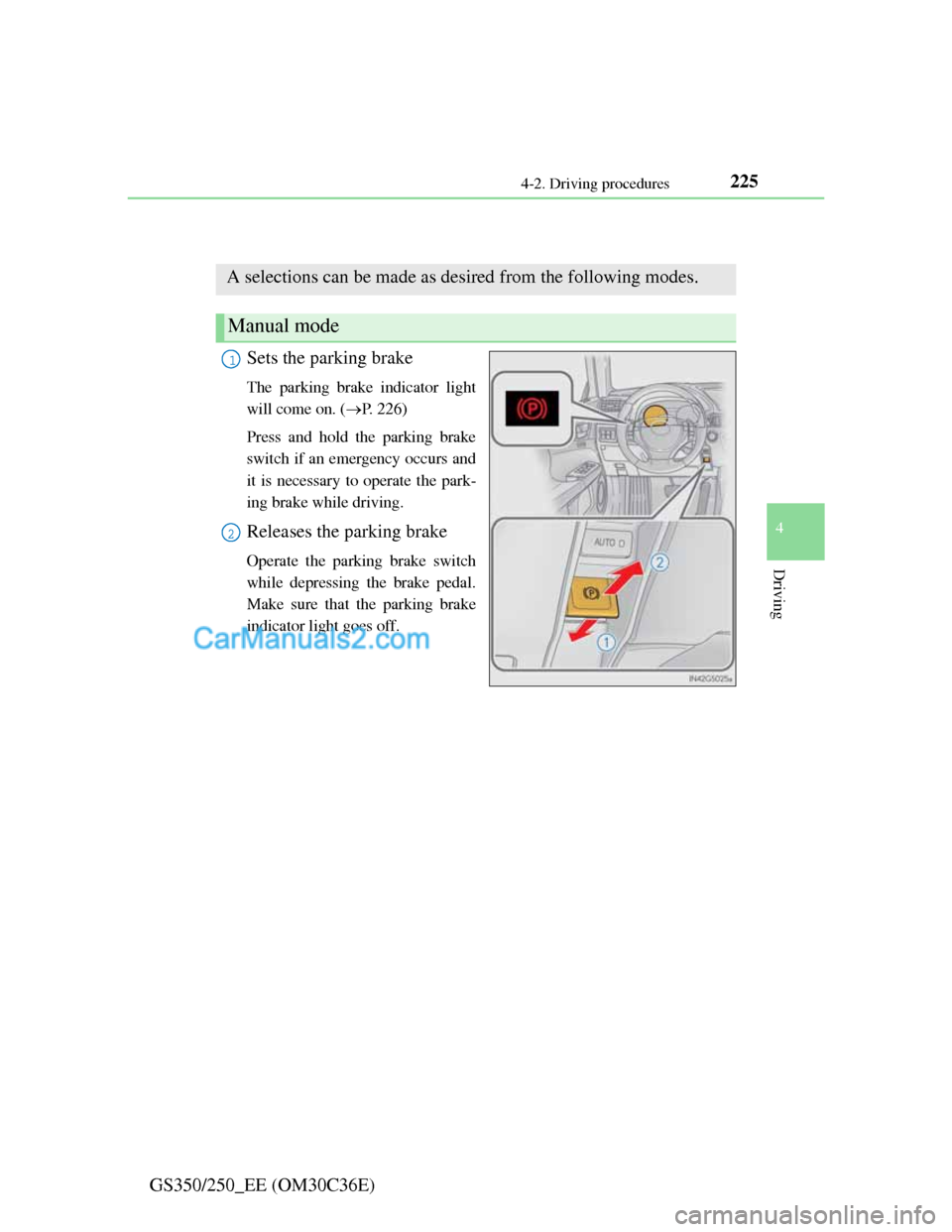
Sets the parking brake
The parking brake indicator light
will come on. (P. 226)
Press and hold the parking brake
switch if an emergency occurs and
it is necessary to operate the park-
ing brake while driving.
Releases the parking brake
Operate the parking brake switch
while depressing the brake pedal.
Make sure that the parking brake
indicator light goes off.
A selections can be made as desired from the following modes.
Manual mode
1
2
Page 232 of 914
2264-2. Driving procedures
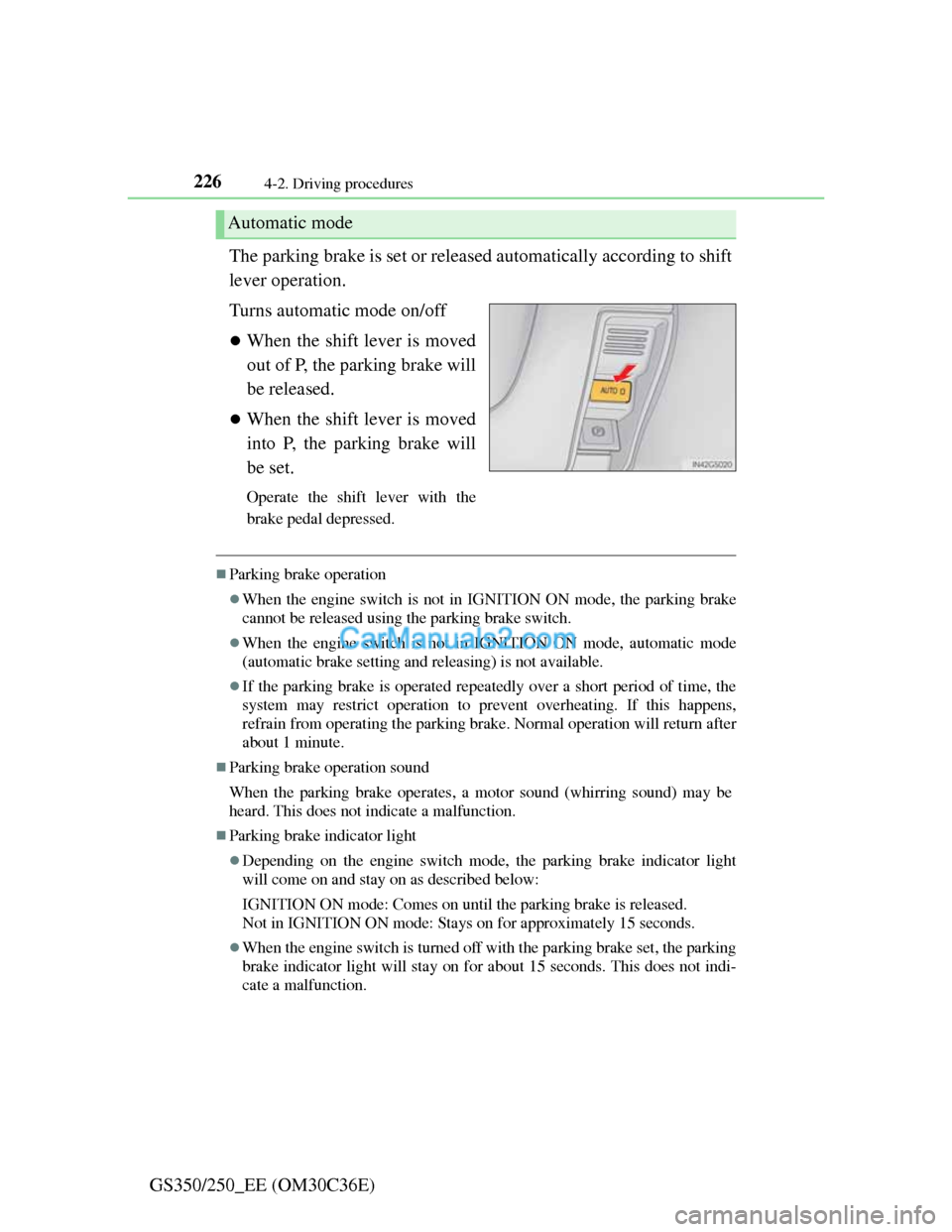
GS350/250_EE (OM30C36E)The parking brake is set or released automatically according to shift
lever operation.
Turns automatic mode on/off
When the shift lever is moved
out of P, the parking brake will
be released.
When the shift lever is moved
into P, the parking brake will
be set.
Operate the shift lever with the
brake pedal depressed.
Parking brake operation
When the engine switch is not in IGNITION ON mode, the parking brake
cannot be released using the parking brake switch.
When the engine switch is not in IGNITION ON mode, automatic mode
(automatic brake setting and releasing) is not available.
If the parking brake is operated repeatedly over a short period of time, the
system may restrict operation to prevent overheating. If this happens,
refrain from operating the parking brake. Normal operation will return after
about 1 minute.
Parking brake operation sound
When the parking brake operates, a motor sound (whirring sound) may be
heard. This does not indicate a malfunction.
Parking brake indicator light
Depending on the engine switch mode, the parking brake indicator light
will come on and stay on as described below:
IGNITION ON mode: Comes on until the parking brake is released.
Not in IGNITION ON mode: Stays on for approximately 15 seconds.
When the engine switch is turned off with the parking brake set, the parking
brake indicator light will stay on for about 15 seconds. This does not indi-
cate a malfunction.
Automatic mode
Page 233 of 914
227
4 4-2. Driving procedures
Driving
GS350/250_EE (OM30C36E)
When there is a malfunction in the system
Warning lights and/or warning message will turn on or flash. (P. 749, 757)
Depending on the condition, the parking brake indicator light may flash.
Usage in winter time
P. 3 5 9
NOTICE
When parking the vehicle
Before you leave the vehicle, set the parking brake, shift the shift lever to P
and make sure that the vehicle does not move.
When the system malfunctions
Stop the vehicle in a safe place and check the warning messages.
When the parking brake cannot be released due to a malfunction
Use the parking brake release tool to manually release the parking brake.
(P. 818)
Driving the vehicle with the parking brake set will lead to brake compo-
nents overheating, which may affect braking performance and increase
brake wear.
Page 238 of 914

2314-3. Operating the lights and wipers
4
Driving
GS350/250_EE (OM30C36E)
Daytime running light system
To make your vehicle more visible to other drivers, the front position lights
turn on automatically whenever the engine is started and the parking brake is
released. Daytime running lights are not designed for use at night.
Headlight control sensor
Automatic light off system
When the light switch is in : The headlights turn off automatically if the
engine switch is turned to ACCESSORY mode or turned off.
When the light switch is in : The headlights and all lights turn off auto-
matically if the engine switch is turned to ACCESSORY mode or turned
off.
To turn the lights on again, turn the engine switch to IGNITION ON mode,
or turn the light switch off once and then back to or .
If any of the doors or trunk lid is kept open, the lights automatically turn off
after 20 minutes.
Light reminder buzzer
A buzzer sounds when the engine switch is turned off or turned to ACCES-
SORY mode and the driver’s door is opened while the lights are turned on.
Automatic headlight leveling system
The level of the headlights is automatically adjusted according to the number
of passengers and the loading condition of the vehicle to ensure that the
headlights do not interfere with other road users. The sensor may not function properly if
an object is placed on the sensor, or any-
thing that blocks the sensor is affixed to
the windshield.
Doing so interferes with the sensor
detecting the level of ambient light and
may cause the automatic headlight system
to malfunction.
Page 245 of 914
2384-3. Operating the lights and wipers
GS350/250_EE (OM30C36E)
NOTICE
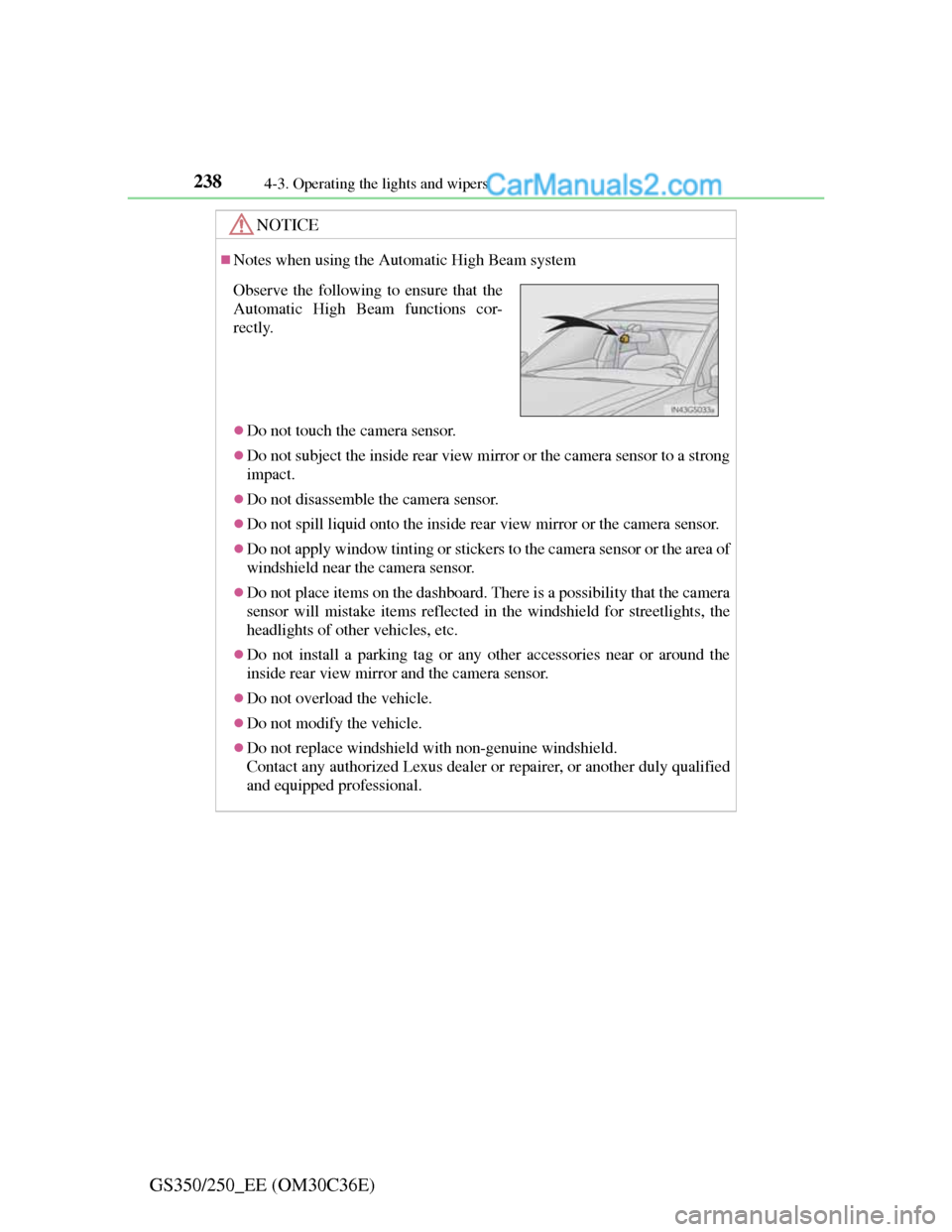
Notes when using the Automatic High Beam system
Do not touch the camera sensor.
Do not subject the inside rear view mirror or the camera sensor to a strong
impact.
Do not disassemble the camera sensor.
Do not spill liquid onto the inside rear view mirror or the camera sensor.
Do not apply window tinting or stickers to the camera sensor or the area of
windshield near the camera sensor.
Do not place items on the dashboard. There is a possibility that the camera
sensor will mistake items reflected in the windshield for streetlights, the
headlights of other vehicles, etc.
Do not install a parking tag or any other accessories near or around the
inside rear view mirror and the camera sensor.
Do not overload the vehicle.
Do not modify the vehicle.
Do not replace windshield with non-genuine windshield.
Contact any authorized Lexus dealer or repairer, or another duly qualified
and equipped professional.
Observe the following to ensure that the
Automatic High Beam functions cor-
rectly.
Page 257 of 914
2504-4. Refueling
GS350/250_EE (OM30C36E)
CAUTION
When refueling the vehicle
Observe the following precautions while refueling the vehicle. Failure to do
so may result in death or serious injury.
After exiting the vehicle and before opening the fuel door, touch an
unpainted metal surface to discharge any static electricity. It is important
to discharge static electricity before refueling because sparks resulting
from static electricity can cause fuel vapors to ignite while refueling.
Always hold the grips on the fuel tank cap and turn it slowly to remove it.
A whooshing sound may be heard when the fuel tank cap is loosened.
Wait until the sound cannot be heard before fully removing the cap. In hot
weather, pressurized fuel may spray out the filler neck and cause injury.
Do not allow anyone that has not discharged static electricity from their
body to come close to an open fuel tank.
Do not inhale vaporized fuel.
Fuel contains substances that are harmful if inhaled.
Do not smoke while refueling the vehicle.
Doing so may cause the fuel to ignite and cause a fire.
Do not return to the vehicle or touch any person or object that is statically
charged.
This may cause static electricity to build up, resulting in a possible igni-
tion hazard.
When refueling
Observe the following precautions to prevent fuel overflowing from the
fuel tank:
Securely insert the fuel nozzle into the fuel filler neck.
Stop filling the tank after the fuel nozzle automatically clicks off.
Do not top off the fuel tank.
NOTICE
Refueling
Do not spill fuel during refueling.
Doing so may damage the vehicle, such as causing the emission control
system to operate abnormally or damaging fuel system components or the
vehicle’s painted surface.
Page 287 of 914
2804-5. Using the driving support
GS350/250_EE (OM30C36E)
After the vehicle has been parked in the sun
The LKA system functions may not be available and a warning message
(P. 767) will be displayed for a while after driving has started. In such
cases, turn the LKA system off and turn it on again after normal temperature
returns. When the temperature in the cabin decreases and the temperature
around the camera sensor (P. 274) becomes suitable for its operation, the
functions will begin to operate.
If there are lane markers on only one side of the vehicle
The lane keeping assist function will not operate. Also, the lane departure
warning will not operate for the side on which lane markers could not be rec-
ognized.
Conditions in which the function may not operate correctly
In the following conditions, the LKA system functions may not operate, or it
may not be possible to ensure adequate performance. Also, the camera sensor
may be unable to recognize lane lines causing the lane departure warning
function to operate incorrectly, or the lane keeping assist function may not
operate properly. However, this does not indicate a malfunction.
When driving through an area with no lane markers, such as a tollbooth, a
crossing or before a ticket checkpoint
When driving on a sharp curve
When lanes are extremely narrow or extremely wide
When the vehicle leans to one side an unusual amount due to a heavy load
or improper tire inflation pressure
When the following distance between your vehicle and the vehicle ahead is
extremely short
When the lane markers are yellow (These may be more difficult for the sys-
tem to recognize compared to white markers.)
When the lane markers are broken, “Raised pavement marker” or stones
When lane markers are obscured or partially obscured by sand, dirt, etc.
When there are shadows on the road running parallel with lane markers, or
if a shadow covers the lane markers
When driving on a particularly bright road surface, such as concrete
When driving on a road surface that is bright due to reflected light
When driving in a location where the light level changes rapidly, such as the
entrance to or exit from a tunnel
When sunlight or the headlights of oncoming vehicles are shining directly
into the camera lens
Page 291 of 914

2844-5. Using the driving support
GS350/250_EE (OM30C36E)
Lexus parking assist-sensor
Types of sensors
: If equipped
The distance from your vehicle to nearby obstacles when parallel
parking or maneuvering into a garage is measured by the sensors
and communicated via the multi-information display, Remote
Touch screen and a buzzer. Always check the surrounding area
when using this system.
Front center sensors
Front corner sensors
Rear corner sensors
Rear center sensors1
2
3
4
Page 292 of 914

2854-5. Using the driving support
4
Driving
GS350/250_EE (OM30C36E)
Lexus parking assist-sensor switch
Turns the Lexus parking
assist-sensor on/off
When on, the indicator light
comes on and the buzzer sounds
to inform the driver that the sys-
tem is operational.
Page 294 of 914
2874-5. Using the driving support
4
Driving
GS350/250_EE (OM30C36E)
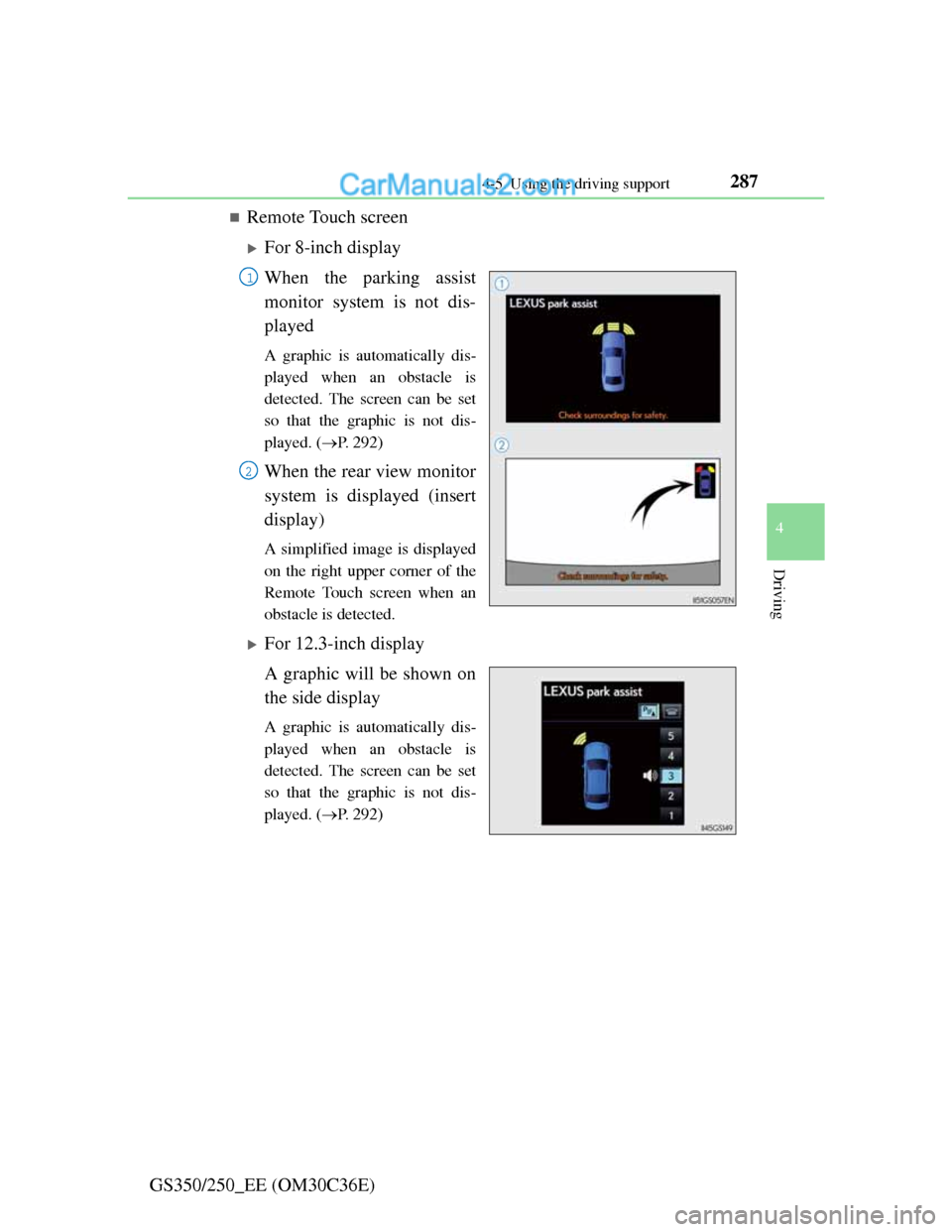
Remote Touch screen
For 8-inch display
When the parking assist
monitor system is not dis-
played
A graphic is automatically dis-
played when an obstacle is
detected. The screen can be set
so that the graphic is not dis-
played. (P. 292)
When the rear view monitor
system is displayed (insert
display)
A simplified image is displayed
on the right upper corner of the
Remote Touch screen when an
obstacle is detected.
For 12.3-inch display
A graphic will be shown on
the side display
A graphic is automatically dis-
played when an obstacle is
detected. The screen can be set
so that the graphic is not dis-
played. (P. 292)
1
2