Park Lexus GS250 2012 Manual PDF
[x] Cancel search | Manufacturer: LEXUS, Model Year: 2012, Model line: GS250, Model: Lexus GS250 2012Pages: 914, PDF Size: 53.04 MB
Page 348 of 914
341
4 4-5. Using the driving support
Driving
GS350/250_EE (OM30C36E)
Hill-start assist control
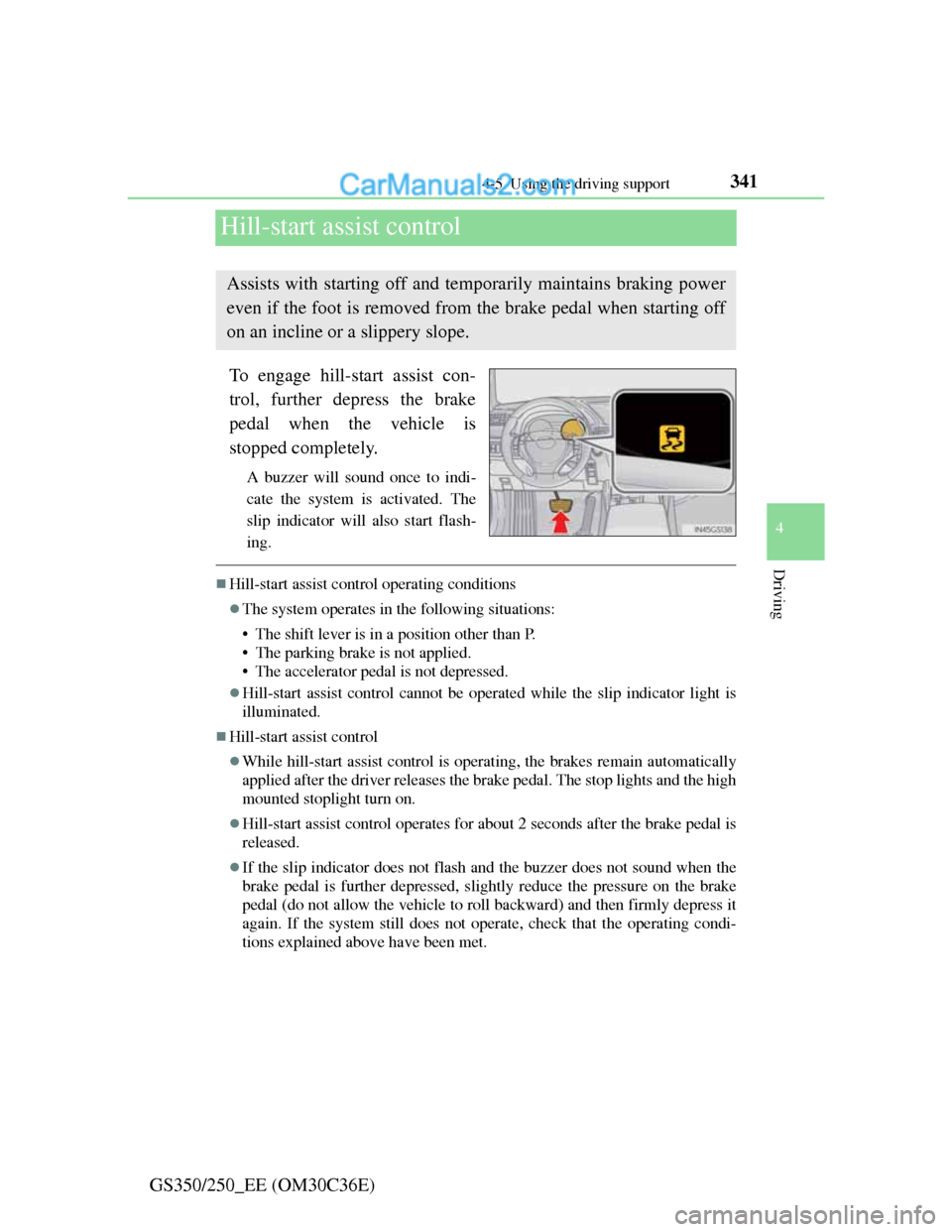
To engage hill-start assist con-
trol, further depress the brake
pedal when the vehicle is
stopped completely.
A buzzer will sound once to indi-
cate the system is activated. The
slip indicator will also start flash-
ing.
Hill-start assist control operating conditions
The system operates in the following situations:
• The shift lever is in a position other than P.
• The parking brake is not applied.
• The accelerator pedal is not depressed.
Hill-start assist control cannot be operated while the slip indicator light is
illuminated.
Hill-start assist control
While hill-start assist control is operating, the brakes remain automatically
applied after the driver releases the brake pedal. The stop lights and the high
mounted stoplight turn on.
Hill-start assist control operates for about 2 seconds after the brake pedal is
released.
If the slip indicator does not flash and the buzzer does not sound when the
brake pedal is further depressed, slightly reduce the pressure on the brake
pedal (do not allow the vehicle to roll backward) and then firmly depress it
again. If the system still does not operate, check that the operating condi-
tions explained above have been met.
Assists with starting off and temporarily maintains braking power
even if the foot is removed from the brake pedal when starting off
on an incline or a slippery slope.
Page 349 of 914
3424-5. Using the driving support
GS350/250_EE (OM30C36E)
Hill-start assist control buzzer
When hill-start assist control is activated, the buzzer will sound once.
In the following situations, hill-start assist control will be canceled and the
buzzer will sound twice.
• No attempt is made to drive the vehicle within approximately 2 seconds
of releasing the brake pedal.
• The shift lever is moved to P.
• The parking brake is applied.
• The brake pedal is depressed again.
• The brake pedal has been depressed for more than approximately 3 min-
utes.
If the slip indicator comes on
It may indicate a malfunction in the system. Contact any authorized Lexus
dealer or repairer, or another duly qualified and equipped professional.
CAUTION
Hill-start assist control
Do not overly rely on hill-start assist control. Hill-start assist control may
not operate effectively on steep inclines and roads covered with ice.
Unlike the parking brake, hill-start assist control is not intended to hold
the vehicle stationary for an extended period of time. Do not attempt to
use hill-start assist control to hold the vehicle on an incline, as doing so
may lead to an accident.
Page 363 of 914
3564-5. Using the driving support
GS350/250_EE (OM30C36E)
The Blind Spot Monitor system is operational when
The BSM main switch is set to on and vehicle speed is greater than approxi-
mately 40 km/h (25 mph).
The Blind Spot Monitor will detect a vehicle when
A vehicle in an adjacent lane overtakes your vehicle.
Another vehicle enters the detection area when it changes lanes.
Conditions under which the Blind Spot Monitor will not detect a vehicle
The Blind Spot Monitor system is not designed to detect the following types
of vehicles and/or objects:
Small motorcycles, bicycles, pedestrians etc.*
Vehicles traveling in the opposite direction
Guardrails, walls, signs, parked vehicles and similar stationary objects*
Following vehicles that are in the same lane*
Vehicles driving 2 lanes across from your vehicle*
*
: Depending on conditions, detection of a vehicle and/or object may occur.
Page 370 of 914
3604-6. Driving tips
GS350/250_EE (OM30C36E)Perform the following according to the driving conditions:
Do not try to forcibly open a window or move a wiper that is fro-
zen. Pour warm water over the frozen area to melt the ice. Wipe
away the water immediately to prevent it from freezing.
To ensure proper operation of the climate control system fan,
remove any snow that has accumulated on the air inlet vents in
front of the windshield.
Check for and remove any excess ice or snow that may have
accumulated on the exterior lights, vehicle’s roof, chassis, around
the tires or on the brakes.
Remove any snow or mud from the bottom of your shoes before
getting in the vehicle.
Accelerate the vehicle slowly, keep a safe distance between you
and the vehicle ahead, and drive at a reduced speed suitable to road
conditions.
Park the vehicle and move the shift lever to P without setting the
parking brake. The parking brake may freeze up, preventing it from
being released. If necessary, block the wheels to prevent inadver-
tent sliding or creeping.
Before driving the vehicle
When driving the vehicle
When parking the vehicle
Page 409 of 914
3995-1. Remote Touch screen
5
Interior features
GS350/250_EE (OM30C36E)
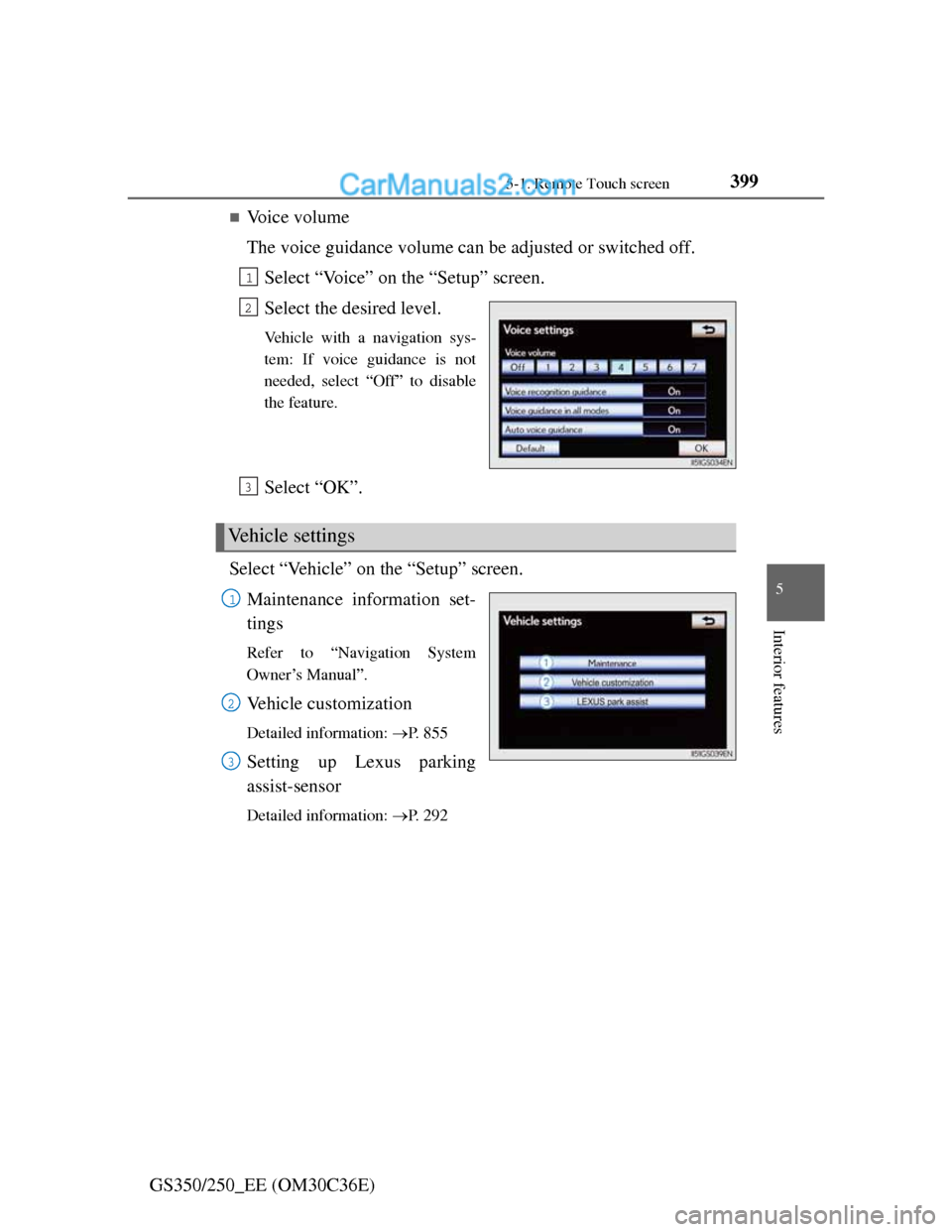
Voice volume
The voice guidance volume can be adjusted or switched off.
Select “Voice” on the “Setup” screen.
Select the desired level.
Vehicle with a navigation sys-
tem: If voice guidance is not
needed, select “Off” to disable
the feature.
Select “OK”.
Select “Vehicle” on the “Setup” screen.
Maintenance information set-
tings
Refer to “Navigation System
Owner’s Manual”.
Vehicle customization
Detailed information: P. 8 5 5
Setting up Lexus parking
assist-sensor
Detailed information: P. 2 9 2
1
2
Vehicle settings
3
1
2
3
Page 486 of 914
4755-3. Using the audio system
5
Interior features
GS350/250_EE (OM30C36E)
Playing DVD video
For safety reasons, you can enjoy the visual contents of discs only
when the vehicle is completely stopped with the engine switch in
ACCESSORY or IGNITION ON mode and the parking brake
applied. While driving in DVD video mode, only the DVD’s audio
can be heard.
When a DVD video disc is inserted while driving, the audio con-
tents of the main feature will automatically be played. However,
some discs may not be played from the main story.
Press the “MEDIA” button if a disc has already been loaded in the
disc slot.
Select the “DISC” tab or press the “MEDIA” button repeatedly
until the “DISC” tab is selected.
Page 487 of 914
4765-3. Using the audio system
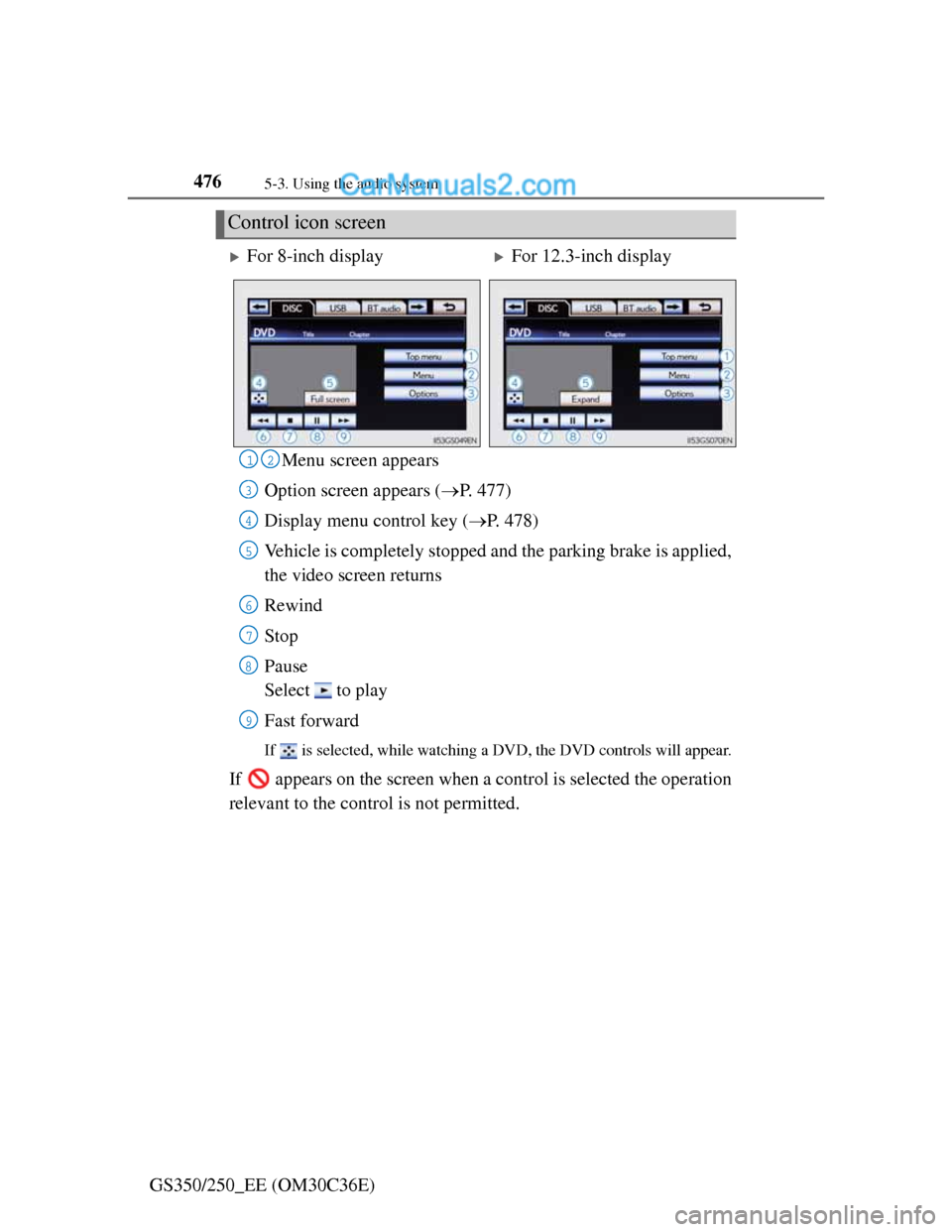
GS350/250_EE (OM30C36E)Menu screen appears
Option screen appears (P. 477)
Display menu control key (P. 478)
Vehicle is completely stopped and the parking brake is applied,
the video screen returns
Rewind
Stop
Pause
Select to play
Fast forward
If is selected, while watching a DVD, the DVD controls will appear.
If appears on the screen when a control is selected the operation
relevant to the control is not permitted.
Control icon screen
For 8-inch displayFor 12.3-inch display
12
3
4
5
6
7
8
9
Page 488 of 914
4775-3. Using the audio system
5
Interior features
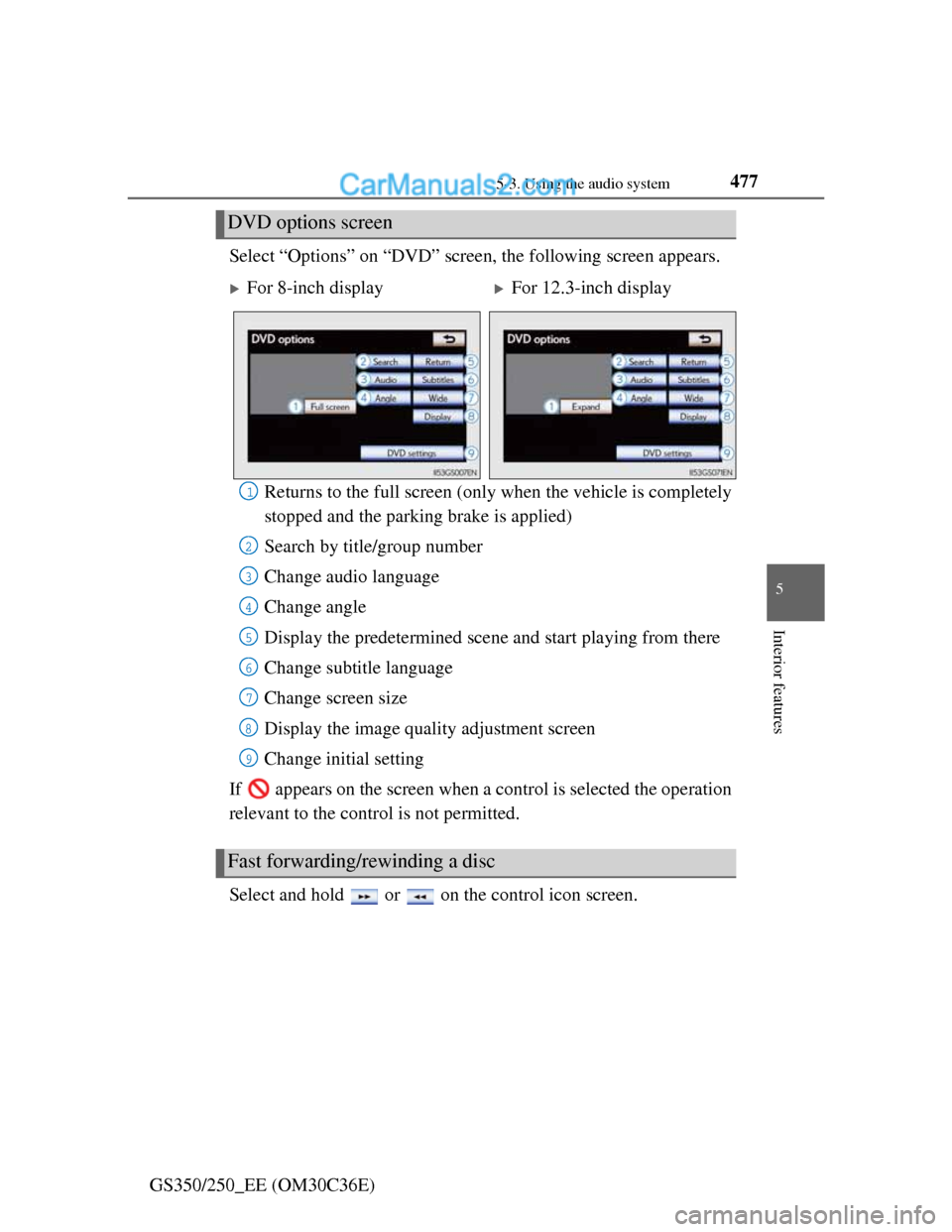
GS350/250_EE (OM30C36E)Select “Options” on “DVD” screen, the following screen appears.
Returns to the full screen (only when the vehicle is completely
stopped and the parking brake is applied)
Search by title/group number
Change audio language
Change angle
Display the predetermined scene and start playing from there
Change subtitle language
Change screen size
Display the image quality adjustment screen
Change initial setting
If appears on the screen when a control is selected the operation
relevant to the control is not permitted.
Select and hold or on the control icon screen.
DVD options screen
For 8-inch displayFor 12.3-inch display
Fast forwarding/rewinding a disc
1
2
3
4
5
6
7
8
9
Page 668 of 914

6506-1. Maintenance and care
GS350/250_EE (OM30C36E)
NOTICE
Cleaning detergents
Do not use the following types of detergent, as they may discolor the vehi-
cle interior or cause streaks or damage to painted surfaces:
• Non-seat portions: Organic substances such as benzene or gasoline,
alkaline or acidic solutions, dye, and bleach
• Seats: Alkaline or acidic solutions, such as thinner, benzene, and alco-
hol
Do not use polish wax or polish cleaner. The instrument panel’s or other
interior part’s painted surface may be damaged.
Preventing damage to leather surfaces
Observe the following precautions to avoid damage to and deterioration of
leather surfaces:
Remove any dust or dirt from leather surfaces immediately.
Do not expose the vehicle to direct sunlight for extended periods of time.
Park the vehicle in the shade, especially during summer.
Do not place items made of vinyl, plastic, or containing wax on the uphol-
stery, as they may stick to the leather surface if the vehicle interior heats
up significantly.
Water on the floor
Do not wash the vehicle floor with water.
Vehicle systems such as the audio system may be damaged if water comes
into contact with electrical components such as the audio system above or
under the floor of the vehicle. Water may also cause the body to rust.
When cleaning the inside of the windshield (vehicles with LKA [Lane-
Keeping Assist])
Be careful not to touch the camera sensor (P. 274).
If the camera is accidentally scratched or hit, LKA may not operate prop-
erly or may cause a malfunction.
Cleaning the inside of the rear window
Do not use glass cleaner to clean the rear window, as this may cause dam-
age to the rear window defogger heater wires or antenna. Use a cloth
dampened with lukewarm water to gently wipe the window clean. Wipe
the window in strokes running parallel to the heater wires or antenna.
Be careful not to scratch or damage the heater wires or antenna.
Page 673 of 914
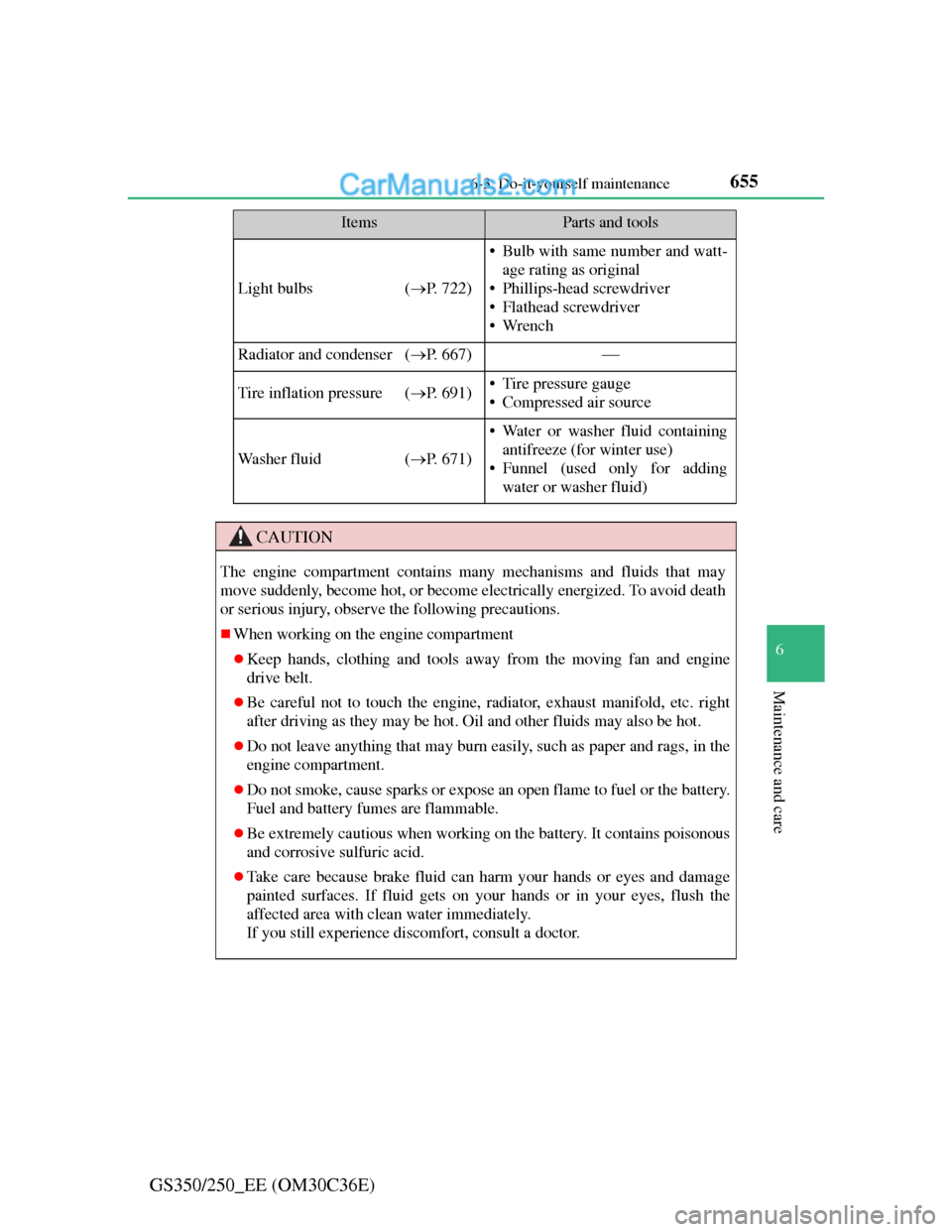
655 6-3. Do-it-yourself maintenance
6
Maintenance and care
GS350/250_EE (OM30C36E)
Light bulbs (P. 722)
• Bulb with same number and watt-
age rating as original
• Phillips-head screwdriver
• Flathead screwdriver
•Wrench
Radiator and condenser (P. 667)
Tire inflation pressure (P. 691)• Tire pressure gauge
• Compressed air source
Wa s h e r f l u i d (P. 671)
• Water or washer fluid containing
antifreeze (for winter use)
• Funnel (used only for adding
water or washer fluid)
CAUTION
The engine compartment contains many mechanisms and fluids that may
move suddenly, become hot, or become electrically energized. To avoid death
or serious injury, observe the following precautions.
When working on the engine compartment
Keep hands, clothing and tools away from the moving fan and engine
drive belt.
Be careful not to touch the engine, radiator, exhaust manifold, etc. right
after driving as they may be hot. Oil and other fluids may also be hot.
Do not leave anything that may burn easily, such as paper and rags, in the
engine compartment.
Do not smoke, cause sparks or expose an open flame to fuel or the battery.
Fuel and battery fumes are flammable.
Be extremely cautious when working on the battery. It contains poisonous
and corrosive sulfuric acid.
Take care because brake fluid can harm your hands or eyes and damage
painted surfaces. If fluid gets on your hands or in your eyes, flush the
affected area with clean water immediately.
If you still experience discomfort, consult a doctor.
ItemsParts and tools