lights Lexus GS250 2012 Workshop Manual
[x] Cancel search | Manufacturer: LEXUS, Model Year: 2012, Model line: GS250, Model: Lexus GS250 2012Pages: 914, PDF Size: 53.04 MB
Page 328 of 914
3214-5. Using the driving support
4
Driving
GS350/250_EE (OM30C36E)
If you think something is wrong
If you notice any of the following symptoms, refer to the likely
cause and the solution, and re-check.
If the symptom is not resolved by the solution, have the vehicle
inspected by any authorized Lexus dealer or repairer, or another
duly qualified and equipped professional.
Things you should know
SymptomLikely causeSolution
The image is difficult
to see
• The vehicle is in a
dark area
• The temperature
around the lens is
either high or low
• The outside tempera-
ture is low
• There are water drop-
lets on the camera
• It is raining or humid
• Foreign matter (mud
etc.) is adhering to
the camera
• There are scratches
on the camera
• Sunlight or head-
lights are shining
directly into the cam-
era
• The vehicle is under
fluorescent lights,
sodium lights, mer-
cury lights etc.
If this happens due to
these causes, it does
not indicate a malfunc-
tion.
Back up while visually
checking the vehicle’s
surroundings. (Use the
monitor again once
conditions have been
improved.)
To adjust the image on
the parking assist mon-
itor screen. (P. 3 7 2 )
Page 334 of 914
3274-5. Using the driving support
4
Driving
GS350/250_EE (OM30C36E)
NOTICE
How to use the camera
The parking assist monitor may not operate properly in the following
cases, or if the precautions described below are not followed.
• If the back of the vehicle is hit, the position and mounting angle of the
camera may change.
• As the camera has a water proof construction, do not detach, disassem-
ble or modify it. This may cause incorrect operation.
• Do not strongly rub the camera lens. If the camera lens is scratched, it
cannot transmit a clear image.
• Do not allow organic solvent, car wax, window cleaner or glass coat to
adhere to the camera. If this happens, wipe it off as soon as possible.
• If the temperature changes rapidly, such as when hot water is poured on
the vehicle in cold weather, the system may not operate normally.
• When washing the vehicle, do not apply intensive bursts of water to the
camera or camera area. Doing so may result in the camera malfunction-
ing.
• When the camera is used under fluorescent lights, sodium light or mer-
cury light etc., the lights and the illuminated areas may appear to
flicker.
Do not expose the camera to strong impact as this could cause a malfunc-
tion. If this happens, have the vehicle inspected by any authorized Lexus
dealer or repairer, or another duly qualified and equipped professional as
soon as possible.
Page 341 of 914
3344-5. Using the driving support
GS350/250_EE (OM30C36E)
EPS (Electric Power Steering)
Employs an electric motor to reduce the amount of effort needed
to turn the steering wheel
AVS (Adaptive Variable Suspension system) (if equipped)
By independently controlling the damping force of the shock
absorbers for each of the 4 wheels according to the road and driv-
ing conditions, this system combines riding comfort with supe-
rior steering stability, and ensures good vehicle posture. (P.
328)
VDIM (Vehicle Dynamics Integrated Management)
Provides integrated control of the ABS, brake assist, TRC, VSC,
hill-start assist control and EPS systems
Helps to maintain vehicle stability when swerving on slippery
road surfaces by controlling the brakes, engine output, steering
assist, and steering ratio
PCS (Pre-Crash Safety system) (if equipped)
P. 343
Emergency brake signal
When the brakes are applied suddenly, the stop lights automati-
cally flash to alert the vehicle behind.
Page 348 of 914
341
4 4-5. Using the driving support
Driving
GS350/250_EE (OM30C36E)
Hill-start assist control
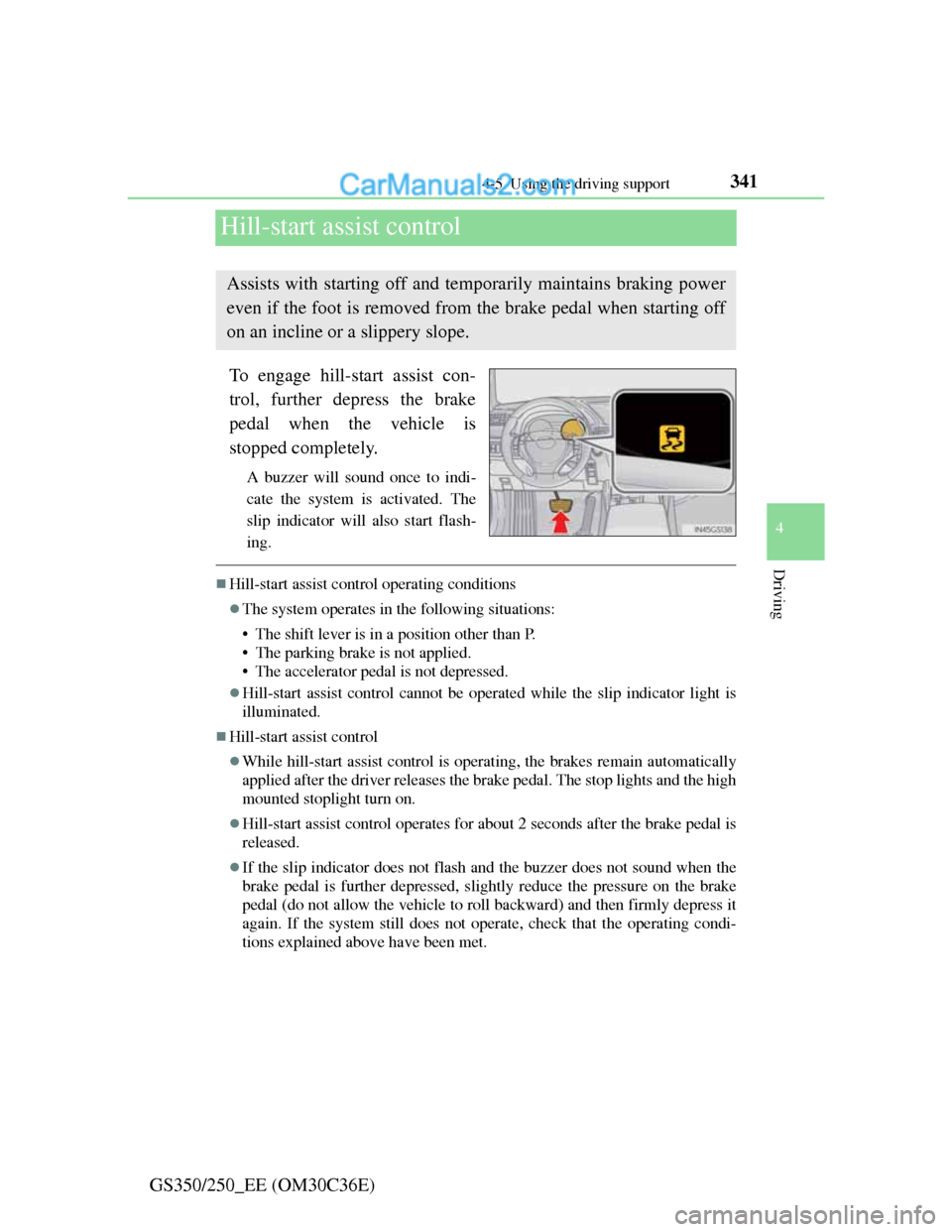
To engage hill-start assist con-
trol, further depress the brake
pedal when the vehicle is
stopped completely.
A buzzer will sound once to indi-
cate the system is activated. The
slip indicator will also start flash-
ing.
Hill-start assist control operating conditions
The system operates in the following situations:
• The shift lever is in a position other than P.
• The parking brake is not applied.
• The accelerator pedal is not depressed.
Hill-start assist control cannot be operated while the slip indicator light is
illuminated.
Hill-start assist control
While hill-start assist control is operating, the brakes remain automatically
applied after the driver releases the brake pedal. The stop lights and the high
mounted stoplight turn on.
Hill-start assist control operates for about 2 seconds after the brake pedal is
released.
If the slip indicator does not flash and the buzzer does not sound when the
brake pedal is further depressed, slightly reduce the pressure on the brake
pedal (do not allow the vehicle to roll backward) and then firmly depress it
again. If the system still does not operate, check that the operating condi-
tions explained above have been met.
Assists with starting off and temporarily maintains braking power
even if the foot is removed from the brake pedal when starting off
on an incline or a slippery slope.
Page 370 of 914
3604-6. Driving tips
GS350/250_EE (OM30C36E)Perform the following according to the driving conditions:
Do not try to forcibly open a window or move a wiper that is fro-
zen. Pour warm water over the frozen area to melt the ice. Wipe
away the water immediately to prevent it from freezing.
To ensure proper operation of the climate control system fan,
remove any snow that has accumulated on the air inlet vents in
front of the windshield.
Check for and remove any excess ice or snow that may have
accumulated on the exterior lights, vehicle’s roof, chassis, around
the tires or on the brakes.
Remove any snow or mud from the bottom of your shoes before
getting in the vehicle.
Accelerate the vehicle slowly, keep a safe distance between you
and the vehicle ahead, and drive at a reduced speed suitable to road
conditions.
Park the vehicle and move the shift lever to P without setting the
parking brake. The parking brake may freeze up, preventing it from
being released. If necessary, block the wheels to prevent inadver-
tent sliding or creeping.
Before driving the vehicle
When driving the vehicle
When parking the vehicle
Page 377 of 914
367
5Interior features
GS350/250_EE (OM30C36E)
5-4. Using the hands-free phone
system (for cellular phone)
Hands-free system
(for cellular phone) ......... 542
Using a Bluetooth
®
phone............................... 556
Setting the hands-free system
(for cellular phone) ......... 575
Setting the Bluetooth
®...... 598
5-5. Using the interior lights
Interior lights list ............... 611
• Interior light .................. 612
• Personal lights............... 6125-6. Using the storage features
List of storage features ..... 614
• Glove box ..................... 616
• Console box .................. 617
• Cup holders .................. 618
• Auxiliary boxes ............ 620
Trunk features ................... 621
5-7. Other interior features
Sun visors and
vanity mirrors ................. 624
Clock................................. 625
Ashtrays ............................ 626
Power outlets .................... 627
Heated steering wheel....... 629
Seat heaters/
seat ventilators ................ 631
Armrest ............................. 635
Rear sunshade/
rear door sunshades ........ 636
Trunk storage extension.... 639
Coat hooks ........................ 640
Assist grip ......................... 641
Utility hook ....................... 642
For vehicles sold outside Europe, some of the functions can-
not be operated while driving.
Page 629 of 914
611
5 5-5. Using the interior lights
Interior features
GS350/250_EE (OM30C36E)
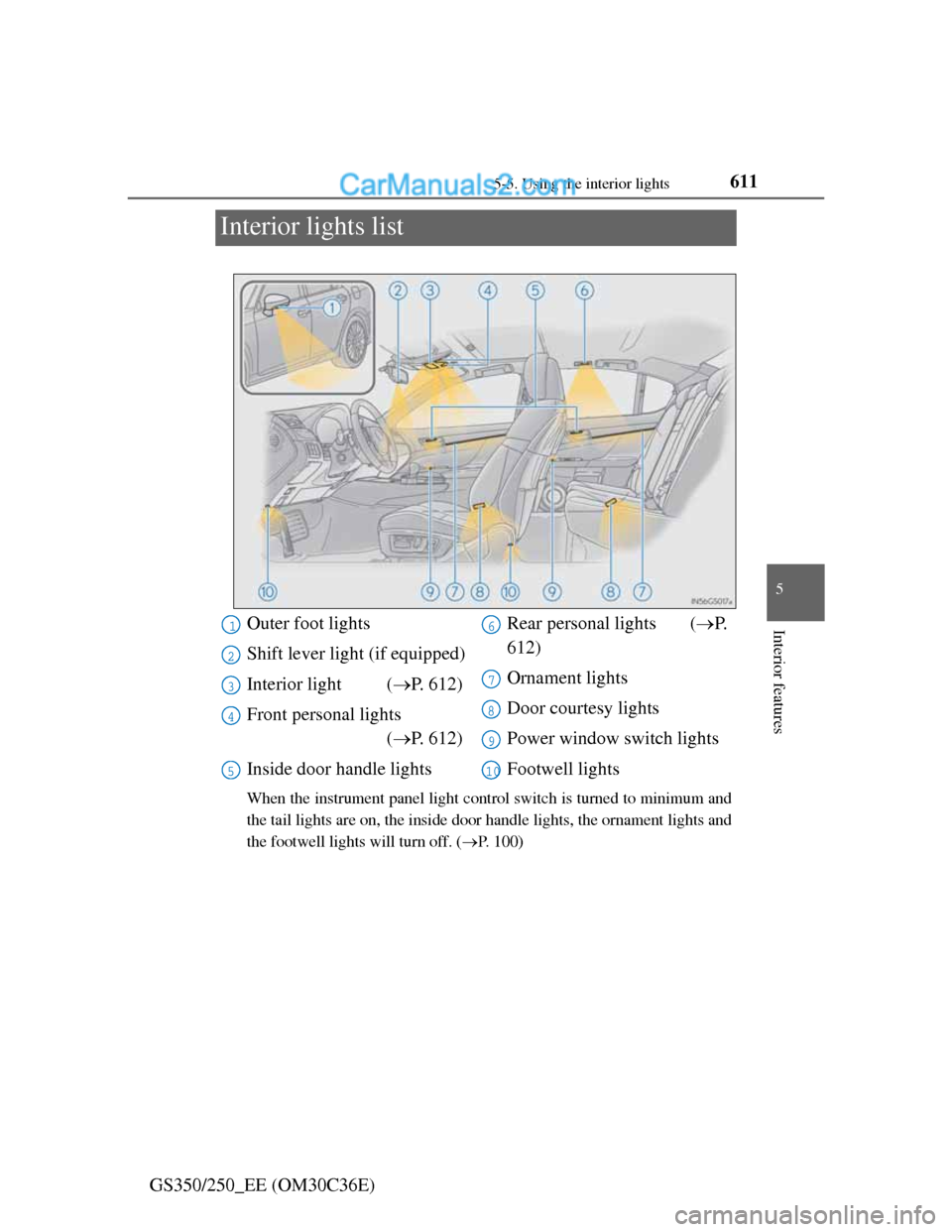
Interior lights list
When the instrument panel light control switch is turned to minimum and
the tail lights are on, the inside door handle lights, the ornament lights and
the footwell lights will turn off. (P. 100)
Outer foot lights
Shift lever light (if equipped)
Interior light (P. 612)
Front personal lights
(P. 612)
Inside door handle lightsRear personal lights (P.
612)
Ornament lights
Door courtesy lights
Power window switch lights
Footwell lights1
2
3
4
5
6
7
8
9
10
Page 630 of 914
6125-5. Using the interior lights
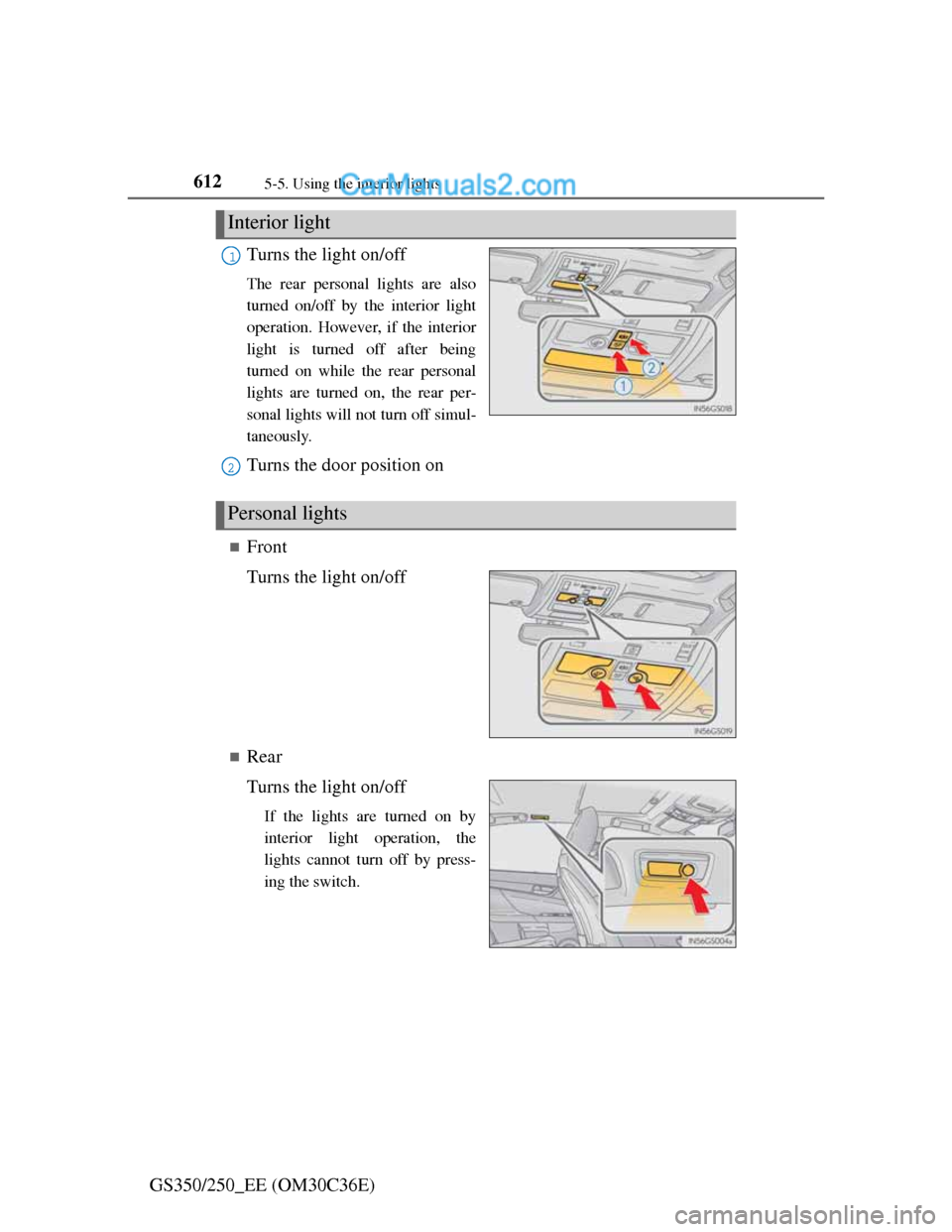
GS350/250_EE (OM30C36E)Turns the light on/off
The rear personal lights are also
turned on/off by the interior light
operation. However, if the interior
light is turned off after being
turned on while the rear personal
lights are turned on, the rear per-
sonal lights will not turn off simul-
taneously.
Turns the door position on
Front
Turns the light on/off
Rear
Turns the light on/off
If the lights are turned on by
interior light operation, the
lights cannot turn off by press-
ing the switch.
Interior light
1
2
Personal lights
Page 631 of 914
6135-5. Using the interior lights
5
Interior features
GS350/250_EE (OM30C36E)
Illuminated entry system
The lights automatically turn on/off according to engine switch mode, the
presence of the electronic key, whether the doors are locked/unlocked, and
whether the doors are opened/closed.
To prevent battery discharge
If the interior lights remain on when the engine switch is turned off, the lights
will go off automatically after 20 minutes.
Customization
Setting (e.g. the time elapsed before lights turn off) can be changed.
(Customizable features: P. 855)
NOTICE
To prevent battery discharge
Do not leave the lights on longer than necessary when the engine is not run-
ning.
Page 634 of 914
6165-6. Using the storage features
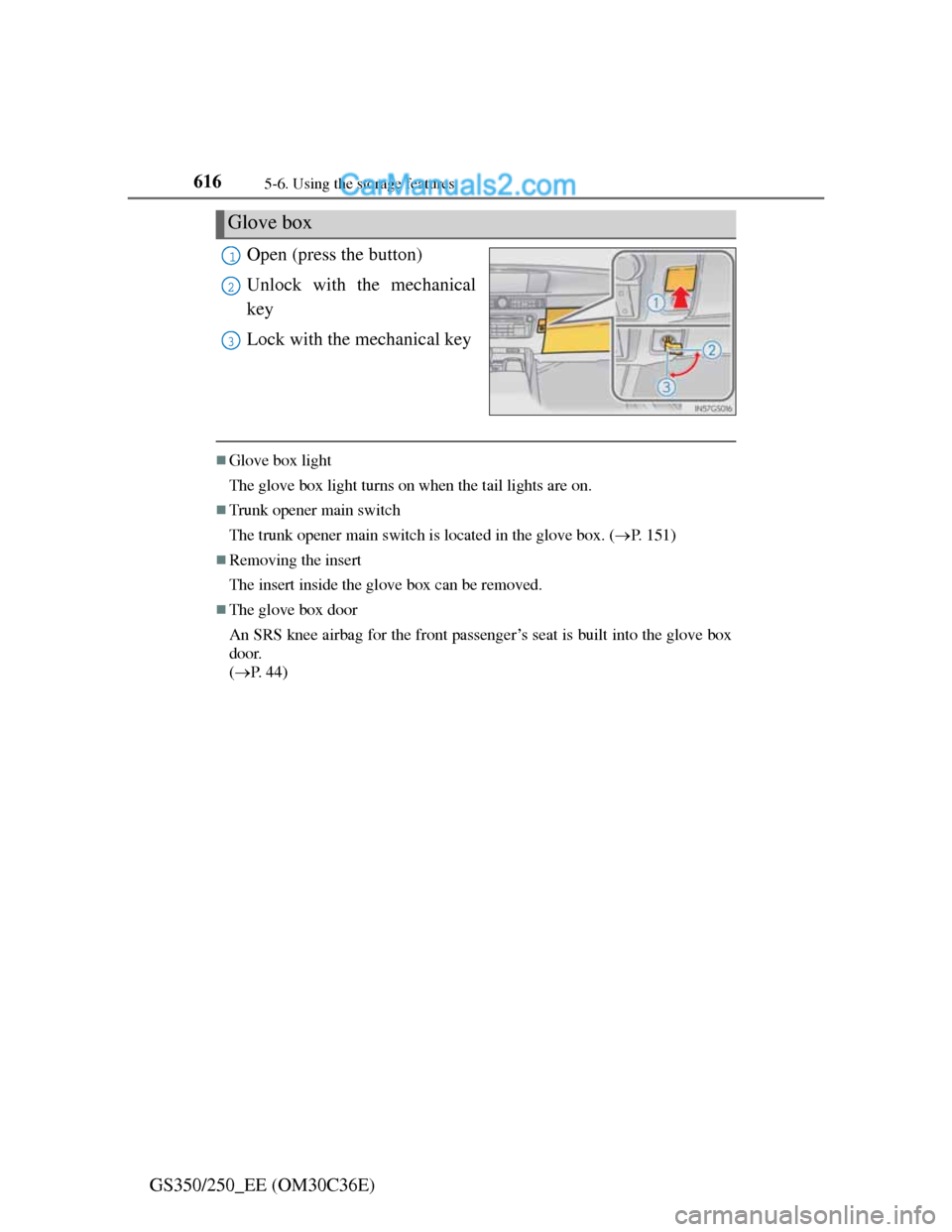
GS350/250_EE (OM30C36E)Open (press the button)
Unlock with the mechanical
key
Lock with the mechanical key
Glove box light
The glove box light turns on when the tail lights are on.
Trunk opener main switch
The trunk opener main switch is located in the glove box. (P. 151)
Removing the insert
The insert inside the glove box can be removed.
The glove box door
An SRS knee airbag for the front passenger’s seat is built into the glove box
door.
(P. 44)
Glove box
1
2
3