AUTO Lexus GS250 2012 Repair Manual
[x] Cancel search | Manufacturer: LEXUS, Model Year: 2012, Model line: GS250, Model: Lexus GS250 2012Pages: 914, PDF Size: 53.04 MB
Page 250 of 914
2434-3. Operating the lights and wipers
4
Driving
GS350/250_EE (OM30C36E)
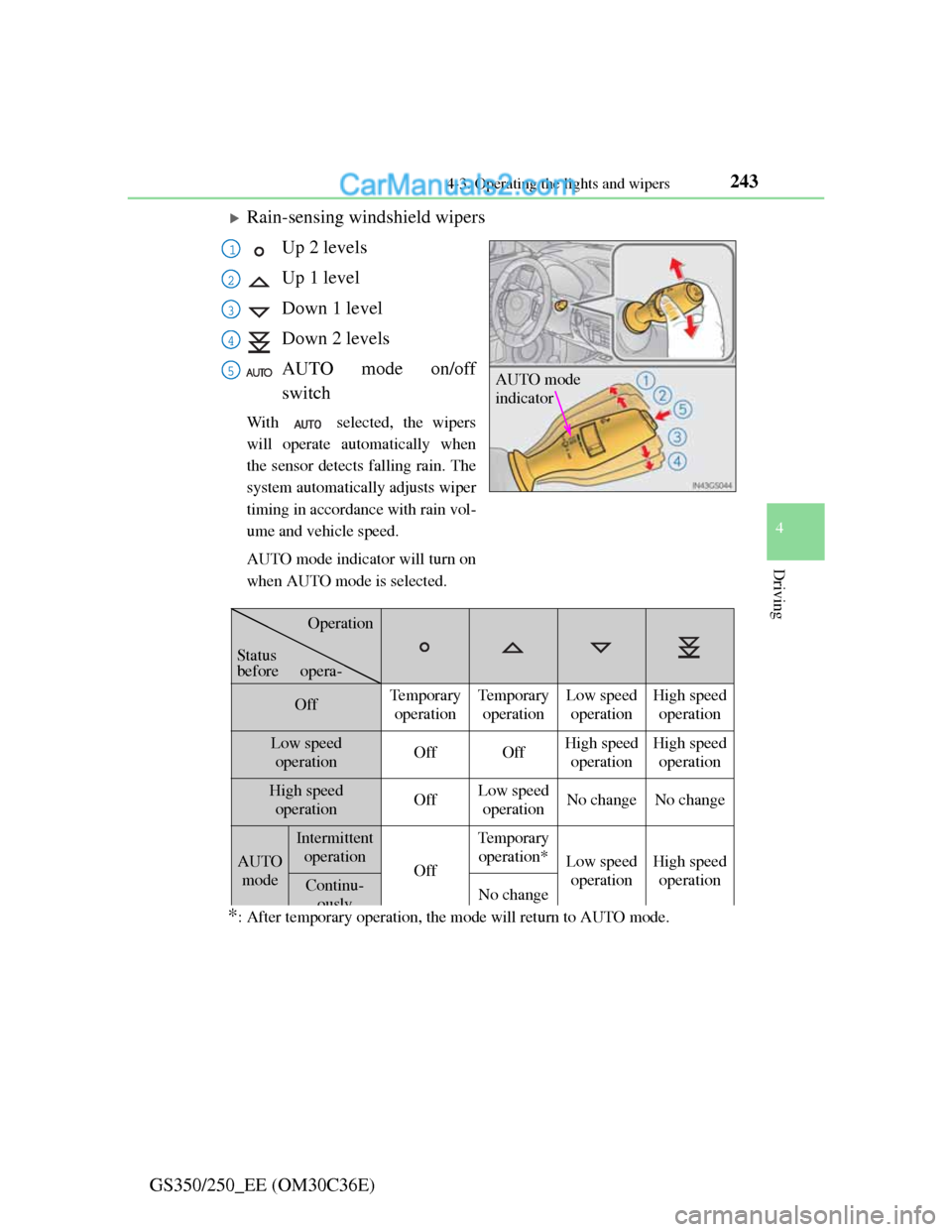
Rain-sensing windshield wipers
Up 2 levels
Up 1 level
Down 1 level
Down 2 levels
AUTO mode on/off
switch
With selected, the wipers
will operate automatically when
the sensor detects falling rain. The
system automatically adjusts wiper
timing in accordance with rain vol-
ume and vehicle speed.
AUTO mode indicator will turn on
when AUTO mode is selected.
*: After temporary operation, the mode will return to AUTO mode.
AUTO mode
indicator
1
2
3
4
5
OffTemporary
operationTe m p o r a r y
operationLow speed
operationHigh speed
operation
Low speed
operationOffOffHigh speed
operationHigh speed
operation
High speed
operationOffLow speed
operationNo changeNo change
AUTO
mode
Intermittent
operation
Off
Te m p o r a r y
operation*
Low speed
operationHigh speed
operation
Continu-
ouslyNo change
Operation
Status
before opera-
Page 251 of 914
2444-3. Operating the lights and wipers
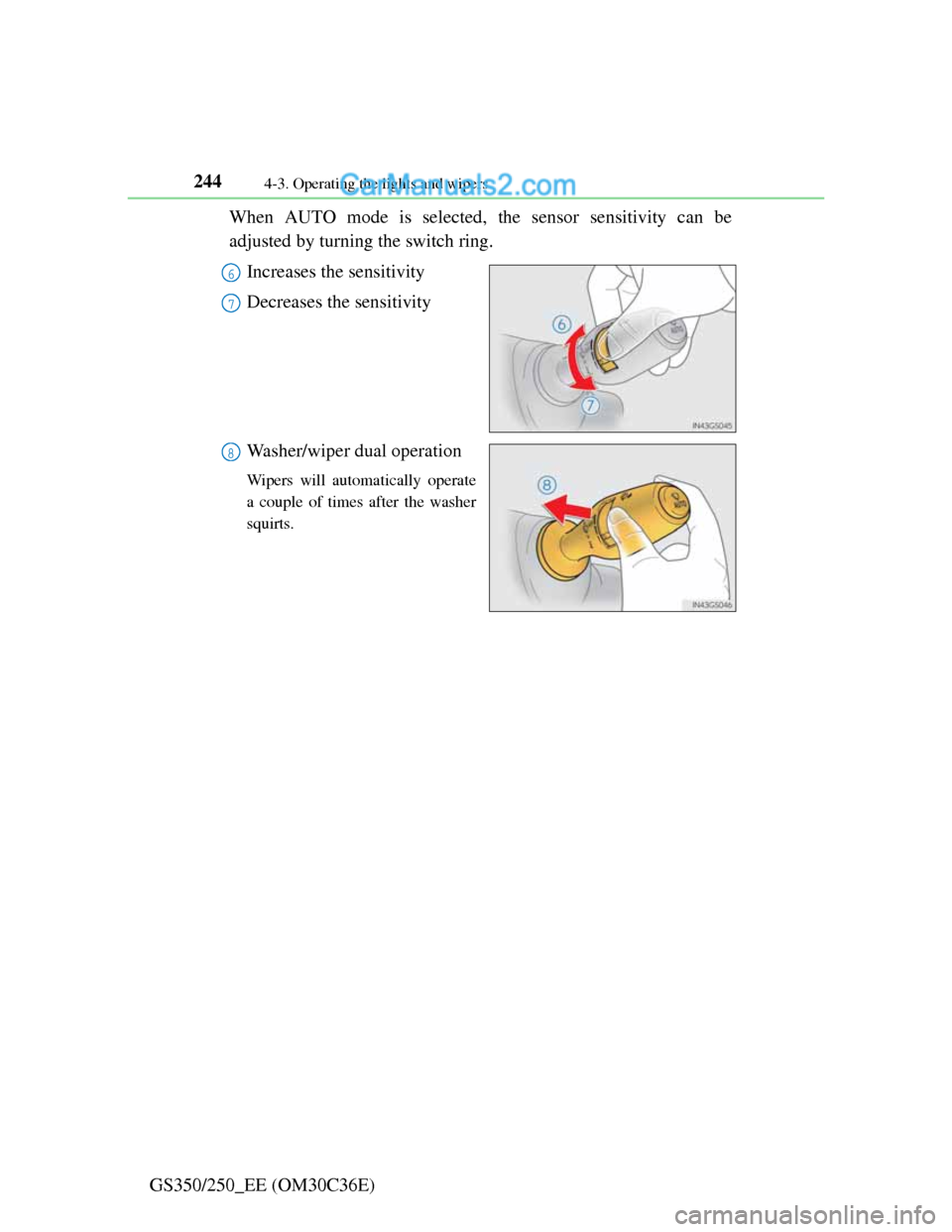
GS350/250_EE (OM30C36E)When AUTO mode is selected, the sensor sensitivity can be
adjusted by turning the switch ring.
Increases the sensitivity
Decreases the sensitivity
Washer/wiper dual operation
Wipers will automatically operate
a couple of times after the washer
squirts.
6
7
8
Page 252 of 914
2454-3. Operating the lights and wipers
4
Driving
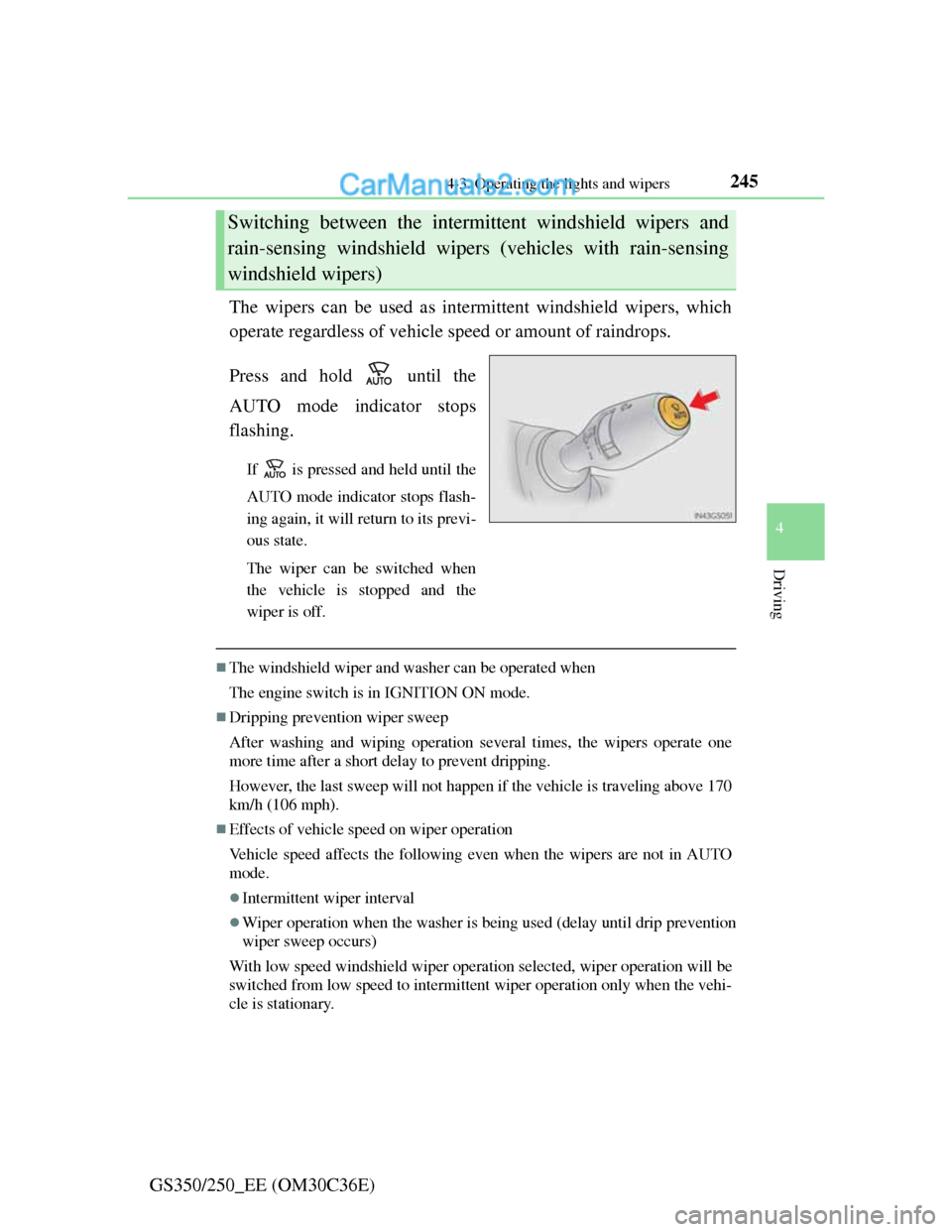
GS350/250_EE (OM30C36E)The wipers can be used as intermittent windshield wipers, which
operate regardless of vehicle speed or amount of raindrops.
Press and hold until the
AUTO mode indicator stops
flashing.
If is pressed and held until the
AUTO mode indicator stops flash-
ing again, it will return to its previ-
ous state.
The wiper can be switched when
the vehicle is stopped and the
wiper is off.
The windshield wiper and washer can be operated when
The engine switch is in IGNITION ON mode.
Dripping prevention wiper sweep
After washing and wiping operation several times, the wipers operate one
more time after a short delay to prevent dripping.
However, the last sweep will not happen if the vehicle is traveling above 170
km/h (106 mph).
Effects of vehicle speed on wiper operation
Vehicle speed affects the following even when the wipers are not in AUTO
mode.
Intermittent wiper interval
Wiper operation when the washer is being used (delay until drip prevention
wiper sweep occurs)
With low speed windshield wiper operation selected, wiper operation will be
switched from low speed to intermittent wiper operation only when the vehi-
cle is stationary.
Switching between the intermittent windshield wipers and
rain-sensing windshield wipers (vehicles with rain-sensing
windshield wipers)
Page 253 of 914

2464-3. Operating the lights and wipers
GS350/250_EE (OM30C36E)
Raindrop sensor (vehicles with rain-sensing windshield wipers)
If the wiper is turned to AUTO mode while the engine switch is in IGNI-
TION ON mode, the wipers will operate once to show that AUTO mode is
activated.
If the temperature of the raindrop sensor is 85°C (185°F) or higher, or -
30°C (-22°F) or lower, automatic operation may not occur. In this case,
operate the wipers in any mode other than AUTO mode.
When the windshield wipers are in temporary operation
AUTO mode cannot be activated even if is pressed.
If no windshield washer fluid sprays
Check that the washer nozzles are not blocked if there is washer fluid in the
windshield washer fluid reservoir.
The raindrop sensor judges the amount
of raindrops.
An optical sensor is adopted. It may not
operate properly when sunlight from
the rising or setting of the sun intermit-
tently strikes the windshield, or if bugs
etc. are present on the windshield.
CAUTION
Caution regarding the use of windshield wipers in AUTO mode
The windshield wipers may operate unexpectedly if the sensor is touched
or the windshield is subject to vibration in AUTO mode. Take care that
your fingers or anything else do not become caught in the windshield wip-
ers.
Caution regarding the use of washer fluid
When it is cold, do not use the washer fluid until the windshield becomes
warm. The fluid may freeze on the windshield and cause low visibility.
This may lead to an accident, resulting in death or serious injury.
Page 257 of 914
2504-4. Refueling
GS350/250_EE (OM30C36E)
CAUTION
When refueling the vehicle
Observe the following precautions while refueling the vehicle. Failure to do
so may result in death or serious injury.
After exiting the vehicle and before opening the fuel door, touch an
unpainted metal surface to discharge any static electricity. It is important
to discharge static electricity before refueling because sparks resulting
from static electricity can cause fuel vapors to ignite while refueling.
Always hold the grips on the fuel tank cap and turn it slowly to remove it.
A whooshing sound may be heard when the fuel tank cap is loosened.
Wait until the sound cannot be heard before fully removing the cap. In hot
weather, pressurized fuel may spray out the filler neck and cause injury.
Do not allow anyone that has not discharged static electricity from their
body to come close to an open fuel tank.
Do not inhale vaporized fuel.
Fuel contains substances that are harmful if inhaled.
Do not smoke while refueling the vehicle.
Doing so may cause the fuel to ignite and cause a fire.
Do not return to the vehicle or touch any person or object that is statically
charged.
This may cause static electricity to build up, resulting in a possible igni-
tion hazard.
When refueling
Observe the following precautions to prevent fuel overflowing from the
fuel tank:
Securely insert the fuel nozzle into the fuel filler neck.
Stop filling the tank after the fuel nozzle automatically clicks off.
Do not top off the fuel tank.
NOTICE
Refueling
Do not spill fuel during refueling.
Doing so may damage the vehicle, such as causing the emission control
system to operate abnormally or damaging fuel system components or the
vehicle’s painted surface.
Page 263 of 914
2564-5. Using the driving support
GS350/250_EE (OM30C36E)
Cruise control can be set when
The shift lever is in D.
Range 4 or higher of D has been selected by using the paddle shift.
Vehicle speed is above approximately 40 km/h (25 mph).
Accelerating after setting the vehicle speed
The vehicle can be accelerated normally. After acceleration, the set speed
resumes.
Even without canceling the cruise control, the set speed can be increased by
first accelerating the vehicle to the desired speed and then pushing the lever
down to set the new speed.
Automatic cruise control cancelation
Cruise control will stop maintaining the vehicle speed in any of the following
situations.
Actual vehicle speed falls more than approximately 16 km/h (10 mph)
below the preset vehicle speed.
At this time, the memorized set speed is not retained.
Actual vehicle speed is below approximately 40 km/h (25 mph).
VSC is activated.
TRC is activated for a period of time.
When the VSC or TRC system is turned off by pressing the VSC OFF
switch.
If the warning message for the cruise control is shown on the multi-informa-
tion display
Press the “ON-OFF” button once to deactivate the system, and then press the
button again to reactivate the system.
If the cruise control speed cannot be set or if the cruise control cancels imme-
diately after being activated, there may be a malfunction in the cruise control
system. Have the vehicle inspected by any authorized Lexus dealer or
repairer, or another duly qualified and equipped professional.
Page 265 of 914
2584-5. Using the driving support
GS350/250_EE (OM30C36E)
Dynamic radar cruise control
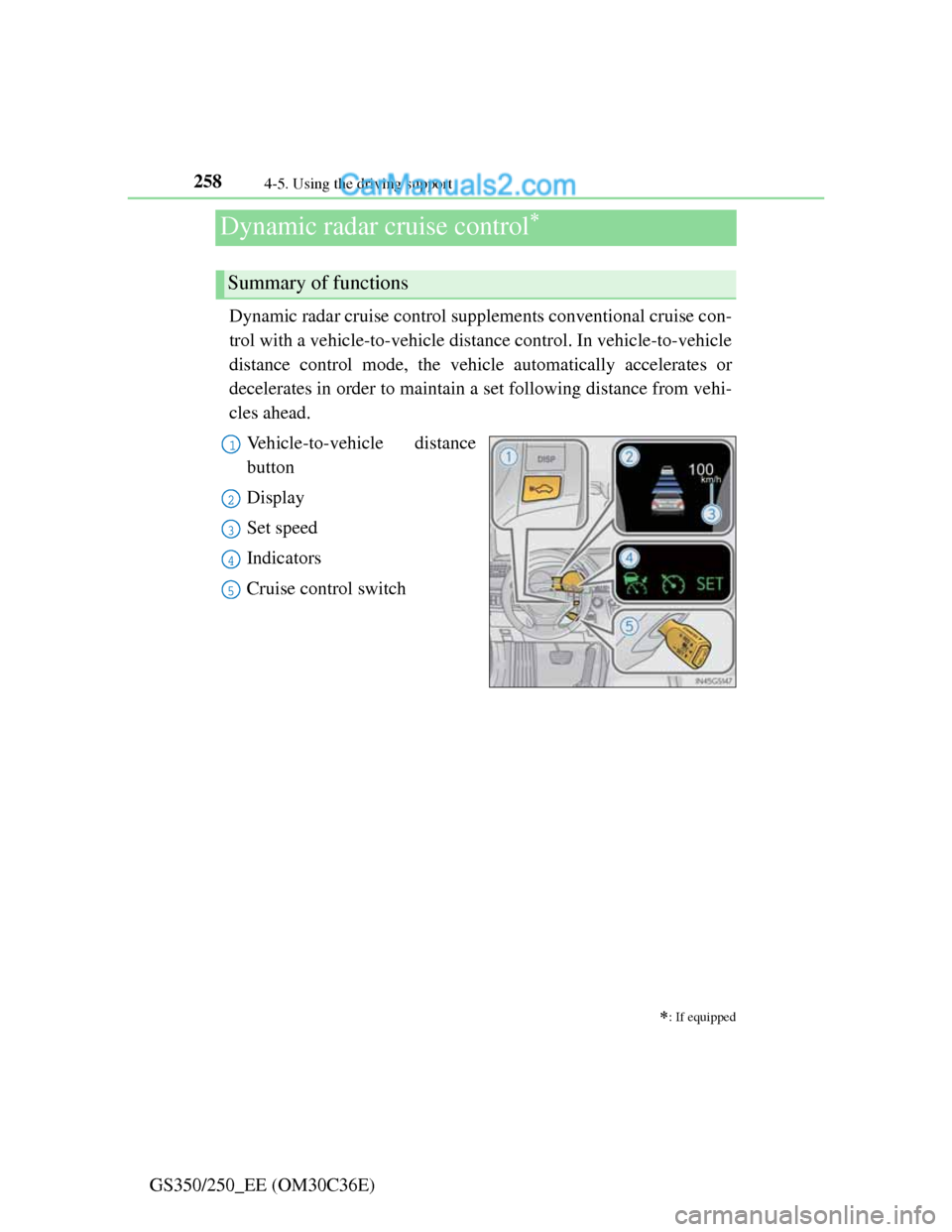
Dynamic radar cruise control supplements conventional cruise con-
trol with a vehicle-to-vehicle distance control. In vehicle-to-vehicle
distance control mode, the vehicle automatically accelerates or
decelerates in order to maintain a set following distance from vehi-
cles ahead.
Vehicle-to-vehicle distance
button
Display
Set speed
Indicators
Cruise control switch
: If equipped
Summary of functions
1
2
3
4
5
Page 268 of 914
2614-5. Using the driving support
4
Driving
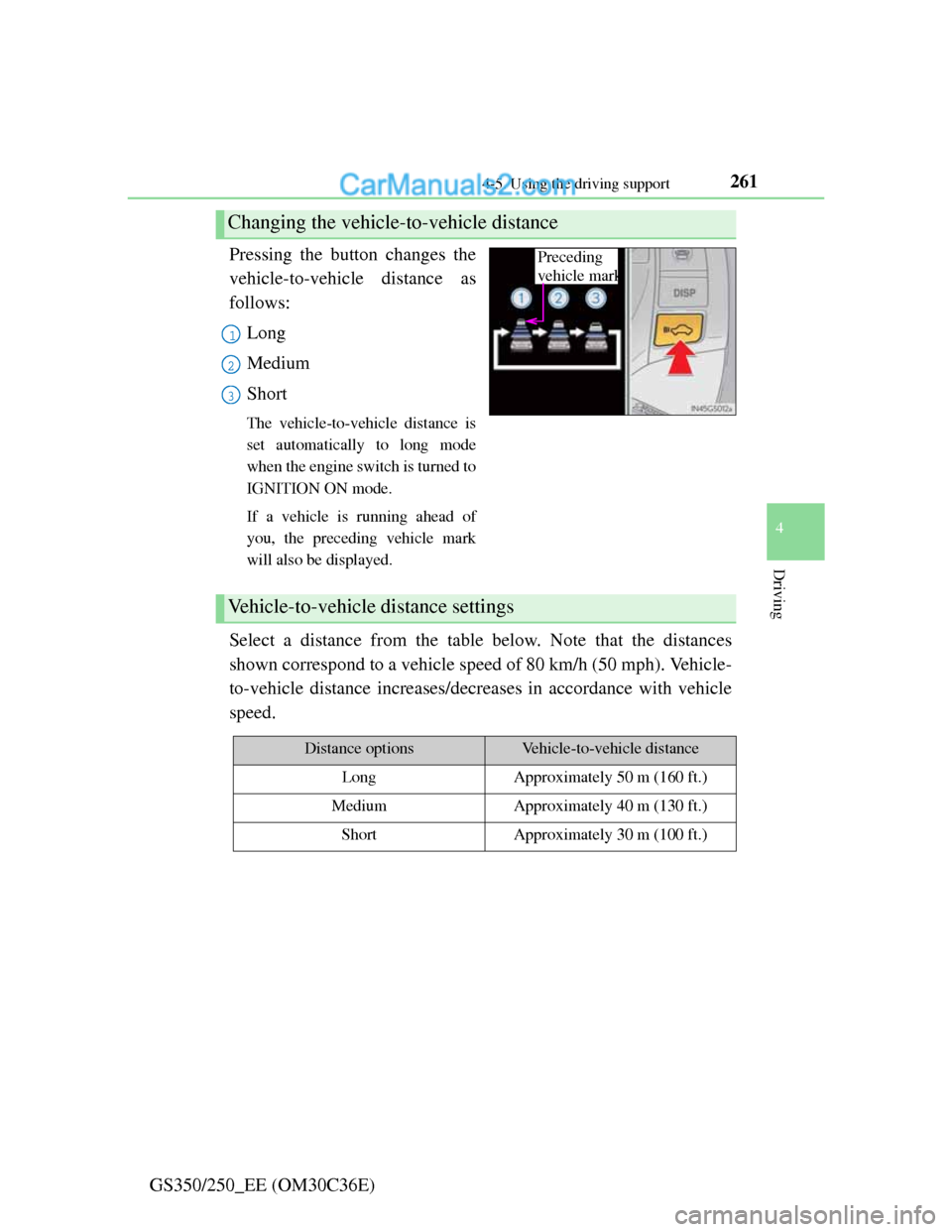
GS350/250_EE (OM30C36E)Pressing the button changes the
vehicle-to-vehicle distance as
follows:
Long
Medium
Short
The vehicle-to-vehicle distance is
set automatically to long mode
when the engine switch is turned to
IGNITION ON mode.
If a vehicle is running ahead of
you, the preceding vehicle mark
will also be displayed.
Select a distance from the table below. Note that the distances
shown correspond to a vehicle speed of 80 km/h (50 mph). Vehicle-
to-vehicle distance increases/decreases in accordance with vehicle
speed.
Changing the vehicle-to-vehicle distance
Preceding
vehicle mark
1
2
3
Vehicle-to-vehicle distance settings
Distance optionsVehicle-to-vehicle distance
LongApproximately 50 m (160 ft.)
MediumApproximately 40 m (130 ft.)
ShortApproximately 30 m (100 ft.)
Page 270 of 914
2634-5. Using the driving support
4
Driving
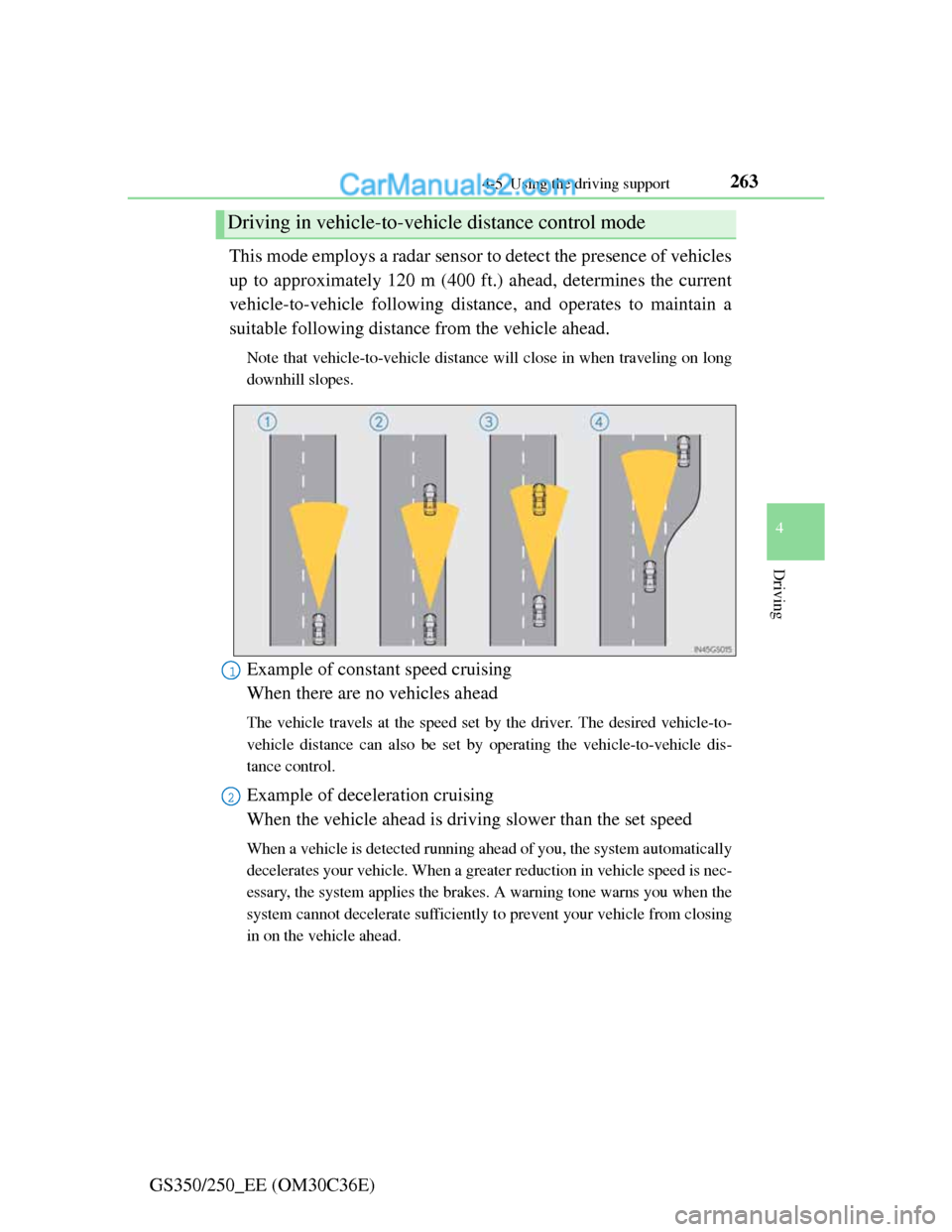
GS350/250_EE (OM30C36E)This mode employs a radar sensor to detect the presence of vehicles
up to approximately 120 m (400 ft.) ahead, determines the current
vehicle-to-vehicle following distance, and operates to maintain a
suitable following distance from the vehicle ahead.
Note that vehicle-to-vehicle distance will close in when traveling on long
downhill slopes.
Example of constant speed cruising
When there are no vehicles ahead
The vehicle travels at the speed set by the driver. The desired vehicle-to-
vehicle distance can also be set by operating the vehicle-to-vehicle dis-
tance control.
Example of deceleration cruising
When the vehicle ahead is driving slower than the set speed
When a vehicle is detected running ahead of you, the system automatically
decelerates your vehicle. When a greater reduction in vehicle speed is nec-
essary, the system applies the brakes. A warning tone warns you when the
system cannot decelerate sufficiently to prevent your vehicle from closing
in on the vehicle ahead.
Driving in vehicle-to-vehicle distance control mode
1
2
Page 271 of 914
2644-5. Using the driving support
GS350/250_EE (OM30C36E)Example of follow-up cruising
When following a vehicle driving slower than the set speed
The system continues follow-up cruising while adjusting for changes in
the speed of the vehicle ahead in order to maintain the vehicle-to-vehicle
distance set by the driver.
Example of acceleration
When there are no longer any vehicles ahead driving slower than
the set speed
The system accelerates until the set speed is reached. The system then
returns to constant speed cruising.
When your vehicle is too close to a vehicle ahead, and sufficient
automatic deceleration via the cruise control is not possible, the dis-
play will flash and the buzzer will sound to alert the driver. An
example of this would be if another driver cuts in front of you while
you are following a vehicle. Apply the brakes to ensure an appro-
priate vehicle-to-vehicle distance.
Warnings may not occur when
In the following instances, there is a possibility that the warnings
will not occur:
When the speed of the vehicle ahead matches or exceeds your
vehicle speed
When the vehicle ahead is traveling at an extremely slow
speed
Immediately after the cruise control speed was set
At the instant the accelerator is applied
Approach warning
3
4