phone Lexus GS250 2012 Manual PDF
[x] Cancel search | Manufacturer: LEXUS, Model Year: 2012, Model line: GS250, Model: Lexus GS250 2012Pages: 914, PDF Size: 53.04 MB
Page 606 of 914
5915-4. Using the hands-free phone system (for cellular phone)
5
Interior features
GS350/250_EE (OM30C36E)
Registering the speed dial in a different way
From “Speed dial” screen
Display the “Telephone” screen. (P. 556)
Select “Speed dials” on the “Telephone” screen.
Select “(empty)” on the “Select speed dial location” screen.
Select “Yes” to on the “Speed dial” screen set new speed dial.
Choose the desired data from the list.
Select the desired phone number.
Follow the steps “Registering the speed dial” from step . (P. 588)
From “Contact” screen
Display the “Telephone” screen. (P. 556)
Select “Contacts” on the “Telephone” screen.
Choose the desired data from the list.
Select “Options” on the “Contact data” screen.
Select “Set speed dial” on the “Contact data” screen.
Select the desired phone number.
Follow the steps “Registering the speed dial” from step . (P. 588)
1
2
3
4
5
6
76
1
2
3
4
5
6
76
Page 607 of 914
5925-4. Using the hands-free phone system (for cellular phone)
GS350/250_EE (OM30C36E)The call history can be deleted. For PBAP compatible phones,
delete the call history after setting “Automatically download call
history” to “Off”. (P. 583)
Display the “Phonebook settings” screen. (P. 581)
Select “Delete call history” on the “Phonebook settings”
screen.
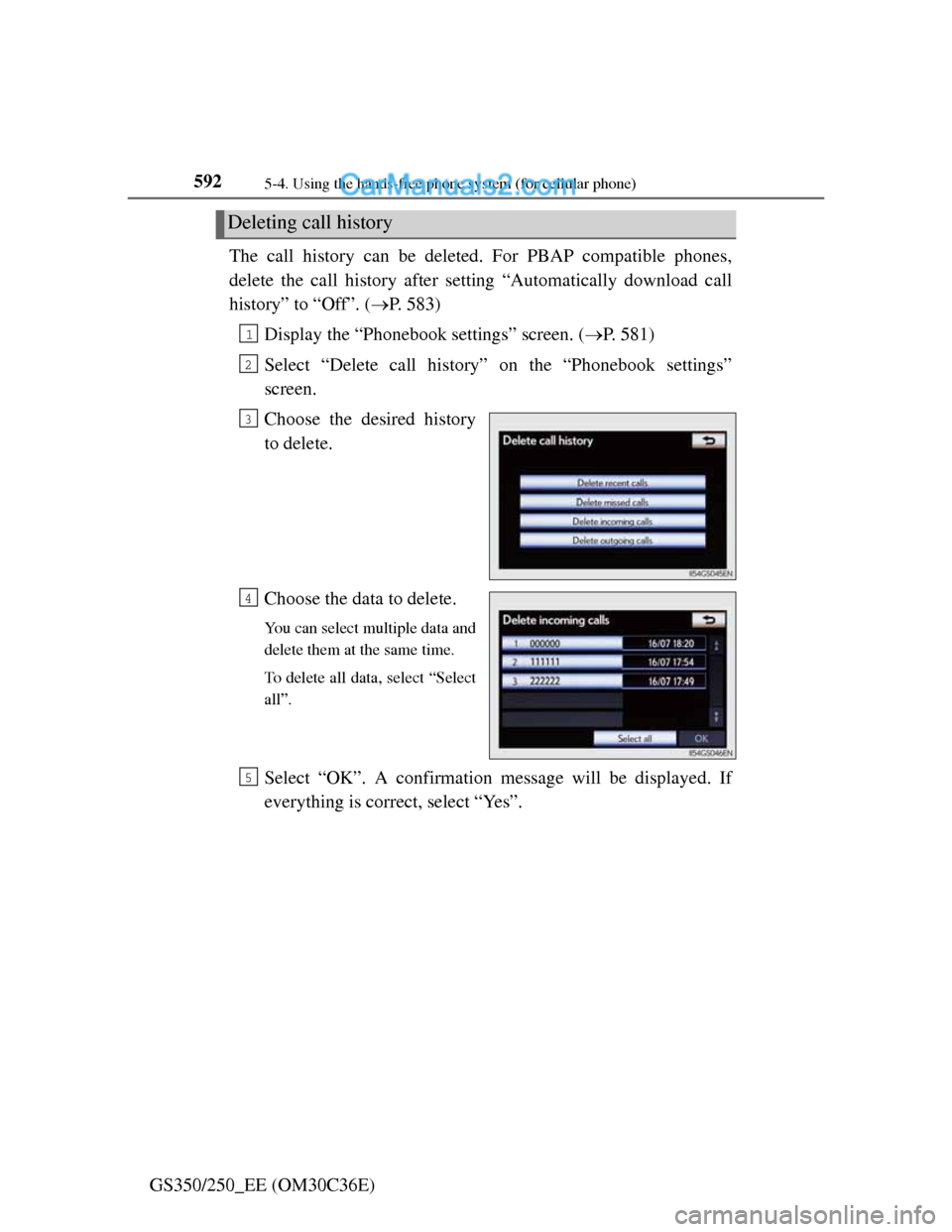
Choose the desired history
to delete.
Choose the data to delete.
You can select multiple data and
delete them at the same time.
To delete all data, select “Select
all”.
Select “OK”. A confirmation message will be displayed. If
everything is correct, select “Yes”.
Deleting call history
1
2
3
4
5
Page 608 of 914
5935-4. Using the hands-free phone system (for cellular phone)
5
Interior features
GS350/250_EE (OM30C36E)
Deleting call history in a different way
Display the “Telephone” screen. (P. 556)
Select “Call history” on the “Telephone” screen.
Select “Delete” on the “Call history” screen.
Follow the steps “Deleting call history” from step . (P. 592)
Deleting after call history has been displayed
Display the “Telephone” screen. (P. 556)
Select “Call history” on the “Telephone” screen.
Select the desired history to delete.
Select “Delete”. A confirmation message will be displayed. If everything is
correct, select “Yes”.
1
2
3
44
1
2
3
4
Page 609 of 914
5945-4. Using the hands-free phone system (for cellular phone)
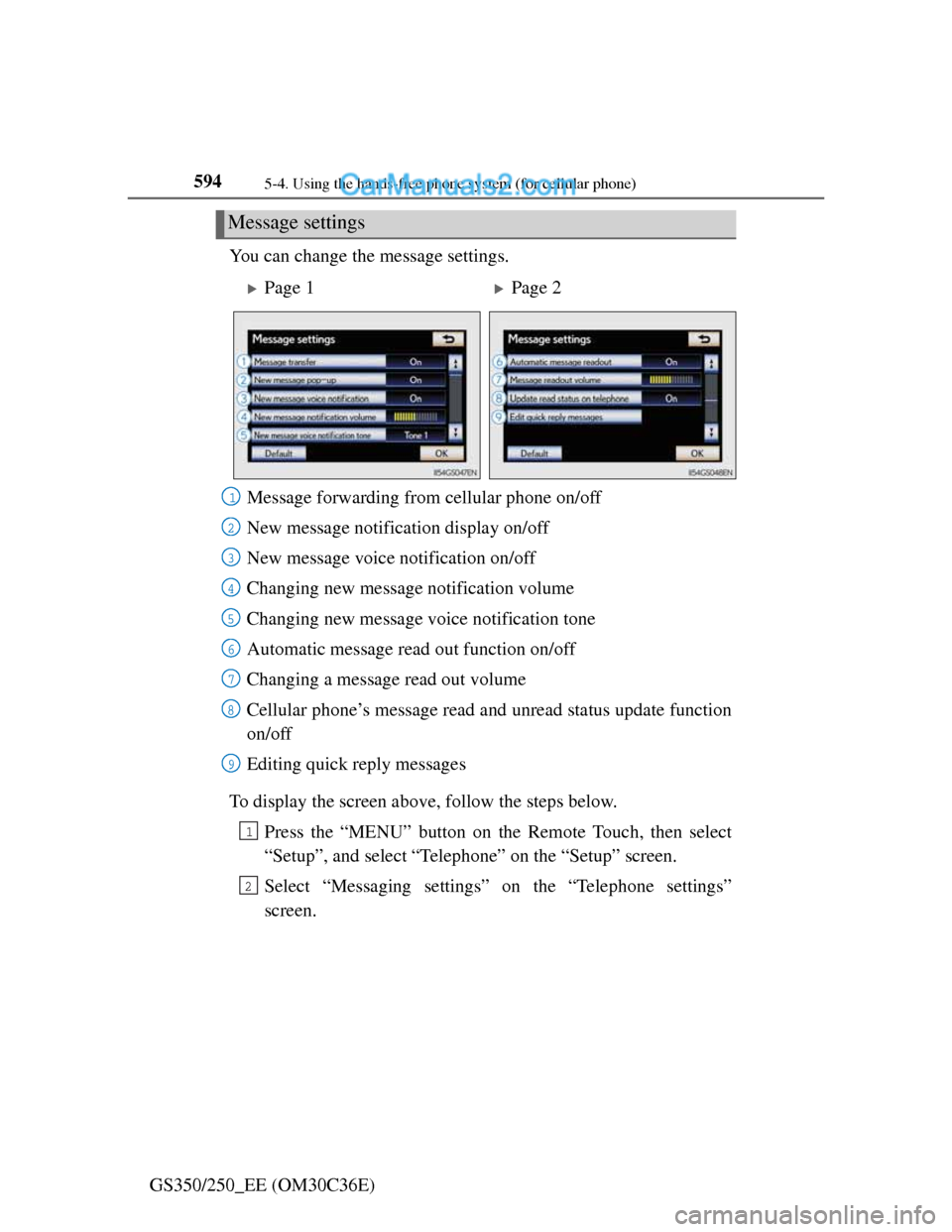
GS350/250_EE (OM30C36E)You can change the message settings.
To display the screen above, follow the steps below.
Press the “MENU” button on the Remote Touch, then select
“Setup”, and select “Telephone” on the “Setup” screen.
Select “Messaging settings” on the “Telephone settings”
screen.
Message settings
Page 1Page 2
Message forwarding from cellular phone on/off
New message notification display on/off
New message voice notification on/off
Changing new message notification volume
Changing new message voice notification tone
Automatic message read out function on/off
Changing a message read out volume
Cellular phone’s message read and unread status update function
on/off
Editing quick reply messages
1
2
3
4
5
6
7
8
9
1
2
Page 610 of 914
5955-4. Using the hands-free phone system (for cellular phone)
5
Interior features
GS350/250_EE (OM30C36E)
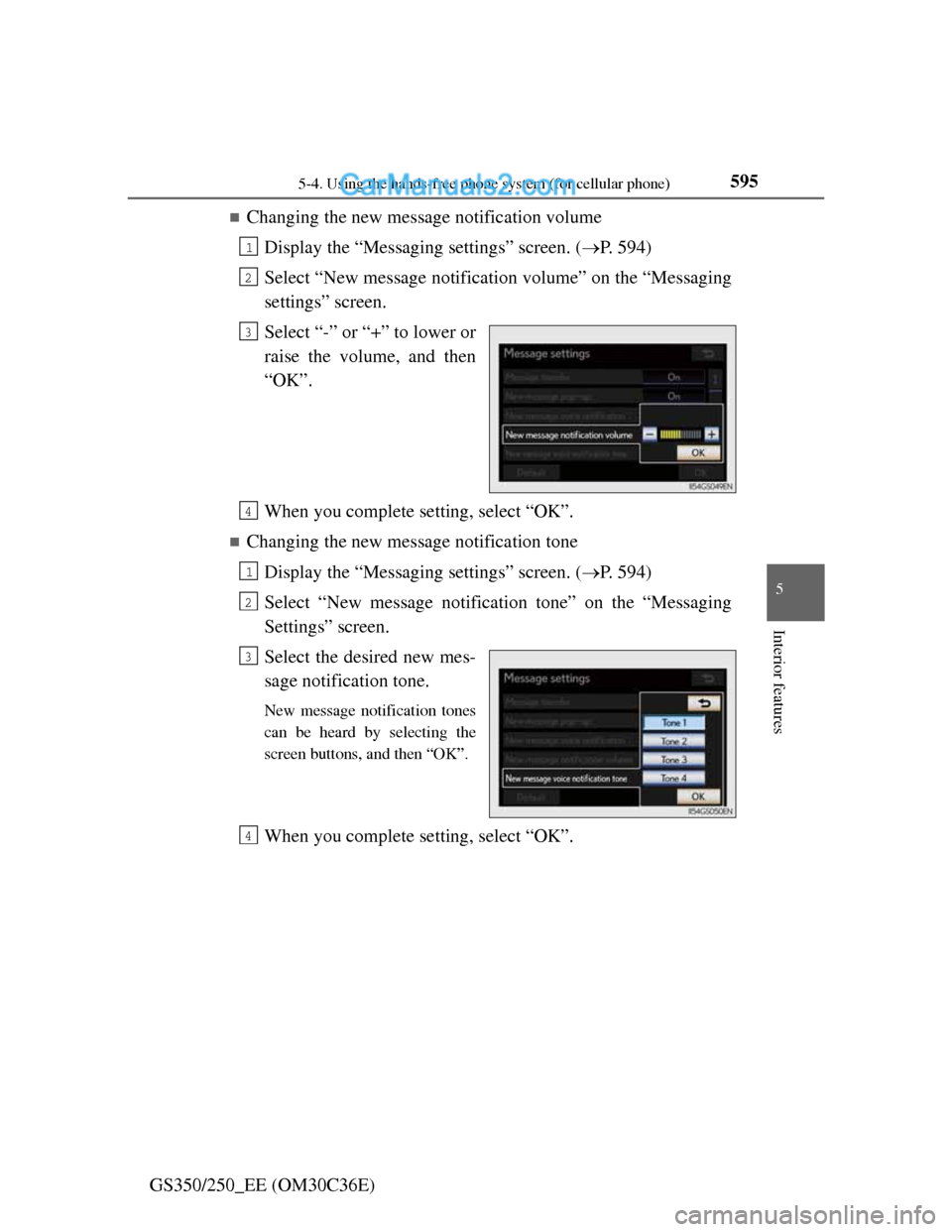
Changing the new message notification volume
Display the “Messaging settings” screen. (P. 594)
Select “New message notification volume” on the “Messaging
settings” screen.
Select “-” or “+” to lower or
raise the volume, and then
“OK”.
When you complete setting, select “OK”.
Changing the new message notification tone
Display the “Messaging settings” screen. (P. 594)
Select “New message notification tone” on the “Messaging
Settings” screen.
Select the desired new mes-
sage notification tone.
New message notification tones
can be heard by selecting the
screen buttons, and then “OK”.
When you complete setting, select “OK”.
1
2
3
4
1
2
3
4
Page 611 of 914
5965-4. Using the hands-free phone system (for cellular phone)
GS350/250_EE (OM30C36E)
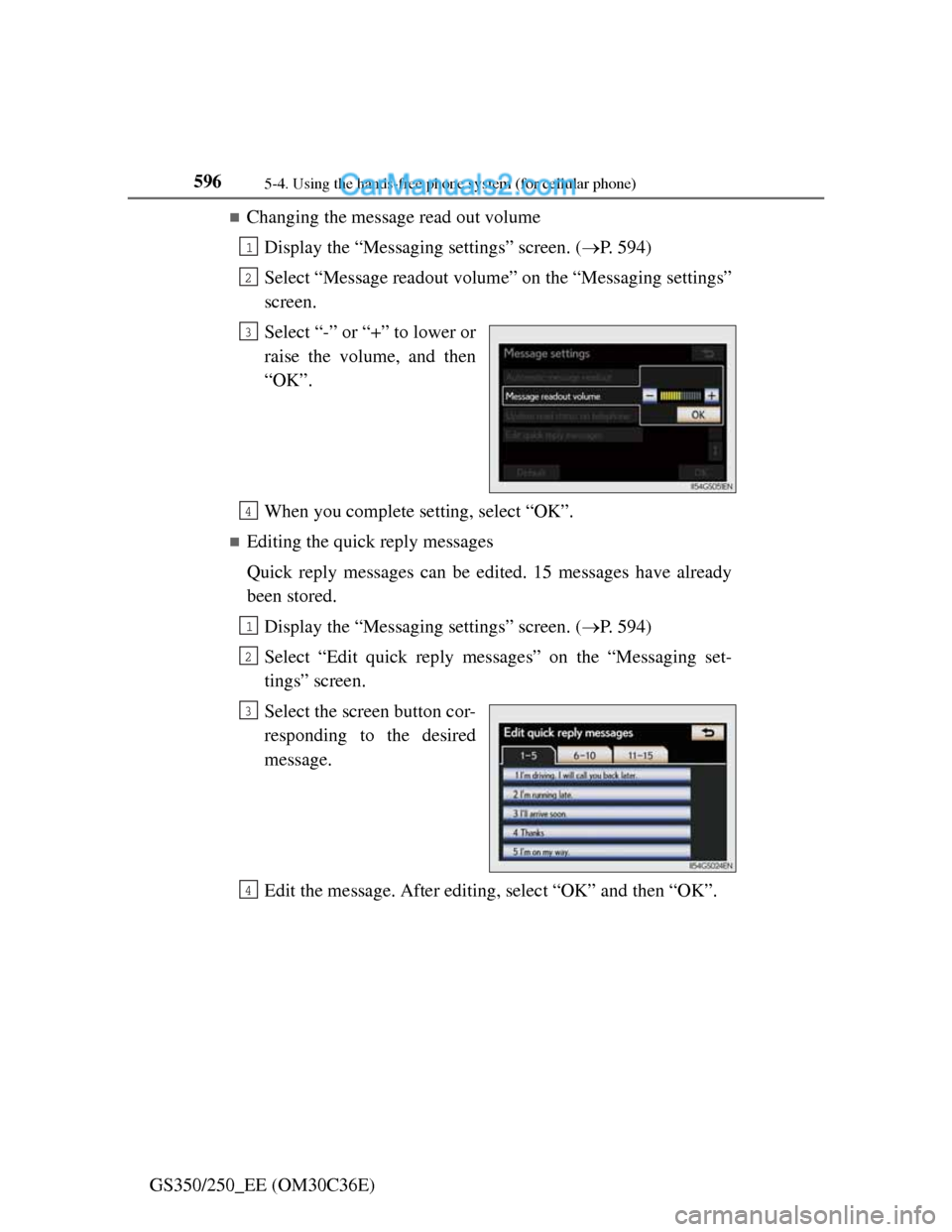
Changing the message read out volume
Display the “Messaging settings” screen. (P. 594)
Select “Message readout volume” on the “Messaging settings”
screen.
Select “-” or “+” to lower or
raise the volume, and then
“OK”.
When you complete setting, select “OK”.
Editing the quick reply messages
Quick reply messages can be edited. 15 messages have already
been stored.
Display the “Messaging settings” screen. (P. 594)
Select “Edit quick reply messages” on the “Messaging set-
tings” screen.
Select the screen button cor-
responding to the desired
message.
Edit the message. After editing, select “OK” and then “OK”.
1
2
3
4
1
2
3
4
Page 612 of 914
5975-4. Using the hands-free phone system (for cellular phone)
5
Interior features
GS350/250_EE (OM30C36E)
To display the “Message settings” screen in a different way
Display the “Telephone” screen. (P. 556)
Select “Messages” on the “Telephone” screen.
Select “Options” on the “Messages” screen.
Editing the quick reply messages in a different way
Display the desired message on “Messages” screen. (P. 576)
Select “Reply” on the desired message screen.
Select “Edit” on the “Quick reply messages”.
Select the screen button corresponding to the desired message.
When you complete editing, select “OK” and then on the “Edit Quick
Replay Message” screen.
Adaptive volume control
When traveling at 80 km/h (50 mph) or more, the system automatically raises
the volume.
To return to the default message settings
Select “Default”, and then “Yes”.
1
2
3
1
2
3
4
5
Page 613 of 914
5985-4. Using the hands-free phone system (for cellular phone)
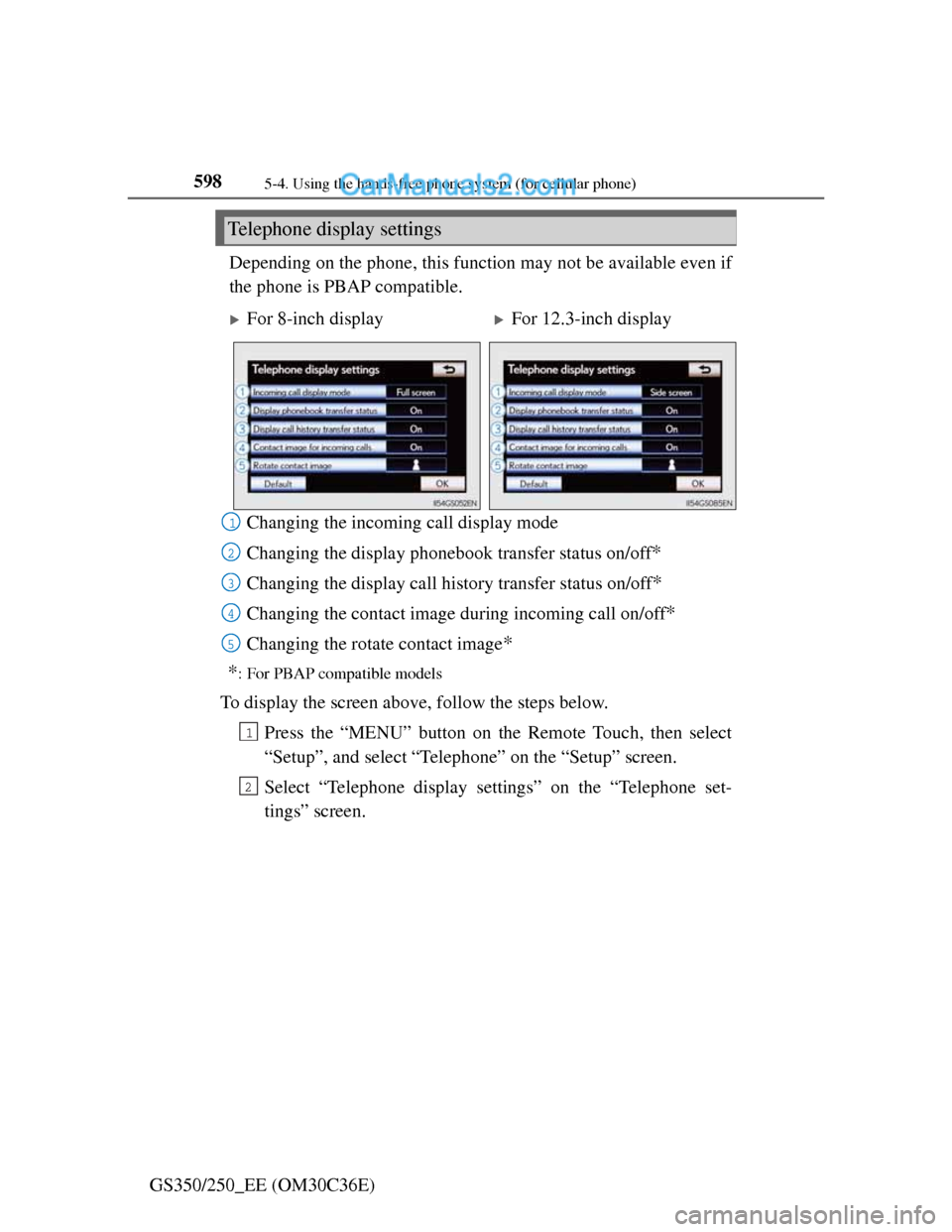
GS350/250_EE (OM30C36E)Depending on the phone, this function may not be available even if
the phone is PBAP compatible.
Changing the incoming call display mode
Changing the display phonebook transfer status on/off
*
Changing the display call history transfer status on/off*
Changing the contact image during incoming call on/off*
Changing the rotate contact image*
*
: For PBAP compatible models
To display the screen above, follow the steps below.
Press the “MENU” button on the Remote Touch, then select
“Setup”, and select “Telephone” on the “Setup” screen.
Select “Telephone display settings” on the “Telephone set-
tings” screen.
Telephone display settings
For 8-inch displayFor 12.3-inch display
1
2
3
4
15
1
2
Page 614 of 914
5995-4. Using the hands-free phone system (for cellular phone)
5
Interior features
GS350/250_EE (OM30C36E)
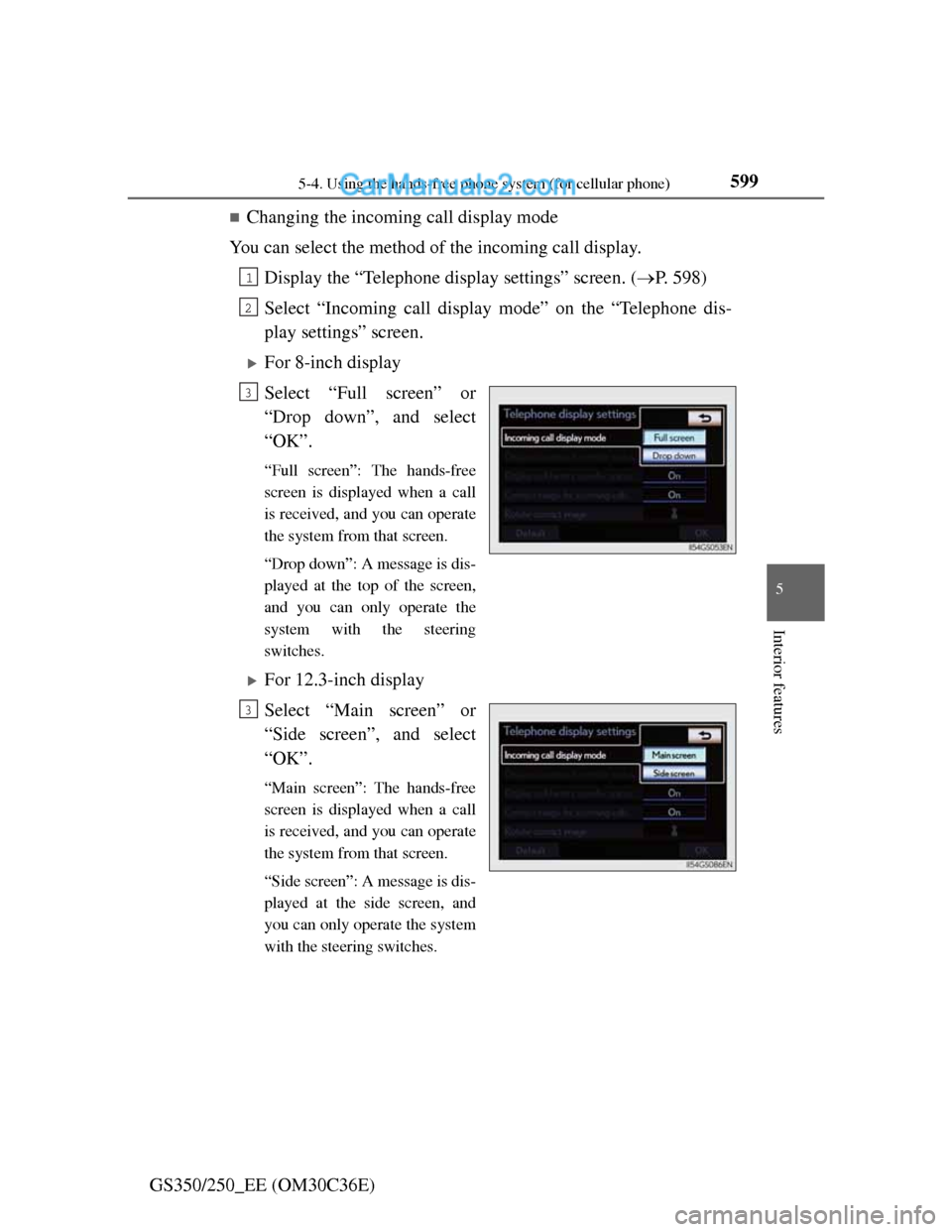
Changing the incoming call display mode
You can select the method of the incoming call display.
Display the “Telephone display settings” screen. (P. 598)
Select “Incoming call display mode” on the “Telephone dis-
play settings” screen.
For 8-inch display
Select “Full screen” or
“Drop down”, and select
“OK”.
“Full screen”: The hands-free
screen is displayed when a call
is received, and you can operate
the system from that screen.
“Drop down”: A message is dis-
played at the top of the screen,
and you can only operate the
system with the steering
switches.
For 12.3-inch display
Select “Main screen” or
“Side screen”, and select
“OK”.
“Main screen”: The hands-free
screen is displayed when a call
is received, and you can operate
the system from that screen.
“Side screen”: A message is dis-
played at the side screen, and
you can only operate the system
with the steering switches.
1
2
3
3
Page 615 of 914
6005-4. Using the hands-free phone system (for cellular phone)
GS350/250_EE (OM30C36E)
Changing the rotating contact images
For PBAP compatible models, when “Contact image for incom-
ing calls” is set to “On”, images stored together with phone num-
bers in the cellular phone’s phonebook will be transferred and
displayed during the incoming call. The orientation of the image
can be set.
Display the “Telephone display settings” screen. (P. 598)
Select “Rotate contact image” on the “Telephone display set-
tings” screen.
Choose the desired orientation of the image to be displayed,
and then “OK”.
To return to the default detailed phone settings
Select “Default”, and then “Yes”.
1
2
3