seat Lexus GS250 2012 Manual Online
[x] Cancel search | Manufacturer: LEXUS, Model Year: 2012, Model line: GS250, Model: Lexus GS250 2012Pages: 914, PDF Size: 53.04 MB
Page 426 of 914
4155-2. Using the air conditioning system and defogger
5
Interior features
GS350/250_EE (OM30C36E)
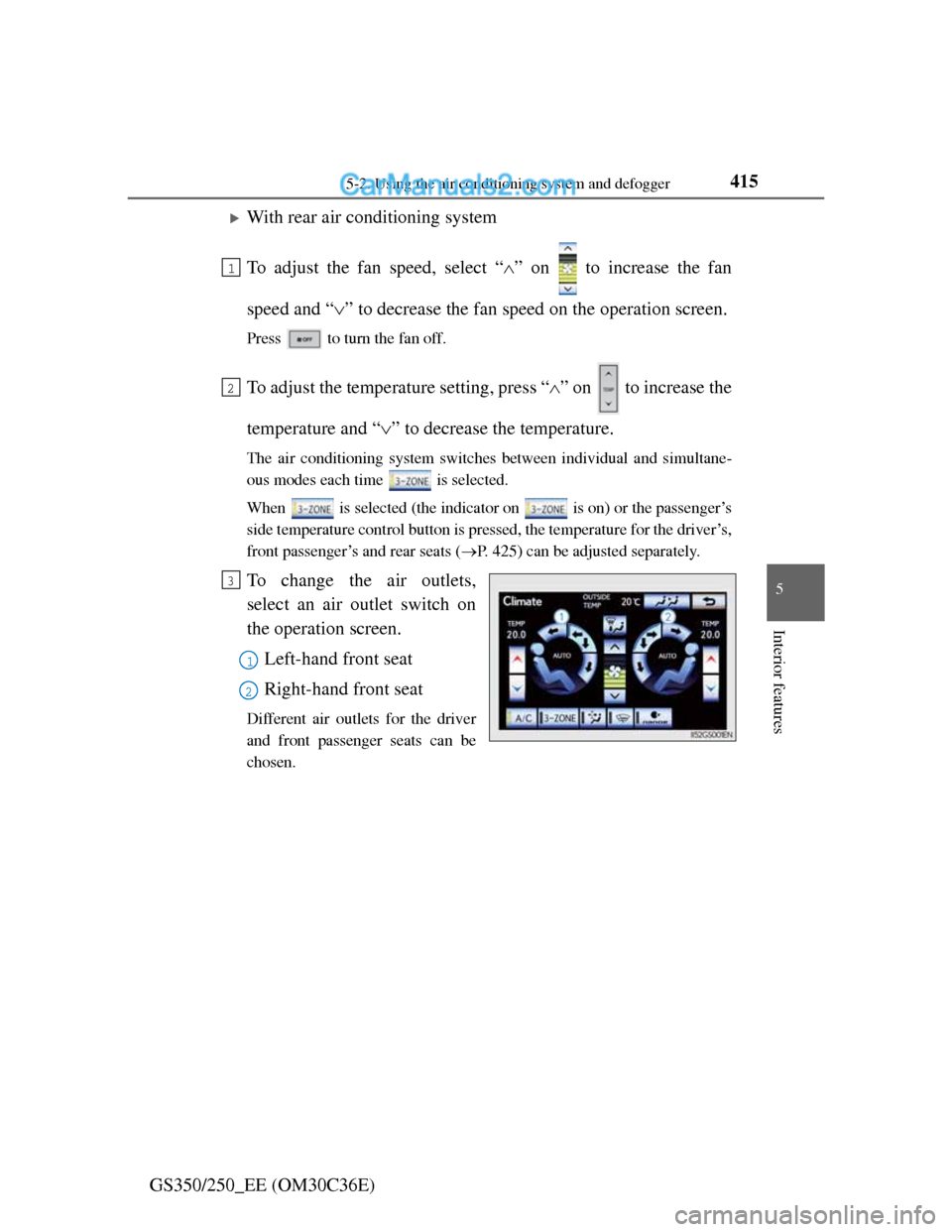
With rear air conditioning system
To adjust the fan speed, select “” on to increase the fan
speed and “” to decrease the fan speed on the operation screen.
Press to turn the fan off.
To adjust the temperature setting, press “” on to increase the
temperature and “” to decrease the temperature.
The air conditioning system switches between individual and simultane-
ous modes each time is selected.
When is selected (the indicator on is on) or the passenger’s
side temperature control button is pressed, the temperature for the driver’s,
front passenger’s and rear seats (P. 425) can be adjusted separately.
To change the air outlets,
select an air outlet switch on
the operation screen.
Left-hand front seat
Right-hand front seat
Different air outlets for the driver
and front passenger seats can be
chosen.
1
2
3
1
2
Page 429 of 914
4185-2. Using the air conditioning system and defogger
GS350/250_EE (OM30C36E)
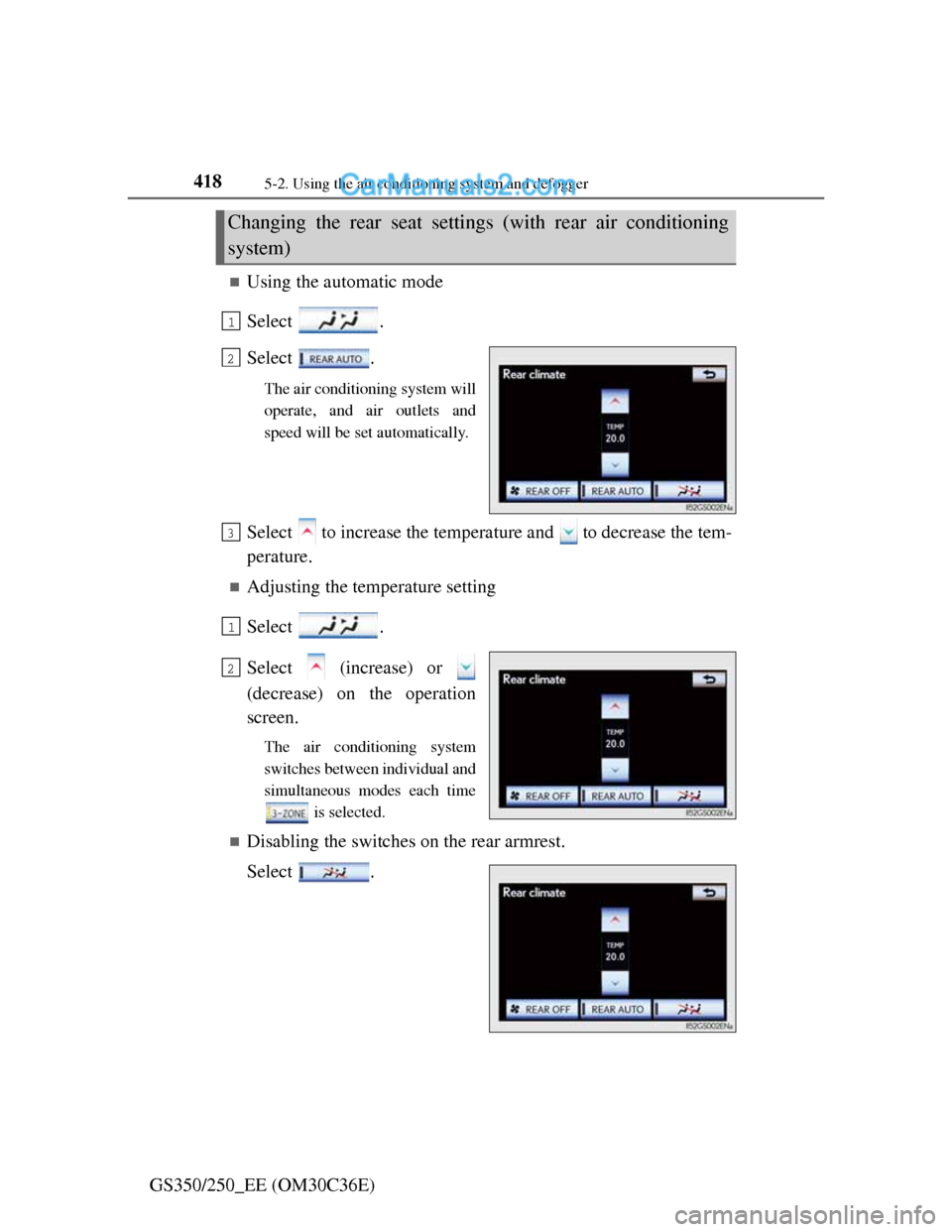
Using the automatic mode
Select .
Select .
The air conditioning system will
operate, and air outlets and
speed will be set automatically.
Select to increase the temperature and to decrease the tem-
perature.
Adjusting the temperature setting
Select .
Select (increase) or
(decrease) on the operation
screen.
The air conditioning system
switches between individual and
simultaneous modes each time
is selected.
Disabling the switches on the rear armrest.
Select .
Changing the rear seat settings (with rear air conditioning
system)
1
2
3
1
2
Page 430 of 914
4195-2. Using the air conditioning system and defogger
5
Interior features
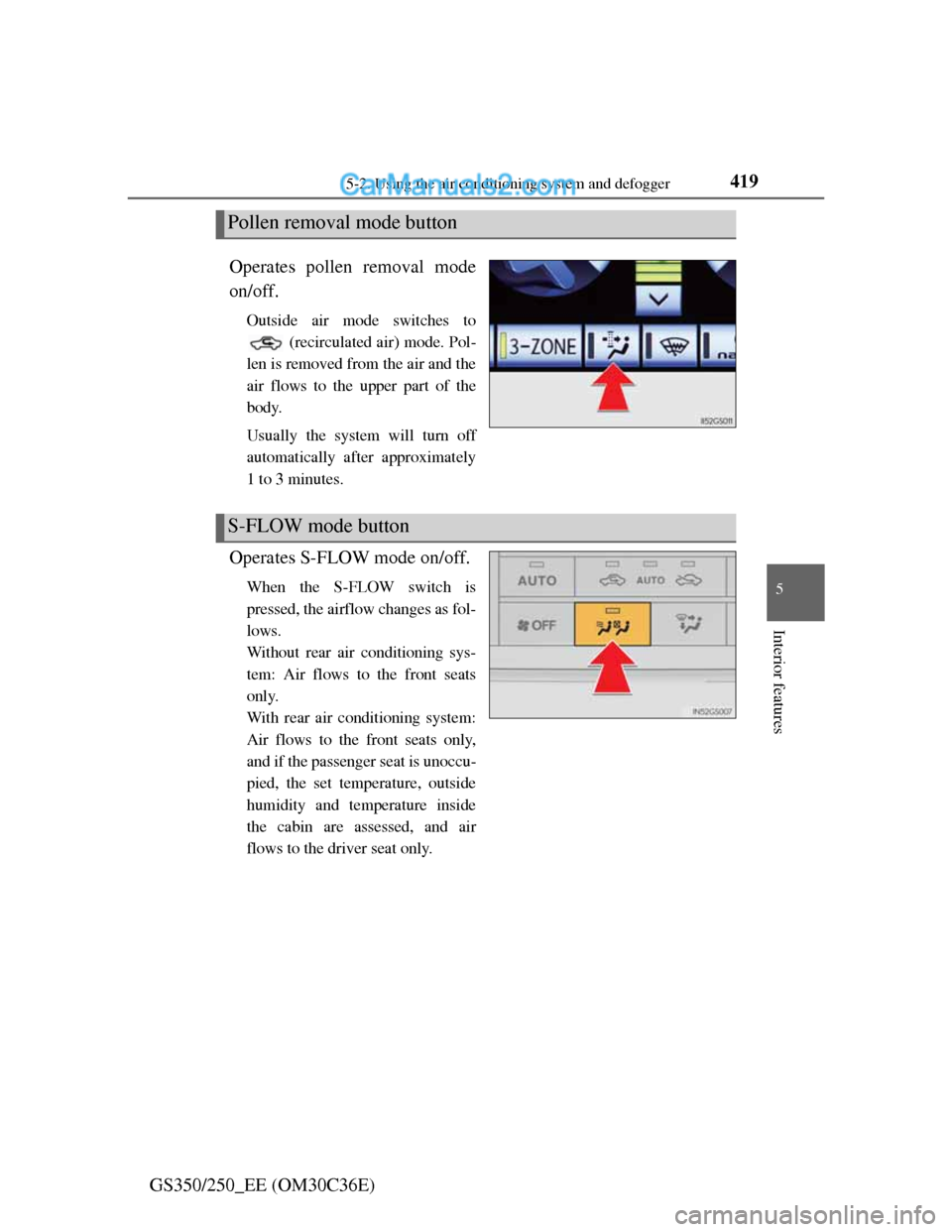
GS350/250_EE (OM30C36E)Operates pollen removal mode
on/off.
Outside air mode switches to
(recirculated air) mode. Pol-
len is removed from the air and the
air flows to the upper part of the
body.
Usually the system will turn off
automatically after approximately
1 to 3 minutes.
Operates S-FLOW mode on/off.
When the S-FLOW switch is
pressed, the airflow changes as fol-
lows.
Without rear air conditioning sys-
tem: Air flows to the front seats
only.
With rear air conditioning system:
Air flows to the front seats only,
and if the passenger seat is unoccu-
pied, the set temperature, outside
humidity and temperature inside
the cabin are assessed, and air
flows to the driver seat only.
Pollen removal mode button
S-FLOW mode button
Page 431 of 914
4205-2. Using the air conditioning system and defogger
GS350/250_EE (OM30C36E)
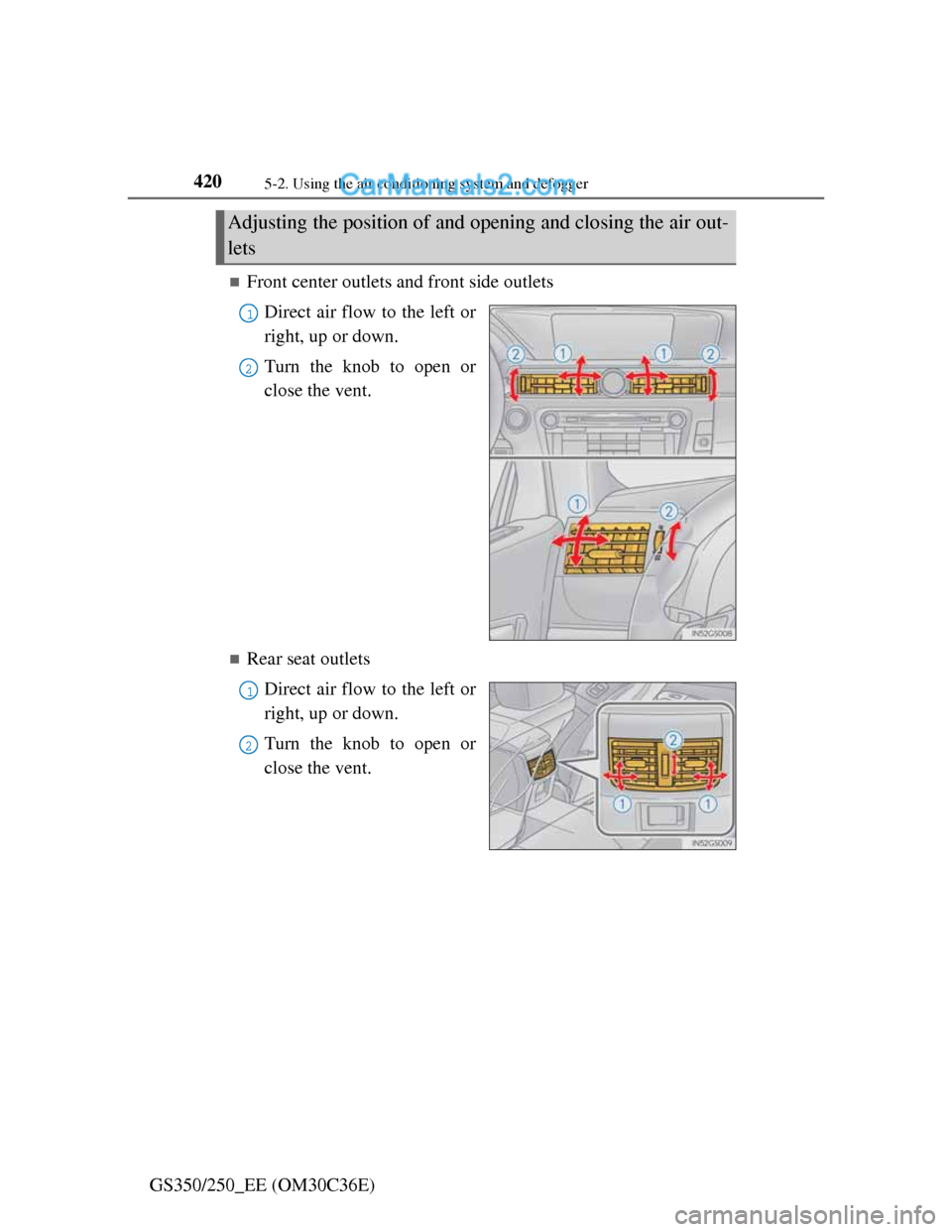
Front center outlets and front side outlets
Direct air flow to the left or
right, up or down.
Turn the knob to open or
close the vent.
Rear seat outlets
Direct air flow to the left or
right, up or down.
Turn the knob to open or
close the vent.
Adjusting the position of and opening and closing the air out-
lets
1
2
1
2
Page 498 of 914
4875-3. Using the audio system
5
Interior features
GS350/250_EE (OM30C36E)
When a rear passenger selects set up menu
Follow the directions on the warning screen that is displayed.
Under the same condition, the rear passenger can cancel the set up operation
from the front seat.
Error messages
If “Region code error” is displayed, check if the region code printed on the
DVD matches the player’s region code.
If a different message is displayed: P. 4 8 8
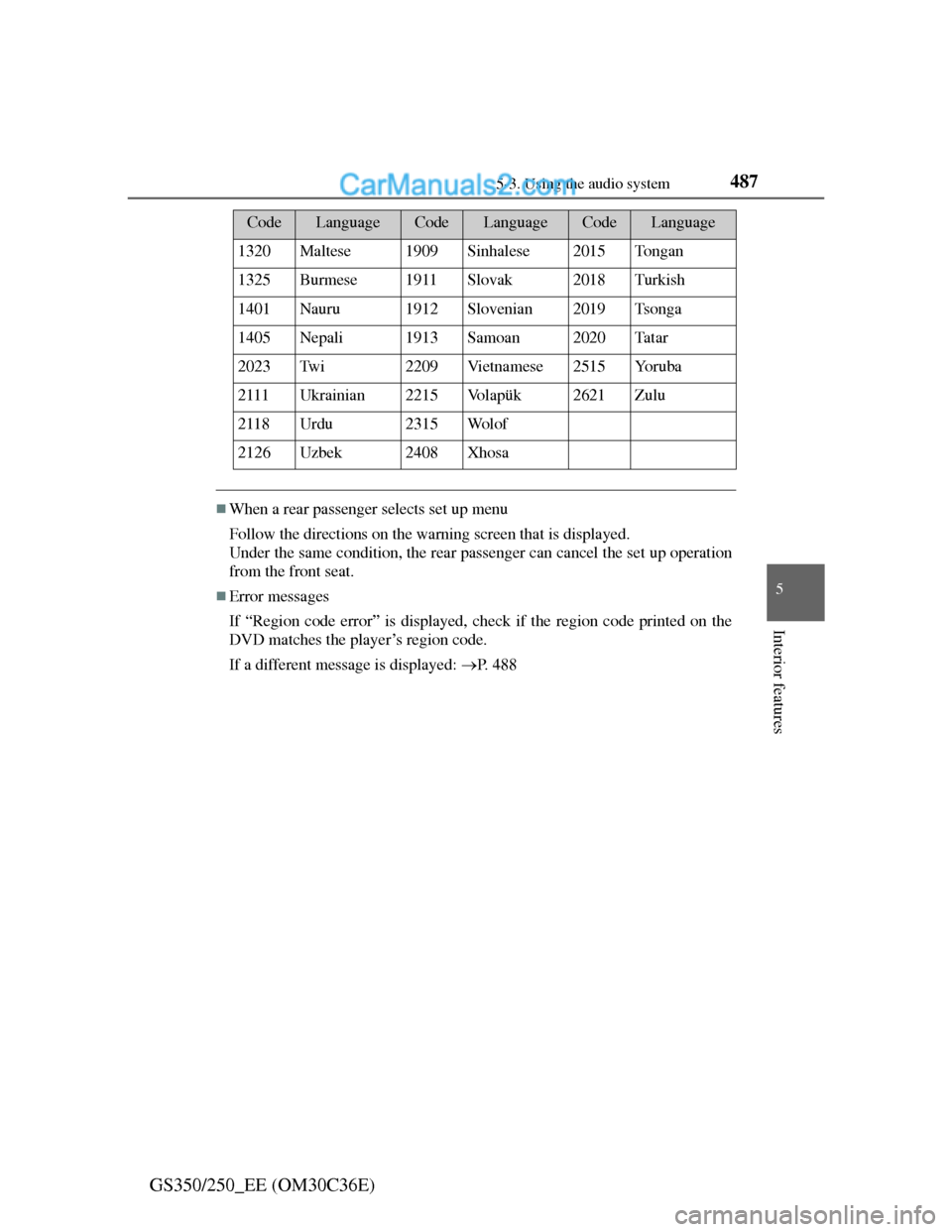
1320Maltese1909Sinhalese2015To n g a n
1325Burmese1911Slovak2018Turkish
1401Nauru1912Slovenian2019Tsonga
1405Nepali1913Samoan2020Ta t a r
2023Tw i2209Vi e t n a m e s e2515Yo r u b a
2111Ukrainian2215Vo l a p ü k2621Zulu
2118Urdu2315Wo l o f
2126Uzbek2408Xhosa
CodeLanguageCodeLanguageCodeLanguage
Page 518 of 914
5075-3. Using the audio system
5
Interior features
GS350/250_EE (OM30C36E)
If you select
The display returns to the previous screen.
Connecting Bluetooth® audio player
Selecting “Connect portable player” on the “Bluetooth*” screen also con-
nects a Bluetooth® audio player. (P. 606)
When none of the selectable portable players have been registered, a screen
confirming registration is displayed. The registration method is the same as
phone registration. (P. 599)
When the currently connected portable player is selected, a screen confirm-
ing the selected player’s disconnection is displayed. (P. 599)
If connection fails once, a changing connection method confirmation screen
is displayed. If connection fails 2 or more times, a message will be dis-
played. When this message is displayed, try again.
*: Bluetooth is a registered trademark of Bluetooth SIG. Inc.
When using the Bluetooth® audio system
In the following conditions, the system may not function.
• The portable player is turned off
• The portable player is not connected
• The portable player battery is low
There may be a delay if phone connection is carried out during Bluetooth®
audio play.
Depending on the type of portable player that is connected to the system,
operation may differ slightly and certain functions may not be available.
Bluetooth® antenna
The antenna is built into the instrument panel. If the portable player is behind
the seat or in the glove box or console box, or is touching or covered by
metal objects, connection status may deteriorate.
Battery charge/signal status
This display may not correspond exactly with the portable player, and this
system does not have a charging function.
Page 548 of 914
5375-3. Using the audio system
5
Interior features
GS350/250_EE (OM30C36E)
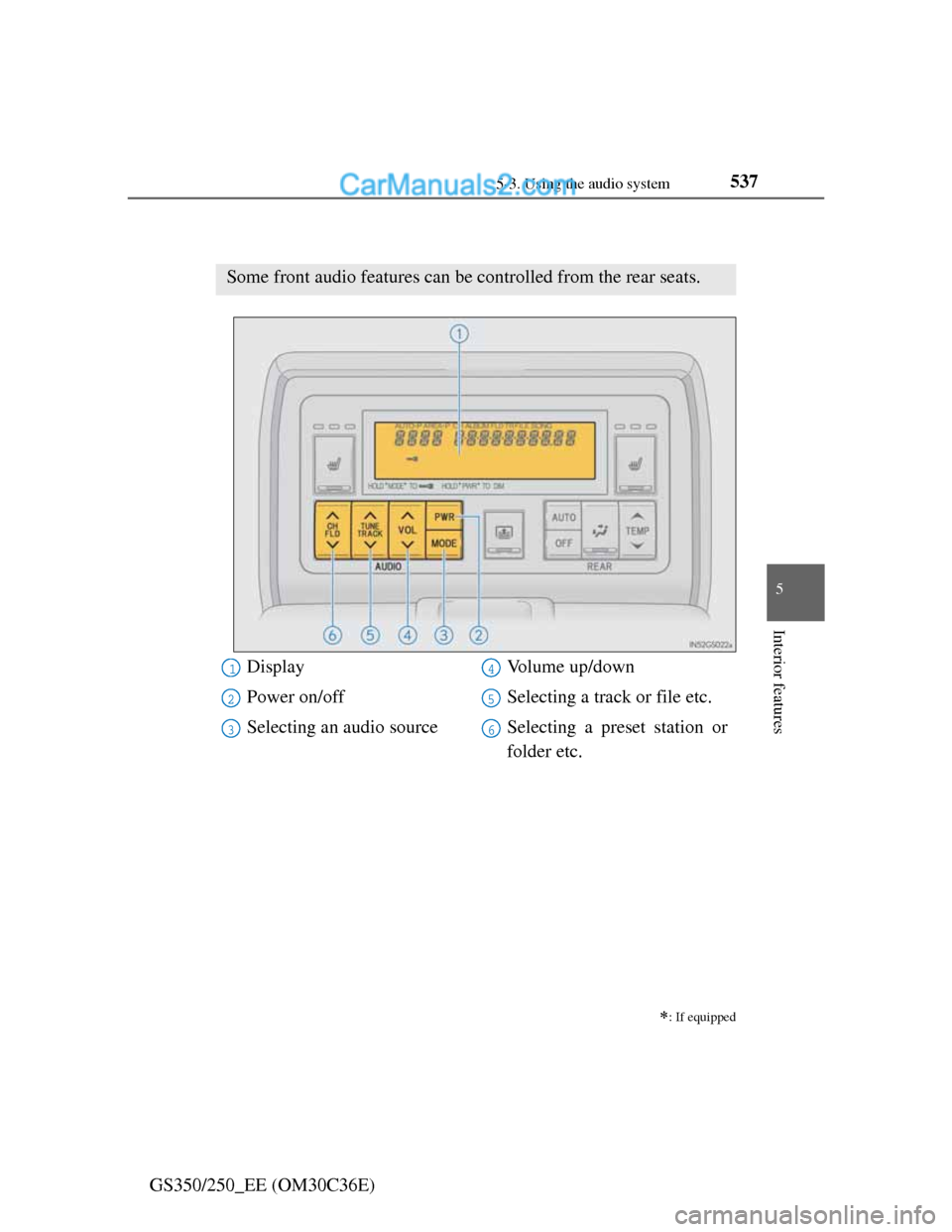
Using the rear seat audio controls
: If equipped
Some front audio features can be controlled from the rear seats.
Display
Power on/off
Selecting an audio sourceVolume up/down
Selecting a track or file etc.
Selecting a preset station or
folder etc.1
2
3
4
5
6
Page 561 of 914
5465-4. Using the hands-free phone system (for cellular phone)
GS350/250_EE (OM30C36E)
When using the hands-free system
The audio system is muted when making a call.
If both parties speak at the same time, it may be difficult to hear.
If the incoming call volume is overly loud, an echo may be heard.
Try to face toward the microphone as much as possible when speaking.
In the following circumstances, it may be difficult to hear the other party:
• When driving on unpaved roads
• When driving at high speeds
• If a window is open
• If the air conditioning is blowing directly on the microphone
• If the air conditioning is set to high
• There is an effect from the network of the cellular phone
Conditions under which the system will not operate
If using a cellular phone that does not support Bluetooth®
If the cellular phone is turned off
If you are outside service range
If the cellular phone is not connected
If the cellular phone’s battery is low
When the cellular phone is not connected, “No connect” is displayed.
Bluetooth® antenna
The antenna is built into the instrument panel. If the cellular phone is behind
the seat or in the console box, or touching or covered by metal objects, con-
nection status may deteriorate.
Battery charge/Signal status
This display may not correspond exactly with the cellular phone itself.
When the cellular phone is out of the service area or in a place inaccessible
by radio waves, “No service” is displayed.
When using Bluetooth® audio and hands-free system at the same time
The following problems may occur.
The Bluetooth® connection may be cut.
Noise may be heard on the Bluetooth® audio playback.
Page 634 of 914
6165-6. Using the storage features
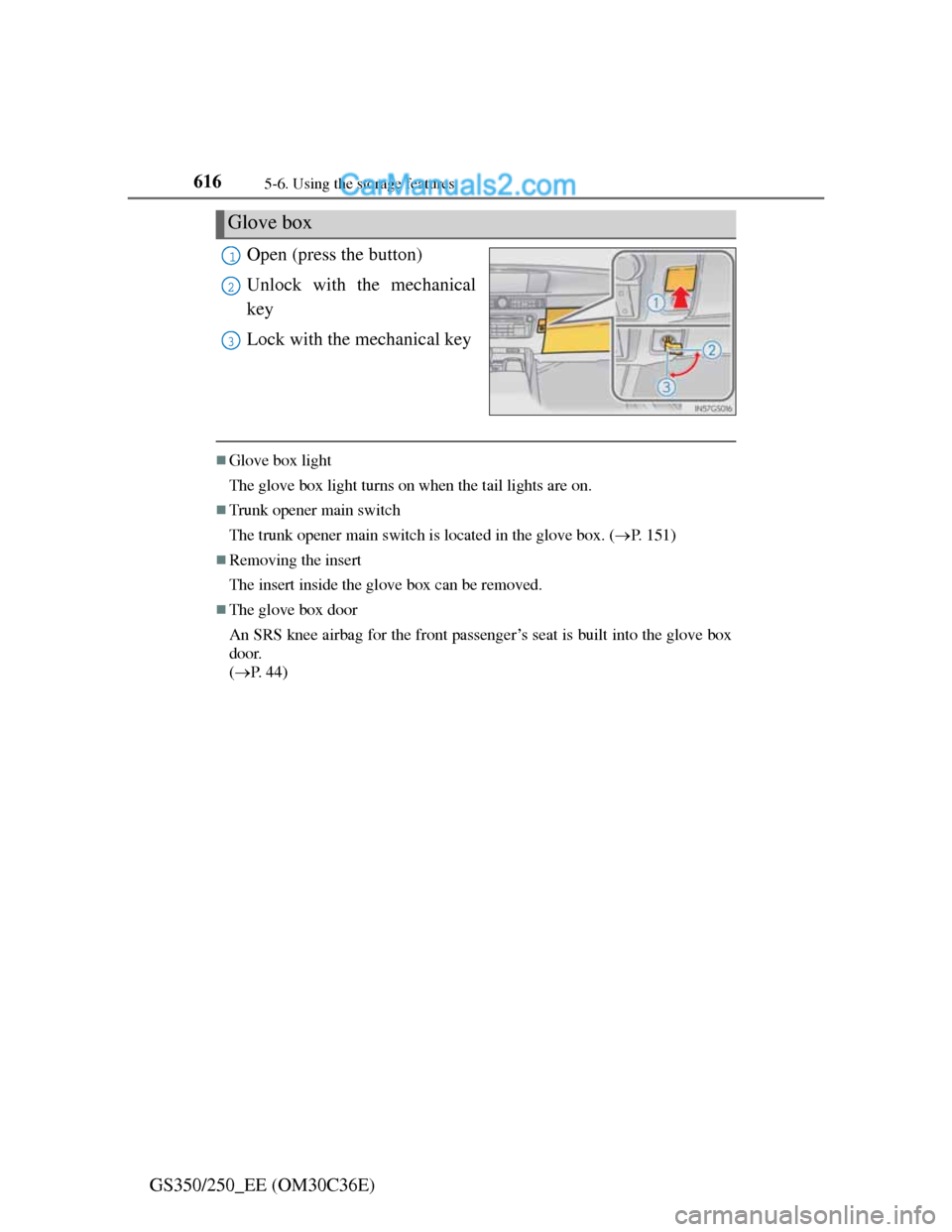
GS350/250_EE (OM30C36E)Open (press the button)
Unlock with the mechanical
key
Lock with the mechanical key
Glove box light
The glove box light turns on when the tail lights are on.
Trunk opener main switch
The trunk opener main switch is located in the glove box. (P. 151)
Removing the insert
The insert inside the glove box can be removed.
The glove box door
An SRS knee airbag for the front passenger’s seat is built into the glove box
door.
(P. 44)
Glove box
1
2
3
Page 649 of 914
631
5 5-7. Other interior features
Interior features
GS350/250_EE (OM30C36E)
Seat heaters/seat ventilators
Front seats
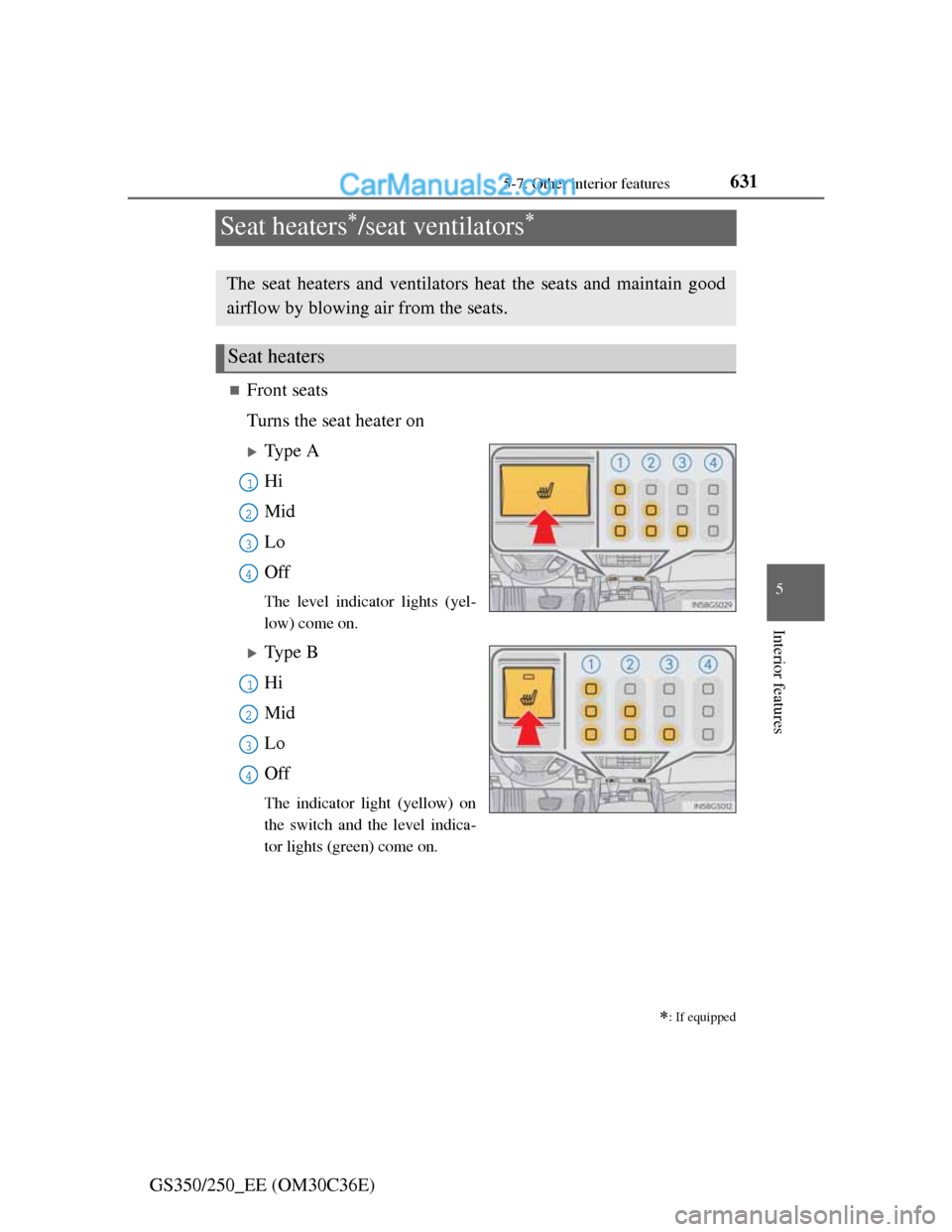
Turns the seat heater on
Type A
Hi
Mid
Lo
Off
The level indicator lights (yel-
low) come on.
Type B
Hi
Mid
Lo
Off
The indicator light (yellow) on
the switch and the level indica-
tor lights (green) come on.
: If equipped
The seat heaters and ventilators heat the seats and maintain good
airflow by blowing air from the seats.
Seat heaters
1
2
13
4
1
2
13
4