seat Lexus GS250 2012 Repair Manual
[x] Cancel search | Manufacturer: LEXUS, Model Year: 2012, Model line: GS250, Model: Lexus GS250 2012Pages: 914, PDF Size: 53.04 MB
Page 168 of 914
1653-3. Adjusting the seats
3
Operation of each component
GS350/250_EE (OM30C36E)
Cancelation procedure
Carry only the key to which you want to cancel the linked door
unlock operation.
If 2 or more keys are in the vehicle, the driving position cannot
be canceled properly.
Turn the engine switch to IGNITION ON mode.
While pressing the “SET” button, press the driver’s door lock
switch (either lock or unlock) until the signal beeps.
1
2
Page 169 of 914
1663-3. Adjusting the seats
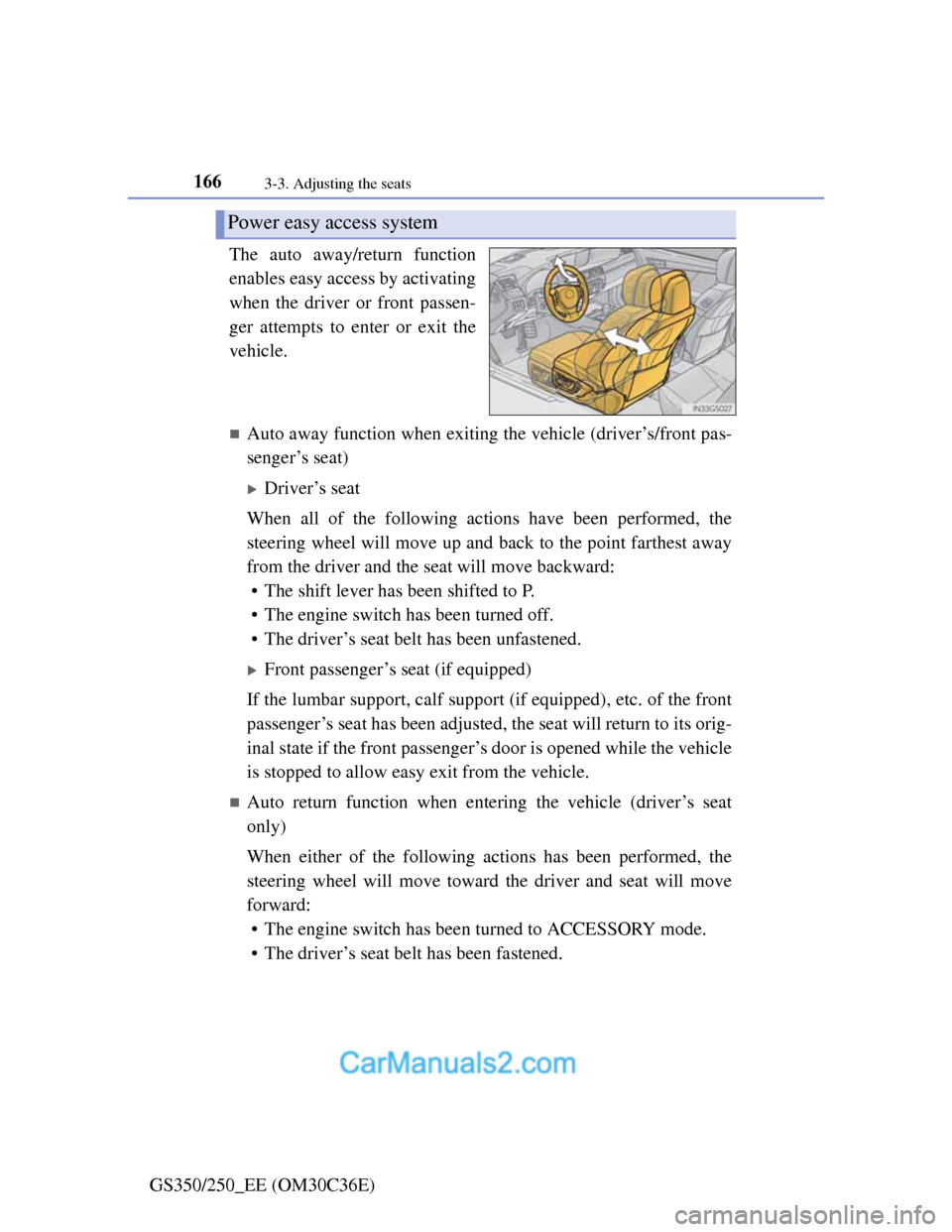
GS350/250_EE (OM30C36E)The auto away/return function
enables easy access by activating
when the driver or front passen-
ger attempts to enter or exit the
vehicle.
Auto away function when exiting the vehicle (driver’s/front pas-
senger’s seat)
Driver’s seat
When all of the following actions have been performed, the
steering wheel will move up and back to the point farthest away
from the driver and the seat will move backward:
• The shift lever has been shifted to P.
• The engine switch has been turned off.
• The driver’s seat belt has been unfastened.
Front passenger’s seat (if equipped)
If the lumbar support, calf support (if equipped), etc. of the front
passenger’s seat has been adjusted, the seat will return to its orig-
inal state if the front passenger’s door is opened while the vehicle
is stopped to allow easy exit from the vehicle.
Auto return function when entering the vehicle (driver’s seat
only)
When either of the following actions has been performed, the
steering wheel will move toward the driver and seat will move
forward:
• The engine switch has been turned to ACCESSORY mode.
• The driver’s seat belt has been fastened.
Power easy access system
Page 170 of 914
167
3 3-3. Adjusting the seats
Operation of each component
GS350/250_EE (OM30C36E)
When driving position memory is linked with door unlock operation
If the driver’s door is opened, the driver’s seat will move toward the memo-
rized position but stop slightly beforehand to allow easy access to the vehi-
cle.
Turning the engine switch to ACCESSORY or IGNITION ON mode, or fas-
tening the driver’s seat belt moves the seat fully into the memorized position.
Operating the driving position memory after turning the engine switch off
Driver’s seat:
Memorized seat positions can be activated up to 180 seconds after the
driver’s door is opened and another 60 seconds after it is closed again. Mem-
orized steering wheel position can be activated by pressing the engine switch.
Front passenger’s seat:
Memorized positions can be activated up to 180 seconds after the front pas-
senger’s door is opened by pressing button “1”, “2” or “3”.
Correct seat position
When the seat is in the most forward or most backward position, and the seat
is being moved in those directions, the system may not correctly recognize
the current position and the memorized position will not be correctly
recalled.
The auto away function for exiting the driver’s seat
If the seat is already close to the rearmost position, the auto away function
may not operate when the driver exits the vehicle.
Customization
The distance that the driver’s seat moves backward during the auto away
function can be changed. (Customizable features: P. 855)
CAUTION
Seat adjustment caution
Take care during seat adjustment so that the seat does not strike the rear
passenger or squeeze your body against the steering wheel.
Page 171 of 914
1683-3. Adjusting the seats
GS350/250_EE (OM30C36E)
Head restraints
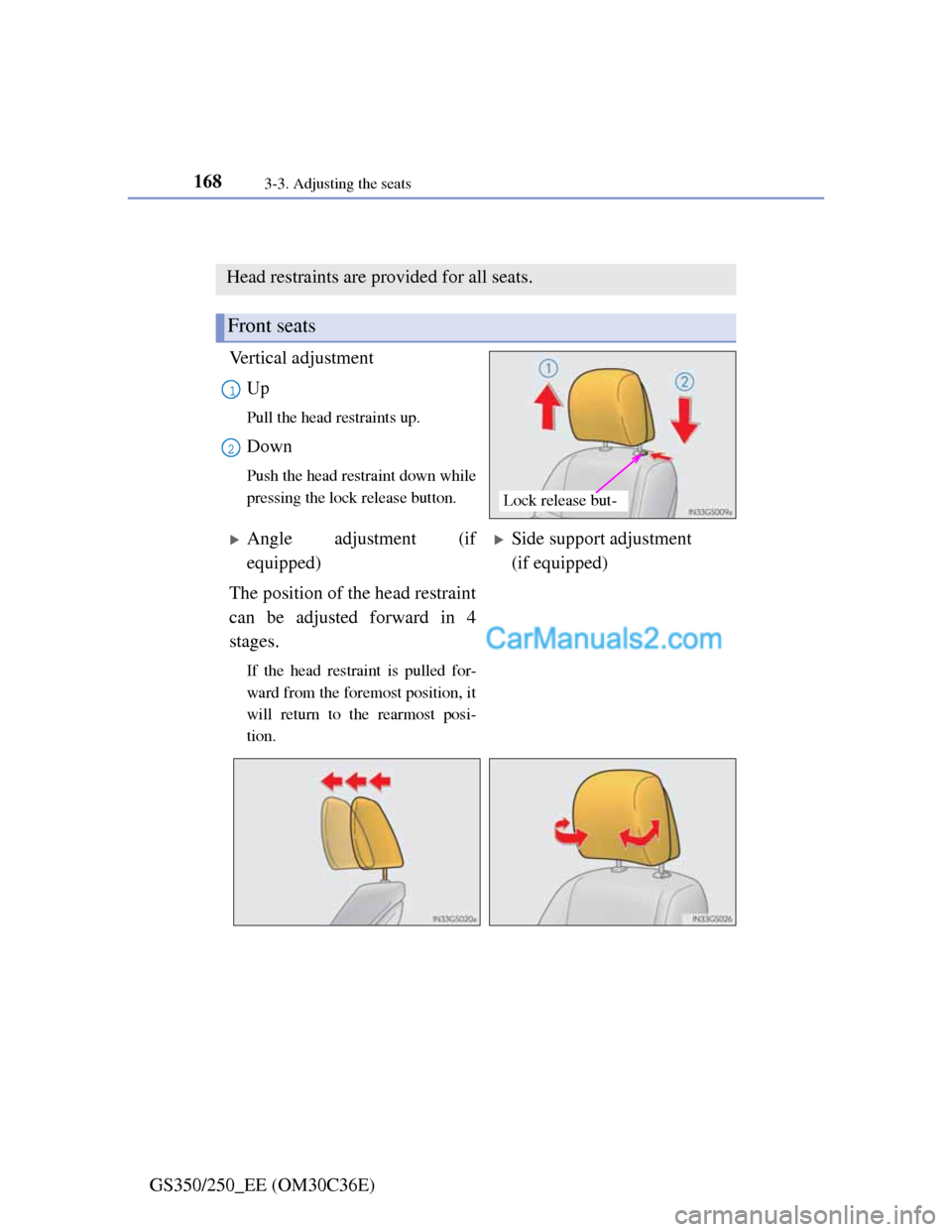
Vertical adjustment
Up
Pull the head restraints up.
Down
Push the head restraint down while
pressing the lock release button.
Head restraints are provided for all seats.
Front seats
Lock release but-
1
2
Angle adjustment (if
equipped)Side support adjustment
(if equipped)
The position of the head restraint
can be adjusted forward in 4
stages.
If the head restraint is pulled for-
ward from the foremost position, it
will return to the rearmost posi-
tion.
Page 172 of 914
1693-3. Adjusting the seats
3
Operation of each component
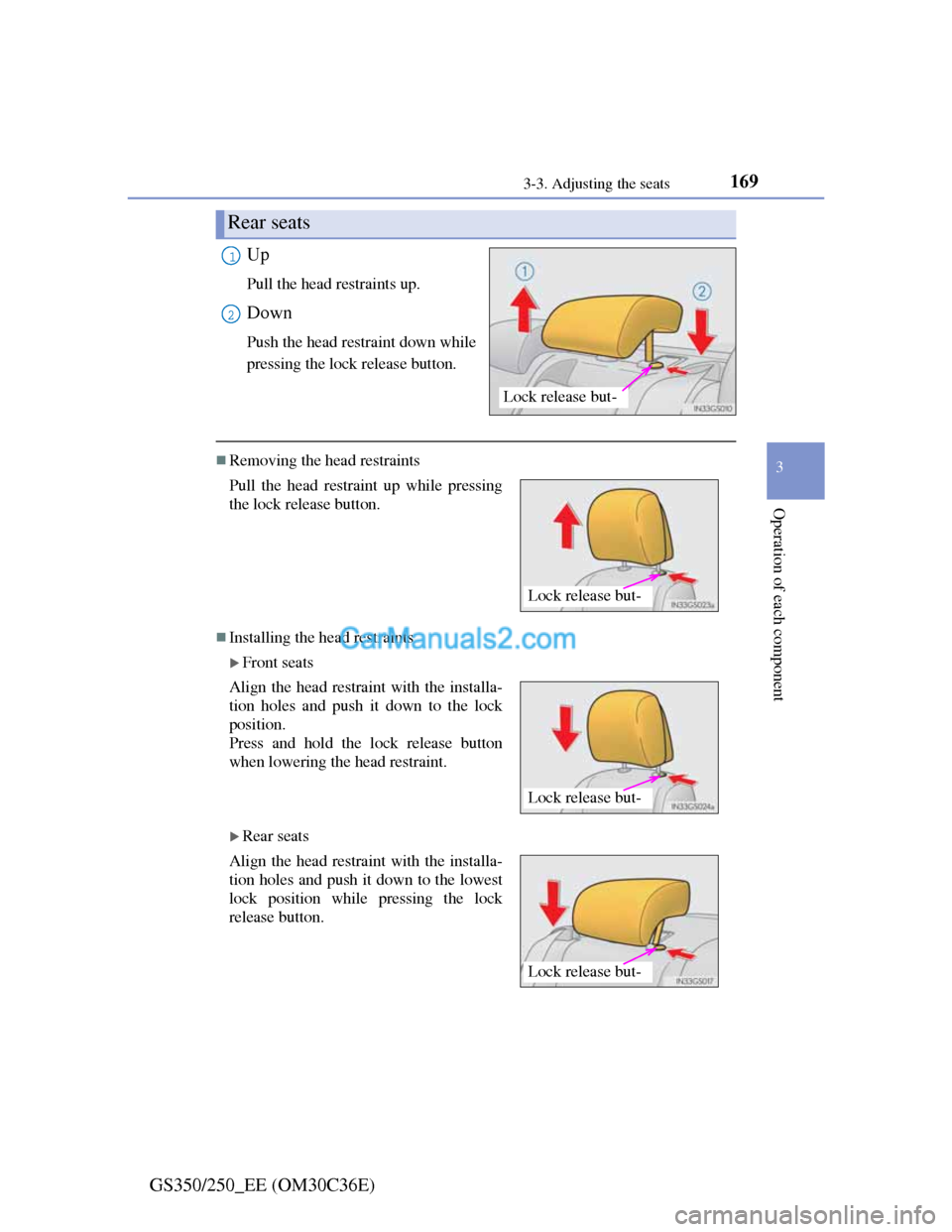
GS350/250_EE (OM30C36E)Up
Pull the head restraints up.
Down
Push the head restraint down while
pressing the lock release button.
Removing the head restraints
Installing the head restraints
Front seats
Rear seats
Rear seats
Lock release but-
1
2
Pull the head restraint up while pressing
the lock release button.
Align the head restraint with the installa-
tion holes and push it down to the lock
position.
Press and hold the lock release button
when lowering the head restraint.
Align the head restraint with the installa-
tion holes and push it down to the lowest
lock position while pressing the lock
release button.
Lock release but-
Lock release but-
Lock release but-
Page 173 of 914
1703-3. Adjusting the seats
GS350/250_EE (OM30C36E)
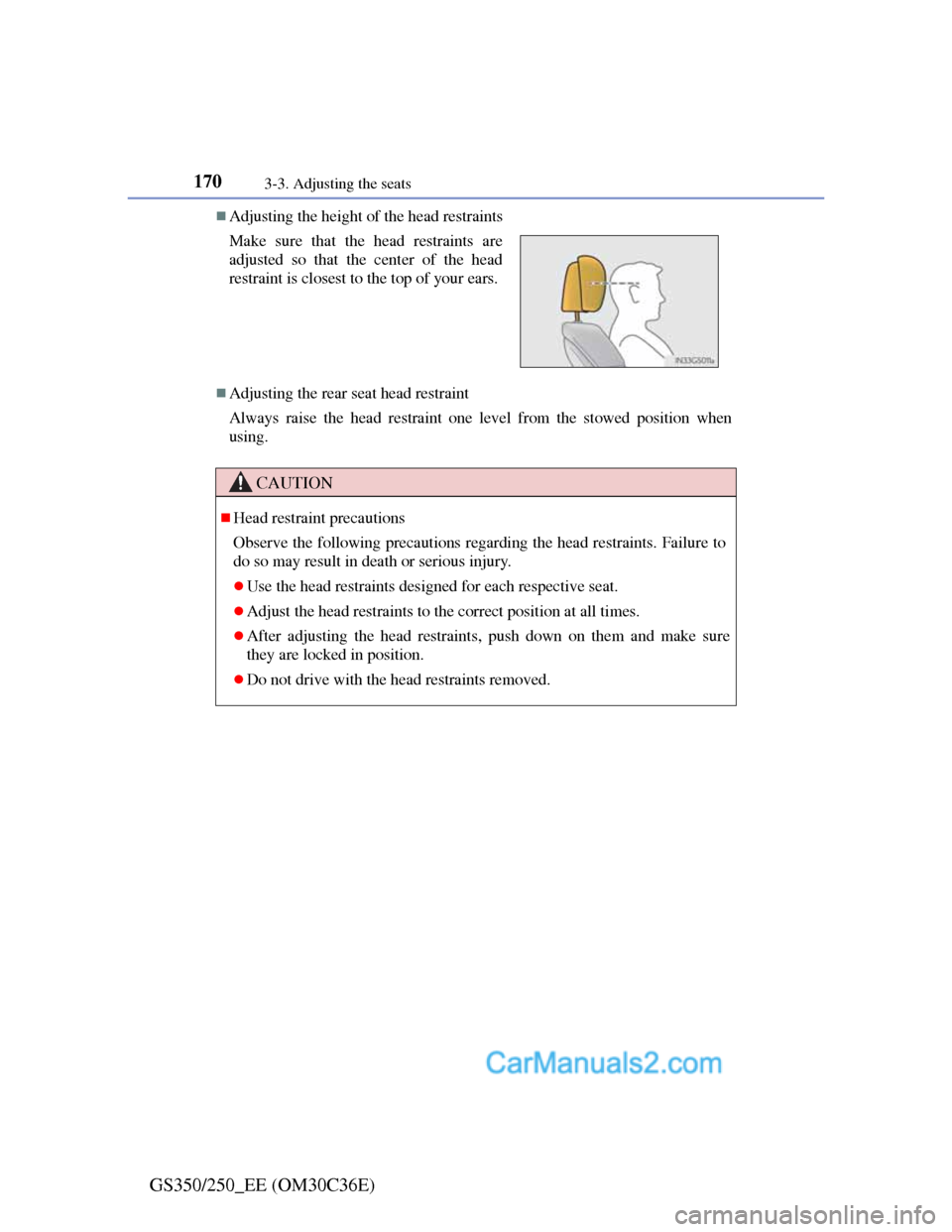
Adjusting the height of the head restraints
Adjusting the rear seat head restraint
Always raise the head restraint one level from the stowed position when
using. Make sure that the head restraints are
adjusted so that the center of the head
restraint is closest to the top of your ears.
CAUTION
Head restraint precautions
Observe the following precautions regarding the head restraints. Failure to
do so may result in death or serious injury.
Use the head restraints designed for each respective seat.
Adjust the head restraints to the correct position at all times.
After adjusting the head restraints, push down on them and make sure
they are locked in position.
Do not drive with the head restraints removed.
Page 174 of 914
1703-4. Adjusting the steering wheel and mirrors
GS350/250_EE (OM30C36E)
Steering wheel
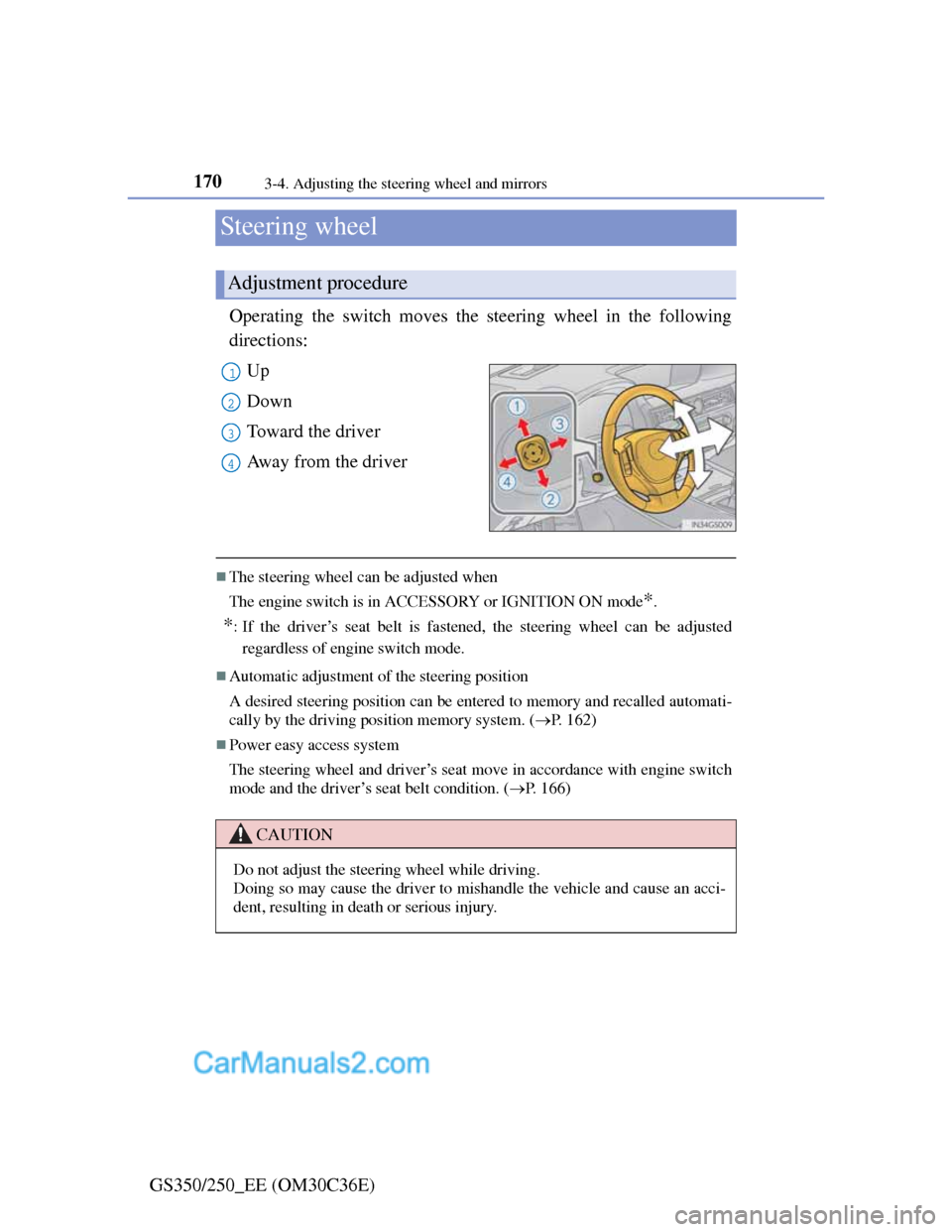
Operating the switch moves the steering wheel in the following
directions:
Up
Down
Toward the driver
Away from the driver
The steering wheel can be adjusted when
The engine switch is in ACCESSORY or IGNITION ON mode
*.
*: If the driver’s seat belt is fastened, the steering wheel can be adjusted
regardless of engine switch mode.
Automatic adjustment of the steering position
A desired steering position can be entered to memory and recalled automati-
cally by the driving position memory system. (P. 162)
Power easy access system
The steering wheel and driver’s seat move in accordance with engine switch
mode and the driver’s seat belt condition. (P. 166)
Adjustment procedure
1
2
3
4
CAUTION
Do not adjust the steering wheel while driving.
Doing so may cause the driver to mishandle the vehicle and cause an acci-
dent, resulting in death or serious injury.
Page 195 of 914
1914-1. Before driving
4
Driving
GS350/250_EE (OM30C36E)
CAUTION
Observe the following precautions.
Failure to do so may result in death or serious injury.
When driving the vehicle
During normal driving, do not turn off the engine. Turning the engine off
while driving will not cause loss of steering or braking control, but the
power assist to these systems will be lost. This will make it more difficult
to steer and brake, so you should pull over and stop the vehicle as soon as
it is safe to do so.
However, in the event of an emergency, such as if it becomes impossible
to stop the vehicle in the normal way: P. 7 3 9
Use engine braking (downshift) to maintain a safe speed when driving
down a steep hill.
Using the brakes continuously may cause the brakes to overheat and lose
effectiveness. (P. 214)
Do not adjust the positions of the steering wheel, the seat, or the inside or
outside rear view mirrors while driving.
Doing so may result in a loss of vehicle control.
Always check that all passengers’ arms, heads or other parts of their body
are not outside the vehicle.
When driving on slippery road surfaces
Sudden braking, acceleration and steering may cause tire slippage and
reduce your ability to control the vehicle.
Sudden acceleration, engine braking due to shift changing, or changes in
engine speed could cause the vehicle to skid.
After driving through a puddle, lightly depress the brake pedal to make
sure that the brakes are functioning properly. Wet brake pads may prevent
the brakes from functioning properly. If the brakes on only one side are
wet and not functioning properly, steering control may be affected.
Page 198 of 914
1944-1. Before driving
GS350/250_EE (OM30C36E)
CAUTION
When the vehicle is parked
Do not leave glasses, cigarette lighters, spray cans, or soft drink cans in
the vehicle when it is in the sun.
Doing so may result in the following:
• Gas may leak from a cigarette lighter or spray can, and may lead to a
fire.
• The temperature inside the vehicle may cause the plastic lenses and
plastic material of glasses to deform or crack.
• Soft drink cans may fracture, causing the contents to spray over the
interior of the vehicle, and may also cause a short circuit in the vehi-
cle’s electrical components.
Do not leave cigarette lighters in the vehicle. If a cigarette lighter is in a
place such as the glove box or on the floor, it may be lit accidentally when
luggage is loaded or the seat is adjusted, causing a fire.
Do not attach adhesive discs to the windshield or windows. Do not place
containers such as air fresheners on the instrument panel or dashboard.
Adhesive discs or containers may act as lenses, causing a fire in the vehi-
cle.
Do not leave a door or window open if the curved glass is coated with a
metallized film such as a silver-colored one. Reflected sunlight may cause
the glass to act as a lens, causing a fire.
Always apply the parking brake, shift the shift lever to P, stop the engine
and lock the vehicle.
Do not leave the vehicle unattended while the engine is running.
Do not touch the exhaust pipes while the engine is running or immediately
after turning the engine off.
Doing so may cause burns.
Page 202 of 914
1984-1. Before driving
GS350/250_EE (OM30C36E)
Cargo and luggage
Take notice of the following information about storage precau-
tions, cargo capacity and load:
CAUTION
Things that must not be carried in the trunk
The following things may cause a fire if loaded in the trunk:
Receptacles containing gasoline
Aerosol cans
Storage precautions
Observe the following precautions.
Failure to do so may prevent the pedals from being depressed properly, may
block the driver’s vision, or may result in items hitting the driver or passen-
gers, possibly causing an accident.
Stow cargo and luggage in the trunk whenever possible.
Do not place cargo or luggage in or on the following locations.
• At the feet of the driver
• On the front passenger or rear seats (when stacking items)
• On the package tray
• On the instrument panel
• On the dashboard
• In front of the Remote Touch screen
Secure all items in the occupant compartment.
Load and distribution
Do not overload your vehicle.
Do not apply loads unevenly.
Improper loading may cause deterioration of steering or braking control
which may cause death or serious injury.