ECO mode Lexus GS250 2014 Workshop Manual
[x] Cancel search | Manufacturer: LEXUS, Model Year: 2014, Model line: GS250, Model: Lexus GS250 2014Pages: 688, PDF Size: 152.64 MB
Page 480 of 688
4806-3. Do-it-yourself maintenance
GS350_250_OM_OM30E16E_(EE)
CAUTION
■When inspecting or replacing tires
Observe the following precautions to prevent accidents.
Failure to do so may cause damage to parts of the drive train as well as dangerous
handling characteristics, which may lead to an accident resulting in death or seri-
ous injury.
●Do not mix tires of different makes, models or tread patterns.
Also, do not mix tires of remarkably different treadwear.
●Do not use tire sizes other than those recommended by Lexus.
●Do not mix differently constructed tires (radial, bias-belted or bias-ply tires).
●Do not mix summer, all season and snow tires.
●Do not use tires that have been used on another vehicle.
Do not use tires if you do not know how they were used previously.
●Vehicles with a compact spare tire: Do not tow if your vehicle has a compact
spare tire installed.
●Vehicles with an emergency tire puncture repair kit (if equipped): Do not tow
anything if a tire that has been repaired using the emergency tire puncture repair
kit is installed. The load on the tire may cause unexpected damage to the tire.
■When initializing the tire pressure warning system (vehicles with the tire pressure
warning system)
Do not operate the tire pressure warning reset switch without first adjusting the tire
inflation pressure to the specified level. Otherwise, the tire pressure warning light
may not come on even if the tire inflation pressure is low, or it may come on when
the tire inflation pressure is actually normal.
GS350_250_OM_OM30E16E_(EE).book Page 480 Tuesday, July 8, 2014 7:11 PM
Page 540 of 688
5407-2. Steps to take in an emergency
GS350_250_OM_OM30E16E_(EE)
■While towing
If the engine is not running, the power assist for the brakes and steering will not func-
tion, making steering and braking more difficult.
■Wheel nut wrench
Wheel nut wrench is installed in trunk. (→P. 5 7 8 , 5 9 3 )
CAUTION
Observe the following precautions.
Failure to do so may result in death or serious injury.
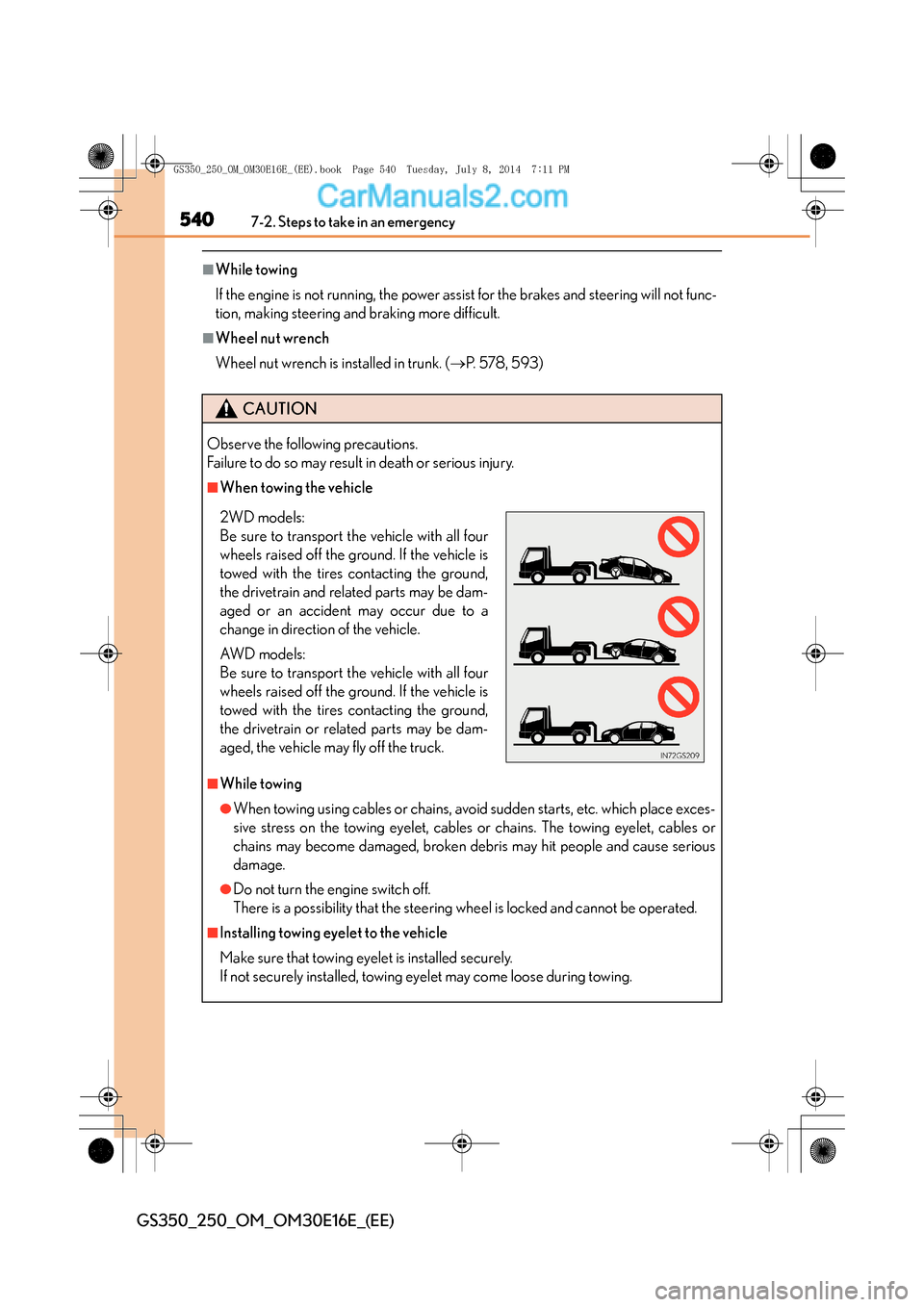
■When towing the vehicle
■While towing
●When towing using cables or chains, avoid sudden starts, etc. which place exces-
sive stress on the towing eyelet, cables or chains. The towing eyelet, cables or
chains may become damaged, broken debris may hit people and cause serious
damage.
●Do not turn the engine switch off.
There is a possibility that the steering wheel is locked and cannot be operated.
■Installing towing eyelet to the vehicle
Make sure that towing eyelet is installed securely.
If not securely installed, towing eyelet may come loose during towing.
2WD models:
Be sure to transport the vehicle with all four
wheels raised off the ground. If the vehicle is
towed with the tires contacting the ground,
the drivetrain and related parts may be dam-
aged or an accident may occur due to a
change in direction of the vehicle.
AW D m o d e l s :
Be sure to transport the vehicle with all four
wheels raised off the ground. If the vehicle is
towed with the tires contacting the ground,
the drivetrain or related parts may be dam-
aged, the vehicle may fly off the truck.
GS350_250_OM_OM30E16E_(EE).book Page 540 Tuesday, July 8, 201 4 7:11 PM
Page 566 of 688

5667-2. Steps to take in an emergency
GS350_250_OM_OM30E16E_(EE)
■Warning message in radar cruise mode (if equipped)
In the following cases, the warning message may not be displayed even if vehicle-to-
vehicle distance decreases:
●When your vehicle and the vehicle ahead are traveling at the same speed or the
vehicle ahead is traveling more quickly than your vehicle
●When the vehicle ahead is traveling at a very low speed
●Immediately after cruise control speed is set
●At the instant the accelerator pedal is depressed
■The LKA (Lane-Keeping Assist) lane departure warning function
In the following cases, the warning message will not be displayed even if a lane line is
crossed.
●When the vehicle speed deviates from the operating range of the LKA system
functions
●When the lane lines cannot be recognized
●When the steering wheel is turned as far as necessary to cause the vehicle to
change lanes
■Open door warning message
The open door warning message continues to display until a door or the trunk is fully
closed, even if the engine switch is turned off. However, approximately 20 minutes
after a door or the trunk is not fully closed, the battery-saving function operates and
the display turns off even though a door or the trunk is not fully closed.
GS350_250_OM_OM30E16E_(EE).book Page 566 Tuesday, July 8, 2014 7:11 PM
Page 573 of 688
5737-2. Steps to take in an emergency
7
When trouble arises
GS350_250_OM_OM30E16E_(EE)
InteriorbuzzerExterior
buzzerWa r n i n g m e s s a g eDetailsCorrection procedure
OnceCon-
tinuous
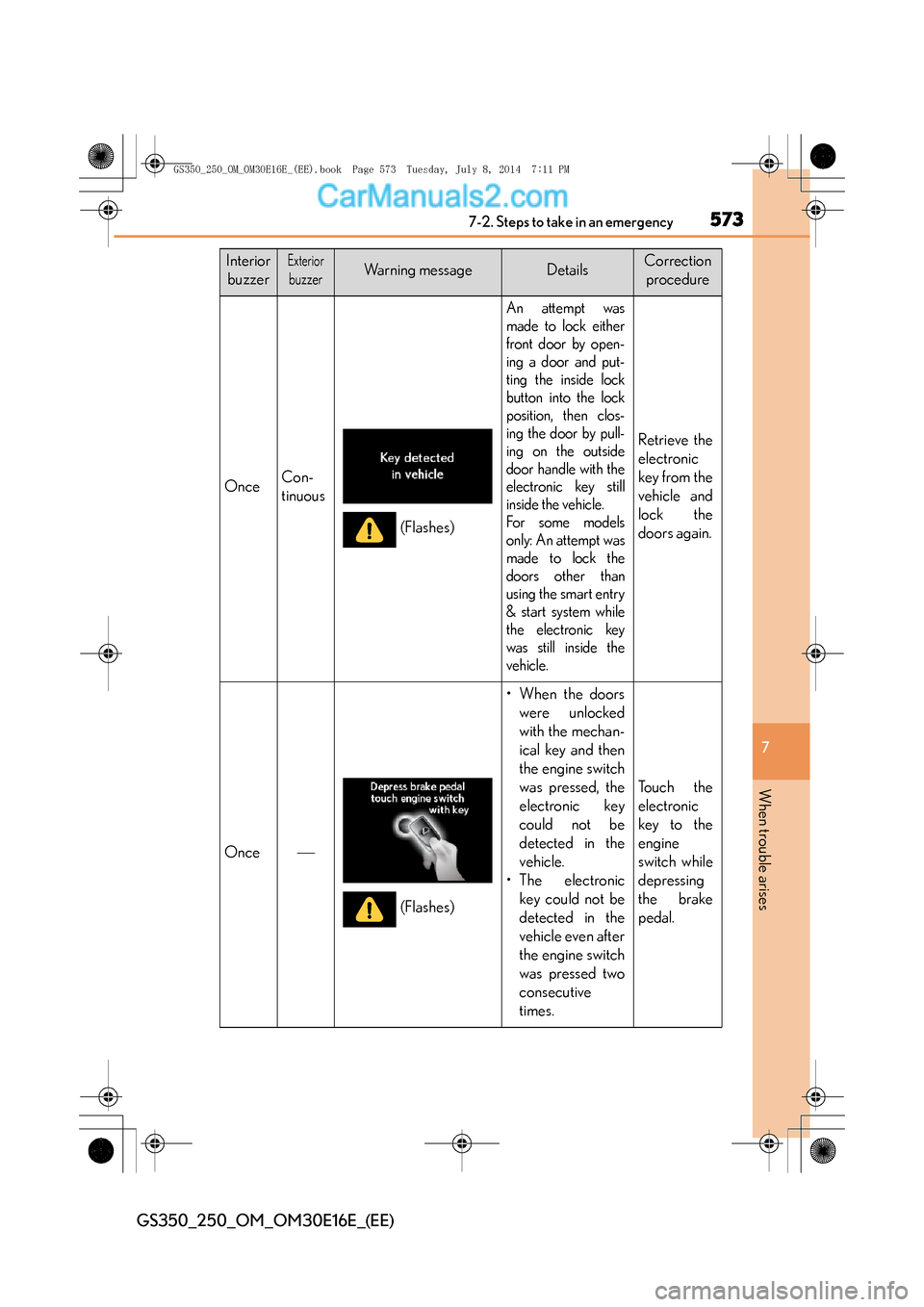
An attempt was
made to lock either
front door by open-
ing a door and put-
ting the inside lock
button into the lock
position, then clos-
ing the door by pull-
ing on the outside
door handle with the
electronic key still
inside the vehicle.
For some models
only: An attempt was
made to lock the
doors other than
using the smart entry
& start system while
the electronic key
was still inside the
vehicle.
Retrieve the
electronic
key from the
vehicle and
lock the
doors again.
Once
• When the doors were unlocked
with the mechan-
ical key and then
the engine switch
was pressed, the
electronic key
could not be
detected in the
vehicle.
• The electronic key could not be
detected in the
vehicle even after
the engine switch
was pressed two
consecutive
times.
To u c h t h e
electronic
key to the
engine
switch while
depressing
the brake
pedal.
(Flashes)
(Flashes)
GS350_250_OM_OM30E16E_(EE).book Page 573 Tuesday, July 8, 201 4 7:11 PM
Page 575 of 688
5757-2. Steps to take in an emergency
7
When trouble arises
GS350_250_OM_OM30E16E_(EE)
InteriorbuzzerExterior
buzzerWa r n i n g m e s s a g eDetailsCorrection procedure
Once
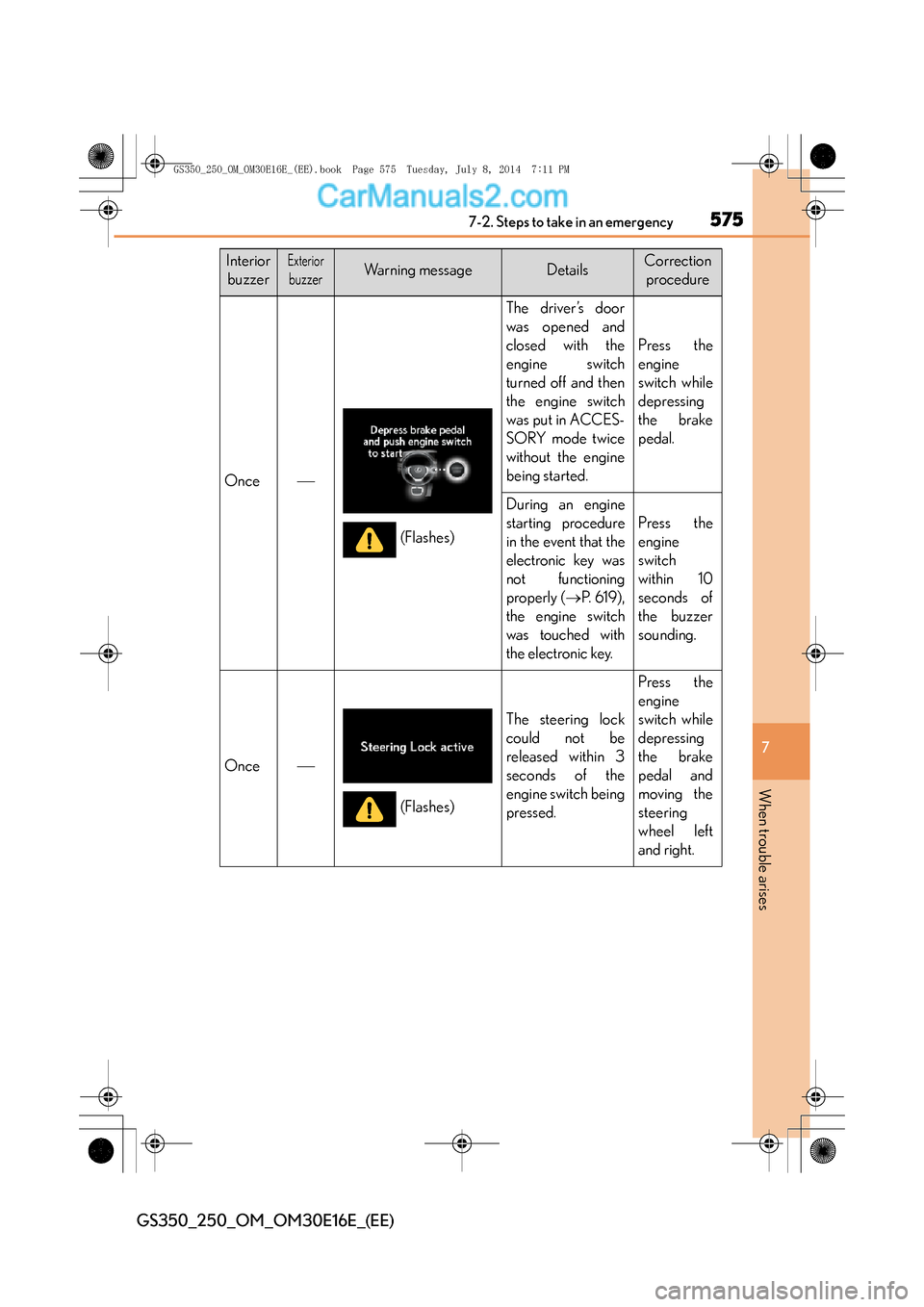
The driver’s door
was opened and
closed with the
engine switch
turned off and then
the engine switch
was put in ACCES-
SORY mode twice
without the engine
being started.
Press the
engine
switch while
depressing
the brake
pedal.
During an engine
starting procedure
in the event that the
electronic key was
not functioning
properly ( →P. 6 1 9 ) ,
the engine switch
was touched with
the electronic key.
Press the
engine
switch
within 10
seconds of
the buzzer
sounding.
Once
The steering lock
could not be
released within 3
seconds of the
engine switch being
pressed.
Press the
engine
switch while
depressing
the brake
pedal and
moving the
steering
wheel left
and right.
(Flashes)
(Flashes)
GS350_250_OM_OM30E16E_(EE).book Page 575 Tuesday, July 8, 201 4 7:11 PM
Page 613 of 688
6137-2. Steps to take in an emergency
7
When trouble arises
GS350_250_OM_OM30E16E_(EE)
One of the following may be the cause of the problem:
●One or both of the battery terminals may be disconnected.
●The battery may be discharged. (→P. 6 2 1 )
●There may be a malfunction in the steering lock system.
Contact any authorized Lexus dealer or repairer, or another duly qualified and
equipped professional if the problem cannot be repaired, or if repair procedures
are unknown.
When the engine does not start, the following steps can be used as an
interim measure to start the engine if the engine switch is functioning nor-
mally:
Set the parking brake.
Shift the shift lever to P.
Turn the engine switch to ACCESSORY mode.
Press and hold the engine switch for about 15 seconds while depress-
ing the brake pedal firmly.
Even if the engine can be started using the above steps, the system may be
malfunctioning. Have the vehicle inspected by any authorized Lexus
dealer or repairer, or another du ly qualified and equipped professional.
The starter motor does not turn ov er, the interior lights and head-
lights do not turn on, or the horn does not sound.
Emergency start function
1
2
3
4
GS350_250_OM_OM30E16E_(EE).book Page 613 Tuesday, July 8, 201 4 7:11 PM
Page 620 of 688
6207-2. Steps to take in an emergency
GS350_250_OM_OM30E16E_(EE)
■Stopping the engine
Shift the shift lever to P and press the engine switch as you normally do when stop-
ping the engine.
■Replacing the key battery
As the above procedure is a temporary measure, it is recommended that the elec-
tronic key battery be replaced immediately when the battery is depleted. (→P. 4 8 9 )
■Alarm (if equipped)
Using the mechanical key to lock the doors will not set the alarm system.
If a door is unlocked using the mechanical key when the alarm system is set, the
alarm may be triggered.
■Changing engine switch modes
Release the brake pedal and press the engine switch in step above.
The engine does not start and modes will be changed each time the switch is
pressed.( →P. 2 3 8 )
■When the electronic key does not work properly
●Make sure that the smart entry & start system has not been deactivated in the cus-
tomization setting. If it is off, turn the function on.
(Customizable features: →P. 6 5 0 )
●Check if battery-saving mode is set. If it is set, cancel the function. ( →P. 1 3 3 )
CAUTION
■When using the mechanical key and operating the power windows and moon
roof
Operate the power window or moon roof after checking to make sure that there is
no possibility of any passenger having any of their body parts caught in the window
or moon roof.
Also, do not allow children to operate the mechanical key. It is possible for children
and other passengers to get caught in power window and moon roof.
3
GS350_250_OM_OM30E16E_(EE).book Page 620 Tuesday, July 8, 201 4 7:11 PM
Page 622 of 688
6227-2. Steps to take in an emergency
GS350_250_OM_OM30E16E_(EE)
Start the engine of the second vehicle. Increase the engine speed
slightly and maintain at that level for approximately 5 minutes to
recharge the battery of your vehicle.
Open and close any of the doors of your vehicle with the engine switch
off.
Maintain the engine speed of the second vehicle and start the engine of
your vehicle by turning the engine switch to IGNITION ON mode.
Once the vehicle’s engine has started, remove the jumper cables in the
exact reverse order from which they were connected.
Once the engine starts, have the vehicle inspected at any authorized
Lexus dealer or repairer, or another duly qualified and equipped profes-
sional as soon as possible.
■Starting the engine when the battery is discharged
The engine cannot be started by push-starting.
■To prevent battery discharge
●Turn off the headlights and the audio system while the engine is off.
●Turn off any unnecessary electrical components when the vehicle is running at a
low speed for an extended period, such as in heavy traffic.
■Charging the battery
The electricity stored in the battery will discharge gradually even when the vehicle is
not in use, due to natural discharge and the draining effects of certain electrical
appliances. If the vehicle is left for a long time, the battery may discharge, and the
engine may be unable to start. (The battery recharges automatically during driving.)
3
4
5
6
GS350_250_OM_OM30E16E_(EE).book Page 622 Tuesday, July 8, 201 4 7:11 PM
Page 623 of 688
6237-2. Steps to take in an emergency
7
When trouble arises
GS350_250_OM_OM30E16E_(EE)
■When recharging or replacing the battery
●For vehicles with an alarm: make sure that the key is not inside the vehicle when
recharging or replacing the battery. The key may be locked in the vehicle if the
alarm is activated. (→P. 88)
●In some cases, it may not be possible to unlock the doors using the smart entry &
start system when the battery is discharged. Use the wireless remote control or the
mechanical key to lock or unlock the doors.
●The engine may not start on the first attempt after the battery has recharged but
will start normally after the second attempt. This is not a malfunction.
●The engine switch mode is memorized by the vehicle. When the battery is recon-
nected, the system will return to the mode it was in before the battery was dis-
charged. Before disconnecting the battery, turn the engine switch off.
If you are unsure what mode the engine switch was in before the battery dis-
charged, be especially careful when reconnecting the battery.
CAUTION
■Avoiding battery fires or explosions
Observe the following precautions to prevent accidentally igniting the flammable
gas that may be emitted from the battery:
●Make sure each jumper cable is connected to the correct terminal and that it is
not unintentionally in contact with any other than the intended terminal.
●Do not allow the other end of the jumper cable connected to the “+” terminal to
come into contact with any other parts or metal surfaces in the area, such as
brackets or unpainted metal.
●Do not allow the + and - clamps of the jumper cables to come into contact with
each other.
●Do not smoke, use matches, cigarette lighters or allow open flame near the bat-
tery.
GS350_250_OM_OM30E16E_(EE).book Page 623 Tuesday, July 8, 201 4 7:11 PM
Page 659 of 688
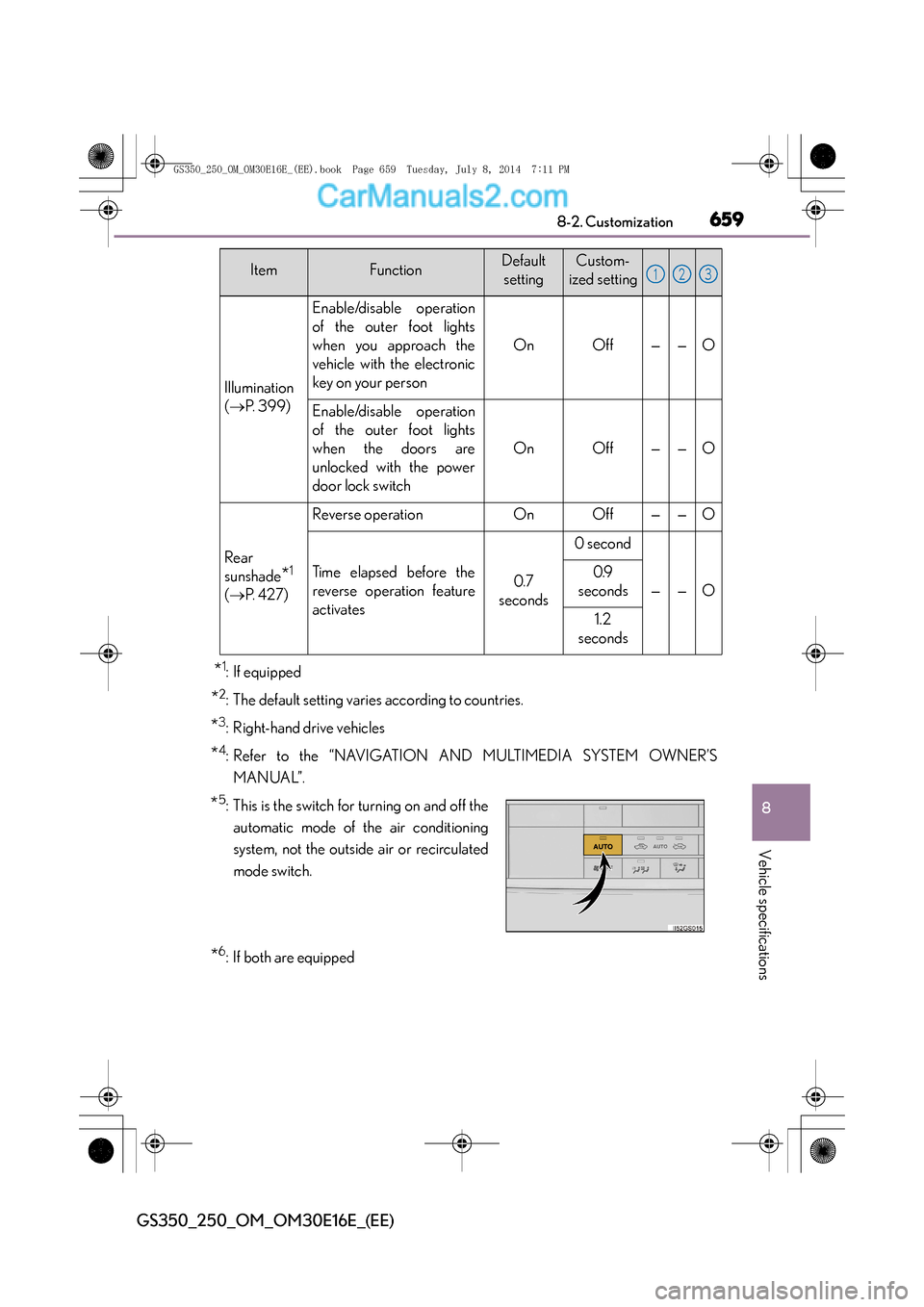
659
8
8-2. Customization
Vehicle specifications
GS350_250_OM_OM30E16E_(EE)
*1: If equipped
*2: The default setting varies according to countries.
*3: Right-hand drive vehicles
*4: Refer to the “NAVIGATION AND MULTIMEDIA SYSTEM OWNER’S
MANUAL”.
*6: If both are equipped
ItemFunctionDefaultsettingCustom-
ized setting
Illumination
( → P. 3 9 9 )
Enable/disable operation
of the outer foot lights
when you approach the
vehicle with the electronic
key on your person
OnOff——O
Enable/disable operation
of the outer foot lights
when the doors are
unlocked with the power
door lock switch
OnOff——O
Rear
sunshade
*1
(→ P. 4 2 7 )
Reverse operationOnOff——O
Time elapsed before the
reverse operation feature
activates0.7
seconds
0 second
——O
0.9
seconds
1.2
seconds
*5: This is the switch for turning on and off the
automatic mode of the air conditioning
system, not the outside air or recirculated
mode switch.
123
GS350_250_OM_OM30E16E_(EE).book Page 659 Tuesday, July 8, 201 4 7:11 PM