display Lexus GS300h 2013 Owner's Manual
[x] Cancel search | Manufacturer: LEXUS, Model Year: 2013, Model line: GS300h, Model: Lexus GS300h 2013Pages: 1014
Page 616 of 1014
5965-3. Using the audio system
GS450h_300h_OM_OM30D53E_(EE)
Selecting one track at a time
Select “<” or “> on the screen to select the next/previous track.
Turn the “TUNE/SCROLL” knob or press “<” or “>” on the
“CH•TRACK” button to select the desired track.
Selecting a track from the list
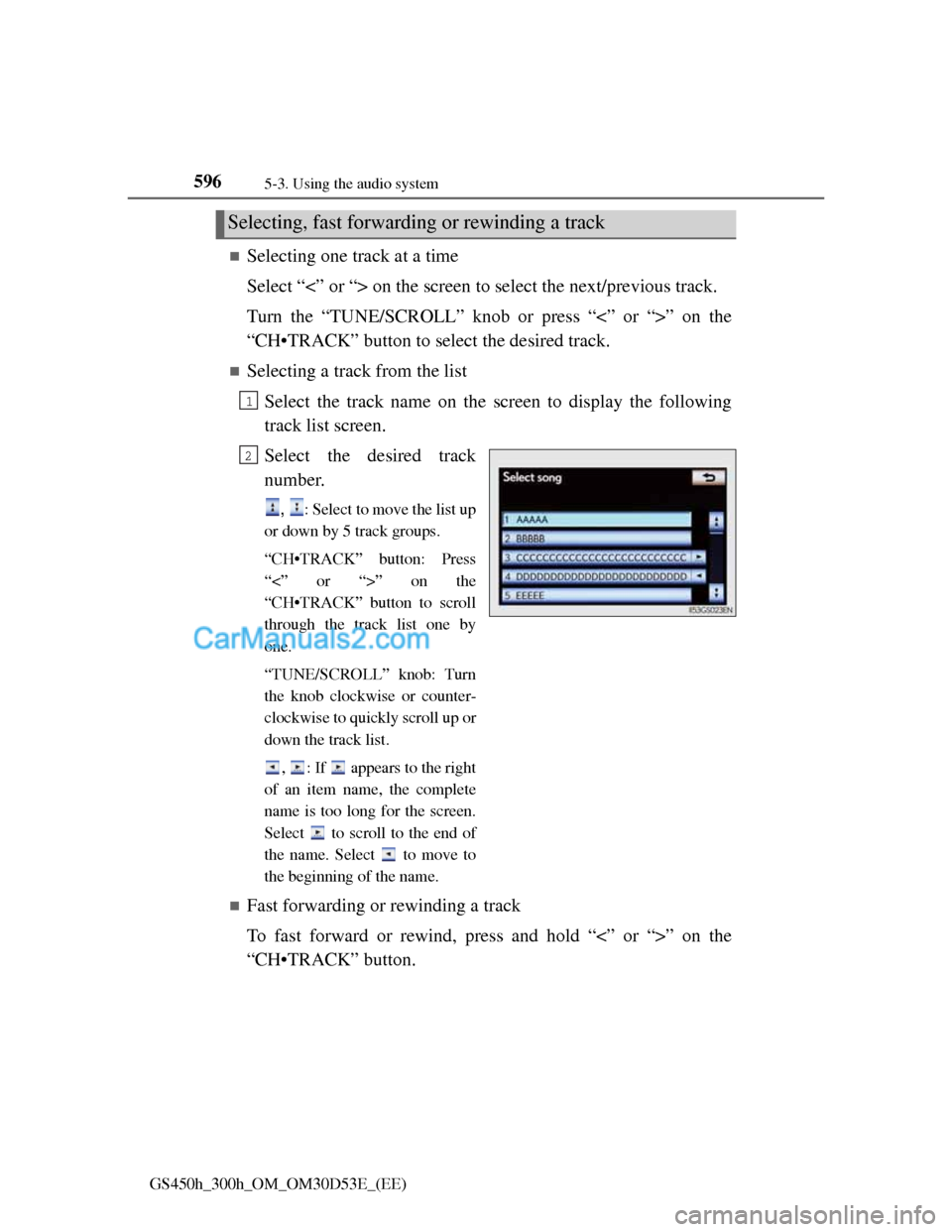
Select the track name on the screen to display the following
track list screen.
Select the desired track
number.
, : Select to move the list up
or down by 5 track groups.
“CH•TRACK” button: Press
“<” or “>” on the
“CH•TRACK” button to scroll
through the track list one by
one.
“TUNE/SCROLL” knob: Turn
the knob clockwise or counter-
clockwise to quickly scroll up or
down the track list.
, : If appears to the right
of an item name, the complete
name is too long for the screen.
Select to scroll to the end of
the name. Select to move to
the beginning of the name.
Fast forwarding or rewinding a track
To fast forward or rewind, press and hold “<” or “>” on the
“CH•TRACK” button.
Selecting, fast forwarding or rewinding a track
1
2
Page 618 of 1014
5985-3. Using the audio system
GS450h_300h_OM_OM30D53E_(EE)
If you select
The display returns to the previous screen.
About iPod
“Made for iPod” and “Made for iPhone” mean that an electronic accessory
has been designed to connect specifically to iPod, or iPhone, respectively,
and has been certified by the developer to meet Apple performance stan-
dards.
Apple is not responsible for the operation of this device or its compliance
with safety and regulatory standards. Please note that the use of this acces-
sory with iPod or iPhone may affect wireless performance.
iPhone, iPod, iPod classic, iPod nano and iPod touch are trademarks of
Apple Inc., registered in the U.S. and other countries.
Page 619 of 1014
599
5 5-3. Using the audio system
Interior features
GS450h_300h_OM_OM30D53E_(EE)
iPod cover art
Depending on the iPod and the songs in the iPod, iPod cover art may be dis-
played. This function can be changed to “On” or “Off”. (P. 593)
It may take time to display iPod cover art, and the iPod may not be operated
while the cover art display is in process.
Only iPod cover art that is saved in JPEG format can be displayed.
iPod functions
When the iPod connected to the system includes iPod video, the system can
only output the sound by selecting “Video” on the “iPod” screen.
Depending on the iPod, the video sound may not be able to be heard.
When an iPod is connected and the audio source is changed to iPod mode,
the iPod will resume play from the same point in which it was last used.
Depending on the iPod that is connected to the system, certain functions
may not be available. If a function is unavailable due to a malfunction (as
opposed to a system specification), disconnecting the device and reconnect-
ing it once again may resolve the problem.
When using an iPod
You maybe unable to use the instrument panel power outlet if the iPod is con-
nected to the USB port at the same time.
Battery charge
When an iPod is connected using a genuine iPod cable, the iPod starts
charging its battery.
Error messages for iPod
“iPod error”:
This indicates a problem in the iPod or its connection.
“No music files found.”:
This indicates that there is no music data in the iPod.
“Please check the iPod firmware version.”:
This indicates that the software version is not compatible. Perform the iPod
firmware updates and try again.
“iPod authorization failed.”:
This indicates that it failed to authorize the iPod. Please check your iPod.
Page 626 of 1014
6065-3. Using the audio system
GS450h_300h_OM_OM30D53E_(EE)
Using the rear seat audio controls
: If equipped
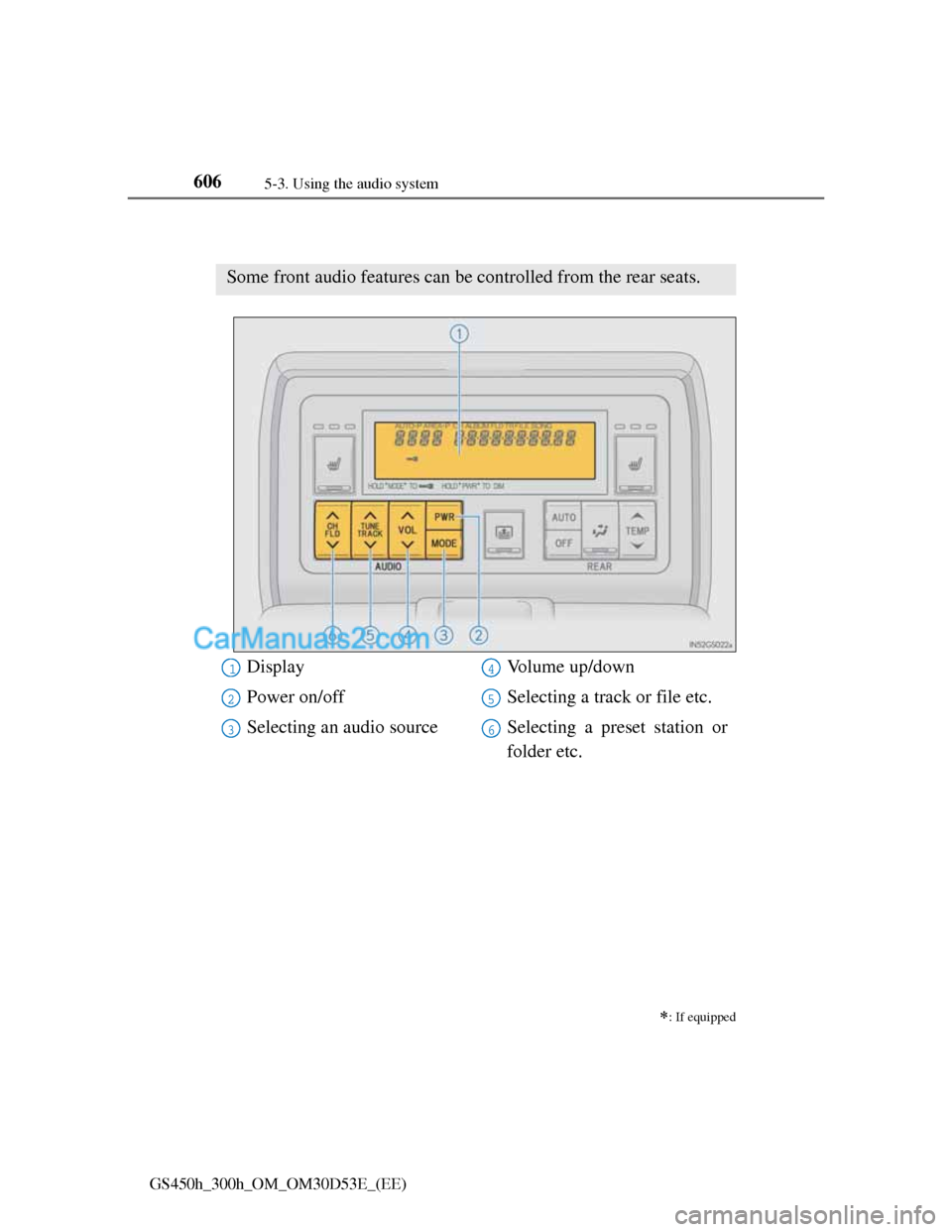
Some front audio features can be controlled from the rear seats.
Display
Power on/off
Selecting an audio sourceVolume up/down
Selecting a track or file etc.
Selecting a preset station or
folder etc.1
2
3
4
5
6
Page 630 of 1014
6105-3. Using the audio system
GS450h_300h_OM_OM30D53E_(EE)
Fast forwarding or rewinding a chapter or file
Press and hold “” or “” on .
Button lock function
To prevent inadvertent operation, some buttons on the rear armrest can be
locked. (P. 500)
Rear control panel illumination off function
Control panel illumination on the rear armrest can be turned off. (P. 500)
When “ERROR”, “WAIT” or “NO MUSIC” is shown on the display
Refer to the following and take the appropriate measures. If the problem is
not rectified, take the vehicle inspected by any authorized Lexus dealer or
repairer, or another duly qualified and equipped professional.
“ERROR”:This indicates a trouble either in the disc or inside the player. The
disc may be dirty, damaged, or inserted up-side down.
“WAIT”:Operation is stopped due to a high temperature inside the player.
Eject the disc and allow the player to cool down.
“NO MUSIC”:This indicates that an MP3/WMA file is not included in the
disc.
Page 634 of 1014
611
5 5-4. Using the hands-free phone system(for cellular phone)
Interior features
GS450h_300h_OM_OM30D53E_(EE)
Hands-free system (for cellular phone)
The hands-free system is a function that allows you to use your
cellular phone without touching it.
This system supports Bluetooth
® cellular phones. Bluetooth® is a
wireless data system that allows a cellular phone to wirelessly con-
nect to the hands-free system and outgoing/incoming calls.
The illustrations of the hands-free system screens shown here may
slightly vary depending on the type of the system.
Vehicles with a 12.3-inch display: The hands-free system function
can be displayed and operated on the “Side Display”. For details,
refer to the “Navigation System Owner’s Manual”.
Page 635 of 1014
6125-4. Using the hands-free phone system(for cellular phone)
GS450h_300h_OM_OM30D53E_(EE)
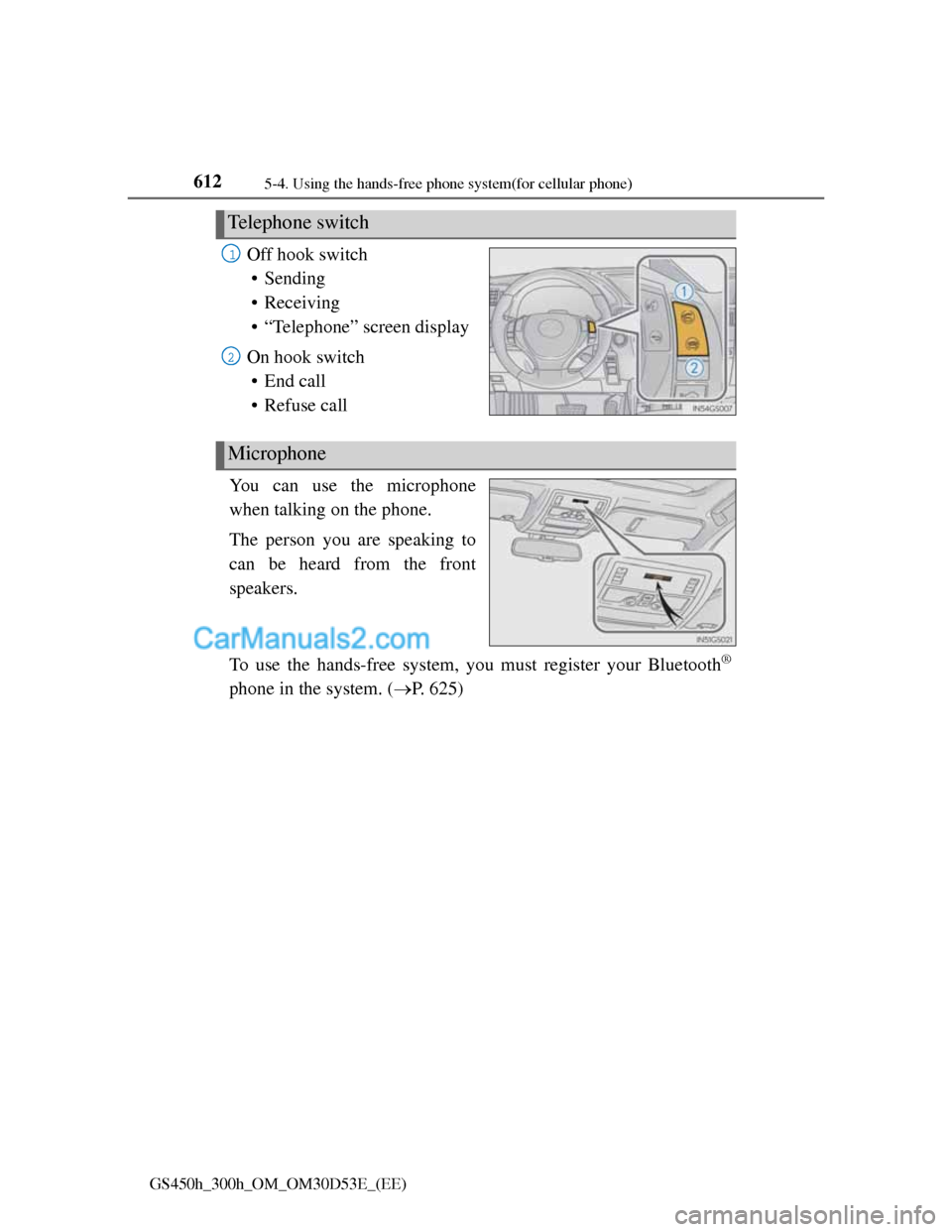
Off hook switch
• Sending
• Receiving
• “Telephone” screen display
On hook switch
• End call
• Refuse call
You can use the microphone
when talking on the phone.
The person you are speaking to
can be heard from the front
speakers.
To use the hands-free system, you must register your Bluetooth
®
phone in the system. (P. 625)
Telephone switch
1
2
Microphone
Page 636 of 1014
6135-4. Using the hands-free phone system(for cellular phone)
5
Interior features
GS450h_300h_OM_OM30D53E_(EE)
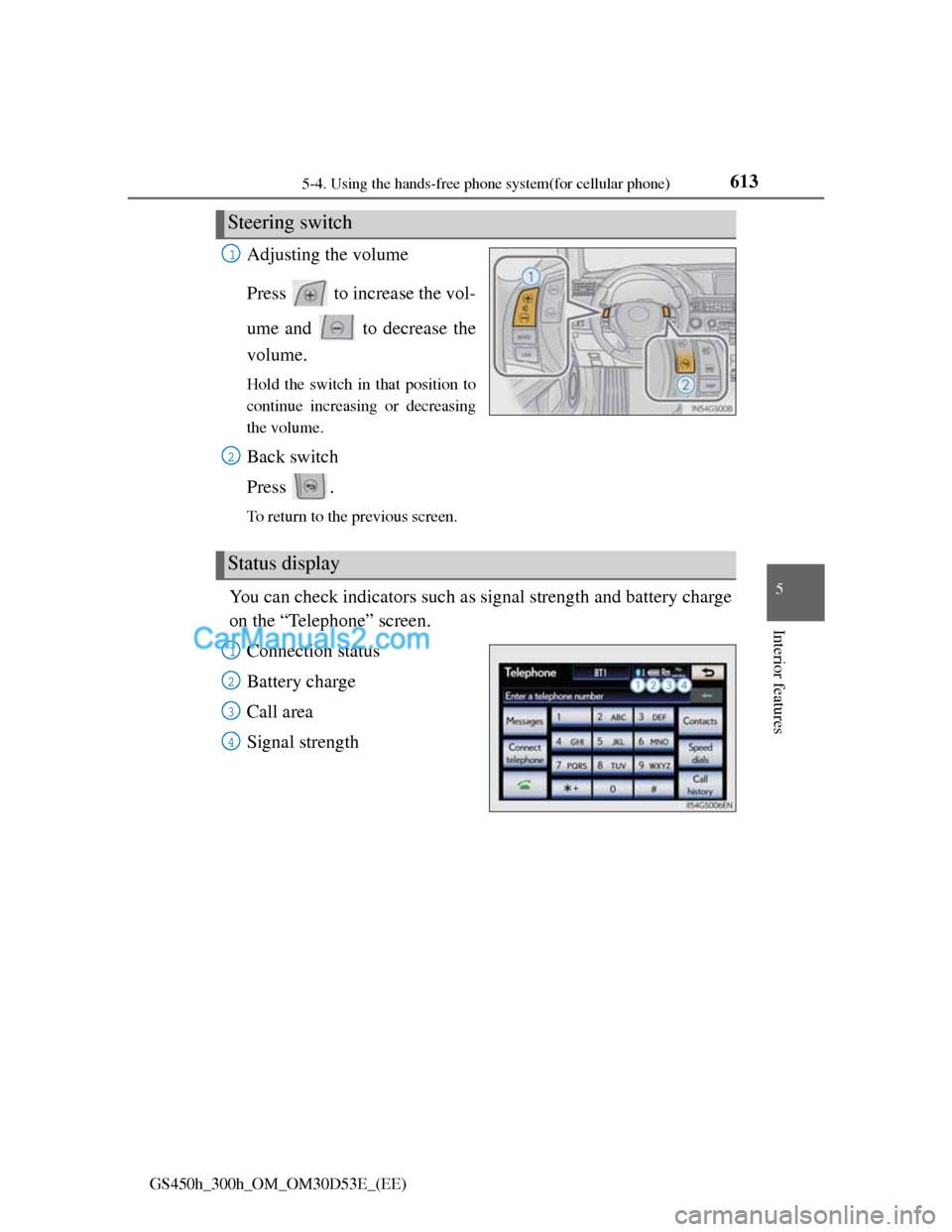
Adjusting the volume
Press to increase the vol-
ume and to decrease the
volume.
Hold the switch in that position to
continue increasing or decreasing
the volume.
Back switch
Press .
To return to the previous screen.
You can check indicators such as signal strength and battery charge
on the “Telephone” screen.
Connection status
Battery charge
Call area
Signal strength
Steering switch
1
2
Status display
1
2
3
4
Page 638 of 1014
6155-4. Using the hands-free phone system(for cellular phone)
5
Interior features
GS450h_300h_OM_OM30D53E_(EE)
When using the hands-free system
The audio system is muted when making a call.
If both parties speak at the same time, it may be difficult to hear.
If the incoming call volume is overly loud, an echo may be heard.
Try to face toward the microphone as much as possible when speaking.
In the following circumstances, it may be difficult to hear the other party:
• When driving on unpaved roads
• When driving at high speeds
• If a window is open
• If the air conditioning is blowing directly on the microphone
• If the air conditioning is set to high
• There is an effect from the network of the cellular phone
Conditions under which the system will not operate
If using a cellular phone that does not support Bluetooth®
If the cellular phone is turned off
If you are outside service range
If the cellular phone is not connected
If the cellular phone’s battery is low
Bluetooth® antenna
The antenna is built into the instrument panel. If the cellular phone is behind
the seat or in the console box, or touching or covered by metal objects, con-
nection status may deteriorate.
Battery charge/Signal status
This display may not correspond exactly with the cellular phone itself.
When the cellular phone is not connected, “No connect” is displayed.
When the cellular phone is out of the service area or in a place inaccessible
by radio waves, “No service” is displayed.
When using Bluetooth® audio and hands-free system at the same time
The following problems may occur.
The Bluetooth® connection may be cut.
Noise may be heard on the Bluetooth® audio playback.
Page 648 of 1014
625
5 5-4. Using the hands-free phone system(for cellular phone)
Interior features
GS450h_300h_OM_OM30D53E_(EE)
Using a Bluetooth® phone
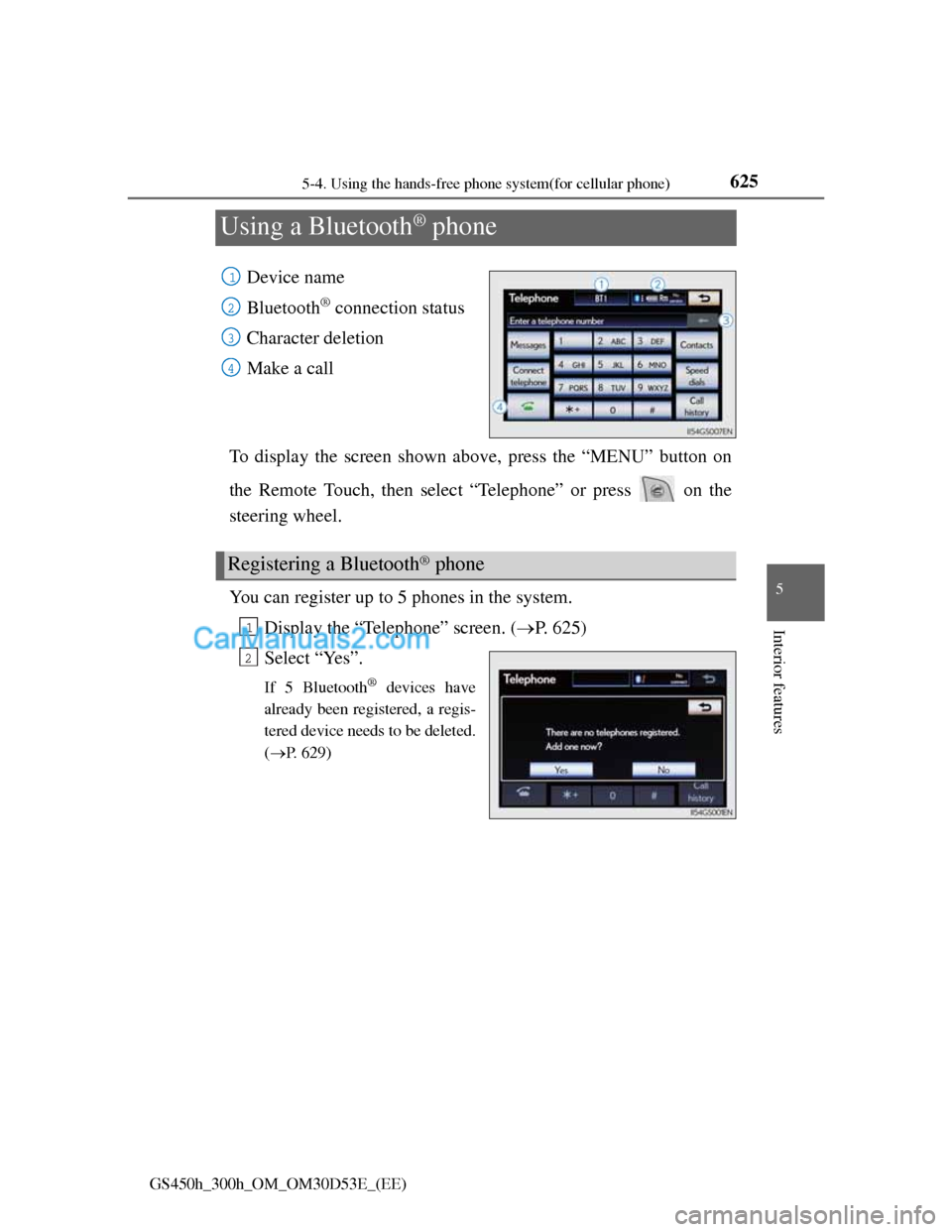
Device name
Bluetooth
® connection status
Character deletion
Make a call
To display the screen shown above, press the “MENU” button on
the Remote Touch, then select “Telephone” or press on the
steering wheel.
You can register up to 5 phones in the system.
Display the “Telephone” screen. (P. 625)
Select “Yes”.
If 5 Bluetooth® devices have
already been registered, a regis-
tered device needs to be deleted.
(P. 629)
1
2
3
4
Registering a Bluetooth® phone
1
2