display Lexus GS300h 2013 Owner's Manual
[x] Cancel search | Manufacturer: LEXUS, Model Year: 2013, Model line: GS300h, Model: Lexus GS300h 2013Pages: 1014
Page 552 of 1014
5325-3. Using the audio system
GS450h_300h_OM_OM30D53E_(EE)
Listening to stations of the same network
FM alternative frequency:The station among those of the same
network with strong reception is
selected. FM alternative frequency on/
off (P. 530)
Regional code change: The station among those of the same net-
work with strong reception and broad-
casting the same program is selected.
Regional code change on/off (P. 530)
FM Traffic announcement
The system automatically switches to traffic information when a
broadcast with a traffic information signal is received.
“TP” (Traffic program) will appear on the screen. The station returns to
the previous one when the traffic information ends.
FM Traffic announcement on/off (P. 530)
Selecting a channel
Press “<” or “>” on “CH•TRACK” button or select or
on the screen.
Selecting a service
Manual tuning
Turn the “TUNE/SCROLL” knob.
Service list
Select one of the displayed services on the service list screen.
Preset stations
Select the desired preset stations (1 - 6).
RDS (Radio Data System)
DAB (Digital Audio Broadcast)
Page 553 of 1014
5335-3. Using the audio system
5
Interior features
GS450h_300h_OM_OM30D53E_(EE)
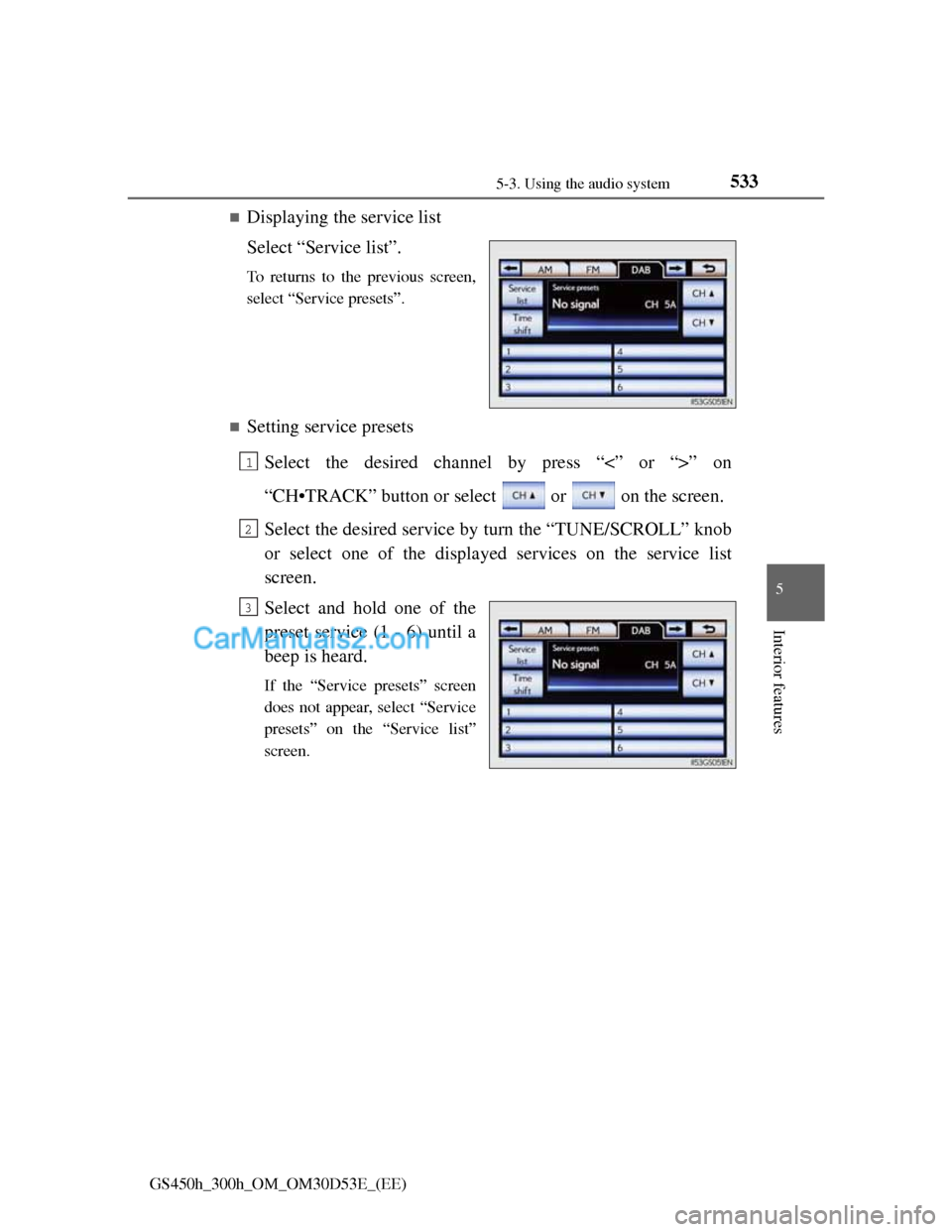
Displaying the service list
Select “Service list”.
To returns to the previous screen,
select “Service presets”.
Setting service presets
Select the desired channel by press “<” or “>” on
“CH•TRACK” button or select or on the screen.
Select the desired service by turn the “TUNE/SCROLL” knob
or select one of the displayed services on the service list
screen.
Select and hold one of the
preset service (1 - 6) until a
beep is heard.
If the “Service presets” screen
does not appear, select “Service
presets” on the “Service list”
screen.
1
2
3
Page 554 of 1014
5345-3. Using the audio system
GS450h_300h_OM_OM30D53E_(EE)
Time shift operation
The service you are currently listening to can be re-listened to at
any time.
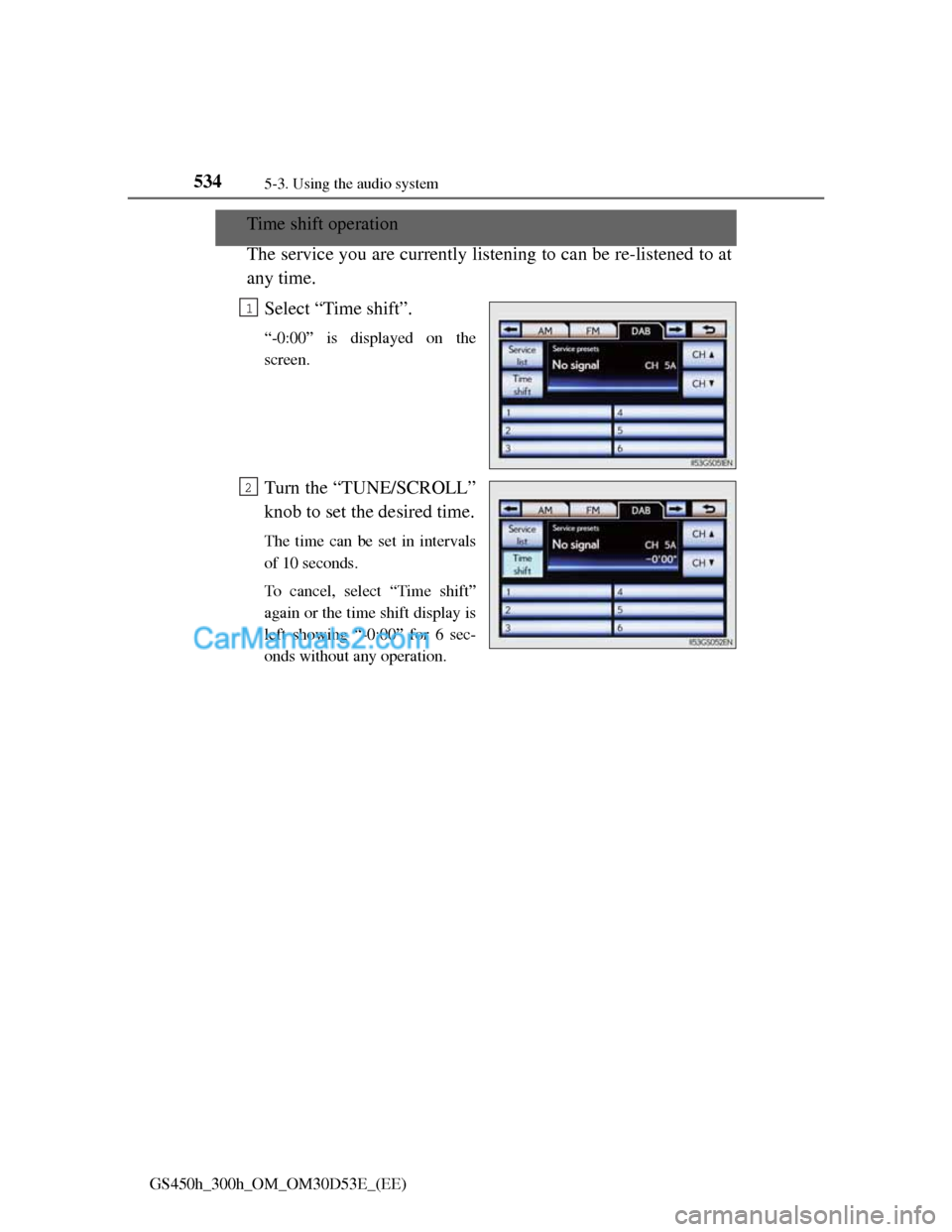
Select “Time shift”.
“-0:00” is displayed on the
screen.
Turn the “TUNE/SCROLL”
knob to set the desired time.
The time can be set in intervals
of 10 seconds.
To cancel, select “Time shift”
again or the time shift display is
left showing “-0:00” for 6 sec-
onds without any operation.
1
2
Page 555 of 1014
5355-3. Using the audio system
5
Interior features
GS450h_300h_OM_OM30D53E_(EE)
Press .
Press the button again to turn the system back on.
If you select
The display returns to the previous screen.
EON (Enhanced Other Network) system (for traffic announcement function)
If the RDS station (with EON data) you are listening to is not broadcasting a
traffic information program and the audio system is in the TA (Traffic
announcement) mode, the radio will be switched automatically to a station
broadcasting a traffic information program in the EON AF list when traffic
information begins.
When listening to a disc
When the traffic information program starts, the disc playback mode is inter-
rupted and the traffic information is automatically broadcasted. When the
program ends, the initial operation resumes.
When the 12-volt battery is disconnected
All preset stations are erased.
Reception sensitivity
Maintaining perfect radio reception at all times is difficult due to the contin-
ually changing position of the antenna, differences in signal strength and
surrounding objects, such as trains, transmitters, etc.
The radio antenna is mounted inside the rear window. To maintain clear
radio reception, do not attach metallic window tinting or other metallic
objects to the antenna wire mounted inside the rear window.
About Time shift
The times at which playback is possible depend on the bit rate of the DAB
station to be recorded, the amount of DAB unit memory, and the time at
which reception of the broadcast began.
Silencing the sound
Page 557 of 1014

5375-3. Using the audio system
5
Interior features
GS450h_300h_OM_OM30D53E_(EE)
Insert a disc into the disc slot.
Press and remove the disc.
To play or pause a track/file/chapter, press .
Using the display
Under extremely cold conditions, the screen may react slowly or operation
sound may become louder.
If a disc is inserted with the label facing down, it cannot be played.
Inserting a disc
Ejecting a disc
Playing and pausing a track/file/chapter
Page 559 of 1014
5395-3. Using the audio system
5
Interior features
GS450h_300h_OM_OM30D53E_(EE)
Selecting a track
Select “<” or “>” on the screen to select the next/previous track.
Press “<” or “>” on the “CH•TRACK” button or turn the
“TUNE/SCROLL” knob to select the desired track number.
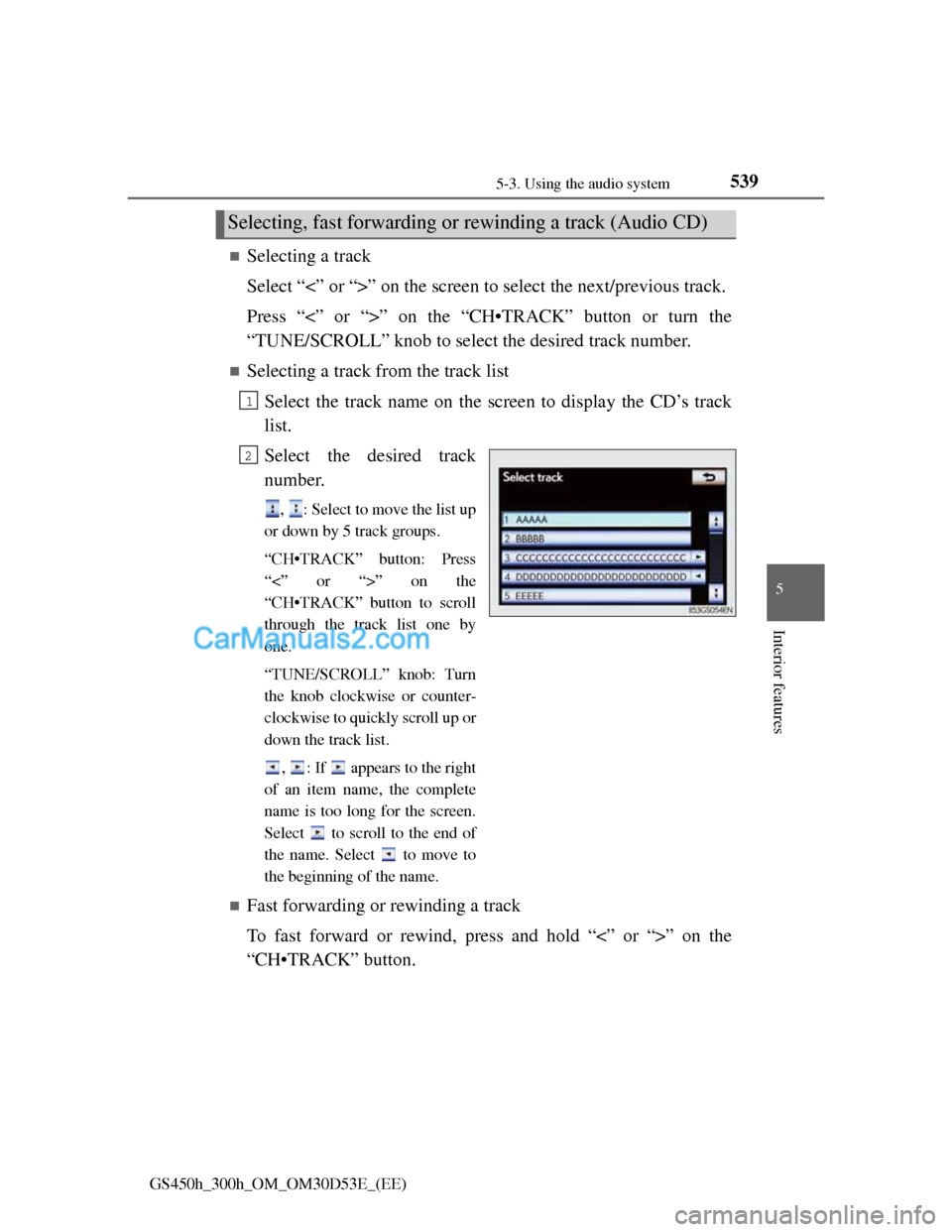
Selecting a track from the track list
Select the track name on the screen to display the CD’s track
list.
Select the desired track
number.
, : Select to move the list up
or down by 5 track groups.
“CH•TRACK” button: Press
“<” or “>” on the
“CH•TRACK” button to scroll
through the track list one by
one.
“TUNE/SCROLL” knob: Turn
the knob clockwise or counter-
clockwise to quickly scroll up or
down the track list.
, : If appears to the right
of an item name, the complete
name is too long for the screen.
Select to scroll to the end of
the name. Select to move to
the beginning of the name.
Fast forwarding or rewinding a track
To fast forward or rewind, press and hold “<” or “>” on the
“CH•TRACK” button.
Selecting, fast forwarding or rewinding a track (Audio CD)
1
2
Page 560 of 1014
5405-3. Using the audio system
GS450h_300h_OM_OM30D53E_(EE)
Selecting a folder
Select “<” or “>” on the screen to select the next/previous folder.
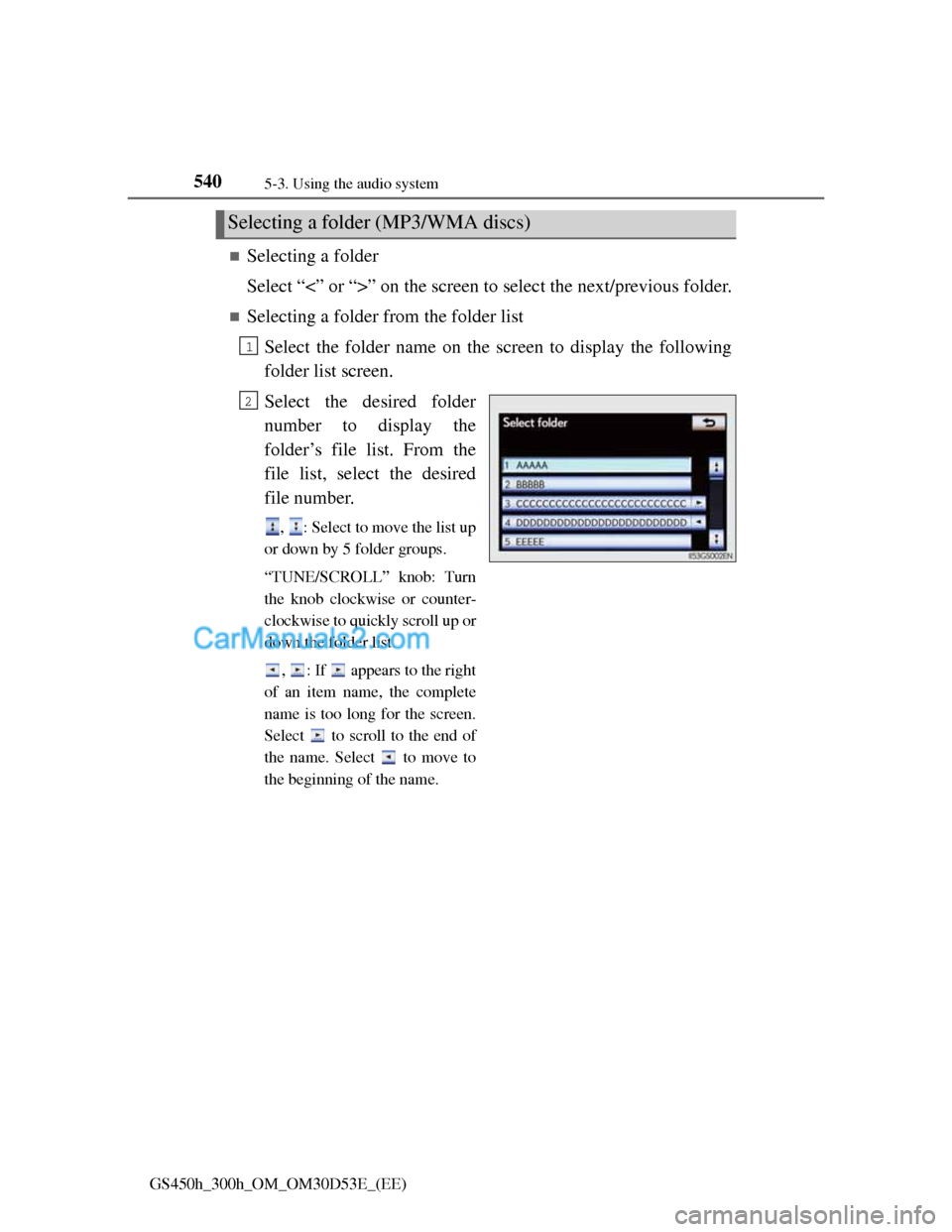
Selecting a folder from the folder list
Select the folder name on the screen to display the following
folder list screen.
Select the desired folder
number to display the
folder’s file list. From the
file list, select the desired
file number.
, : Select to move the list up
or down by 5 folder groups.
“TUNE/SCROLL” knob: Turn
the knob clockwise or counter-
clockwise to quickly scroll up or
down the folder list.
, : If appears to the right
of an item name, the complete
name is too long for the screen.
Select to scroll to the end of
the name. Select to move to
the beginning of the name.
Selecting a folder (MP3/WMA discs)
1
2
Page 561 of 1014
5415-3. Using the audio system
5
Interior features
GS450h_300h_OM_OM30D53E_(EE)
Selecting a file
Select “<” or “>” on the screen to select the next/previous file.
Press “<” or “>” on the “CH•TRACK” button or turn the
“TUNE/SCROLL” knob to select the desired file number.
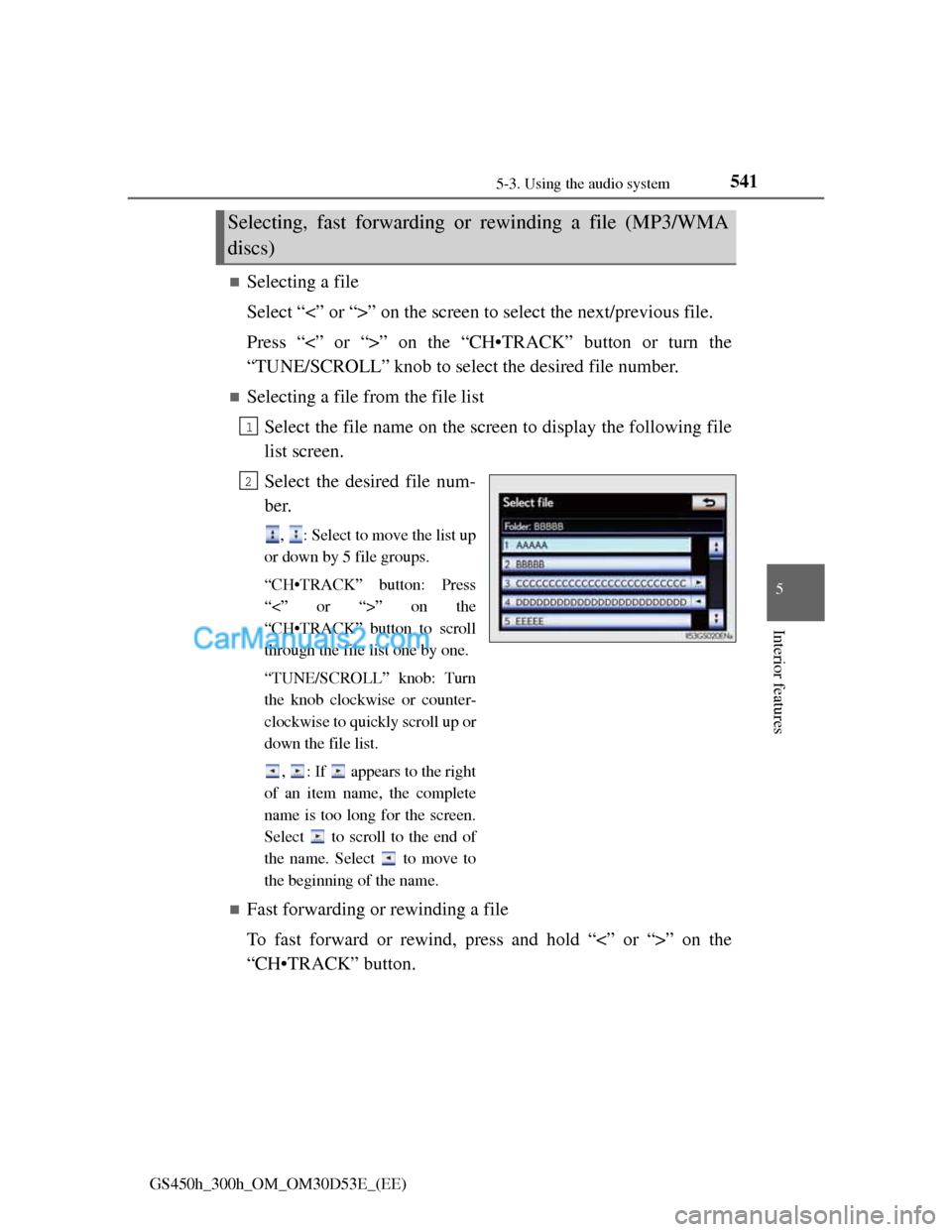
Selecting a file from the file list
Select the file name on the screen to display the following file
list screen.
Select the desired file num-
ber.
, : Select to move the list up
or down by 5 file groups.
“CH•TRACK” button: Press
“<” or “>” on the
“CH•TRACK” button to scroll
through the file list one by one.
“TUNE/SCROLL” knob: Turn
the knob clockwise or counter-
clockwise to quickly scroll up or
down the file list.
, : If appears to the right
of an item name, the complete
name is too long for the screen.
Select to scroll to the end of
the name. Select to move to
the beginning of the name.
Fast forwarding or rewinding a file
To fast forward or rewind, press and hold “<” or “>” on the
“CH•TRACK” button.
Selecting, fast forwarding or rewinding a file (MP3/WMA
discs)
1
2
Page 563 of 1014

5435-3. Using the audio system
5
Interior features
GS450h_300h_OM_OM30D53E_(EE)
Audio CD
Select “RPT” on the screen.
“RPT” appears on the screen.
To cancel, select “RPT” again.
MP3/WMA disc
Repeating a file
Select “RPT” on the screen.
Each time is “RPT” selected, the mode changes as follows:
• When “RAND” is off
file repeat folder repeat off
• When “RAND” is on
file repeat off
Repeating all of the files in a folder
Select “RPT” repeatedly until “FLD.RPT” appears on the
screen.
To cancel, select “RPT” again.
If you select
The display returns to the previous screen.
Displaying the title and artist name (Audio CD)
If a CD-TEXT disc is inserted, the title of the disc and track will be dis-
played. Up to 32 characters can be displayed.
Error messages
P. 5 5 7
Repeat play
Page 565 of 1014

5455-3. Using the audio system
5
Interior features
GS450h_300h_OM_OM30D53E_(EE)
Menu screen appears
Option screen appears (P. 546)
Display menu control key (P. 547)
Returns to the full screen (only when the vehicle is completely
stopped and the parking brake is applied)
Rewind
Stop
Pause
Select to play
Fast forward
If is selected, while watching a DVD, the DVD controls will appear.
If appears on the screen when a control is selected the operation
relevant to the control is not permitted.
Control icon screen
For 8-inch displayFor 12.3-inch display
12
3
4
5
6
7
8
9