display Lexus GS300h 2013 Owner's Manual
[x] Cancel search | Manufacturer: LEXUS, Model Year: 2013, Model line: GS300h, Model: Lexus GS300h 2013Pages: 1014
Page 592 of 1014
5725-3. Using the audio system
GS450h_300h_OM_OM30D53E_(EE)
On the audio top screen
Select “<” or “>” on the screen to select the next/previous folder/
album.
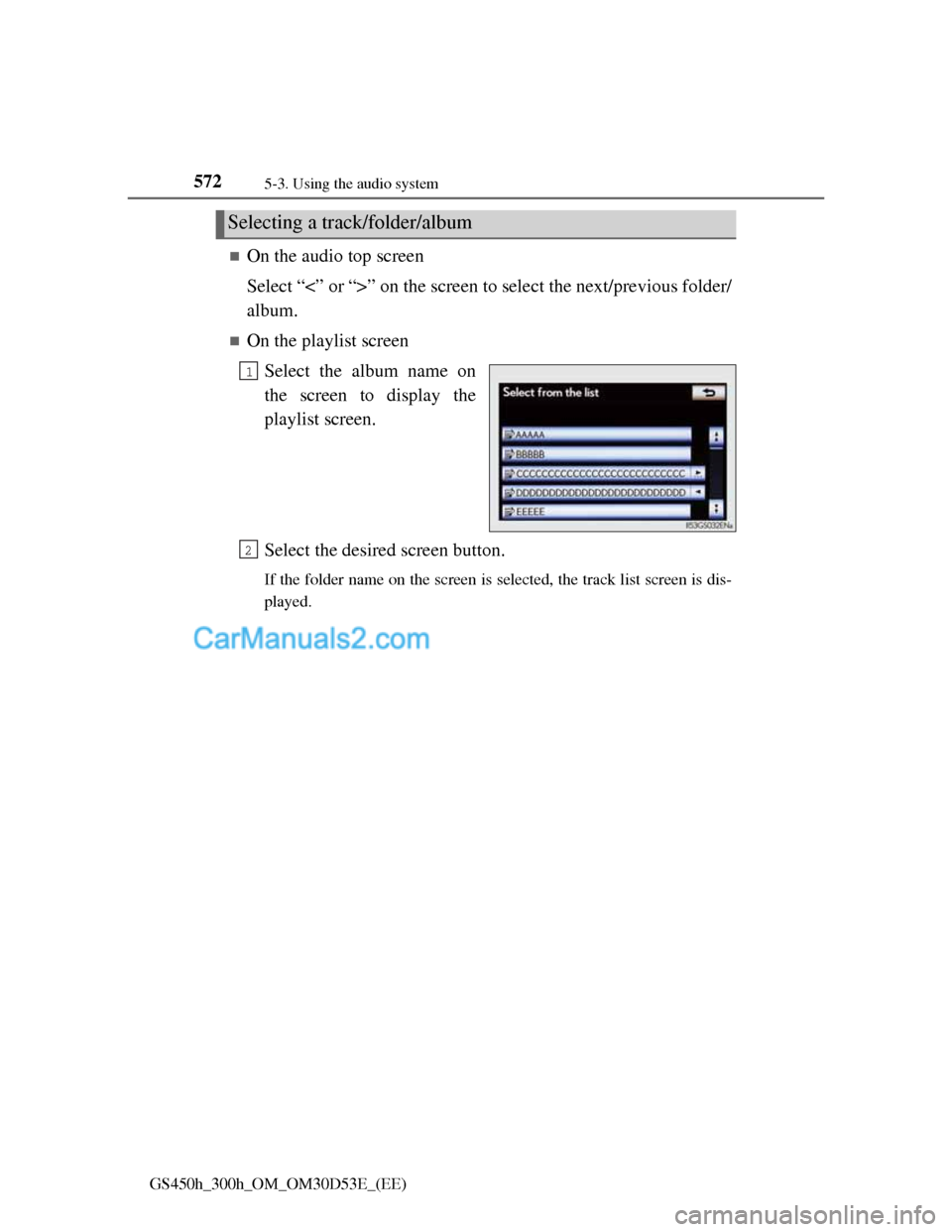
On the playlist screen
Select the album name on
the screen to display the
playlist screen.
Select the desired screen button.
If the folder name on the screen is selected, the track list screen is dis-
played.
Selecting a track/folder/album
1
2
Page 594 of 1014
5745-3. Using the audio system
GS450h_300h_OM_OM30D53E_(EE)
On the audio top screen
Select “<” or “>” on the screen to select the next/previous track.
Turn the “TUNE/SCROLL” knob or press “<” or “>” on the
“CH•TRACK” button to select the desired track number.
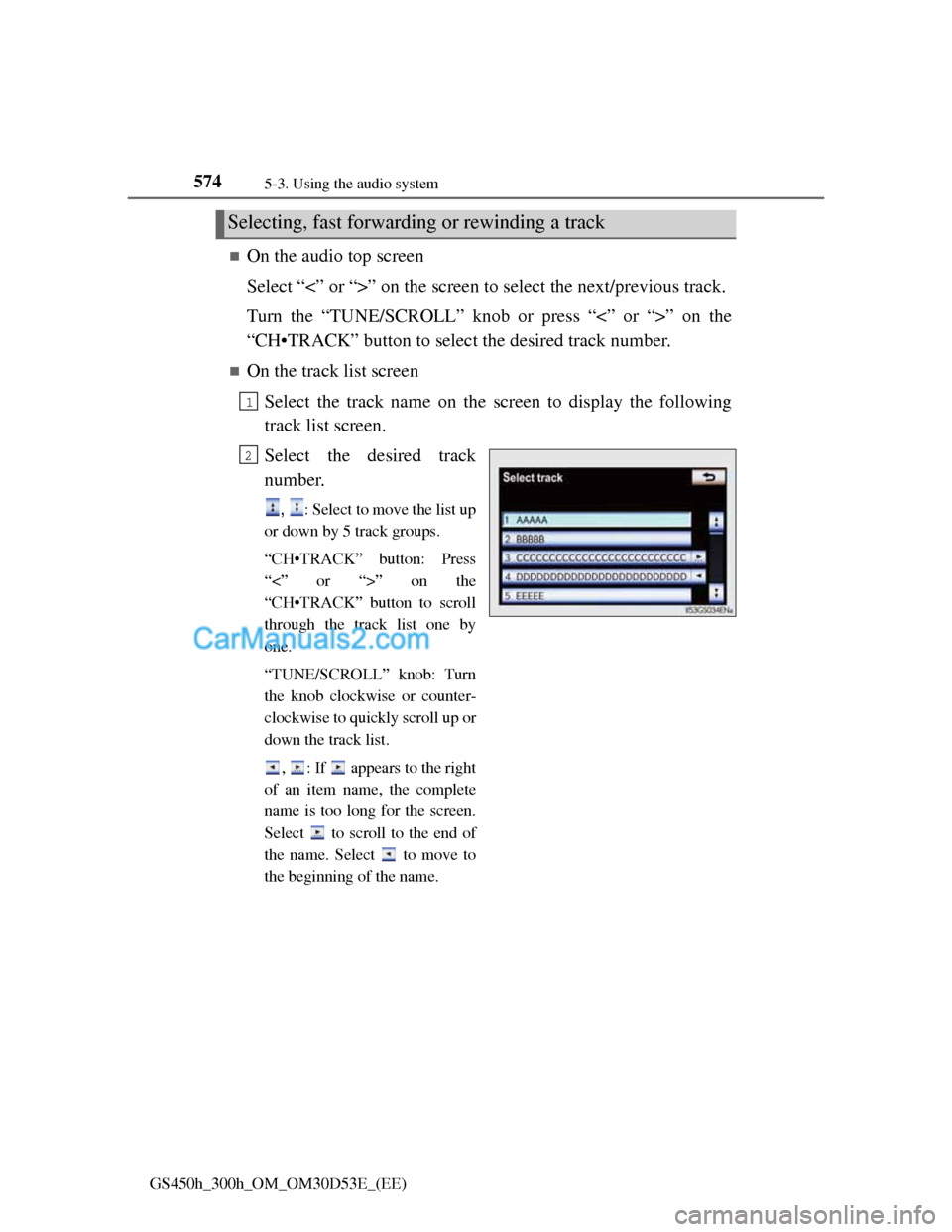
On the track list screen
Select the track name on the screen to display the following
track list screen.
Select the desired track
number.
, : Select to move the list up
or down by 5 track groups.
“CH•TRACK” button: Press
“<” or “>” on the
“CH•TRACK” button to scroll
through the track list one by
one.
“TUNE/SCROLL” knob: Turn
the knob clockwise or counter-
clockwise to quickly scroll up or
down the track list.
, : If appears to the right
of an item name, the complete
name is too long for the screen.
Select to scroll to the end of
the name. Select to move to
the beginning of the name.
Selecting, fast forwarding or rewinding a track
1
2
Page 596 of 1014
5765-3. Using the audio system
GS450h_300h_OM_OM30D53E_(EE)
If you select
The display returns to the previous screen.
Connecting Bluetooth® audio player
Selecting “Connect portable player” on the “Bluetooth*” screen also con-
nects a Bluetooth® audio player. (P. 679)
When none of the selectable portable players have been registered, a screen
confirming registration is displayed. The registration method is the same as
phone registration. (P. 672)
When the currently connected portable player is selected, a screen confirm-
ing the selected player’s disconnection is displayed. (P. 672)
If connection fails once, a changing connection method confirmation screen
is displayed. If connection fails 2 or more times, a message will be dis-
played. When this message is displayed, try again.
*: Bluetooth is a registered trademark of Bluetooth SIG, Inc.
When using the Bluetooth® audio system
In the following conditions, the system may not function.
• The portable player is turned off
• The portable player is not connected
• The portable player battery is low
There may be a delay if phone connection is carried out during Bluetooth®
audio play.
Depending on the type of portable player that is connected to the system,
operation may differ slightly and certain functions may not be available.
Bluetooth® antenna
The antenna is built into the instrument panel. If the portable player is behind
the seat or in the glove box or console box, or is touching or covered by
metal objects, connection status may deteriorate.
Battery charge/signal status
This display may not correspond exactly with the portable player, and this
system does not have a charging function.
Page 597 of 1014
577
5 5-3. Using the audio system
Interior features
GS450h_300h_OM_OM30D53E_(EE)
About Bluetooth®
Compatible models
Portable players must correspond to the following specifications:
Bluetooth® specification
Ver. 1.1 or higher
(Recommended: Ver. 2.1+EDR or higher)
Profile
• A2DP (Advanced Audio Distribution Profile) Ver. 1.0 or higher
(Recommended: Ver. 1.2 or higher)
• AVRCP (Audio/Video Remote Control Profile) Ver. 1.0 or higher
(Recommended: Ver. 1.4 or higher)
However, please note that some functions may be limited depending on the
type of portable player. Also, the different screen is displayed depending on
which portable player is connecting.
Certification
P. 6 1 8
Reconnecting the portable player
If the portable player is disconnected with a poor reception when the power
switch is in ACCESSORY or ON mode, the system automatically reconnects
the portable player.
If you have switched off the portable player yourself, follow the instructions
below to reconnect:
Select the portable player again
Enter the portable player
When transferring ownership of your vehicle
Be sure to remove the registered portable player from the system. (P. 674) Bluetooth is a registered trademark of
Bluetooth SIG, Inc.
Page 600 of 1014
5805-3. Using the audio system
GS450h_300h_OM_OM30D53E_(EE)
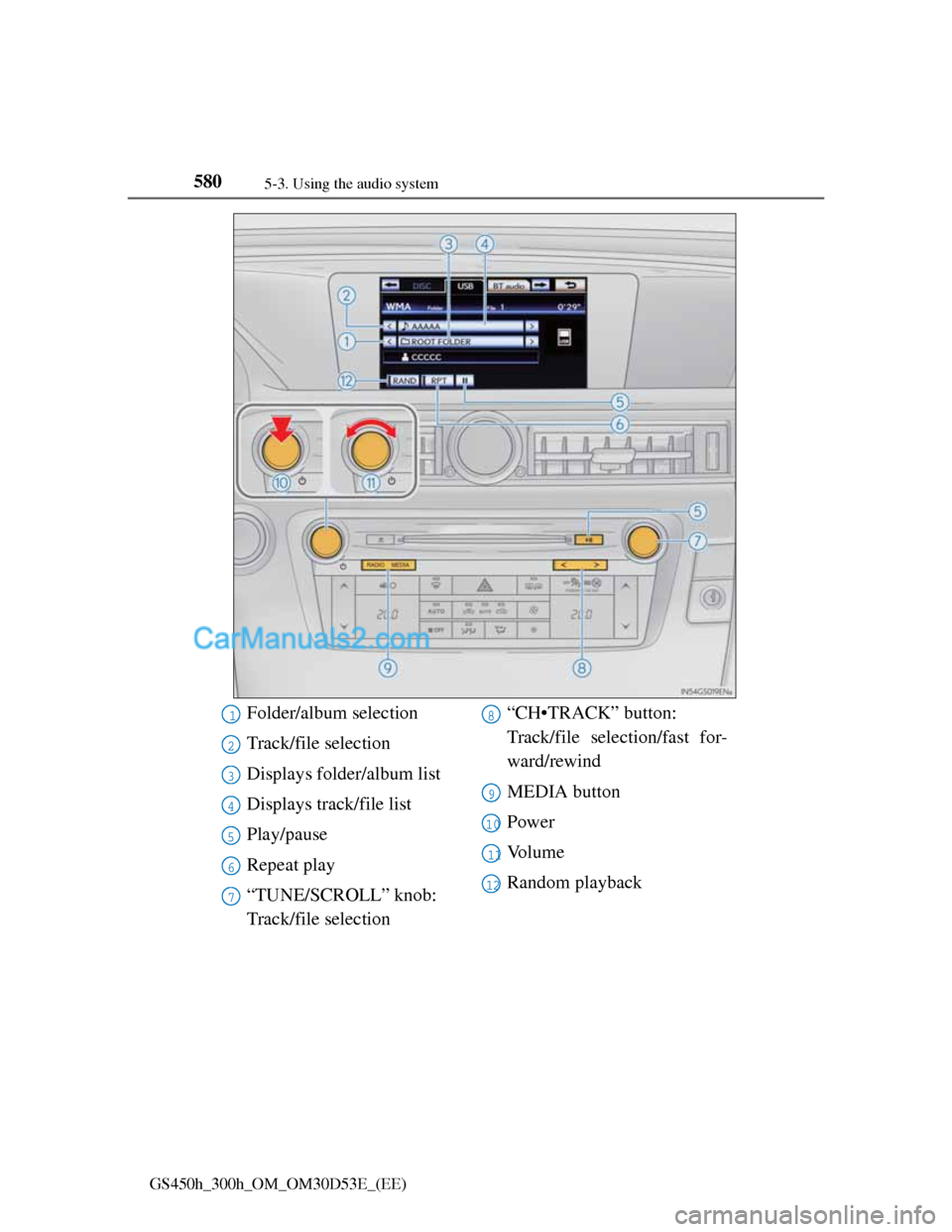
Folder/album selection
Track/file selection
Displays folder/album list
Displays track/file list
Play/pause
Repeat play
“TUNE/SCROLL” knob:
Track/file selection“CH•TRACK” button:
Track/file selection/fast for-
ward/rewind
MEDIA button
Power
Vo l u m e
Random playback1
2
3
4
5
6
7
8
9
10
11
12
Page 603 of 1014
5835-3. Using the audio system
5
Interior features
GS450h_300h_OM_OM30D53E_(EE)
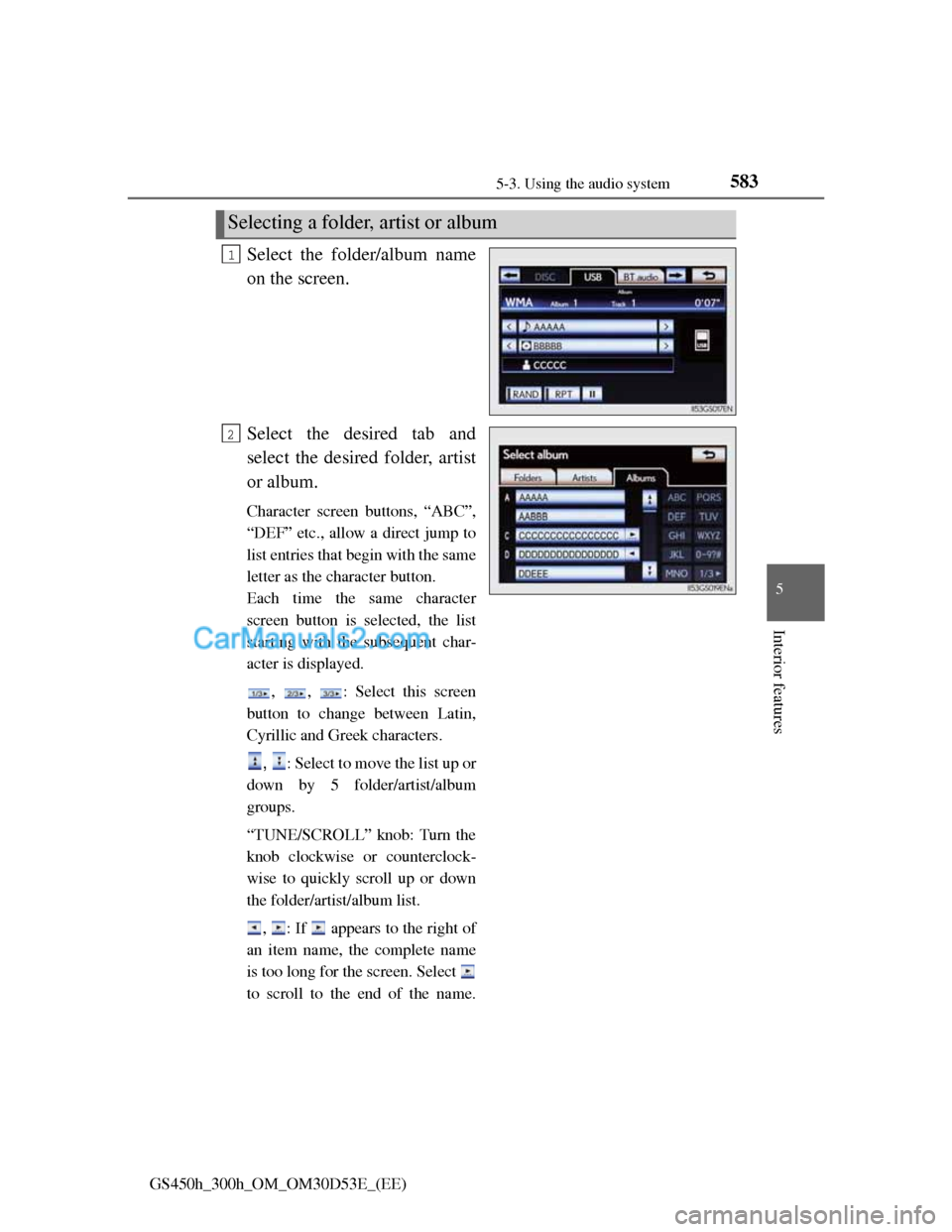
Select the folder/album name
on the screen.
Select the desired tab and
select the desired folder, artist
or album.
Character screen buttons, “ABC”,
“DEF” etc., allow a direct jump to
list entries that begin with the same
letter as the character button.
Each time the same character
screen button is selected, the list
starting with the subsequent char-
acter is displayed.
, , : Select this screen
button to change between Latin,
Cyrillic and Greek characters.
, : Select to move the list up or
down by 5 folder/artist/album
groups.
“TUNE/SCROLL” knob: Turn the
knob clockwise or counterclock-
wise to quickly scroll up or down
the folder/artist/album list.
, : If appears to the right of
an item name, the complete name
is too long for the screen. Select
to scroll to the end of the name.
Selecting a folder, artist or album
1
2
Page 605 of 1014
5855-3. Using the audio system
5
Interior features
GS450h_300h_OM_OM30D53E_(EE)
Selecting one file/track at a time
Select “<” or “>” on the screen to select the next/previous file/
track.
Turn the “TUNE/SCROLL” knob or press “<” or “>” on the
“CH•TRACK” button to select the desired file/track.
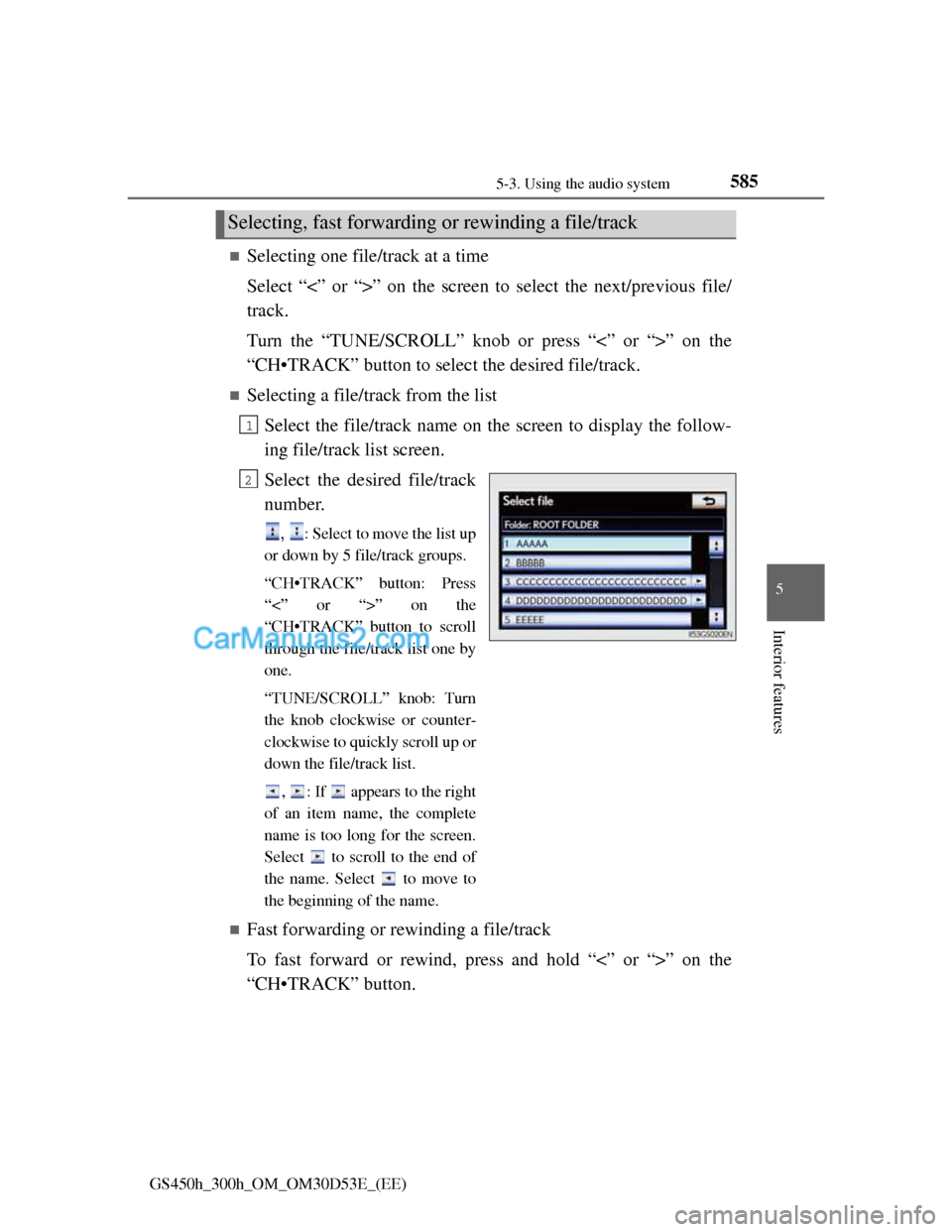
Selecting a file/track from the list
Select the file/track name on the screen to display the follow-
ing file/track list screen.
Select the desired file/track
number.
, : Select to move the list up
or down by 5 file/track groups.
“CH•TRACK” button: Press
“<” or “>” on the
“CH•TRACK” button to scroll
through the file/track list one by
one.
“TUNE/SCROLL” knob: Turn
the knob clockwise or counter-
clockwise to quickly scroll up or
down the file/track list.
, : If appears to the right
of an item name, the complete
name is too long for the screen.
Select to scroll to the end of
the name. Select to move to
the beginning of the name.
Fast forwarding or rewinding a file/track
To fast forward or rewind, press and hold “<” or “>” on the
“CH•TRACK” button.
Selecting, fast forwarding or rewinding a file/track
1
2
Page 607 of 1014
5875-3. Using the audio system
5
Interior features
GS450h_300h_OM_OM30D53E_(EE)
If you select
The display returns to the previous screen.
USB memory functions
When the USB memory is connected and the audio source is changed to
USB memory mode, the USB memory will start playing the first file in the
first folder. If the same device is removed and reinserted (and the contents
have not been changed), the USB memory will resume playing from the
same point it was last used.
Depending on the USB memory that is connected to the system, certain
functions may not be available. Disconnecting the device and reconnecting
it once again may resolve some malfunctions.
When using a USB memory
You may be unable to use the instrument panel power outlet if the USB mem-
ory is connected to the USB port at the same time.
Error messages for USB memory
“USB Error”: This indicates a problem in the USB memory or its connection.
“No music files found.”:This indicates that no MP3/WMA files are included
in the USB memory.
USB memory
Compatible devices
USB memory that can be used for MP3 and WMA playback.
Compatible device formats
The following device formats can be used:
• USB communication formats: USB2.0 HS (480 Mbps) and FS (12
Mbps)
• File formats: FAT16/32 (Windows)
• Correspondence class: Mass storage class
MP3 and WMA files written in any format other than those listed above
may not play correctly, and their file names and folder names may not be
displayed correctly.
Items related to standards and limitations are as follows:
• Maximum directory hierarchy: 8 levels
• Maximum number of folders in a device: 3000 (including the root)
• Maximum number of files in a device: 9999
• Maximum number of files per folder: 255
Page 612 of 1014
5925-3. Using the audio system
GS450h_300h_OM_OM30D53E_(EE)
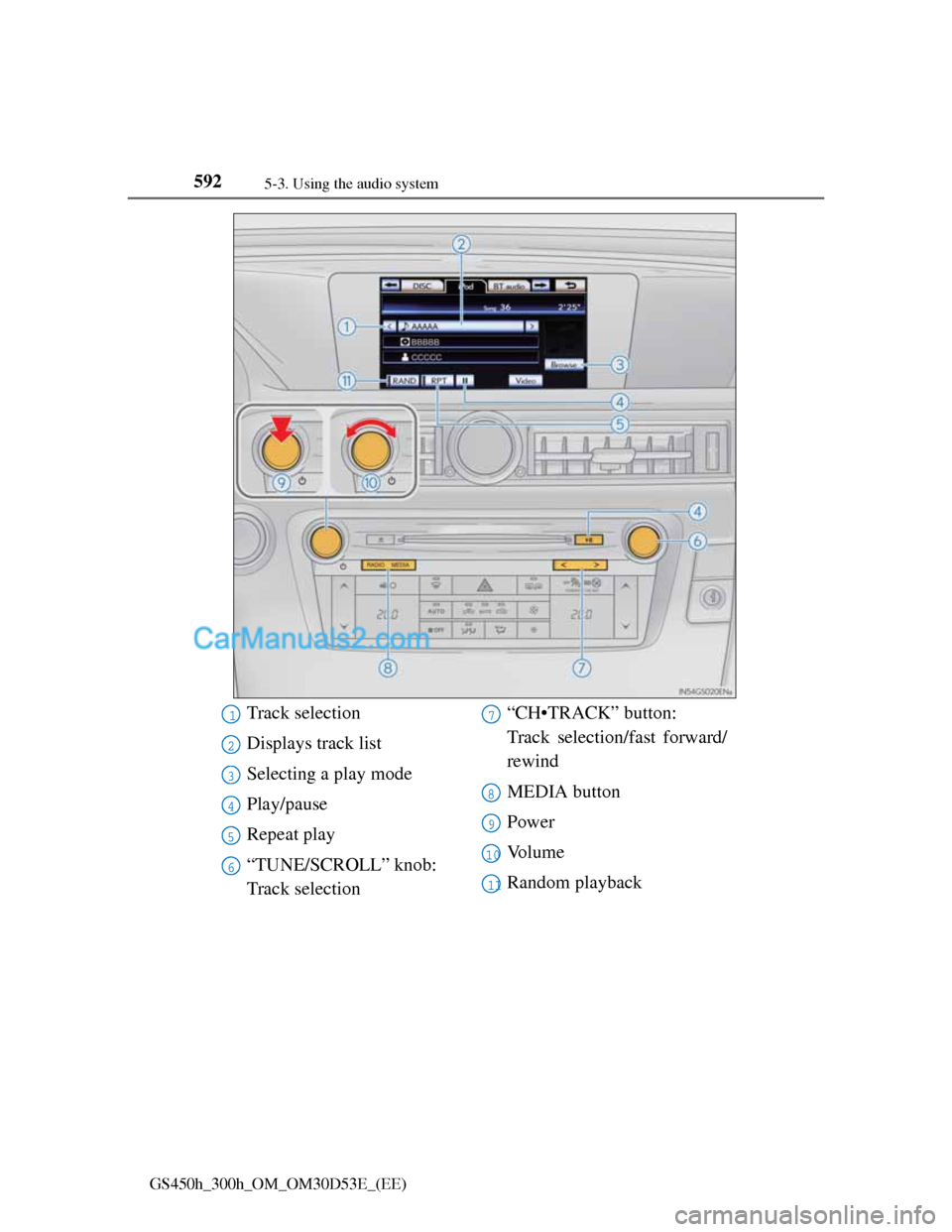
Track selection
Displays track list
Selecting a play mode
Play/pause
Repeat play
“TUNE/SCROLL” knob:
Track selection“CH•TRACK” button:
Track selection/fast forward/
rewind
MEDIA button
Power
Vo l u m e
Random playback1
2
3
4
5
6
7
8
9
10
11
Page 613 of 1014
5935-3. Using the audio system
5
Interior features
GS450h_300h_OM_OM30D53E_(EE)
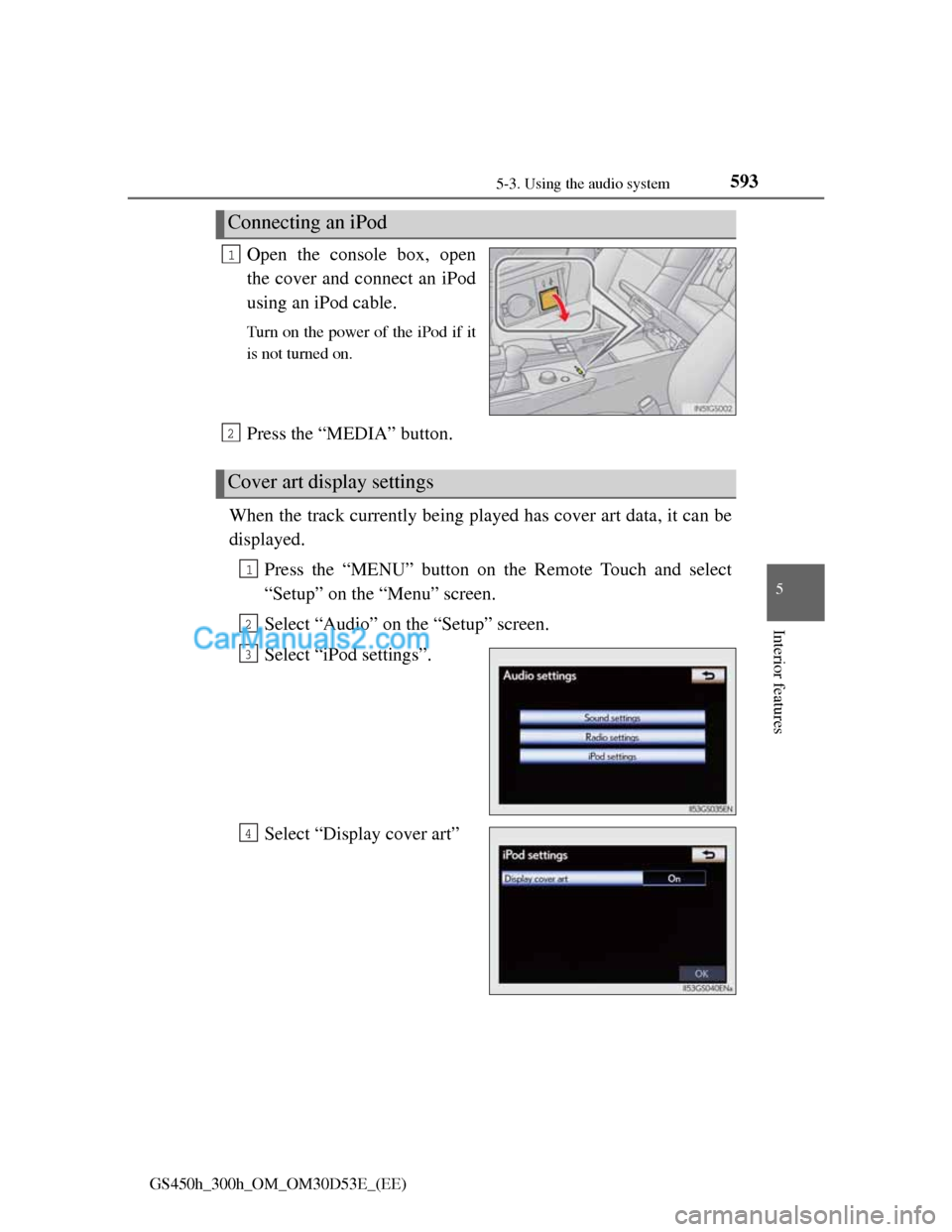
Open the console box, open
the cover and connect an iPod
using an iPod cable.
Turn on the power of the iPod if it
is not turned on.
Press the “MEDIA” button.
When the track currently being played has cover art data, it can be
displayed.
Press the “MENU” button on the Remote Touch and select
“Setup” on the “Menu” screen.
Select “Audio” on the “Setup” screen.
Select “iPod settings”.
Select “Display cover art”
Connecting an iPod
1
Cover art display settings
2
1
2
3
4