fuel Lexus GS300h 2013 User Guide
[x] Cancel search | Manufacturer: LEXUS, Model Year: 2013, Model line: GS300h, Model: Lexus GS300h 2013Pages: 1014
Page 114 of 1014

1132. Instrument cluster
2
Instrument cluster
GS450h_300h_OM_OM30D53E_(EE)
ECO lamp and SPORT lamp
When sport mode is selected, SPORT lamp (red) will illuminate.
When all of the following conditions are satisfied and Eco-friendly driving,
ECO lamp (blue) will illuminate. (ECO lamp will become brighter the more
Eco-friendly driving you perform. Also, while the vehicle is stopped or the
acceleration exceeds Zone of Eco driving, ECO lamp turns off. P. 1 1 2 ]
However, when Eco drive mode is selected, while the vehicle is stopped or
the acceleration exceeds Zone of Eco driving, ECO lamp does not turn off.):
• Driving with the shift lever in D
• Paddle shift switch is not operated.
• Either normal mode or Eco drive mode is selected.
• The vehicle speed is approximately 130 km/h (80 mph) or below.
Tachometer
Hybrid System Indicator switches to the tachometer when driving mode is in
sport mode.
Engine speed
On hybrid vehicles, engine speed is precisely controlled in order to help
improve fuel efficiency and reduce exhaust emissions etc.
There are times when the engine speed that is displayed may differ even
when vehicle operation and driving conditions are the same.
Customization
Settings (e.g. on/off operation of ECO lamp) can be changed.
(Customizable features: P. 944)
NOTICE
To prevent damage to the engine and its components
Do not let the indicator needle of the tachometer enter the red zone, which
indicates the maximum engine speed.
The engine may be overheating if the engine coolant temperature gauge is
in the red zone (H). In this case, immediately stop the vehicle in a safe
place, and check the engine after it has cooled completely. (P. 915)
Page 115 of 1014

1142. Instrument cluster
GS450h_300h_OM_OM30D53E_(EE)
Multi-information display
The multi-information display presents the driver with a variety of
driving-related data including the current outside air temperature.
Energy monitor (P. 131)
Outside temperature display
(P. 115)
Trip information (P. 115)
Displays driving range, fuel con-
sumption and other cruising
related information
Tire inflation pressure (if equipped) (P. 117)
Drive monitor (P. 117)
Lexus parking assist-sensor display* (if equipped) (P. 347)
Dynamic radar cruise control display* (if equipped) (P. 302)
Dynamic radar cruise control with full-speed range display*
(if equipped) (P. 318)
LKA (Lane-Keeping Assist) display* (if equipped) (P. 339)
Warning messages (P. 838)
Automatically displayed when a malfunction occurs in one of the vehicle’s
systems. Display can be switched by pressing the “DISP” button. (P.
115)
*: Automatically displayed when the system is used. Display can be
switched by pressing the “DISP” button. (P. 115)
Display contents
Page 116 of 1014

1152. Instrument cluster
2
Instrument cluster
GS450h_300h_OM_OM30D53E_(EE)
Switching the display
Items displayed can be
switched by pressing the
“DISP” button.
Energy monitor
P. 131
Outside temperature
Current fuel consumption
Average fuel consumption after refueling
Trip information
Displays the outside air temperature
The temperature range that can be displayed is
from
-40C (-40F) to 50C (122F)
Displays the current rate of fuel consumption
Displays the average fuel consumption since
the vehicle was last refueled
Use the displayed average fuel consumption as a
reference.
Page 117 of 1014

1162. Instrument cluster
GS450h_300h_OM_OM30D53E_(EE)
Average fuel consumption
Average vehicle speed
Driving range Displays the average fuel consumption since
the function was reset
• The function can be reset by pressing the
“DISP” button for longer than 1 second when
the average fuel consumption is displayed.
• Use the displayed average fuel consumption as
a reference.
Displays the average vehicle speed since the
function was reset
The function can be reset by pressing the “DISP”
button for longer than 1 second when the average
vehicle speed is displayed.
Displays the estimated approximate distance
that can be driven with the quantity of fuel
remaining
• This distance is computed based on your aver-
age fuel consumption. As a result, the actual
distance that can be driven may differ from that
displayed.
• When only a small amount of fuel is added to
the tank, the display may not be updated.
When refueling, turn the power switch off. If
the vehicle is refueled without turning the
power switch off, the display may not be
updated.
Page 118 of 1014

1172. Instrument cluster
2
Instrument cluster
GS450h_300h_OM_OM30D53E_(EE)
Tire inflation pressure (if equipped)
Outside temperature, average
fuel consumption after refueling
or driving range can be selected
and displayed.
If displayed on the drive moni-
tor, other trip information or
warning messages can be dis-
played simultaneously.
For display and selection proce-
dures, follow the “Setting up the
displays”.
The information displayed on the
drive monitor will not be displayed
on the trip information screen.
Displays inflation pressure of each tire
For the vehicles with a compact spare tire: The
inflation pressure of the spare tire will not be dis-
played.
Drive monitor
Page 134 of 1014
1332. Instrument cluster
2
Instrument cluster
GS450h_300h_OM_OM30D53E_(EE)
Vehicles with a 12.3-inch display: The consumption screen can be
displayed on the “Side Display”. For details, refer to the “Naviga-
tion System Owner’s Manual”.
Press the “MENU” button on the Remote Touch, then select
“Car” on the “Menu” screen.
If the “Energy monitor” screen is displayed, select “Fuel con-
sumption”.
Consumption
1
2
Page 135 of 1014
1342. Instrument cluster
GS450h_300h_OM_OM30D53E_(EE)
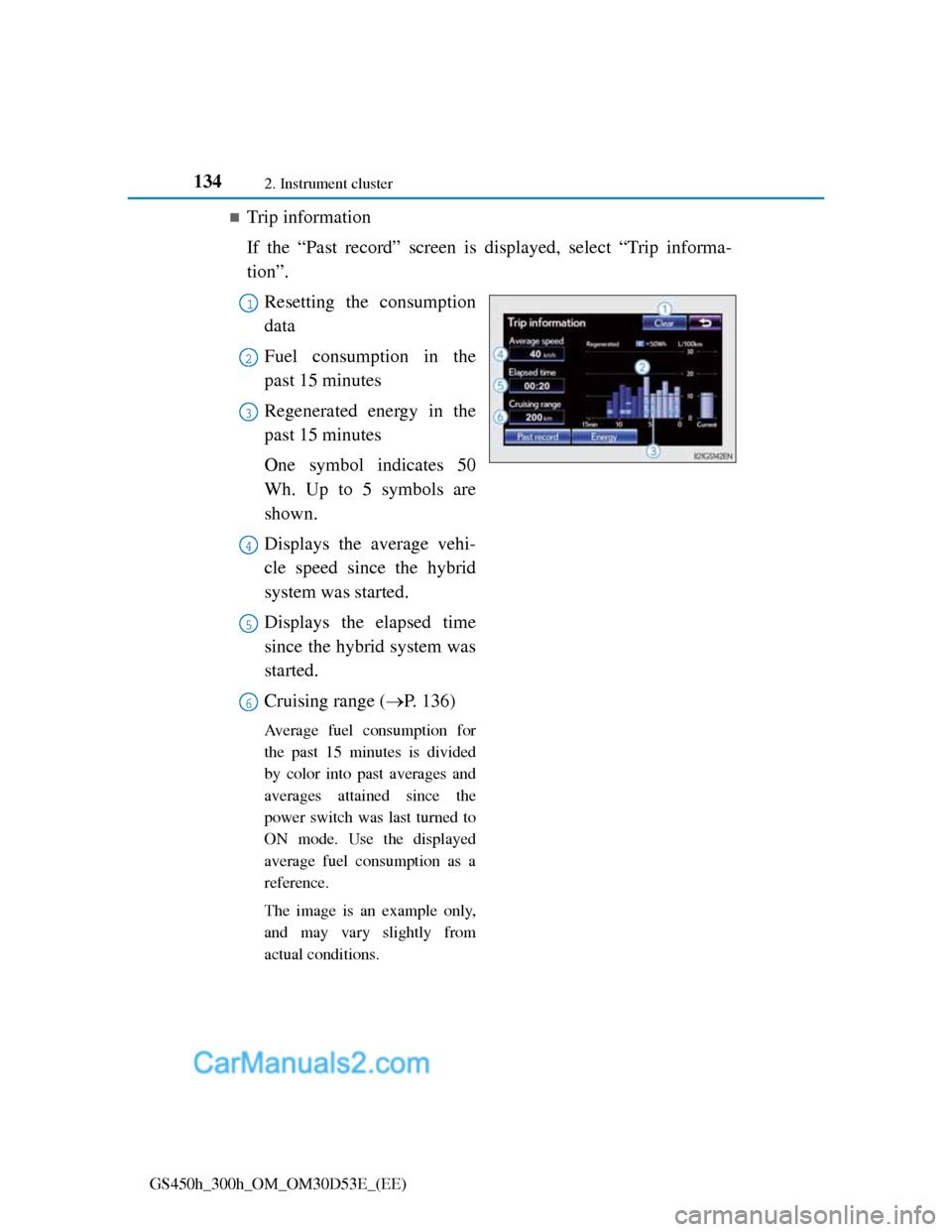
Trip information
If the “Past record” screen is displayed, select “Trip informa-
tion”.
Resetting the consumption
data
Fuel consumption in the
past 15 minutes
Regenerated energy in the
past 15 minutes
One symbol indicates 50
Wh. Up to 5 symbols are
shown.
Displays the average vehi-
cle speed since the hybrid
system was started.
Displays the elapsed time
since the hybrid system was
started.
Cruising range (P. 136)
Average fuel consumption for
the past 15 minutes is divided
by color into past averages and
averages attained since the
power switch was last turned to
ON mode. Use the displayed
average fuel consumption as a
reference.
The image is an example only,
and may vary slightly from
actual conditions.
1
2
3
4
5
6
Page 136 of 1014
1352. Instrument cluster
2
Instrument cluster
GS450h_300h_OM_OM30D53E_(EE)
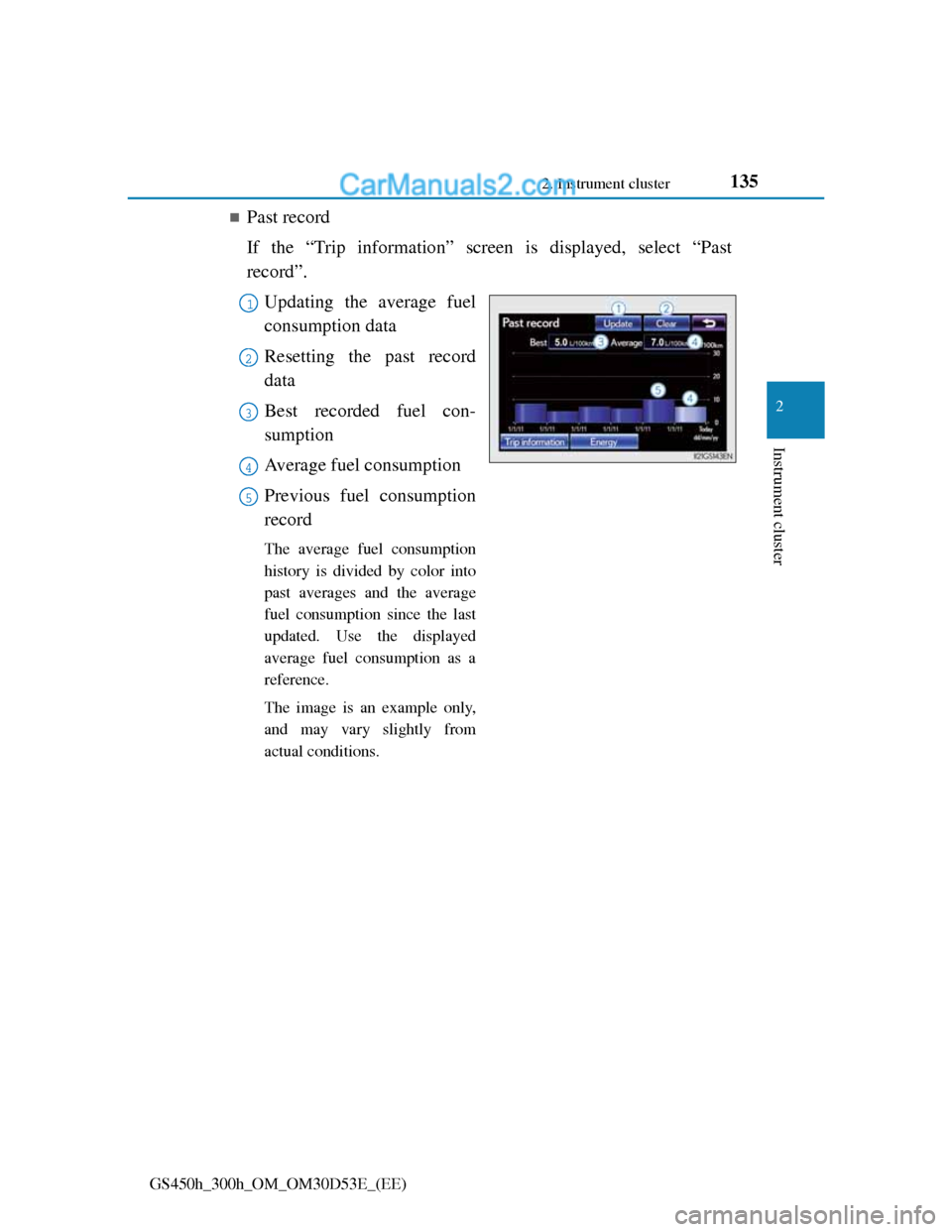
Past record
If the “Trip information” screen is displayed, select “Past
record”.
Updating the average fuel
consumption data
Resetting the past record
data
Best recorded fuel con-
sumption
Average fuel consumption
Previous fuel consumption
record
The average fuel consumption
history is divided by color into
past averages and the average
fuel consumption since the last
updated. Use the displayed
average fuel consumption as a
reference.
The image is an example only,
and may vary slightly from
actual conditions.
1
2
3
4
5
Page 137 of 1014
1362. Instrument cluster
GS450h_300h_OM_OM30D53E_(EE)
Updating the past record data
Update the average fuel consumption by selecting “Update” to measure the
current fuel consumption again.
Resetting the data
The fuel consumption data can be deleted by selecting “Clear”.
Cruising range
Displays the estimated maximum distance that can be driven with the quan-
tity of fuel remaining.
This distance is computed based on your average fuel consumption.
As a result, the actual distance that can be driven may differ from that dis-
played.
Page 226 of 1014
223
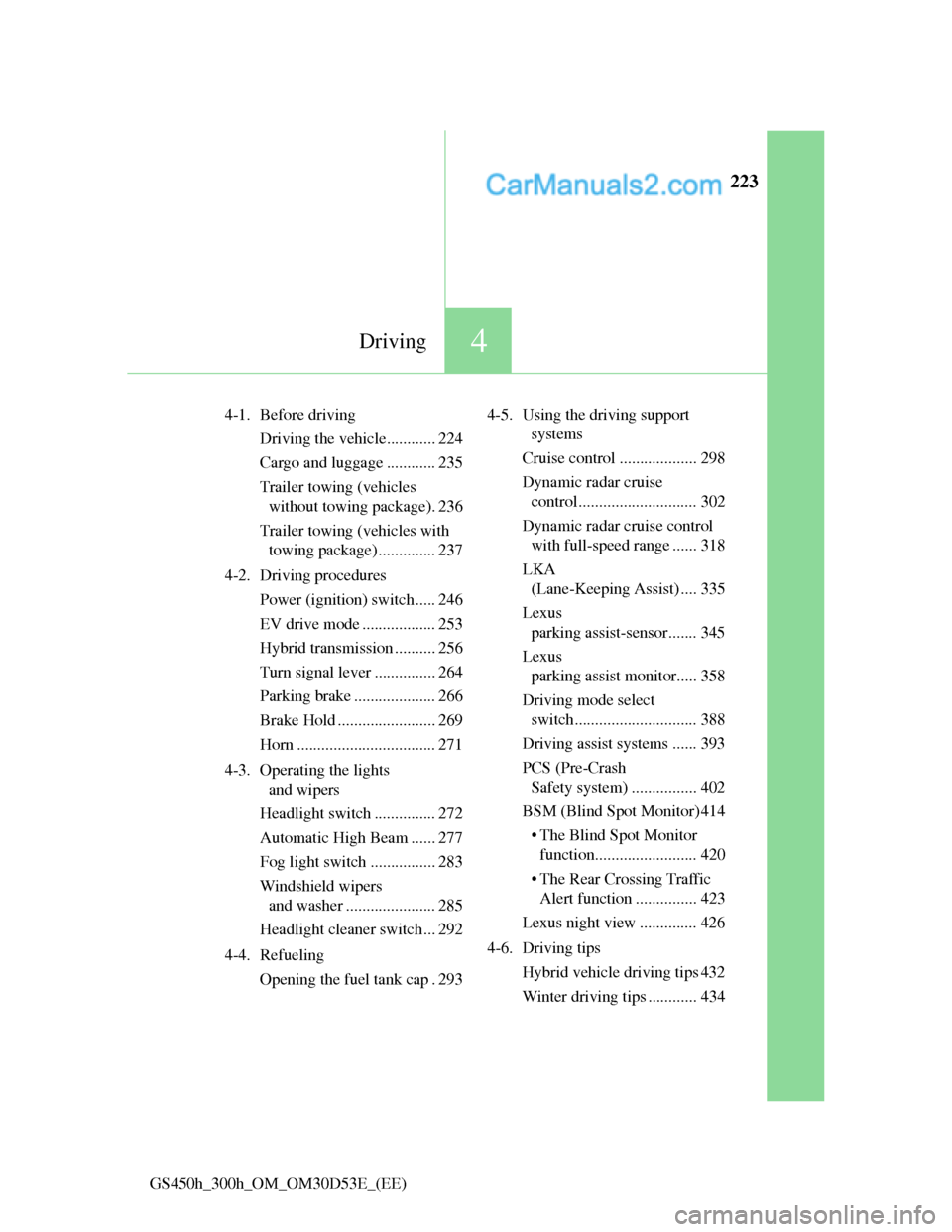
4Driving
GS450h_300h_OM_OM30D53E_(EE)4-1. Before driving
Driving the vehicle............ 224
Cargo and luggage ............ 235
Trailer towing (vehicles
without towing package). 236
Trailer towing (vehicles with
towing package) .............. 237
4-2. Driving procedures
Power (ignition) switch ..... 246
EV drive mode .................. 253
Hybrid transmission .......... 256
Turn signal lever ............... 264
Parking brake .................... 266
Brake Hold ........................ 269
Horn .................................. 271
4-3. Operating the lights
and wipers
Headlight switch............... 272
Automatic High Beam ...... 277
Fog light switch ................ 283
Windshield wipers
and washer ...................... 285
Headlight cleaner switch ... 292
4-4. Refueling
Opening the fuel tank cap . 2934-5. Using the driving support
systems
Cruise control ................... 298
Dynamic radar cruise
control ............................. 302
Dynamic radar cruise control
with full-speed range ...... 318
LKA
(Lane-Keeping Assist) .... 335
Lexus
parking assist-sensor....... 345
Lexus
parking assist monitor..... 358
Driving mode select
switch.............................. 388
Driving assist systems ...... 393
PCS (Pre-Crash
Safety system) ................ 402
BSM (Blind Spot Monitor) 414
• The Blind Spot Monitor
function......................... 420
• The Rear Crossing Traffic
Alert function ............... 423
Lexus night view .............. 426
4-6. Driving tips
Hybrid vehicle driving tips 432
Winter driving tips ............ 434