air condition LEXUS GS300H 2019 Owner's Manual
[x] Cancel search | Manufacturer: LEXUS, Model Year: 2019, Model line: GS300H, Model: LEXUS GS300H 2019Pages: 600, PDF Size: 55.99 MB
Page 330 of 600
3304-5. Using the driving support systems
GS450h_300h_OM_OM30F92E_(EE)
WARNING
■When the VSC is activated
The slip indicator light flashes. Always drive carefully. Reckless driving may cause an accident. Exercise particular care when the indicator light flashes.
■When the TRC/VSC systems are turned off
Be especially careful and drive at a speed appropriate to the road conditions. As these are the systems to help ensure vehicle stability and driving force, do not turn the TRC/
VSC systems off unless necessary.
■Replacing tires
Make sure that all tires are of the specified size, brand, tread pattern and total load
capacity. In addition, make sure that the tires are inflated to the recommended tire infla- tion pressure level.
The ABS, TRC and VSC systems will not function correctly if different tires are installed
on the vehicle. Contact any authorized Lexus retailer or Lexus authorized repairer, or any reliable repairer for further information when replacing tires or wheels.
■Handling of tires and the suspension
Using tires with any kind of problem or modi fying the suspension will affect the driving assist systems, and may cause a system to malfunction.
Page 331 of 600
331
4
4-6. Driving tips
Driving
GS450h_300h_OM_OM30F92E_(EE)
Hybrid vehicle driving tips
◆Using Eco drive mode
When using Eco drive mode, the torque corresponding to the accelerator
pedal depression amount can be generate d more smoothly than it is in normal
conditions. In addition, the operation of the air conditioning system (heating/
cooling) will be minimized, improving the fuel economy. ( P. 311)
◆Use of Hybrid System Indicator
The Eco-friendly driving is possible by keeping the indicate of Hybrid System
Indicator within Eco area. ( P. 108, 123)
◆Shift lever operation
Shift the shift lever to D when stopped at a traffic light, or driving in heavy traf-
fic etc. Shift the shift lever to P when parking. When using the N, there is no
positive effect on fuel consumption. In the N, the gasoline engine operates but
electricity cannot be generated. Also, when using the air conditioning system,
etc., the hybrid battery (traction battery) power is consumed.
◆Accelerator pedal/brake pedal operation
●Drive your vehicle smoothly. Avoid abrupt acceleration and deceleration.
Gradual acceleration and deceleration will make more effective use of the
electric motor (traction motor) without having to use gasoline engine
power.
●Avoid repeated acceleration. Repeated acceleration consumes hybrid bat-
tery (traction battery) power, resulting in poor fuel consumption. Battery
power can be restored by driving with the accelerator pedal slightly
released.
◆When braking
Make sure to operate the brakes gently and in a timely manner. A greater
amount of electrical energy can be regenerated when slowing down.
For economical and ecological driving, pay attention to the following points:
Page 332 of 600
3324-6. Driving tips
GS450h_300h_OM_OM30F92E_(EE)
◆Delays
Repeated acceleration and deceleration, as well as long waits at traffic lights,
will lead to bad fuel economy. Check traffic reports before leaving and avoid
delays as much as possible. When driving in a traffic jam, gently release the
brake pedal to allow the vehicle to move forward slightly while avoiding over-
use of the accelerator pedal. Doing so can help control excessive gasoline
consumption.
◆Highway driving
Control and maintain the vehicle at a constant speed. Before stopping at a toll
booth or similar, allow plenty of time to release the accelerator and gently
apply the brakes. A greater amount of electrical energy can be regenerated
when slowing down.
◆Air conditioning
Use the air conditioning only when necessary. Doing so can help reduce
excessive gasoline consumption.
In summer: When the ambient temperature is high, use the recirculated air
mode. Doing so will help to reduce the burden on the air conditioning system
and reduce fuel consumption as well.
In winter: Because the gasoline engine will not automatically cut out until it
and the interior of the vehicle are warm, it will consume fuel. Also, fuel con-
sumption can be improved by avoiding overuse of the heater.
◆Checking tire inflation pressure
Make sure to check the tire inflation pressure frequently. Improper tire infla-
tion pressure can cause poor fuel economy.
Also, as snow tires can cause large amounts of friction, their use on dry roads
can lead to poor fuel economy. Use ti res that are appropriate for the season.
Page 334 of 600
3344-6. Driving tips
GS450h_300h_OM_OM30F92E_(EE)
Winter driving tips
●Use fluids that are appropriate to the prevailing outside temperatures.
•Engine oil
• Engine/power control unit coolant
•Washer fluid
●Have a service technician inspect the condition of the 12-volt battery.
●Have the vehicle fitted with four snow tires or purchase a set of tire chains for
the rear tires.*
Ensure that all tires are the specified size and brand, and that chains match the size of the tires.
*: Tire chains cannot be mounted on vehicles with front and rear tires of differing
sizes and vehicles with LDH and 19 inch tires
Perform the following according to the driving conditions:
●Do not try to forcibly open a window or move a wiper that is frozen. Pour
warm water over the frozen area to melt the ice. Wipe away the water imme-
diately to prevent it from freezing.
●To ensure proper operation of the climate control system fan, remove any
snow that has accumulated on the air inlet vents in front of the windshield.
●Check for and remove any excess ice or snow that may have accumulated on
the exterior lights, vehicle’s roof, chassis, around the tires or on the brakes.
●Remove any snow or mud from the bottom of your shoes before getting in the
vehicle.
Carry out the necessary preparations an d inspections before driving the vehi-
cle in winter. Always drive the vehicle in a manner appropriate to the prevail-
ing weather conditions.
Preparation for winter
Before driving the vehicle
Page 335 of 600
3354-6. Driving tips
4
Driving
GS450h_300h_OM_OM30F92E_(EE)
Accelerate the vehicle slowly, keep a safe distance between you and the vehicle
ahead, and drive at a reduced speed suitable to road conditions.
●Park the vehicle and move the shift lever to P without setting the parking
brake. The parking brake may freeze up, preventing it from being released. If
the vehicle is parked without setting the parking brake, make sure to block the
wheels.
Failure to do so may be dangerous because it may cause the vehicle to move
unexpectedly, possibly leading to an accident.
●If the vehicle is parked without setting the parking brake, confirm that the shift
lever cannot be moved out of P*.
*: The shift lever will be locked if it is attemp ted to be shifted from P to any other position
without depressing the brake pedal. If the shift lever can be shifted from P, there may
be a problem with the shift lock system. Have the vehicle inspected by any authorized
Lexus retailer or Lexus authorized repair er, or any reliable repairer immediately.
When driving the vehicle
When parking the vehicle
Page 339 of 600
339
5Interior features
GS450h_300h_OM_OM30F92E_(EE)
5-1. Remote Touch screen
Remote Touch/12.3-inch
display ......................................... 340
5-2. Using the air conditioning
system and defogger
Front automatic
air conditioning system ......... 346
Rear air conditioning
system ......................................... 358
Heated steering wheel/
seat heaters/
seat ventilators .......................... 361
5-3. Using the interior lights
Interior lights list..........................366
• Interior lights .......................... 367
• Personal lights ....................... 367
5-4. Using the storage features
List of storage features ............ 369
• Glove box ............................... 370
• Console box .......................... 370
• Cup holders .............................371
• Auxiliary boxes ..................... 373
Trunk features ............................. 374
5-5. Using the other interior
features
Other interior features ............ 377
• Sun visors ................................ 377
• Vanity mirrors .........................377
• Clock ........................................ 378
• Ashtrays................................... 378
• Power outlets......................... 379
• Armrest................................... 380
• Rear sunshade/
rear door sunshades.......... 380
• Coat hooks .............................382
• Assist grips .............................383
ERA-GLONASS ......................384
Page 343 of 600
3435-1. Remote Touch screen
5
Interior features
GS450h_300h_OM_OM30F92E_(EE)
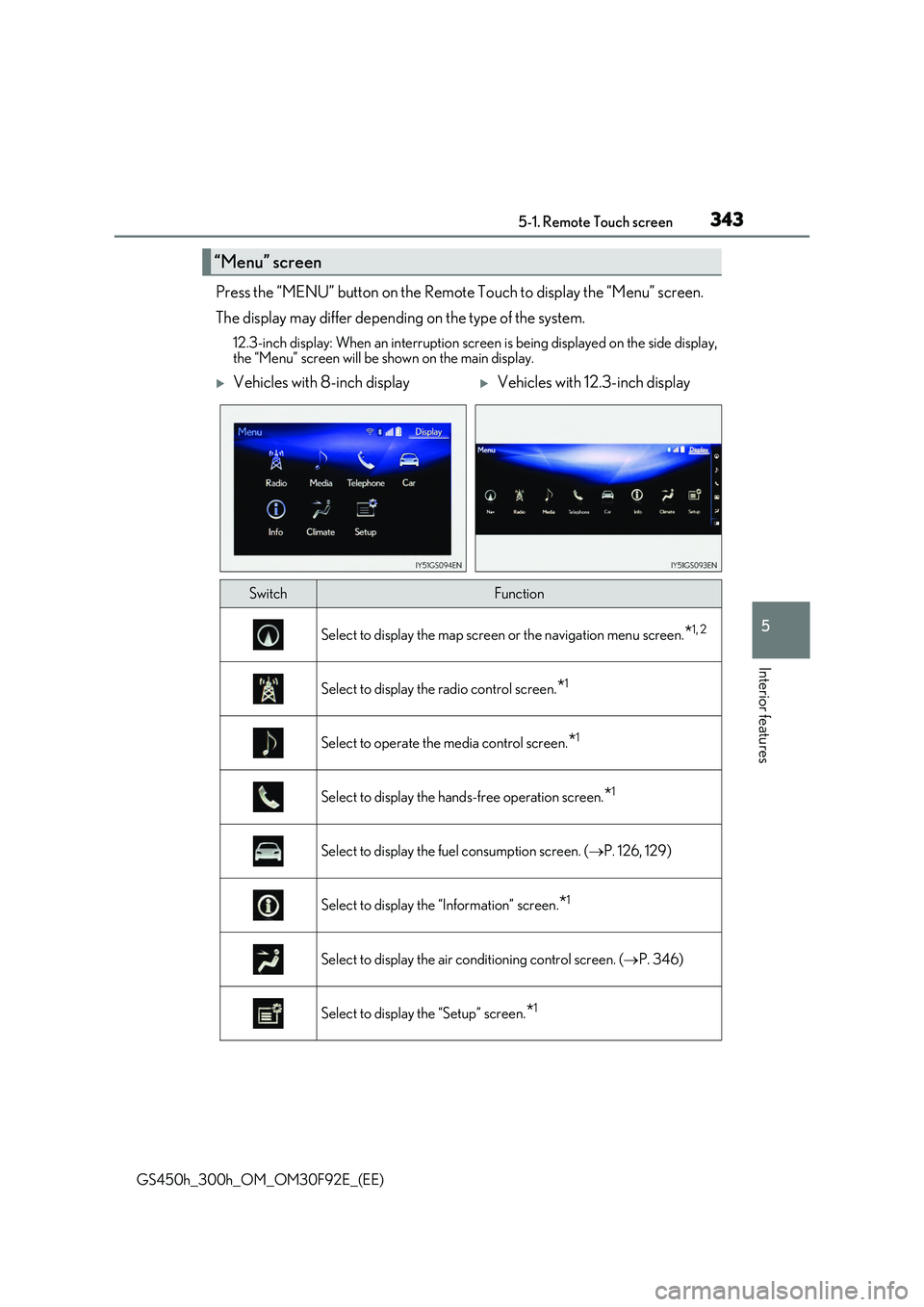
Press the “MENU” button on the Remote Touch to display the “Menu” screen.
The display may differ depending on the type of the system.
12.3-inch display: When an interruption scr een is being displayed on the side display, the “Menu” screen will be shown on the main display.
“Menu” screen
Vehicles with 8-inch displayVehicles with 12.3-inch display
SwitchFunction
Select to display the map screen or the navigation menu screen.*1, 2
Select to display the radio control screen.*1
Select to operate the media control screen.*1
Select to display the hands-free operation screen.*1
Select to display the fuel consumption screen. (P. 126, 129)
Select to display the “Information” screen.*1
Select to display the air conditioning control screen. (P. 346)
Select to display the “Setup” screen.*1
Page 344 of 600
3445-1. Remote Touch screen
GS450h_300h_OM_OM30F92E_(EE)
*1: Refer to the “NAVIGATION AND MULTIMEDIA SYSTEM OWNER’S MANUAL”.
*2: If equipped
■Full screen display
The following functions can be displayed full screen:
*: Refer to the “NAVIGATION AND MULTIMEDIA SYSTEM OWNER’S MAN-
UAL”.
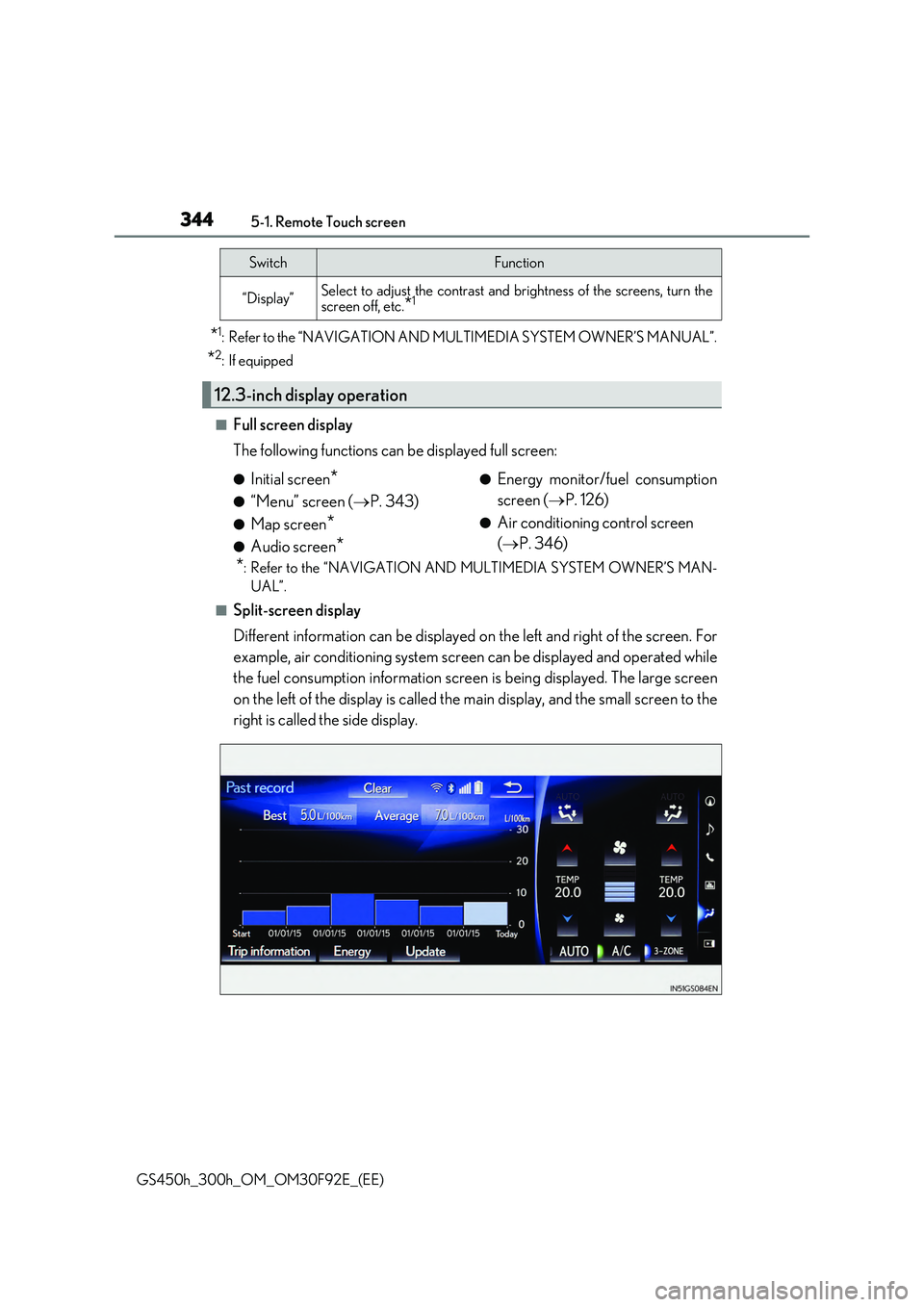
■Split-screen display
Different information can be displayed on the left and right of the screen. For
example, air conditioning system screen can be displayed and operated while
the fuel consumption information screen is being displayed. The large screen
on the left of the display is called the main display, and the small screen to the
right is called the side display.
“Display”Select to adjust the contrast and brightness of the screens, turn the screen off, etc.*1
12.3-inch display operation
SwitchFunction
●Initial screen*
●“Menu” screen ( P. 343)
●Map screen*
●Audio screen*
●Energy monitor/fuel consumption
screen ( P. 126)
●Air conditioning control screen
( P. 346)
Page 345 of 600
3455-1. Remote Touch screen
5
Interior features
GS450h_300h_OM_OM30F92E_(EE)
For details of the functions and operation of the main display, refer to the respec-
tive section.
■Display the side display
Basic screens
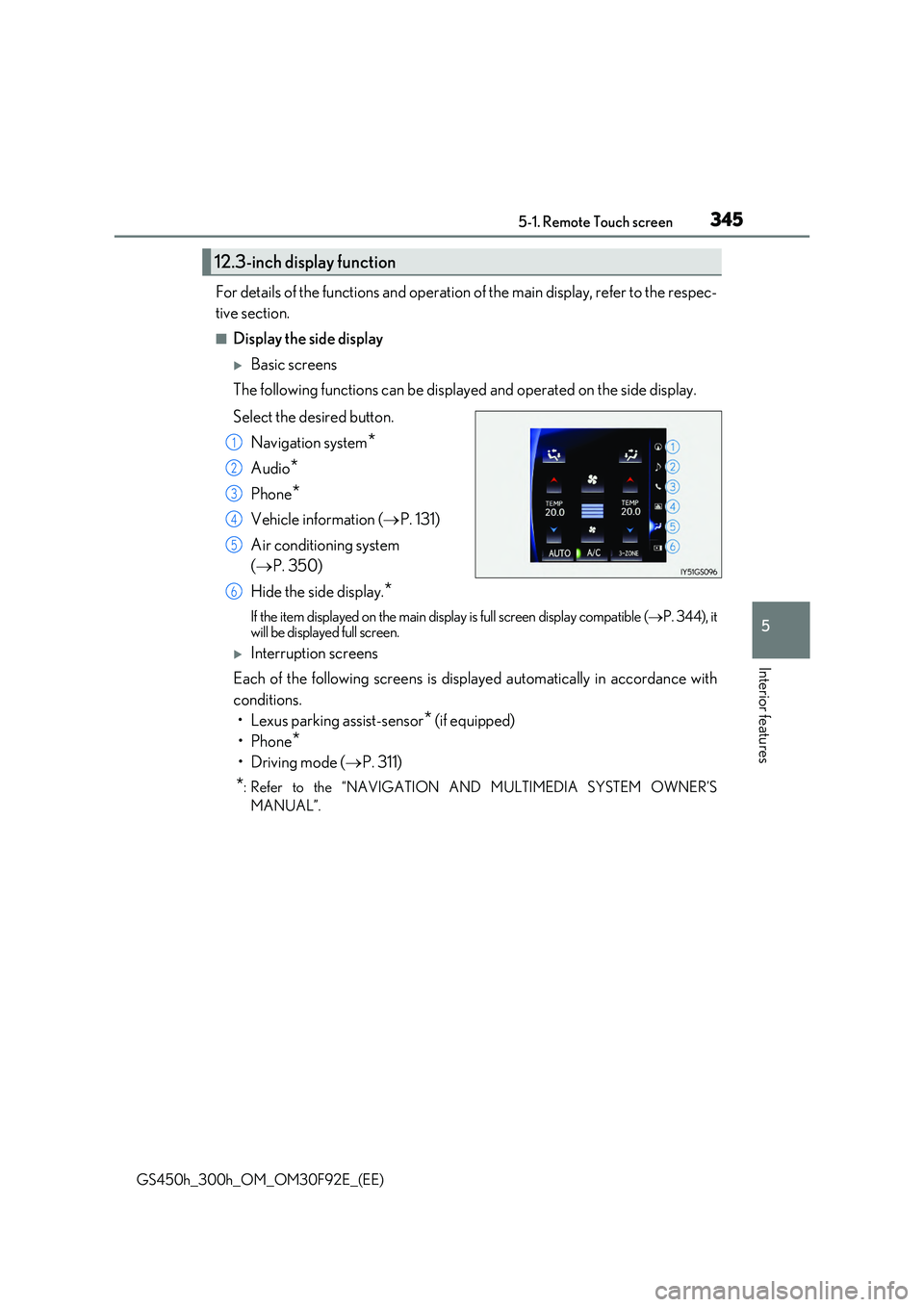
The following functions can be displayed and operated on the side display.
Select the desired button.
Navigation system*
Audio*
Phone*
Vehicle information ( P. 131)
Air conditioning system
( P. 350)
Hide the side display.*
If the item displayed on the main display is full screen display compatible ( P. 344), it will be displayed full screen.
Interruption screens
Each of the following screens is displayed automatically in accordance with
conditions.
• Lexus parking assist-sensor* (if equipped)
•Phone*
•Driving mode ( P. 311)
*: Refer to the “NAVIGATION AND MULTIMEDIA SYSTEM OWNER’S
MANUAL”.
12.3-inch display function
1
2
3
4
5
6
Page 346 of 600
3465-2. Using the air conditioning system and defogger
GS450h_300h_OM_OM30F92E_(EE)
Front automatic air conditioning system
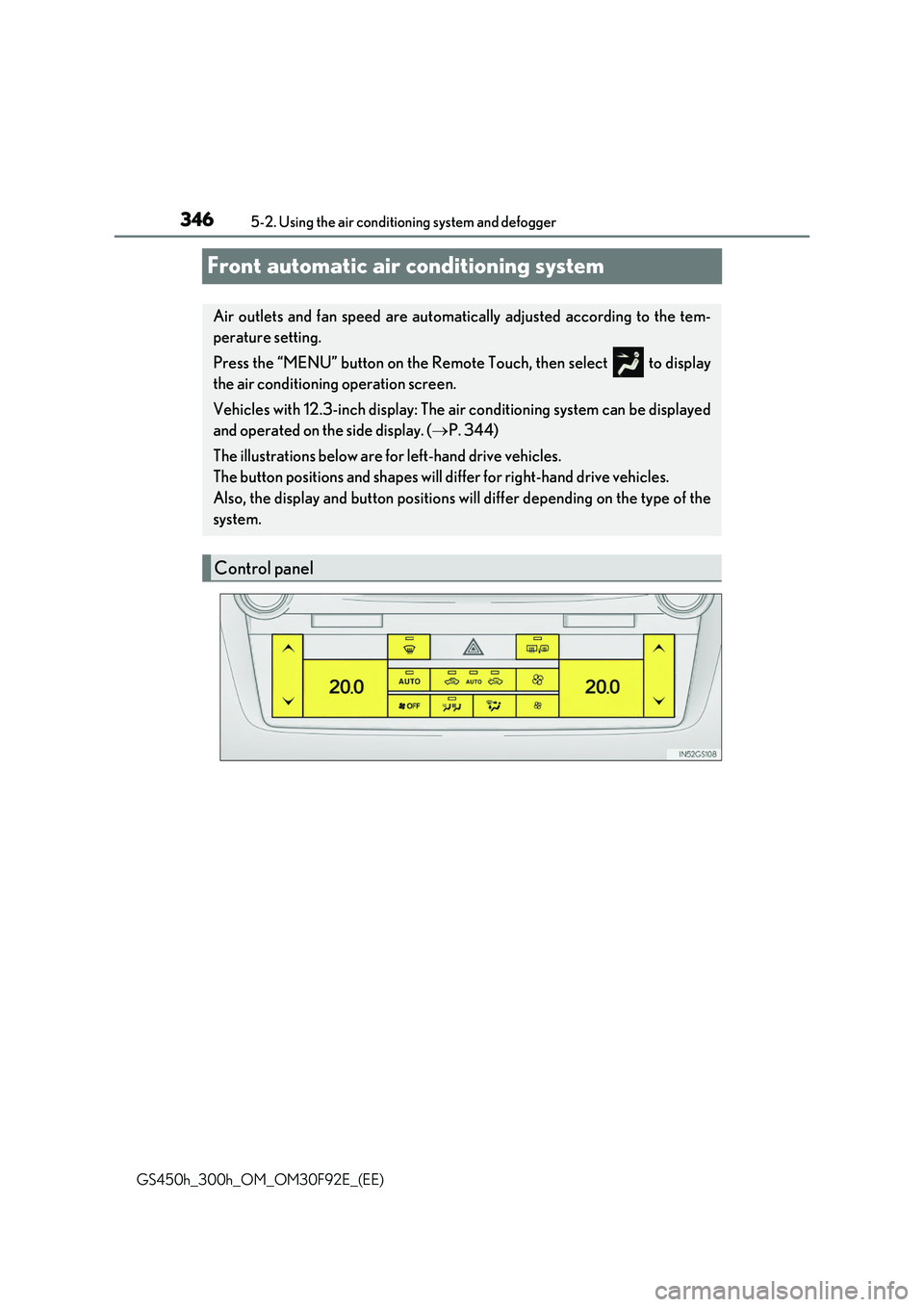
Air outlets and fan speed are automatically adjusted according to the tem-
perature setting.
Press the “MENU” button on the Remote Touch, then select to display
the air conditioning operation screen.
Vehicles with 12.3-inch display: The air conditioning system can be displayed
and operated on the side display. ( P. 344)
The illustrations below are for left-hand drive vehicles.
The button positions and shapes will di ffer for right-hand drive vehicles.
Also, the display and button positions will differ depending on the type of the
system.
Control panel