Auto Lexus GS350 2008 Owner's Guide
[x] Cancel search | Manufacturer: LEXUS, Model Year: 2008, Model line: GS350, Model: Lexus GS350 2008Pages: 598, PDF Size: 14.03 MB
Page 115 of 598
114
2-1. Driving procedures
GS_G_U
June 19, 2008 12:54 pm
CAUTION
■When starting the vehicle
Always keep your foot on the brake pedal while stopped with the engine running.
This prevents the vehicle from creeping.
■When driving the vehicle
●Do not drive if you are unfamiliar with the location of the brake and accelerator
pedals to avoid depressing the wrong pedal.
• Accidentally depressing the accelerator pedal instead of the brake pedal willresult in sudden acceleration that may lead to an accident that could result in
death or serious injury.
• When backing up, you may twist your body around, leading to a difficulty in operating the pedals. Make sure to operate the pedals properly.
• Make sure to keep a correct driving posture even when moving the vehicle only slightly, allowing you to depress the brake and accelerator pedals prop-
erly.
• Depress the brake pedal using your right foot. Depressing the brake pedal using your left foot may delay response in an emergency, resulting in an acci-
dent.
●Do not drive the vehicle over or stop the vehicle near flammable materials.
The exhaust system and exhaust gases can be extremely hot. This may cause a
fire if there is any flammable material nearby.
●Do not let the vehicle roll backwards while the shift lever is in a driving position, or
roll forward while the shift lever is in “R”.
Doing so may cause the engine not to operate or lead to poor brake and steering
performance, resulting in an accident or damage to the vehicle.
●If the smell of exhaust is noticed inside the vehicle, open the windows and check
that the trunk is closed.
Large amounts of exhaust in the vehicle can cause driver drowsiness and an acci-
dent, resulting in death or a serious health hazard. Have the vehicle inspected by
your Lexus dealer immediately.
●Do not under any circumstances shift the sh ift lever to “P”, “R” or “N” while the
vehicle is moving.
Doing so can cause significant damage to the automatic transmission and may
result in a loss of vehicle control.
GS_U_G.book Page 114 Thursday, June 19, 2008 12:54 PM
Page 121 of 598
120
2-1. Driving procedures
GS_G_U
June 19, 2008 12:54 pm
NOTICE
■If you get a flat tire while driving
A flat or damaged tire may cause the following situations. Hold the steering wheel
firmly and gradually press the brake pedal to slow down the vehicle.
●It may be difficult to control your vehicle.
●The vehicle will make abnormal sounds.
●The vehicle will behave abnormally.
Replace a flat tire with a new one. ( →P. 5 1 5 )
■When encountering flooded roads
Do not drive on a road that has flooded after heavy rain etc. Doing so may cause the
following serious damage to the vehicle.
●Engine stalling
●Short in electrical components
●Engine damage caused by water immersion
In the event that you drive on a flooded road and the vehicle is flooded, be sure to
have your Lexus dealer check the following.
●Brake function
●Changes in quantity and quality of oil and fluid used for the engine, automatic
transmission, transfer (4WD models), differentials, etc.
●Lubricant condition for the propeller shaft (4WD models), bearings and suspen-
sion joints (where possible) and the function of all joints, bearings, etc.
GS_U_G.book Page 120 Thursday, June 19, 2008 12:54 PM
Page 124 of 598
123
2-1. Driving procedures
2
When driving
GS_G_U
June 19, 2008 12:54 pm
■If the engine does not start
The immobilizer system may not have been deactivated. (→P. 7 3 )
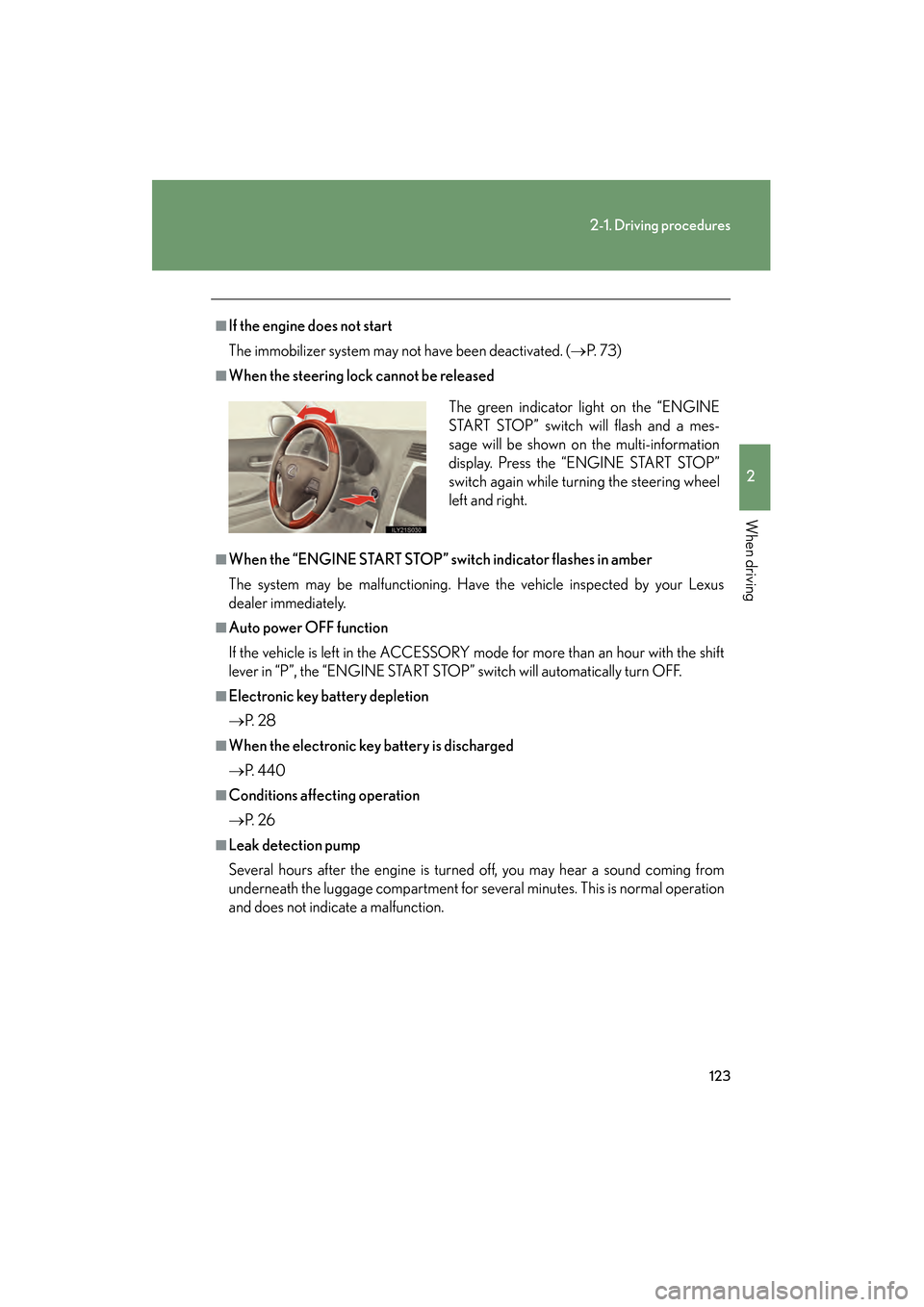
■When the steering lock cannot be released
■When the “ENGINE START STOP” switch indicator flashes in amber
The system may be malfunctioning. Have the vehicle inspected by your Lexus
dealer immediately.
■Auto power OFF function
If the vehicle is left in the ACCESSORY mode for more than an hour with the shift
lever in “P”, the “ENGINE START STOP” switch will automatically turn OFF.
■Electronic key battery depletion
→P. 2 8
■When the electronic key battery is discharged
→P. 4 4 0
■Conditions affecting operation
→P. 2 6
■Leak detection pump
Several hours after the engine is turned off, you may hear a sound coming from
underneath the luggage compartment for several minutes. This is normal operation
and does not indicate a malfunction. The green indicator light on the “ENGINE
START STOP” switch will flash and a mes-
sage will be shown on the multi-information
display. Press the “ENGINE START STOP”
switch again while turning the steering wheel
left and right.
GS_U_G.book Page 123 Thursday, June 19, 2008 12:54 PM
Page 126 of 598
125
2-1. Driving procedures
2
When driving
GS_G_U
June 19, 2008 12:54 pm
Automatic transmission
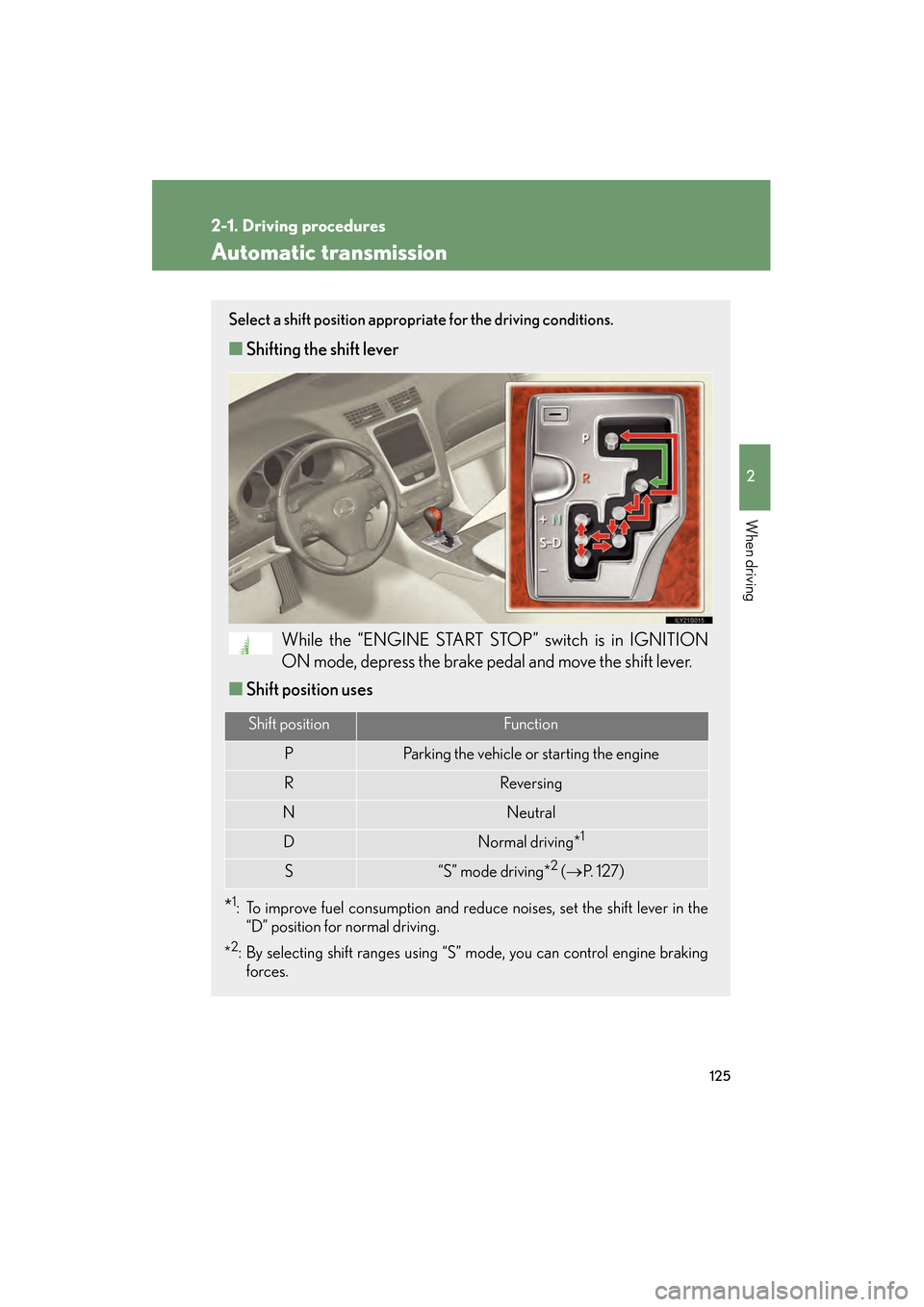
Select a shift position appropriate for the driving conditions.
■Shifting the shift lever
While the “ENGINE START STOP” switch is in IGNITION
ON mode, depress the brake pedal and move the shift lever.
■ Shift position uses
*1: To improve fuel consumption and reduce noises, set the shift lever in the
“D” position for normal driving.
*
2: By selecting shift ranges using “S” mode, you can control engine braking forces.
Shift positionFunction
PParking the vehicle or starting the engine
RReversing
NNeutral
DNormal driving*1
S“S” mode driving*2 ( → P. 1 2 7 )
GS_U_G.book Page 125 Thursday, June 19, 2008 12:54 PM
Page 128 of 598
127
2-1. Driving procedures
2
When driving
GS_G_U
June 19, 2008 12:54 pm
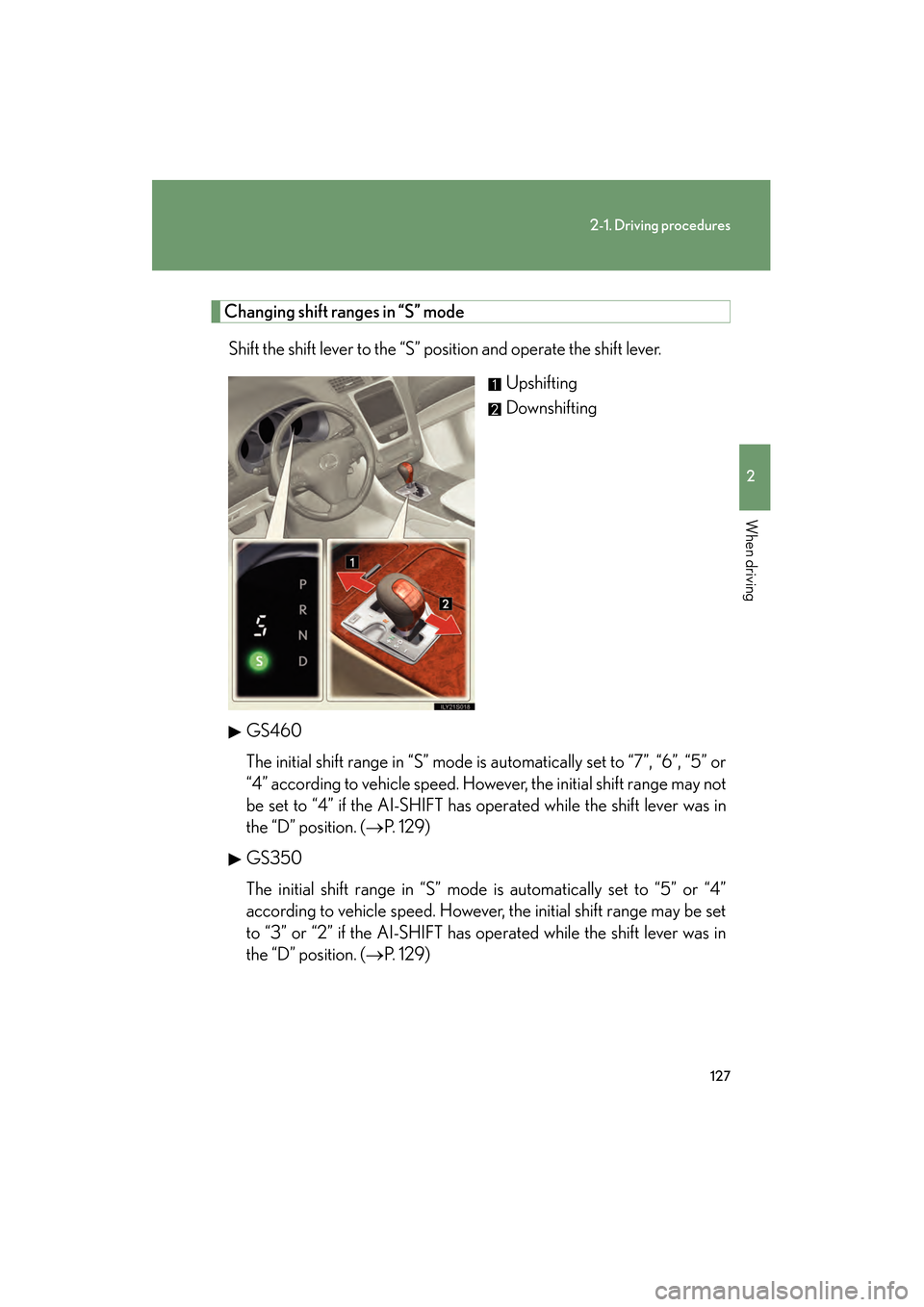
Changing shift ranges in “S” modeShift the shift lever to the “S” position and operate the shift lever. Upshifting
Downshifting
GS460
The initial shift range in “S” mode is automatically set to “7”, “6”, “5” or
“4” according to vehicle speed. However, the initial shift range may not
be set to “4” if the AI-SHIFT has operated while the shift lever was in
the “D” position. ( →P. 129)
GS350
The initial shift range in “S” mode is automatically set to “5” or “4”
according to vehicle speed. However, the initial shift range may be set
to “3” or “2” if the AI-SHIFT has operated while the shift lever was in
the “D” position. ( →P. 129)
GS_U_G.book Page 127 Thursday, June 19, 2008 12:54 PM
Page 129 of 598
128
2-1. Driving procedures
GS_G_U
June 19, 2008 12:54 pm
■Shift ranges and their functions
●You can choose from 8 levels (GS460) or 6 levels (GS350) of
engine braking force.
● A lower shift range will provide greater engine braking force than a
higher shift range, and the engine revolutions will also increase.
● If you accelerate while in ranges “1” to “7” (GS460) or “1” to “5”
(GS350), the shift range may automatically range up in accordance
with the vehicle’s speed.
■“S” mode
When the shift range is “6” (GS460) or “4” (GS350) or lower, holding the shift
lever toward “+” sets the shift range to “8” (GS460) or “6” (GS350).
■Downshifting restrictions warning buzzer (in the “S” mode)
To help ensure safety and driving performance, downshifting operation may some-
times be restricted. In some circumstances, downshifting may not be possible even
when the shift lever is operated. (The warning buzzer will sound twice.)
■When driving with the cruise control syst em (or dynamic radar cruise control sys-
tem)
The engine brake will not operate in the “S” mode, even when downshifting to “7”,
“6”, “5” or “4” (GS460) or “5” or “4” (GS350). ( →P. 150, 153)
■Snow mode automatic deactivation
Snow mode is automatically deactivated if the “ENGINE START STOP” switch is
turned to ACCESSORY or IGNITION ON mode after driving in snow mode.
■If the shift lever cannot be shifted from “P”
→ P. 5 2 4
GS_U_G.book Page 128 Thursday, June 19, 2008 12:54 PM
Page 130 of 598
129
2-1. Driving procedures
2
When driving
GS_G_U
June 19, 2008 12:54 pm
■If the indicator does not come on even after shifting the shift lever to “S”
This may indicate a malfunction in the automatic transmission. Have the vehicle
inspected by your Lexus dealer immediately.
(In this situation, the vehicle will operate as if the shift lever is in “D”.)
■AI-SHIFT
The AI-SHIFT automatically shifts the gear to the optimal position according to the
driver’s input and driving conditions.
GS460: The AI-SHIFT automatically operates when the shift lever is in the “D” or
“S” position.
GS350: The AI-SHIFT automatically operates when the shift lever is in the “D”
position. (Shifting the shift lever to the “S” position cancels the function.)
GS_U_G.book Page 129 Thursday, June 19, 2008 12:54 PM
Page 135 of 598
134
2-2. Instrument cluster
GS_G_U
June 19, 2008 12:54 pm
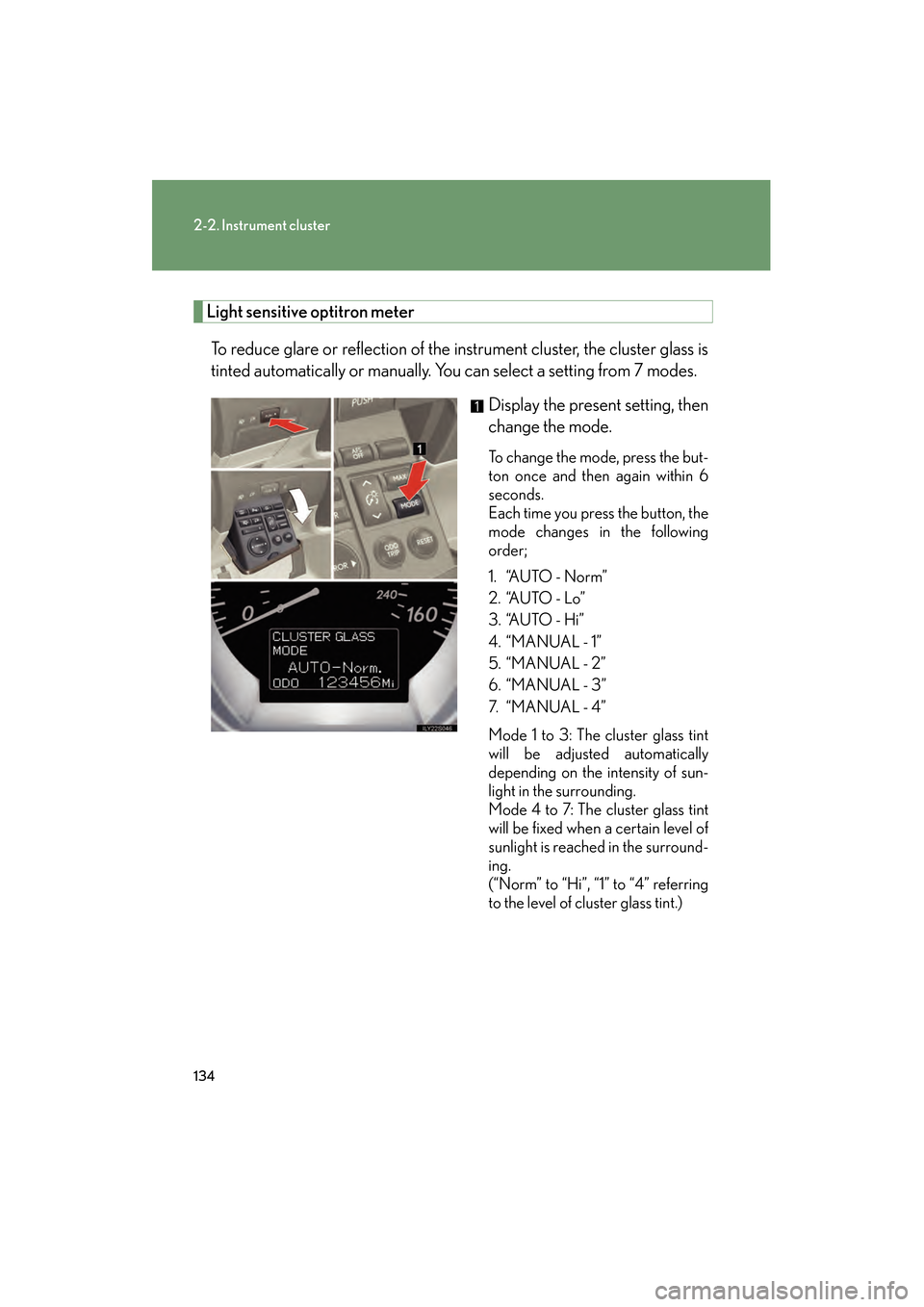
Light sensitive optitron meterTo reduce glare or reflection of the instrument cluster, the cluster glass is
tinted automatically or manually. You can select a setting from 7 modes. Display the present setting, then
change the mode.
To change the mode, press the but-
ton once and then again within 6
seconds.
Each time you press the button, the
mode changes in the following
order;
1. “AUTO - Norm”
2. “AUTO - Lo”
3. “AUTO - Hi”
4. “MANUAL - 1”
5. “MANUAL - 2”
6. “MANUAL - 3”
7. “ M A N U A L - 4 ”
Mode 1 to 3: The cluster glass tint
will be adjusted automatically
depending on the intensity of sun-
light in the surrounding.
Mode 4 to 7: The cluster glass tint
will be fixed when a certain level of
sunlight is reached in the surround-
ing.
(“Norm” to “Hi”, “1” to “4” referring
to the level of cluster glass tint.)
GS_U_G.book Page 134 Thursday, June 19, 2008 12:54 PM
Page 140 of 598
139
2-2. Instrument cluster
2
When driving
GS_G_U
June 19, 2008 12:54 pm
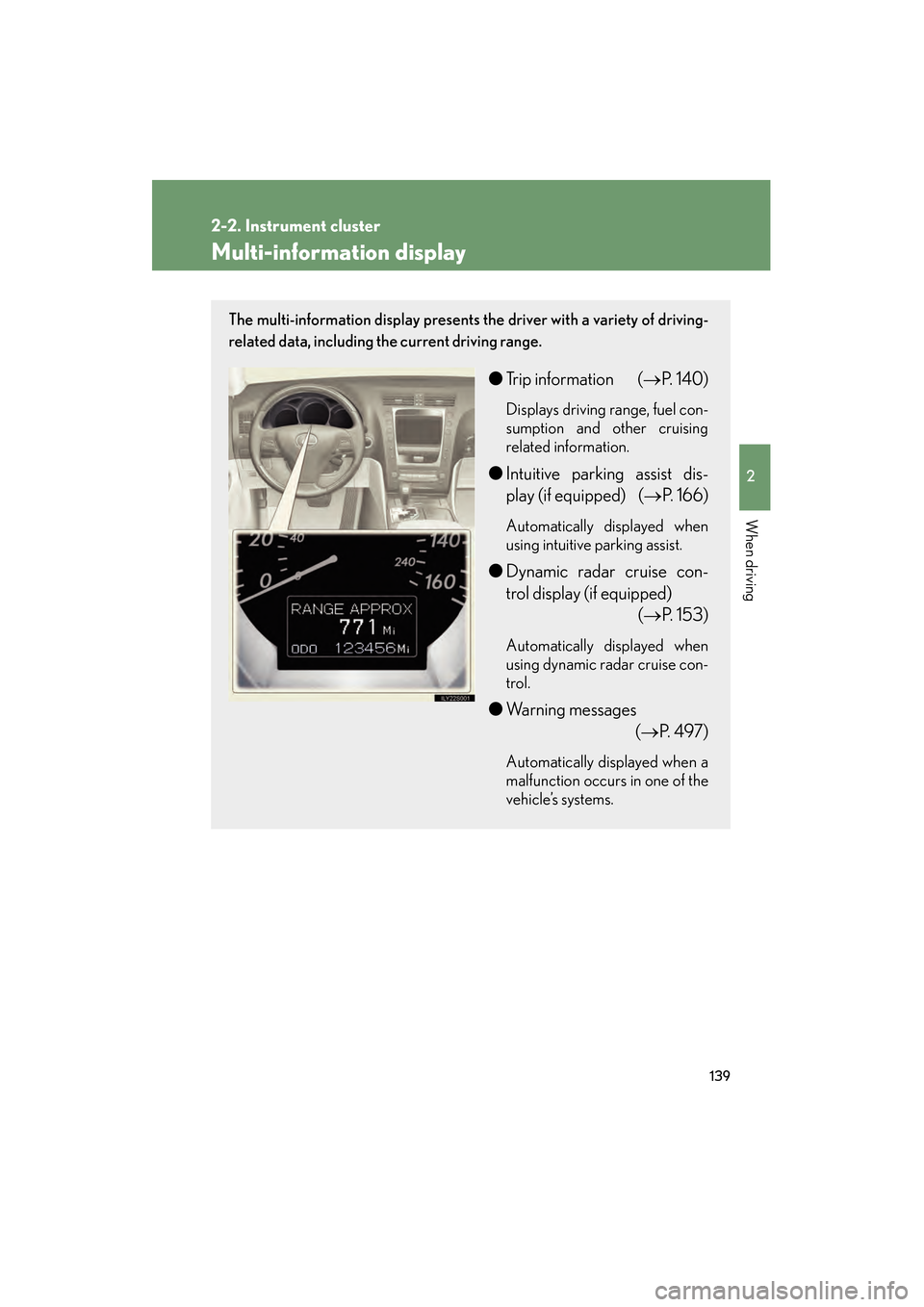
Multi-information display
The multi-information display presents the driver with a variety of driving-
related data, including the current driving range.
●Trip information ( →P. 1 4 0 )
Displays driving range, fuel con-
sumption and other cruising
related information.
●Intuitive parking assist dis-
play (if equipped) (→ P. 166)
Automatically displayed when
using intuitive parking assist.
●Dynamic radar cruise con-
trol display (if equipped)
(→P. 153)
Automatically displayed when
using dynamic radar cruise con-
trol.
●Warning messages
(→P. 4 9 7 )
Automatically displayed when a
malfunction occurs in one of the
vehicle’s systems.
GS_U_G.book Page 139 Thursday, June 19, 2008 12:54 PM
Page 143 of 598
142
GS_G_U
June 19, 2008 12:54 pm
2-3. Operating the lights and windshield wipers
Headlight switch
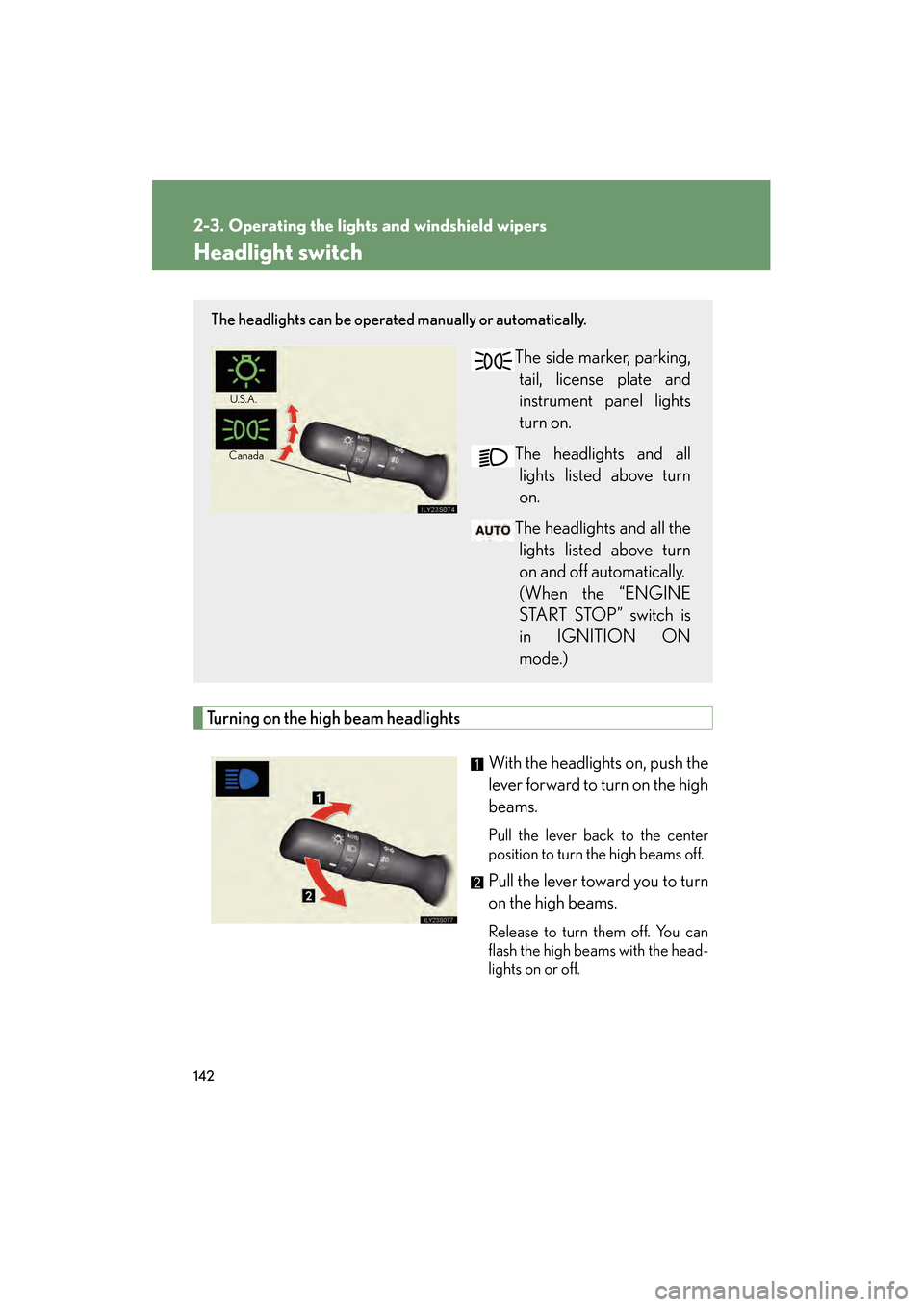
Turning on the high beam headlightsWith the headlights on, push the
lever forward to turn on the high
beams.
Pull the lever back to the center
position to turn the high beams off.
Pull the lever toward you to turn
on the high beams.
Release to turn them off. You can
flash the high beams with the head-
lights on or off.
The headlights can be operated manually or automatically.
The side marker, parking,tail, license plate and
instrument panel lights
turn on.
The headlights and all lights listed above turn
on.
The headlights and all the lights listed above turn
on and off automatically.
(When the “ENGINE
START STOP” switch is
in IGNITION ON
mode.)
U.S.A .
Canada
GS_U_G.book Page 142 Thursday, June 19, 2008 12:54 PM