Auto Lexus GS350 2008 Service Manual
[x] Cancel search | Manufacturer: LEXUS, Model Year: 2008, Model line: GS350, Model: Lexus GS350 2008Pages: 598, PDF Size: 14.03 MB
Page 159 of 598
158
2-4. Using other driving systems
GS_G_U
June 19, 2008 12:54 pm
■The dynamic radar cruise can be set when
●The shift lever is in “D” or the “4”, “5”, “6”, “7” or “8” (GS460) or “4”, “5” or “6”
(GS350) range of “S”.
●Vehicle speed is between approximately 27 mph (43 km/h) and 87 mph (139
km/h).
■Accelerating
The vehicle can be accelerated normally.
■Automatically canceling vehicle-to-vehicle distance control
Vehicle-to-vehicle distance control driving is automatically canceled in the follow-
ing situations.
●Actual vehicle speed falls below 25 mph (40 km/h)
●VSC is activated
●The windshield wipers are operating at high speed
●The mode select switch is set to snow mode
●The sensor cannot operate correctly because it is covered in some way
Vehicle-to-vehicle distance control driving must be reset by turning the “ON-
OFF” button on again.
If vehicle-to-vehicle distance control driving is automatically canceled for any other
reason, there may be a malfunction in the system. Contact your Lexus dealer.
■Automatically canceling constant speed control
The set speed is automatically canceled in the following situations.
●Actual vehicle speed is more than 10 mph (16 km/h) below the preset vehicle
speed
●Actual vehicle speed falls below 25 mph (40 km/h)
●VSC is activated
GS_U_G.book Page 158 Thursday, June 19, 2008 12:54 PM
Page 162 of 598
161
2-4. Using other driving systems
2
When driving
GS_G_U
June 19, 2008 12:54 pm
CAUTION
■Before using dynamic radar cruise control
Do not overly rely on vehicle-to-vehicle distance control.
Be aware of the set vehicle speed. If automatic deceleration/acceleration is not
appropriate, adjust the vehicle speed, as well as the distance between your vehicle
and vehicles ahead by applying the brakes, etc.
■To avoid operating the dynamic radar cruise control by mistake
Keep the “ON-OFF” button off when not in use.
■Situations unsuitable for dynamic radar cruise control
Do not use dynamic radar cruise control in any of the following situations.
Doing so may result in inappropriate control of speed and could cause serious or
fatal accident.
●In heavy traffic
●On roads with sharp bends
●On winding roads
●On slippery roads, such as those covered with rain, ice or snow
●On steep downhills, where there are sudden changes between sharp up and
down gradients
Vehicle speed may exceed the set speed when driving down a steep hill.
●At entrances to expressways
●When weather conditions are bad enough that they may prevent the sensors
from functioning correctly (fog, snow, sandstorm, etc.)
●When the approach warning buzzer can be heard often
GS_U_G.book Page 161 Thursday, June 19, 2008 12:54 PM
Page 185 of 598
184
2-4. Using other driving systems
GS_G_U
June 19, 2008 12:54 pm
Driving assist systems
To help enhance driving safety and performance, the following systems
operate automatically in response to various driving situations. Be aware,
however, that these systems are supplementary and should not be relied
upon too heavily when operating the vehicle.
■ ABS (Anti-lock Brake System)
Helps to prevent wheel lock when the brakes are applied suddenly, or if
the brakes are applied while driving on a slippery road surface.
■Brake assist
Generates an increased level of braking force after the brake pedal is
depressed, when the system detects a panic stop situation.
■VSC (Vehicle Stability Control)
Helps the driver to control skidding when swerving suddenly or turning on
slippery road surfaces.
■TRAC (Traction Control)
Maintains drive power and prevents the rear wheels from spinning when
starting the vehicle or accelerating on slippery roads.
■Hill-start assist control
Helps prevent the vehicle from rolling backwards when starting on an
incline or slippery slope. It operates for approximately 5 seconds at maxi-
mum.
■EPS (Electric Power Steering)
Employs an electric motor to reduce the amount of effort needed to turn
the steering wheel.
■Active stabilizer suspensi on system (if equipped)
Turns at smaller angles to maintain the stable vehicle posture.
GS_U_G.book Page 184 Thursday, June 19, 2008 12:54 PM
Page 188 of 598
187
2-4. Using other driving systems
2
When driving
GS_G_U
June 19, 2008 12:54 pm
■Automatic reactivation of TRAC and VSC
Turning the “ENGINE START STOP” switch OFF after turning off the TRAC and
VSC systems will automatically re-enable them.
■Automatic TRAC reactivation
If only the TRAC system is turned off, the TRAC system will turn on when the vehi-
cle speed increases.
■Automatic TRAC and VSC reactivation
If the TRAC and VSC systems are turned off, the systems will not turn on even when
the vehicle speed increases.
■Sounds and vibrations caused by the ABS, brake assist, VSC, TRAC, hill-start
assist control and VGRS (GS460) systems
●A sound may be heard from the engine compartment when the engine is
started or just after the vehicle begins to move. This sound does not indicate that
a malfunction has occurred in any of these systems.
●Any of the following conditions may occur when the above systems are operat-
ing. None of these indicates that a malfunction has occurred.
• Vibrations may be felt through the vehicle body and steering.
• A motor sound may be heard after the vehicle comes to a stop.
• The brake pedal may pulsate slightly after the ABS is activated.
• The brake pedal may move down slightly after the ABS is activated.
■Hill-start assist control operating conditions
This system comes into operation under the following conditions after the brake
pedal has been depressed and the vehicle has come to a stop:
●The shift lever is in the “D” or “S”.
●The system has detected that the vehicle is moving backwards.
●GS350: The brake pedal is not depressed.
GS_U_G.book Page 187 Thursday, June 19, 2008 12:54 PM
Page 191 of 598
190
2-4. Using other driving systems
GS_G_U
June 19, 2008 12:54 pm
PCS (Pre-Collision System) (if equipped)
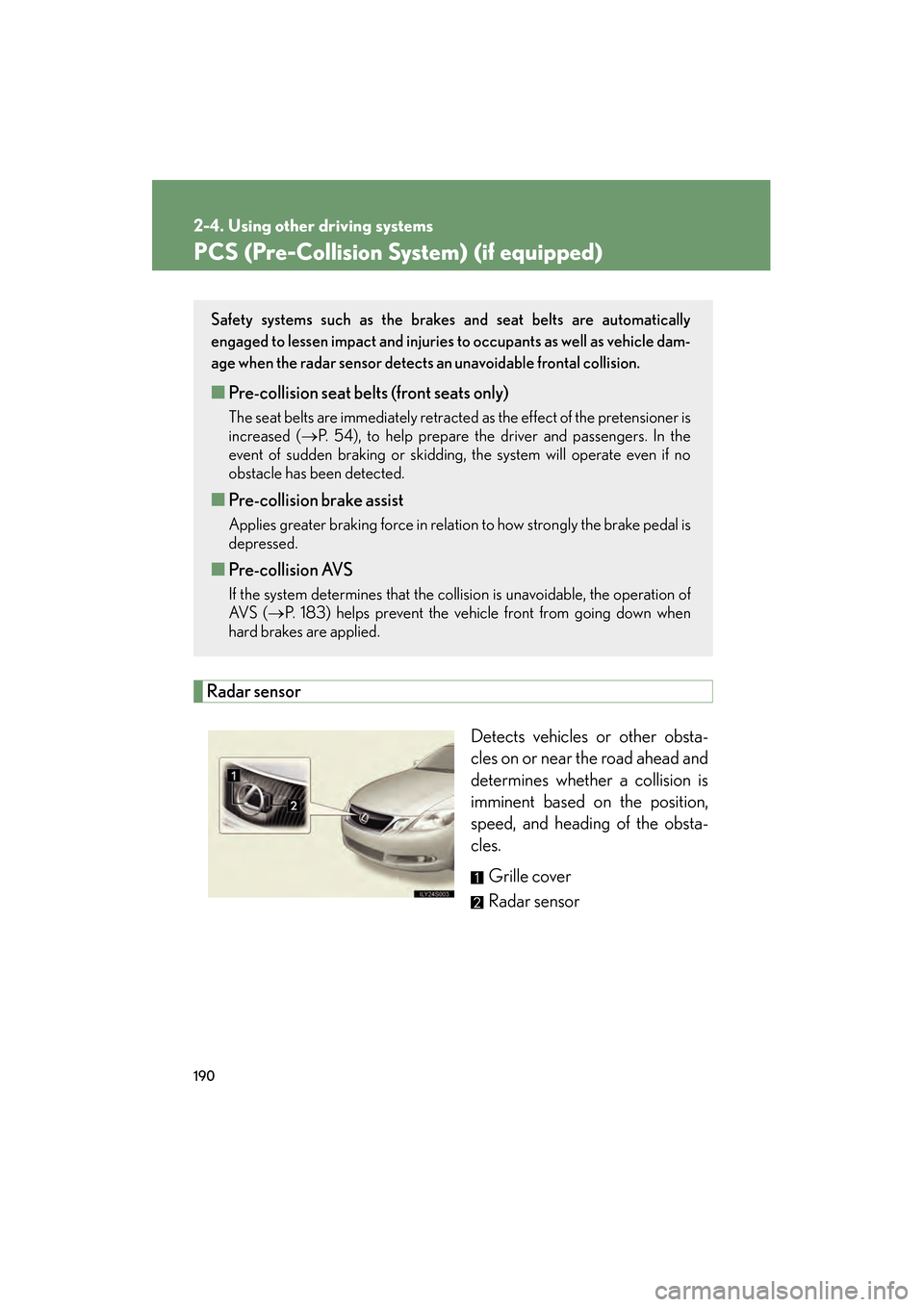
Radar sensorDetects vehicles or other obsta-
cles on or near the road ahead and
determines whether a collision is
imminent based on the position,
speed, and heading of the obsta-
cles. Grille cover
Radar sensor
Safety systems such as the brakes and seat belts are automatically
engaged to lessen impact and injuries to occupants as well as vehicle dam-
age when the radar sensor detects an unavoidable frontal collision.
■Pre-collision seat belts (front seats only)
The seat belts are immediately retracted as the effect of the pretensioner is
increased ( →P. 54), to help prepare the driver and passengers. In the
event of sudden braking or skidding, the system will operate even if no
obstacle has been detected.
■ Pre-collision brake assist
Applies greater braking force in relation to how strongly the brake pedal is
depressed.
■Pre-collision AVS
If the system determines that the collision is unavoidable, the operation of
AV S ( →P. 183) helps prevent the vehicle front from going down when
hard brakes are applied.
GS_U_G.book Page 190 Thursday, June 19, 2008 12:54 PM
Page 207 of 598
206
GS_G_U
June 19, 2008 12:54 pm
3-1. Using the touch screen ........................... 208
Touch screen ........................... 208
Setting the touch screen ...... 212
3-2. Using the air conditioning system and
defogger........................ 217
Automatic air conditioning system ...................................... 217
Rear window and
outside rear view
mirror defoggers................. 225
GS_U_G.book Page 206 Thursday, June 19, 2008 12:54 PM
Page 216 of 598
215
3-1. Using the touch screen
3
Interior features
GS_G_U
June 19, 2008 12:54 pm
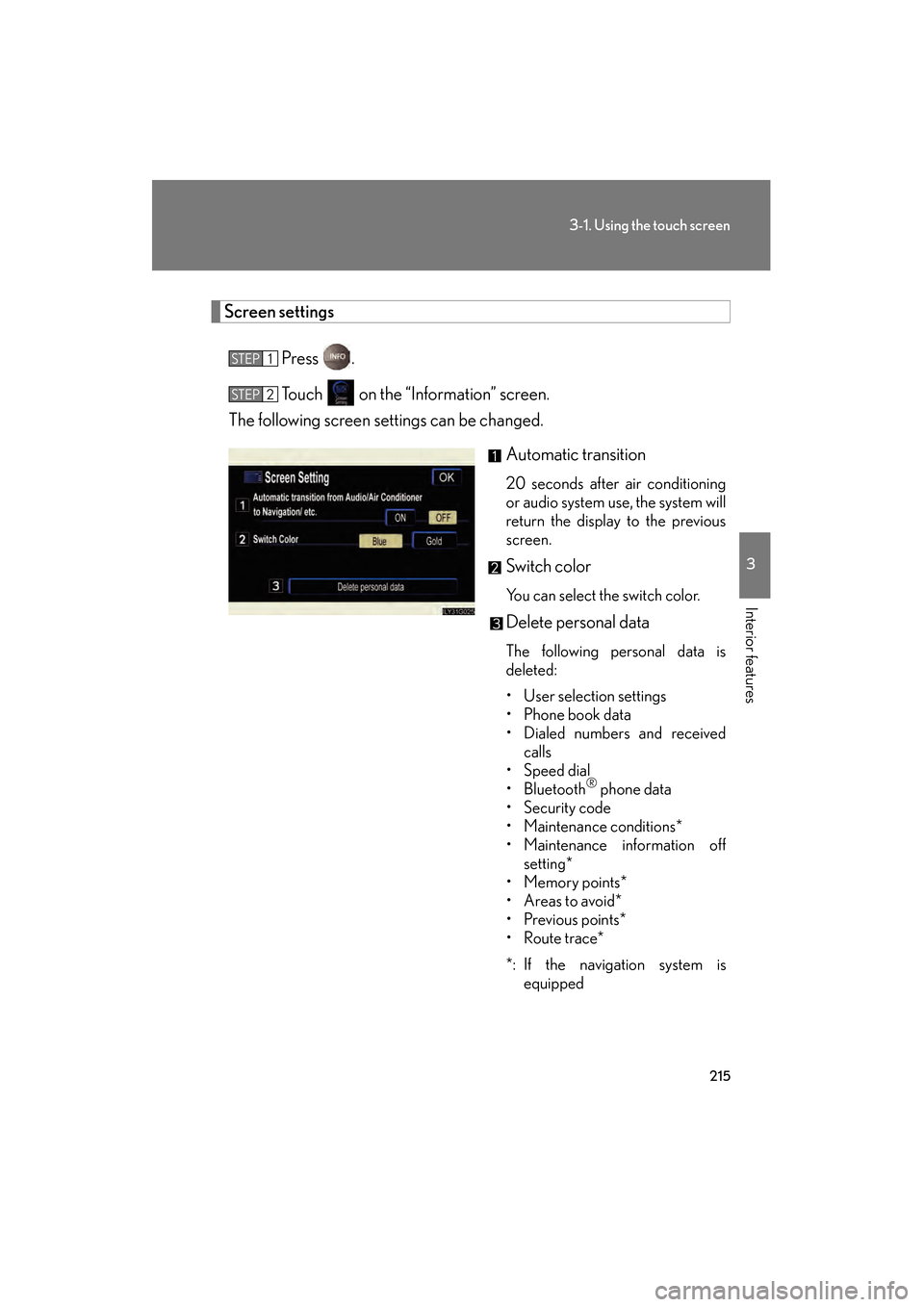
Screen settingsPress .
Touch on the “Information” screen.
The following screen settings can be changed.
Automatic transition
20 seconds after air conditioning
or audio system use, the system will
return the display to the previous
screen.
Switch color
You can select the switch color.
Delete personal data
The following personal data is
deleted:
• User selection settings
• Phone book data
• Dialed numbers and receivedcalls
• Speed dial
•Bluetooth
® phone data
• Security code
• Maintenance conditions*
• Maintenance information off setting*
•Memory points*
•Areas to avoid*
•Previous points*
•Route trace*
*: If the navigation system is equipped
STEP1
STEP2
GS_U_G.book Page 215 Thursday, June 19, 2008 12:54 PM
Page 217 of 598
216
3-1. Using the touch screen
GS_G_U
June 19, 2008 12:54 pm
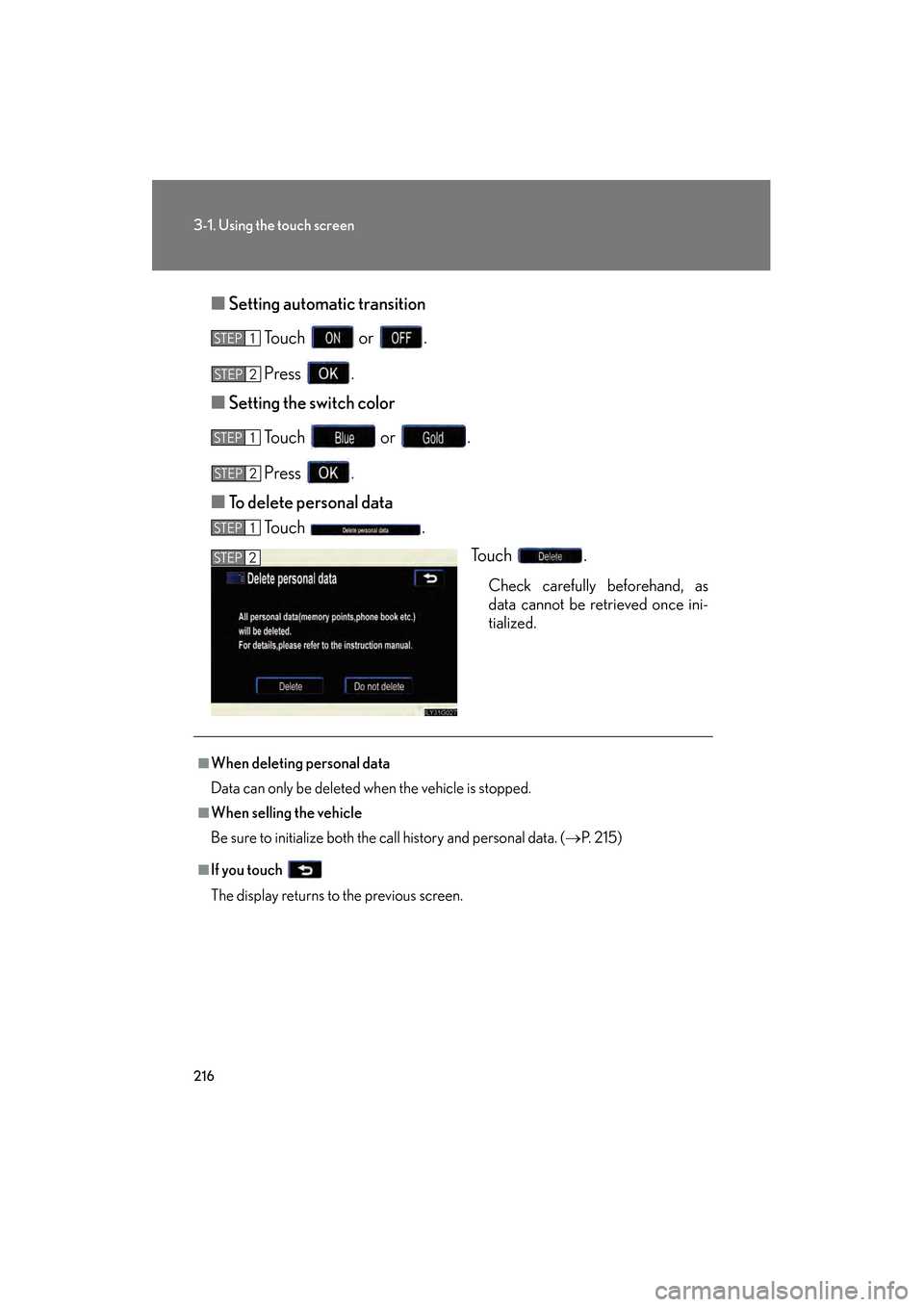
■Setting automatic transition
Touch or .
Press .
■ Setting the switch color
Touch or .
Press .
■ To delete personal data
Touch .
Touch .
Check carefully beforehand, as
data cannot be retrieved once ini-
tialized.
STEP1
STEP2
STEP1
STEP4STEP2
STEP1
STEP2
■When deleting personal data
Data can only be deleted when the vehicle is stopped.
■When selling the vehicle
Be sure to initialize both the call history and personal data. ( →P. 2 1 5 )
■If you touch
The display returns to the previous screen.
GS_U_G.book Page 216 Thursday, June 19, 2008 12:54 PM
Page 218 of 598
217
3
Interior features
GS_G_U
June 19, 2008 12:54 pm
3-2. Using the air conditioning system and defogger
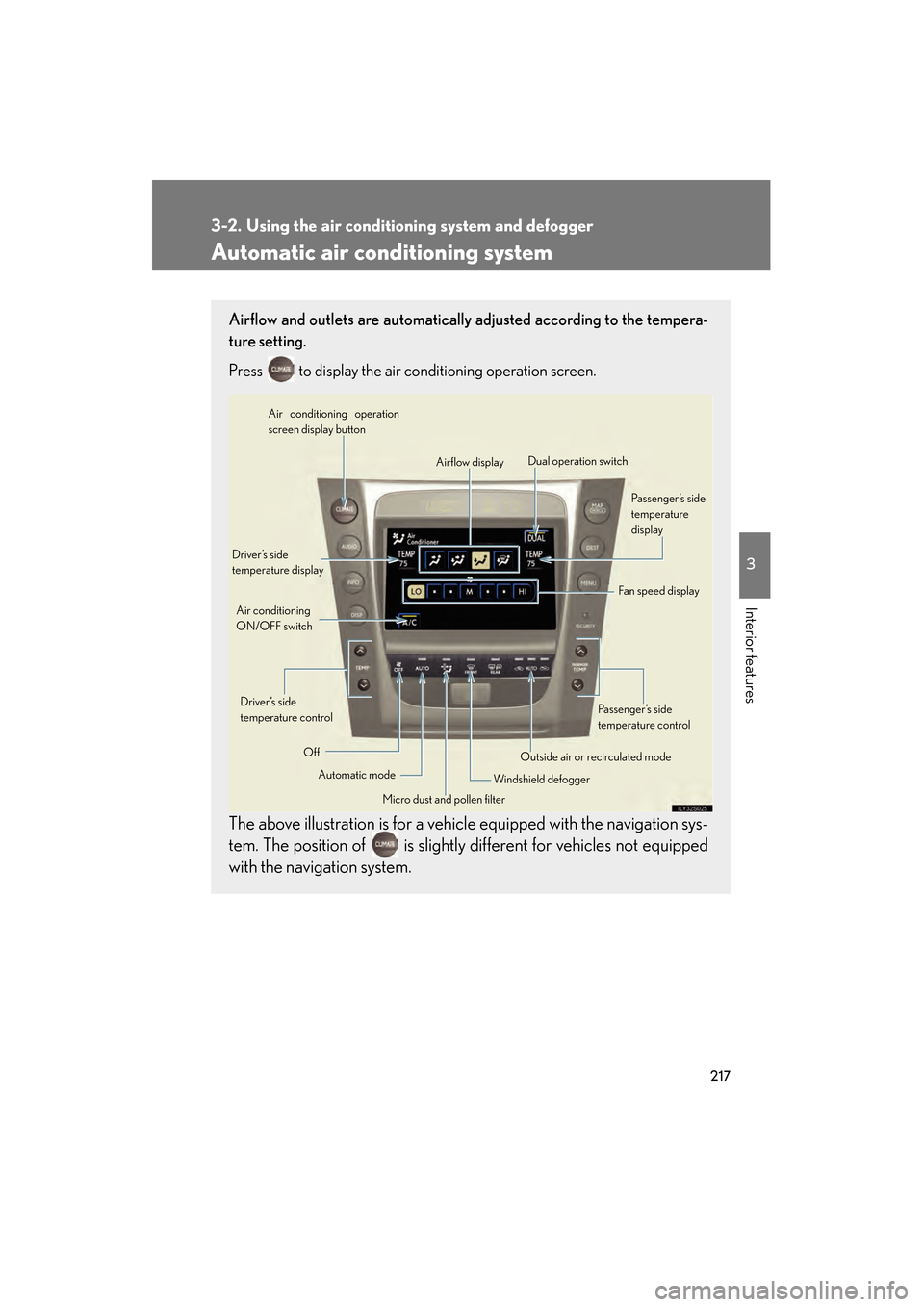
Automatic air conditioning system
Airflow and outlets are automatically adjusted according to the tempera-
ture setting.
Press
to display the air conditioning operation screen.
The above illustration is for a vehicle equipped with the navigation sys-
tem. The position of is slightly different for vehicles not equipped
with the navigation system.
Automatic mode
Driver’s side
temperature display
Fan speed display
Off Airflow display
Air conditioning operation
screen display button
Passenger’s side
temperature
display
Micro dust and pollen filter
Driver’s side
temperature control
Air conditioning
ON/OFF switch
Outside air or recirculated mode
Windshield defogger Passenger’s side
temperature control
Dual operation switch
GS_U_G.book Page 217 Thursday, June 19, 2008 12:54 PM
Page 219 of 598
218
3-2. Using the air conditioning system and defogger
GS_G_U
June 19, 2008 12:54 pm
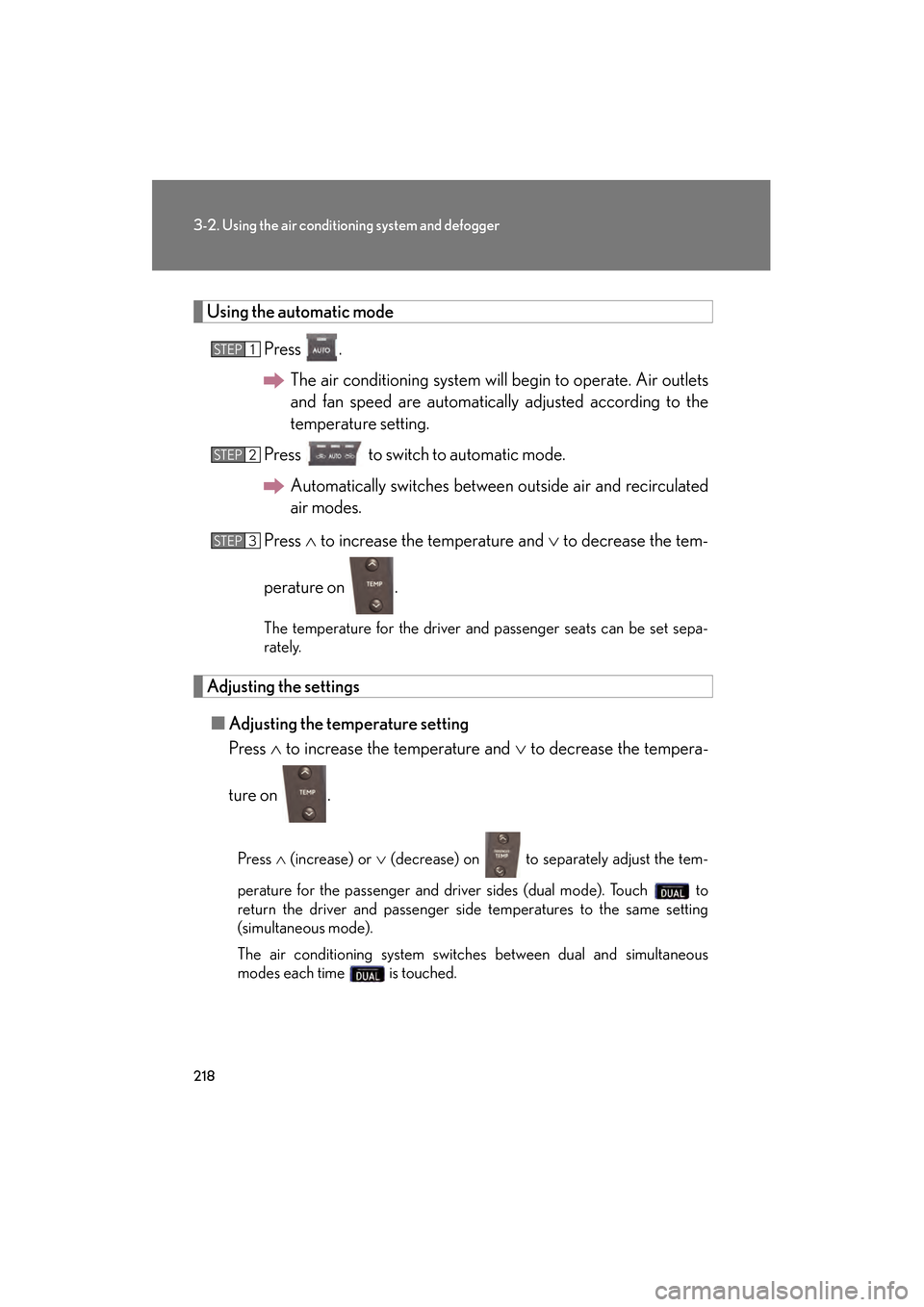
Using the automatic modePress .The air conditioning system will begin to operate. Air outlets
and fan speed are automatically adjusted according to the
temperature setting.
Press to switch to automatic mode. Automatically switches between outside air and recirculated
air modes.
Press ∧ to increase the temperature and ∨ to decrease the tem-
perature on .
The temperature for the driver and passenger seats can be set sepa-
rately.
Adjusting the settings ■ Adjusting the temperature setting
Press ∧ to increase the temperature and ∨ to decrease the tempera-
ture on .
Press ∧ (increase) or ∨ (decrease) on to separately adjust the tem-
perature for the passenger and driver sides (dual mode). Touch to
return the driver and passenger side temperatures to the same setting
(simultaneous mode).
The air conditioning system switches between dual and simultaneous
modes each time is touched.
STEP1
STEP2
STEP3
GS_U_G.book Page 218 Thursday, June 19, 2008 12:54 PM