Heat Lexus GS350 2011 User Guide
[x] Cancel search | Manufacturer: LEXUS, Model Year: 2011, Model line: GS350, Model: Lexus GS350 2011Pages: 654, PDF Size: 11.03 MB
Page 144 of 654
143
2-1. Driving procedures
2
When driving
GS_G_U (OM30C11U)
October 28, 2011 5:15 pm
Parking brake
■Usage in winter time
See “Winter driving tips” for parking brake usage in winter time. (→P. 2 1 8 )
NOTICE
■Before driving
Fully release the parking brake.
Driving the vehicle with the parking brake set will lead to brake components over-
heating, which may affect braking performance and increase brake wear.
Sets the parking brake*
(Depressing the pedal again
releases the parking brake.)
*: Fully depress the parking
brake pedal with your left
foot while depressing the
brake pedal with your right
foot.
Canada
U.S.A .
Page 149 of 654
148
2-2. Instrument cluster
GS_G_U (OM30C11U)
October 28, 2011 5:15 pm
NOTICE
■To prevent damage to the engine and its components
●The engine may be overheating if the engine coolant temperature gauge is in the
red zone (“H”). In this case, immediately stop the vehicle in a safe place. Check
the engine after it has cooled completely. (→P. 5 7 8 )
●Do not let the indicator needle of the ta chometer enter the red zone, which indi-
cates the maximum engine speed.
■To activate the light sensitivity function properly
Do not affix a sticker or window tint to the rear window glass, or put an object
behind the rear seat.
Page 165 of 654
164
2-3. Operating the lights and windshield wipers
GS_G_U (OM30C11U)
October 28, 2011 5:15 pm
Headlight cleaner switch∗
■The headlight cleaner can be operated when
The “ENGINE START STOP” switch is in IGNITION ON mode and the headlight
switch is turned ON.
NOTICE
■When the washer fluid tank is empty
Do not press the switch continually, as the washer fluid pump may overheat.
∗: If equipped
Washer fluid can be sprayed on the headlights.
Press the switch to clean the
headlights.
Page 205 of 654
204
2-4. Using other driving systems
GS_G_U (OM30C11U)
October 28, 2011 5:15 pm
■Reduced effectiveness of EPS
The effectiveness of EPS is reduced to prevent the system from overheating when
there is frequent steering input over an extended period of time. The steering wheel
may feel heavy as a result. Should this occur, refrain from excessive steering input or
stop the vehicle and turn the engine off. The system should return to normal about
10 minutes.
■GS460: VGRS is disabled in the following situations
●During stopping or the steering wheel has been moved for a long time while
driving at lower speeds.
●After the engine is restarted at less than -22°F (-30°C).
CAUTION
Any of the following conditions may result in an accident which could cause death or
serious injury:
■The ABS does not operate effectively when
●The limits of tire gripping performance have been exceeded.
●The vehicle hydroplanes while driving at high speed on a wet or slick road.
■Stopping distance when the ABS is operating will exceed that of normal condi-
tions
The ABS is not designed to shorten the vehicle’s stopping distance. Always main-
tain a safe distance from the vehicle in front of you in the following situations.
●When driving on dirt, gravel or snow-covered roads
●When driving with tire chains
●When driving over bumps in the road
●When driving over roads with potholes or uneven roads
■TRAC may not operate effectively when
Directional control and power may not be achievable while driving on slippery road
surfaces, even if the TRAC is operating.
Do not drive the vehicle in conditions where stability and power may be lost.
Page 228 of 654
Interior features3
227
GS_G_U (OM30C11U)
May 21, 2010 4:03 pm
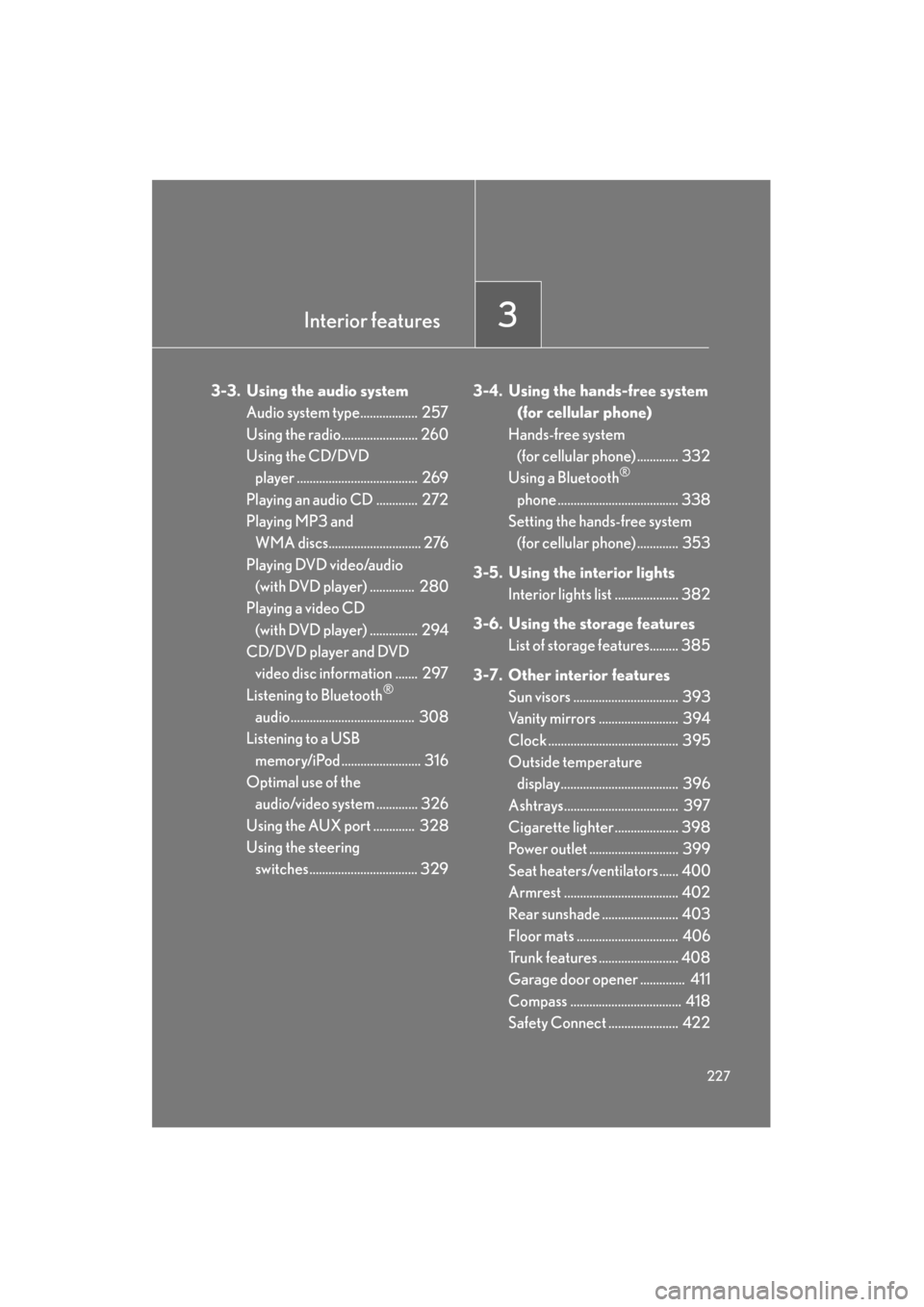
3-3. Using the audio systemAudio system type.................. 257
Using the radio........................ 260
Using the CD/DVD player ...................................... 269
Playing an audio CD ............. 272
Playing MP3 and WMA discs............................. 276
Playing DVD video/audio (with DVD player) .............. 280
Playing a video CD
(with DVD player) ............... 294
CD/DVD player and DVD video disc information ....... 297
Listening to Bluetooth
®
audio....................................... 308
Listening to a USB
memory/iPod ......................... 316
Optimal use of the audio/video system ............. 326
Using the AUX port ............. 328
Using the steering switches.................................. 329 3-4. Using the hands-free system
(for cellular phone)
Hands-free system (for cellular phone) ............. 332
Using a Bluetooth
®
phone ...................................... 338
Setting the hands-free system (for cellular phone) ............. 353
3-5. Using the interior lights Interior lights list .................... 382
3-6. Using the storage features List of storage features......... 385
3-7. Other interior features Sun visors ................................. 393
Vanity mirrors ......................... 394
Clock ......................................... 395
Outside temperature
display..................................... 396
Ashtrays.................................... 397
Cigarette lighter .................... 398
Power outlet ............................ 399
Seat heaters/ventilators ...... 400
Armrest .................................... 402
Rear sunshade ........................ 403
Floor mats ................................ 406
Trunk features ......................... 408
Garage door opener .............. 411
Compass ................................... 418
Safety Connect ...................... 422
Page 254 of 654
253
3-2. Using the air conditioning system and defogger
3
Interior features
GS_G_U (OM30C11U)
May 21, 2010 12:06 pm
■Using the automatic mode
Fan speed is adjusted automatically in accordance with the temperature setting and
ambient conditions. As a result, the following may occur.
●Immediately after the switch is pressed, the fan may stop for a while until warm
or cool air is ready to flow.
●Cool air may flow to the area around the upper body when the heater is on.
■Using the system in recirculated air mode
The windows will fog up more easily if the recirculated air mode is used for an
extended period.
■Switching between outside air and recirculated air modes
Recirculated air mode or outside air mode may be automatically switched to in
accordance with the temperature setting and the inside temperature.
■Window defogger feature
Recirculated air mode may automatically switch to
(outside air) mode in situ-
ations where the windows need to be defogged.
■Outside temperature approaches 32 °F (0 °C)
The air conditioning system may not operate even when
“A / C ” is touched.
■Automatic mode for air intake control
In automatic mode, the system detects exhaust gas and other pollutants and auto-
matically switches between outside air and recirculated air modes.
When the air conditioning is off, and the fan is operating, turning the auto mode on
will activate the air conditioning system.
■Micro dust and pollen filter
●In order to prevent the windows from fogging up when the outside air is cold,
the following may occur.
• Outside air mode does not switch to .
• The air conditioning system operates automatically.
• The operation cancels after 1 minute.
●In rainy weather, the windows may fog up. Press .
Page 302 of 654
301
3-3. Using the audio system
3
Interior features
GS_G_U (OM30C11U)
October 28, 2011 5:15 pm
●Audio
This DVD player can play linear PCM, Dolby Digital and MPEG audio format
DVD. Other decoded types cannot be played.
●Title and chapter
Video and audio programs stored in DVD video discs are divided into parts by
title and chapter.
Title: The largest unit of the video and audio programs stored on DVD video discs.
Usually, one movie, one album, or one audio program is assigned as a title.
Chapter: A title is comprised of one or more chapters.
■Sound
●Dolby Digital
Manufactured under license from Dolby Laboratories.
“Dolby”, “Pro Logic”, and the double-D symbol are trademarks of Dolby Labo-
ratories.
●Macrovision
This product incorporates copyright protection technology that is protected by
method claims of certain U. S. patents and other intellectual property rights
owned by Macrovision Corporation and other rights owners. Use of this copy-
right protection technology must be authorized by Macrovision Corporation,
and is intended for home and other limited viewing uses only unless otherwise
authorized by Macrovision Corporation.
Reverse engineering or disassembly is prohibited.
●DTS
“DTS” and “DTS Digital Surround” are registered trademarks of Digital Theater
System, Inc.
Manufactured under license under U.S. Patent #’s: 5,451,942; 5,956,674;
5,974,380; 5,978,762; 6,487,535 & other U.S. and worldwide patents issued
& pending. DTS and the Symbol are registered trademarks & DTS Digital Sur-
round and the DTS logos are trademarks of DTS, Inc. Product includes software.
© DTS, Inc. All Rights Reserved.
Page 387 of 654
386
3-6. Using the storage features
GS_G_U (OM30C11U)
October 28, 2011 5:15 pm
CAUTION
■Items that should not be left in the storage spaces
Do not leave glasses, lighters or spray cans in the storage spaces, as this may cause
the following when cabin temperature becomes high:
●Glasses may be deformed by heat or cracked if they come into contact with
other stored items.
●Lighters or spray cans may explode. If they come into contact with other stored
items, the lighter may catch fire or the spray can may release gas, causing a fire
hazard.
Page 399 of 654
398
3-7. Other interior features
GS_G_U (OM30C11U)
October 28, 2011 5:15 pm
Cigarette lighter
■The cigarette lighter can be used when
The “ENGINE START STOP” switch is in ACCESSORY or IGNITION ON mode.
CAUTION
■To avoid burns or fires
●Do not touch the metal parts of the cigarette lighter.
●Do not hold the cigarette lighter down. It could overheat and cause a fire.
●Do not insert anything other than the cigarette lighter into the outlet.
■When not in use
Keep the ashtray lid closed.
Injuries may result in the event of sudden braking, sudden swerving or an accident.
Slide the lid to open, and push
the cigarette lighter down.
The cigarette lighter will pop up
when ready for use.
Page 401 of 654
400
3-7. Other interior features
GS_G_U (OM30C11U)
October 28, 2011 5:15 pm
Seat heaters/ventilators∗
■The seat heaters/ventilators can be used when
The “ENGINE START STOP” switch is in IGNITION ON mode.
■When not in use
Set the dial to “0”. The indicator light turns off.
∗: If equipped
The temperature of the seats can be adjusted individually.
■ Seat heaters
Heats the seats
The indicator light comes on.
The higher the number, the
warmer the seats become.
■Seat heaters/ventilators
Heats the seats
The indicator light (red) comes
on.
The higher the number, the
warmer the seats become.
Blows air from the seats
The indicator light (green)
comes on.
The higher the number, the
stronger the airflow becomes.