Sound system Lexus GS350 2012 Owner's Guide
[x] Cancel search | Manufacturer: LEXUS, Model Year: 2012, Model line: GS350, Model: Lexus GS350 2012Pages: 914, PDF Size: 49.39 MB
Page 410 of 914
4005-1. Remote Touch screen
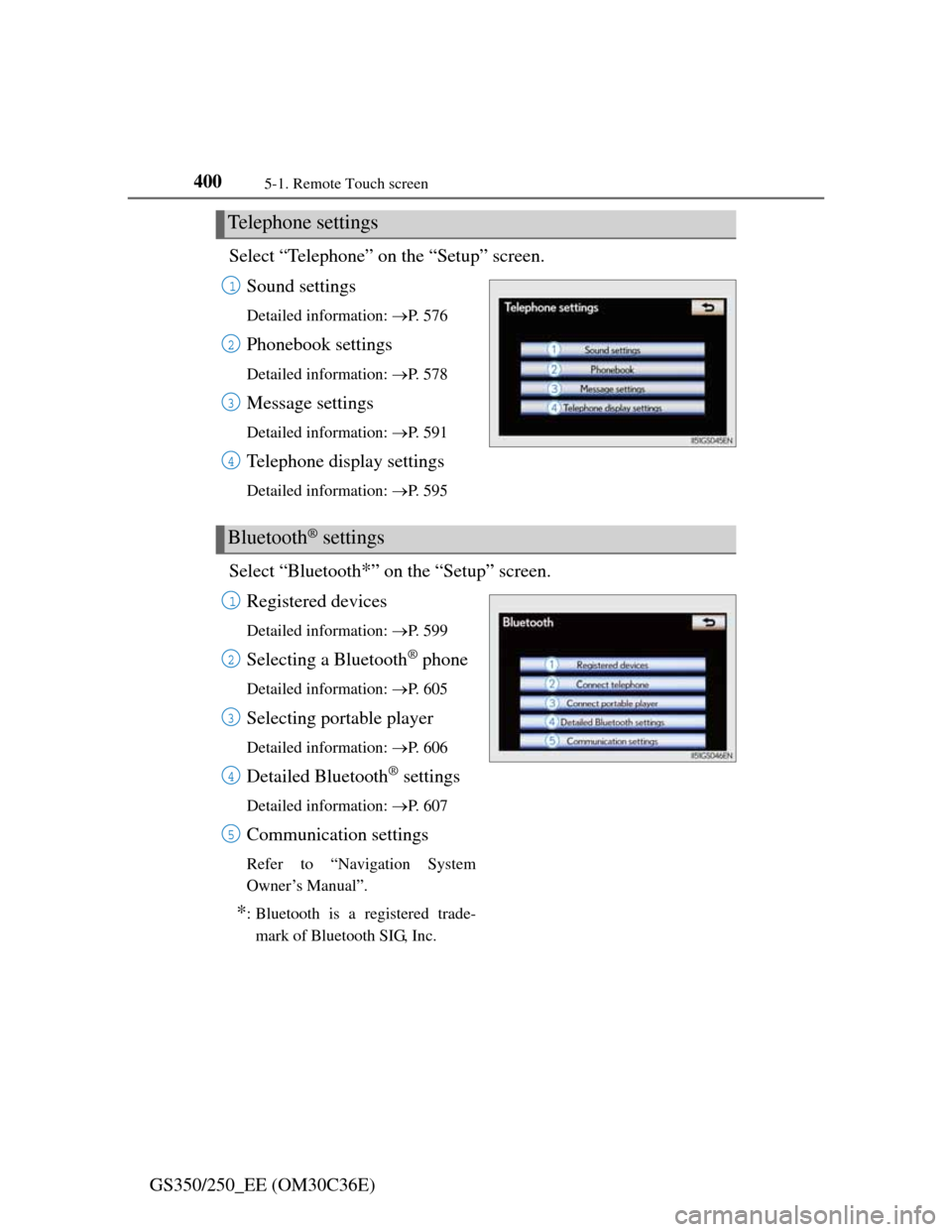
GS350/250_EE (OM30C36E)Select “Telephone” on the “Setup” screen.
Sound settings
Detailed information: P. 5 7 6
Phonebook settings
Detailed information: P. 5 7 8
Message settings
Detailed information: P. 5 9 1
Telephone display settings
Detailed information: P. 5 9 5
Select “Bluetooth*” on the “Setup” screen.
Registered devices
Detailed information: P. 5 9 9
Selecting a Bluetooth® phone
Detailed information: P. 6 0 5
Selecting portable player
Detailed information: P. 6 0 6
Detailed Bluetooth® settings
Detailed information: P. 6 0 7
Communication settings
Refer to “Navigation System
Owner’s Manual”.
*: Bluetooth is a registered trade-
mark of Bluetooth SIG, Inc.
Telephone settings
1
2
3
4
Bluetooth® settings
1
2
3
4
5
Page 414 of 914
4045-1. Remote Touch screen
GS350/250_EE (OM30C36E)
Speech command system operation
Press .
After the “Shortcuts” screen has been displayed, voice guidance will
commence.
Voice guidance for the speech command system can be skipped by
pressing .
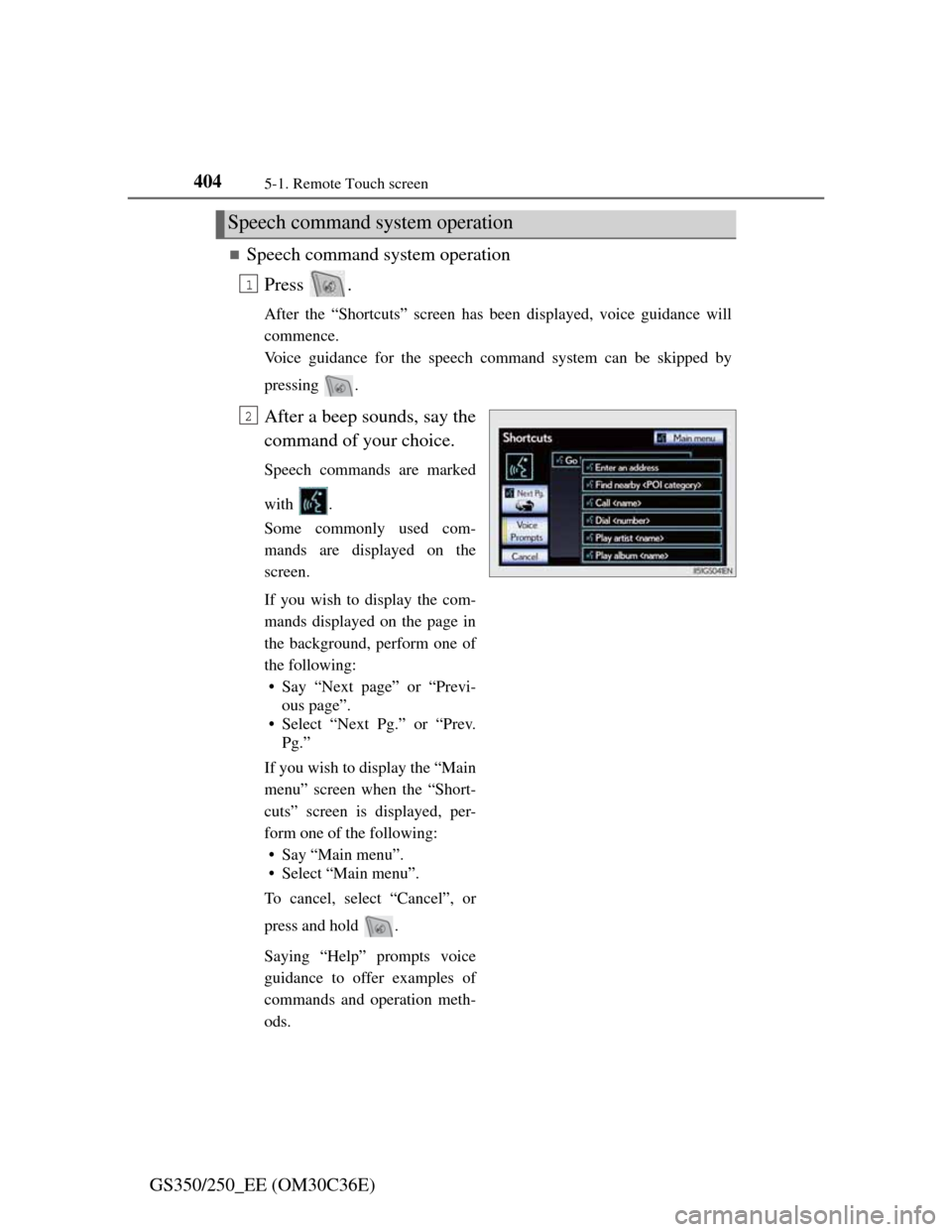
After a beep sounds, say the
command of your choice.
Speech commands are marked
with .
Some commonly used com-
mands are displayed on the
screen.
If you wish to display the com-
mands displayed on the page in
the background, perform one of
the following:
• Say “Next page” or “Previ-
ous page”.
• Select “Next Pg.” or “Prev.
Pg.”
If you wish to display the “Main
menu” screen when the “Short-
cuts” screen is displayed, per-
form one of the following:
• Say “Main menu”.
• Select “Main menu”.
To cancel, select “Cancel”, or
press and hold .
Saying “Help” prompts voice
guidance to offer examples of
commands and operation meth-
ods.
Speech command system operation
1
2
Page 477 of 914

4665-3. Using the audio system
GS350/250_EE (OM30C36E)Press .
Press the button again to turn the system back on.
If you select
The display returns to the previous screen.
EON (Enhanced Other Network) system (for traffic announcement function)
If the RDS station (with EON data) you are listening to is not broadcasting a
traffic information program and the audio system is in the TA (Traffic
announcement) mode, the radio will be switched automatically to a station
broadcasting a traffic information program in the EON AF list when traffic
information begins.
When listening to a disc
When the traffic information program starts, the disc playback mode is inter-
rupted and the traffic information is automatically broadcasted. When the
program ends, the initial operation resumes.
When the battery is disconnected
All preset stations are erased.
Reception sensitivity
Maintaining perfect radio reception at all times is difficult due to the contin-
ually changing position of the antenna, differences in signal strength and
surrounding objects, such as trains, transmitters, etc.
The radio antenna is mounted inside the rear quarter window. To maintain
clear radio reception, do not attach metallic window tinting or other metal-
lic objects to the antenna wire mounted inside the rear quarter window.
About Time shift
The times at which playback is possible depend on the bit rate of the DAB
station to be recorded, the amount of DAB unit memory, and the time at
which reception of the broadcast began.
Silencing the sound
Page 479 of 914
4685-3. Using the audio system
GS350/250_EE (OM30C36E)Insert a disc into the disc slot.
Press and remove the disc.
To play or pause a track/file/chapter, press .
Using the display
Under extremely cold conditions, the screen may react slowly or operation
sound may become louder.
If a disc is inserted with the label facing down, it cannot be played.
Inserting a disc
Ejecting a disc
Playing and pausing a track/file/chapter
Page 495 of 914

4845-3. Using the audio system
GS350/250_EE (OM30C36E)
Setting menu language
Select “Menu language” on the “DVD settings” screen.
Select the desired language to be read on the “Menu language”
screen.
If you cannot find the desired language, select “Other” and input the
desired language code. (P. 485)
Setting angle mark
If the DVD has angle options, you can turn the angle mark on or
off.
Select “Angle mark” on the “DVD settings” screen.
Select “On” or “Off”.
Setting parental lock
Select “Parental lock” on the “DVD settings” screen.
Input the 4-digit personal code on the “Key code” screen.
If you enter wrong numbers, select to delete the numbers.
Select a parental level (1-8) on the “Select restriction level”
screen. (P. 491)
Setting the auto start
Discs that are inserted while the vehicle is in motion will auto-
matically start playing.
Select “Auto start” on the “DVD settings” screen.
Select “On” or “Off”.
Setting sound dynamic range
The difference between the lowest volume and the highest vol-
ume can be adjusted.
Select “Sound dynamic range” on the “DVD settings” screen.
Select “MAX”, “STD” or “MIN”.
1
2
1
2
1
2
3
1
2
1
2
Page 502 of 914

4915-3. Using the audio system
5
Interior features
GS350/250_EE (OM30C36E)
DVD video disc information
DVD video discs
A DVD video disc is a Digital Versatile Disc that holds video. DVD video
discs have adopted “MPEG2”, one of the world standards of digital com-
pression technologies. The picture data is compressed by 1/40 on average
and stored. Variable rate encoded technology in which the volume of data
assigned to the picture is changed depending on the picture format has also
been adopted. Audio data is stored using PCM and Dolby Digital, which
enables higher quality of sound. Furthermore, multi-angle and multi-lan-
guage features will also help you enjoy the more advanced technology of
DVD video.
Viewer restrictions
This feature limits what can be viewed in conformity with the level of
restrictions of the country. The level of restrictions varies depending on the
DVD video disc. Some DVD video discs cannot be played at all, or violent
scenes are skipped or replaced with other scenes.
Level 1: DVD video discs for children can be played.
Level 2-7: DVD video discs for children and G-rated movies can be
played.
Level 8: All types of DVD video discs can be played.
Multi-angle option
You can enjoy the same scene from different angles.
Multi-language option
You can select the subtitle and audio languages.
Region codes
The region codes are provided on DVD players and DVD discs. If the DVD
video disc does not have the same region code as the DVD player, you can-
not play the disc on the DVD player. (P. 489)
Audio
This DVD player can play linear PCM, Dolby Digital and MPEG audio for-
mat DVDs. Other decoded types cannot be played.
Page 503 of 914

4925-3. Using the audio system
GS350/250_EE (OM30C36E)
Title and chapter
Video and audio programs stored in DVD video discs are divided into parts
by title and chapter.
Title: The largest unit of the video and audio programs stored on DVD
video discs. Usually, one movie, one album, or one audio program is
assigned as a title.
Chapter: A title is comprised of one or more chapters.
Sound
Dolby Digital
Manufactured under license from Dolby Laboratories. Dolby and the double-
D symbol are trademarks of Dolby Laboratories.
MP3 and WMA files
MP3 (MPEG Audio LAYER 3) is a standard audio compression format.
Files can be compressed to approximately 1/10 of their original size by using
MP3 compression.
WMA (Windows Media Audio) is a Microsoft audio compression format.
This format compresses audio data to a size smaller than that of the MP3 for-
mat.
There is a limit to the MP3 and WMA file standards that can be used and to
the media/formats on which the files are recorded.
MP3 file compatibility
• Compatible standards
MP3 (MPEG1 LAYER3, MPEG2 LSF LAYER3)
• Compatible sampling frequencies
MPEG1 LAYER3: 32, 44.1, 48 (kHz)
MPEG2 LSF LAYER3: 16, 22.05, 24 (kHz)
• Compatible bit rates (compatible with VBR)
MPEG1 LAYER3: 32, 64, 80, 96, 112, 128, 160, 192, 224, 256, 320
(kbps)
MPEG2 LSF LAYER3: 8, 32, 64, 80, 96, 112, 128, 144, 160 (kbps)
• Compatible channel modes: stereo, joint stereo, dual channel and monau-
ral
Page 506 of 914

4955-3. Using the audio system
5
Interior features
GS350/250_EE (OM30C36E)
Playback
• To play MP3 files with steady sound quality, we recommend a fixed bit
rate of at least 128 kbps and a sampling frequency of 44.1 kHz.
• CD-R or CD-RW playback may not be possible in some instances,
depending on the characteristics of the disc.
• There is a wide variety of freeware and other encoding software for MP3
and WMA files on the market, and depending on the status of the encod-
ing and the file format, poor sound quality or noise at the start of play-
back may result. In some cases, playback may not be possible at all.
• When files other than MP3 or WMA files are recorded on a disc, it may
take more time to recognize the disc and in some cases, playback may
not be possible at all.
• Microsoft, Windows, and Windows Media are the registered trademarks
of Microsoft Corporation in the U.S. and other countries.
CAUTION
DVD video precaution
Conversational speech on some DVDs is recorded at a low volume to
emphasize the impact of sound effects. If you adjust the volume assuming
that the conversations represent the maximum volume level that the DVD
will play, you may be startled by louder sound effects or startled when you
change to a different audio source.
Loud sounds may have a significant impact on the human body or pose a
driving hazard. Keep this in mind when you adjust the volume.
Page 531 of 914

5205-3. Using the audio system
GS350/250_EE (OM30C36E)
MP3 and WMA playback
• When a device containing MP3 or WMA files is connected, all files in
the USB memory device are checked. Once the file check is finished, the
first MP3 or WMA file is played. To make the file check finish more
quickly, we recommend that you do not include any files other than MP3
or WMA files or create any unnecessary folders.
• When the USB device is connected and the audio source is changed to
USB memory mode, the USB device will start playing the first file in the
first folder. If the same device is removed and reinserted (and the con-
tents have not been changed), the USB device will resume play from the
same point in which it was last used.
Extensions
If the file extensions .mp3 and .wma are used for files other than MP3 and
WMA files, they will be skipped (not played).
Playback
• To play MP3 files with steady sound quality, we recommend a fixed bit
rate of at least 128 kbps and a sampling frequency of 44.1 kHz.
• There is a wide variety of freeware and other encoding software for MP3
and WMA files on the market, and depending on the status of the encod-
ing and the file format, poor sound quality or noise at the start of play-
back may result. In some cases, playback may not be possible at all.
• Microsoft, Windows, and Windows Media are registered trademarks of
Microsoft Corporation in the U.S.A. and other countries.
Page 541 of 914

5305-3. Using the audio system
GS350/250_EE (OM30C36E)
iPod cover art
Depending on the iPod and the songs in the iPod, iPod cover art may be dis-
played. This function can be changed to “On” or “Off”. (P. 524)
It may take time to display iPod cover art, and the iPod may not be operated
while the cover art display is in process.
Only iPod cover art that is saved in JPEG format can be displayed.
iPod functions
When the iPod connected to the system includes iPod video, the system can
only output the sound by selecting “Video” on the “iPod” screen.
Depending on the iPod, the video sound may not be able to be heard.
When an iPod is connected and the audio source is changed to iPod mode,
the iPod will resume play from the same point in which it was last used.
Depending on the iPod that is connected to the system, certain functions
may not be available. If a function is unavailable due to a malfunction (as
opposed to a system specification), disconnecting the device and reconnect-
ing it once again may resolve the problem.
When using an iPod
You maybe unable to use the instrument panel power outlet if the iPod is con-
nected to the USB port at the same time.
Battery charge
When an iPod is connected using a genuine iPod cable, the iPod starts
charging its battery.
Error messages for iPod
“iPod error”:
This indicates a problem in the iPod or its connection.
“No music files found.”:
This indicates that there is no music data in the iPod.
“Please check the iPod firmware version.”:
This indicates that the software version is not compatible. Perform the iPod
firmware updates and try again.
“iPod authorization failed.”:
This indicates that it failed to authorize the iPod. Please check your iPod.