Sound system Lexus GS350 2012 User Guide
[x] Cancel search | Manufacturer: LEXUS, Model Year: 2012, Model line: GS350, Model: Lexus GS350 2012Pages: 914, PDF Size: 49.39 MB
Page 298 of 914
2914-5. Using the driving support
4
Driving
GS350/250_EE (OM30C36E)
Buzzer operation and distance to an obstacle
A buzzer sounds when the corner sensors and rear center sensors
are operating.
The buzzer beeps faster as the vehicle approaches an obstacle.
When the vehicle comes within the following distance of the
obstacle, the buzzer sounds continuously:
• Front center sensors: Approximately 30 cm (1.0 ft.)
• Corner sensors: Approximately 30 cm (1.0 ft.)
• Rear center sensors: Approximately 35 cm (1.1 ft.)
When 2 or more obstacles are detected simultaneously, the
buzzer system responds to the nearest obstacle. If one or both
come within the above distances, the beep will repeat a long
tone, followed by fast beeps.
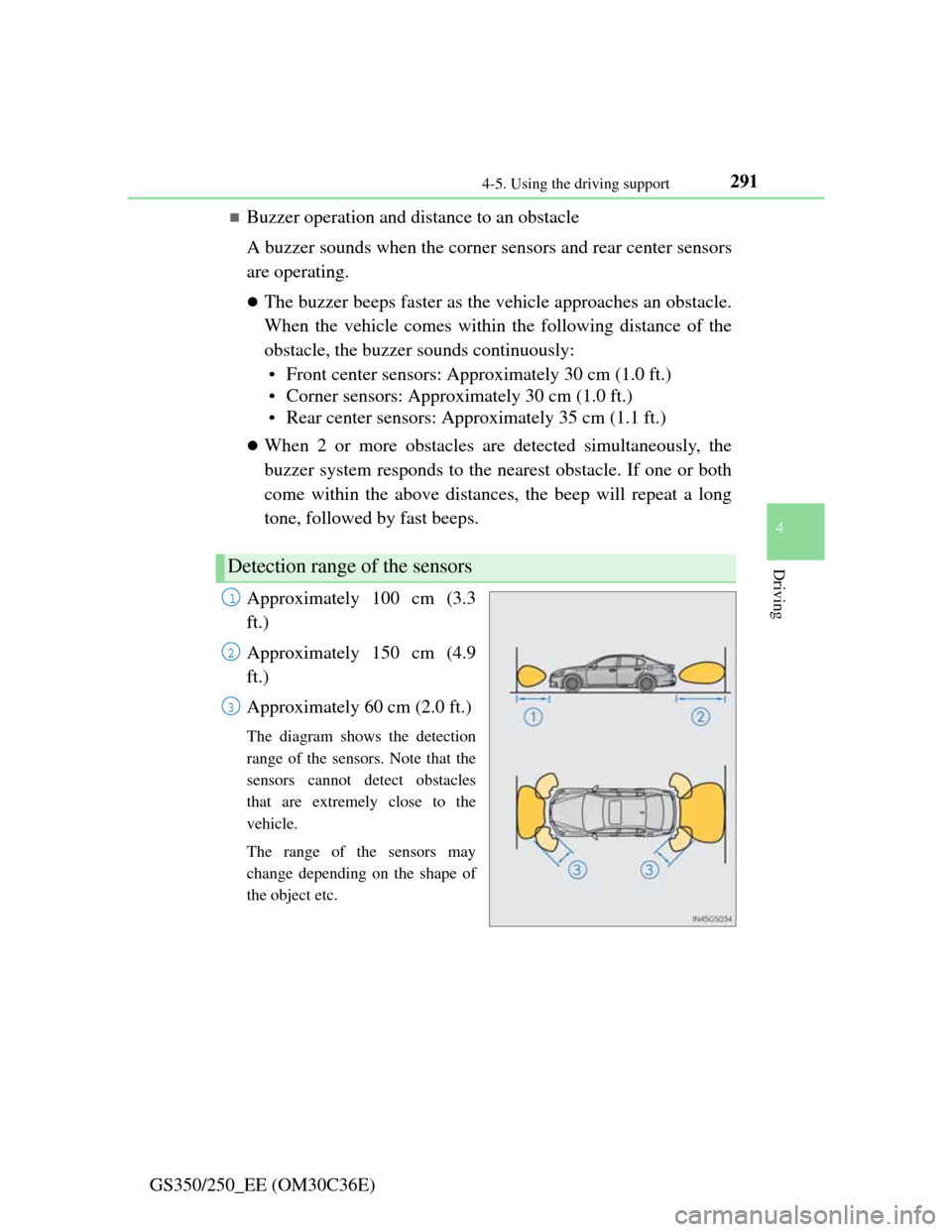
Approximately 100 cm (3.3
ft.)
Approximately 150 cm (4.9
ft.)
Approximately 60 cm (2.0 ft.)
The diagram shows the detection
range of the sensors. Note that the
sensors cannot detect obstacles
that are extremely close to the
vehicle.
The range of the sensors may
change depending on the shape of
the object etc.
Detection range of the sensors
1
2
3
Page 302 of 914

2954-5. Using the driving support
4
Driving
GS350/250_EE (OM30C36E)
The shape of the obstacle may prevent the sensor from detecting it. Pay par-
ticular attention to the following obstacles:
• Wires, fences, ropes, etc.
• Cotton, snow and other materials that absorb sound waves
• Sharply-angled objects
•Low obstacles
• Tall obstacles with upper sections projecting outwards in the direction of
your vehicle
The following situations may occur during use.
• Depending on the shape of the obstacle and other factors, the detection
distance may shorten, or detection may be impossible.
• Obstacles may not be detected if they are too close to the sensor.
• There will be a short delay between obstacle detection and display. Even
at slow speeds, there is a possibility that the obstacle will come within
the sensor’s detection areas before the display is shown and the warning
beep sounds.
• Thin posts or objects lower than the sensor may not be detected for colli-
sion when approached, even if they have been detected once.
• It might be difficult to hear beeps due to the volume of audio system or
air flow noise of air conditioning system.
If a message is displayed on the multi-information display
P. 760, 766
Page 303 of 914
2964-5. Using the driving support
GS350/250_EE (OM30C36E)
CAUTION
When using the Lexus parking assist-sensor
Observe the following precautions.
Failing to do so may result in the vehicle being unable to be driven safely
and possibly cause an accident.
Do not use the sensor at speeds in excess of 10 km/h (6 mph).
The sensors’ detection areas and reaction times are limited. When moving
forward or reversing, check the areas surrounding the vehicle (especially
the sides of the vehicle) for safety, and drive slowly, using the brake to
control the vehicle’s speed.
Do not install accessories within the sensors’ detection areas.
NOTICE
When using Lexus parking assist-sensor
In the following situations, the system may not function correctly due to a
sensor malfunction etc. Have the vehicle checked by any authorized Lexus
dealer or repairer, or another duly qualified and equipped professional.
The Lexus parking assist-sensor operation display flashes, and a beep
sounds when no obstacles are detected.
If the area around a sensor collides with something, or is subjected to
strong impact.
If the bumper collides with something.
If the display shows continuously without a beep.
If a display error occurs, first check the sensor.
If the error occurs even if there is no ice, snow or mud on the sensor, it is
likely that the sensor is malfunctioning.
Notes when washing the vehicle
Do not apply intensive bursts of water or steam to the sensor area.
Doing so may result in the sensor malfunctioning.
Page 308 of 914
3014-5. Using the driving support
4
Driving
GS350/250_EE (OM30C36E)
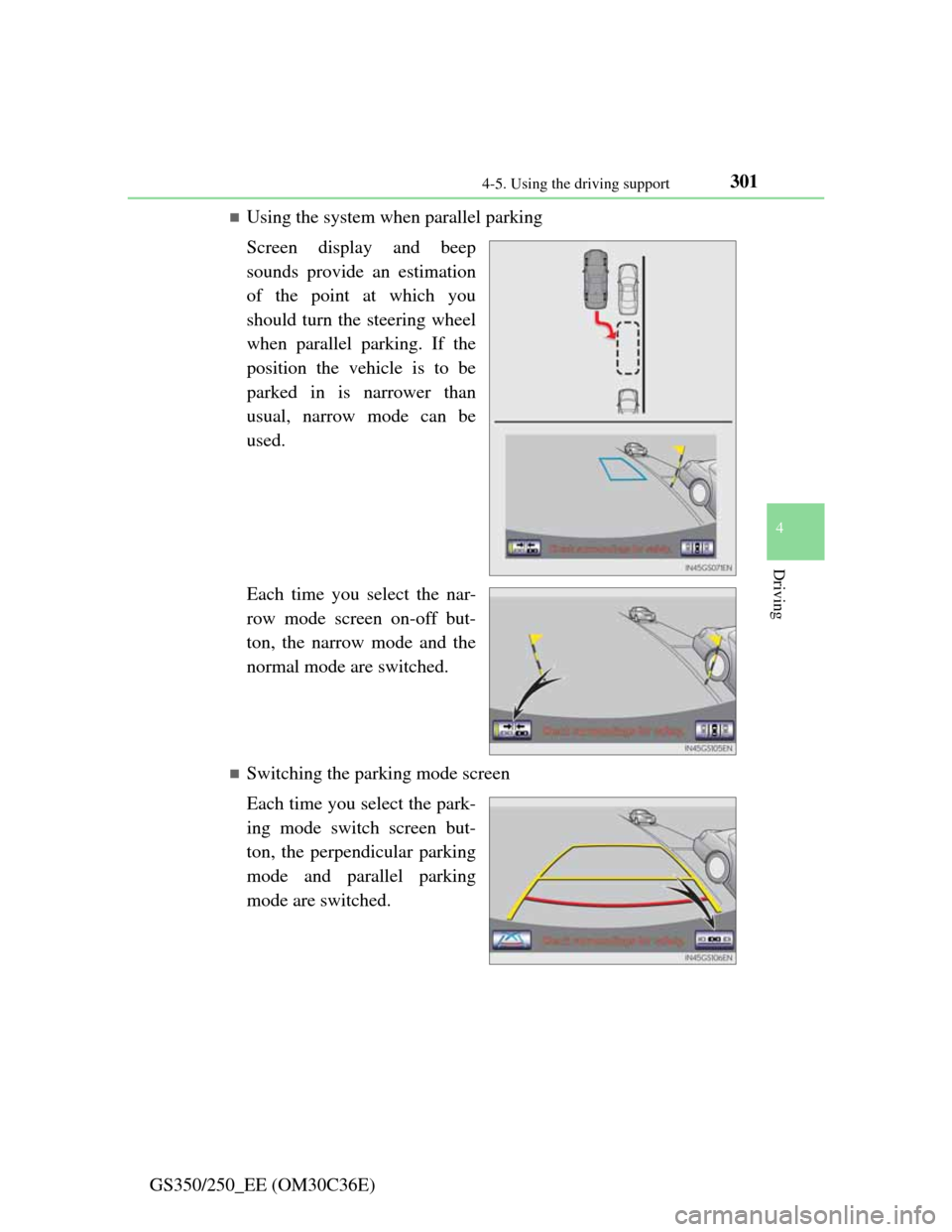
Using the system when parallel parking
Screen display and beep
sounds provide an estimation
of the point at which you
should turn the steering wheel
when parallel parking. If the
position the vehicle is to be
parked in is narrower than
usual, narrow mode can be
used.
Each time you select the nar-
row mode screen on-off but-
ton, the narrow mode and the
normal mode are switched.
Switching the parking mode screen
Each time you select the park-
ing mode switch screen but-
ton, the perpendicular parking
mode and parallel parking
mode are switched.
Page 344 of 914

3374-5. Using the driving support
4
Driving
GS350/250_EE (OM30C36E)
When the message is displayed on the multi-information display showing that
TRC has been disabled even if the VSC OFF switch has not been pressed
TRC cannot be operated. Contact any authorized Lexus dealer or repairer, or
another duly qualified and equipped professional.
Sounds and vibrations caused by the ABS, brake assist, VSC and TRC sys-
tems
A sound may be heard from the engine compartment when the engine is
started or just after the vehicle begins to move. This sound does not indicate
that a malfunction has occurred in any of these systems.
Any of the following conditions may occur when the above systems are
operating. None of these indicates that a malfunction has occurred.
• Vibrations may be felt through the vehicle body and steering.
• A motor sound may be heard after the vehicle comes to a stop.
• The brake pedal may pulsate slightly after the ABS is activated.
• The brake pedal may move down slightly after the ABS is activated.
EPS operation sound
When the steering wheel is operated, a motor sound (whirring sound) may be
heard. This does not indicate a malfunction.
Reactivation of the TRC/VSC systems
Even after the TRC/VSC systems have been turned off, turning the engine
off and then on again will automatically reactivate the TRC/VSC systems.
Page 348 of 914

341
4 4-5. Using the driving support
Driving
GS350/250_EE (OM30C36E)
Hill-start assist control
To engage hill-start assist con-
trol, further depress the brake
pedal when the vehicle is
stopped completely.
A buzzer will sound once to indi-
cate the system is activated. The
slip indicator will also start flash-
ing.
Hill-start assist control operating conditions
The system operates in the following situations:
• The shift lever is in a position other than P.
• The parking brake is not applied.
• The accelerator pedal is not depressed.
Hill-start assist control cannot be operated while the slip indicator light is
illuminated.
Hill-start assist control
While hill-start assist control is operating, the brakes remain automatically
applied after the driver releases the brake pedal. The stop lights and the high
mounted stoplight turn on.
Hill-start assist control operates for about 2 seconds after the brake pedal is
released.
If the slip indicator does not flash and the buzzer does not sound when the
brake pedal is further depressed, slightly reduce the pressure on the brake
pedal (do not allow the vehicle to roll backward) and then firmly depress it
again. If the system still does not operate, check that the operating condi-
tions explained above have been met.
Assists with starting off and temporarily maintains braking power
even if the foot is removed from the brake pedal when starting off
on an incline or a slippery slope.
Page 349 of 914

3424-5. Using the driving support
GS350/250_EE (OM30C36E)
Hill-start assist control buzzer
When hill-start assist control is activated, the buzzer will sound once.
In the following situations, hill-start assist control will be canceled and the
buzzer will sound twice.
• No attempt is made to drive the vehicle within approximately 2 seconds
of releasing the brake pedal.
• The shift lever is moved to P.
• The parking brake is applied.
• The brake pedal is depressed again.
• The brake pedal has been depressed for more than approximately 3 min-
utes.
If the slip indicator comes on
It may indicate a malfunction in the system. Contact any authorized Lexus
dealer or repairer, or another duly qualified and equipped professional.
CAUTION
Hill-start assist control
Do not overly rely on hill-start assist control. Hill-start assist control may
not operate effectively on steep inclines and roads covered with ice.
Unlike the parking brake, hill-start assist control is not intended to hold
the vehicle stationary for an extended period of time. Do not attempt to
use hill-start assist control to hold the vehicle on an incline, as doing so
may lead to an accident.
Page 378 of 914

3685-1. Remote Touch screen
GS350/250_EE (OM30C36E)
Remote Touch
“•” button
Press this button to change map scale and scroll through lists.
“HOME” button
Press this button to display the home screen.
Remote Touch knob
Use this knob to move the cursor and select items on the screen.
Feedback force, pointer sound volume, on or off of selection sounds etc.
can be changed.
“MENU” button
Press this button to display the “Menu” screen.
The Remote Touch can be used to operate the Remote Touch
screens.
Owners of models equipped with a navigation system should refer
to the “Navigation System Owner’s Manual”.
The illustration below is for left-hand drive vehicles without navi-
gation system.
The button positions may differ slightly for right-hand drive vehi-
cles.
1
2
3
4
Page 393 of 914
3835-1. Remote Touch screen
5
Interior features
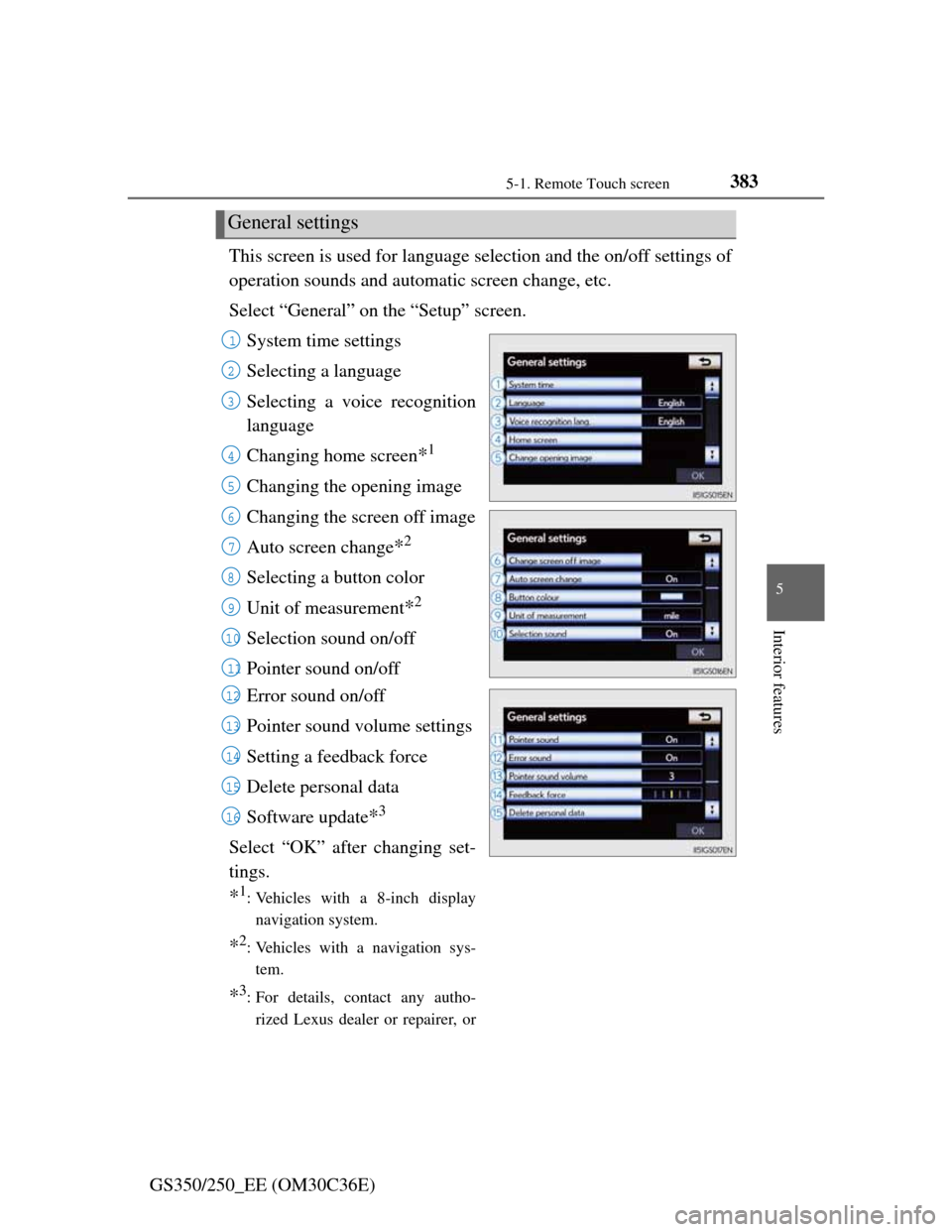
GS350/250_EE (OM30C36E)This screen is used for language selection and the on/off settings of
operation sounds and automatic screen change, etc.
Select “General” on the “Setup” screen.
System time settings
Selecting a language
Selecting a voice recognition
language
Changing home screen
*1
Changing the opening image
Changing the screen off image
Auto screen change
*2
Selecting a button color
Unit of measurement
*2
Selection sound on/off
Pointer sound on/off
Error sound on/off
Pointer sound volume settings
Setting a feedback force
Delete personal data
Software update
*3
Select “OK” after changing set-
tings.
*1: Vehicles with a 8-inch display
navigation system.
*2: Vehicles with a navigation sys-
tem.
*3: For details, contact any autho-
rized Lexus dealer or repairer, or
General settings
1
2
3
4
5
6
7
8
9
10
11
12
13
14
15
16
Page 406 of 914
3965-1. Remote Touch screen
GS350/250_EE (OM30C36E)
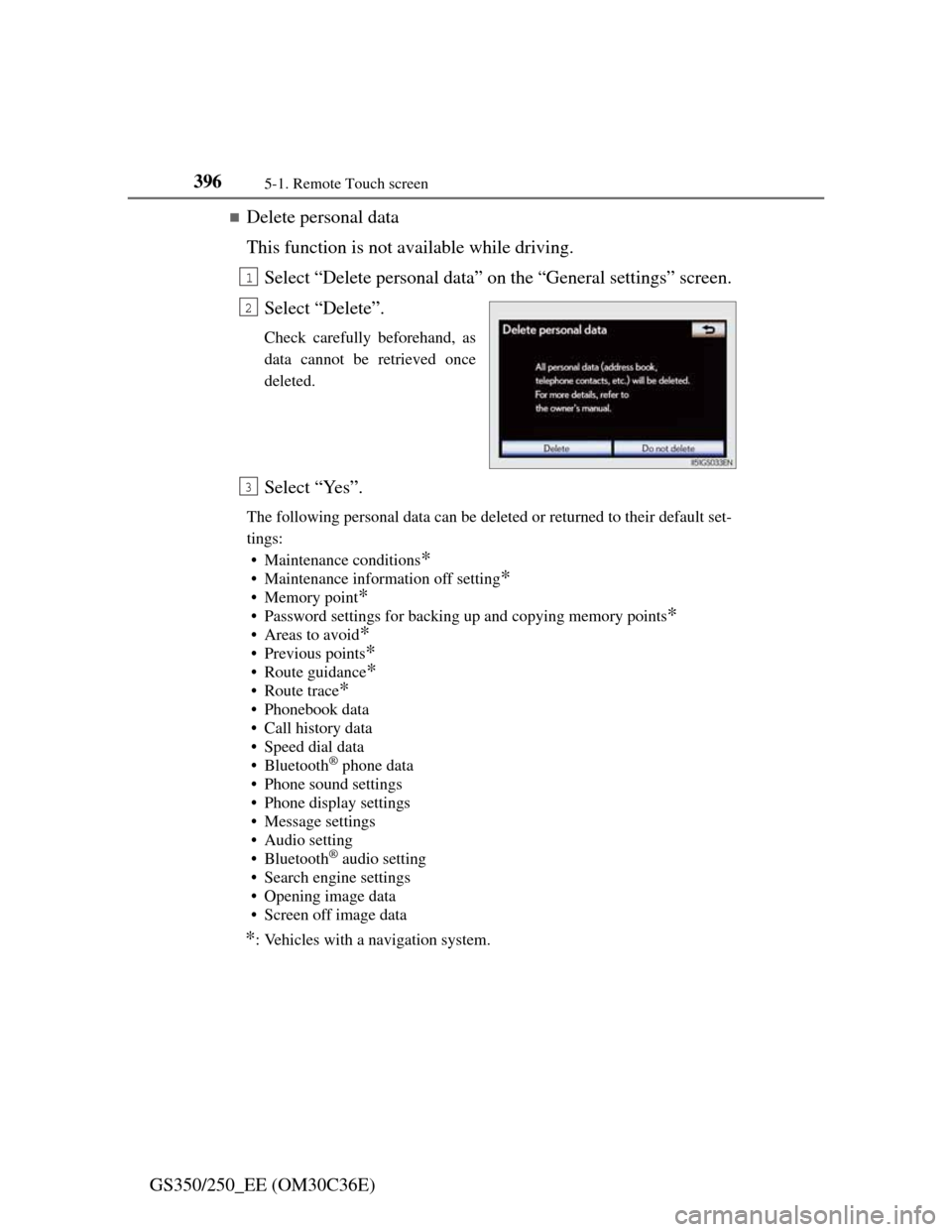
Delete personal data
This function is not available while driving.
Select “Delete personal data” on the “General settings” screen.
Select “Delete”.
Check carefully beforehand, as
data cannot be retrieved once
deleted.
Select “Yes”.
The following personal data can be deleted or returned to their default set-
tings:
• Maintenance conditions
*
• Maintenance information off setting*
• Memory point*
• Password settings for backing up and copying memory points*
•Areas to avoid*
• Previous points*
• Route guidance*
•Route trace*
• Phonebook data
• Call history data
• Speed dial data
•Bluetooth
® phone data
• Phone sound settings
• Phone display settings
• Message settings
• Audio setting
•Bluetooth
® audio setting
• Search engine settings
• Opening image data
• Screen off image data
*: Vehicles with a navigation system.
1
2
3