change Lexus GS350 2013 Adjusting the steering wheel and mirrors / LEXUS 2013 GS350 OWNERS MANUAL (OM30C34U)
[x] Cancel search | Manufacturer: LEXUS, Model Year: 2013, Model line: GS350, Model: Lexus GS350 2013Pages: 828, PDF Size: 10.43 MB
Page 8 of 828
8
GS350_U (OM30C34U)
For your information
Please note that this manual applies to all models and explains all equipment, includ-
ing options. Therefore, you may find some explanations for equipment not installed
on your vehicle.
All specifications provided in this manual are current at the time of printing. How-
ever, because of the Lexus policy of continual product improvement, we reserve the
right to make changes at any time without notice.
Depending on specifications, the vehicle shown in the illustrations may differ from
your vehicle in terms of color and equipment.
Approximately five hours after the engine is turned off, you may hear sound coming
from under the vehicle for several minutes. This is the sound of a fuel evaporation
leakage check and, it does not indicate a malfunction.
A wide variety of non-genuine spare parts and accessories for Lexus vehicles are
currently available in the market. You should know that Toyota does not warrant
these products and is not responsible for their performance, repair, or replacement,
or for any damage they may cause to, or adverse effect they may have on, your
Lexus vehicle.
This vehicle should not be modified with non-genuine Lexus products. Modification
with non-genuine Lexus products could affect its performance, safety or durability,
and may even violate governmental regula tions. In addition, damage or perfor-
mance problems resulting from the modification may not be covered under war-
ranty.
Main Owner’s Manual
Noise from under vehicle af ter turning off the engine
Accessories, spare parts and modification of your Lexus
Page 39 of 828

391-1. For safe use
GS350_U (OM30C34U)
1
For safety and security
Your vehicle is equipped with ADVANCED AIRBAGS designed based
on the US motor vehicle safety standards (FMVSS208). The airbag sen-
sor assembly (ECU) controls airbag deployment based on information
obtained from the sensors etc. show n in the system components diagram
above. This information includes crash severity and occupant information.
As the airbags deploy, a chemical reaction in the inflators quickly fills the
airbags with non-toxic gas to help restrain the motion of the occupants.
CAUTION
■SRS airbag precautions
Observe the following precautions regarding the SRS airbags.
Failure to do so may caus e death or serious injury.
●The driver and all passengers in the vehi cle must wear their seat belts properly.
The SRS airbags are supplemental devices to be used with the seat belts.
●The SRS driver airbag deploys with considerable force, and can cause death or
serious injury especially if the driver is very close to the airbag. The National
Highway Traffic Safety Admi nistration (NHTSA) advises:
Since the risk zone for the driver’s airbag is the first 2 - 3 in. (50 - 75 mm) of
inflation, placing yourself 10 in. (250 mm) from your driver airbag provides you
with a clear margin of safety. This distance is measured from the center of the
steering wheel to your breastbone. If you sit less than 10 in. (250 mm) away now,
you can change your driving position in several ways:
• Move your seat to the rear as far as you can while still reaching the pedals comfortably.
• Slightly recline the back of the seat. Although vehicle designs vary, many drivers can achieve the 10 in. (250 mm)
distance, even with the driver seat all the way forward, simply by reclining the
back of the seat somewhat. If reclining the back of your seat makes it hard to
see the road, raise yourself by using a fi rm, non-slippery cushion, or raise the
seat if your vehicle has that feature.
• If your steering wheel is adjustable, ti lt it downward. This points the airbag
toward your chest instead of your head and neck.
The seat should be adjusted as reco mmended by NHTSA above, while still
maintaining control of the foot pedals, steering wheel, and your view of the
instrument panel controls.
Page 69 of 828

691-2. Theft deterrent system
GS350_U (OM30C34U)
1
For safety and security
■Certifications for the engine immobilizer system
For vehicles sold in the U.S.A.
FCC ID: NI4TMIMB-3
This device complies with part 15 of the FCC Rules. Operation is subject to the fol-
lowing two conditions: (1) This device may not cause harmful interference, and (2)
this device must accept any interference received, including interference that may
cause undesire d operation.
For vehicles sold in Canada
Operation is subject to the following two conditions: (1) this device may not cause
interference, and (2) this device must acc ept any interference, including interfer-
ence that may cause undesired operation of the device.
CAUTION
■Certifications for the engine immobilizer system
Changes or modifications no t expressly approved by the party responsible for
compliance could void the user’s authority to operate the equipment.
NOTICE
■To ensure the system operates correctly
Do not modify or remove the system. If modified or removed, the proper operation
of the system cannot be guaranteed.
Page 70 of 828

701-2. Theft deterrent system
GS350_U (OM30C34U)
Alarm
The alarm uses light and sound to give an alert when an intrusion is
detected.
The alarm is triggered in the following situations when the alarm is set:
●A locked door or trunk is unlocked or opened in any way other than
using the entry function, wireless remote control or mechanical key.
(The doors will lock again automatically.)
●The hood is opened.
Close the doors, trunk and hood,
and lock all the doors. The system
will be set automatically after 30
seconds.
The indicator light changes from
being on to flashing when the system
is set.
Do one of the following to deactivate or stop the alarms:
●Unlock the doors or open the trunk.
●Turn the engine switch to ACCE SSORY or IGNITION ON mode, or
start the engine. (The alarm will be deactivated or stopped after a few
seconds.)
The alarm
Setting the alarm system
Deactivating or stopping the alarm
Page 79 of 828
79
GS350_U (OM30C34U)2. Instrument cluster
2
Instrument cluster
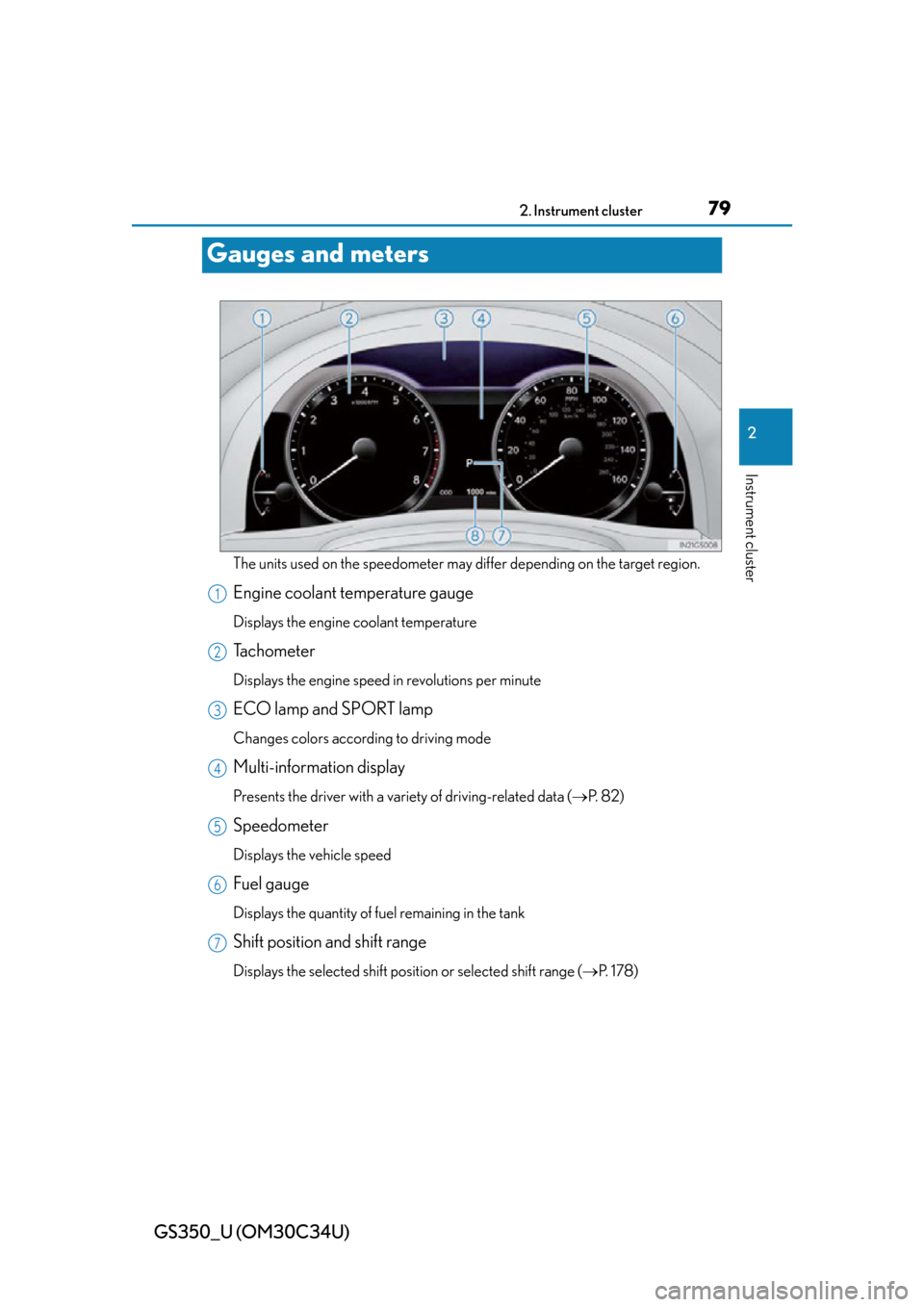
Gauges and meters
The units used on the speedometer may di ffer depending on the target region.
Engine coolant temperature gauge
Displays the engine coolant temperature
Tachometer
Displays the engine speed in revolutions per minute
ECO lamp and SPORT lamp
Changes colors according to driving mode
Multi-information display
Presents the driver with a variety of driving-related data ( P. 8 2 )
Speedometer
Displays the vehicle speed
Fuel gauge
Displays the quantity of fuel remaining in the tank
Shift position and shift range
Displays the selected shift position or selected shift range ( P. 1 7 8 )
1
2
3
4
5
6
7
Page 81 of 828

GS350_U (OM30C34U)
812. Instrument cluster
2
Instrument cluster
■The meters and display illuminate when
The engine switch is in IGNITION ON mode.
■Instrument panel brightness adjustment
The instrument panel brightness levels when the tail lights are on and off can be
adjusted individually. However, when the surroundings are bright (daytime, etc.),
turning on the tail lights will not change th e instrument panel brightness. At this time,
any adjustments made to the instrument panel brightness levels will be applied to
both settings at once.
■Limitation of brightness adjustment
The brightness of the instrument panel ligh ts is automatically adjusted based on the
light sensor detecting how bright the surroundings are. However, if the instrument
panel brightness has been manually set to ei ther the brightest or darkest setting, the
automatic adjustment will not be performed.
■ECO lamp and SPORT lamp
●When sport mode is selected, SPORT lamp (red) will illuminate.
●When all of the following conditions are satisfied and Eco-friendly driving, ECO
lamp (blue) will illuminate. (ECO lamp will become brighter the more Eco-friendly
driving you perform. Also, while the acceleration exceeds Zone of Eco driving,
ECO lamp turns off. (P. 88) However, when Eco drive mode is selected, while
the acceleration exceeds Zone of Eco driving, ECO lamp does not turn off.):
• Driving with the shift lever in D
• Paddle shift switch is not operated.
• Either normal mode or Eco drive mode is selected.
• The vehicle speed is approximately 80 mph (130 km/h) or below.
■Customization
Settings (e.g. on/off operatio n of ECO lamp) can be changed.
(Customizable features P. 777)
NOTICE
■To prevent damage to the engine and its components
●Do not let the indicator needle of the tachometer enter the red zone, which indi-
cates the maximum engine speed.
●The engine may be overheating if the engine coolant temperature gauge is in the
red zone (H). In this case, immediately stop the vehicle in a safe place, and check
the engine after it has cooled completely. ( P. 74 7 )
Page 86 of 828

86
GS350_U (OM30C34U)
2. Instrument cluster
While the vehicle is stopped,
press the “DISP” button until the
“Settings” screen appears.
Press and hold the “DISP” button
until the screen changes.
Press and hold the “DISP” button
after selecting the desired set-
ting item by pressing the “DISP”
button.
Setting up the displays
1
2
3
Page 88 of 828

88
GS350_U (OM30C34U)
2. Instrument cluster
■System check display
After turning the engine switch to IGNITION ON mode, “SYSTEM CHECK” is dis-
played while system operation is checked.
■Eco Driving Indicator Zone Display
Eco Driving Indicator will not operate in the following conditions:
●The shift lever is anything other than D.
●Paddle shift switch is operated.
●Neither normal mode nor Eco drive mode is selected. ( P. 1 7 9 )
●The vehicle speed is approximatel y 80 mph (130 km/h) or higher.
■Outside temperature display
In the following situations, the correct outside temperature may not be displayed, or
the display may take longer than normal to change.
●When stopped, or driving at low speeds (less than 12 mph [20 km/h])
●When the outside temperature has changed suddenly (at the entrance/exit of a
garage, tunnel, etc.)
■Setting display automatic cancelation
In the following situations, setting display in which the settings can be changed
through the “DISP” button will automatically be turned off.
●When a warning message appears whil e the setting display is displayed
●When the vehicle begins to move while the setting display is displayed
Suggests Zone of Eco driving and Eco driving
ratio based on acceleration.
Eco driving ratio based on acceleration
If the acceleration exceeds Zone of Eco
driving, the right side of Eco Driving Indica-
tor Zone Display blinks.
Zone of Eco driving
1
2
Page 89 of 828

GS350_U (OM30C34U)
892. Instrument cluster
2
Instrument cluster
■Tire inflation pressure (if equipped)
●It may take a few minutes to display the tire inflation pressure after the engine
switch is turned to IGNITION ON mode. It may also take a few minutes to display
the tire inflation pressure after inflation pressure has been adjusted.
●“---” may be displayed if the tire information cannot be determined due to unfavor-
able radio wave conditions.
●Tire inflation pressure changes with temperature. The displayed values may also be
different from the values measured using a tire pressure gauge.
■Liquid crystal display
Small spots or light spots may appear on th e display. This phenomenon is character-
istic of liquid crystal displays, and there is no problem continuing to use the display.
■Customization
Setting of available languages can be changed. (Custo mizable features P. 777)
CAUTION
■The information display at low temperatures
Allow the interior of the vehicle to warm up before using the liquid crystal informa-
tion display. At extremely low temperatures, the information display monitor may
respond slowly, and display changes may be delayed.
For example, there is a lag between the dr iver’s shifting and the new gear number
appearing on the display. This lag could ca use the driver to downshift again, caus-
ing rapid and excessive engine braking and possibly an accident resulting in death
or injury.
■Cautions during setting up the display
As the engine needs to be running during setting up the display, ensure that the
vehicle is parked in a place with adequate ventilation. In a closed area such as a
garage, exhaust gases including harmful carbon monoxide (CO) may collect and
enter the vehicle. This may lead to death or a serious health hazard.
NOTICE
■During setting up the display
To prevent battery discharge, ensure that the engine is running while setting up the
display features.
Page 90 of 828

90
GS350_U (OM30C34U)
2. Instrument cluster
Head-up display
The head-up display can be used to project vehicle speed and other infor-
mation onto the windshield.
Head-up display
Display brightness will change auto-
matically according to the brightness
of the surrounding area.
“HUD” button
Display brightness adjustment
switch
Display brightness can be adjusted to
the desired level.
Display position adjustment
switch
“DISP” button
: If equipped
Summary of functions
1
2
3
4
5