phone Lexus GS350 2013 Navigation manual
[x] Cancel search | Manufacturer: LEXUS, Model Year: 2013, Model line: GS350, Model: Lexus GS350 2013Pages: 256, PDF Size: 30.05 MB
Page 80 of 256
80
1. DESTINATION SEARCH
GS450h_300h_350_250_NAVI_OM30D64E_(EE)
13.10.23 11:07
“Home”
Select your personal home address without
having to enter the address each time. If a
home address has not been registered, a mes-
sage will be displayed and the setting screen
will automatically appear. (To register home,
see “REGISTERING HOME” on page 126.)
83
“Coordinates”Select to enter latitude and longitude coordi-
nates.96
“Telephone
no.”Select to enter a destination using a telephone
number.96
No.NameFunctionPage
Page 82 of 256
82
1. DESTINATION SEARCH
GS450h_300h_350_250_NAVI_OM30D64E_(EE)
13.10.23 11:07
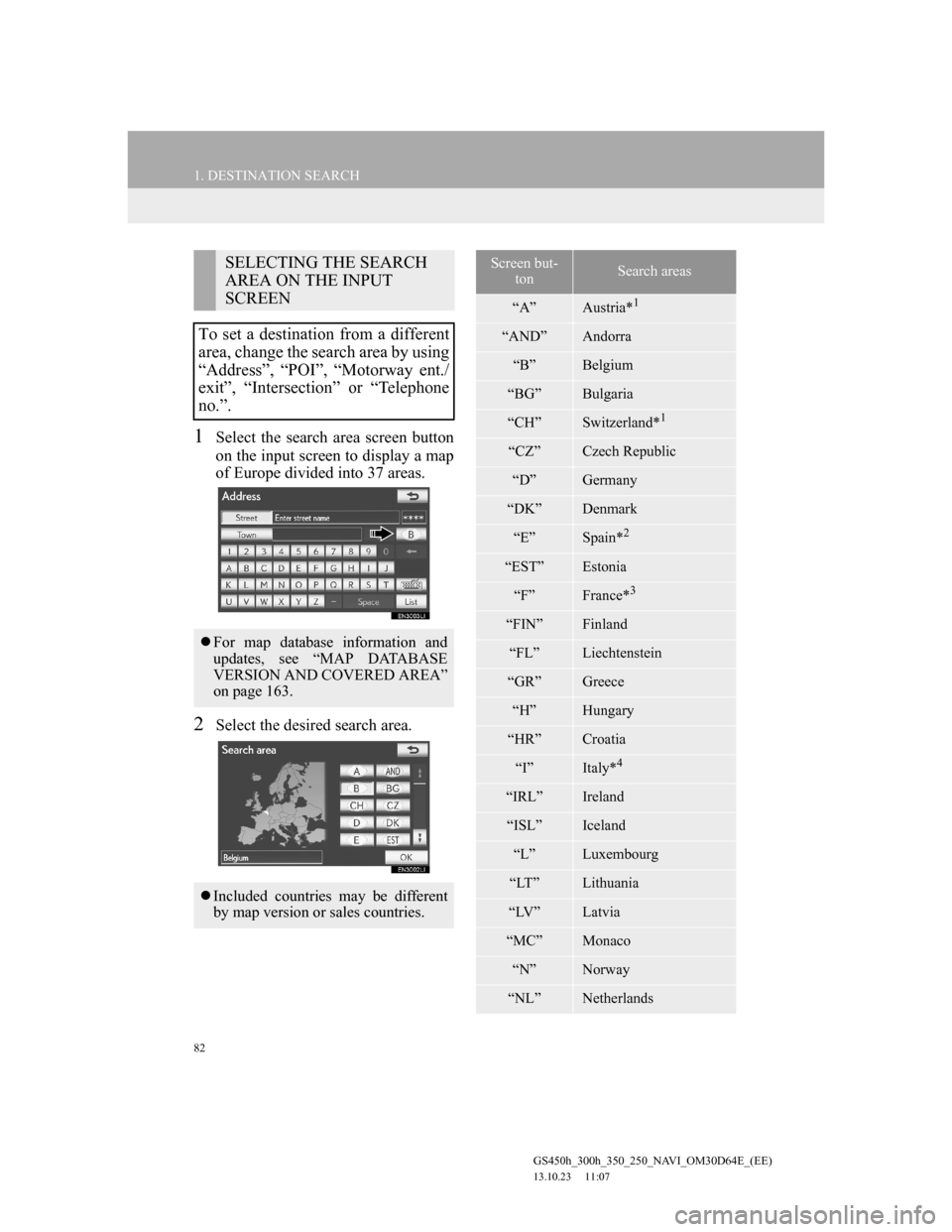
1Select the search area screen button
on the input screen to display a map
of Europe divided into 37 areas.
2Select the desired search area.
SELECTING THE SEARCH
AREA ON THE INPUT
SCREEN
To set a destination from a different
area, change the search area by using
“Address”, “POI”, “Motorway ent./
exit”, “Intersection” or “Telephone
no.”.
For map database information and
updates, see “MAP DATABASE
VERSION AND COVERED AREA”
on page 163.
Included countries may be different
by map version or sales countries.
Screen but-
tonSearch areas
“A”Austria*1
“AND”Andorra
“B”Belgium
“BG”Bulgaria
“CH”Switzerland*1
“CZ”Czech Republic
“D”Germany
“DK”Denmark
“E”Spain*2
“EST”Estonia
“F”France*3
“FIN”Finland
“FL”Liechtenstein
“GR”Greece
“H”Hungary
“HR”Croatia
“I”Italy*4
“IRL”Ireland
“ISL”Iceland
“L”Luxembourg
“LT”Lithuania
“LV”Latvia
“MC”Monaco
“N”Norway
“NL”Netherlands
Page 96 of 256
96
1. DESTINATION SEARCH
GS450h_300h_350_250_NAVI_OM30D64E_(EE)
13.10.23 11:07
1Select “Menu”.
2Select “Destination” on the naviga-
tion menu screen.
3Select “Coordinates” on the second
page of the “Destination” screen.
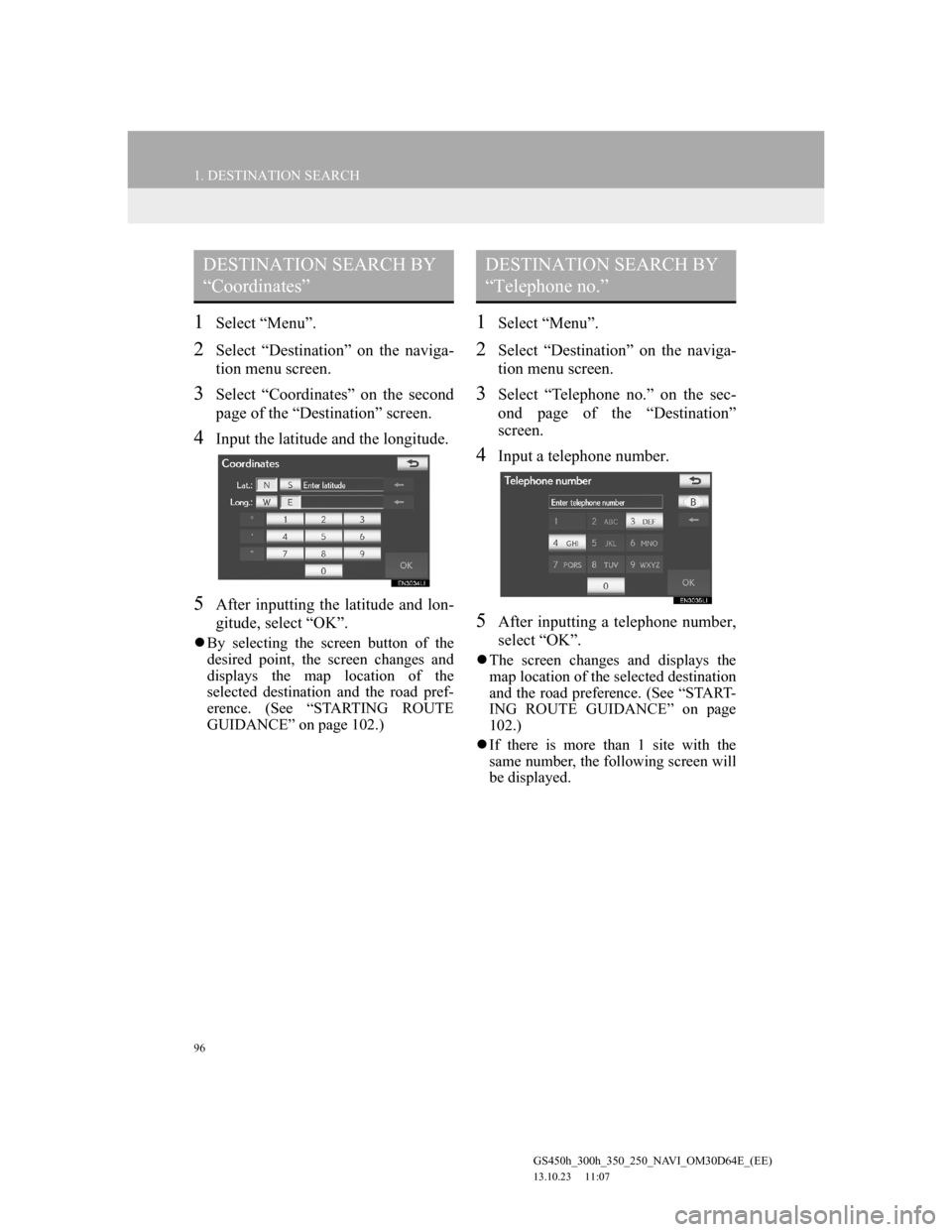
4Input the latitude and the longitude.
5After inputting the latitude and lon-
gitude, select “OK”.
By selecting the screen button of the
desired point, the screen changes and
displays the map location of the
selected destination and the road pref-
erence. (See “STARTING ROUTE
GUIDANCE” on page 102.)
1Select “Menu”.
2Select “Destination” on the naviga-
tion menu screen.
3Select “Telephone no.” on the sec-
ond page of the “Destination”
screen.
4Input a telephone number.
5After inputting a telephone number,
select “OK”.
The screen changes and displays the
map location of the selected destination
and the road preference. (See “START-
ING ROUTE GUIDANCE” on page
102.)
If there is more than 1 site with the
same number, the following screen will
be displayed.
DESTINATION SEARCH BY
“Coordinates”DESTINATION SEARCH BY
“Telephone no.”
Page 97 of 256
97
1. DESTINATION SEARCH
3
NAVIGATION SYSTEM
GS450h_300h_350_250_NAVI_OM30D64E_(EE)
13.10.23 11:07
1Select “Menu”.
2Select “Destination” on the naviga-
tion menu screen.
3Select “POI near cursor” on the sec-
ond page of the “Destination”
screen.
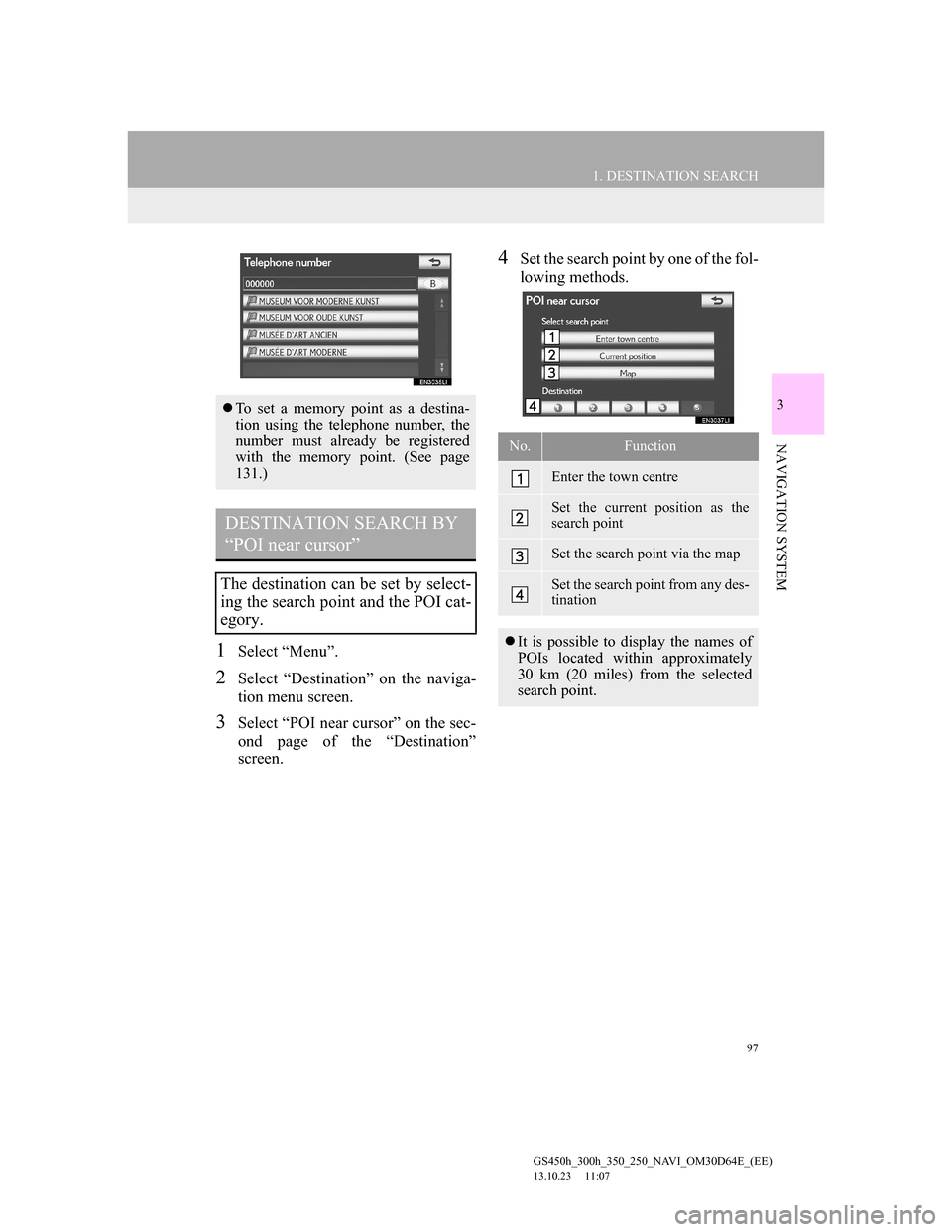
4Set the search point by one of the fol-
lowing methods.
To set a memory point as a destina-
tion using the telephone number, the
number must already be registered
with the memory point. (See page
131.)
DESTINATION SEARCH BY
“POI near cursor”
The destination can be set by select-
ing the search point and the POI cat-
egory.
No.Function
Enter the town centre
Set the current position as the
search point
Set the search point via the map
Set the search point from any des-
tination
It is possible to display the names of
POIs located within approximately
30 km (20 miles) from the selected
search point.
Page 102 of 256

102
1. DESTINATION SEARCH
GS450h_300h_350_250_NAVI_OM30D64E_(EE)
13.10.23 11:07
3. STARTING ROUTE GUIDANCE
1When an arrow facing the desired
point is selected, the map scrolls in
that direction.
The scroll stops when the selection of
the arrow is released.
2Select “Enter”.
The system starts route search and dis-
plays recommended routes.
3To start guidance, select “Start”.
*: Can only be used when receiving
TPEG (Transport Protocol Experts
Group) information. Depending on the
country or area, receiving TPEG infor-
mation may not be possible.After inputting the destination, the
screen changes and displays the map
location of the selected destination
and the road preference.
If a destination has already been set,
“Add to ” and “Replace ” will be
displayed.
“Replace ”: Select to delete the ex-
isting destinations and set a new one.
“Add to ”: Select to add a destina-
tion(s).
“Road preference”: Select to change
the road preference. (See page 119.)
“Info”: If this screen button is dis-
played on the top of the screen, select
it to view items such as name, address,
position and telephone number.
No./
IconFunction
Current position
Destination point
Type of route and its distance
Distance of the entire route
Select the desired route from 3
possible routes. (See page 104.)
Select to change the route. (See
page 115.)
*Select to display traffic predic-
tion information. (See page
178.)
Page 127 of 256

127
3. MEMORY POINTS
GS450h_300h_350_250_NAVI_OM30D64E_(EE)
13.10.23 11:07
3
NAVIGATION SYSTEM
1Select “Menu”.
2Select “Memory point” on the navi-
gation menu screen.
3Select “Home” on the “Memory
point” screen.
4Select “Edit”.
5Select the screen button to be edited.
6Select “OK”.
EDITING HOME
No.FunctionPage
Select to change the
home icon to be dis-
played on the map. 133
Select to edit home
name. The name can be
displayed on the map.
134
Select to illuminate the
indicator. When the indi-
cator is illuminated, the
registered name is dis-
played on the upper part
of the map screen.
135
Select to edit location in-
formation. 135
Select to edit home’s
telephone number. 135
Page 130 of 256

130
3. MEMORY POINTS
GS450h_300h_350_250_NAVI_OM30D64E_(EE)
13.10.23 11:07
1Select “Menu”.
2Select “Memory point” on the navi-
gation menu screen.
3Select “Quick access” on the “Mem-
ory point” screen.
4Select “Edit”.
5Select the screen button of the de-
sired quick access.
6Select the screen button to be edited.
7Select “OK”.
EDITING QUICK ACCESS
No.FunctionPage
Select to change the
icons to be displayed on
the map. 133
Select to edit the quick
access name. The names
can be displayed on the
map.
134
Select to illuminate the
indicator. When the indi-
cator is illuminated, the
registered name is dis-
played on the upper part
of the map screen.
135
Select to edit location in-
formation. 135
Select to edit telephone
number. 135
Page 132 of 256
132
3. MEMORY POINTS
GS450h_300h_350_250_NAVI_OM30D64E_(EE)
13.10.23 11:07
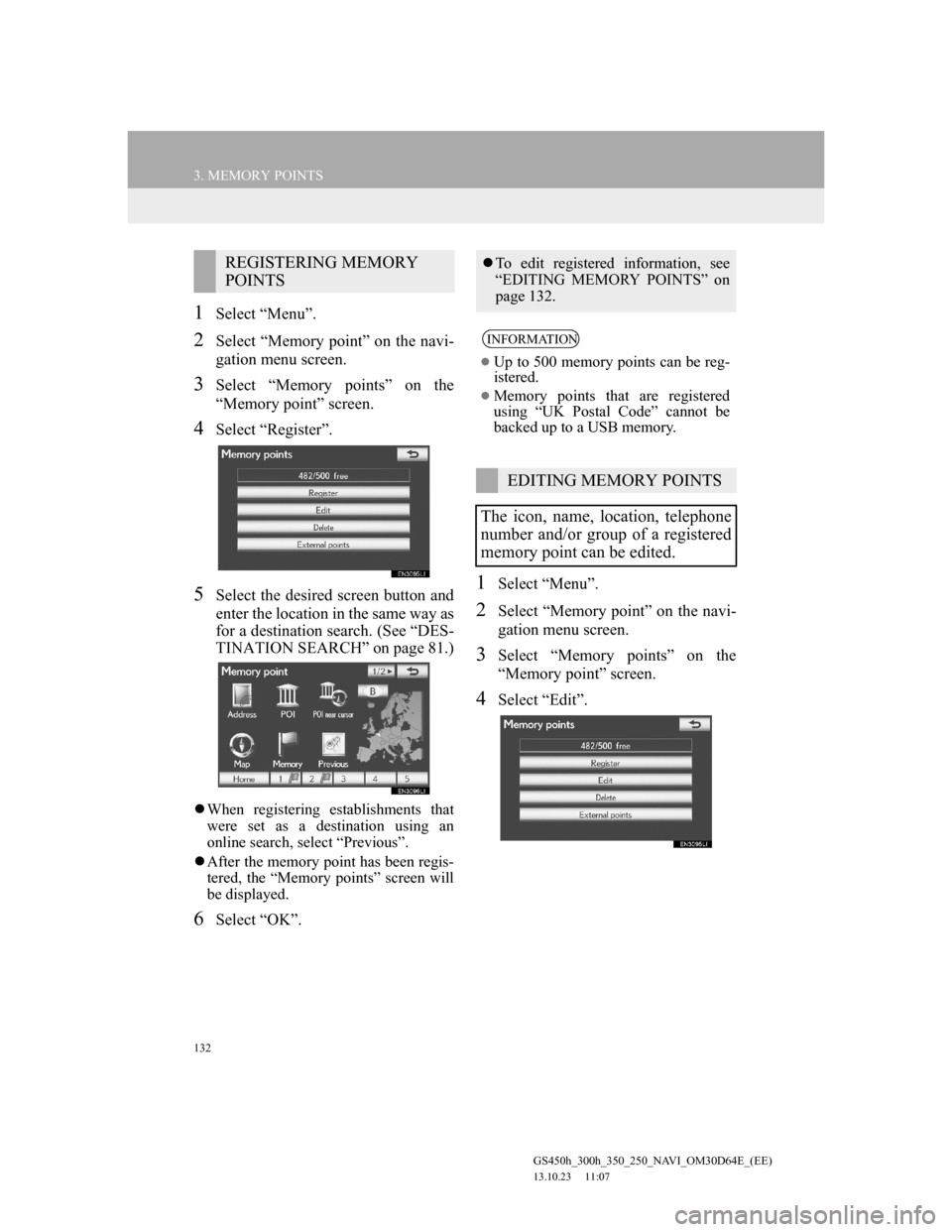
1Select “Menu”.
2Select “Memory point” on the navi-
gation menu screen.
3Select “Memory points” on the
“Memory point” screen.
4Select “Register”.
5Select the desired screen button and
enter the location in the same way as
for a destination search. (See “DES-
TINATION SEARCH” on page 81.)
When registering establishments that
were set as a destination using an
online search, select “Previous”.
After the memory point has been regis-
tered, the “Memory points” screen will
be displayed.
6Select “OK”.
1Select “Menu”.
2Select “Memory point” on the navi-
gation menu screen.
3Select “Memory points” on the
“Memory point” screen.
4Select “Edit”.
REGISTERING MEMORY
POINTSTo edit registered information, see
“EDITING MEMORY POINTS” on
page 132.
INFORMATION
Up to 500 memory points can be reg-
istered.
Memory points that are registered
using “UK Postal Code” cannot be
backed up to a USB memory.
EDITING MEMORY POINTS
The icon, name, location, telephone
number and/or group of a registered
memory point can be edited.
Page 133 of 256
133
3. MEMORY POINTS
GS450h_300h_350_250_NAVI_OM30D64E_(EE)
13.10.23 11:07
3
NAVIGATION SYSTEM
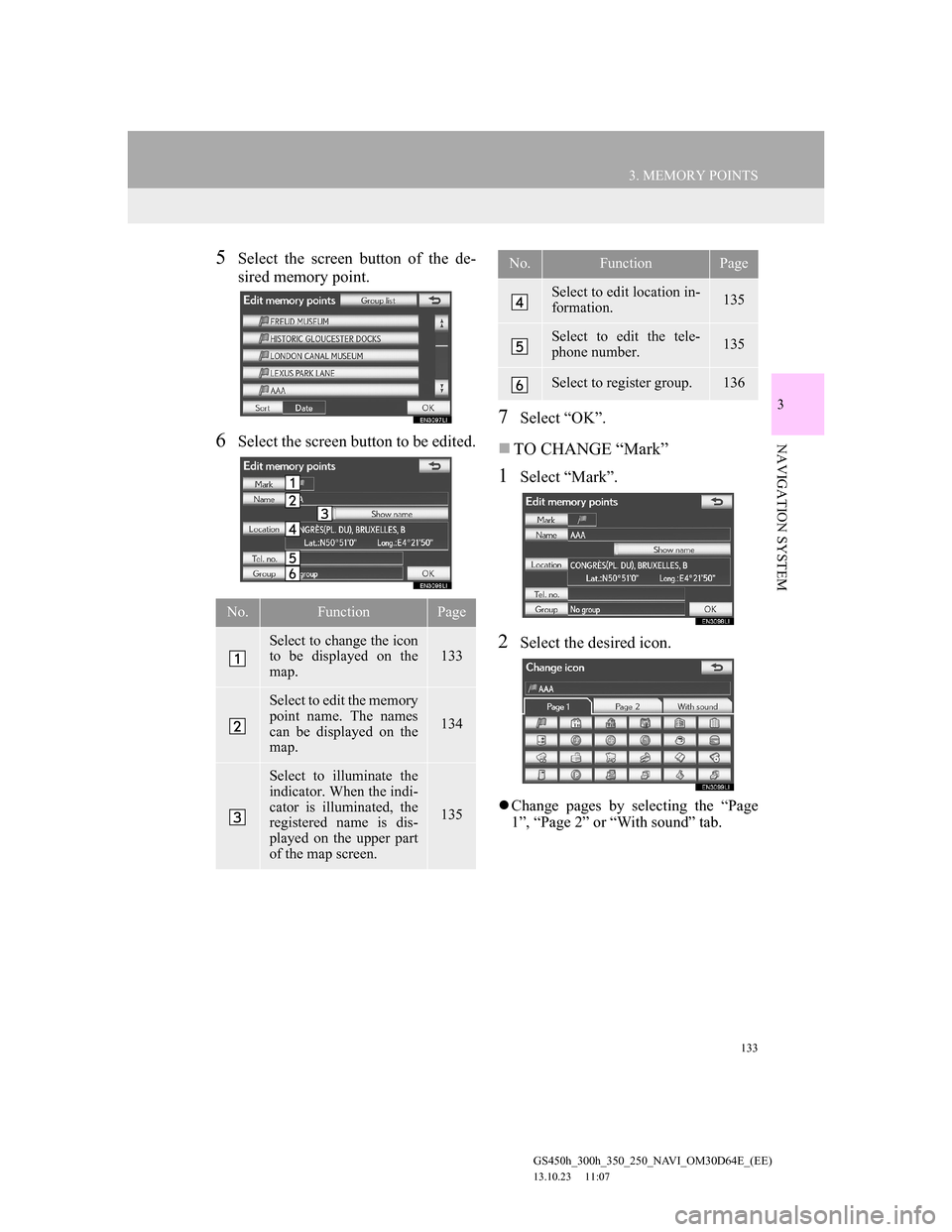
5Select the screen button of the de-
sired memory point.
6Select the screen button to be edited.
7Select “OK”.
TO CHANGE “Mark”
1Select “Mark”.
2Select the desired icon.
Change pages by selecting the “Page
1”, “Page 2” or “With sound” tab.
No.FunctionPage
Select to change the icon
to be displayed on the
map. 133
Select to edit the memory
point name. The names
can be displayed on the
map.
134
Select to illuminate the
indicator. When the indi-
cator is illuminated, the
registered name is dis-
played on the upper part
of the map screen.
135
Select to edit location in-
formation. 135
Select to edit the tele-
phone number. 135
Select to register group. 136
No.FunctionPage
Page 135 of 256
135
3. MEMORY POINTS
GS450h_300h_350_250_NAVI_OM30D64E_(EE)
13.10.23 11:07
3
NAVIGATION SYSTEM
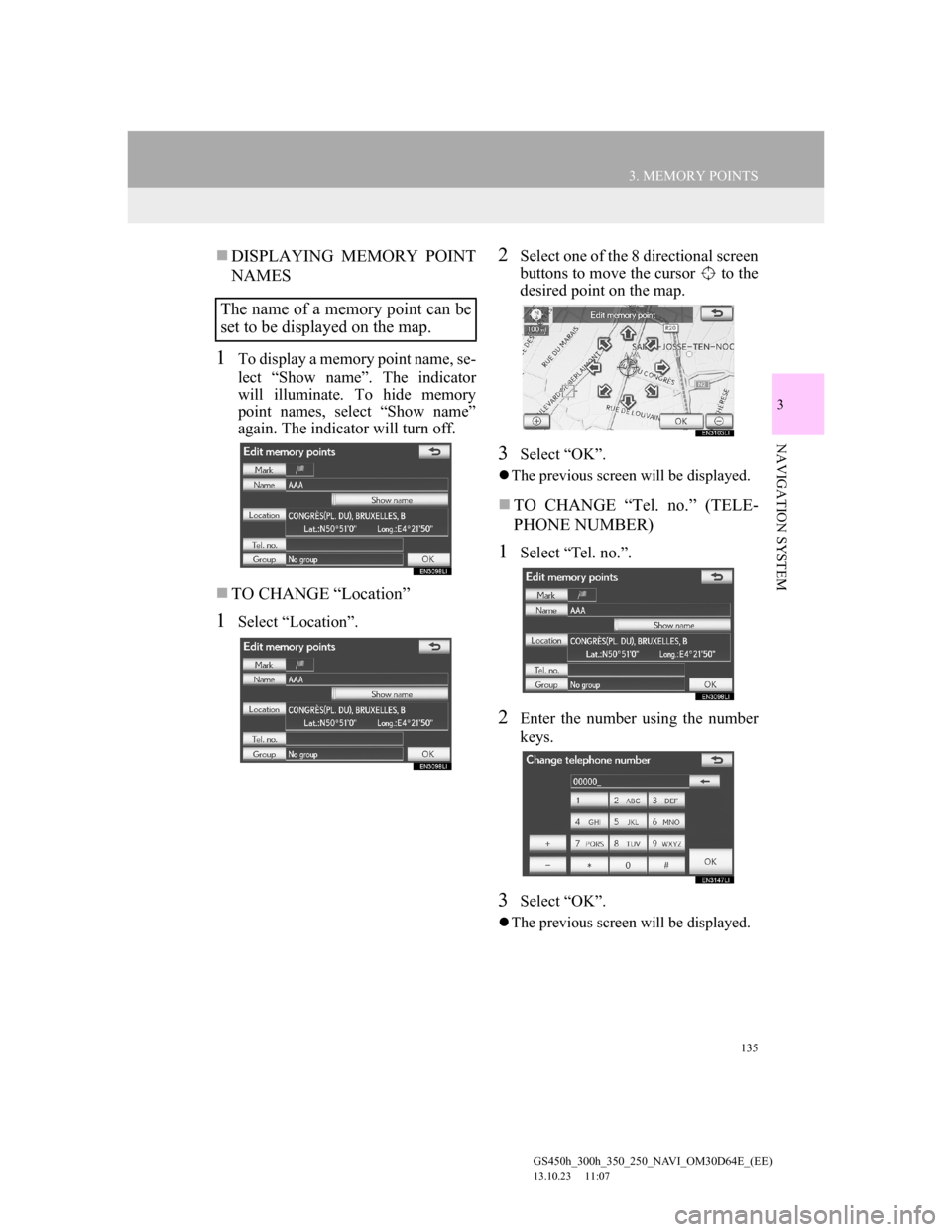
DISPLAYING MEMORY POINT
NAMES
1To display a memory point name, se-
lect “Show name”. The indicator
will illuminate. To hide memory
point names, select “Show name”
again. The indicator will turn off.
TO CHANGE “Location”
1Select “Location”.
2Select one of the 8 directional screen
buttons to move the cursor to the
desired point on the map.
3Select “OK”.
The previous screen will be displayed.
TO CHANGE “Tel. no.” (TELE-
PHONE NUMBER)
1Select “Tel. no.”.
2Enter the number using the number
keys.
3Select “OK”.
The previous screen will be displayed.
The name of a memory point can be
set to be displayed on the map.