lock Lexus GS350 2013 Owner's Manual
[x] Cancel search | Manufacturer: LEXUS, Model Year: 2013, Model line: GS350, Model: Lexus GS350 2013Pages: 830, PDF Size: 9.71 MB
Page 570 of 830
GS350_U (OM30C34U)
5695-7. Other interior features
5
Interior features
Blows air from the seatHi
Mid
Lo
Off
The indicator light (green) on the
switch and the level indicator lights
(green) come on.
■The seat heaters/seat ventilators can be used when
The engine switch is in IGNITION ON mode.
■The seat heater timer control
The seat heater automatically switches from Hi → Mid → Lo → Off. The switching
timing differs depending on the temperature inside the cabin etc. when the seat
heater was operated.
■Automatic operation of the seat heater during Eco drive mode
If the driving mode select switch is switched to Eco drive mode in cold temperatures,
the seat heater may be automatically operated to assist heating performance.
■Button lock function (vehicles with rear control panel)
To prevent inadvertent operation, some buttons on the rear armrest can be locked.
( → P. 3 6 4 )
■Rear control panel illumination off function (vehicles with rear control panel)
Control panel illumination on the rear armrest can be turned off. ( →P. 3 6 4 )
Seat ventilators (front seats only)
1
2
13
4
Page 573 of 830
572
GS350_U (OM30C34U)
5-7. Other interior features
Rear sunshade∗/rear door sunshades∗
The rear sunshade can be raised and lowered by operating the button
shown below.
■From the front seatsPull up the lever to release the
lock.
Slide the armrest.
Raise/lower
■From the rear seats (if equipped)
Raise/lower
∗
: If equipped
Rear sunshade
1
2
13
Page 575 of 830
574
GS350_U (OM30C34U)
5-7. Other interior features
■Button lock function (vehicles with rear control panel)
To prevent inadvertent operation, some buttons on the rear armrest can be locked.
(→ P. 3 6 4 )
■Rear control panel illumination off function (vehicles with rear control panel)
Control panel illumination on the rear armrest can be turned off. ( →P. 3 6 4 )
■Customization
Time elapsed before the reverse operation feature activates can be changed.
(Customizable features: → P. 777)
CAUTION
■When the rear sunshade is being operated
Do not place fingers or other objects in the fastener section or in the opening.
They may get caught, causing injury.
NOTICE
■To prevent battery discharge
Do not operate the rear sunshade when the engine is off.
■To ensure normal operation of the re ar sunshade and rear door sunshades
Observe the following precautions.
●Do not place excessive load on the motor or other components of the rear sun-
shade.
●Do not place objects where they may hinder opening and closing operations.
●Do not attach items to the rear sunshade and rear door sunshades.
●Keep the opening clean and clear of obstructions.
●Do not operate the rear sunshade cont inuously for long periods of time.
Page 576 of 830
575
GS350_U (OM30C34U)5-7. Other interior features
5
Interior features
Trunk storage extension
Fold down the armrest.
Fold down the handle and open
the armrest door.
The armrest door can be locked
and unlocked using the mechani-
cal key. Unlock
Lock
Long objects can be loaded into the vehicle by utilizing the trunk space
and rear seat area.
1
2
1
2
CAUTION
■When not in use
Ensure that the armrest door is closed.
In the event of sudden braking, items stored in the trunk may be thrown forward
into the cabin, resulting in injury.
Page 580 of 830
579
GS350_U (OM30C34U)5-7. Other interior features
5
Interior features
Garage door opener∗
The garage door opener (HomeLink® Universal Transceiver) is manufac-
tured under license from HomeLink
®.
The HomeLink
® compatible transceiver in your vehicle has 3 buttons
which can be programmed to operate 3 different devices. Refer to the
programming method below appropriate for the device.
Indicator light
Buttons
∗
: If equipped
The garage door opener can be programmed to operate garage doors,
gates, entry doors, door locks, home lighting systems, security systems,
and other devices.
Programming the HomeLink® (for U.S.A. owners)
1
2
Page 583 of 830
582
GS350_U (OM30C34U)
5-7. Other interior features
Press and hold the vehicle’s programmed HomeLink® button for 2
seconds and release it. Repeat this step once again. The garage door
may open.
If the garage door opens, the programming process is complete. If the door
does not open, press and release the button a third time. This third press and
release will complete the programming process by opening the garage door.
The ceiling mounted garage door opener motor should now recognize the
HomeLink
® signal and operate the garage door.
Repeat the steps above to program another rolling code system for
any of the remaining HomeLink
® buttons.
■Programming an entry gate (for U.S.A. owners)/Programming a
devices in the Canadian market
Place the remote control transmit ter 1 to 3 in. (25 to 75 mm) away
from the HomeLink
® buttons.
Keep the HomeLink® indicator light in view while programming.
Press and hold the selected HomeLink® button.
Repeatedly press and release (cycle) the remote control transmitter
for 2 seconds each until step is completed.
When the HomeLink
® indicator light starts to flash rapidly, release
the buttons.
Test the HomeLink
® operation by pressing the newly programmed
button. Check to see if the gate/device operates correctly.
Repeat the steps above to program another device for any of the
remaining HomeLink
® buttons.
■Programming other devices
To program other devices such as home security systems, home door
locks and lighting, contact your Lexus dealer for assistance.
■Reprogramming a button
The individual HomeLink
® buttons cannot be erased but can be repro-
grammed. To reprogram a button, follow the “Reprogramming a
HomeLink
® button” instructions.
3
4
1
2
3
4
4
5
6
Page 595 of 830
594
GS350_U (OM30C34U)
6-1. Maintenance and care
Cleaning and protecting the vehicle exterior
●Working from top to bottom, liberally apply water to the vehicle body,
wheel wells and underside of the vehicle to remove any dirt and dust.
●Wash the vehicle body using a sponge or soft cloth, such as a chamois.
●For hard-to-remove marks, use car wash soap and rinse thoroughly
with water.
●Wipe away any water.
●Wax the vehicle when the waterproof coating deteriorates.
If water does not bead on a clean surface, apply wax when the vehicle body is
cool.
■Automatic car washes
●Fold the mirrors before washing the vehicle. Start washing from the front of the
vehicle. Make sure to extend the mirrors before driving.
●Brushes used in automatic car washes may scratch the vehicle surface and harm
your vehicle’s paint.
●Rear spoiler (if equipped) may not be washable in some automatic car washes.
There may also be an increased risk of damage to vehicle.
■High pressure car washes
●Do not allow the nozzles of the car wash to come within close proximity of the win-
dows.
●Before using the car wash, check that the fuel filler door on your vehicle is closed
properly.
■When using a car wash
If the door handle becomes wet while the electronic key is within the effective range,
the door may lock and unlock repeatedly. In that case, follow the following correc-
tion procedures to wash the vehicle:
●Place the key in a position 6 ft. (2 m) or more separate from the vehicle while the
vehicle is being washed. (Take care to ensure that the key is not stolen.)
●Set the electronic key to battery-saving mode to disable the smart access system
with push-button start. (→P. 1 0 7 )
Perform the following to protect the vehicle and mainta in it in prime
condition:
Page 607 of 830
606
GS350_U (OM30C34U)
6-2. Maintenance
Head restraints• Do the head restraints movesmoothly and lock securely?
Indicators/buzzers• Do the indicators and buzzers func-tion properly?
Lights
• Do all the lights come on?
• Are the headlights aimed correctly? ( →P. 6 6 1 )
Parking brake
• Moves smoothly?
• When parked on a slope and the
parking brake is on, is the vehicle
securely stopped?
Seat belts
• Do the seat belts operate smoothly?
• The seat belts should not be dam-aged.
Seats• Do the seat controls operate prop-erly?
Steering wheel
• Does the steering wheel rotatesmoothly?
• Does the steering wheel have the correct amount of free play?
• There should not be any strange sounds coming from the steering
wheel.
ItemsCheck points
Page 608 of 830
GS350_U (OM30C34U)
6076-2. Maintenance
6
Maintenance and care
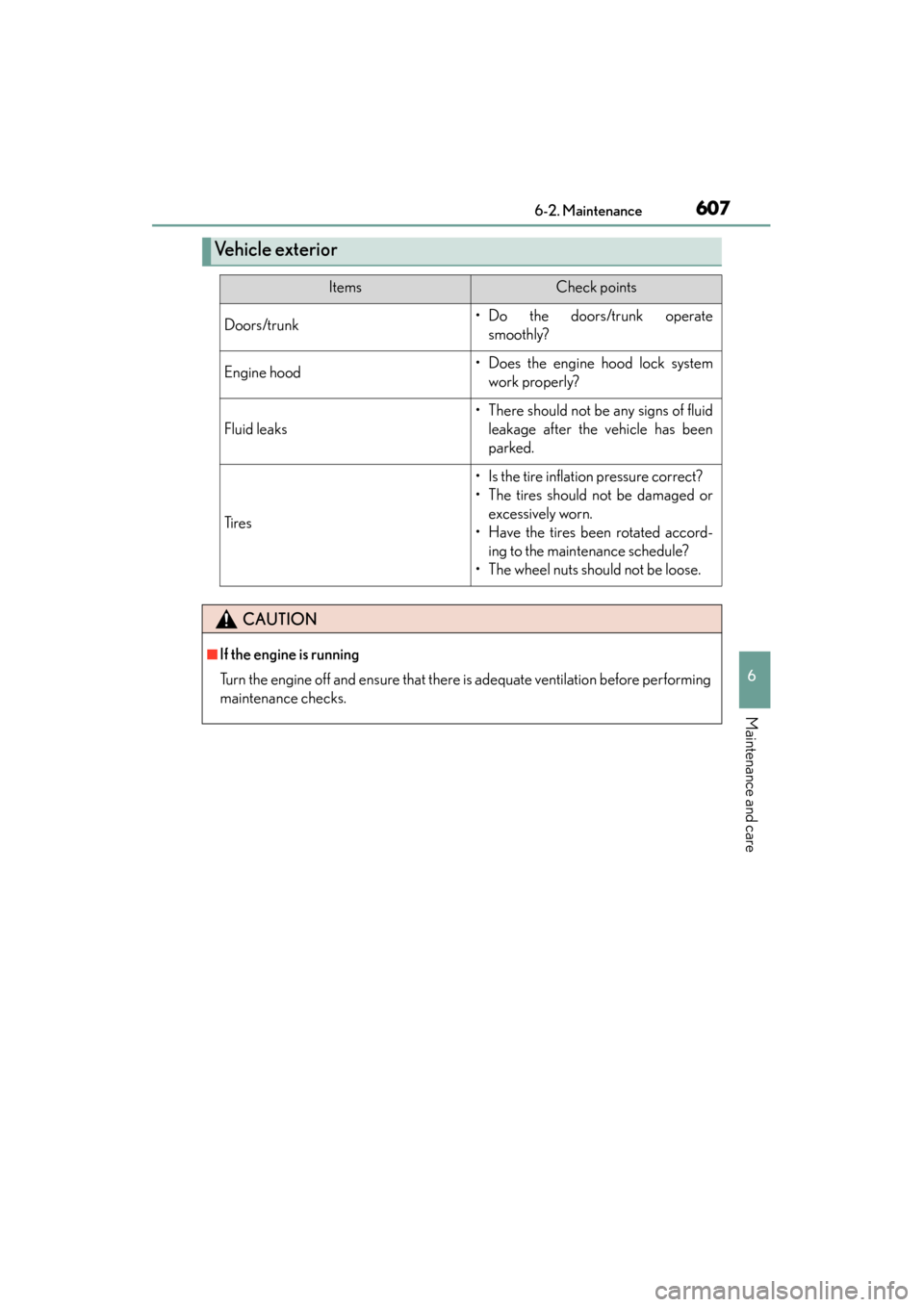
Ve h i c l e e x t e r i o r
ItemsCheck points
Doors/trunk• Do the doors/trunk operatesmoothly?
Engine hood• Does the engine hood lock systemwork properly?
Fluid leaks
• There should not be any signs of fluidleakage after the vehicle has been
parked.
Ti r e s
• Is the tire inflation pressure correct?
• The tires should not be damaged orexcessively worn.
• Have the tires been rotated accord- ing to the maintenance schedule?
• The wheel nuts should not be loose.
CAUTION
■If the engine is running
Turn the engine off and ensure that there is adequate ventilation before performing
maintenance checks.
Page 613 of 830
612
GS350_U (OM30C34U)
6-3. Do-it-yourself maintenance
Hood
Pull the hood lock release lever.
The hood will pop up slightly.
Pull up the auxiliary catch lever
and lift the hood.
Release the lock from the inside of the vehicle to open the hood.
1
2
CAUTION
■Pre-driving check
Check that the hood is fully closed and locked.
If the hood is not locked properly, it may open while the vehicle is in motion and
cause an accident, which may result in death or serious injury.