bluetooth Lexus GS350 2014 Navigation manual
[x] Cancel search | Manufacturer: LEXUS, Model Year: 2014, Model line: GS350, Model: Lexus GS350 2014Pages: 438, PDF Size: 54.27 MB
Page 376 of 438

376
2. SETUP
GS_Navi+MM_OM30E40E_(EE)
14.07.24 15:56
■UPDATING THE CONTACTS IN A
DIFFERENT WAY (FROM THE “Call
history” SCREEN)
1Display the telephone top screen.
(→ P.346)
2Select “Call history” and select a con-
tact not yet registered in the contact list.
3Select “Update contact” .
4Select the desired contact.
5Select a telephone type for the tele-
phone number.
1Select “New contact” .
2Enter the name and select “OK”.
3Enter the telephone number and select
“OK” .
For PBAP compatible Bluetooth®
phones, this function is available when
“Automatic contact/history transfer” is
set to off. ( →P.369)
REGISTERING A NEW
CONTACT TO THE CONTACT
LIST
New contact data can be registered.
Up to 4 numbers per person can be reg-
istered. For PBAP compatible
Bluetooth
® phones, this function is
available when “Automatic contact/his-
tory transfer” is set to off. (→P.369)
GS_Navi+MM_OM30E40E_(EE).book Page 376 Thursday, July 24, 201 4 3:57 PM
Page 377 of 438

377
2. SETUP
TELEPHONE
GS_Navi+MM_OM30E40E_(EE)
14.07.24 15:56
7
4Select the telephone type for the tele-
phone number.
5To add another number to this contact,
select “Yes”.
■REGISTERING A NEW CONTACT
IN A DIFFERENT WAY (FROM THE
“Call history” SCREEN)
1Display the telephone top screen.
(→ P.346)
2Select “Call history” and select a con-
tact not yet registered in the contact list.
3Select “Add to contacts” .
4Follow the steps in “REGISTERING A
NEW CONTACT TO THE CON-
TACTS LIST” from “STEP 2”.
(→ P.376)
1Select “Edit contact” .
2Select the desired contact.
3Select corresponding to the de-
sired name or number.
EDITING THE CONTACT
DATA
For PBAP compatible Bluetooth
®
phones, this function is available when
“Automatic contact/history transfer” is
set to off. ( →P.369)
GS_Navi+MM_OM30E40E_(EE).book Page 377 Thursday, July 24, 201 4 3:57 PM
Page 379 of 438

379
2. SETUP
TELEPHONE
GS_Navi+MM_OM30E40E_(EE)
14.07.24 15:56
7
1Select “Delete contacts” .
2Select the desired contact and select
“Delete”.
3Select “Yes” when the confirmation
screen appears.
■ DELETING THE CONTACT IN A
DIFFERENT WAY (FROM THE
“Contact details” SCREEN)
1Display the telephone top screen.
(→ P.346)
2Select “Contacts” , “Call history” or
“Favourites” and select the desired
contact.
3Select “Delete contact” .
4Select “Yes” when the confirmation
screen appears.
DELETING THE CONTACT
DATA
For PBAP compatible Bluetooth
®
phones, this function is available when
“Automatic contact/history transfer” is
set to off. ( →P.369)
INFORMATION
●
Multiple data can be selected and
deleted at the same time.
INFORMATION
●
When a Bluetooth® phone is deleted, the
contact data will be deleted at the same
time.
GS_Navi+MM_OM30E40E_(EE).book Page 379 Thursday, July 24, 201 4 3:57 PM
Page 384 of 438
384
2. SETUP
GS_Navi+MM_OM30E40E_(EE)
14.07.24 15:56
1Display the “Contacts” screen.
(→ P.372)
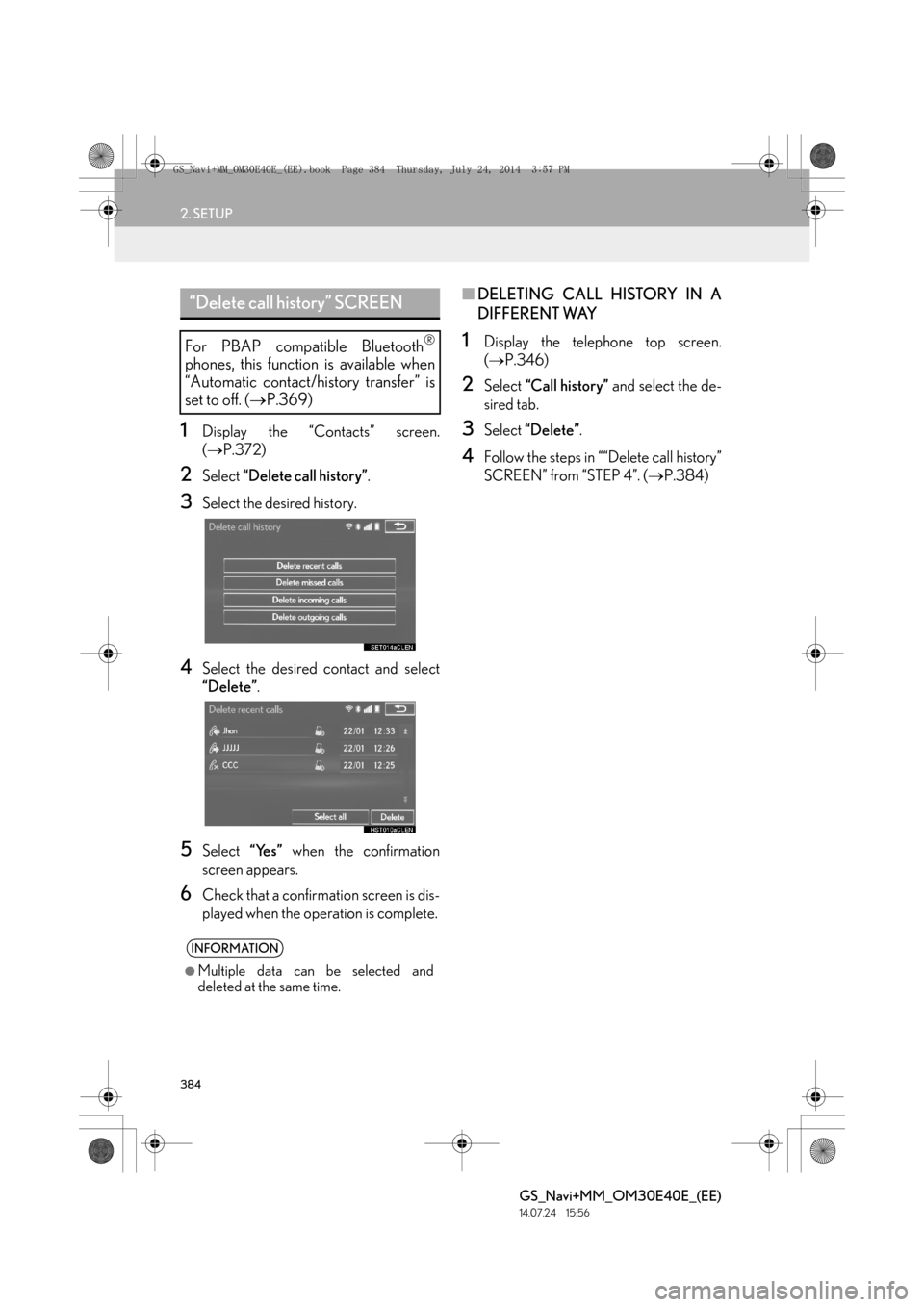
2Select “Delete call history” .
3Select the desired history.
4Select the desired contact and select
“Delete”.
5Select “Yes” when the confirmation
screen appears.
6Check that a confirmation screen is dis-
played when the operation is complete.
■ DELETING CALL HISTORY IN A
DIFFERENT WAY
1Display the telephone top screen.
(→ P.346)
2Select “Call history” and select the de-
sired tab.
3Select “Delete” .
4Follow the steps in ““Delete call history”
SCREEN” from “STEP 4”. ( →P.384)
“Delete call history” SCREEN
For PBAP compatible Bluetooth®
phones, this function is available when
“Automatic contact/history transfer” is
set to off. ( →P.369)
INFORMATION
●
Multiple data can be selected and
deleted at the same time.
GS_Navi+MM_OM30E40E_(EE).book Page 384 Thursday, July 24, 201 4 3:57 PM
Page 385 of 438
385
GS_Navi+MM_OM30E40E_(EE)
14.07.24 15:56
TELEPHONE
7
3. WHAT TO DO IF...
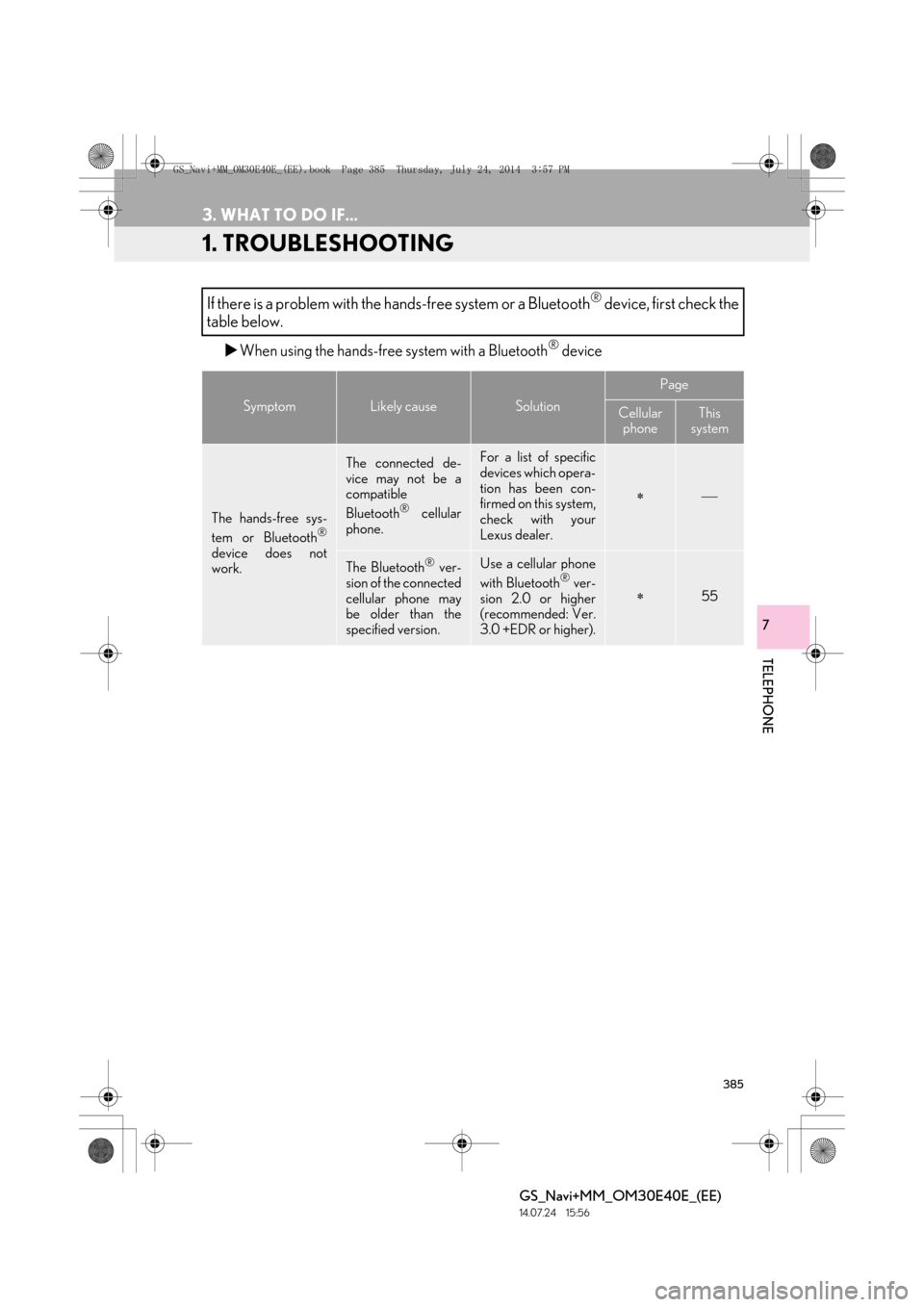
1. TROUBLESHOOTING
XWhen using the hands-free system with a Bluetooth® device
If there is a problem with the hands-free system or a Bluetooth® device, first check the
table below.
SymptomLikely causeSolution
Page
Cellular phoneThis
system
The hands-free sys-
tem or Bluetooth®
device does not
work.
The connected de-
vice may not be a
compatible
Bluetooth
® cellular
phone.
For a list of specific
devices which opera-
tion has been con-
firmed on this system,
check with your
Lexus dealer.
∗
The Bluetooth® ver-
sion of the connected
cellular phone may
be older than the
specified version.Use a cellular phone
with Bluetooth® ver-
sion 2.0 or higher
(recommended: Ver.
3.0 +EDR or higher).∗55
GS_Navi+MM_OM30E40E_(EE).book Page 385 Thursday, July 24, 201 4 3:57 PM
Page 387 of 438

387
3. WHAT TO DO IF...
TELEPHONE
GS_Navi+MM_OM30E40E_(EE)
14.07.24 15:56
7
A Bluetooth® con-
nection cannot be
made.
Another Bluetooth®
device is already
connected.
Manually connect
the cellular phone
you wish to use to this
system.
61
Bluetooth® function
is not enabled on the
cellular phone.Enable the
Bluetooth® function
on the cellular phone.∗
Automatic
Bluetooth® connec-
tion on this system is
set to off.
Set automatic
Bluetooth® connec-
tion on this system to
on when the engine
ACCESSORY or
IGNITION ON
66
“Check your tele-
phone.” message is
displayed.
Bluetooth® function
is not enabled on the
cellular phone.Enable the
Bluetooth® function
on the cellular phone.∗
Old registration in-
formation remains on
either this system or
the cellular phone.
Delete the existing
registration informa-
tion from both this
system and the cellu-
lar phone, then regis-
ter the cellular phone
you wish to connect
to this system.
∗60
SymptomLikely causeSolution
Page
Cellular
phoneThis
system
GS_Navi+MM_OM30E40E_(EE).book Page 387 Thursday, July 24, 201 4 3:57 PM
Page 390 of 438
390
3. WHAT TO DO IF...
GS_Navi+MM_OM30E40E_(EE)
14.07.24 15:56
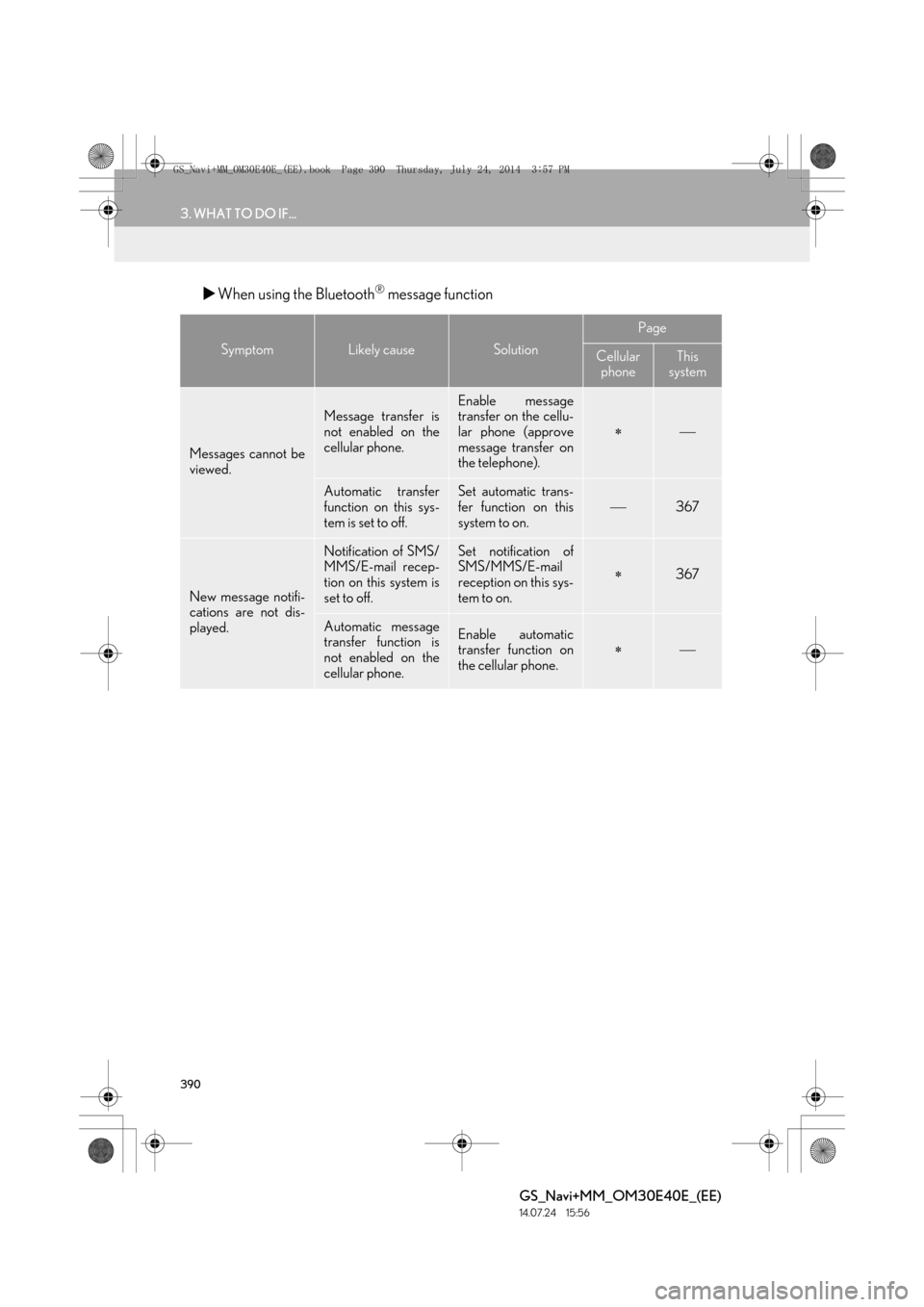
XWhen using the Bluetooth® message function
SymptomLikely causeSolution
Page
Cellular
phoneThis
system
Messages cannot be
viewed.
Message transfer is
not enabled on the
cellular phone.Enable message
transfer on the cellu-
lar phone (approve
message transfer on
the telephone).
∗
Automatic transfer
function on this sys-
tem is set to off.Set automatic trans-
fer function on this
system to on.367
New message notifi-
cations are not dis-
played.
Notification of SMS/
MMS/E-mail recep-
tion on this system is
set to off.Set notification of
SMS/MMS/E-mail
reception on this sys-
tem to on.
∗367
Automatic message
transfer function is
not enabled on the
cellular phone.Enable automatic
transfer function on
the cellular phone.∗
GS_Navi+MM_OM30E40E_(EE).book Page 390 Thursday, July 24, 201 4 3:57 PM
Page 391 of 438

391
3. WHAT TO DO IF...
TELEPHONE
GS_Navi+MM_OM30E40E_(EE)
14.07.24 15:56
7
XIn other situations
SymptomLikely causeSolution
Page
Cellular
phoneThis
system
The Bluetooth® con-
nection status is dis-
played at the top of
the screen each time
the engine
switch is in ACCES-
SORY or IGNI-
TION ON
mode.
Connection confir-
mation display on this
system is set to on.To turn off the dis-
play, set connection
confirmation display
on this system to off.
65
GS_Navi+MM_OM30E40E_(EE).book Page 391 Thursday, July 24, 201 4 3:57 PM
Page 392 of 438

392
3. WHAT TO DO IF...
GS_Navi+MM_OM30E40E_(EE)
14.07.24 15:56
∗: For details, refer to the owner’s manual that came with the cellular phone.
Even though all con-
ceivable measures
have been taken, the
symptom status does
not change.
The cellular phone is
not close enough to
this system.Bring the cellular
phone closer to this
system.
Radio interference
has occurred.Turn off Wi-Fi® de-
vices or other devic-
es that may emit
radio waves.
The cellular phone is
the most likely cause
of the symptom.
Turn the cellular
phone off, remove
and reinstall the bat-
tery pack, and then
restart the cellular
phone.
∗
Enable the cellular
phone’s Bluetooth®
connection.
∗
Disable the Wi-Fi®
connection of the
cellular phone.∗
Stop the cellular
phone’s security soft-
ware and close all ap-
plications.
∗
Before using an ap-
plication installed on
the cellular phone,
carefully check its
source and how its
operation might af-
fect this system.
∗
SymptomLikely causeSolution
Page
Cellular
phoneThis
system
GS_Navi+MM_OM30E40E_(EE).book Page 392 Thursday, July 24, 201 4 3:57 PM
Page 396 of 438

396
1. CONNECTED SERVICES
GS_Navi+MM_OM30E40E_(EE)
14.07.24 15:56
BEFORE USING CONNECTED
SERVICES
Observe the following precaution:• Before using this service, it is neces- sary to access Lexus portal site via a
personal computer and create an
account. When creating an account,
“Navigation identification” will be
required. Navigation identification:
→ P. 3 9 7
When using a cellular phone to connect
to the internet, observe the following
precautions: •In order to use this service, a
Bluetooth
® DUN/PAN compatible
cellular phone with sufficient network
coverage and a SIM card with a con-
tract that allows access to the internet
are required.
• When using the connected services, depending on your telephone sub-
scription, some related fees might
apply.
• When a cellular phone is used in a roaming situation (when outside the
geographical coverage area of
mobile network provider) connection
fees may apply.
GS_Navi+MM_OM30E40E_(EE).book Page 396 Thursday, July 24, 201 4 3:57 PM