warning Lexus GS350 2014 Owners Manual
[x] Cancel search | Manufacturer: LEXUS, Model Year: 2014, Model line: GS350, Model: Lexus GS350 2014Pages: 846, PDF Size: 35.04 MB
Page 716 of 846
7157-2. Steps to take in an emergency
GS350_OM_OM30D41U_(U)
7
When trouble arises
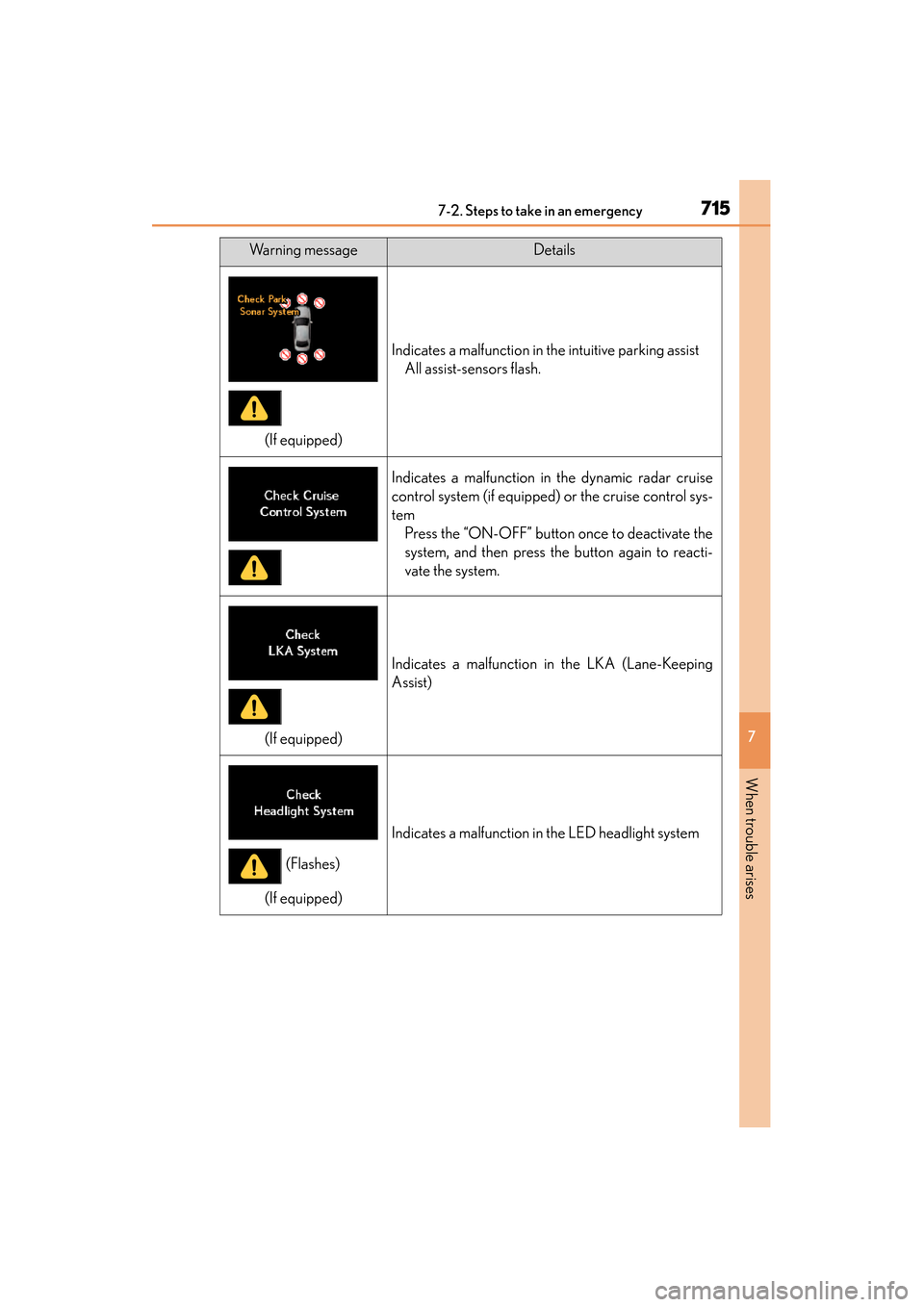
(If equipped)
Indicates a malfunction in the intuitive parking assistAll assist-sensors flash.
Indicates a malfunction in the dynamic radar cruise
control system (if equipped) or the cruise control sys-
temPress the “ON-OFF” button once to deactivate the
system, and then press the button again to reacti-
vate the system.
(If equipped)
Indicates a malfunction in the LKA (Lane-Keeping
Assist)
(If equipped)
Indicates a malfunction in the LED headlight system
Warning messageDetails
(Flashes)
GS350_OM_OM30D41U_(U).book Page 715 Monday, July 29, 2013 2:22 PM
Page 717 of 846
7167-2. Steps to take in an emergency
GS350_OM_OM30D41U_(U)
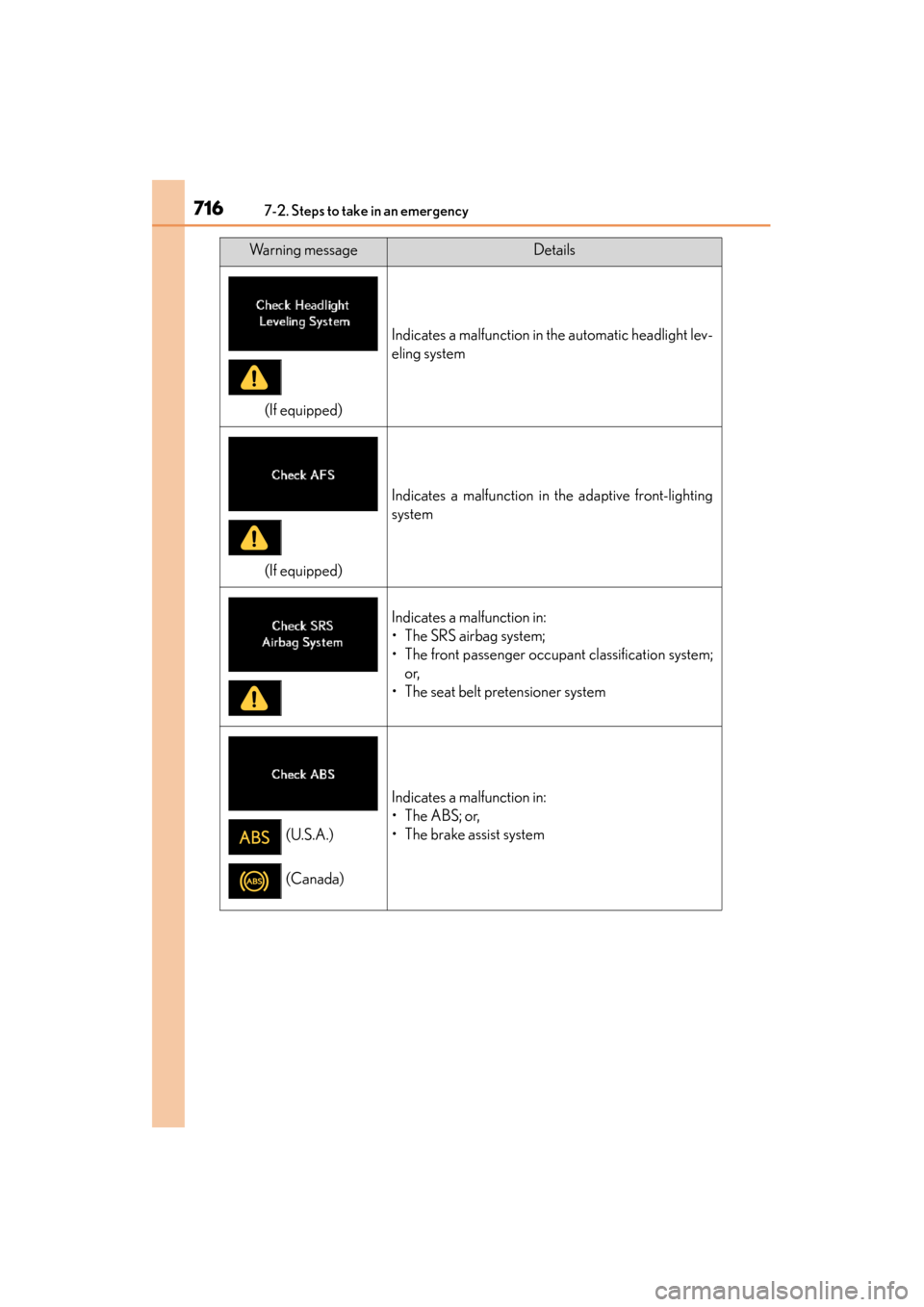
(If equipped)
Indicates a malfunction in the automatic headlight lev-
eling system
(If equipped)
Indicates a malfunction in the adaptive front-lighting
system
Indicates a malfunction in:
• The SRS airbag system;
• The front passenger occupant classification system;or,
• The seat belt pretensioner system
Indicates a malfunction in:
•The ABS; or,
• The brake assist system
Warning messageDetails
(U.S.A.)
(Canada)
GS350_OM_OM30D41U_(U).book Page 716 Monday, July 29, 2013 2:22 PM
Page 718 of 846
7177-2. Steps to take in an emergency
GS350_OM_OM30D41U_(U)
7
When trouble arises
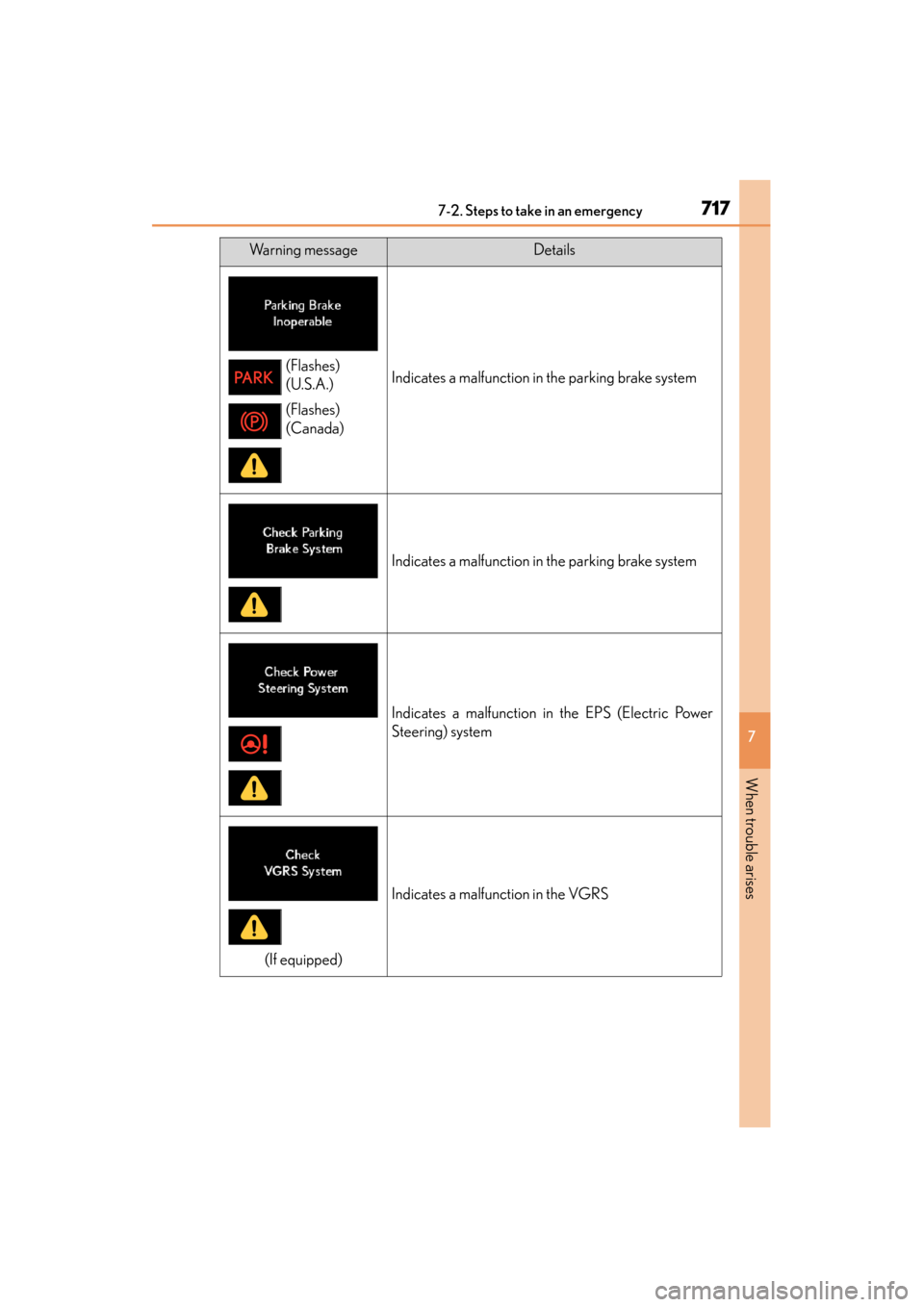
Indicates a malfunction in the parking brake system
Indicates a malfunction in the parking brake system
Indicates a malfunction in the EPS (Electric Power
Steering) system
(If equipped)
Indicates a malfunction in the VGRS
Warning messageDetails
(Flashes)
(U.S.A.)
(Flashes)
(Canada)
GS350_OM_OM30D41U_(U).book Page 717 Monday, July 29, 2013 2:22 PM
Page 719 of 846
7187-2. Steps to take in an emergency
GS350_OM_OM30D41U_(U)
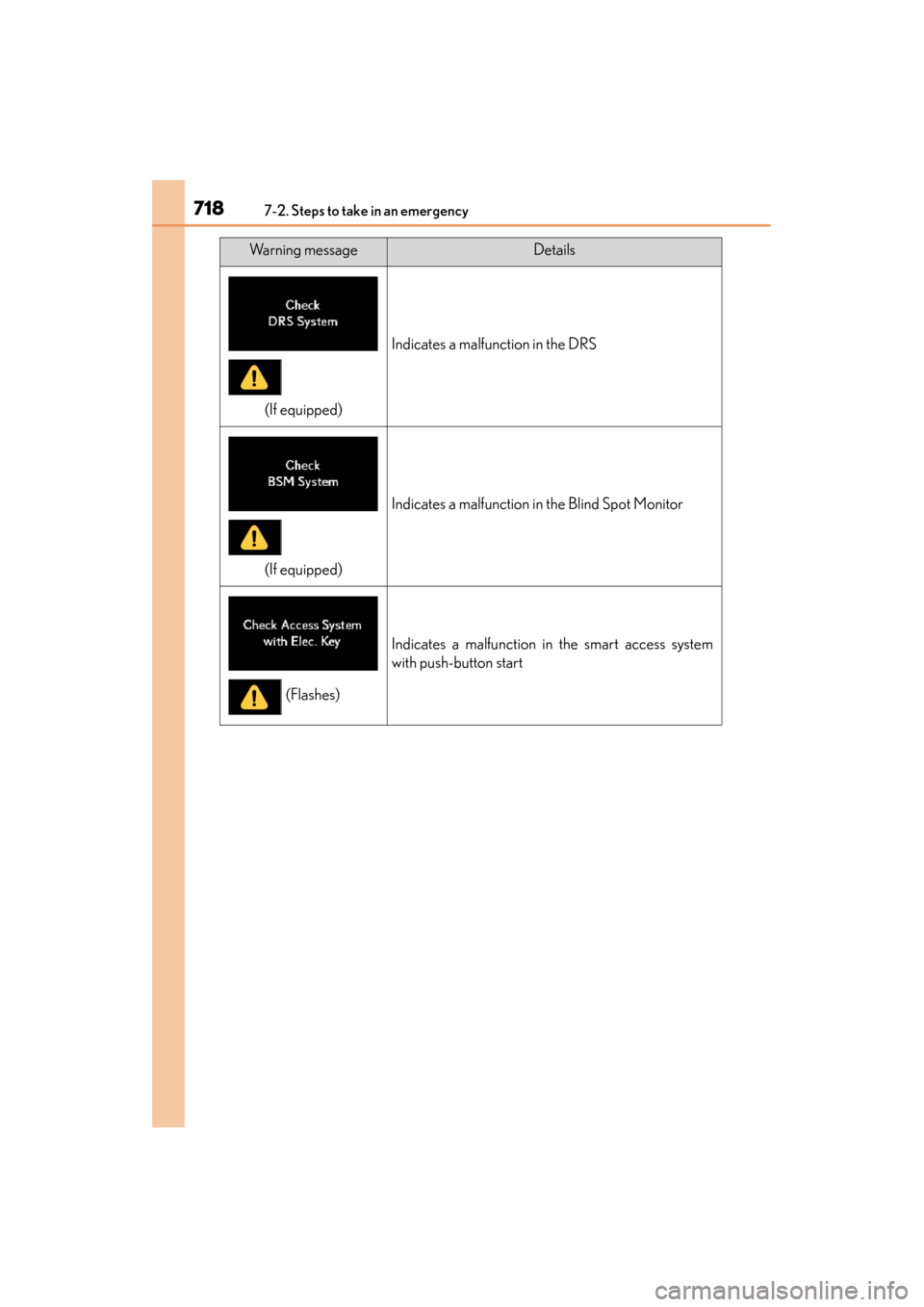
(If equipped)
Indicates a malfunction in the DRS
(If equipped)
Indicates a malfunction in the Blind Spot Monitor
Indicates a malfunction in the smart access system
with push-button start
Warning messageDetails
(Flashes)
GS350_OM_OM30D41U_(U).book Page 718 Monday, July 29, 2013 2:22 PM
Page 720 of 846
7197-2. Steps to take in an emergency
GS350_OM_OM30D41U_(U)
7
When trouble arises
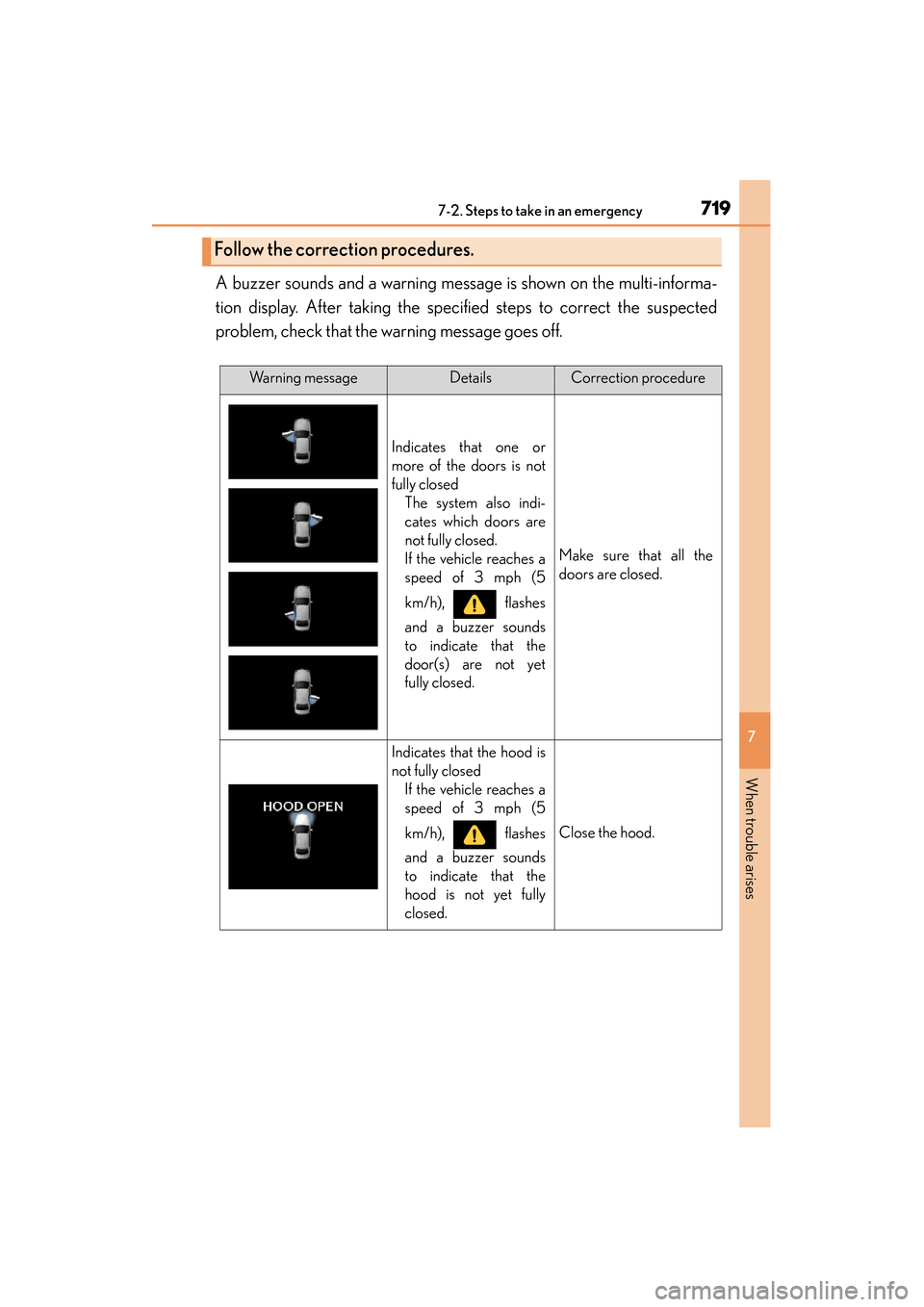
A buzzer sounds and a warning message is shown on the multi-informa-
tion display. After taking the specified steps to correct the suspected
problem, check that the warning message goes off.
Follow the correction procedures.
Warning messageDetailsCorrection procedure
Indicates that one or
more of the doors is not
fully closed The system also indi-
cates which doors are
not fully closed.
If the vehicle reaches a
speed of 3 mph (5
km/h), flashes
and a buzzer sounds
to indicate that the
door(s) are not yet
fully closed.
Make sure that all the
doors are closed.
Indicates that the hood is
not fully closedIf the vehicle reaches a
speed of 3 mph (5
km/h), flashes
and a buzzer sounds
to indicate that the
hood is not yet fully
closed.
Close the hood.
GS350_OM_OM30D41U_(U).book Page 719 Monday, July 29, 2013 2:22 PM
Page 721 of 846

7207-2. Steps to take in an emergency
GS350_OM_OM30D41U_(U)
Indicates that the trunk is
not fully closedIf the vehicle reaches a
speed of 3 mph (5
km/h), flashes
and a buzzer sounds
to indicate that the
trunk is not yet fully
closed.
Close the trunk.
Indicates that the win-
dows are not fully closed
(with the engine switch
off, and the driver’s door
open)
Close all the windows.
Indicates that the moon
roof is not fully closed
(with the engine switch
off, and the driver’s door
open)
Close the moon roof.
Indicates that the win-
dows and the moon roof
are not fully closed (with
the engine switch off, and
the driver’s door open)
Close all the windows
and the moon roof.
Warning messageDetailsCorrection procedure
(Flashes)
(Flashes)
(Flashes)
GS350_OM_OM30D41U_(U).book Page 720 Monday, July 29, 2013 2:22 PM
Page 722 of 846
7217-2. Steps to take in an emergency
GS350_OM_OM30D41U_(U)
7
When trouble arises
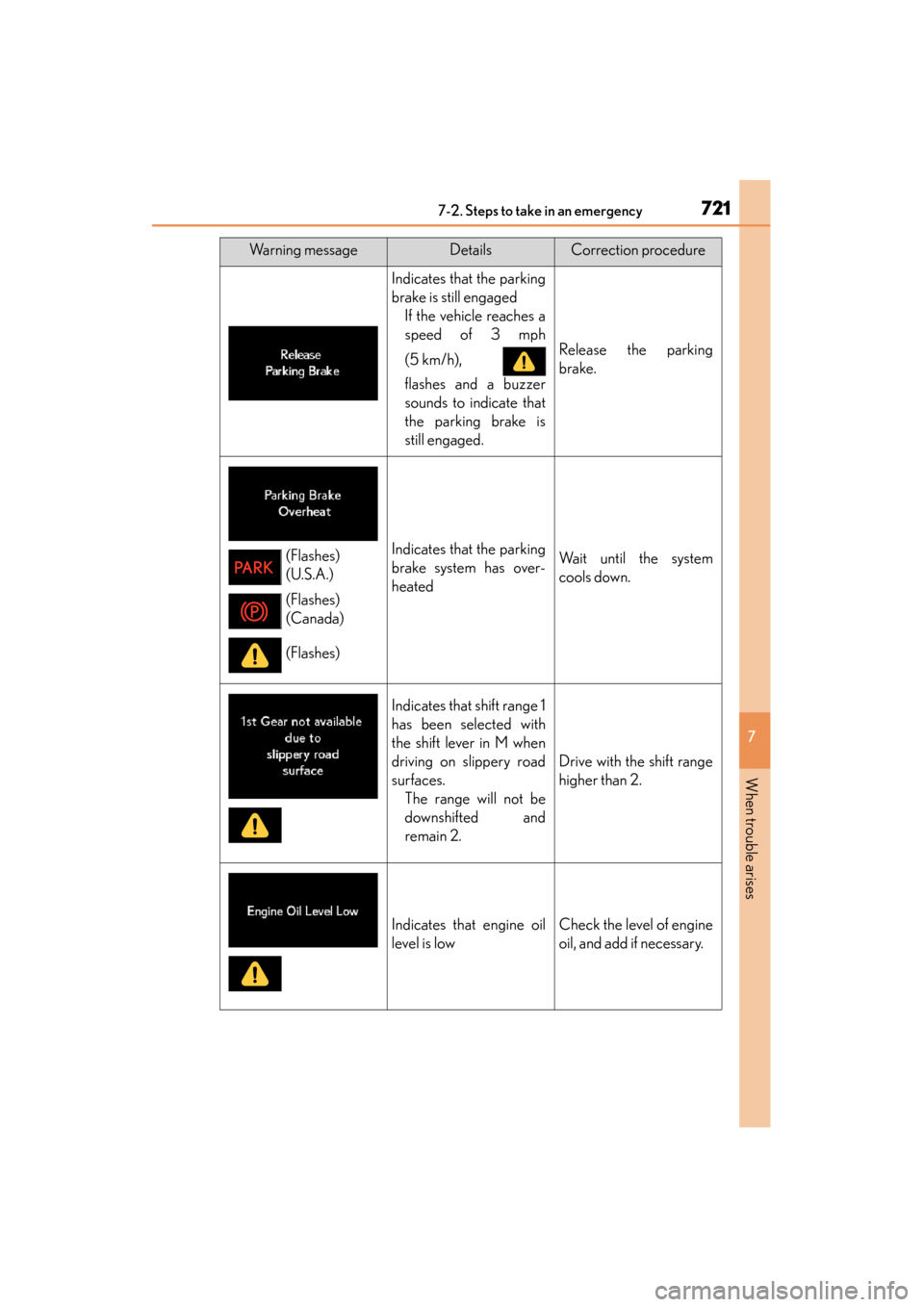
Indicates that the parking
brake is still engagedIf the vehicle reaches a
speed of 3 mph
(5 km/h),
flashes and a buzzer
sounds to indicate that
the parking brake is
still engaged.
Release the parking
brake.
Indicates that the parking
brake system has over-
heatedWait until the system
cools down.
Indicates that shift range 1
has been selected with
the shift lever in M when
driving on slippery road
surfaces.The range will not be
downshifted and
remain 2.
Drive with the shift range
higher than 2.
Indicates that engine oil
level is lowCheck the level of engine
oil, and add if necessary.
Warning messageDetailsCorrection procedure
(Flashes)
(U.S.A.)
(Flashes)
(Canada)
(Flashes)
GS350_OM_OM30D41U_(U).book Page 721 Monday, July 29, 2013 2:22 PM
Page 723 of 846
7227-2. Steps to take in an emergency
GS350_OM_OM30D41U_(U)
(If equipped)
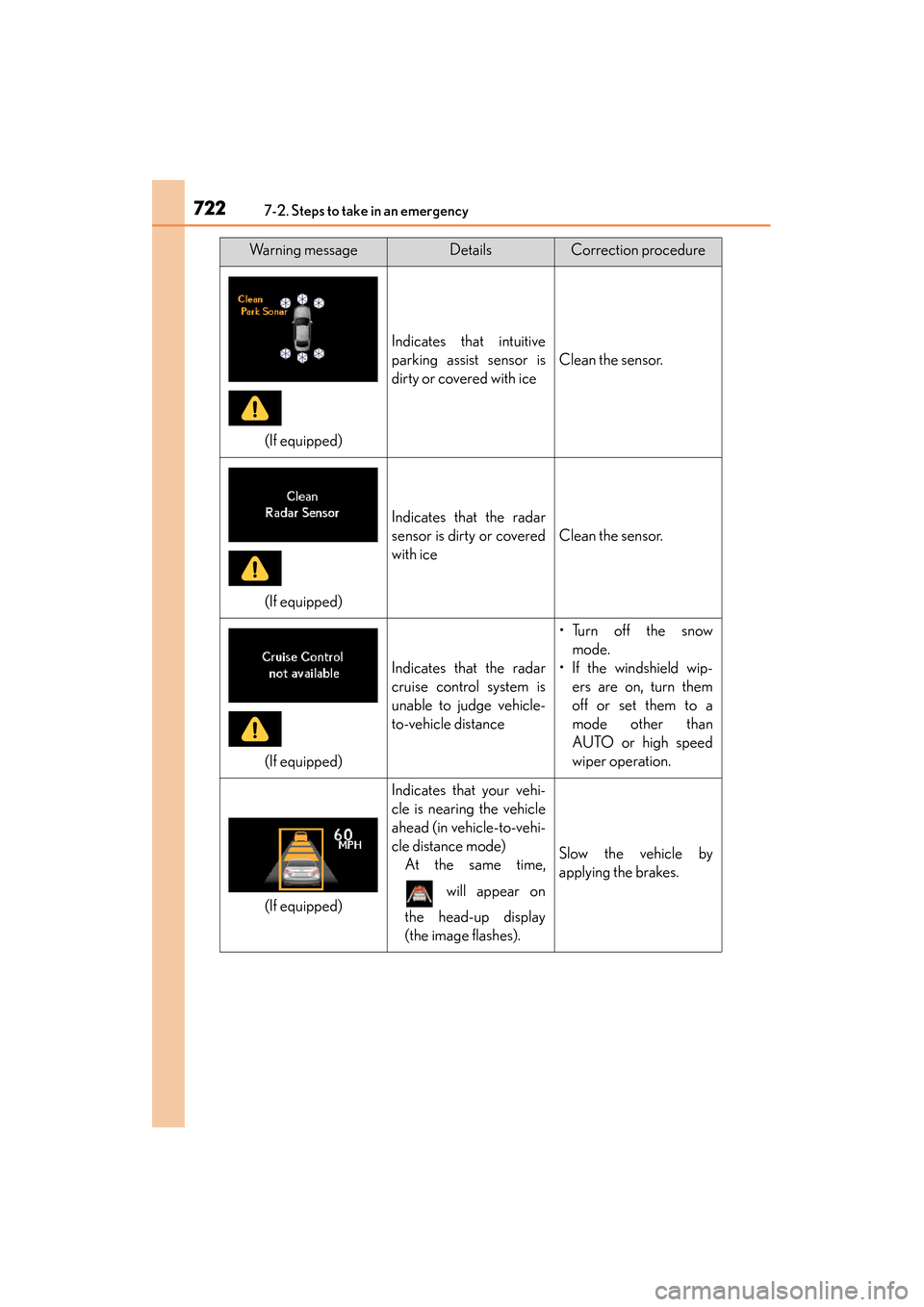
Indicates that intuitive
parking assist sensor is
dirty or covered with ice
Clean the sensor.
(If equipped)
Indicates that the radar
sensor is dirty or covered
with ice
Clean the sensor.
(If equipped)
Indicates that the radar
cruise control system is
unable to judge vehicle-
to-vehicle distance
•Turn off the snowmode.
• If the windshield wip- ers are on, turn them
off or set them to a
mode other than
AUTO or high speed
wiper operation.
(If equipped)
Indicates that your vehi-
cle is nearing the vehicle
ahead (in vehicle-to-vehi-
cle distance mode)At the same time,
will appear on
the head-up display
(the image flashes).
Slow the vehicle by
applying the brakes.
Warning messageDetailsCorrection procedure
GS350_OM_OM30D41U_(U).book Page 722 Monday, July 29, 2013 2:22 PM
Page 724 of 846
7237-2. Steps to take in an emergency
GS350_OM_OM30D41U_(U)
7
When trouble arises
(If equipped)
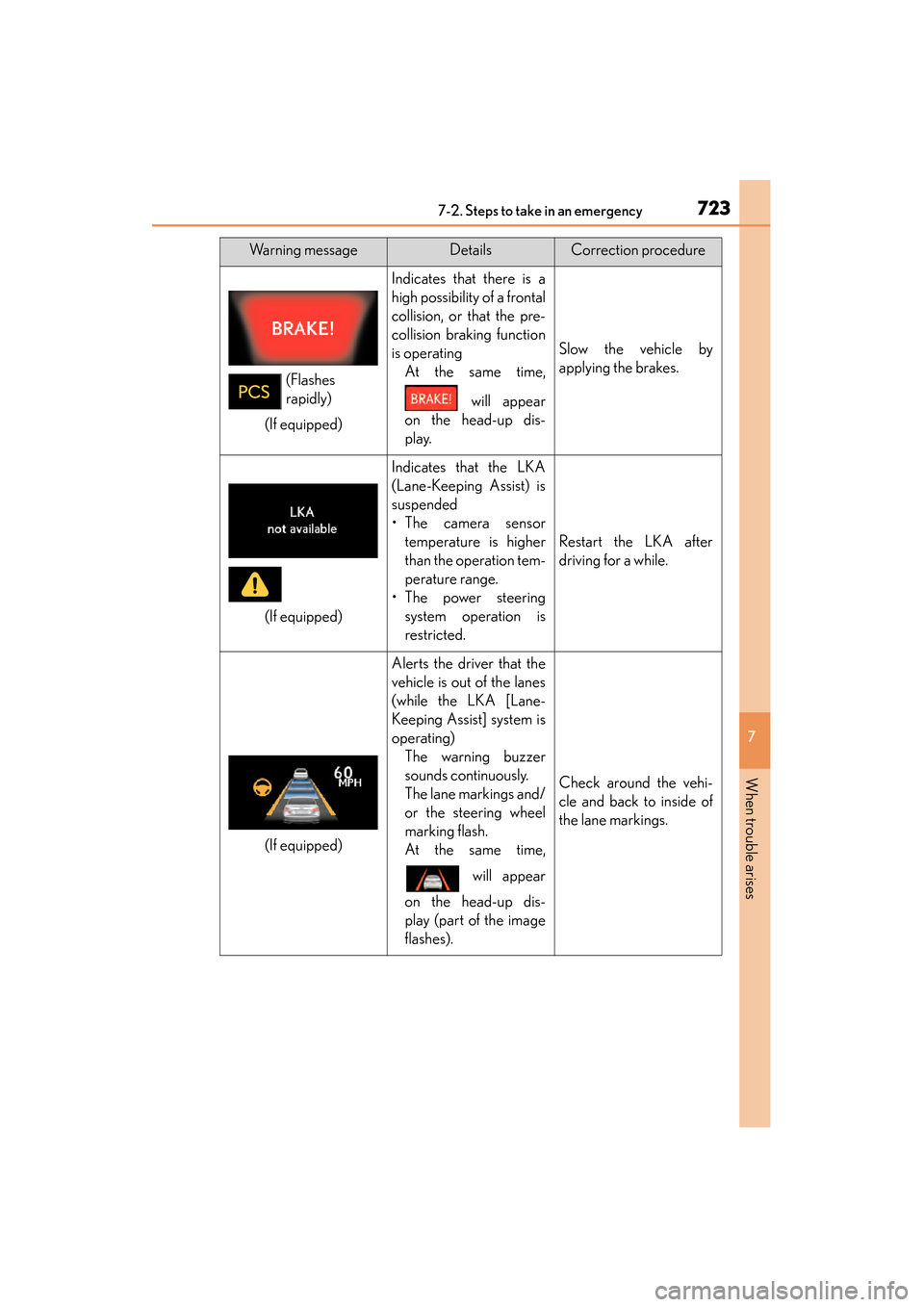
Indicates that there is a
high possibility of a frontal
collision, or that the pre-
collision braking function
is operatingAt the same time,
will appear
on the head-up dis-
play.
Slow the vehicle by
applying the brakes.
(If equipped)
Indicates that the LKA
(Lane-Keeping Assist) is
suspended
•The camera sensor temperature is higher
than the operation tem-
perature range.
•The power steering system operation is
restricted.
Restart the LKA after
driving for a while.
(If equipped)
Alerts the driver that the
vehicle is out of the lanes
(while the LKA [Lane-
Keeping Assist] system is
operating)The warning buzzer
sounds continuously.
The lane markings and/
or the steering wheel
marking flash.
At the same time,
will appear
on the head-up dis-
play (part of the image
flashes).
Check around the vehi-
cle and back to inside of
the lane markings.
Warning messageDetailsCorrection procedure
(Flashes
rapidly)
GS350_OM_OM30D41U_(U).book Page 723 Monday, July 29, 2013 2:22 PM
Page 725 of 846
7247-2. Steps to take in an emergency
GS350_OM_OM30D41U_(U)
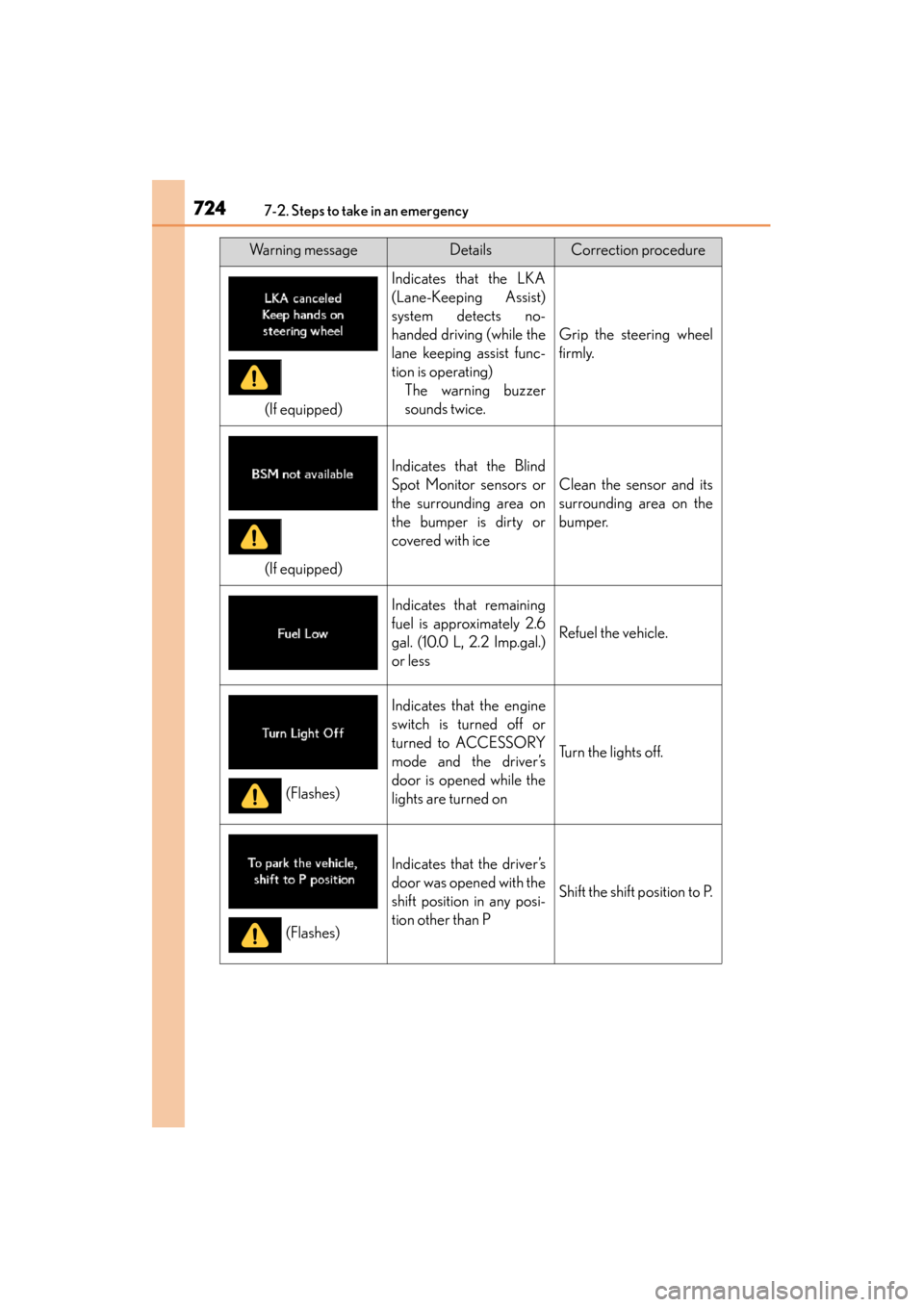
(If equipped)
Indicates that the LKA
(Lane-Keeping Assist)
system detects no-
handed driving (while the
lane keeping assist func-
tion is operating)The warning buzzer
sounds twice.
Grip the steering wheel
firmly.
(If equipped)
Indicates that the Blind
Spot Monitor sensors or
the surrounding area on
the bumper is dirty or
covered with ice
Clean the sensor and its
surrounding area on the
bumper.
Indicates that remaining
fuel is approximately 2.6
gal. (10.0 L, 2.2 Imp.gal.)
or less
Refuel the vehicle.
Indicates that the engine
switch is turned off or
turned to ACCESSORY
mode and the driver’s
door is opened while the
lights are turned on
Turn the lights off.
Indicates that the driver’s
door was opened with the
shift position in any posi-
tion other than P
Shift the shift position to P.
Warning messageDetailsCorrection procedure
(Flashes)
(Flashes)
GS350_OM_OM30D41U_(U).book Page 724 Monday, July 29, 2013 2:22 PM