Cluster Lexus GS350 2016 Workshop Manual
[x] Cancel search | Manufacturer: LEXUS, Model Year: 2016, Model line: GS350, Model: Lexus GS350 2016Pages: 624, PDF Size: 15.29 MB
Page 125 of 624
GS350_200t_GS F_OM_OM30E86U_(U)
1252. Instrument cluster
2
Instrument cluster
Displays the speed limit for the current
road.
Display of the following screens can be switched on or off.
●Audio display
●Route guidance display (vehicles with navigation system)
■Changing the settings
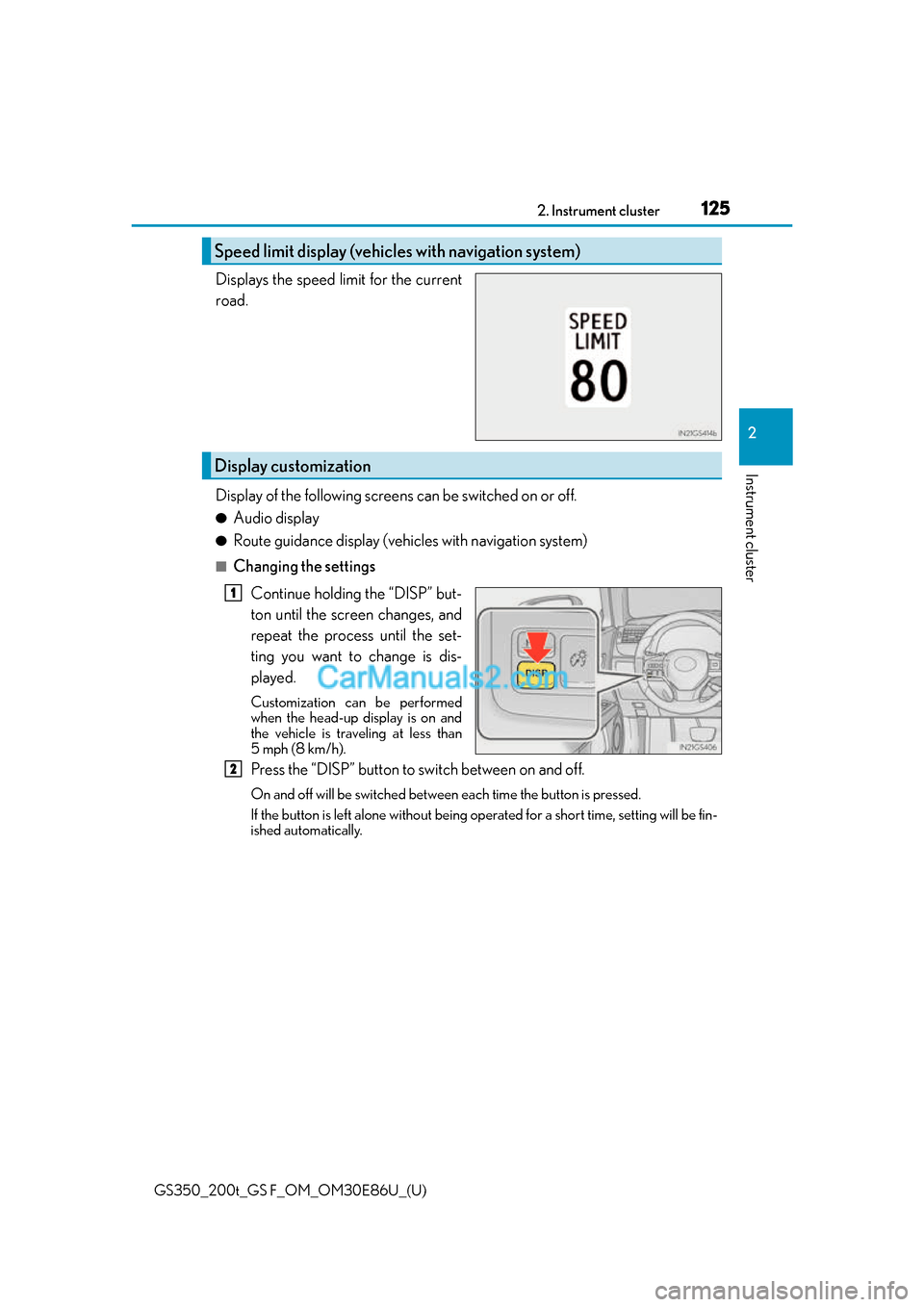
Continue holding the “DISP” but-
ton until the screen changes, and
repeat the process until the set-
ting you want to change is dis-
played.
Customization can be performed
when the head-up display is on and
the vehicle is traveling at less than
5 mph (8 km/h).
Press the “DISP” button to switch between on and off.
On and off will be switched between each time the button is pressed.
If the button is left alone without being op erated for a short time, setting will be fin-
ished automatically.
Speed limit display (vehicles with navigation system)
Display customization
1
2
Page 126 of 624
126
GS350_200t_GS F_OM_OM30E86U_(U)2. Instrument cluster
■Head-up display
●The head-up display may seem dark and hard
to see when viewed through sunglasses,
especially polarized sunglasses.
Adjust the brightness of the head-up display or remove your sunglasses.
●When the head-up display is turned off, it wi ll remain off even if the engine switch is
turned to IGNITION ON mode after the engine switch has been turned off.
●The startup image will be displayed on the head-up display after the engine switch has
been turned to IGNITION ON mode while the head-up display switch is set to on.
■Head-up rev indicator
●The head-up display is linked to the rev indicator in the meter.
●Whether or not to display the rev indicator in the head-up display, as well as display tim-
ing, can be changed through the settings for the rev indicator in the meter. ( P. 1 1 7 )
■When the battery is disconnected
The customize settings of the head-up display will be reset.
■Head-up display automatic position adjustment
If the display position is recorded into me mory, the head-up display will be automatically
adjusted to the desired position. ( P. 1 6 0 )
WA R N I N G
■Before using the head-up display
Check that the position and brightness of the head-up display image does not interfere
with safe driving. Incorrec t adjustment of the image’s position or brightness may
obstruct the driver’s view and lead to an a ccident, resulting in death or serious injury.
NOTICE
■To prevent damage to components
●Do not touch the inside of the head-up disp lay projector or thrust sharp edges or the
like into the projector.
Doing so could cause mechanical malfunctions.
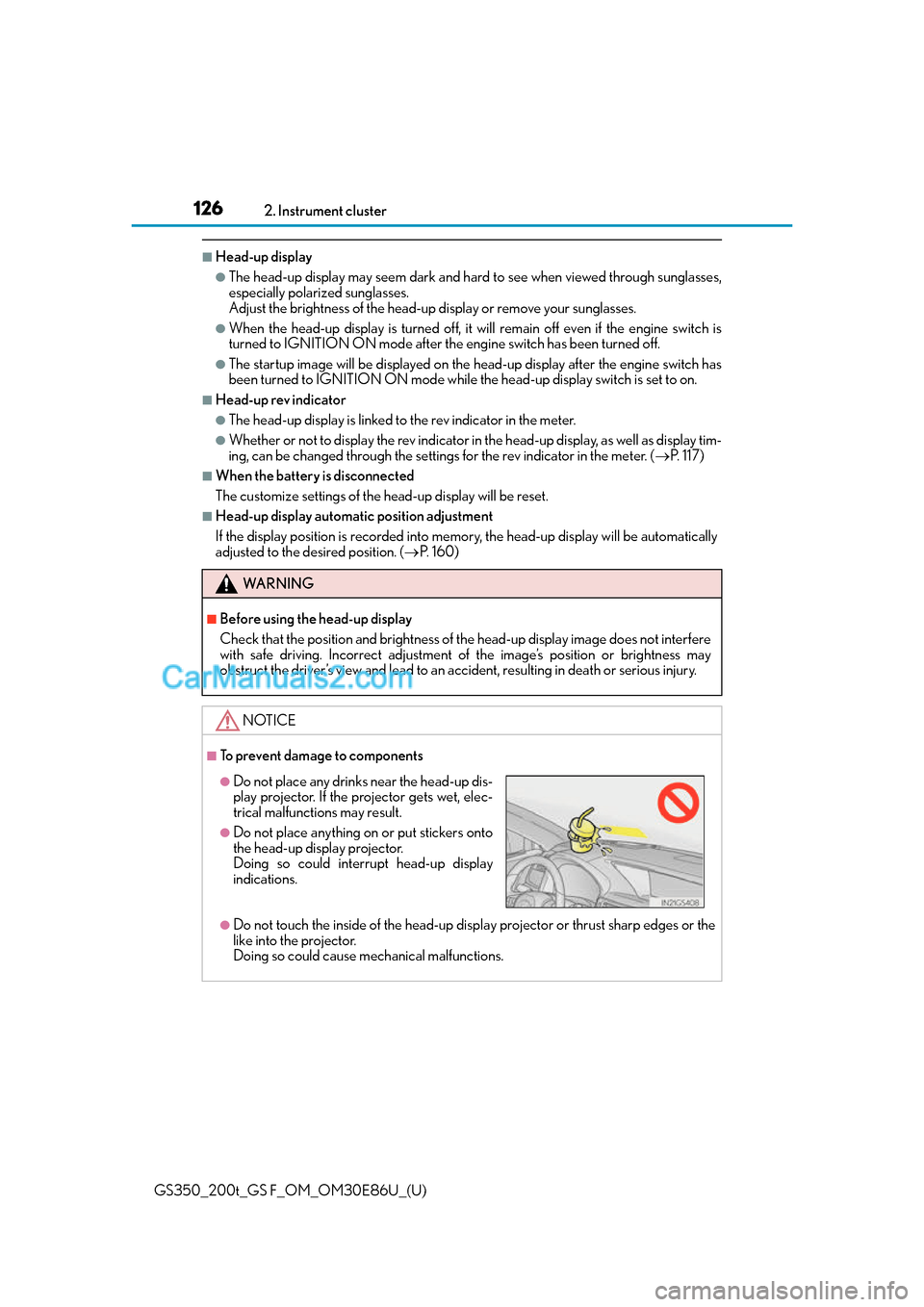
●Do not place any drinks near the head-up dis-
play projector. If the projector gets wet, elec-
trical malfunctions may result.
●Do not place anything on or put stickers onto
the head-up display projector.
Doing so could interrupt head-up display
indications.
Page 127 of 624
127
GS350_200t_GS F_OM_OM30E86U_(U)2. Instrument cluster
2
Instrument cluster
Fuel consumption information
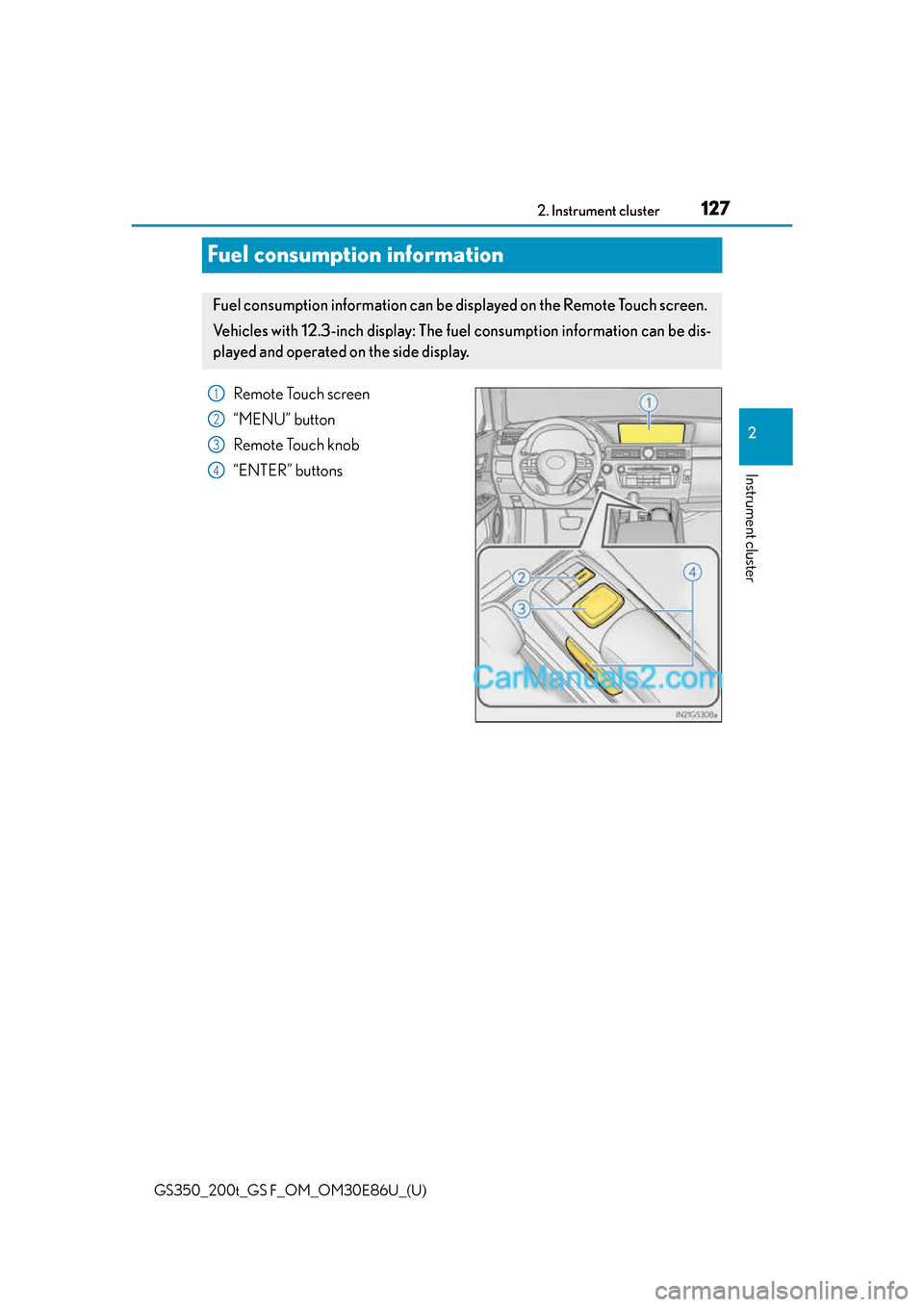
Remote Touch screen
“MENU” button
Remote Touch knob
“ENTER” buttons
Fuel consumption information can be di
splayed on the Remote Touch screen.
Ve h i c l e s w i t h 1 2 . 3 - i n c h d i splay: The fuel consumption information can be dis-
played and operated on the side display.
1
2
3
4
Page 128 of 624
128
GS350_200t_GS F_OM_OM30E86U_(U)2. Instrument cluster
Press the “MENU” button on the Remote Touch, then select on the “Menu”
screen, and then select “Fuel Consumption”.
■Trip information
If the “Past Record” screen is displayed, select “Trip Information”.
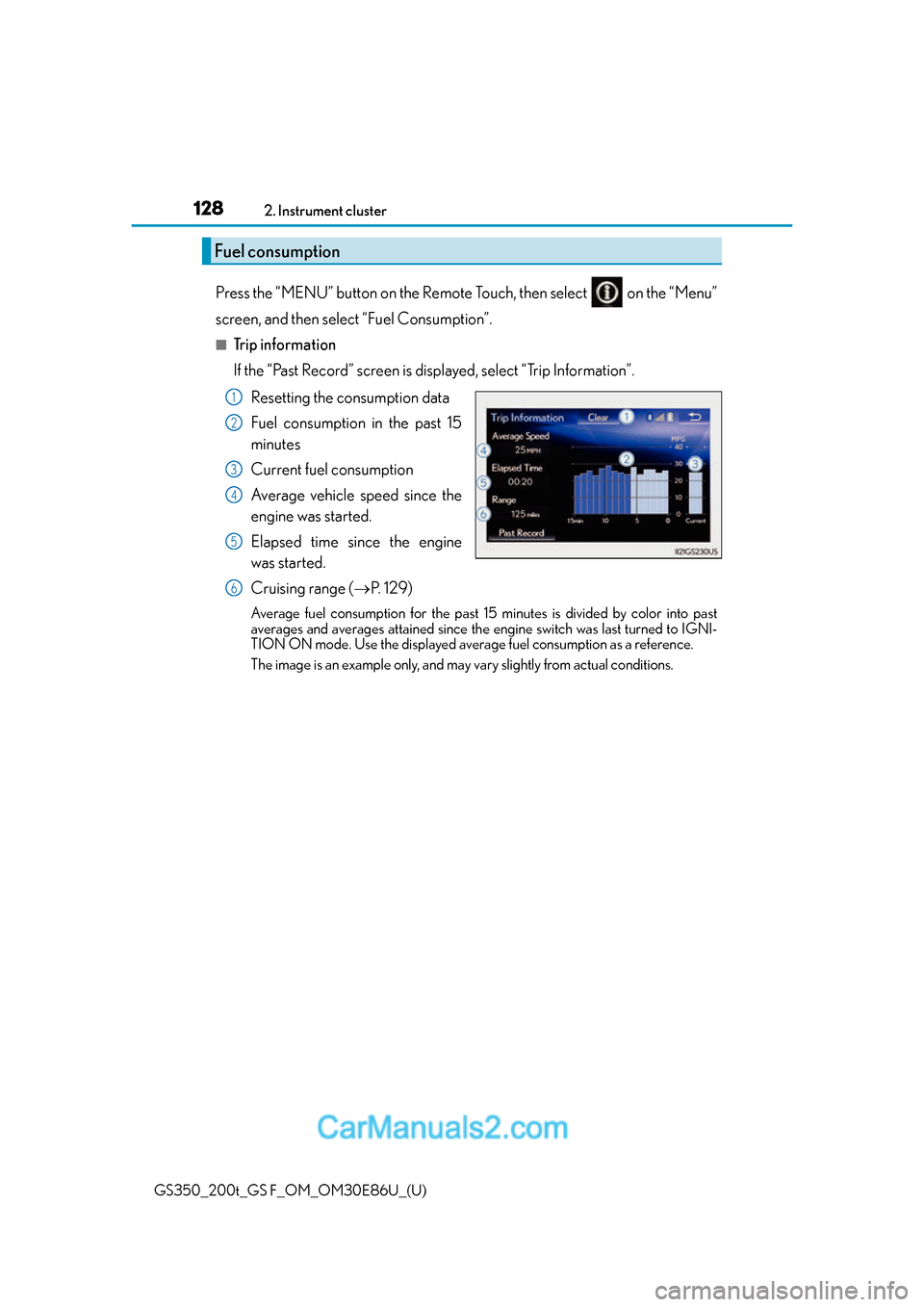
Resetting the consumption data
Fuel consumption in the past 15
minutes
Current fuel consumption
Average vehicle speed since the
engine was started.
Elapsed time since the engine
was started.
Cruising range ( P. 1 2 9 )
Average fuel consumption for the past 15 minutes is divided by color into past
averages and averages attained since the engine switch was last turned to IGNI-
TION ON mode. Use the displayed average fuel consumption as a reference.
The image is an example only, and may vary slightly from actual conditions.
Fuel consumption
1
2
3
4
5
6
Page 129 of 624
GS350_200t_GS F_OM_OM30E86U_(U)
1292. Instrument cluster
2
Instrument cluster
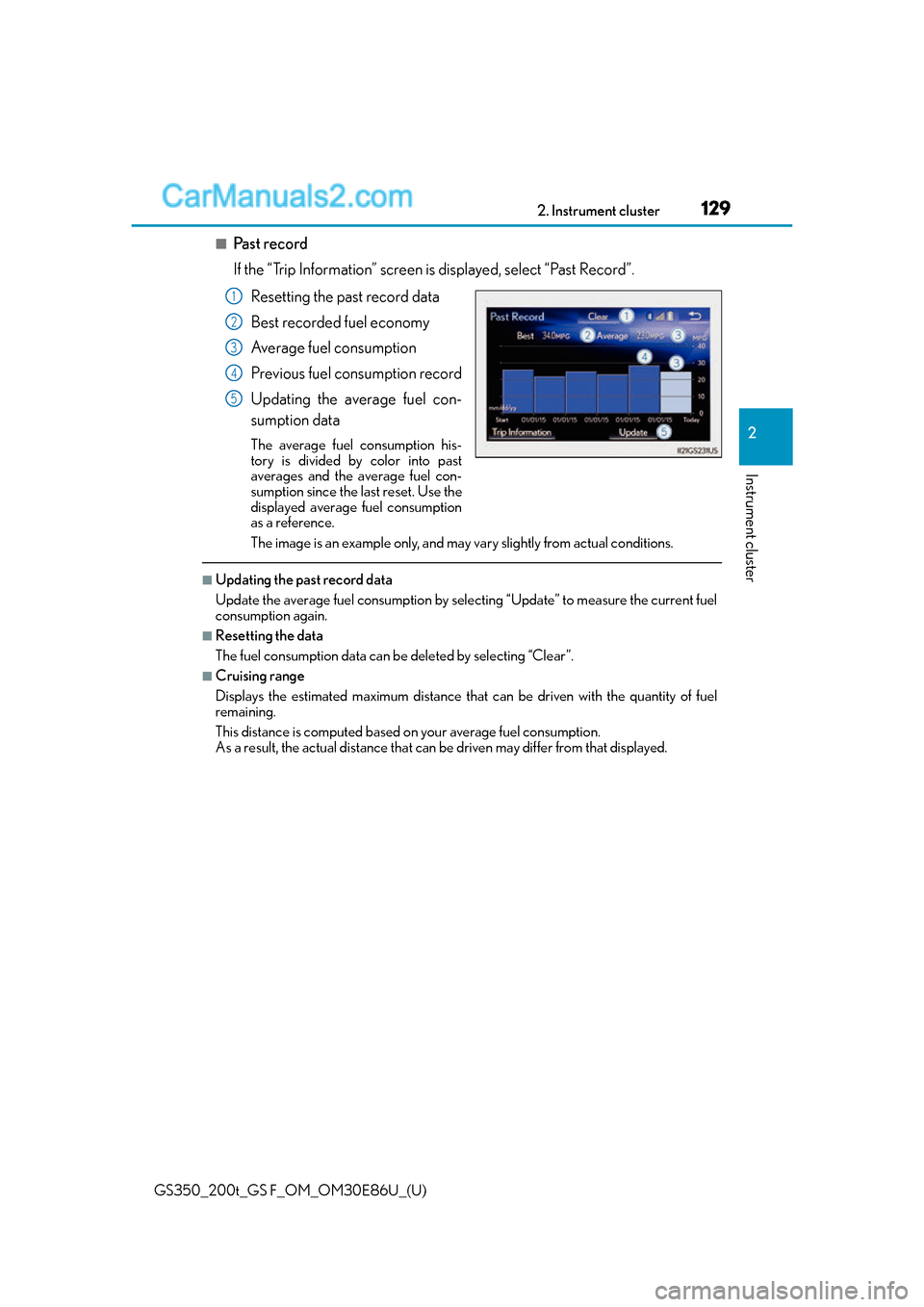
■Past record
If the “Trip Information” screen is displayed, select “Past Record”.
Resetting the past record data
Best recorded fuel economy
Average fuel consumption
Previous fuel consumption record
Updating the average fuel con-
sumption data
The average fuel consumption his-
tory is divided by color into past
averages and the average fuel con-
sumption since the last reset. Use the
displayed average fuel consumption
as a reference.
The image is an example only, and may vary slightly from actual conditions.
■Updating the past record data
Update the average fuel consumption by selecting “Update” to measure the current fuel
consumption again.
■Resetting the data
The fuel consumption data can be deleted by selecting “Clear”.
■Cruising range
Displays the estimated maximum distance that can be driven with the quantity of fuel
remaining.
This distance is computed based on your average fuel consumption.
As a result, the actual distance that can be driven may differ from that displayed.
1
2
3
4
5
Page 130 of 624
130
GS350_200t_GS F_OM_OM30E86U_(U)2. Instrument cluster
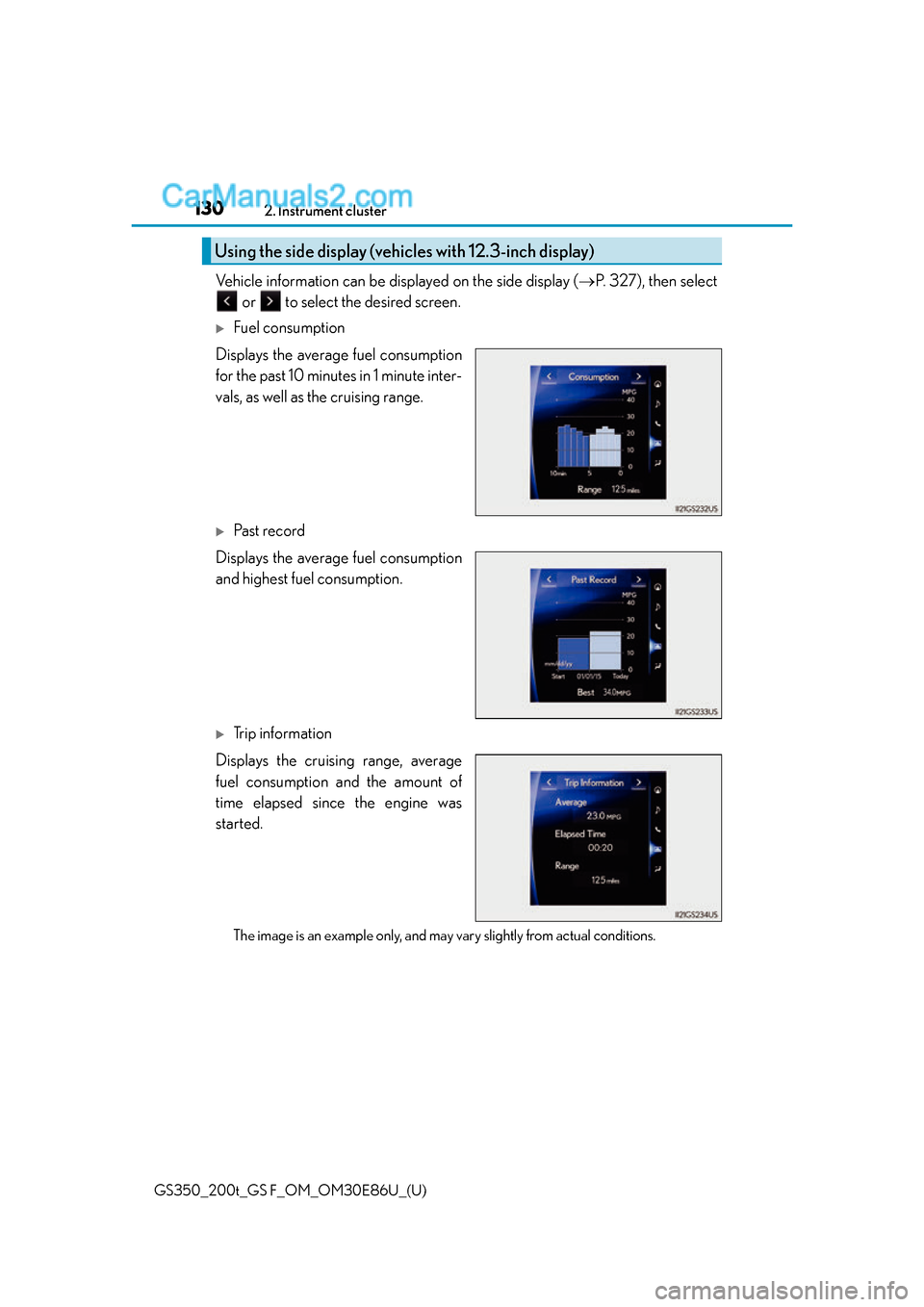
Vehicle information can be displayed on the side display (
P. 3 2 7 ) , t h e n s e l e c t
or to select the desired screen.
Fuel consumption
Displays the average fuel consumption
for the past 10 minutes in 1 minute inter-
vals, as well as the cruising range.
Past record
Displays the average fuel consumption
and highest fuel consumption.
Trip information
Displays the cruising range, average
fuel consumption and the amount of
time elapsed since the engine was
started.
The image is an example only, and may vary slightly from actual conditions.
Using the side display (vehicles with 12.3-inch display)
Page 176 of 624
176
GS350_200t_GS F_OM_OM30E86U_(U)3-5. Opening, closing the windows and moon roof
■When the window cannot be opened or closed
When the jam protection function or catch
protection function operates unusually and
the door window cannot be open ed or closed, perform the following operations with the
power window switch of that door.
●Stop the vehicle. With the engine switch in IGNITION ON mode, within 4 seconds of
the jam protection function or catch protecti on function activating, continuously oper-
ate the power window switch in the one-to uch closing direction or one-touch opening
direction so that the door wind ow can be opened and closed.
●If the door window cannot be opened and closed even when performing the above
operations, perform the following proc edure for function initialization.
Turn the engine switch to IGNITION ON mode.
Pull and hold the power window switch in the one-touch closing direction and com-
pletely close the door window.
Release the power window switch for a mo ment, resume pulling the switch in the
one-touch closing direction, and hold it there for approximately 6 seconds or more.
Press and hold the power window switch in the one-touch opening direction. After
the door window is complete ly opened, continue holding the switch for an additional
1 second or more.
Release the power window switch for a moment, resume pressing the switch in the
one-touch opening direction, and hold it there for approximately 4 seconds or
more.
Pull and hold the power window switch in the one-touch closing direction again.
After the door window is completely clos ed, continue holding the switch for a fur-
ther 1 second or more.
If you release the switch while the window is moving, start again from the beginning.
If the window reverse and cannot be fully closed or opened, have the vehicle inspected
by your Lexus dealer.
■Door lock linked window operation
●The power windows can be opened an d closed using the mechanical key.*( P. 5 2 0 )
●The power windows can be opened us ing the wireless remote control.* ( P. 1 3 7 )
*: These settings must be customized at your Lexus dealer.
■When the battery is disconnected
The window lock switch is disabled. If nece ssary, press the window lock switch after
reconnecting the battery.
■Power windows open warning buzzer
The buzzer sounds and a message is shown on the multi-information display in the instru-
ment cluster when the engine switch is turned off and the driver’s door is opened with the
power windows open.
■Customization
Settings (e.g. linked door lock operation) can be changed.
(Customizable features: P. 5 6 8 )
1
2
3
4
5
6
Page 180 of 624
180
GS350_200t_GS F_OM_OM30E86U_(U)3-5. Opening, closing the windows and moon roof
■Moon roof open warning buzzer
The buzzer sounds and a message is shown on
the multi-information display in the instru-
ment cluster when the engine switch is turned off and the driver’s door is opened with the
moon roof open.
■Customization
Settings (e.g. linked door lock operation) can be changed.
(Customizable features: P. 5 6 8 )
WA R N I N G
Observe the following precautions.
Failure to do so may cause death or serious injury.
■Opening the moon roof
●Do not allow any passengers to put their hands or heads outside the vehicle while it is
moving.
●Do not sit on top of the moon roof.
■Closing the moon roof
●The driver is responsible for moon roof opening and closing operations.
In order to prevent accidental operation, espe cially by a child, do not let a child oper-
ate the moon roof. It is possible for children and other passengers to have body parts
caught in the moon roof.
●Check to make sure that all passengers do not have any part of their body in a posi-
tion where it could be caught when the moon roof is being operated.
●When using the mechanical key and operat ing the moon roof, operate the moon roof
after checking to make sure that there is no possibility of any passenger having any of
their body parts caught in the moon roof. Also, do not let a child operate moon roof
by the mechanical key. It is possible for ch ildren and other passengers to get caught in
the moon roof.
●When exiting the vehicle, turn the engine sw itch off, carry the key and exit the vehicle
along with the child. There may be accidental operation, due to mischief, etc., that
may possibly lead to an accident.
■Jam protection function
●Never use any part of your body to intentio nally activate the jam protection function.
●The jam protection function may not work if something gets caught just before the
moon roof fully closes.
Page 556 of 624
556
GS350_200t_GS F_OM_OM30E86U_(U)8-1. Specifications
■Recommendation of the use of gasoli
ne containing detergent additives
●Lexus recommends the use of gasoline that contains detergent additives to avoid the
build-up of engine deposits.
●All gasoline sold in the U.S.A. contains minimum detergent additives to clean and/or
keep clean intake systems, per EPA’s lowest additives concentration program.
●Lexus strongly recommends the use of Top Ti er Detergent Gasoline. For more informa-
tion on Top Tier Detergent Gasoline and a list of marketers, please go to the official
website www.toptiergas.com.
■Recommendation of the use of low emissions gasoline
Gasolines containing oxygenates such as et hers and ethanol, as well as reformulated
gasolines, are available in some cities. These fuels are typically acceptable for use, pro-
viding they meet other fuel requirements.
Lexus recommends these fuels, since the fo rmulations allow for reduced vehicle emis-
sions.
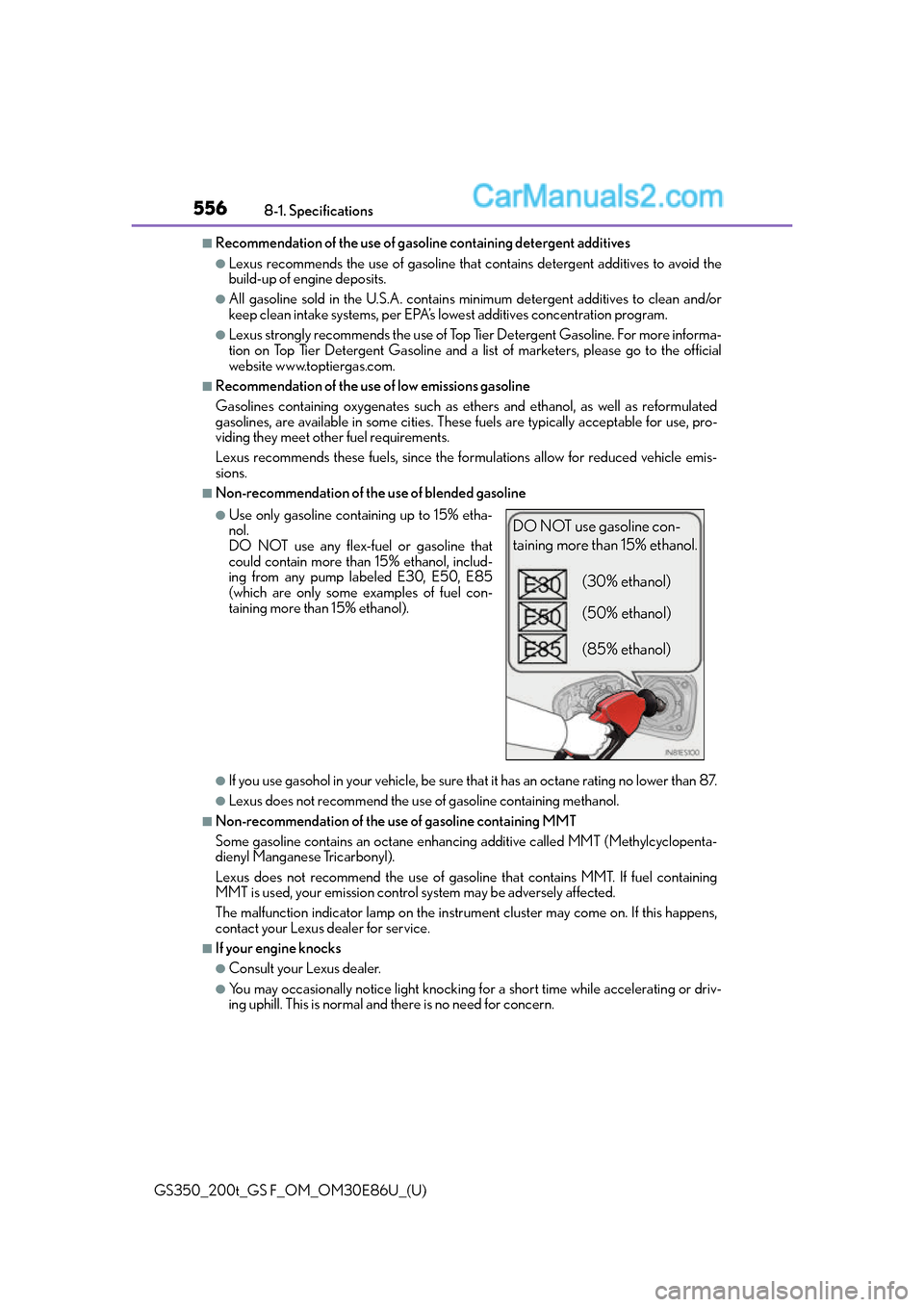
■Non-recommendation of the use of blended gasoline
●If you use gasohol in your vehicle, be sure th at it has an octane rating no lower than 87.
●Lexus does not recommend the use of gasoline containing methanol.
■Non-recommendation of the use of gasoline containing MMT
Some gasoline contains an octane enhancin g additive called MMT (Methylcyclopenta-
dienyl Manganese Tricarbonyl).
Lexus does not recommend the use of gasolin e that contains MMT. If fuel containing
MMT is used, your emission control system may be adversely affected.
The malfunction indicator lamp on the instru ment cluster may come on. If this happens,
contact your Lexus dealer for service.
■If your engine knocks
●Consult your Lexus dealer.
●You may occasionally notice light knocking fo r a short time while accelerating or driv-
ing uphill. This is normal and there is no need for concern.
●Use only gasoline containing up to 15% etha-
nol.
DO NOT use any flex-fuel or gasoline that
could contain more than 15% ethanol, includ-
ing from any pump labeled E30, E50, E85
(which are only some examples of fuel con-
taining more than 15% ethanol).DO NOT use gasoline con-
taining more than 15% ethanol.
(30% ethanol)
(50% ethanol)
(85% ethanol)