light Lexus GS350 2016 Manual Online
[x] Cancel search | Manufacturer: LEXUS, Model Year: 2016, Model line: GS350, Model: Lexus GS350 2016Pages: 624, PDF Size: 15.29 MB
Page 224 of 624
224
GS350_200t_GS F_OM_OM30E86U_(U)4-3. Operating the lights and wipers
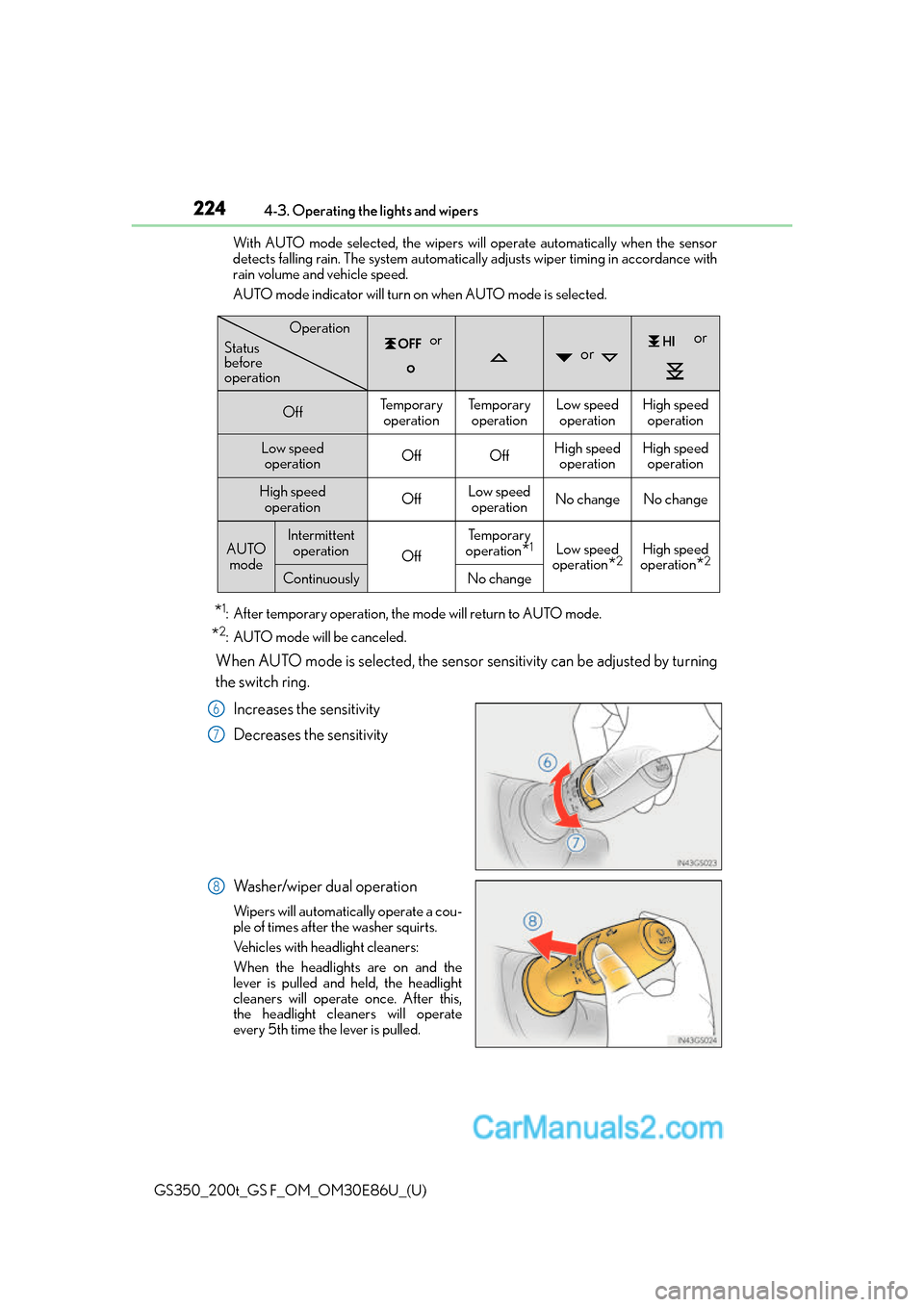
With AUTO mode selected, the wipers will operate automatically when the sensor
detects falling rain. The system automatically adjusts wiper timing in accordance with
rain volume and vehicle speed.
AUTO mode indicator will turn on when AUTO mode is selected.
*1: After temporary operation, the mode will return to AUTO mode.
*2: AUTO mode will be canceled.
When AUTO mode is selected, the sensor sensitivity can be adjusted by turning
the switch ring.
Increases the sensitivity
Decreases the sensitivity
Washer/wiper dual operation
Wipers will automatically operate a cou-
ple of times after the washer squirts.
Vehicles with headlight cleaners:
When the headlights are on and the
lever is pulled and held, the headlight
cleaners will operate once. After this,
the headlight cleaners will operate
every 5th time the lever is pulled.
or or
or
OffTe m p o r a r y operationTe m p o r a r y operationLow speed operationHigh speed operation
Low speed operationOffOffHigh speed operationHigh speedoperation
High speed
operationOffLow speedoperationNo changeNo change
AUTO modeIntermittent operation
Off
Te m p o r a r y
operation
*1Low speed
operation
*2High speed
operation
*2
ContinuouslyNo change
Operation
Status
before
operation
6
7
8
Page 225 of 624
GS350_200t_GS F_OM_OM30E86U_(U)
2254-3. Operating the lights and wipers
4
Driving
The wipers can be used as intermittent windshield wipers, which operate regard-
less of vehicle speed or amount of raindrops. The intermittent windshield wiper
operation can be switched when the vehicl e is stopped and the wiper is off. The
wiper operation cannot be switched during AUTO mode or while the intermit-
tent windshield wipers are operating.
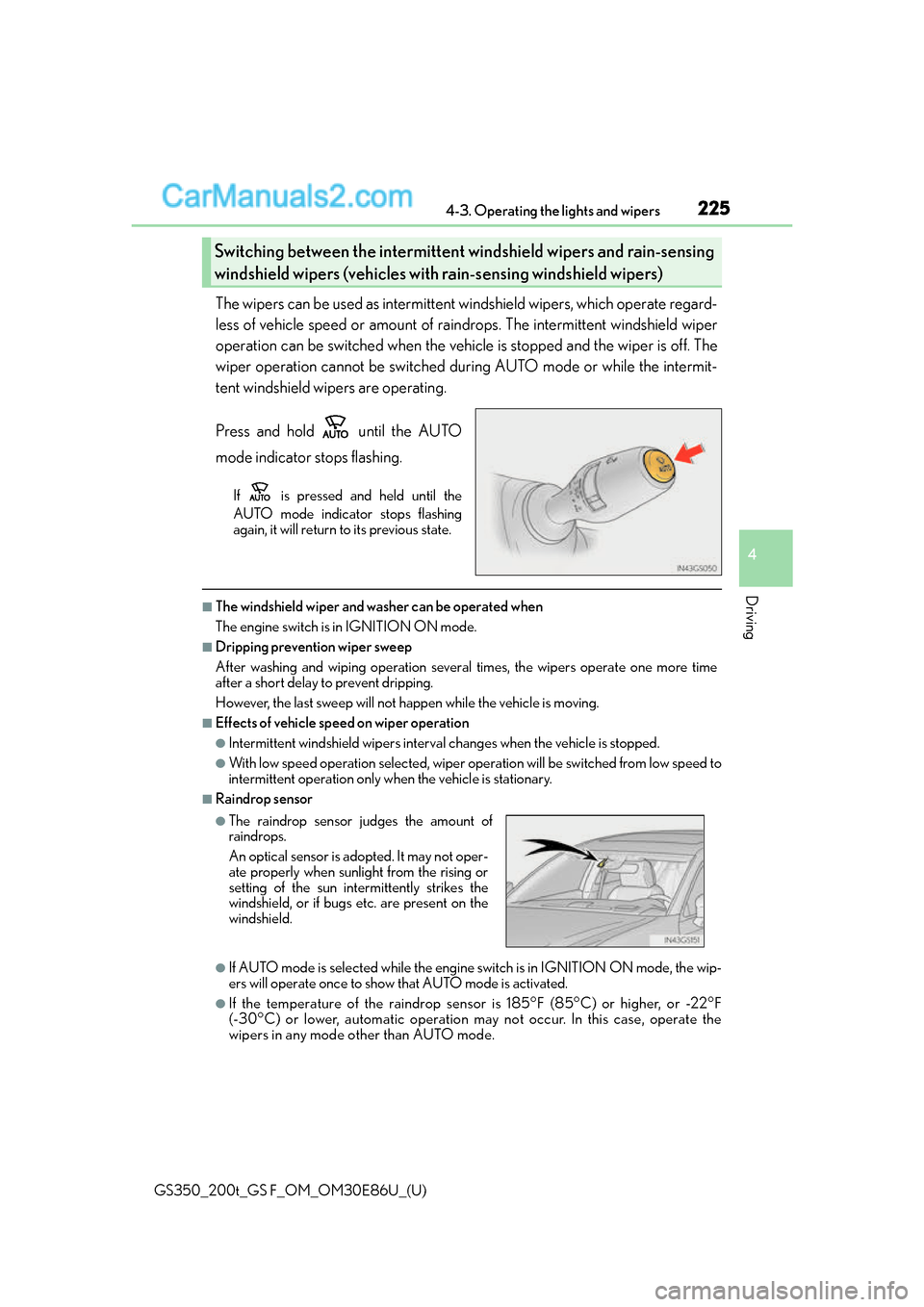
Press and hold until the AUTO
mode indicator stops flashing.
If is pressed and held until the
AUTO mode indicator stops flashing
again, it will return to its previous state.
■The windshield wiper and washer can be operated when
The engine switch is in IGNITION ON mode.
■Dripping prevention wiper sweep
After washing and wiping operation several times, the wipers operate one more time
after a short delay to prevent dripping.
However, the last sweep will not happen while the vehicle is moving.
■Effects of vehicle speed on wiper operation
●Intermittent windshield wi pers interval changes when the vehicle is stopped.
●With low speed operation selected, wiper oper ation will be switched from low speed to
intermittent operation only wh en the vehicle is stationary.
■Raindrop sensor
●If AUTO mode is selected while the engine switch is in IGNITION ON mode, the wip-
ers will operate once to show that AUTO mode is activated.
●If the temperature of the raindrop sensor is 185°F (85°C) or higher, or -22°F
(-30°C) or lower, automatic operation ma y not occur. In this case, operate the
wipers in any mode other than AUTO mode.
Switching between the intermittent wi ndshield wipers and rain-sensing
windshield wipers (vehicles with rain-sensing windshield wipers)
●The raindrop sensor judges the amount of
raindrops.
An optical sensor is ad opted. It may not oper-
ate properly when sunlight from the rising or
setting of the sun intermittently strikes the
windshield, or if bugs etc. are present on the
windshield.
Page 226 of 624
226
GS350_200t_GS F_OM_OM30E86U_(U)4-3. Operating the lights and wipers
■When the windshield wipers are in temporary operation
AUTO mode cannot be activated even if is pressed.
■If no windshield washer fluid sprays
Check that the washer nozzles are not blocked
if there is washer fluid in the windshield
washer fluid reservoir.
WA R N I N G
■Caution regarding the use of windshield wipers in AUTO mode
The windshield wipers may operate unexpectedly if the sensor is touched or the wind-
shield is subject to vibration in AUTO mode. Take care that your fingers or anything
else do not become caught in the windshield wipers.
■Caution regarding the use of washer fluid
When it is cold, do not use the washer fluid until the windshield becomes warm. The
fluid may freeze on the windshield and cause lo w visibility. This may lead to an accident,
resulting in death or serious injury.
NOTICE
■When the windshield is dry
Do not use the wipers, as they may damage the windshield.
■When there is no washer fluid spray from the nozzle
Damage to the washer fluid pump may be caused if the lever is pulled toward you and
held continually.
■When a nozzle becomes blocked
In this case, contact your Lexus dealer.
Do not try to clear it with a pin or other object. The nozzle will be damaged.
■When standing the windshield wipers up
Raise the wipers in line with the windshield. ( P. 3 1 8 )
Failure to do so may result in dama ge to the wipers and/or the hood.
Page 228 of 624
228
GS350_200t_GS F_OM_OM30E86U_(U)4-4. Refueling
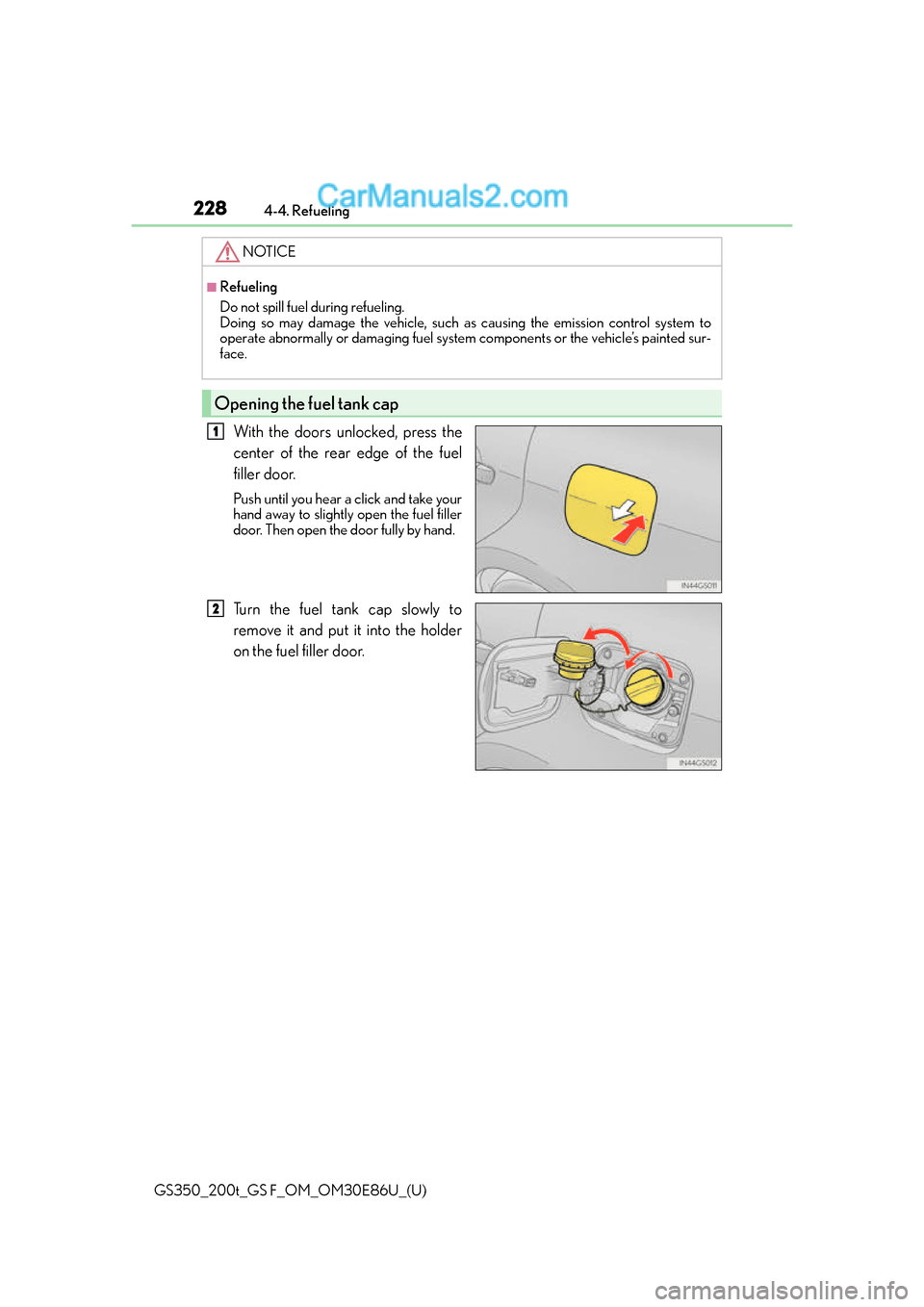
With the doors unlocked, press the
center of the rear edge of the fuel
filler door.
Push until you hear a click and take your
hand away to slightly open the fuel filler
door. Then open the door fully by hand.
Turn the fuel tank cap slowly to
remove it and put it into the holder
on the fuel filler door.
NOTICE
■Refueling
Do not spill fuel during refueling.
Doing so may damage the vehicle, such as
causing the emission control system to
operate abnormally or damaging fuel system components or the vehicle’s painted sur-
face.
Opening the fuel tank cap
1
2
Page 229 of 624
GS350_200t_GS F_OM_OM30E86U_(U)
2294-4. Refueling
4
Driving
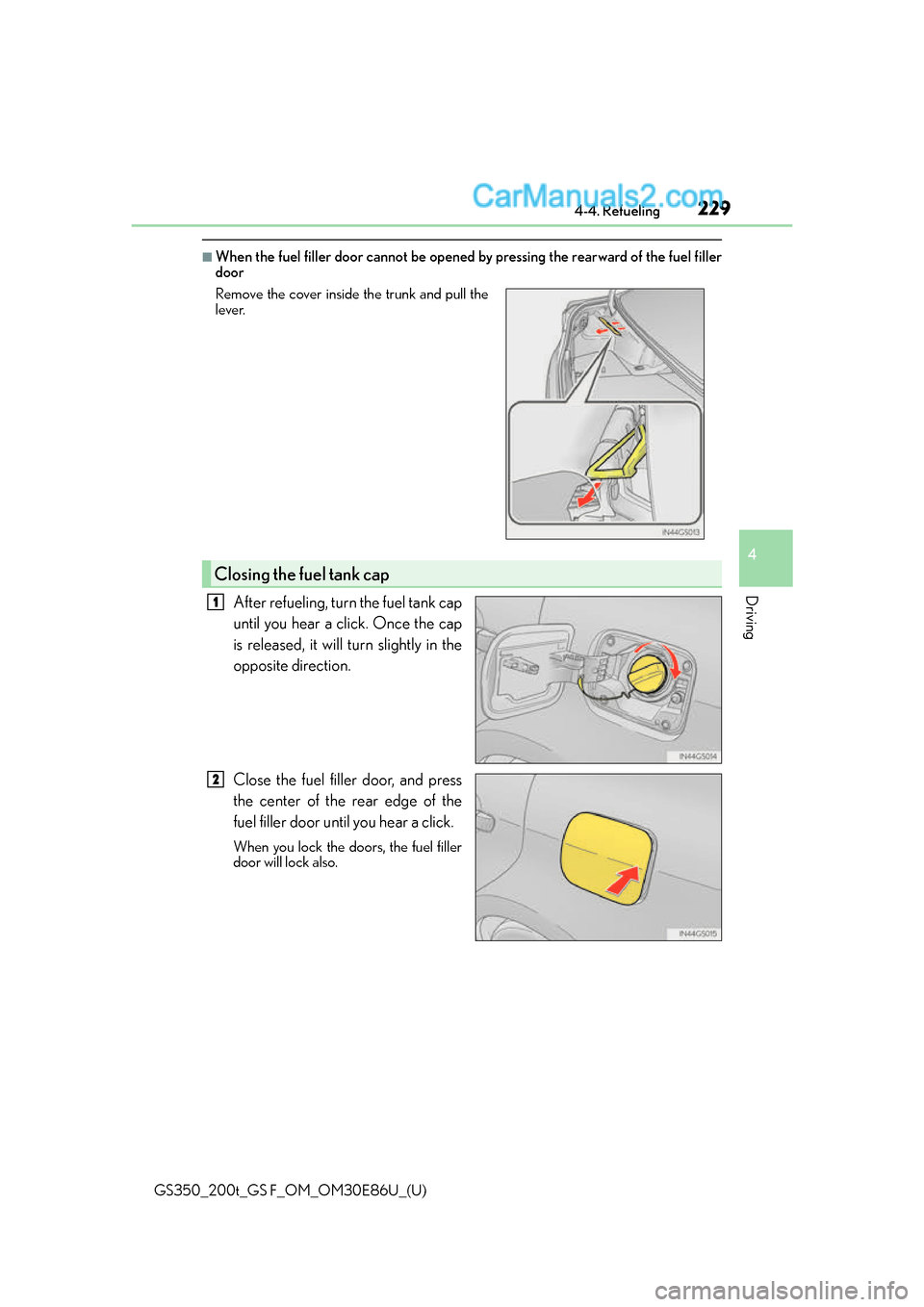
■When the fuel filler door cannot be opened by pressing the rearward of the fuel filler
door
After refueling, turn the fuel tank cap
until you hear a click. Once the cap
is released, it will turn slightly in the
opposite direction.
Close the fuel filler door, and press
the center of the rear edge of the
fuel filler door until you hear a click.
When you lock the doors, the fuel filler
door will lock also.
Remove the cover inside the trunk and pull the
lever.
Closing the fuel tank cap
1
2
Page 234 of 624
234
GS350_200t_GS F_OM_OM30E86U_(U)4-5. Using the driving support systems
WA R N I N G
■To avoid malfunction of the camera sensor
Observe the following precautions.
Otherwise, the camera sensor may not operat
e properly, possibly leading to an acci-
dent resulting in death or serious injury.
●Keep the windshield clean at all times.
• If the windshield is dirty or covered with an oily film, water droplets, snow, etc.,
clear the windshield.
• If a glass coating agent is applied to the windshield, it will still be necessary to use
the windshield wipers to remove water drop lets from the area of the windshield in
front of the camera sensor.
• If the inner side of the windshield where th e camera sensor is installed is dirty, con-
tact your Lexus dealer.
●If the part of the windshield in front of th e camera sensor is fogged up or covered with
condensation or ice, use the windshield defogger to remove the fog, condensation or
ice. ( P. 3 3 4 )
●If water droplets cannot be properly remove d from the area of the windshield in front
of the camera sensor by the windshield wipers, replace the wiper insert or wiper
blade.
If the wiper inserts or wiper blades need to be replaced, contact your Lexus dealer.
●Do not attach window tinting to the windshield.
●Replace the windshield if it is damaged or cracked.
If the windshield needs to be re placed, contact your Lexus dealer.
●Do not get the camera sensor wet.
●Do not allow bright lights to shine into the camera sensor.
●Do not dirty or damage the camera sensor.
When cleaning the inside of the windshield , do not allow glass cleaner to contact the
lens. Also, do not touch the lens.
If the lens is dirty or damage d, contact your Lexus dealer.
●Do not subject the camera sensor to a strong impact.
●Do not change the installation position or di rection of the camera sensor or remove it.
●Do not disassemble the camera sensor.
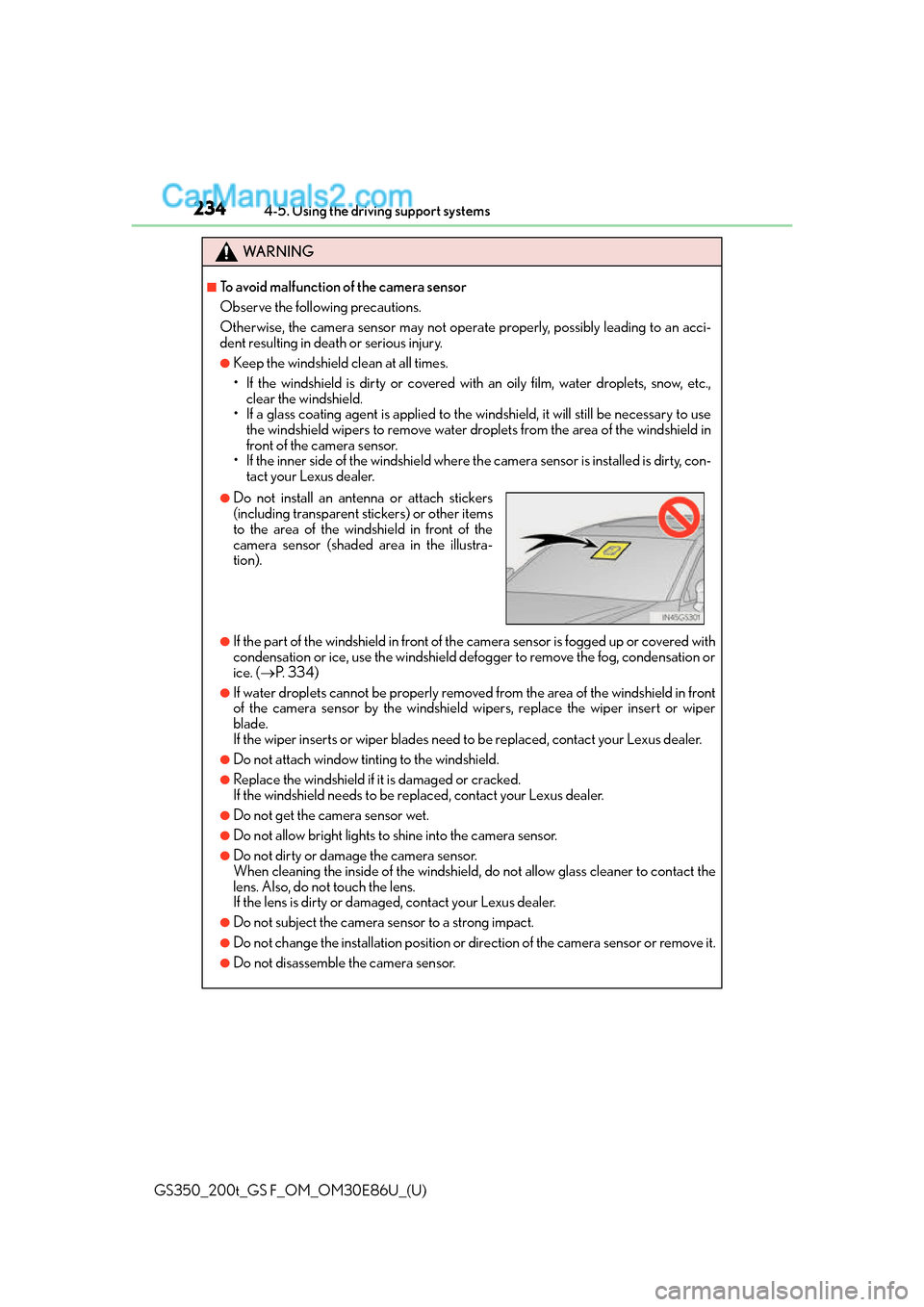
●Do not install an antenna or attach stickers
(including transparent stickers) or other items
to the area of the windshield in front of the
camera sensor (shaded area in the illustra-
tion).
Page 235 of 624
GS350_200t_GS F_OM_OM30E86U_(U)
2354-5. Using the driving support systems
4
Driving
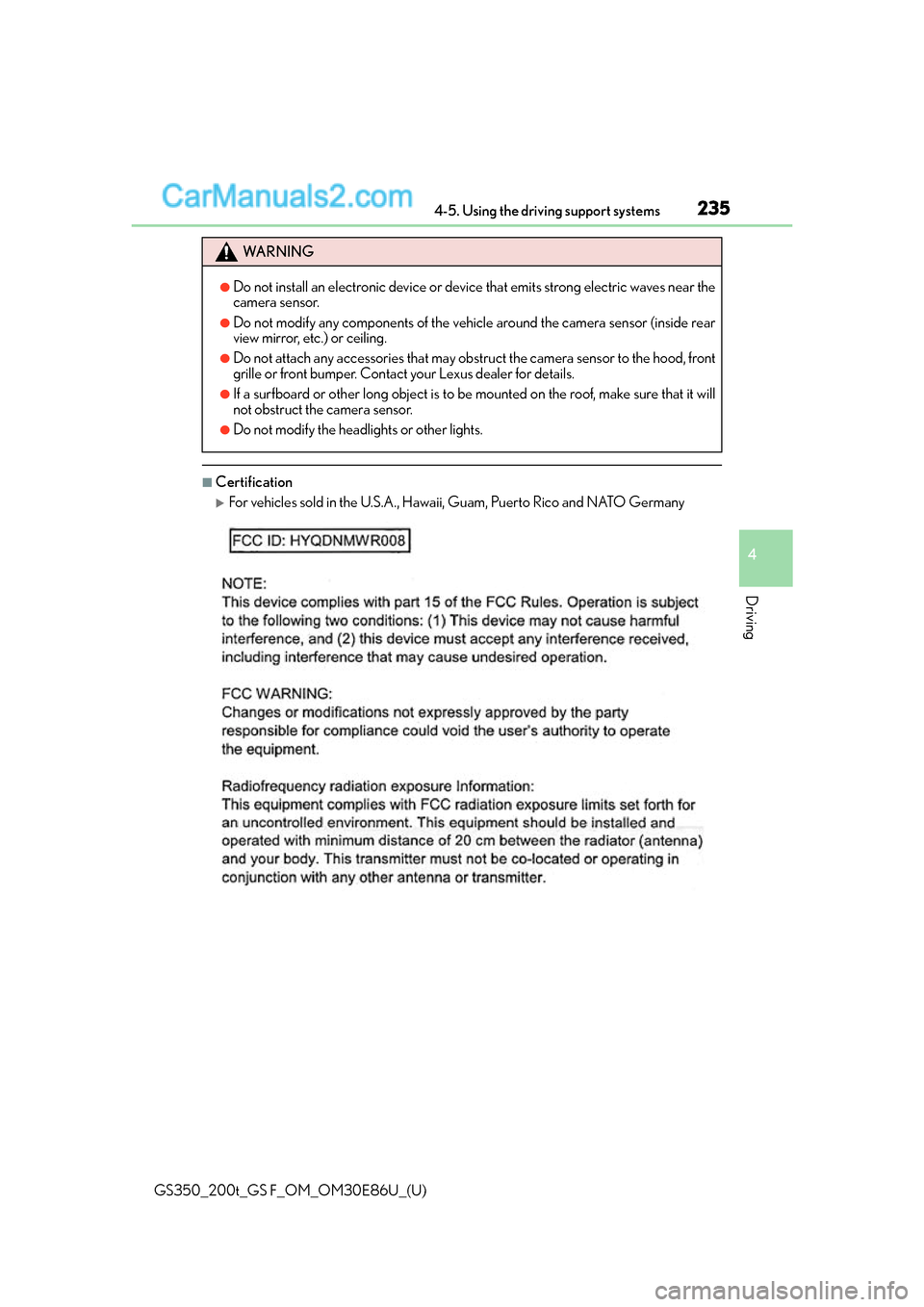
■Certification
For vehicles sold in the U.S.A., Hawaii, Guam, Puerto Rico and NATO Germany
WA R N I N G
●Do not install an electronic device or device that emits strong electric waves near the
camera sensor.
●Do not modify any components of the vehicle around the camera sensor (inside rear
view mirror, etc.) or ceiling.
●Do not attach any accessories that may obst ruct the camera sensor to the hood, front
grille or front bumper. Contact your Lexus dealer for details.
●If a surfboard or other long object is to be mounted on the roof, make sure that it will
not obstruct the camera sensor.
●Do not modify the headlights or other lights.
Page 240 of 624
240
GS350_200t_GS F_OM_OM30E86U_(U)4-5. Using the driving support systems
■Enabling/disabling the pre-collision system
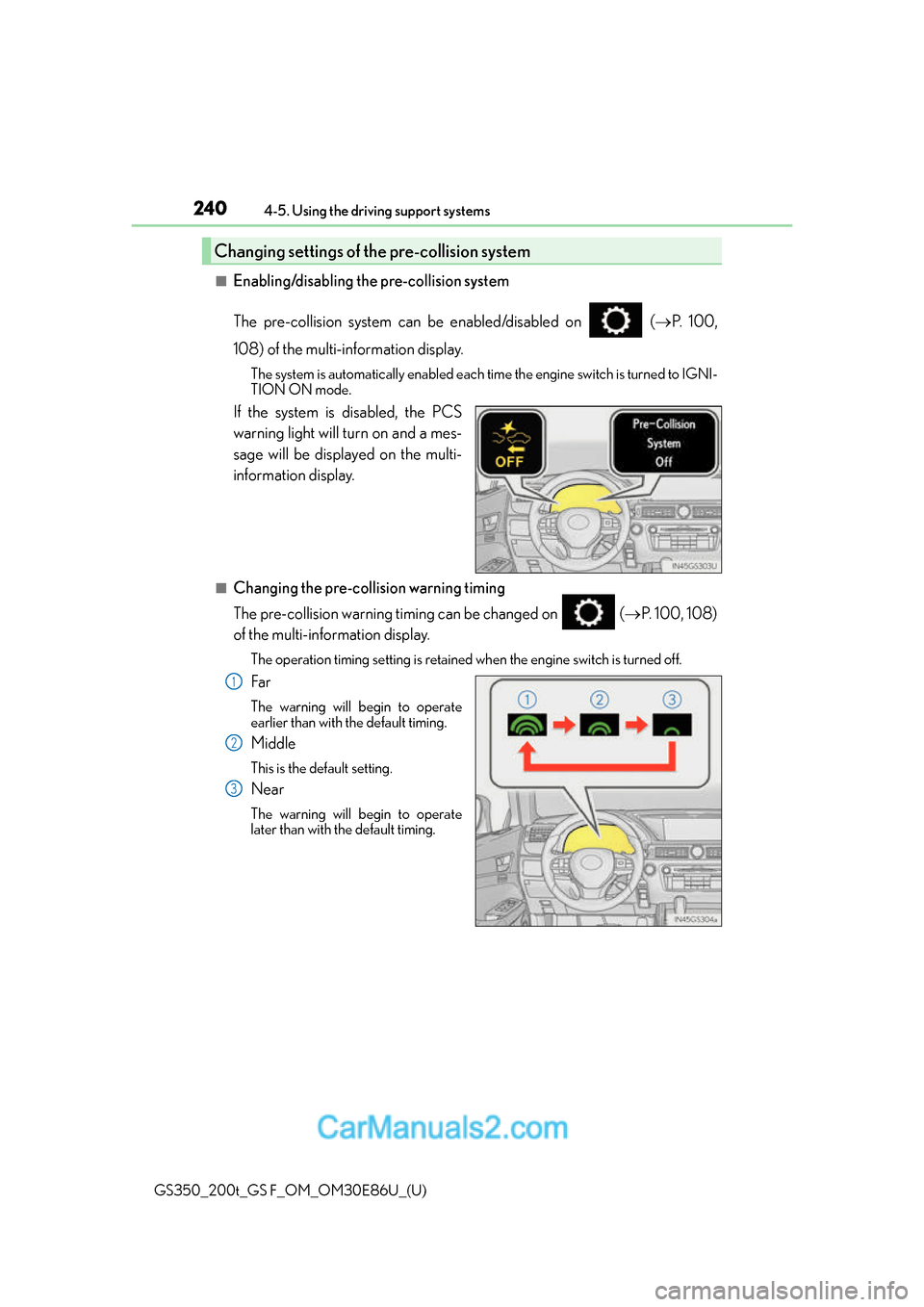
The pre-collision system can be enabled/disabled on (
P. 100,
108) of the multi-information display.
The system is automatically enabled each time the engine switch is turned to IGNI-
TION ON mode.
If the system is disabled, the PCS
warning light will turn on and a mes-
sage will be displayed on the multi-
information display.
■Changing the pre-col lision warning timing
The pre-collision warning timing can be changed on ( P. 100, 108)
of the multi-information display.
The operation timing setting is retained when the engine switch is turned off.
Far
The warning will begin to operate
earlier than with the default timing.
Middle
This is the default setting.
Near
The warning will begin to operate
later than with the default timing.
Changing settings of the pre-collision system
1
2
3
Page 241 of 624
GS350_200t_GS F_OM_OM30E86U_(U)
2414-5. Using the driving support systems
4
Driving
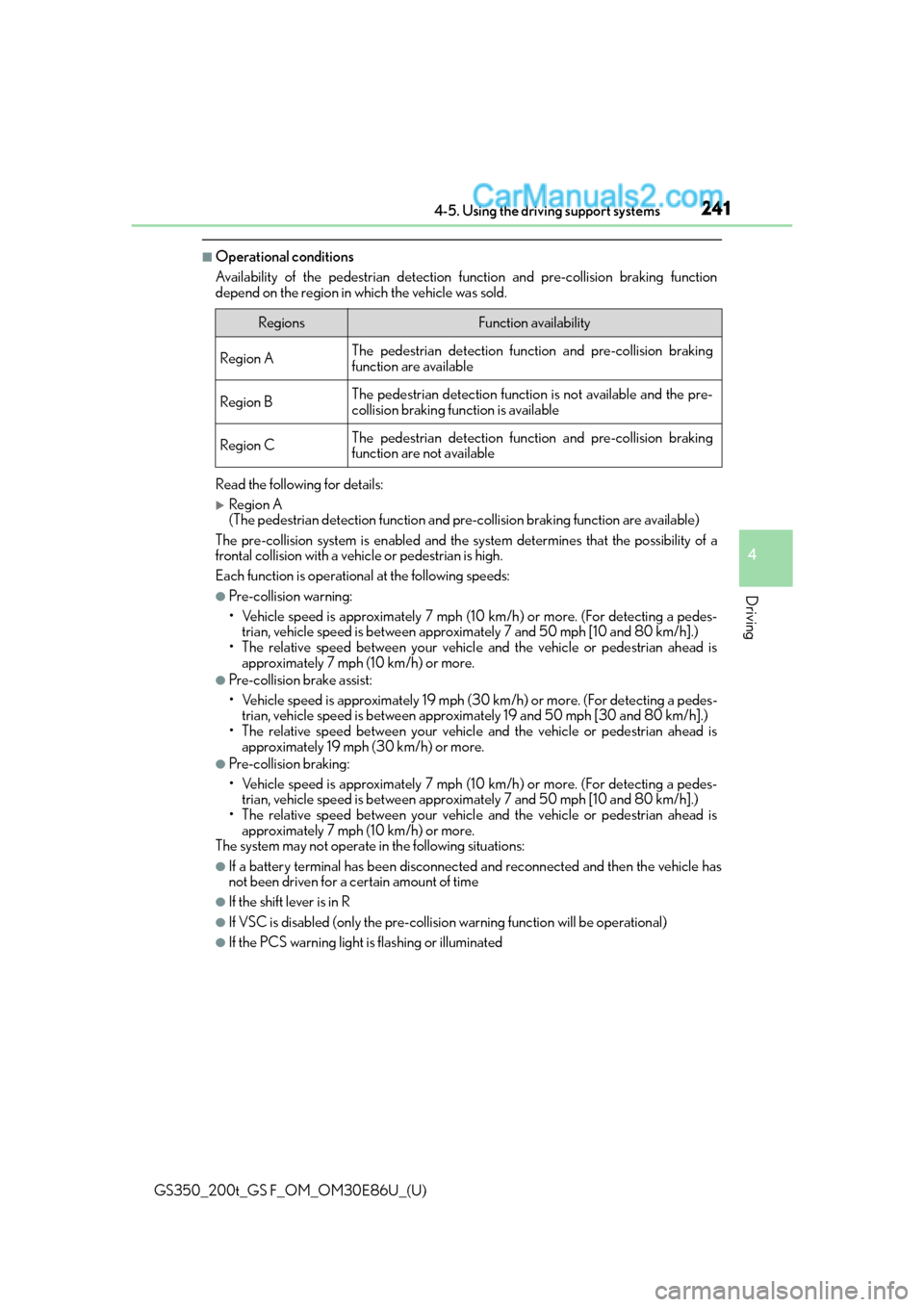
■Operational conditions
Availability of the pedestrian detection function and pre-collision braking function
depend on the region in which the vehicle was sold.
Read the following for details:
Region A
(The pedestrian detection fu nction and pre-collision braking function are available)
The pre-collision system is enabled and the sy stem determines that the possibility of a
frontal collision with a vehicle or pedestrian is high.
Each function is operationa l at the following speeds:
●Pre-collision warning:
• Vehicle speed is approximately 7 mph (1 0 km/h) or more. (For detecting a pedes-
trian, vehicle speed is between approxim ately 7 and 50 mph [10 and 80 km/h].)
• The relative speed between your vehicl e and the vehicle or pedestrian ahead is
approximately 7 mph (10 km/h) or more.
●Pre-collision brake assist:
• Vehicle speed is approximately 19 mph (3 0 km/h) or more. (For detecting a pedes-
trian, vehicle speed is between approxim ately 19 and 50 mph [30 and 80 km/h].)
• The relative speed between your vehicl e and the vehicle or pedestrian ahead is
approximately 19 mph (30 km/h) or more.
●Pre-collision braking:
• Vehicle speed is approximately 7 mph (1 0 km/h) or more. (For detecting a pedes-
trian, vehicle speed is between approxim ately 7 and 50 mph [10 and 80 km/h].)
• The relative speed between your vehicl e and the vehicle or pedestrian ahead is
approximately 7 mph (10 km/h) or more.
The system may not operate in the following situations:
●If a battery terminal has be en disconnected and reconnected and then the vehicle has
not been driven for a certain amount of time
●If the shift lever is in R
●If VSC is disabled (only the pre-collision warning function will be operational)
●If the PCS warning light is flashing or illuminated
RegionsFunction availability
Region AThe pedestrian detection function and pre-collision braking
function are available
Region BThe pedestrian detection function is not available and the pre-
collision braking function is available
Region CThe pedestrian detection function and pre-collision braking
function are not available
Page 242 of 624
242
GS350_200t_GS F_OM_OM30E86U_(U)4-5. Using the driving support systems
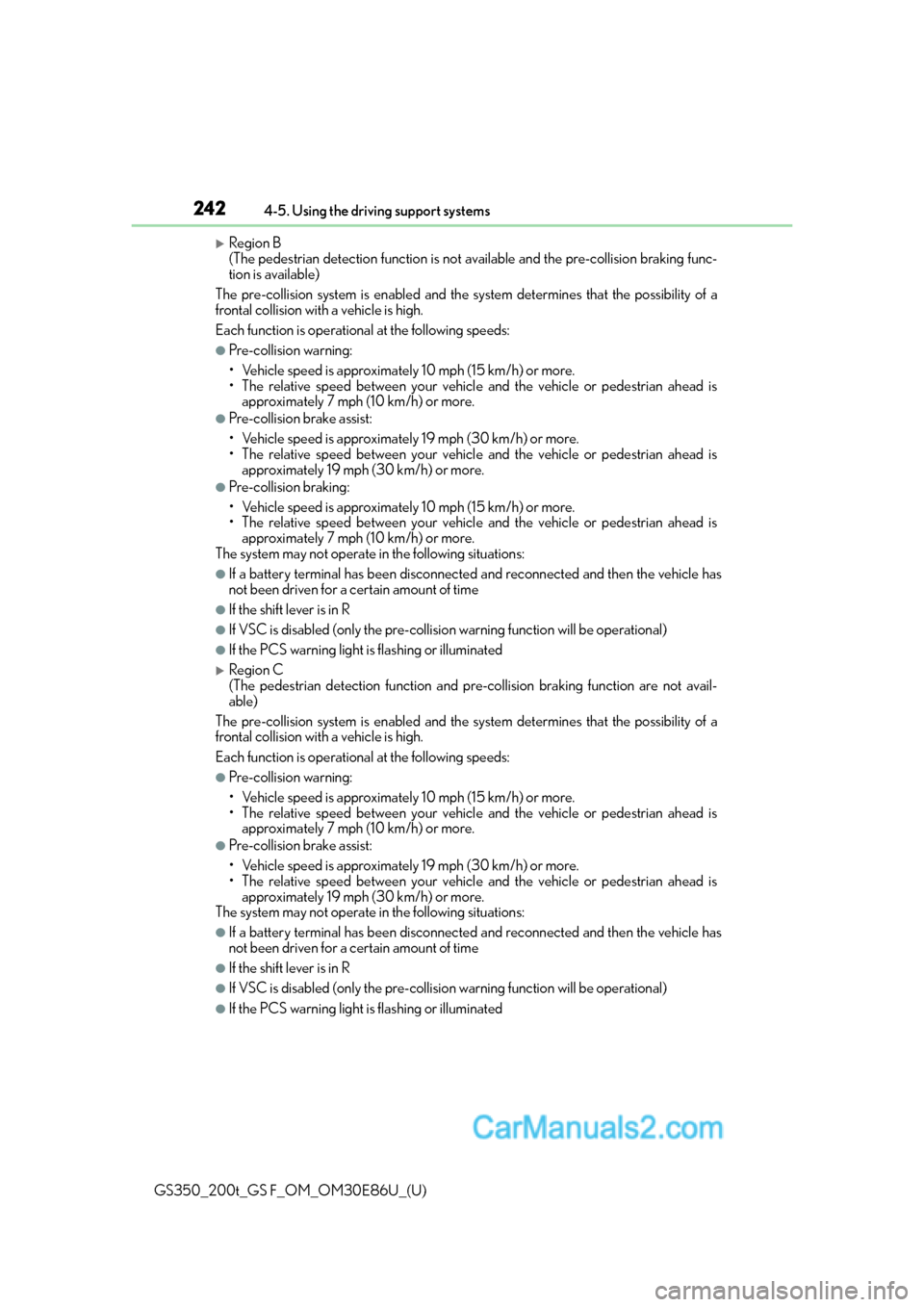
Region B
(The pedestrian detection fu
nction is not available and the pre-collision braking func-
tion is available)
The pre-collision system is enabled and the sy stem determines that the possibility of a
frontal collision with a vehicle is high.
Each function is operationa l at the following speeds:
●Pre-collision warning:
• Vehicle speed is approximately 10 mph (15 km/h) or more.
• The relative speed between your vehicl e and the vehicle or pedestrian ahead is
approximately 7 mph (10 km/h) or more.
●Pre-collision brake assist:
• Vehicle speed is approximately 19 mph (30 km/h) or more.
• The relative speed between your vehicl e and the vehicle or pedestrian ahead is
approximately 19 mph (30 km/h) or more.
●Pre-collision braking:
• Vehicle speed is approximately 10 mph (15 km/h) or more.
• The relative speed between your vehicl e and the vehicle or pedestrian ahead is
approximately 7 mph (10 km/h) or more.
The system may not operate in the following situations:
●If a battery terminal has be en disconnected and reconnected and then the vehicle has
not been driven for a certain amount of time
●If the shift lever is in R
●If VSC is disabled (only the pre-collision warning function will be operational)
●If the PCS warning light is flashing or illuminated
Region C
(The pedestrian detection function and pr e-collision braking function are not avail-
able)
The pre-collision system is enabled and the sy stem determines that the possibility of a
frontal collision with a vehicle is high.
Each function is operationa l at the following speeds:
●Pre-collision warning:
• Vehicle speed is approximately 10 mph (15 km/h) or more.
• The relative speed between your vehicl e and the vehicle or pedestrian ahead is
approximately 7 mph (10 km/h) or more.
●Pre-collision brake assist:
• Vehicle speed is approximately 19 mph (30 km/h) or more.
• The relative speed between your vehicl e and the vehicle or pedestrian ahead is
approximately 19 mph (30 km/h) or more.
The system may not operate in the following situations:
●If a battery terminal has be en disconnected and reconnected and then the vehicle has
not been driven for a certain amount of time
●If the shift lever is in R
●If VSC is disabled (only the pre-collision warning function will be operational)
●If the PCS warning light is flashing or illuminated