light Lexus GS350 2016 Manual PDF
[x] Cancel search | Manufacturer: LEXUS, Model Year: 2016, Model line: GS350, Model: Lexus GS350 2016Pages: 624, PDF Size: 15.29 MB
Page 213 of 624
GS350_200t_GS F_OM_OM30E86U_(U)
2134-2. Driving procedures
4
Driving
■When the parking brake is set automatically while the system is holding the brakes
The parking brake will not be released auto matically. Perform one of the following proce-
dures to release the parking brake and conf irm that the parking brake indicator light
turns off. ( P. 2 1 0 )
●With the brake pedal depressed, operate the parking brake switch.
●Fasten your seat belt, check that the shift leve r is in either D or R and slowly depress the
accelerator pedal.
■Warning message and buzzers
Warning messages and buzzers are used to indicate a system malfunction or to inform
the driver of the need for caution. ( P. 4 5 9 )
WA R N I N G
■When the vehicle is on a steep incline
When using the brake hold system on a stee p incline exercise caution. The brake hold
function may not hold the vehicle in such a situation.
■When stopped on a slippery road
The system cannot stop the vehicle when the gripping ability of the tires has been
exceeded. Do not use the system when stopped on a slippery road.
NOTICE
■When parking the vehicle
The brake hold system is not designed for use when parking the vehicle for a long
period of time. Turning the engine switch of f while the system is holding the brake may
release the brake, which would cause the vehicle to move. When operating the engine
switch, depress the brake pedal, set the parking brake and shift the shift lever to P.
Page 215 of 624
215
GS350_200t_GS F_OM_OM30E86U_(U)4-3. Operating the lights and wipers
4
Driving
Headlight switch
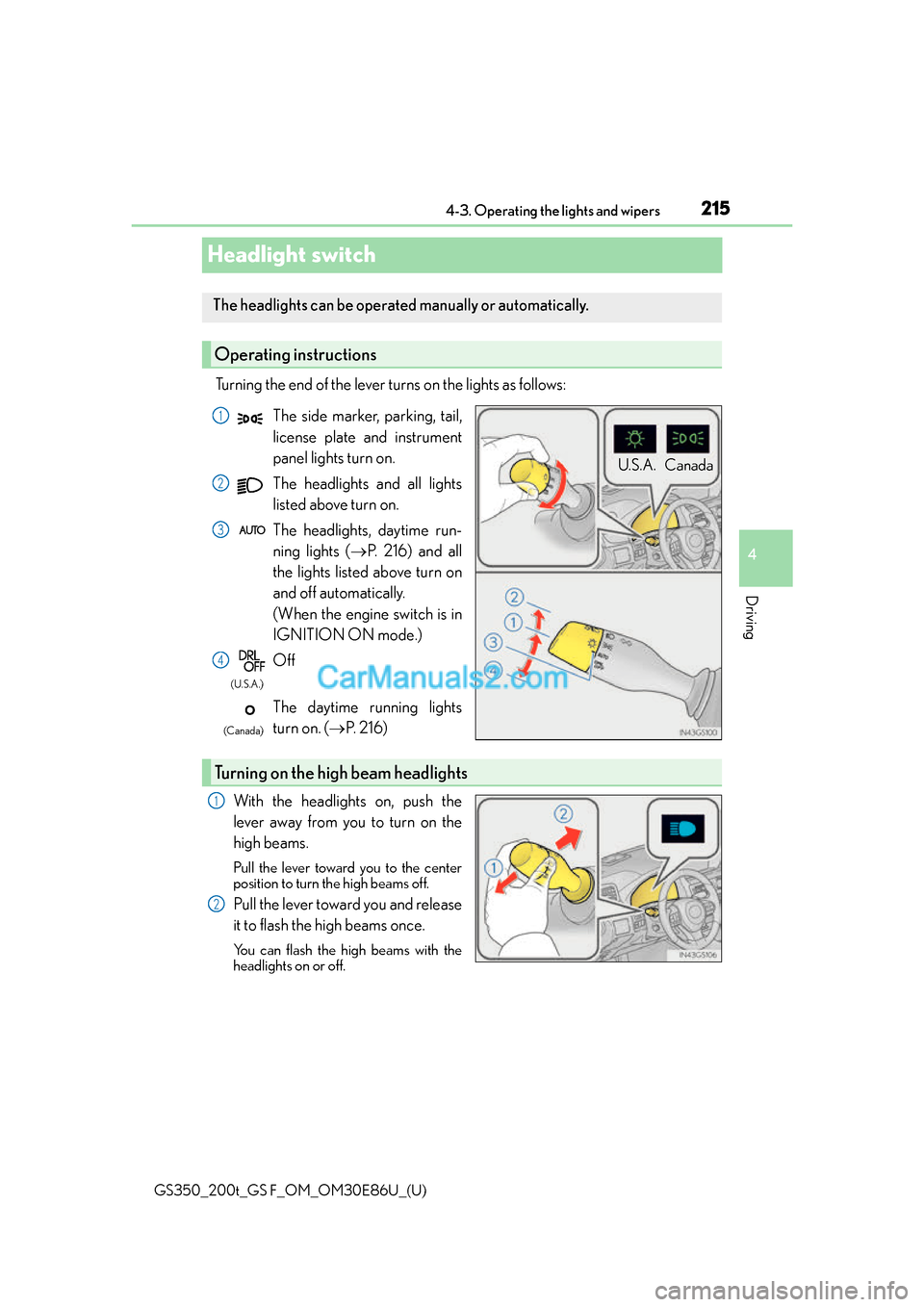
Turning the end of the lever turns on the lights as follows:
With the headlights on, push the
lever away from you to turn on the
high beams.
Pull the lever toward you to the center
position to turn the high beams off.
Pull the lever toward you and release
it to flash the high beams once.
You can flash the high beams with the
headlights on or off.
The headlights can be operated manually or automatically.
Operating instructions
U.S.A. Canada
The side marker, parking, tail,
license plate and instrument
panel lights turn on.
The headlights and all lights
listed above turn on.
The headlights, daytime run-
ning lights ( P. 216) and all
the lights listed above turn on
and off automatically.
(When the engine switch is in
IGNITION ON mode.)
Off
The daytime running lights
turn on. ( P. 2 1 6 )1
2
3
4
(U.S.A.)
(Canada)
Turning on the high beam headlights
1
2
Page 216 of 624
216
GS350_200t_GS F_OM_OM30E86U_(U)4-3. Operating the lights and wipers
AFS (Adaptive Front-lighting System) secure
s excellent visibility at intersections
and on curves by automatically adjusting the direction of the light axis of the
headlights according to vehicle speed and the degree of the tire’s angle as con-
trolled by steering input.
AFS operates at speeds of 6 mph (10 km/h) or higher.
■Deactivating AFS
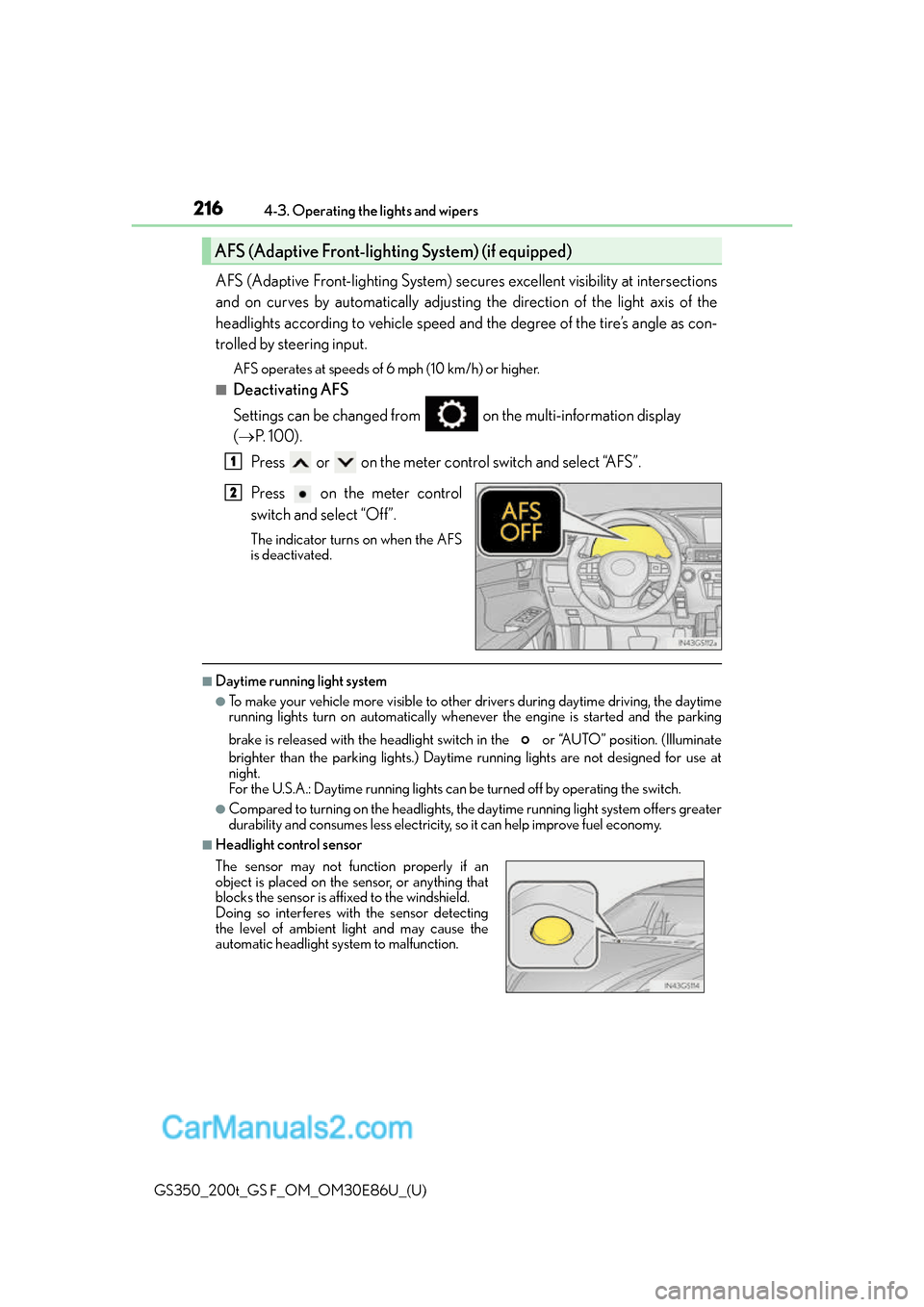
Settings can be changed from on the multi-information display
( P. 100).
Press or on the meter control switch and select “AFS”.
Press on the meter control
switch and select “Off”.
The indicator turns on when the AFS
is deactivated.
■Daytime running light system
●To make your vehicle more visible to other drivers during daytime driving, the daytime
running lights turn on automatically whenever the engine is started and the parking
brake is released with the headlight switch in the or “AUTO” position. (Illuminate
brighter than the parking lights.) Daytim e running lights are not designed for use at
night.
For the U.S.A.: Daytime running lights can be turned off by operating the switch.
●Compared to turning on the headlights, the daytime running light system offers greater
durability and consumes less electricity, so it can help improve fuel economy.
■Headlight control sensor
AFS (Adaptive Front-lighting System) (if equipped)
1
2
The sensor may not function properly if an
object is placed on the sensor, or anything that
blocks the sensor is affixed to the windshield.
Doing so interferes with the sensor detecting
the level of ambient light and may cause the
automatic headlight system to malfunction.
Page 217 of 624
GS350_200t_GS F_OM_OM30E86U_(U)
2174-3. Operating the lights and wipers
4
Driving
■Automatic light off system
●When the headlights are on: The headlights and tail lights turn off 30 seconds after the
engine switch is turned off and a door is opened and all of the doors and trunk are
closed. (The lights turn off immediately if on the key is pressed twice after all the
doors are closed.)
●When only the tail lights are on : The tail lights turn off automatically if the engine switch
is turned off and the driver’s door is opened.
To turn the lights on again, turn the engine switch to IGNITION ON mode, or turn the
light switch off once and then back to or .
If any of the doors or trunk lid is kept open , the lights automatically turn off after 20 min-
utes.
■Light reminder buzzer
A buzzer sounds when the engine switch is turned off or turned to ACCESSORY mode
and the driver’s door is opened while the lights are turned on.
■Automatic headlight leveling system
The level of the headlights is automatically ad justed according to the number of passen-
gers and the loading condition of the vehicle to ensure that the headlights do not inter-
fere with other road users.
■If the “AFS OFF” indicator flashes
It may indicate a malfunction in the system. Contact your Lexus dealer.
■Customization
Settings (e.g. light sensor se nsitivity) can be changed.
(Customizable features: P. 5 6 8 )
NOTICE
■To prevent battery discharge
Do not leave the lights on longer than ne cessary when the engine is not running.
Page 218 of 624
218
GS350_200t_GS F_OM_OM30E86U_(U)4-3. Operating the lights and wipers
Automatic High Beam
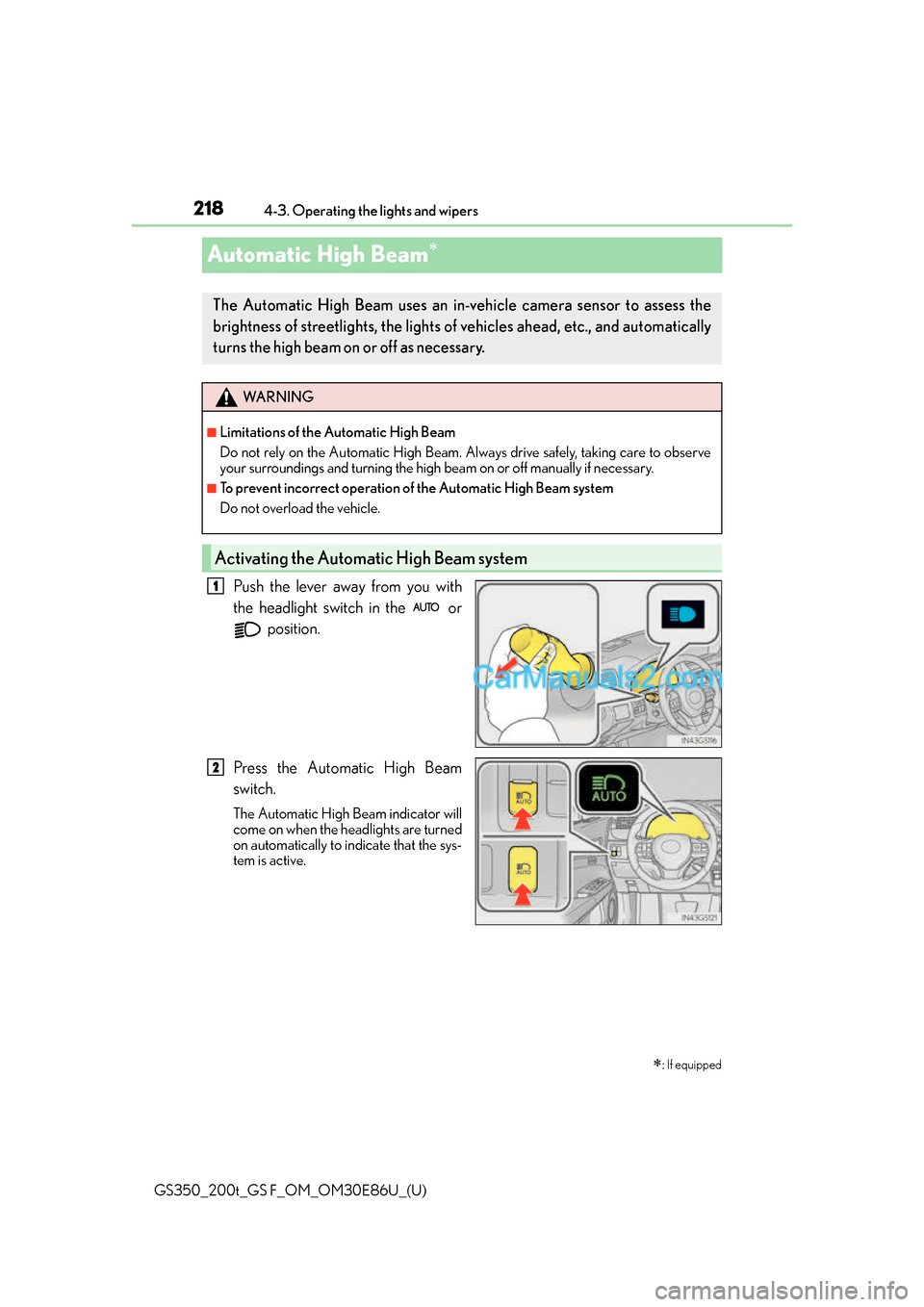
Push the lever away from you with
the headlight switch in the or
position.
Press the Automatic High Beam
switch.
The Automatic High Beam indicator will
come on when the headlights are turned
on automatically to indicate that the sys-
tem is active.
: If equipped
The Automatic High Beam uses an in-v ehicle camera sensor to assess the
brightness of streetlights, the lights of vehicles ahead, etc., and automatically
turns the high beam on or off as necessary.
WA R N I N G
■Limitations of the Automatic High Beam
Do not rely on the Automatic High Beam. Always drive safely, taking care to observe
your surroundings and turning the high beam on or off manually if necessary.
■To prevent incorrect operation of the Automatic High Beam system
Do not overload the vehicle.
Activating the Automatic High Beam system
1
2
Page 219 of 624
GS350_200t_GS F_OM_OM30E86U_(U)
2194-3. Operating the lights and wipers
4
Driving
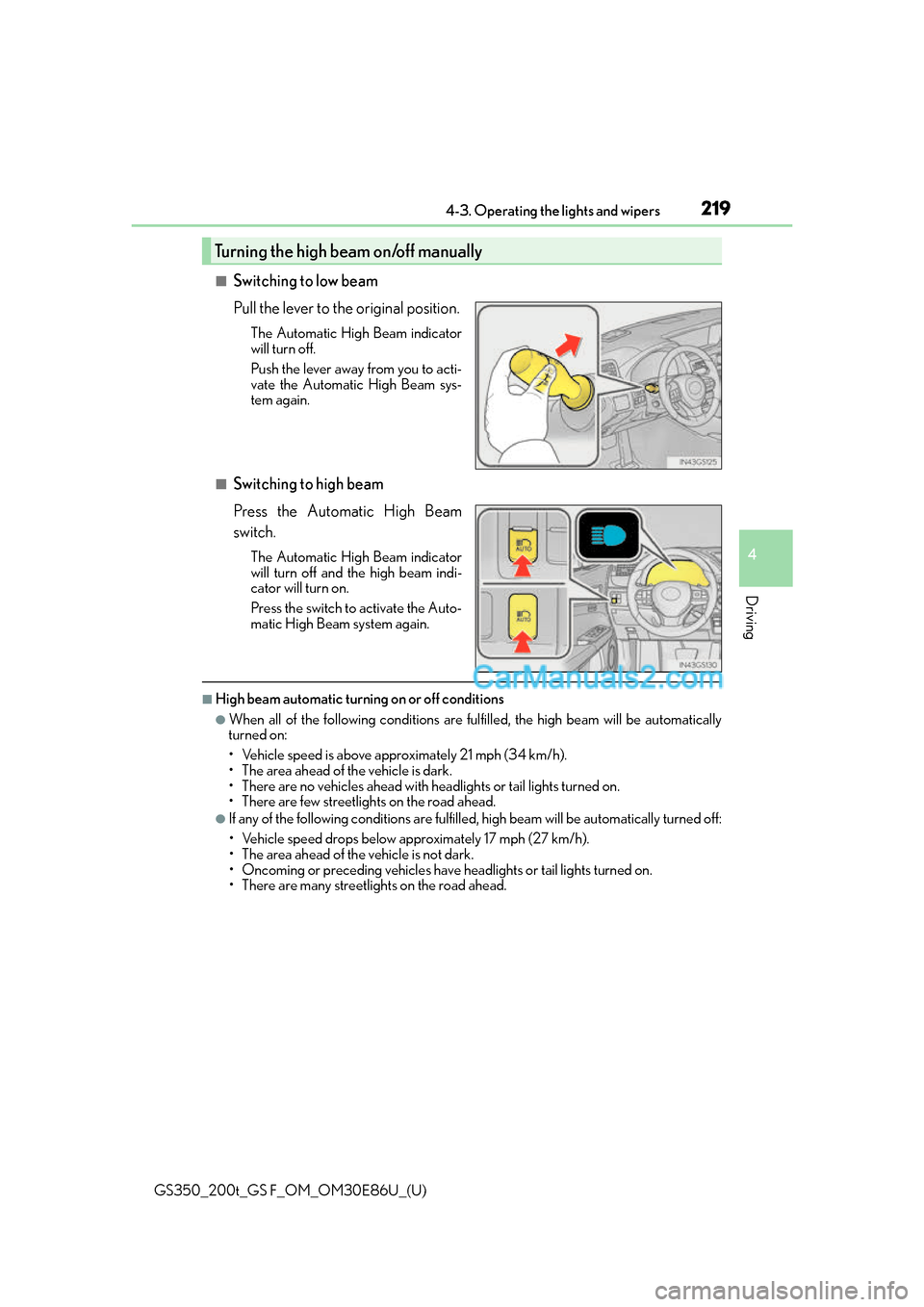
■Switching to low beam
Pull the lever to the original position.
The Automatic High Beam indicator
will turn off.
Push the lever away from you to acti-
vate the Automatic High Beam sys-
tem again.
■Switching to high beam
Press the Automatic High Beam
switch.
The Automatic High Beam indicator
will turn off and the high beam indi-
cator will turn on.
Press the switch to activate the Auto-
matic High Beam system again.
■High beam automatic turning on or off conditions
●When all of the following conditions are fulfilled, the high beam will be automatically
turned on:
• Vehicle speed is above appr oximately 21 mph (34 km/h).
• The area ahead of the vehicle is dark.
• There are no vehicles ahead with headlights or tail lights turned on.
• There are few streetlights on the road ahead.
●If any of the following conditions are fulfilled, high beam will be automatically turned off:
• Vehicle speed drop s below approximately 17 mph (27 km/h).
• The area ahead of the vehicle is not dark.
• Oncoming or preceding vehicles have headlights or tail lights turned on.
• There are many streetlights on the road ahead.
Turning the high beam on/off manually
Page 220 of 624
220
GS350_200t_GS F_OM_OM30E86U_(U)4-3. Operating the lights and wipers
■Camera sensor dete
ction information
●The high beam may not be automatically turned off in the following situations:
• When oncoming vehicles sudd enly appear from a curve
• When the vehicle is cut in front of by another vehicle
• When vehicles ahead are hidden from sight due to repeated curves, road dividers or roadside trees
• When vehicles ahead appear from the faraway lane on wide road
• When vehicles ahead have no lights
●The high beam may be turned off if a vehicl e ahead that is using fog lights without using
the headlights is detected.
●House lights, street lights, traffic signals, and illuminated billboards or signs may cause
the high beam to switch to the low be ams, or the low beams to remain on.
●The following factors may affect the amount of time taken to turn the high beam on or
off:
• The brightness of headlights, fog lights, and tail lights of vehicles ahead
• The movement and direction of vehicles ahead
• When vehicle ahead only has operational lights on one side
• When vehicle ahead is a two-wheeled vehicle
• The condition of the road (gradient, curve, condition of the road surface etc.)
• The number of passengers and amount of luggage
●The high beam may be turned on or off when the driver does not expect it.
●Bicycles or similar objects may not be detected.
●In the situations shown below, the system may not be able to accurately detect sur-
rounding brightness levels. This may caus e the low beams to remain on or the high
beams to cause problems for pedestrians, vehicles ahead or other parties. In these
cases, manually switch between the high and low beams.
• In bad weather (rain, snow, fog, sandstorms etc.)
• The windshield is obscured by fog, mist, ice, dirt etc.
• The windshield is cracked or damaged.
• The camera sensor is deformed or dirty.
• The camera sensor temperature is extremely high.
• Surrounding brightness levels are equal to those of headlights, tail lights or fog lights.
• Vehicles ahead have headlights that are either switched off, dirty, are changing color, or have are not aimed properly.
• When driving through an area of intermit tently changing brightness and darkness.
• When frequently and repeatedly driving ascending/descending roads, or roads with rough, bumpy or uneven surfaces (such as stone-paved roads, gravel tracks etc.).
• When frequently and repeat edly taking curves or driving on a winding road.
• There is a highly reflective object ahead of the vehicle, such as a sign or a mirror.
• The back of a vehicle ahead is highly reflective, such as a container on a truck.
• The vehicle’s headlights are damaged or dirty, or are not aimed properly.
• The vehicle is listing or tilting, due to a flat tire, a trailer being towed etc.
• The high beam and low beam are repeated ly being switched between in an abnor-
mal manner.
• The driver believes that the high beam may be causing problems or distress to other
drivers or pedestrians nearby.
Page 221 of 624
GS350_200t_GS F_OM_OM30E86U_(U)
2214-3. Operating the lights and wipers
4
Driving
■Temporarily lowering sensor sensitivity
The sensitivity of the sensor can be temporarily lowered.
Turn the engine switch off while the following conditions are met.
• The headlight switch is in or .
• The headlight switch lever is in high beam position.
• Automatic High Beam switch is on.
Turn the engine switch to IGNITION ON mode.
Within 30 seconds after , re peat pulling the headlight switch lever to the original
position then pushing it to the high beam po sition quickly 10 times, then leave the lever
in high beam position.
If the sensitivity is changed, the Automatic High Beam indicator is turn on and off 3
times.
Automatic High Beam (headlights) may turn on even the vehicle is stopped.
■Wa r n i n g m e s s a g e
Warning messages are used to indicate a syst em malfunction or to inform the driver of
the need for caution. ( P. 4 5 9 )
1
2
32
4
Page 222 of 624
222
GS350_200t_GS F_OM_OM30E86U_(U)4-3. Operating the lights and wipers
Windshield wipers and washer
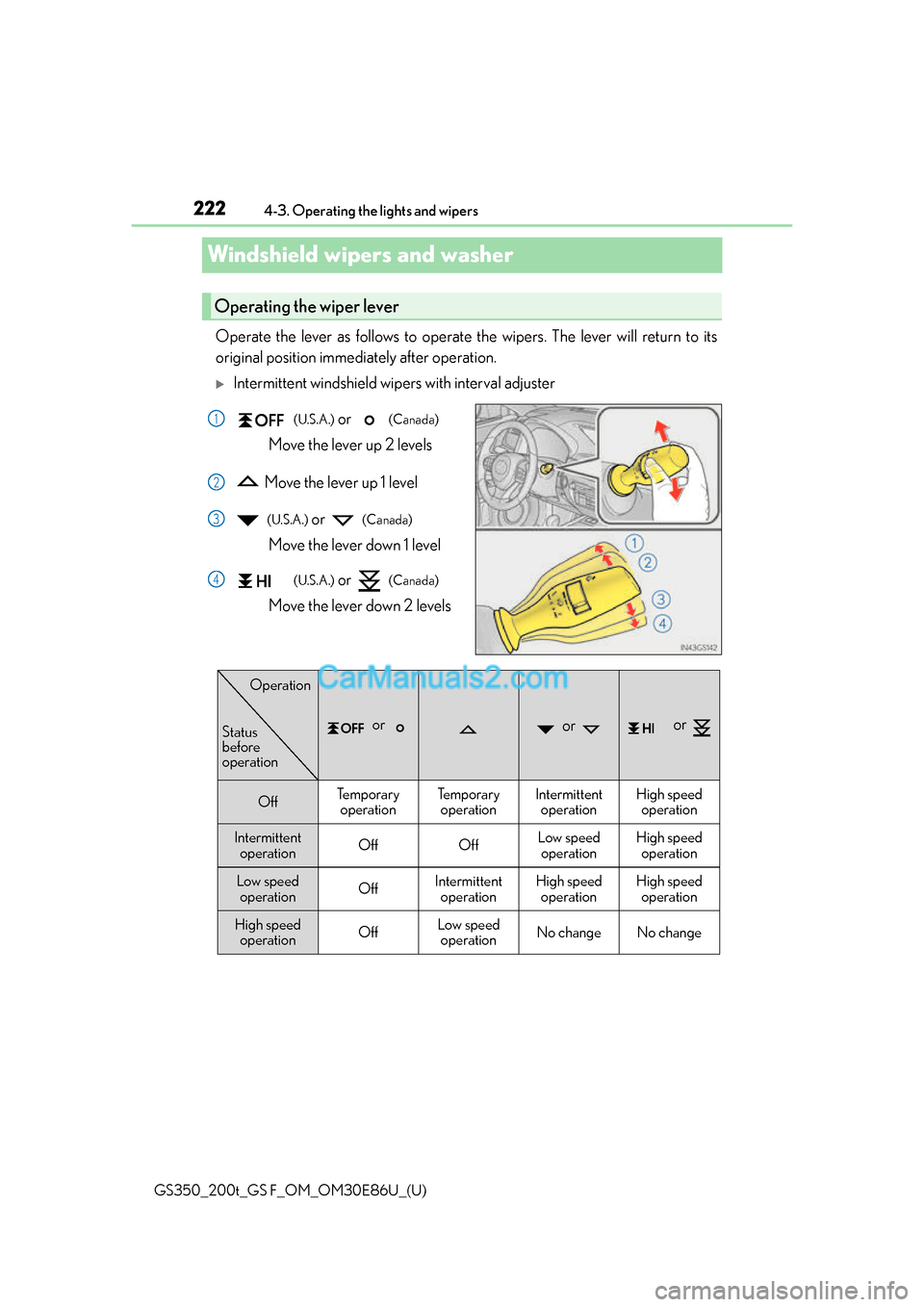
Operate the lever as follows to operate the wipers. The lever will return to its
original position immediately after operation.
Intermittent windshield wipers with interval adjuster
(U.S.A.) or (Canada)
Move the lever up 2 levels
Move the lever up 1 level
(U.S.A.) or (Canada)
Move the lever down 1 level
(U.S.A.) or (Canada)
Move the lever down 2 levels
Operating the wiper lever
1
2
3
4
or or or
OffTe m p o r a r y operationTe m p o r a r yoperationIntermittent operationHigh speedoperation
Intermittent operationOffOffLow speedoperationHigh speed operation
Low speed operationOffIntermittent operationHigh speedoperationHigh speed operation
High speed
operationOffLow speedoperationNo changeNo change
Status
before
operation
Operation
Page 223 of 624
GS350_200t_GS F_OM_OM30E86U_(U)
2234-3. Operating the lights and wipers
4
Driving
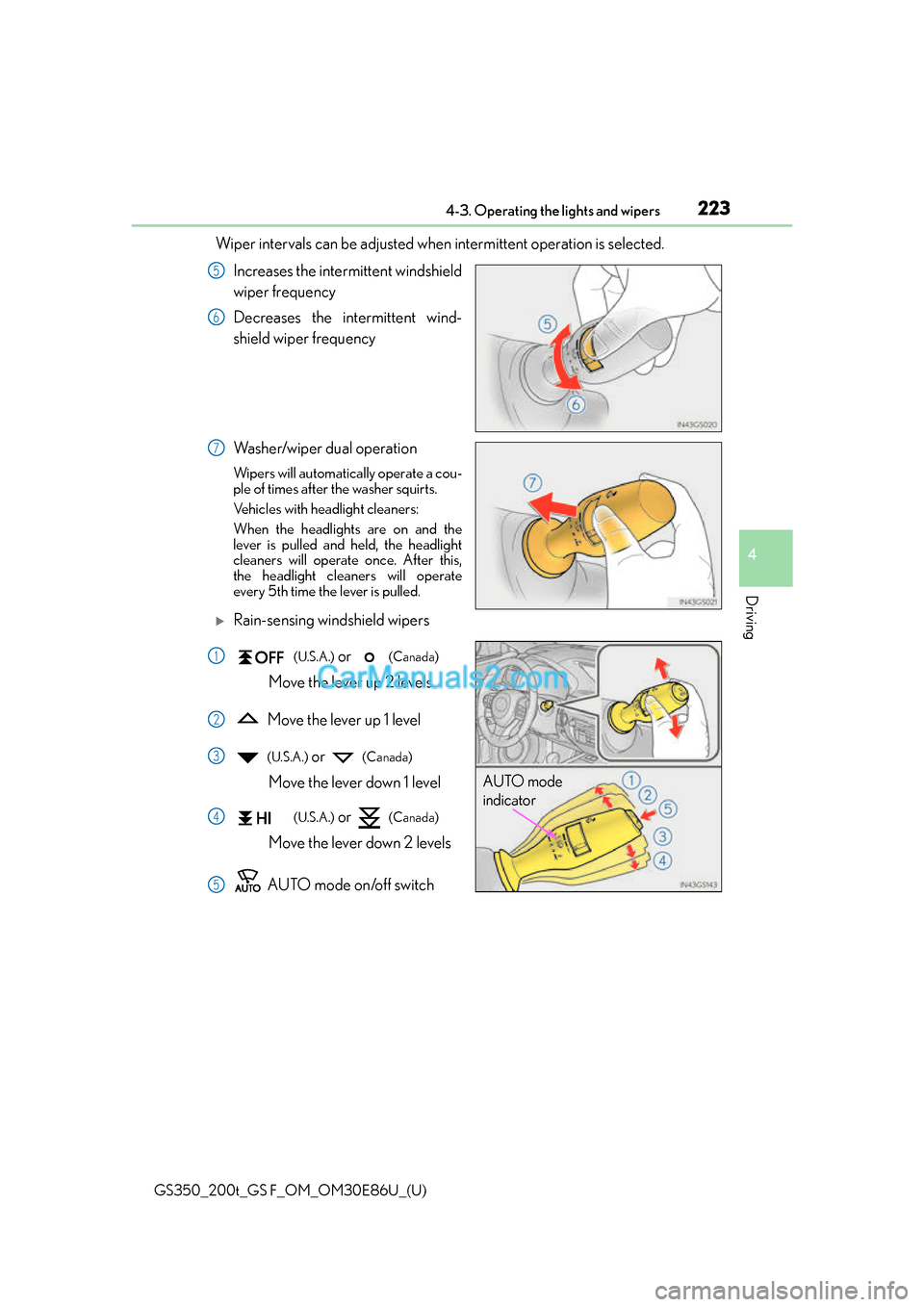
Wiper intervals can be adjusted when intermittent operation is selected.Increases the intermittent windshield
wiper frequency
Decreases the intermittent wind-
shield wiper frequency
Washer/wiper dual operation
Wipers will automatically operate a cou-
ple of times after the washer squirts.
Vehicles with headlight cleaners:
When the headlights are on and the
lever is pulled and held, the headlight
cleaners will operate once. After this,
the headlight cleaners will operate
every 5th time the lever is pulled.
Rain-sensing windshield wipers
(U.S.A.) or (Canada)
Move the lever up 2 levels
Move the lever up 1 level
(U.S.A.) or (Canada)
Move the lever down 1 level
(U.S.A.) or (Canada)
Move the lever down 2 levels
AUTO mode on/off switch
5
6
7
AUTO mode
indicator
1
2
3
4
5