alarm Lexus GS350 2017 User Guide
[x] Cancel search | Manufacturer: LEXUS, Model Year: 2017, Model line: GS350, Model: Lexus GS350 2017Pages: 676, PDF Size: 67.73 MB
Page 164 of 676
1643-2. Opening, closing and locking the doors and trunk
GS350_200t_GS F_OM_OM30F83E_(EE)
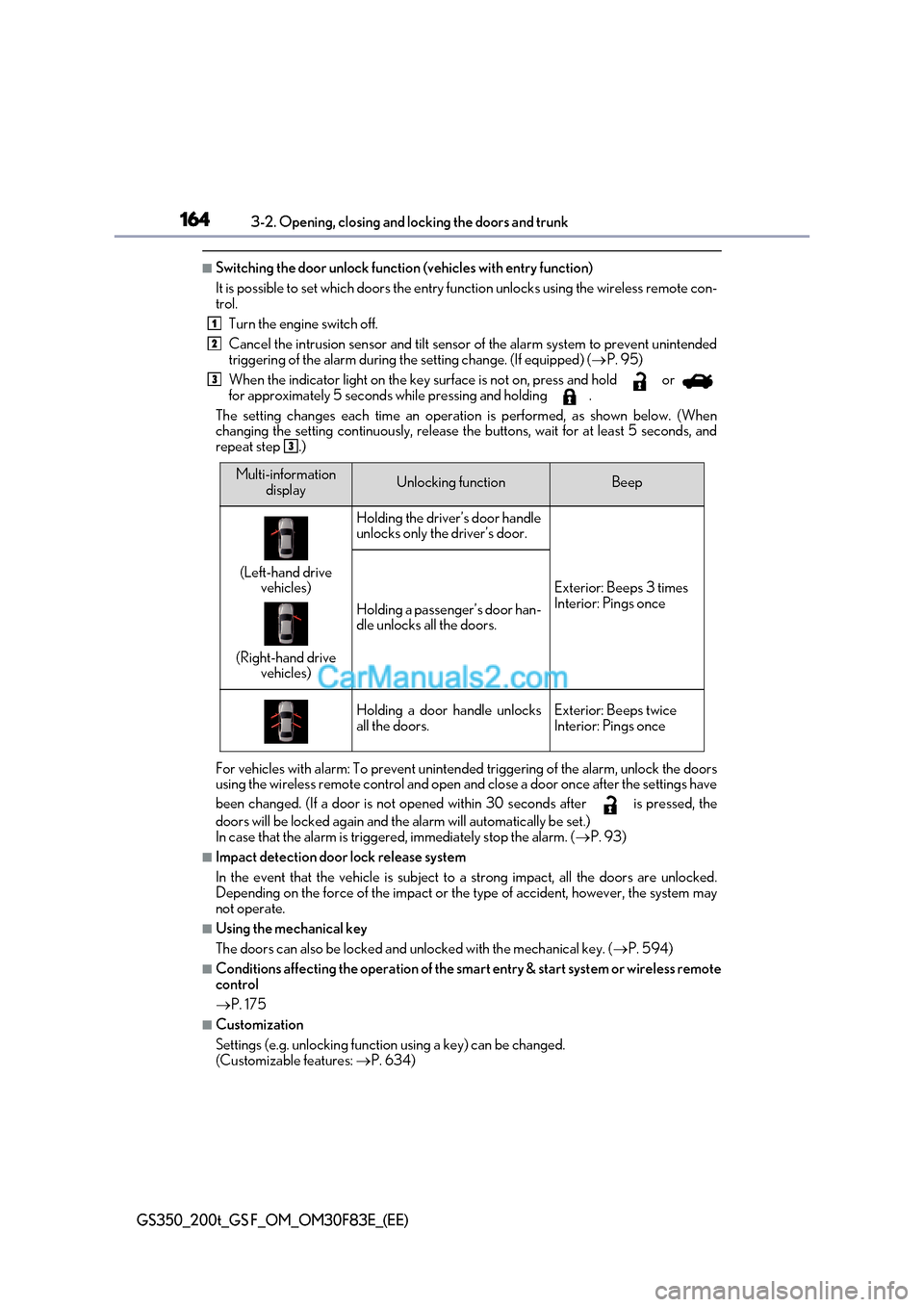
■Switching the door unlock function (vehicles with entry function)
It is possible to set which doors the entry fu nction unlocks using the wireless remote con-
trol.
Turn the engine switch off.
Cancel the intrusion sensor and tilt sensor of the alarm system to prevent unintended
triggering of the alarm during the setting change. (If equipped) ( P. 95)
When the indicator light on the key su rface is not on, press and hold or
for approximately 5 seconds while pressing and holding .
The setting changes each time an operatio n is performed, as shown below. (When
changing the setting continuously, release the buttons, wait for at least 5 seconds, and
repeat step .)
For vehicles with alarm: To prevent unintended triggering of the alarm, unlock the doors
using the wireless remote control and open and close a door once after the settings have
been changed. (If a door is not opened within 30 seconds after is pressed, the
doors will be locked again and the alarm will automatically be set.)
In case that the alarm is triggered, immediately stop the alarm. ( P. 93)
■Impact detection door lock release system
In the event that the vehicle is subject to a strong impact, all the doors are unlocked.
Depending on the force of the impact or the type of accident, however, the system may
not operate.
■Using the mechanical key
The doors can also be locked and unlocked with the mechanical key. ( P. 594)
■Conditions affecting the operation of the smart entry & start system or wireless remote
control P. 175
■Customization
Settings (e.g. unlocking function using a key) can be changed.
(Customizable features: P. 634)
1
2
3
3
Multi-information
displayUnlocking functionBeep
(Left-hand drive vehicles)
(Right-hand drive vehicles)
Holding the driver’s door handle
unlocks only the driver’s door.
Exterior: Beeps 3 times
Interior: Pings once
Holding a passenger’s door han-
dle unlocks all the doors.
Holding a door handle unlocks
all the doors.Exterior: Beeps twice
Interior: Pings once
Page 168 of 676
1683-2. Opening, closing and locking the doors and trunk
GS350_200t_GS F_OM_OM30F83E_(EE)
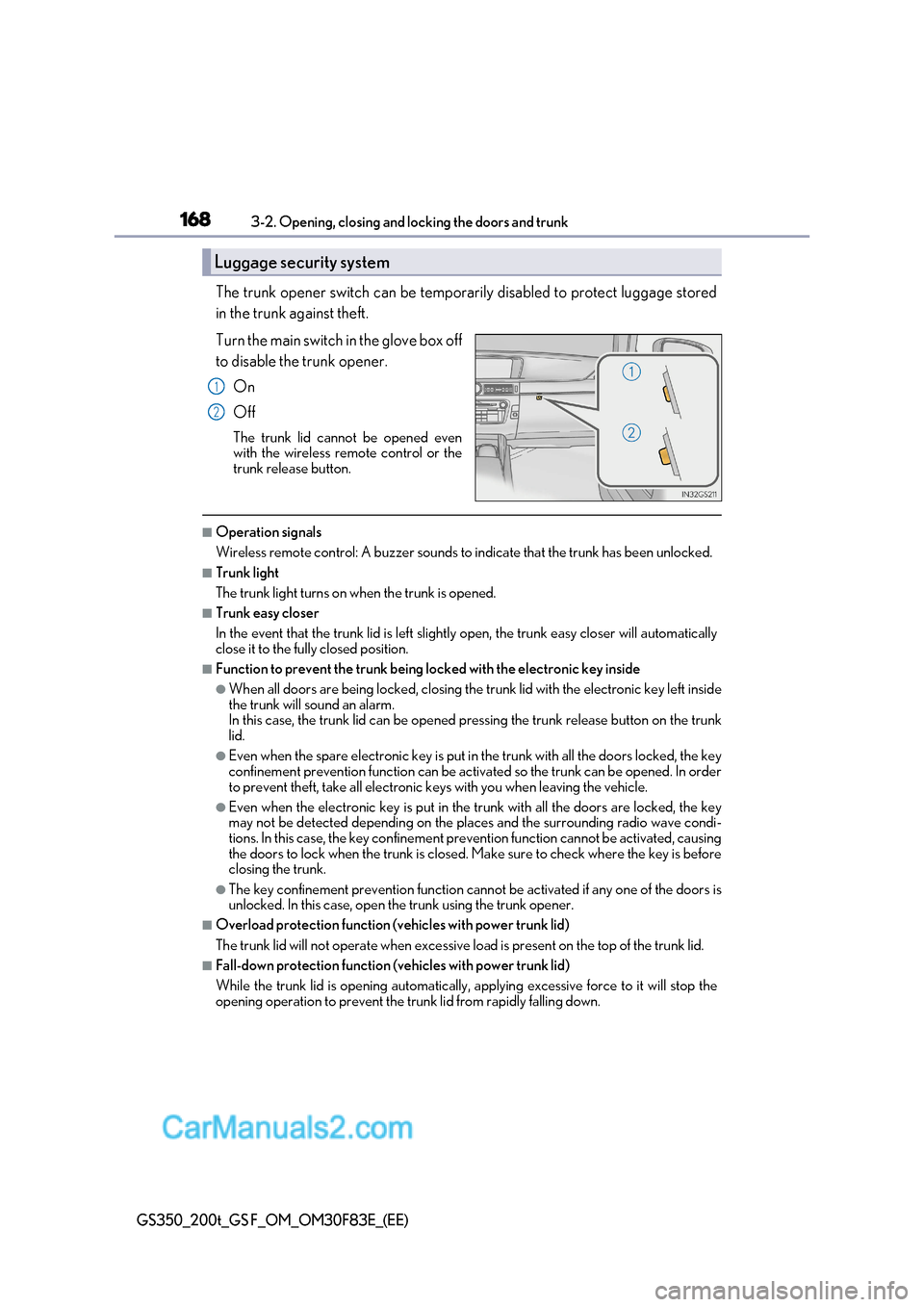
The trunk opener switch can be temporarily disabled to protect luggage stored
in the trunk against theft.
Turn the main switch in the glove box off
to disable the trunk opener.
On
Off
The trunk lid cannot be opened even
with the wireless remote control or the
trunk release button.
■Operation signals
Wireless remote control: A buzzer sounds to indicate that the trunk has been unlocked.
■Trunk light
The trunk light turns on when the trunk is opened.
■Trunk easy closer
In the event that the trunk lid is left slight ly open, the trunk easy closer will automatically
close it to the fully closed position.
■Function to prevent the trunk being locked with the electronic key inside
●When all doors are being locked, closing the tr unk lid with the electronic key left inside
the trunk will sound an alarm.
In this case, the trunk lid can be opened pressing the trunk release button on the tru nk
lid.
●Even when the spare electronic key is put in the trunk with all the doors locked, the key
confinement prevention function can be activated so the trunk can be opened. In order
to prevent theft, take all electronic keys with you when leaving the vehicle.
●Even when the electronic key is put in the trunk with all the doors are locked, the key
may not be detected depending on the places and the surrounding radio wave condi-
tions. In this case, the key confinement prevention function cannot be activated, ca using
the doors to lock when the trunk is closed. Make sure to check where the key is before
closing the trunk.
●The key confinement prevention function cannot be activated if any one of the doors is
unlocked. In this case, open the trunk using the trunk opener.
■Overload protection function (vehicles with power trunk lid)
The trunk lid will not operate when excessive lo ad is present on the top of the trunk lid.
■Fall-down protection function (vehicles with power trunk lid)
While the trunk lid is opening automatically, applying excessive force to it will stop the
opening operation to prevent the trunk lid from rapidly falling down.
Luggage security system
1
2
Page 174 of 676
1743-2. Opening, closing and locking the doors and trunk
GS350_200t_GS F_OM_OM30F83E_(EE)
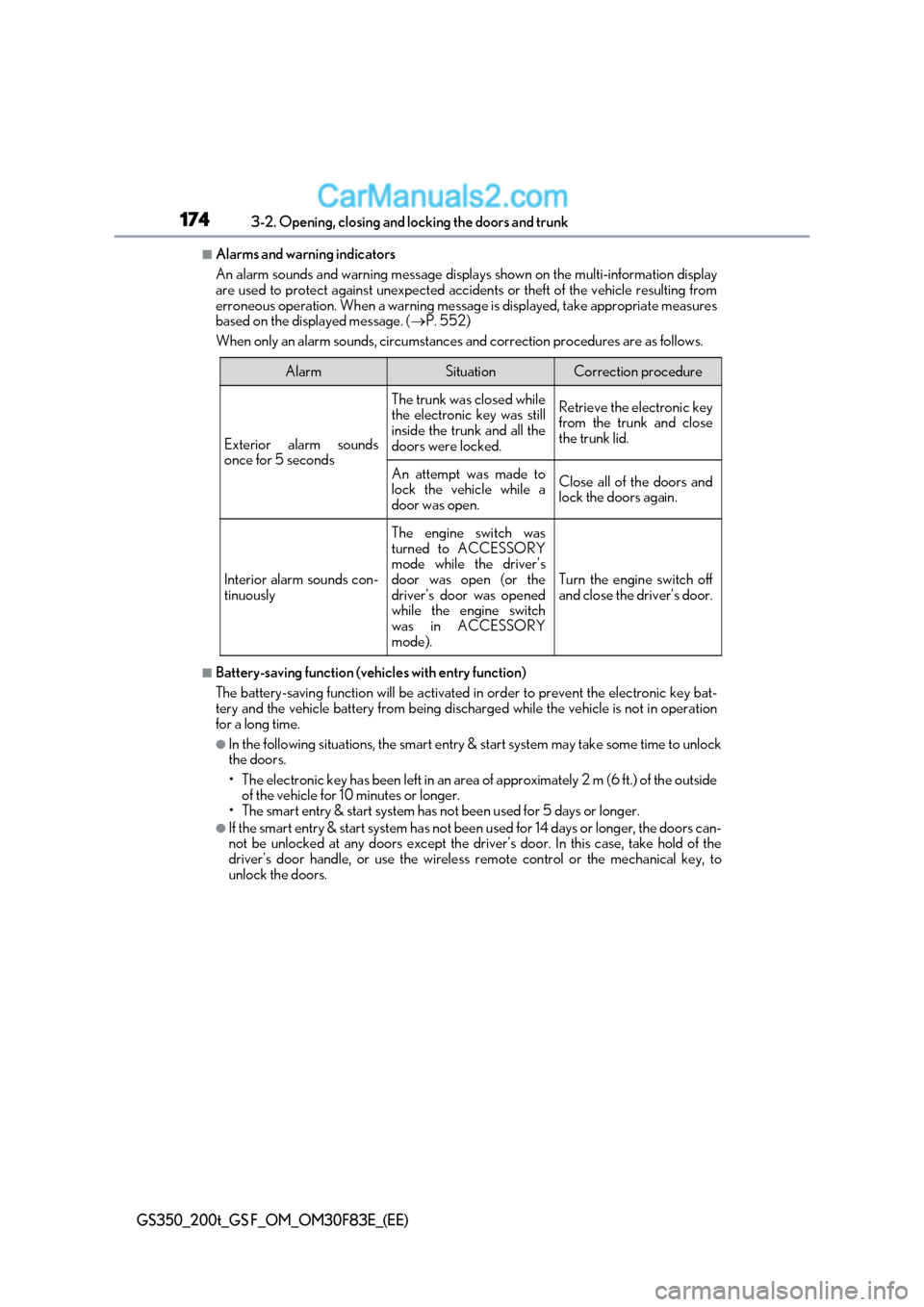
■Alarms and warning indicators
An alarm sounds and warning message displa ys shown on the multi-information display
are used to protect against unexpected accidents or theft of the vehicle resulting from
erroneous operation. When a warning message is displayed, take appropriate measures
based on the displayed message. ( P. 552)
When only an alarm sounds, circumstances and correction procedures are as follows.
■Battery-saving function (vehicles with entry function)
The battery-saving function will be activated in order to prevent the electronic key bat-
tery and the vehicle battery from being discharged while the vehicle is not in opera tion
for a long time.
●In the following situations, the smart entry & start system may take some time to unlock
the doors.
Page 177 of 676
177
3-2. Opening, closing and locking the doors and trunk
3
Operation of each component
GS350_200t_GS F_OM_OM30F83E_(EE)
■Note for the push-start function
●Even when the electronic key is within the effective range (detection areas), the system
may not operate properly when the electronic key is on the instrument panel, rear
package tray or floor, or in the door pocket s or glove box when the engine is started or
engine switch modes are changed.
●Even if the electronic key is not inside the vehicle, it may be possible to start the engine
if the electronic key is near the window.
■When the vehicle is not driven for extended periods
●Vehicles with entry function: To prevent theft of the vehicle, do not leave the electronic
key within 2 m (6 ft.) of the vehicle.
●The smart entry & start system can be deactivated in advance. ( P. 634)
■To operate the system properly
●Make sure to carry the electronic key when operating the system. Do not get the elec-
tronic key too close to the vehicle when operating the system from the outside of the
vehicle.
Depending on the position and holding condit ion of the electronic key, the key may not
be detected correctly and the system may not operate properly. (The alarm may go off
accidentally, or the door lock prev ention function may not operate.)
●Do not leave the electronic key inside the trunk.
The key confinement prevention function may not operate, depending on the location
of the key (close to a spare tire [if equipped], the inside edge of the trunk), conditions
(inside a metal bag, close to metallic obje cts) and the radio waves in the surrounding
area. ( P. 168)
■If the smart entry & start system does not operate properly
●Locking and unlocking the doors and opening the trunk: Use the mechanical key. ( P. 594)
●Starting the engine: P. 595
■Customization
Settings (e. g. smart entry & start system) can be changed.
(Customizable features: P. 634)
■If the smart entry & start system has be en deactivated in a customized setting
●Locking and unlocking the doors and opening the trunk:
Use the wireless remote control or mechanical key. ( P. 159, 166, 594)
●Starting the engine and changing engine switch modes: P. 595
●Stopping the engine: P. 241
Page 595 of 676
595
7-2. Steps to take in an emergency
7
When trouble arises
GS350_200t_GS F_OM_OM30F83E_(EE)
Ensure that the shift lever is in P and depress the brake pedal.
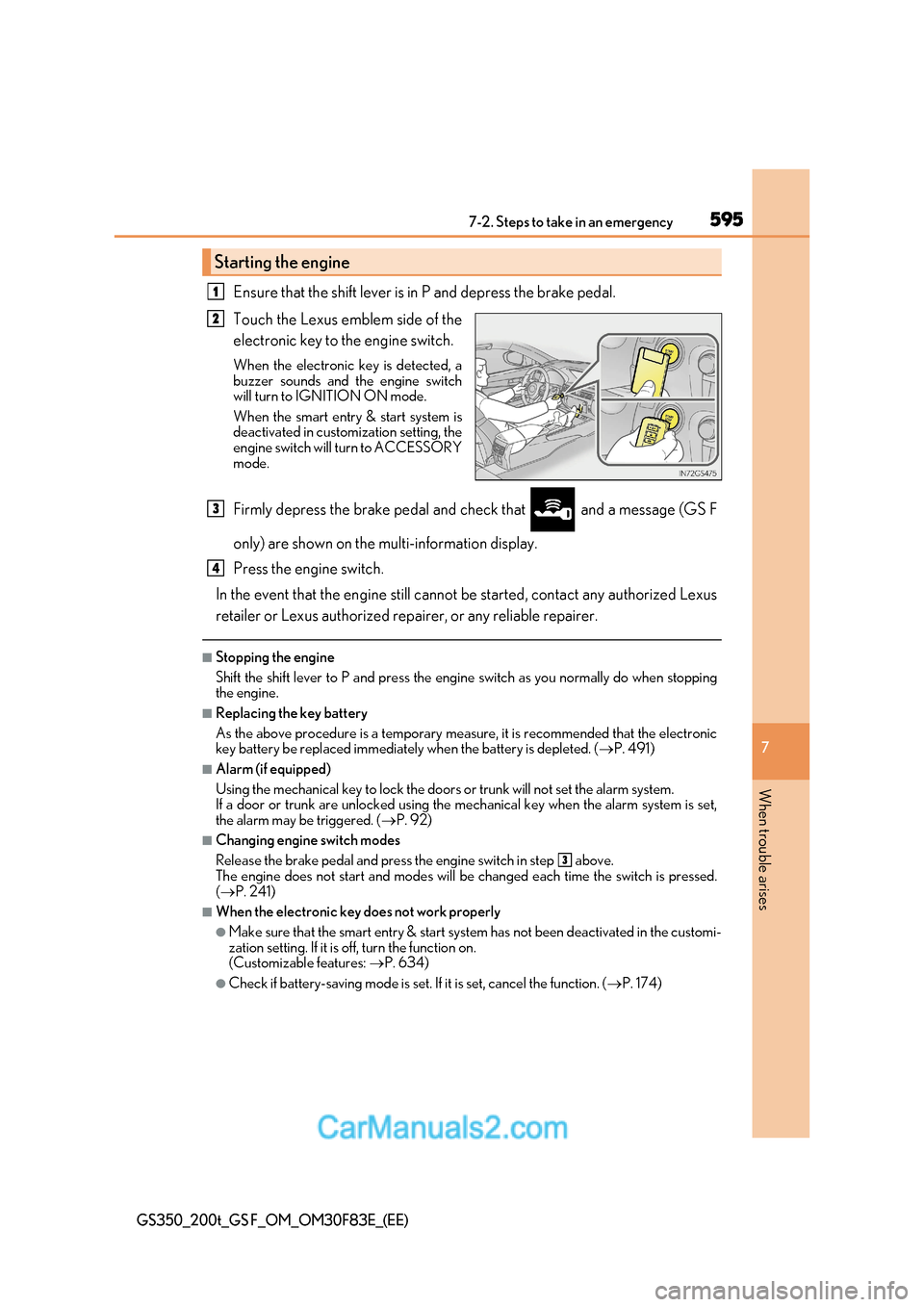
Touch the Lexus emblem side of the
electronic key to the engine switch.
When the electronic key is detected, a
buzzer sounds and the engine switch
will turn to IGNITION ON mode.
When the smart entry & start system is
deactivated in customization setting, the
engine switch will turn to ACCESSORY
mode.
Firmly depress the brake pedal and check that and a message (GS F
only) are shown on the multi-information display.
Press the engine switch.
In the event that the engine still cannot be started, contact any authorized Lexus
retailer or Lexus authorized repairer, or any reliable repairer.
■Stopping the engine
Shift the shift lever to P and press the engine switch as you normally do when stopping
the engine.
■Replacing the key battery
As the above procedure is a temporary measure, it is recommended that the electronic
key battery be replaced immediately when the battery is depleted. ( P. 491)
■Alarm (if equipped)
Using the mechanical key to lock the doors or trunk will not set the alarm system.
If a door or trunk are unlocked using the me chanical key when the alarm system is set,
the alarm may be triggered. ( P. 92)
■Changing engine switch modes
Release the brake pedal and press the engine switch in step above.
The engine does not start and modes will be changed each time the switch is pressed. ( P. 241)
■When the electronic key does not work properly
●Make sure that the smart entry & start syst em has not been deactivated in the customi-
zation setting. If it is off, turn the function on.
(Customizable features: P. 634)
●Check if battery-saving mode is set. If it is set, cancel the function. (P. 174)
Starting the engine
1
2
3
4
3
Page 597 of 676
597
7
7-2. Steps to take in an emergency
When trouble arises
GS350_200t_GS F_OM_OM30F83E_(EE)
If the vehicle battery is discharged
If you have a set of jumper (or booster) cables and a second vehicle with a 12-volt
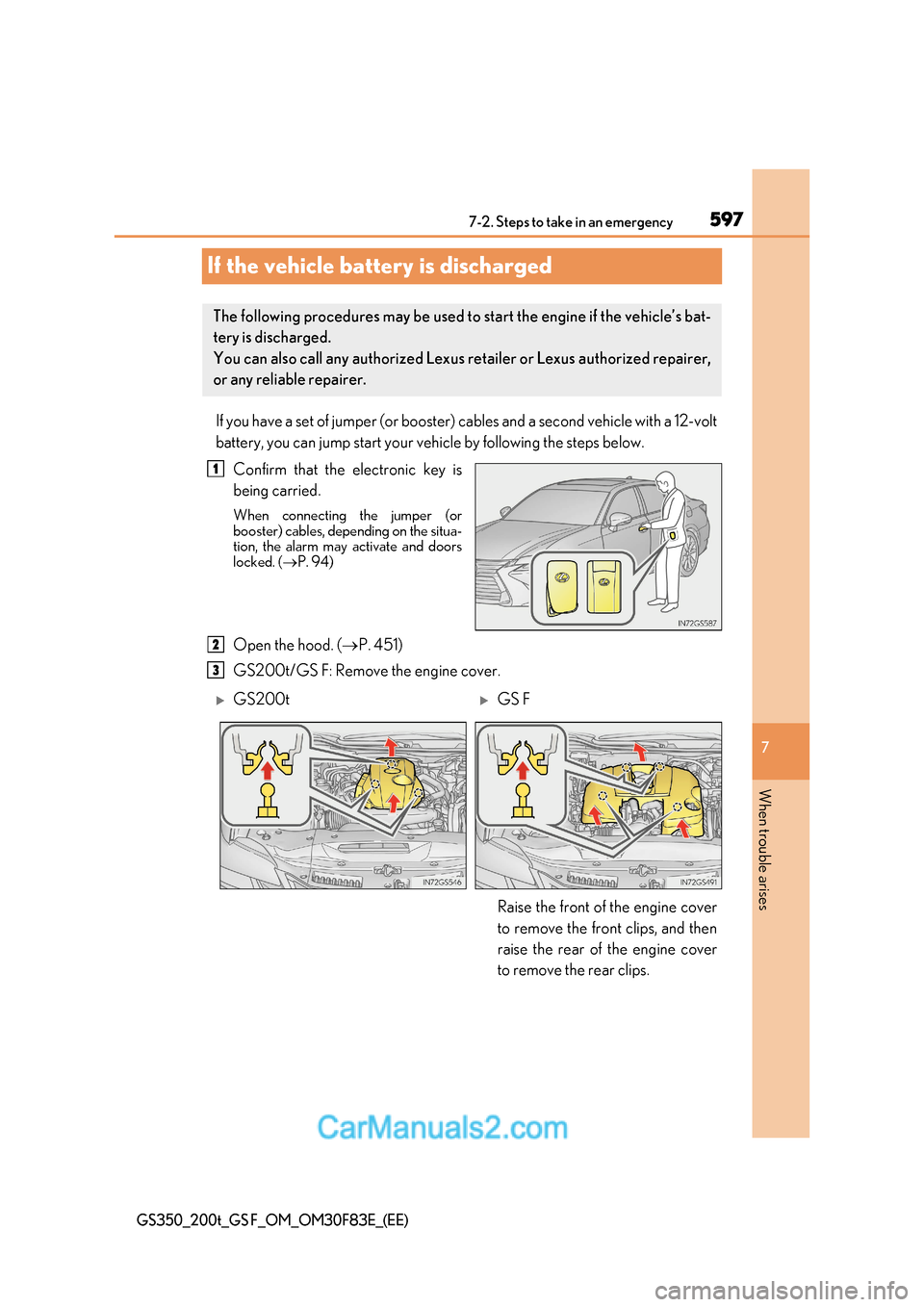
battery, you can jump start your vehicle by following the steps below.Confirm that the electronic key is
being carried.
When connecting the jumper (or
booster) cables, depending on the situa-
tion, the alarm may activate and doors
locked. ( P. 94)
Open the hood. ( P. 451)
GS200t/GS F: Remove the engine cover.
The following procedures may be used to start the engine if the vehicle’s bat-
tery is discharged.
You can also call any authorized Lexus retailer or Lexus authorized repairer,
or any reliable repairer.
1
2
3
GS200tGS F
Raise the front of the engine cover
to remove the front clips, and then
raise the rear of the engine cover
to remove the rear clips.
Page 656 of 676

656What to do if... (Troubleshooting)
GS350_200t_GS F_OM_OM30F83E_(EE)
●Is the window lock switch pressed?
The power window except for the one at the driver’s seat cannot be operated
if the window lock switch is pressed. ( P. 214)
● The auto power off function will be operated if the vehicle is left in ACCES-
SORY or IGNITION ON mode (the engine is not running) for a period of
time. ( P. 242)
● The seat belt reminder light is flashing
Are the driver and the front passenger wearing the seat belts? ( P. 520)
● The parking brake indicator is on
Is the parking brake released? ( P. 256)
Depending on the situation, other type s of warning buzzer may also sound.
( P. 518, 524)
● Did anyone inside the vehicle open a door or anything move inside the vehicle
during setting the alarm?
The sensor detects them and the alarm sounds. ( P. 92)
To stop the alarm, turn the engine switch to IGNITION ON mode or start the
engine. ● Is the electronic key left inside the vehicle or the moon roof opened (if
equipped)?
Check the message on the multi-information display. ( P. 524)
The windows do not open or close by operating the power window
switches
The engine switch is turned off automatically
A warning buzzer sounds during driving
An alarm is activated and th
e horn sounds (if equipped)
A warning buzzer sounds when leaving the vehicle
(vehicles with entry function)
Page 658 of 676
658Alphabetical index
GS350_200t_GS F_OM_OM30F83E_(EE)
Alphabetical index
A/C ............................................................ 396
Air conditioning filter....................... 489
Changing the rear seat settings.................................................403
Front automatic air
conditioning system ......................396
nanoe™ system ................................. 406
Pollen removal mode ...................... 402
Rear air conditioning system ...... 408
S-FLOW mode.................................. 397
ABS (Anti-lock Brake System) ....... 375
Function .................................................. 375
Warning light ........................................ 519
Warning message............................. 524
Active Sound Control (ASC)........... 261
Adaptive Front-lighting System (AFS) ..................................................... 263
Adaptive Variable Suspension system (AVS) ...................................... 376
AFS (Adaptive Front-lighting System) .................................................. 263
AHS (Adaptive High-beam System) .................................................. 265
Air conditioning filter ..........................489
Air conditioning system ..................... 396 Air conditioning filter....................... 489
Changing the rear seat settings.................................................403
Front automatic air
conditioning system ......................396
nanoe™ system ................................. 406
Pollen removal mode ...................... 402
Rear air conditioning system ...... 408
S-FLOW mode.................................. 397 Airbags ..........................................................51
Airbag manual on-off system........... 61
Airbag operating conditions ...........57
Airbag precautions for
your child .............................................. 53
Airbag warning light ..........................518
Correct driving posture.....................44
Curtain shield airbag operating
conditions ..............................................57
Curtain shield airbag
precautions .......................................... 55
General airbag precautions ........... 53
Locations of airbags ............................. 51
Modification and disposal of
airbags.................................................... 56
Side airbag operating
conditions ..............................................57
Side airbag precautions .................... 53
Side and curtain shield airbags operating conditions ........................57
Side and curtain shield airbags precautions .......................................... 53
SRS airbags ............................................... 51
Airbag manual on-off system ............... 61
Alarm ............................................................ 92 Alarm ...........................................................92
Warning buzzer...................... 518, 524
Anchor brackets .......................................76
Antennas (smart entry & start system) ......................................... 173
A
Page 672 of 676
672Alphabetical index
GS350_200t_GS F_OM_OM30F83E_(EE)
LKA (Lane-Keeping Assist)
switch....................................................... 311
Meter control switches .......... 122, 130
Moon roof switches ........................... 217
Outside rear view mirror switches...................................................211
Paddle shift switches ........................ 248
Parking brake switches................... 256
Power door lock switch ...................162
Power window switches .................. 214
Rear sunshade switch........................431
Rear window and outside rear view mirror defoggers
switch.................................................... 402
Seat heater switches .......................... 412
Seat ventilator switches .................... 412
Snow mode switch ........................... 247
Talk switch *
Telephone switches *
Tilt and telescopic steering
control switch................................... 207
Tire pressure warning reset
switch.................................................... 474
Trunk closer switch .............................167
Trunk opener switch ......................... 166
Trunk opener main switch ............. 168
TVD (Torque Vectoring Differential) switch ......................... 373
Vehicle-to-vehicle distance button ....................................... 337, 349
VSC OFF switch ............................... 377
Window lock switch........................... 214
Windshield wipers and washer switch ......................... 276 Tachometer .....................................108, 113
Variable red zone ................................ 118
Tail lights................................................... 262
Light switch............................................262
Replacing light bulbs ....................... 504
Welcome light illumination control ...................................................160
Talk switch *
Telephone switches *
Theft deterrent system Alarm ...........................................................92
Double locking system ........................ 91
Engine immobilizer system ............. 86
Intrusion sensor and tilt sensor...... 95
Tire inflation pressure ......................... 485
Maintenance data ............................. 629
Tire inflation pressure display function ................................................473
Warning light......................................... 521
Warning message ............................ 524
Tire pressure warning system ......... 473
Function...................................................473
Initializing ................................................473
Installing tire pressure warning valves and transmitters ................473
Registering ID codes........................474
Warning light......................................... 521
Warning message ............................ 524T