headlight Lexus GS350 2017 User Guide
[x] Cancel search | Manufacturer: LEXUS, Model Year: 2017, Model line: GS350, Model: Lexus GS350 2017Pages: 676, PDF Size: 67.73 MB
Page 265 of 676
265
4
4-3. Operating the lights and wipers
Driving
GS350_200t_GS F_OM_OM30F83E_(EE)
AHS (Adaptive High-beam System)
●
Adjusts the brightness and illuminated area of the high beams according to
the vehicle speed.
● Adjusts the intensity of the high beams, while driving on a curve, so t hat the
area in the direction that the vehicle is turning will be illuminated more brightly
than other areas.
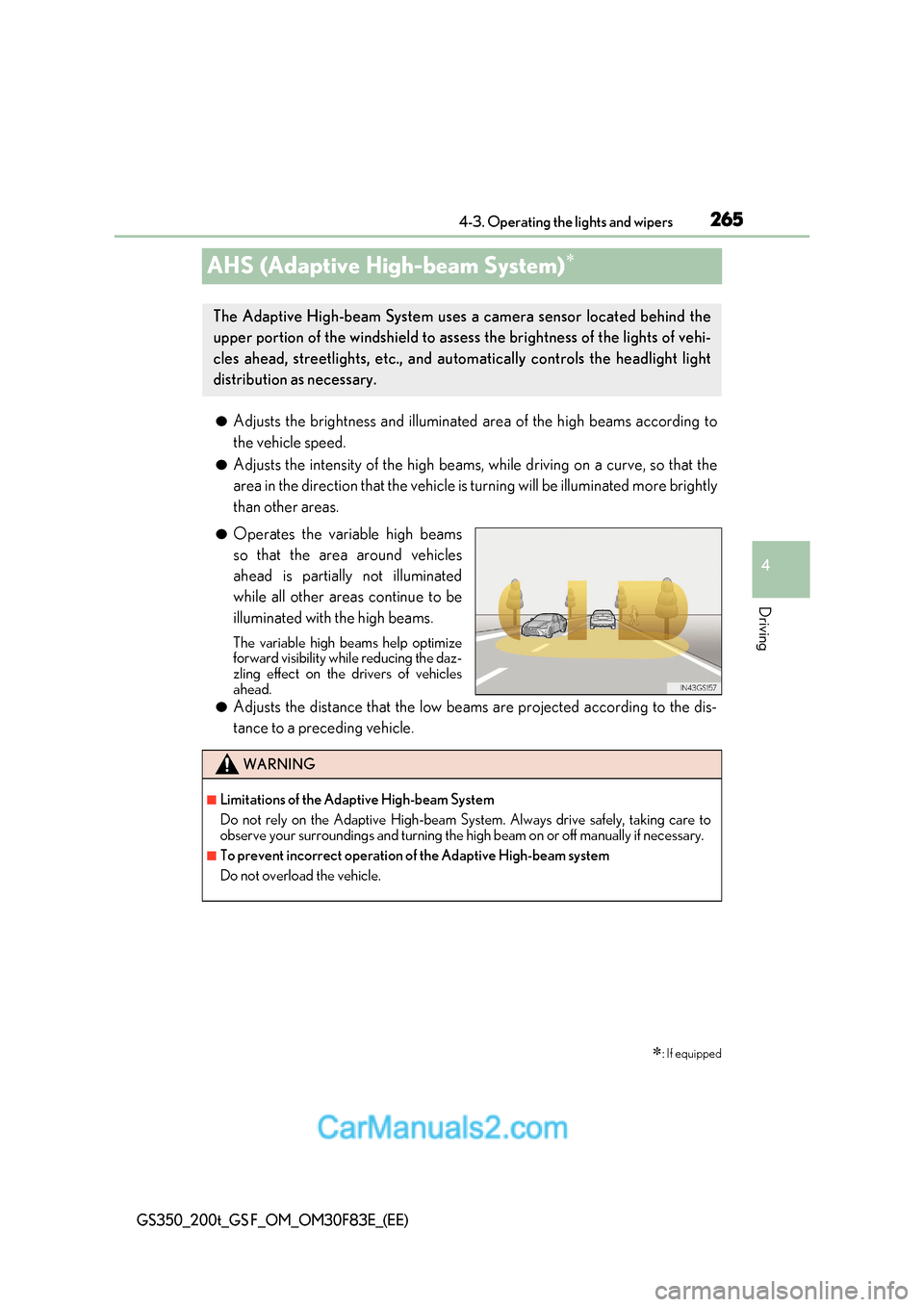
● Operates the variable high beams
so that the area around vehicles
ahead is partially not illuminated
while all other areas continue to be
illuminated with the high beams.
The variable high beams help optimize
forward visibility while reducing the daz-
zling effect on the drivers of vehicles
ahead.
● Adjusts the distance that the low beams are projected according to the dis-
tance to a preceding vehicle.
: If equipped
The Adaptive High-beam System uses a camera sensor located behind the
upper portion of the windshield to assess the brightness of the lights of vehi-
cles ahead, streetlights, etc., and au tomatically controls the headlight light
distribution as necessary.
WARNING
■Limitations of the Adaptive High-beam System
Do not rely on the Adaptive High-beam System. Always drive safely, taking care to
observe your surroundings and turning the high beam on or off manually if necessary.
■To prevent incorrect operation of the Adaptive High-beam system
Do not overload the vehicle.
Page 266 of 676
2664-3. Operating the lights and wipers
GS350_200t_GS F_OM_OM30F83E_(EE)
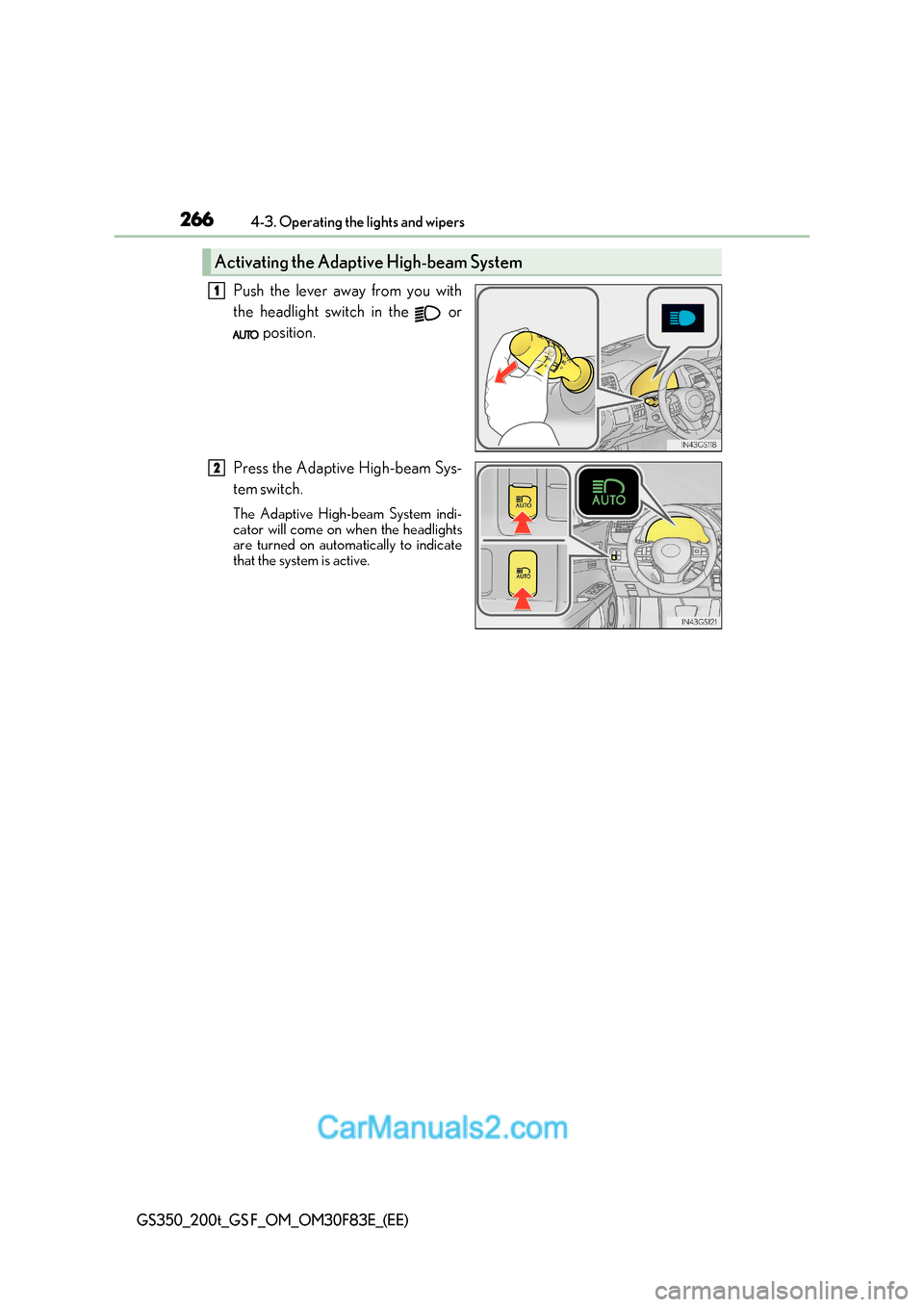
Push the lever away from you with
the headlight switch in the or
position.
Press the Adaptive High-beam Sys-
tem switch.
The Adaptive High-beam System indi-
cator will come on when the headlights
are turned on automatically to indicate
that the system is active.
Activating the Adaptive High-beam System
1
2
Page 268 of 676
2684-3. Operating the lights and wipers
GS350_200t_GS F_OM_OM30F83E_(EE)
■Conditions in wh ich the light distribution control of the headlights changes automati-
cally
●When all of the following conditions are met, the high beams will be turned on automat-
ically and the system will operate:
Page 271 of 676
271
4-3. Operating the lights and wipers
4
Driving
GS350_200t_GS F_OM_OM30F83E_(EE)
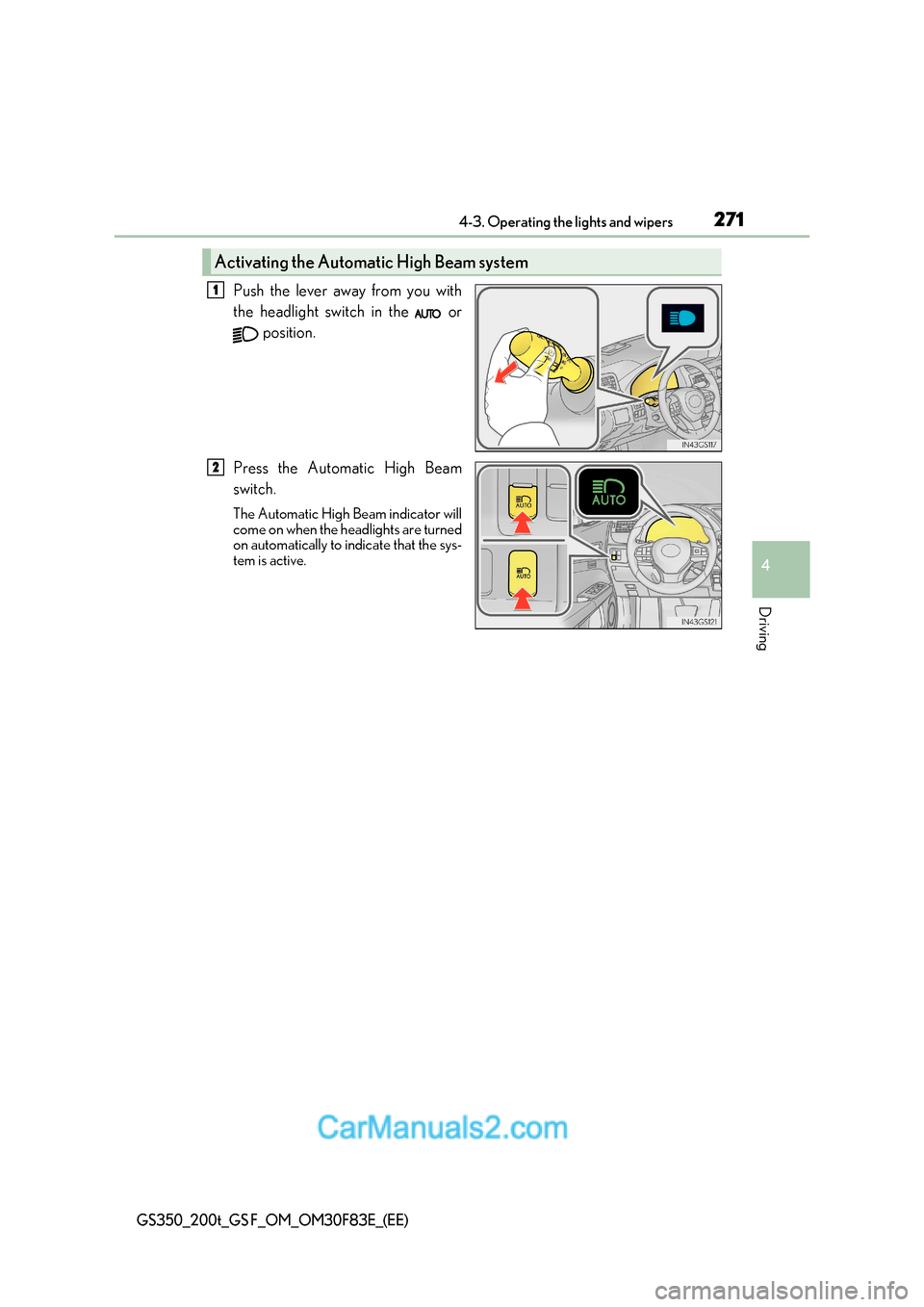
Push the lever away from you with
the headlight switch in the or
position.
Press the Automatic High Beam
switch.
The Automatic High Beam indicator will
come on when the headlights are turned
on automatically to indicate that the sys-
tem is active.
Activating the Automatic High Beam system
1
2
Page 275 of 676
275
4
4-3. Operating the lights and wipers
Driving
GS350_200t_GS F_OM_OM30F83E_(EE)
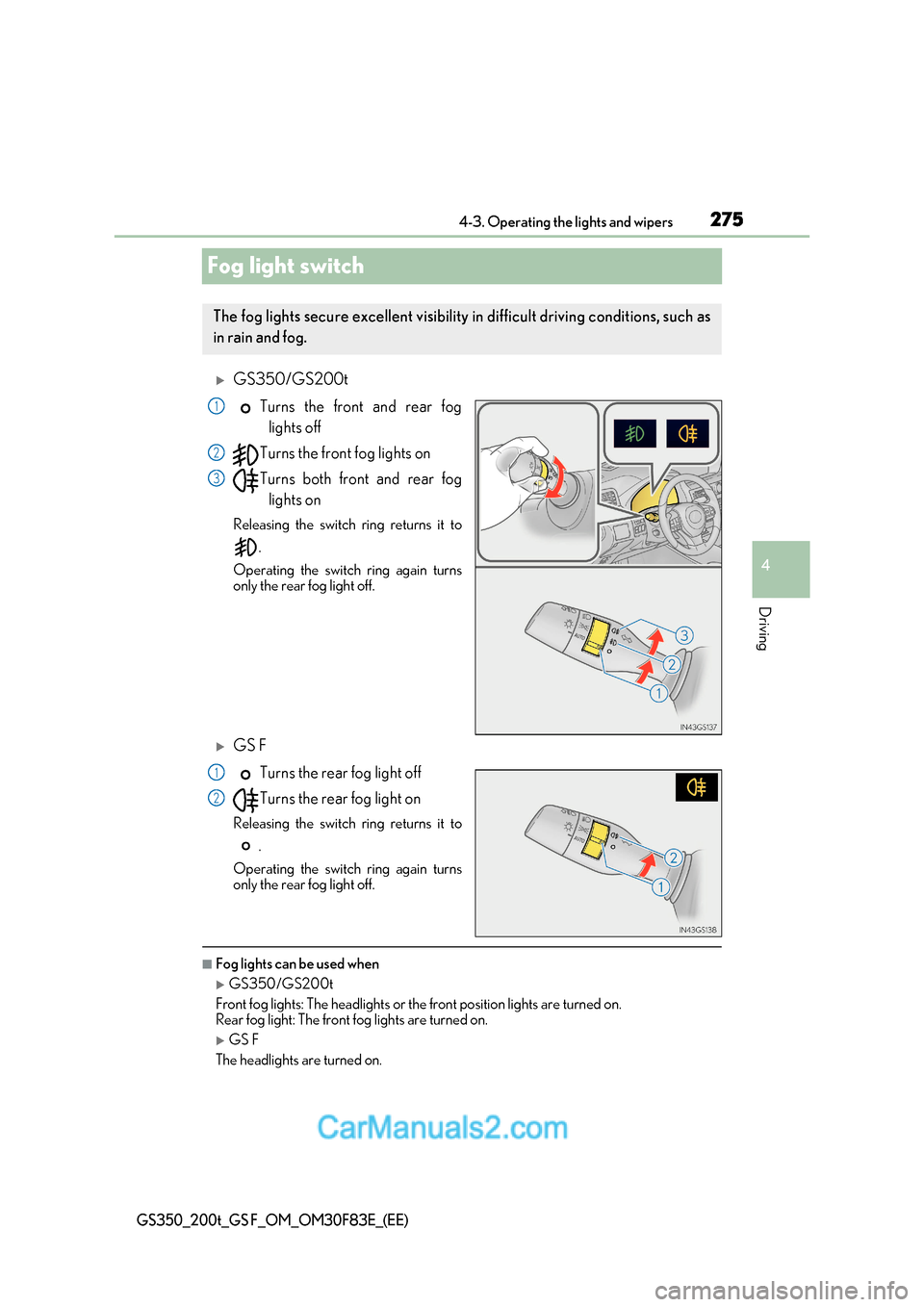
Fog light switch
GS350/GS200tTurns the front and rear foglights off
Turns the front fog lights on
Turns both front and rear fog lights on
Releasing the switch ring returns it to .
Operating the switch ring again turns
only the rear fog light off.
GS F
Turns the rear fog light off
Turns the rear fog light on
Releasing the switch ring returns it to .
Operating the switch ring again turns
only the rear fog light off.
■Fog lights can be used when
GS350/GS200t
Front fog lights: The headlights or the front position lights are turned on.
Rear fog light: The front fog lights are turned on.
GS F
The headlights are turned on.
The fog lights secure excellent visibility in difficult driving conditions, such as
in rain and fog.
1
2
3
1
2
Page 277 of 676
277
4-3. Operating the lights and wipers
4
Driving
GS350_200t_GS F_OM_OM30F83E_(EE)
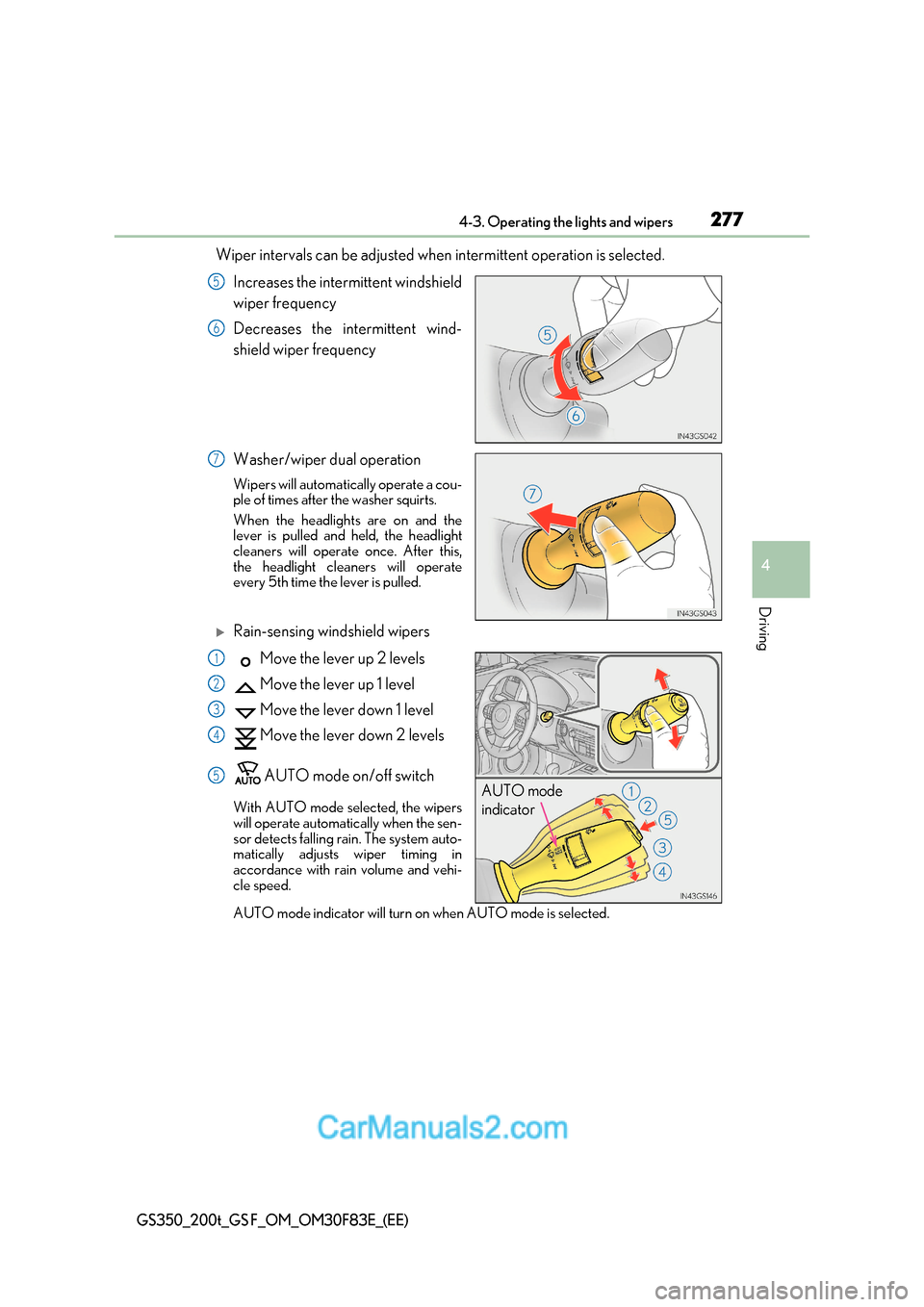
Wiper intervals can be adjusted when intermittent operation is selected.
Increases the intermittent windshield
wiper frequency
Decreases the intermittent wind-
shield wiper frequency
Washer/wiper dual operation
Wipers will automatically operate a cou-
ple of times after the washer squirts.
When the headlights are on and the
lever is pulled and held, the headlight
cleaners will operate once. After this,
the headlight cleaners will operate
every 5th time the lever is pulled.
Rain-sensing windshield wipers
Move the lever up 2 levels
Move the lever up 1 level
Move the lever down 1 level
Move the lever down 2 levels
AUTO mode on/off switch
With AUTO mode selected, the wipers
will operate automatically when the sen-
sor detects falling rain. The system auto-
matically adjusts wiper timing in
accordance with rain volume and vehi-
cle speed.
AUTO mode indicator will turn on when AUTO mode is selected.
5
6
7
AUTO mode
indicator
1
2
3
4
5
Page 278 of 676
2784-3. Operating the lights and wipers
GS350_200t_GS F_OM_OM30F83E_(EE)
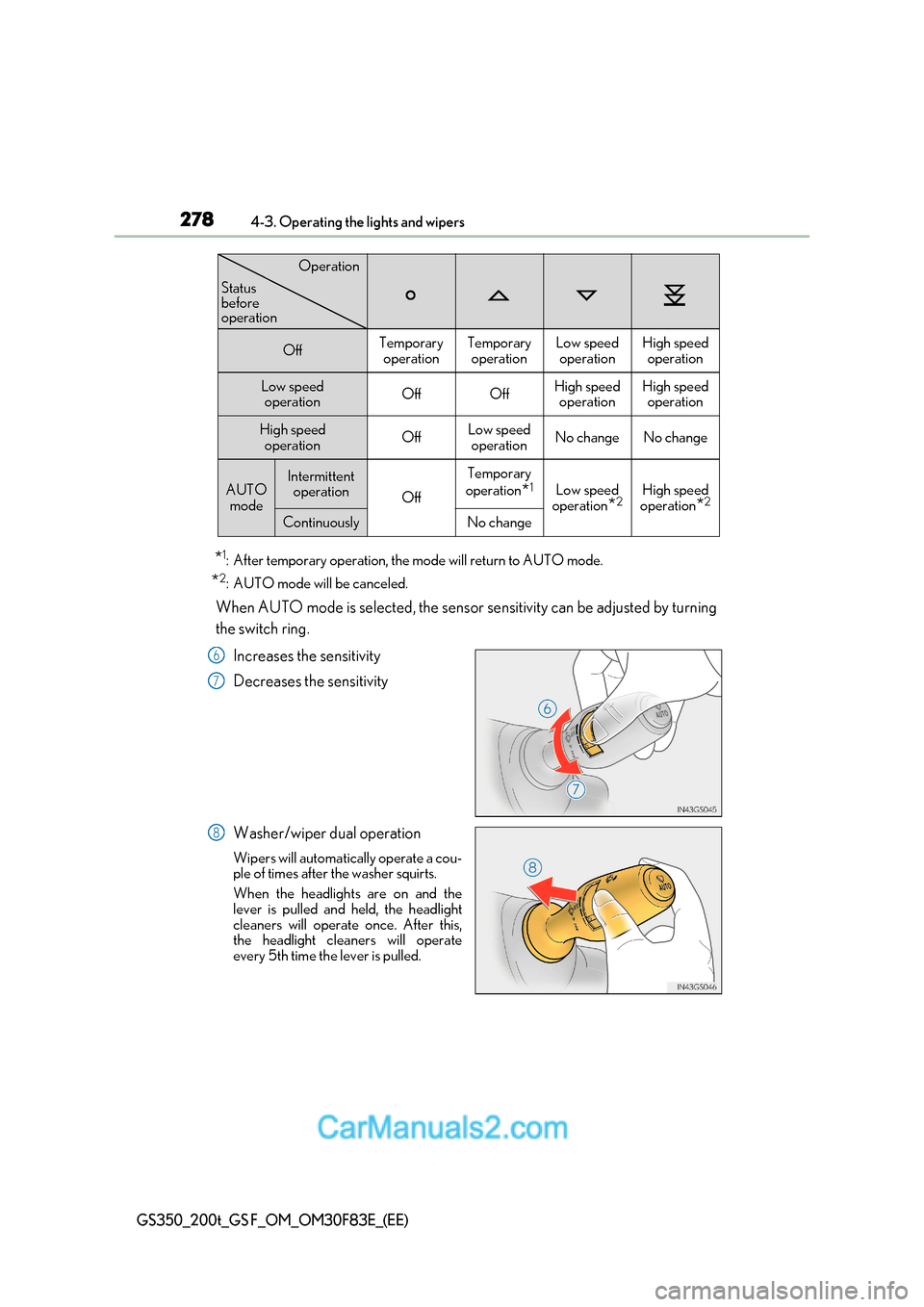
*1
: After temporary operation, the mode will return to AUTO mode.
* 2
: AUTO mode will be canceled.
When AUTO mode is selected, the sensor sensitivity can be adjusted by turning
the switch ring.
Increases the sensitivity
Decreases the sensitivity
Washer/wiper dual operation
Wipers will automatically operate a cou-
ple of times after the washer squirts.
When the headlights are on and the
lever is pulled and held, the headlight
cleaners will operate once. After this,
the headlight cleaners will operate
every 5th time the lever is pulled.
OffTemporary operationTemporary operationLow speedoperationHigh speed operation
Low speed operationOffOffHigh speed operationHigh speedoperation
High speed
operationOffLow speedoperationNo changeNo change
AUTO modeIntermittent operation
Off
Temporary
operation *1
Low speed
operation *2High speed
operation *2
ContinuouslyNo change
Operation
Status
before
operation
6
7
8
Page 291 of 676
291
4-5. Using the driving support systems
4
Driving
GS350_200t_GS F_OM_OM30F83E_(EE)
WARNING
●Do not disassemble the camera sensor.
●Do not install an electronic device or device that emits strong electric waves near the
camera sensor.
●Do not modify any components of the vehicle around the camera sensor (inside rear
view mirror, etc.) or ceiling.
●Do not attach any accessories that may obstruct the camera sensor to the hood, front
grille or front bumper. Contact any author ized Lexus retailer or Lexus authorized
repairer, or any reliable repairer for details.
●If a surfboard or other long object is to be mounted on the roof, make sure that it will
not obstruct the camera sensor.
●Do not modify the headlights or other lights.
Page 310 of 676
3104-5. Using the driving support systems
GS350_200t_GS F_OM_OM30F83E_(EE)
WARNING
■Situations unsuitable for LKA system
Do not use the LKA system in the following situations.
The system may not operate properly and le ad to an accident, resulting in death or
serious injury.
●A spare tire, tire chains, etc. are equipped.
●When the tires have been excessively worn, or when the tire inflation pressure is low.
●Tires which differ by structure, manufacturer, brand or tread pattern are used.
●Objects or patterns that could be mistaken for white (yellow) lines are present on the
side of the road (guardrails, cu rbs, reflective poles, etc.).
●Vehicle is driven on a snow-covered road.
●White (yellow) lines are difficult to see due to rain, snow, fog, dust, etc.
●Asphalt repair marks, white (yellow) line ma rks, etc. are present due to road repair.
●Vehicle is driven in a temporary lane or restricted lane due to construction work.
●Vehicle is driven on a road surface which is slippery due to rainy weather, fallen snow,
freezing, etc.
●Vehicle is driven in traffic lanes other than on highways and freeways.
●Vehicle is driven in a construction zone.
●Vehicle is towing a trailer or another vehicle. (vehicles with towing package)
■Preventing LKA system malfunctions and operations performed by mistake
●Do not modify the headlights or place stickers, etc. on the surface of the lights.
●Do not modify the suspension etc. If the suspension etc. needs to be replaced, con-
tact any authorized Lexus retailer or Le xus authorized repairer, or any reliable
repairer.
●Do not install or place anything on the hood or grille. Also, do not install a grille guard
(bull bars, kangaroo bar, etc.).
●If your windshield needs repairs, contac t any authorized Lexus retailer or Lexus
authorized repairer, or any reliable repairer.
Page 315 of 676
315
4-5. Using the driving support systems
4
Driving
GS350_200t_GS F_OM_OM30F83E_(EE)
■Conditions in which functi ons may not operate properly
In the following situations, the camera sensor may not detect white (yellow) lines and var-
ious functions may not operate normally.
●There are shadows on the road that run paralle l with, or cover, the white (yellow) lines.
●The vehicle is driven in an area without white (yellow) lines, such as in front of a tollgate
or checkpoint, or at an intersection, etc.
●The white (yellow) lines are cracked, “Raised pavement marker” or stones are present.
●The white (yellow) lines cannot be seen or are difficult to see due to sand, etc.
●The vehicle is driven on a road surface that is wet due to rain, puddles, etc.
●The traffic lines are yellow (which may be more difficult to recognize than lines that are
white).
●The white (yellow) lines cross over a curb, etc.
●The vehicle is driven on a bright surface, such as concrete.
●The vehicle is driven on a surface that is bright due to reflected light, etc.
●The vehicle is driven in an area where the brightness changes suddenly, such as at the
entrances and exits of tunnels, etc.
●Light from the headlights of an oncoming vehicle, the sun, etc. enters the camera.
●The vehicle is driven where the road diverges, merges, etc.
●The vehicle is driven on a slope.
●The vehicle is driven on a road which t ilts left or right, or a winding road.
●The vehicle is driven on an unpaved or rough road.
●The vehicle is driven around a sharp curve.
●The traffic lane is excessively narrow or wide.
●The vehicle is extremely tilted due to carrying heavy luggage or having improper tire
pressure.
●The distance to the preceding vehicle is extremely short.
●The vehicle is moving up and down a large amount due to road conditions during driv-
ing (poor roads or road seams).
●The headlight lenses are dirty and emit a faint amount of light at night, or the beam axis
has deviated.
●The vehicle is struck by a crosswind.
●The vehicle has just changed lanes or crossed an intersection.
●Snow tires, etc. are equipped.
■Warning message
Warning messages are used to indicate a syst em malfunction or to inform the driver of
the need for caution while driving. ( P. 524)