key battery Lexus GS350 2017 User Guide
[x] Cancel search | Manufacturer: LEXUS, Model Year: 2017, Model line: GS350, Model: Lexus GS350 2017Pages: 676, PDF Size: 67.73 MB
Page 242 of 676
2424-2. Driving procedures
GS350_200t_GS F_OM_OM30F83E_(EE)
If the engine is stopped with the shift le ver in a position other than P, the engine
switch will not be turned off but inst ead be turned to ACCESSORY mode. Per-
form the following procedure to turn the switch off:
Check that the parking brake is set.
Shift the shift lever to P.
Check that “Turn Off Vehicle” is displayed on the multi-information display
and then press the engine switch once.
Check that “Turn Off Vehicle” on the multi-information display is off.
■Auto power off function
If the vehicle is left in ACCESSORY mode for more than 20 min utes or IGNITION ON
mode (the engine is not running) for more than an hour with th e shift lever in P, the engine
switch will automatically turn off. However, this function cannot entirely prevent battery
discharge. Do not leave the vehicle with the engine switch in ACCESSORY or IGNI-
TION ON mode for long periods of time when the engine is not running.
■Electronic key battery depletion P. 156
■Conditions affecting operation P. 175
■Notes for the push-start function P. 177
■If the engine does not start
●The engine immobilizer system ma y not have been deactivated. (P. 86)
Contact any authorized Lexus retailer or Le xus authorized repairer, or any reliable
repairer.
●Check that the shift lever is securely set in P. The engine may not start if the shift lever is
displaced out of P. “Shift to P position to Start” will be displayed on the multi-information
display.
■Steering lock
After turning the engine switch off and opening and closing the doors, the steering wheel
will be locked due to the steering lock functi on. Operating the engine switch again auto-
matically cancels the steering lock.
When stopping the engine with the shift lever in a position other than P
1
2
3
4
Page 243 of 676
243
4-2. Driving procedures
4
Driving
GS350_200t_GS F_OM_OM30F83E_(EE)
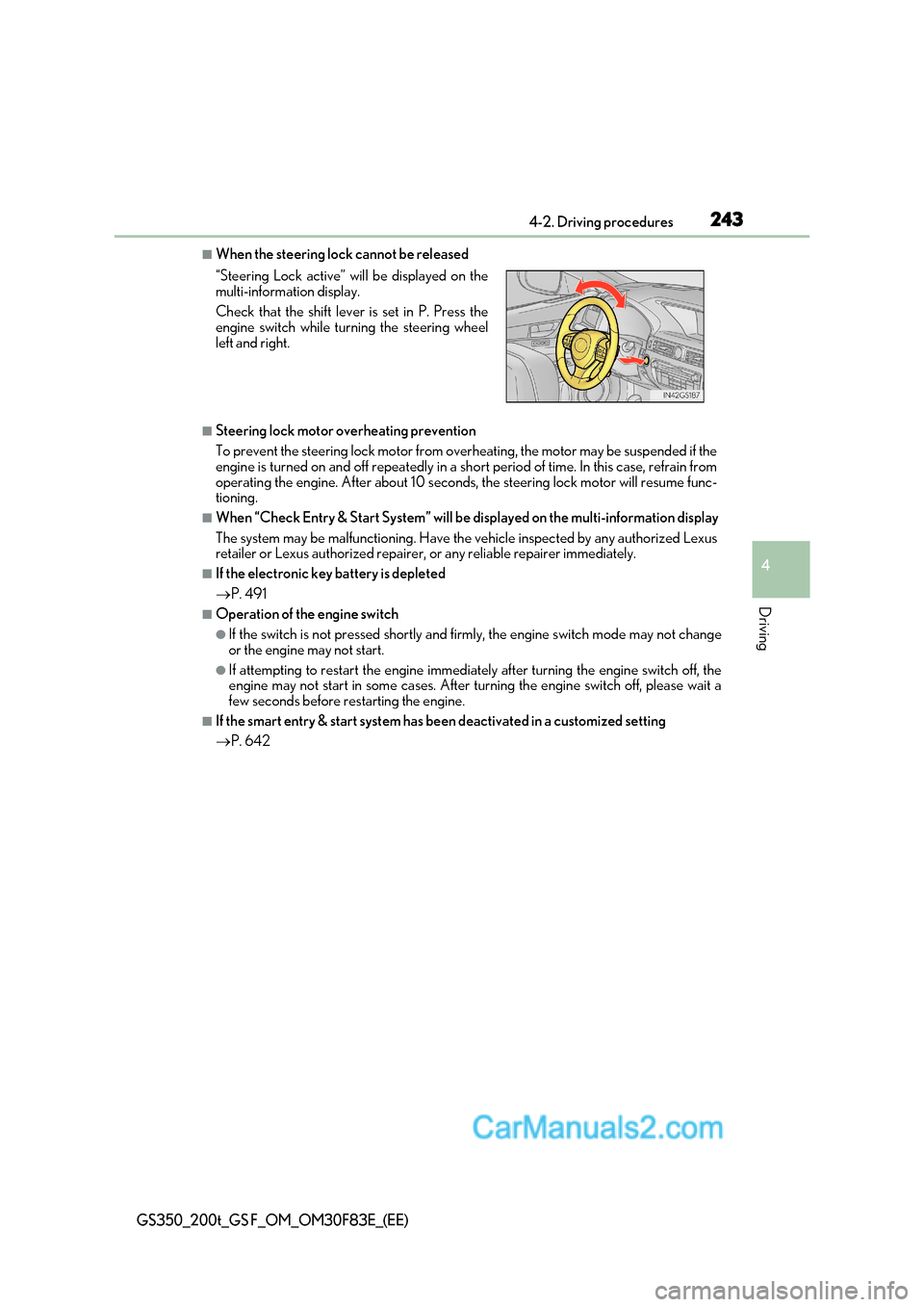
■When the steering lock cannot be released
■Steering lock motor overheating prevention
To prevent the steering lock motor from overheating, the motor may be suspended if the
engine is turned on and off repeatedly in a sh ort period of time. In this case, refrain from
operating the engine. After about 10 seconds, the steering lock motor will resume func-
tioning.
■When “Check Entry & Start System” will be displayed on the multi-information display
The system may be malfunctioning. Have the vehicle inspected by any authorized Lexus
retailer or Lexus authorized repairer, or any reliable repairer immediately.
■If the electronic key battery is depleted P. 491
■Operation of the engine switch
●If the switch is not pressed shortly and fi rmly, the engine switch mode may not change
or the engine may not start.
●If attempting to restart the engine immediately after turning the engine switch off, the
engine may not start in some cases. After turning the engine switch off, please wait a
few seconds before restarting the engine.
■If the smart entry & start system has be en deactivated in a customized setting
P. 642
“Steering Lock active” will be displayed on the
multi-information display.
Check that the shift lever is set in P. Press the
engine switch while turning the steering wheel
left and right.
Page 418 of 676
4185-3. Using the interior lights
GS350_200t_GS F_OM_OM30F83E_(EE)
●Illuminated entry system: The lights automatically turn on/off according to engine
switch mode, the presence of the electronic key, whether the doors are locked/
unlocked, and whether the doors are opened/closed.
●If the interior lights remain on when the engine switch is turned off, the lights will go off
automatically after 20 minutes.
●Setting (e.g. the time elapsed before lights turn off) can be changed.
(Customizable features: P. 634)
NOTICE
To prevent battery discharge, do not leave the lights on longer than necessary when the
engine is not running.
Page 439 of 676
439
6Maintenance and care
GS350_200t_GS F_OM_OM30F83E_(EE)
6-1. Maintenance and careCleaning and protecting the vehicle exterior ................ 440
Cleaning and protecting the vehicle interior.................. 444
6-2. Maintenance Maintenance requirements ............................ 447
6-3. Do-it-yourself maintenance Do-it-yourself service precautions................................ 449
Hood ................................................ 451
Positioning a floor jack ............ 452
Engine compartment ............... 454
Tires ...................................................471
Tire inflation pressure ..............485
Wheels ........................................... 487
Air conditioning filter ...............489
Electronic key battery............... 491
Checking and replacing fuses.............................................. 493
Light bulbs.....................................498
Page 441 of 676
441
6-1. Maintenance and care
6
Maintenance and care
GS350_200t_GS F_OM_OM30F83E_(EE)
■Automatic car washes
●Fold the mirrors before washing the vehicle. Start washing from the front of the vehicle.
Make sure to extend th e mirrors before driving.
●Brushes used in automatic car washes may scratch the vehicle surface and harm your
vehicle’s paint.
●Rear spoiler (if equipped) may not be wash able in some automatic car washes. There
may also be an increased risk of damage to vehicle.
■High-pressure car washes
●Do not allow the nozzles of the car wash to come within close proximity of the windows.
●Before using the car wash, check that the fuel filler door on your vehicle is closed prop- erly.
■Notes for a smart entry & start system
If the door handle becomes wet while the electronic key is within the effective range, the
door may lock and unlock repeatedly. In that case, follow the following correction proce-
dures to wash the vehicle:
●Place the key in a position 2 m (6 ft.) or more separate from the vehicle while the vehi-
cle is being washed. (Take care to ensure that the key is not stolen.)
●Set the electronic key to battery-saving mode to disable the smart entry & start system. ( P. 175)
■Aluminum wheels
●Remove any dirt immediately by using a neutral detergent. Do not use hard brushes or
abrasive cleaners. Do not use strong or harsh chemical cleaners.
Use the same mild detergent and wax as used on the paint.
●Do not use detergent on the wheels when they are hot, for example after driving for
long distance in the hot weather.
●Wash detergent from the wheels immediately after use.
■Brake caliper coating (GS200t with orange brake calipers for F SPORT models, and
GS F)
●When using detergent, use neutral detergent.
Do not use hard brushes or abrasive clea ners, as they will damage the coating.
●Do not use detergent on the brake calipers when they are hot.
●Wash detergent off immediately after use.
■Bumpers
Do not scrub with abrasive cleaners.
■Front side windows water-repellent coating
●The following precautions can extend the effectiveness of the water-repellent coating.
Page 468 of 676
4686-3. Do-it-yourself maintenance
GS350_200t_GS F_OM_OM30F83E_(EE)
■Before recharging
When recharging, the battery produces hydr ogen gas which is flammable and explosive.
Therefore, observe the following before recharging:
●If recharging with the battery installed on the vehicle, be sure to disconnect the g round
cable.
●Make sure the power switch on the charger is off when connecting and disconnecting
the charger cables to the battery.
■After recharging/reconnecting the battery
The engine may not start. Follow the procedure below to initialize the system.
Shift the shift lever to P.
Open and close an y of the doors.
Restart the engine.
●Unlocking the doors using the smart entry & start system may not be possible immedi-
ately after reconnecting the battery. If this happens, use the wireless remote control or
the mechanical key to lock/unlock the doors.
●Start the engine with the engine switch in ACCESSORY mode. The engine may not
start with the engine switch turned off. Ho wever, the engine will operate normally from
the second attempt.
●The engine switch mode is recorded by the vehicle. If the battery is reconnected, the
vehicle will return the engine switch mode to the status it was in before the battery was
disconnected. Make sure to turn off the engine before disconnect the battery. Take
extra care when connecting the battery if the engine switch mode prior to discharge is
unknown.
If the engine will not start even after multiple attempts at both methods, contact any
authorized Lexus retailer or Lexus author ized repairer, or any reliable repairer.
1
2
3
Page 491 of 676
491
6
6-3. Do-it-yourself maintenance
Maintenance and care
GS350_200t_GS F_OM_OM30F83E_(EE)
Electronic key battery
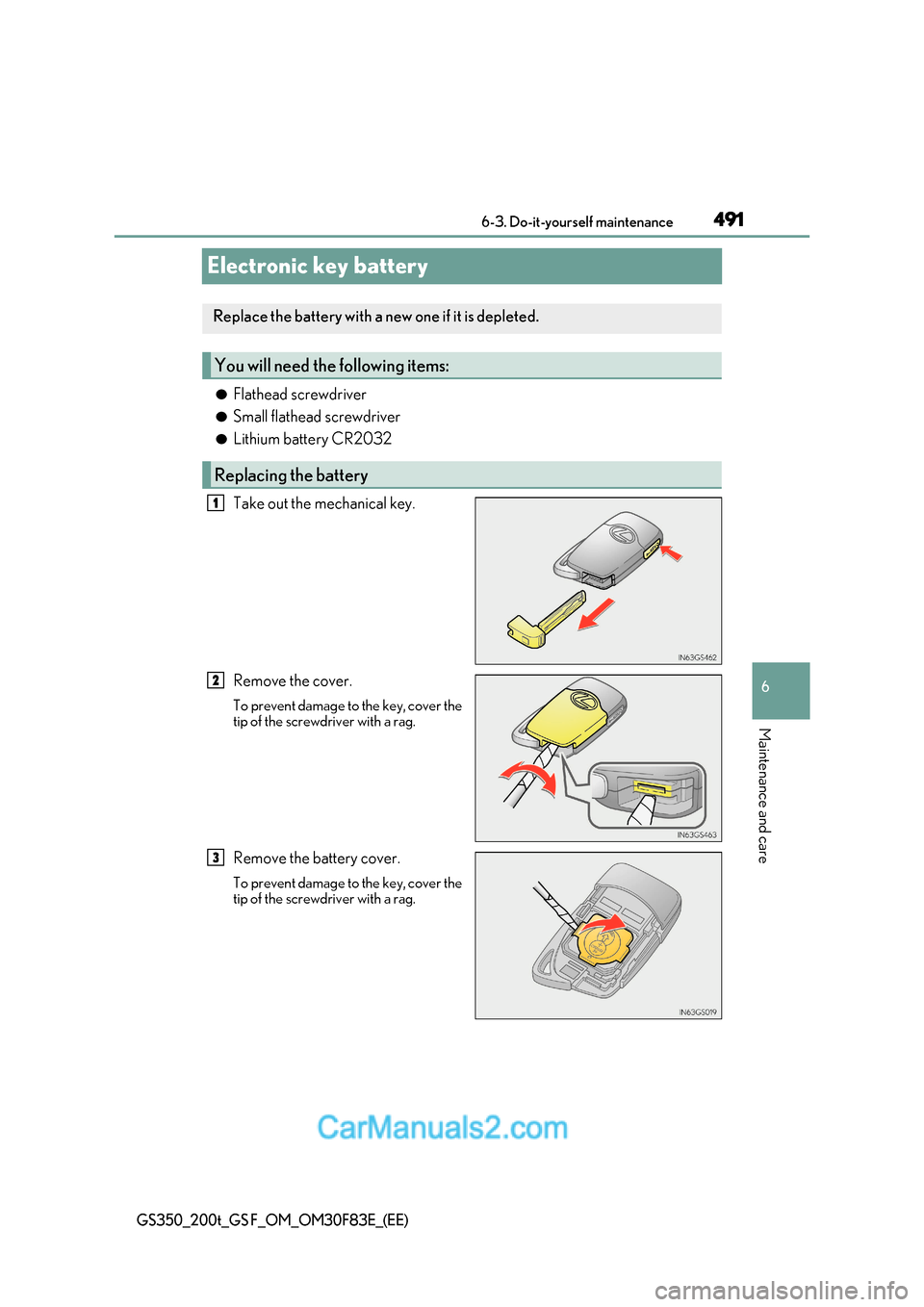
●Flathead screwdriver
● Small flathead screwdriver
● Lithium battery CR2032
Take out the mechanical key.
Remove the cover.
To prevent damage to the key, cover the
tip of the screwdriver with a rag.
Remove the battery cover.
To prevent damage to the key, cover the
tip of the screwdriver with a rag.
Replace the battery with a new one if it is depleted.
You will need th e following items:
Replacing the battery
1
2
3
Page 492 of 676
4926-3. Do-it-yourself maintenance
GS350_200t_GS F_OM_OM30F83E_(EE)
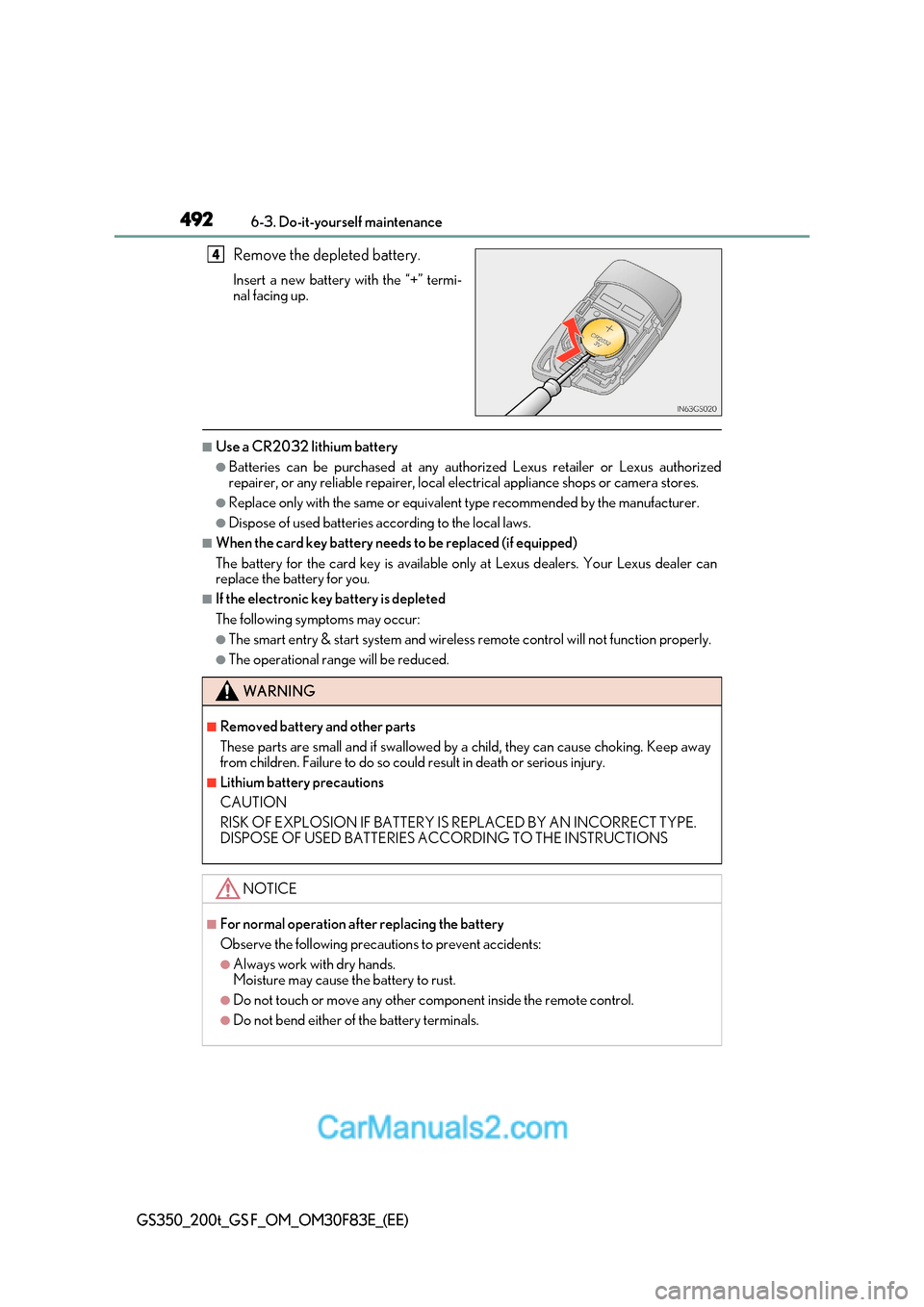
Remove the depleted battery.
Insert a new battery with the “+” termi-
nal facing up.
■Use a CR2032 lithium battery
●Batteries can be purchased at any authorized Lexus retailer or Lexus authorized
repairer, or any reliable repairer, local el ectrical appliance shops or camera stores.
●Replace only with the same or equivalent type recommended by the manufacturer.
●Dispose of used batteries according to the local laws.
■When the card key battery needs to be replaced (if equipped)
The battery for the card key is available only at Lexus dealers. Your Lexus dealer can
replace the battery for you.
■If the electronic key battery is depleted
The following symptoms may occur:
●The smart entry & start system and wireless remote control will not function properly.
●The operational range will be reduced.
4
WARNING
■Removed battery and other parts
These parts are small and if swallowed by a child, they can cause choking. Keep away
from children. Failure to do so could result in death or serious injury.
■Lithium battery precautions
CAUTION
RISK OF EXPLOSION IF BATTERY IS REPLACED BY AN INCORRECT TYPE.
DISPOSE OF USED BATTERIES ACCORDING TO THE INSTRUCTIONS
NOTICE
■For normal operation after replacing the battery
Observe the following precautions to prevent accidents:
●Always work with dry hands.
Moisture may cause the battery to rust.
●Do not touch or move any other component inside the remote control.
●Do not bend either of the battery terminals.
Page 507 of 676
507
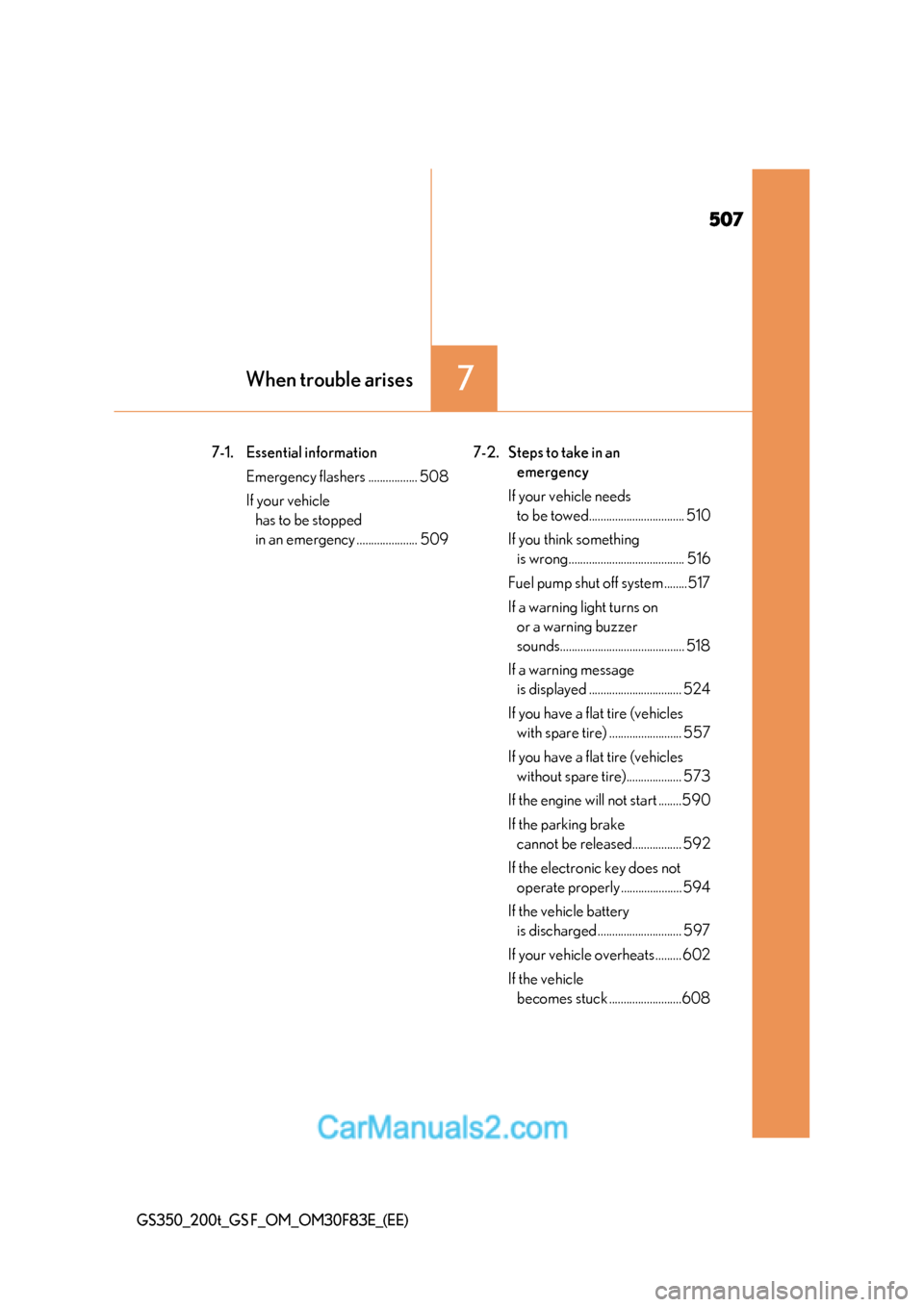
7When trouble arises
GS350_200t_GS F_OM_OM30F83E_(EE)
7-1. Essential informationEmergency flashers ................. 508
If your vehicle has to be stopped
in an emergency ..................... 509 7-2. Steps to take in an
emergency
If your vehicle needs to be towed................................. 510
If you think something is wrong........................................ 516
Fuel pump shut off system ........517
If a warning light turns on or a warning buzzer
sounds........................................... 518
If a warning message is displayed ................................ 524
If you have a flat tire (vehicles with spare tire) ......................... 557
If you have a flat tire (vehicles without spare tire)................... 573
If the engine will not start ........590
If the parking brake cannot be released................. 592
If the electronic key does not operate properly ..................... 594
If the vehicle battery is discharged ............................. 597
If your vehicle overheats ......... 602
If the vehicle becomes stuck .........................608
Page 555 of 676
555
7-2. Steps to take in an emergency
7
When trouble arises
GS350_200t_GS F_OM_OM30F83E_(EE)
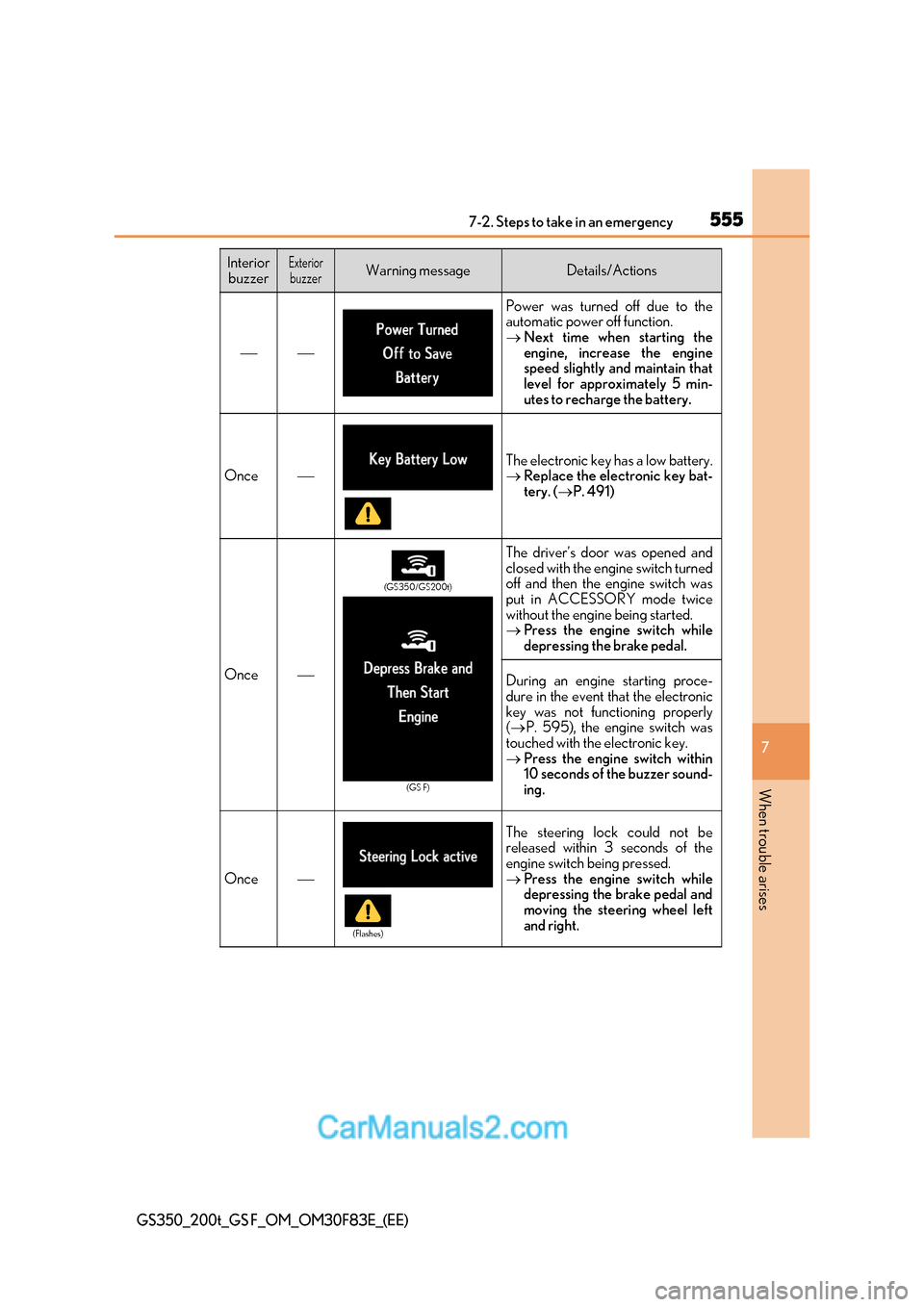
Power was turned off due to the
automatic power off function. Next time when starting the
engine, increase the engine
speed slightly and maintain that
level for approximately 5 min-
utes to recharge the battery.
OnceThe electronic key has a low battery. Replace the electronic key bat-
tery. ( P. 491)
Once
The driver’s door was opened and
closed with the engine switch turned
off and then the engine switch was
put in ACCESSORY mode twice
without the engine being started. Press the engine switch while
depressing the brake pedal.
During an engine starting proce-
dure in the event that the electronic
key was not functioning properly ( P. 595), the engine switch was
touched with the electronic key. Press the engine switch within
10 seconds of the buzzer sound-
ing.
Once
The steering lock could not be
released within 3 seconds of the
engine switch being pressed. Press the engine switch while
depressing the brake pedal and
moving the steering wheel left
and right.
Interior
buzzerExteriorbuzzerWarning messageDetails/Actions
(GS350/GS200t)
(GS F)
(Flashes)