seats Lexus GS350 2017 Owner's Guide
[x] Cancel search | Manufacturer: LEXUS, Model Year: 2017, Model line: GS350, Model: Lexus GS350 2017Pages: 676, PDF Size: 67.73 MB
Page 200 of 676
2003-3. Adjusting the seats
GS350_200t_GS F_OM_OM30F83E_(EE)
■Operation of the power easy access system
When exiting the vehicle, the power easy access system may not op erate if the seat is
already close to the rearmost position, etc.
■Customization
The seat movement amount settings of the power easy access system can be custom-
ized. (Customizable features: P. 634)
Your preferred driving position (the position of the driver’s seat, steering wheel,
outside rear view mirrors and HUD [head-up display] [if equipped]) can be
recorded and recalled by pressing a button.
Three different driving positions can be recorded into memory.
■Recording procedure
Check that the shift lever is in P.
Turn the engine switch to IGNITION ON mode.
Adjust the driver’s seat, steering wheel, outside rear view mirrors and HUD
(head-up display) (if equipped) to the desired positions.
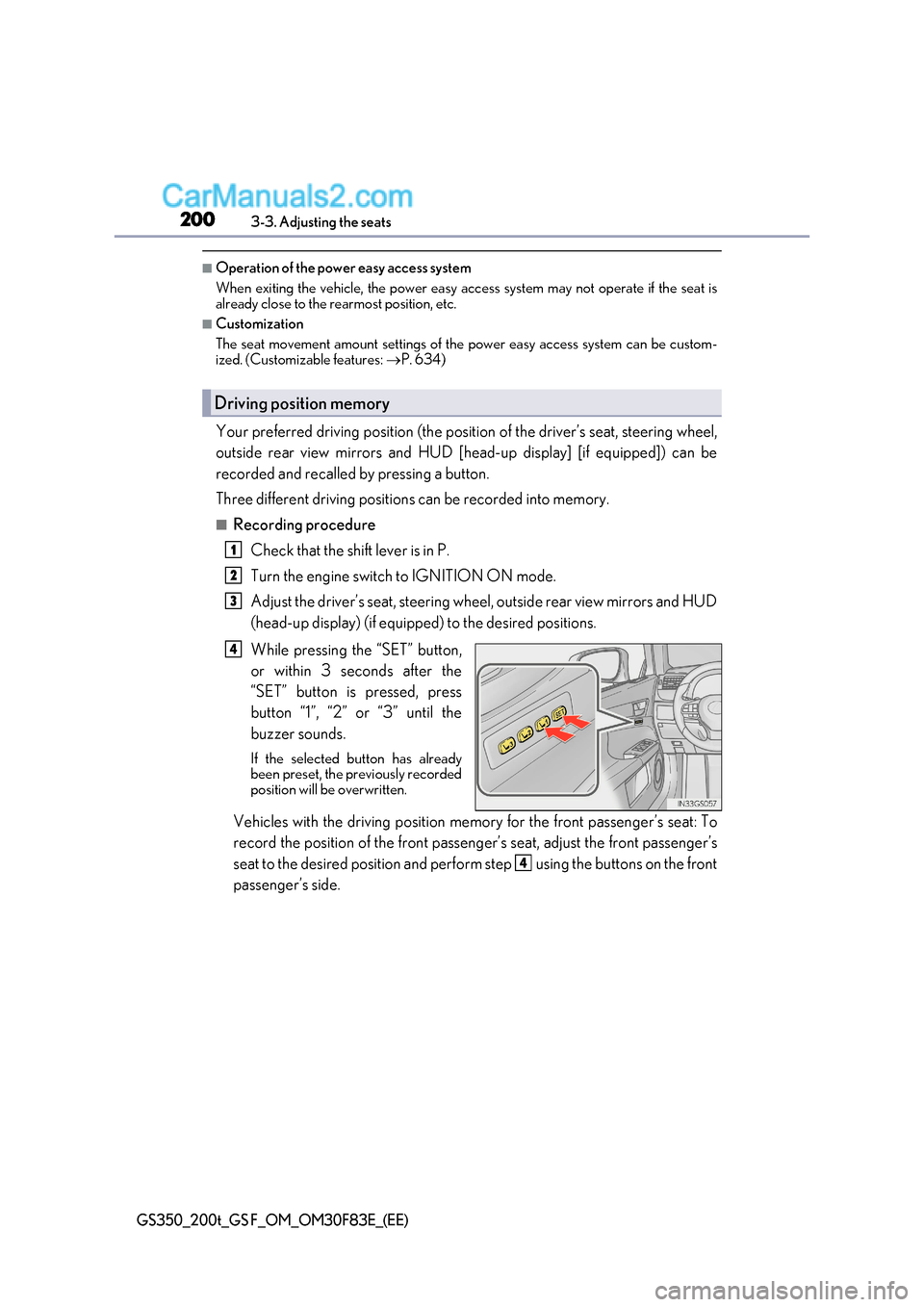
While pressing the “SET” button,
or within 3 seconds after the
“SET” button is pressed, press
button “1”, “2” or “3” until the
buzzer sounds.
If the selected button has already
been preset, the previously recorded
position will be overwritten.
Vehicles with the driving position memory for the front passenger’s seat: To
record the position of the front passeng er’s seat, adjust the front passenger’s
seat to the desired position and perfor m step using the buttons on the front
passenger’s side.
Driving position memory
1
2
3
4
4
Page 201 of 676
201
3-3. Adjusting the seats
3
Operation of each component
GS350_200t_GS F_OM_OM30F83E_(EE)
■Recall procedure
Check that the shift lever is in P.
Turn the engine switch to IGNITION ON mode.
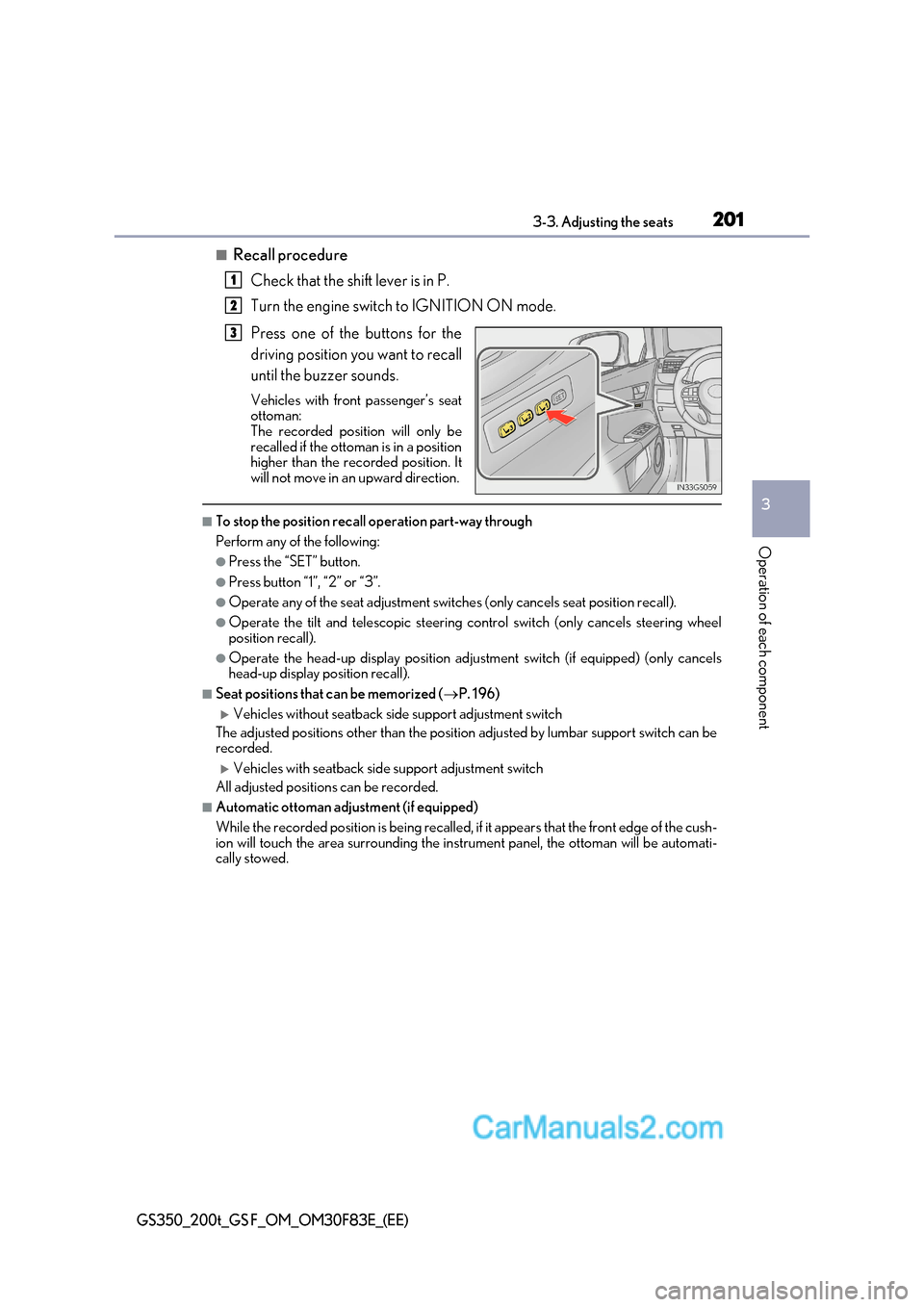
Press one of the buttons for the
driving position you want to recall
until the buzzer sounds.
Vehicles with front passenger’s seat
ottoman:
The recorded position will only be
recalled if the ottoman is in a position
higher than the recorded position. It
will not move in an upward direction.
■To stop the position recall operation part-way through
Perform any of the following:
●Press the “SET” button.
●Press button “1”, “2” or “3”.
●Operate any of the seat adjustment switches (only cancels seat position recall).
●Operate the tilt and telescopic steering control switch (only cancels steering wheel
position recall).
●Operate the head-up display position adju stment switch (if equipped) (only cancels
head-up display position recall).
■Seat positions that can be memorized ( P. 196)
Vehicles without seatback side support adjustment switch
The adjusted positions other than the position adjusted by lumbar support switch can be
recorded.
Vehicles with seatback side support adjustment switch
All adjusted positions can be recorded.
■Automatic ottoman adjustment (if equipped)
While the recorded position is being recalled, if it appears that the front edge of the cush-
ion will touch the area surrounding the instrument panel, the ottoman will be automati-
cally stowed.
1
2
3
Page 202 of 676

2023-3. Adjusting the seats
GS350_200t_GS F_OM_OM30F83E_(EE)
■Operating the driving position memory after turning the engine switch off Driver’s seat:
Recorded seat positions can be activated up to 180 seconds after the driver’s door is
opened and another 60 seconds after it is closed again.
Front passenger’s seat:
Recorded seat positions can be activated up to 180 seconds after the front passenger’s
door is opened.
■In order to correctly use the driving position memory function
If a seat position is already in the furthest possible position and the seat is operated in the
same direction, the recorded position may be slightly different when it is recalled.
Each electronic key (including a card key) can be registered to recall your pre-
ferred driving position.
■Registering procedure
Record your driving position to button “1”, “2” or “3” before performing the
following:
Carry only the key you want to register, and then close the driver’s door.
If 2 or more keys are in the vehicle, the driving position cann ot be recorded
properly.
Check that the shift lever is in P.
Turn the engine switch to IGNITION ON mode.
Recall the driving position that you want to record.
While pressing the recalled but-
ton, press and hold the door lock
switch (either lock or unlock) until
the buzzer sounds.
If the button could not be registered,
the buzzer sounds continuously for
approximately 3 seconds.
Memory recall function (driver’s side only)
1
2
3
4
Page 203 of 676
203
3-3. Adjusting the seats
3
Operation of each component
GS350_200t_GS F_OM_OM30F83E_(EE)
■Recall procedure
Carry the electronic key that has been registered to the driving position,
and then unlock and open the driver’s door using the smart entry & start
system or wireless remote control.
The driving position will move to the reco rded position (not including the steering
wheel and HUD [head-up display] [if equipp ed]). However, the seat will move to a
position slightly behind the recorded position in order to make entering the vehicle
easier.
If the driving position is in a position that has already been recorded, the seat and
outside rear view mirrors will not move.
Turn the engine switch to ACCESSORY mode or IGNITION ON mode,
or fasten a seat belt.
The seat, steering wheel and HUD (head-up display) (if equipped) will move to the
recorded position.
■Cancelation procedure
Carry only the key you want to cancel and then close the driver’s door.
If 2 or more keys are in the vehicle, the driving position cannot be canceled
properly.
Turn the engine switch to IGNITION ON mode.
While pressing the “SET” button, press and hold the door lock switch
(either lock or unlock) until the buzzer sounds twice.
If the button could not be canceled, the buzzer sounds continuously for approxi- mately 3 seconds.
■Recalling the driving position us ing the memory recall function
●Different driving positions can be registered for each electronic key. Therefore, the
driving position that is recalled may be different depending on the key being carried.
●If a door other than the driver’s door is unlocked with the smart entry & start system, the
driving position cannot be recalled. In this case, press the driving position button which
has been set.
■Customization
The unlock door settings of the memory recall function can be customized.
(Customizable features: P. 634)
WARNING
■Seat adjustment caution
Take care during seat adjustment so that the seat does not strike the rear passenger or
squeeze your body against the steering wheel.
1
2
1
2
Page 204 of 676
2043-3. Adjusting the seats
GS350_200t_GS F_OM_OM30F83E_(EE)
Head restraints
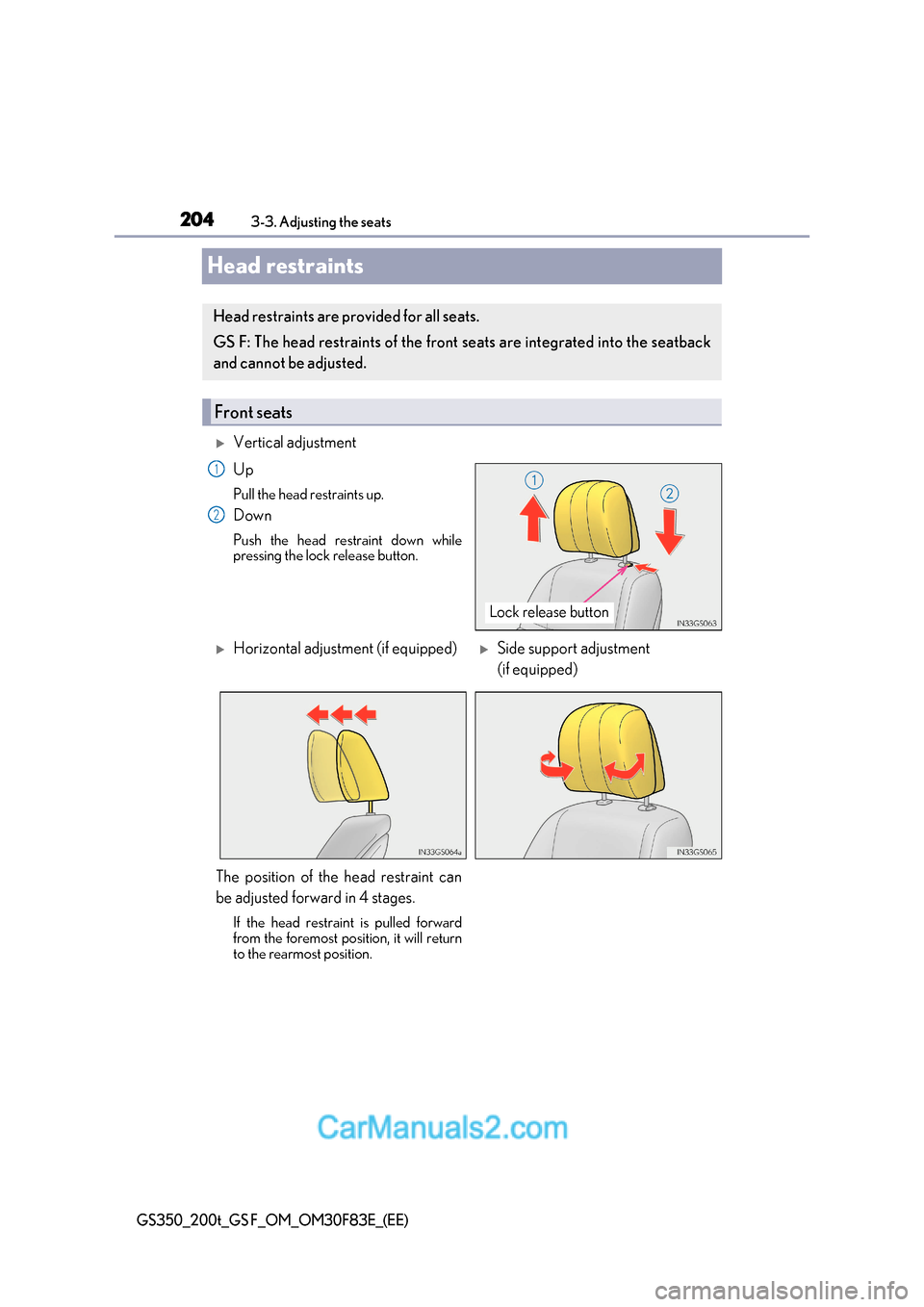
Vertical adjustment Up
Pull the head restraints up.
Down
Push the head restraint down while
pressing the lock release button.
Head restraints are provided for all seats.
GS F: The head restraints of the front seats are integrated into the seatback
and cannot be adjusted.
Front seats
Lock release button
1
2
Horizontal adjustment (if equipped)Side support adjustment
(if equipped)
The position of the head restraint can
be adjusted forward in 4 stages. If the head restraint is pulled forward
from the foremost position, it will return
to the rearmost position.
Page 205 of 676
205
3-3. Adjusting the seats
3
Operation of each component
GS350_200t_GS F_OM_OM30F83E_(EE)
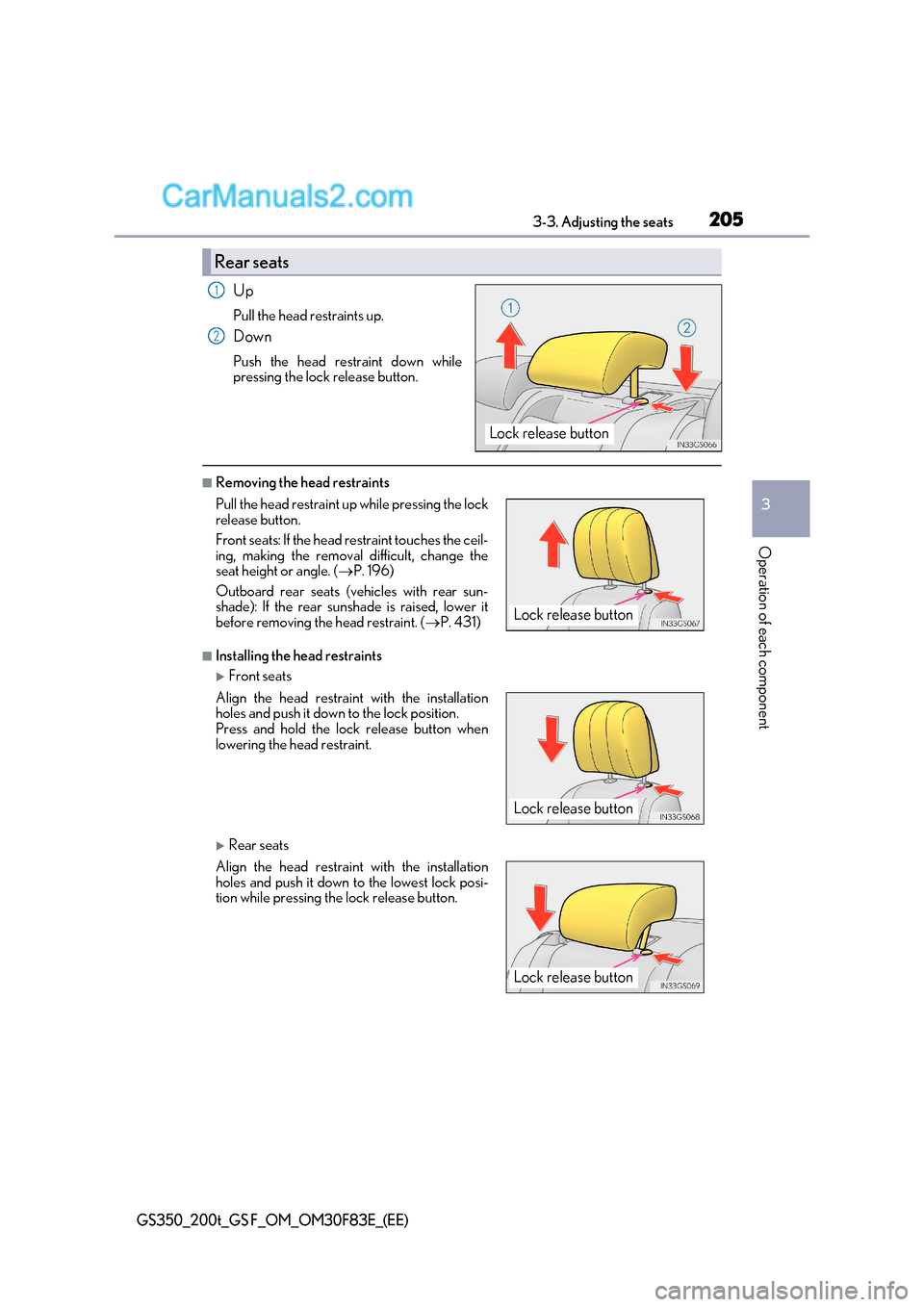
Up
Pull the head restraints up.
Down
Push the head restraint down while
pressing the lock release button.
■Removing the head restraints
■Installing the head restraints
Front seats
Rear seats
Rear seats
Lock release button
1
2
Pull the head restraint up while pressing the lock
release button.
Front seats: If the head restraint touches the ceil-
ing, making the removal difficult, change the
seat height or angle. ( P. 196)
Outboard rear seats (v ehicles with rear sun-
shade): If the rear sunshade is raised, lower it
before removing the head restraint. ( P. 431)
Align the head restraint with the installation
holes and push it down to the lock position.
Press and hold the lock release button when
lowering the head restraint.
Align the head restraint with the installation
holes and push it down to the lowest lock posi-
tion while pressing the lock release button.
Lock release button
Lock release button
Lock release button
Page 206 of 676
2063-3. Adjusting the seats
GS350_200t_GS F_OM_OM30F83E_(EE)
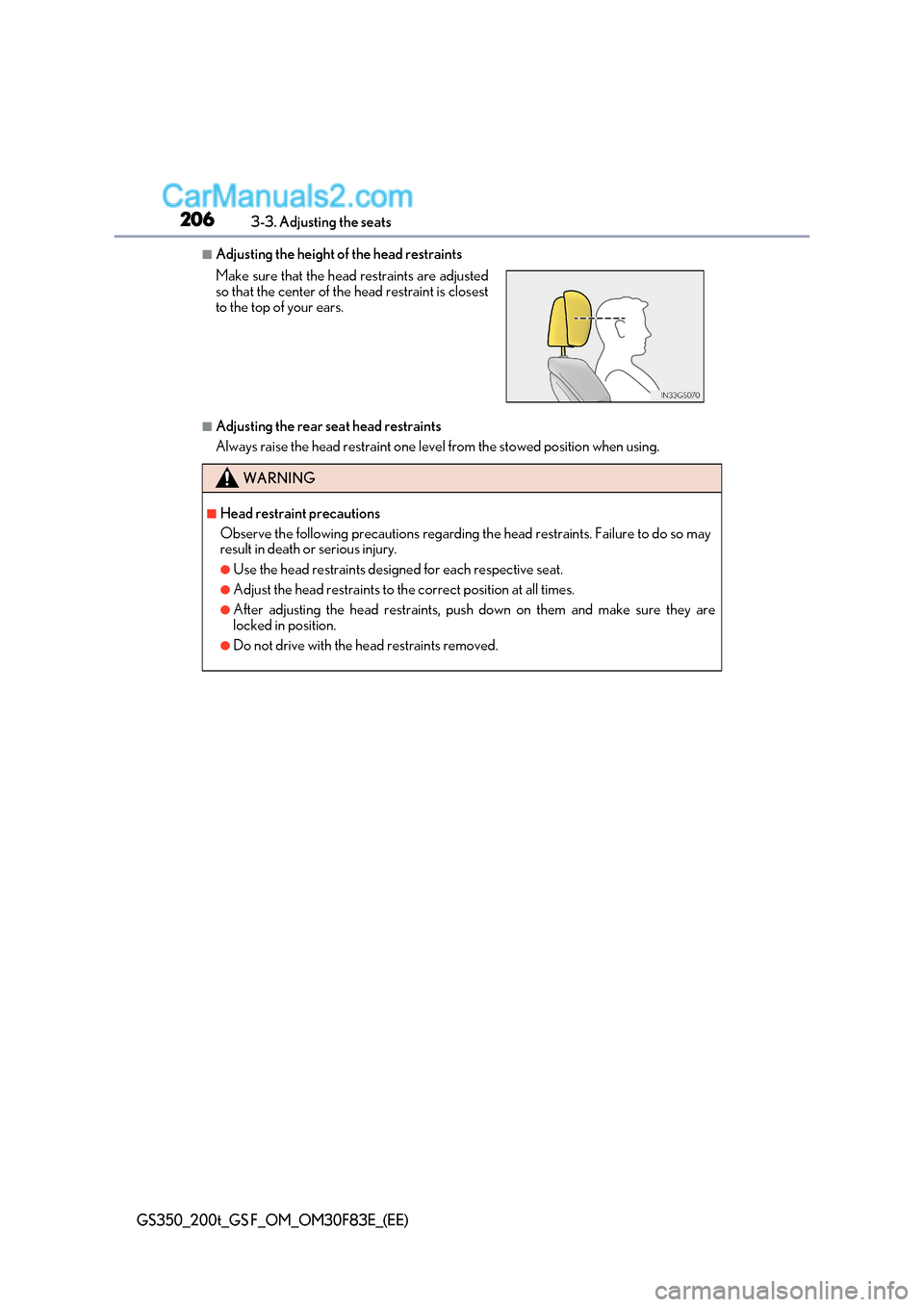
■Adjusting the height of the head restraints
■Adjusting the rear seat head restraints
Always raise the head restraint one level from the stowed position when using.
Make sure that the head restraints are adjusted
so that the center of the head restraint is closest
to the top of your ears.
WARNING
■Head restraint precautions
Observe the following precautions regarding th
e head restraints. Failure to do so may
result in death or serious injury.
●Use the head restraints designed for each respective seat.
●Adjust the head restraints to the correct position at all times.
●After adjusting the head restraints, push down on them and make sure they are
locked in position.
●Do not drive with the head restraints removed.
Page 397 of 676
397
5-2. Using the air conditioning system and defogger
5
Interior features
GS350_200t_GS F_OM_OM30F83E_(EE)
■Adjusting the temperature setting
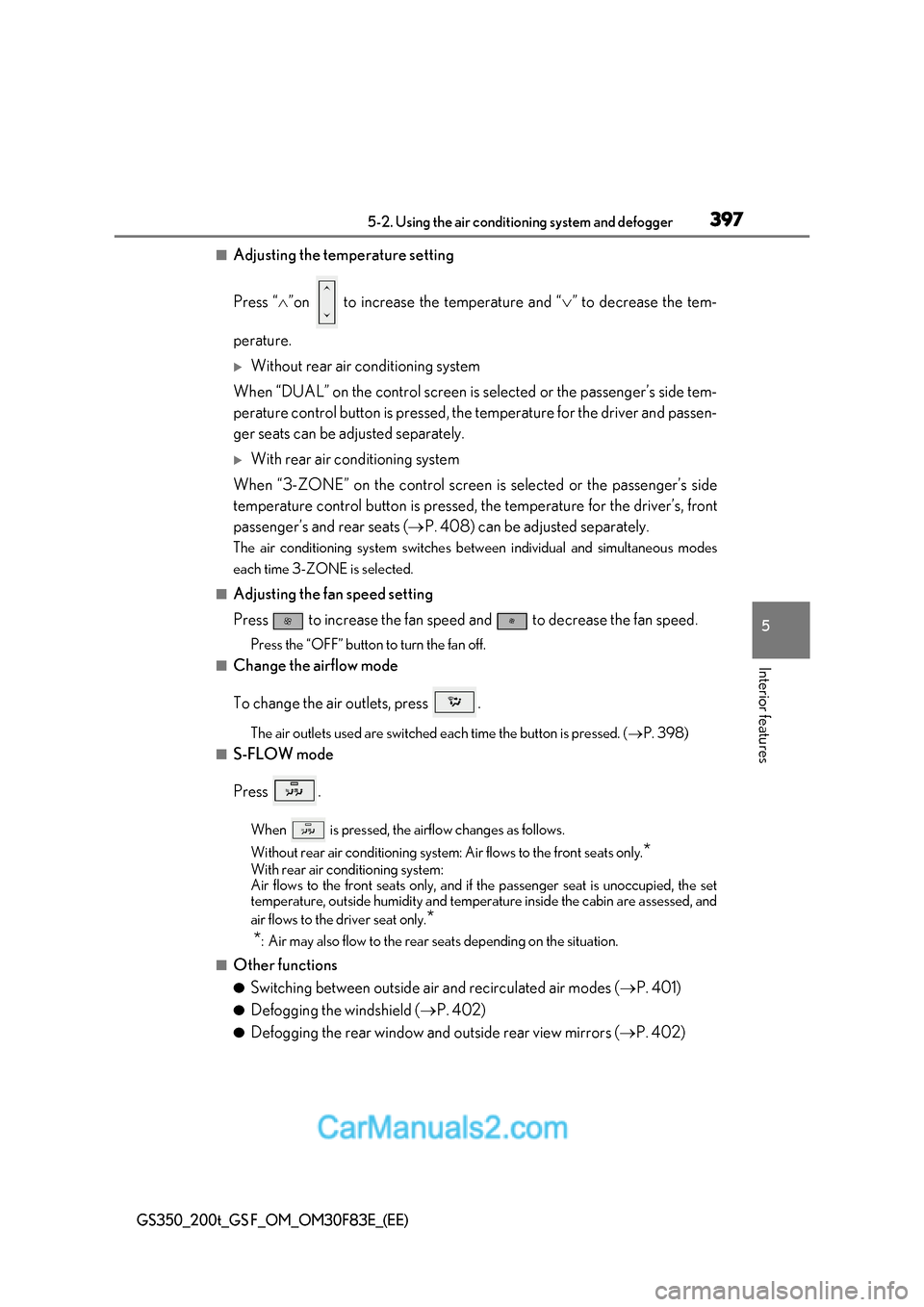
Press “ ”on to increase the temperature and “ ” to decrease the tem-
perature.
Without rear air conditioning system
When “DUAL” on the control screen is selected or the passenger’s side tem-
perature control button is pressed, the temperature for the driver and passen-
ger seats can be adjusted separately.
With rear air conditioning system
When “3-ZONE” on the control screen is selected or the passenger’s side
temperature control button is pressed, the temperature for the driver’s, front
passenger’s and rear seats ( P. 408) can be adjusted separately.
The air conditioning system switches be tween individual and simultaneous modes
each time 3-ZONE is selected.
■Adjusting the fan speed setting
Press to increase the fan speed and to decrease the fan speed.
Press the “OFF” button to turn the fan off.
■Change the airflow mode
To change the air outlets, press .
The air outlets used are switched each time the button is pressed. ( P. 398)
■S-FLOW mode
Press .
When is pressed, the airflow changes as follows.
Without rear air conditioning system: Air flows to the front seats only. *
With rear air conditioning system:
Air flows to the front seats only, and if the passenger seat is unoccupied, the set
temperature, outside humidity and temper ature inside the cabin are assessed, and
air flows to the driver seat only. *
* : Air may also flow to the rear seats depending on the situation.
■Other functions ● Switching between outside air and recirculated air modes ( P. 401)
● Defogging the windshield ( P. 402)
● Defogging the rear window and outside rear view mirrors ( P. 402)
Page 398 of 676
3985-2. Using the air conditio ning system and defogger
GS350_200t_GS F_OM_OM30F83E_(EE)
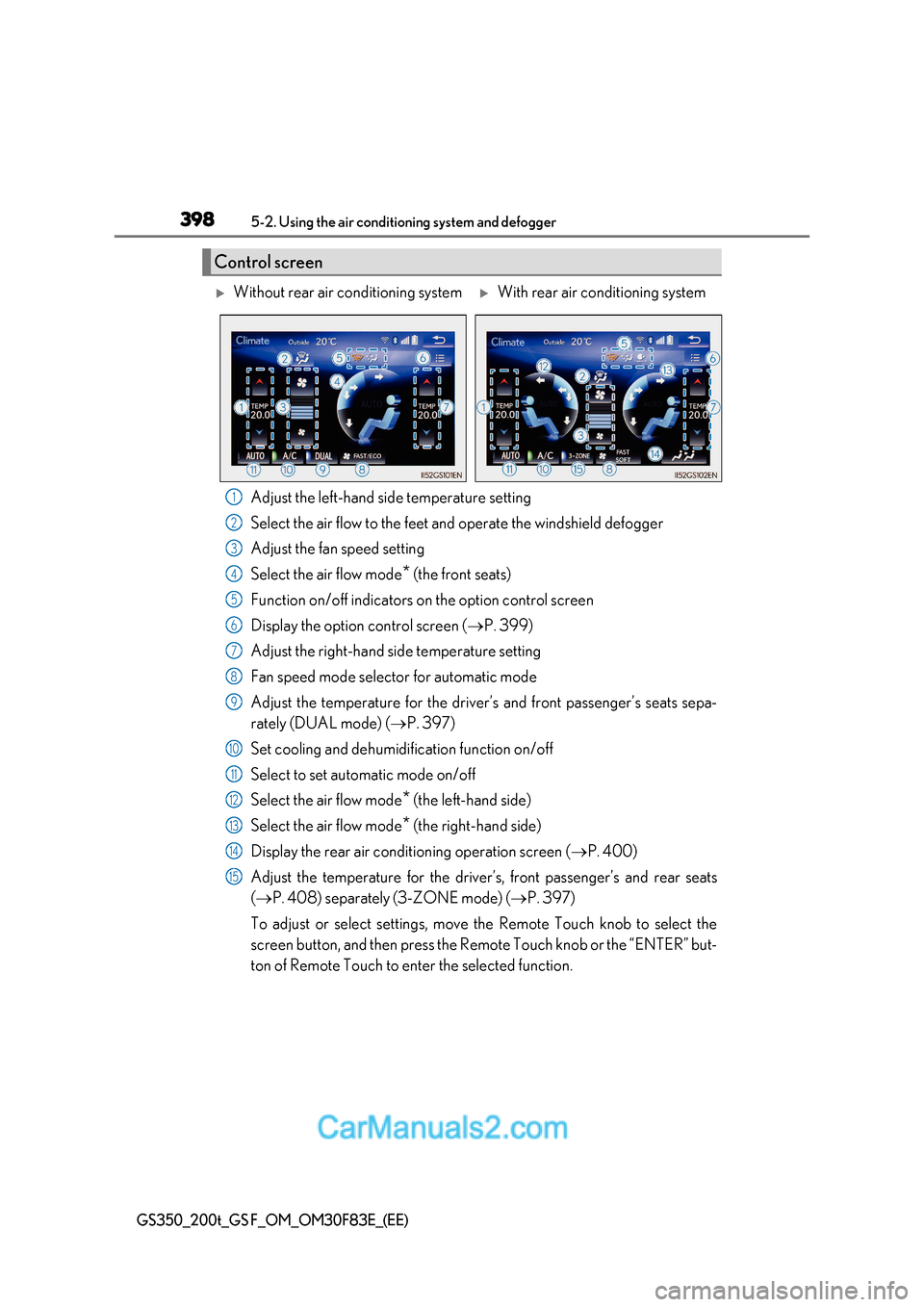
Adjust the left-hand side temperature setting
Select the air flow to the feet and operate the windshield defogger
Adjust the fan speed setting
Select the air flow mode* (the front seats)
Function on/off indicators on the option control screen
Display the option control screen ( P. 399)
Adjust the right-hand side temperature setting
Fan speed mode selector for automatic mode
Adjust the temperature for the driver’s and front passenger’s seats sepa-
rately (DUAL mode) ( P. 397)
Set cooling and dehumidification function on/off
Select to set automatic mode on/off
Select the air flow mode *
(the left-hand side)
Select the air flow mode * (the right-hand side)
Display the rear air conditioning operation screen ( P. 400)
Adjust the temperature for the driver’s, front passenger’s and rear seats ( P. 408) separately (3-ZONE mode) ( P. 397)
To adjust or select settings, move the Remote Touch knob to select the
screen button, and then press the Remote Touch knob or the “ENTER” but-
ton of Remote Touch to enter the selected function.
Control screen
Without rear air conditioning systemWith rear air conditioning system
1
2
3
4
5
6
7
8
9
10
11
12
13
14
15
Page 400 of 676
4005-2. Using the air conditio ning system and defogger
GS350_200t_GS F_OM_OM30F83E_(EE)
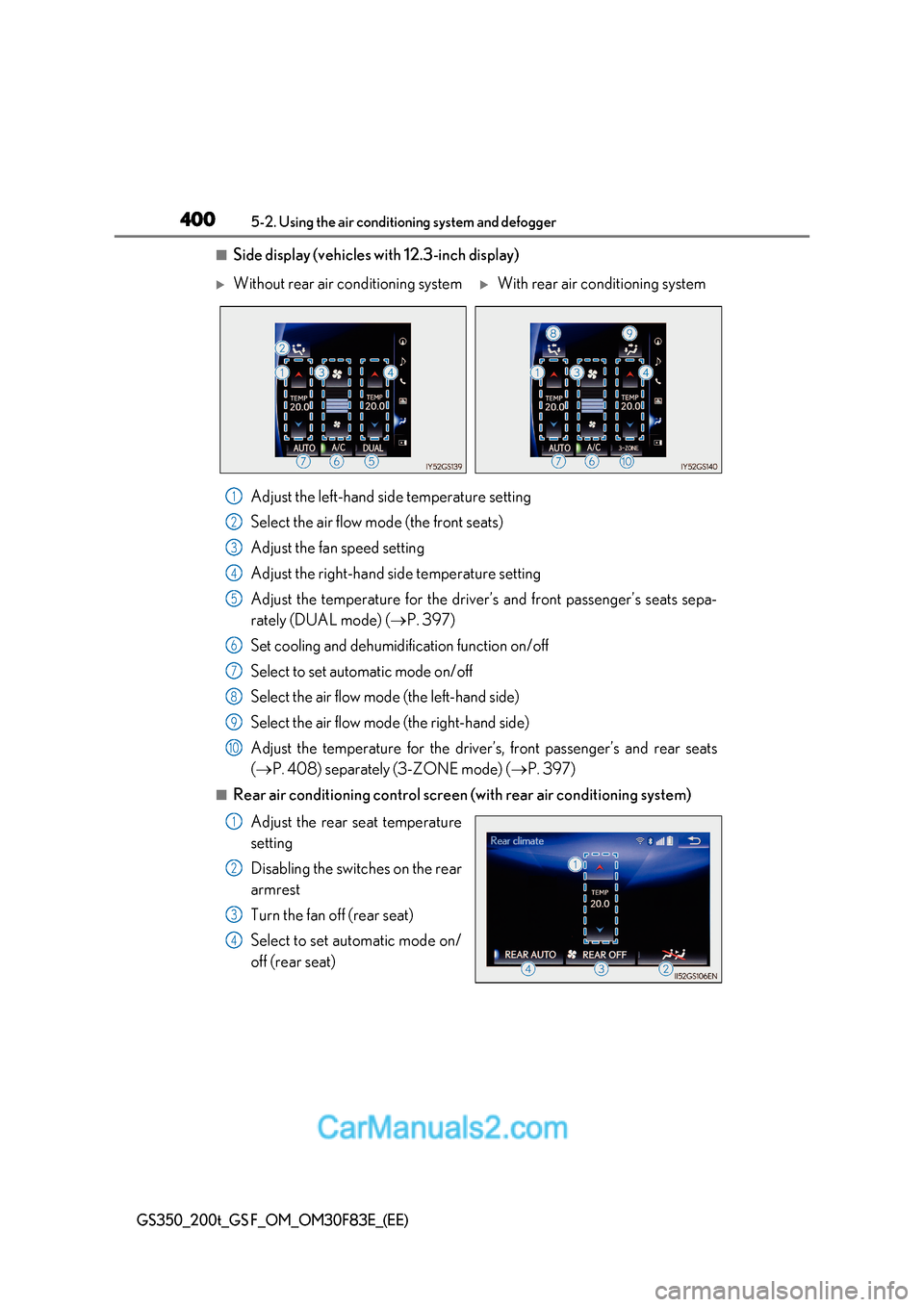
■Side display (vehicles with 12.3-inch display)
Adjust the left-hand side temperature setting
Select the air flow mode (the front seats)
Adjust the fan speed setting
Adjust the right-hand side temperature setting
Adjust the temperature for the driver’s and front passenger’s seats sepa-
rately (DUAL mode) ( P. 397)
Set cooling and dehumidification function on/off
Select to set automatic mode on/off
Select the air flow mode (the left-hand side)
Select the air flow mode (the right-hand side)
Adjust the temperature for the driver’s, front passenger’s and rear seats ( P. 408) separately (3-ZONE mode) ( P. 397)
■Rear air conditioning control screen (with rear air conditioning system)
Adjust the rear seat temperature
setting
Disabling the switches on the rear
armrest
Turn the fan off (rear seat)
Select to set automatic mode on/
off (rear seat)
Without rear air conditioning systemWith rear air conditioning system
1
2
3
4
5
6
7
8
9
10
1
2
3
4