audio Lexus GS350 2017 Quick Guide
[x] Cancel search | Manufacturer: LEXUS, Model Year: 2017, Model line: GS350, Model: Lexus GS350 2017Pages: 100, PDF Size: 3.95 MB
Page 63 of 100
62
GS350_200t_QG_OM30G01U_(U)
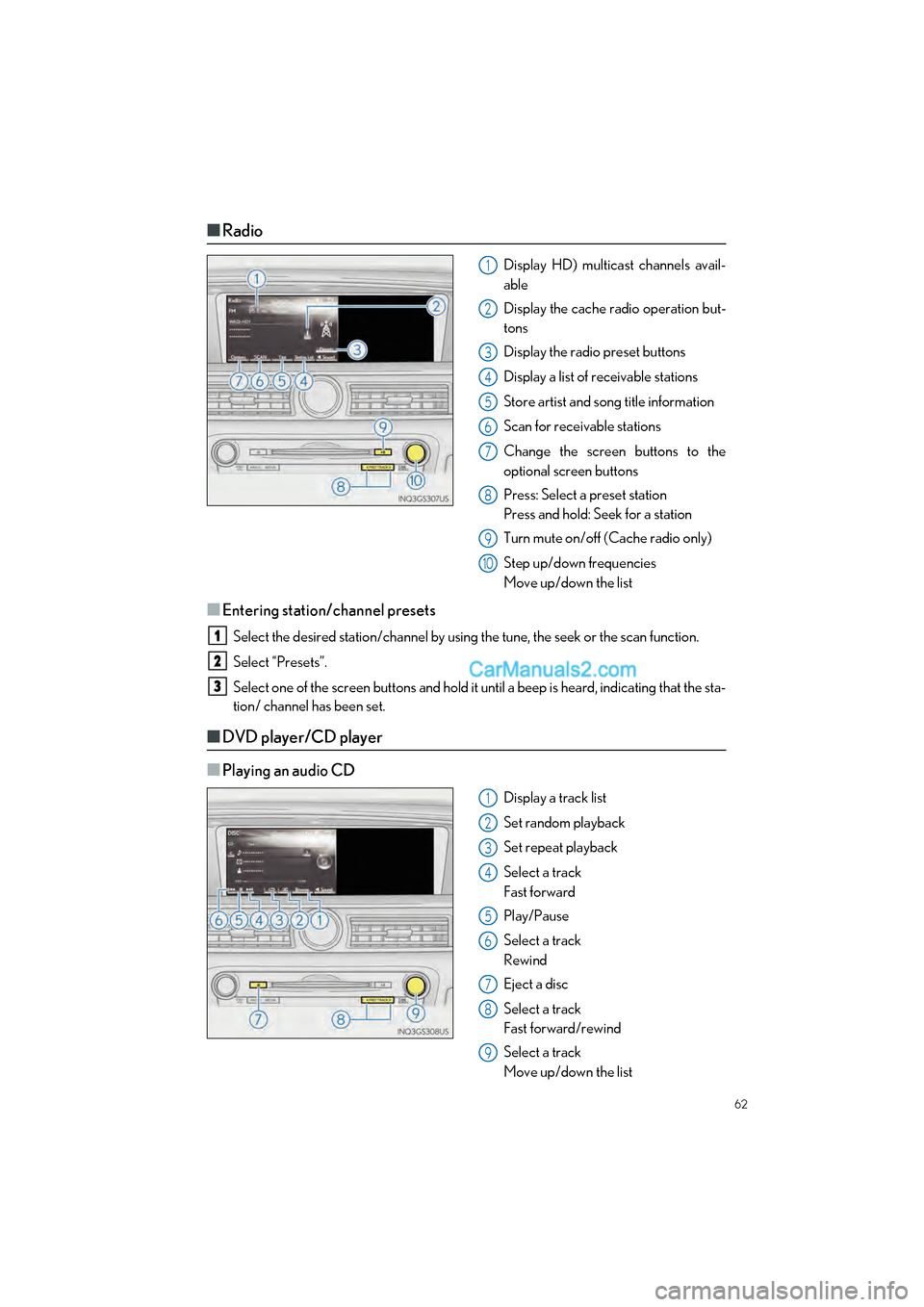
■Radio
Display HD) multicast channels avail-
able
Display the cache radio operation but-
tons
Display the radio preset buttons
Display a list of receivable stations
Store artist and song title information
Scan for receivable stations
Change the screen buttons to the
optional screen buttons
Press: Select a preset station
Press and hold: Seek for a station
Turn mute on/off (Cache radio only)
Step up/down frequencies
Move up/down the list
■Entering station/channel presets
Select the desired station/channel by using the tune, the seek or the scan function.
Select “Presets”.
Select one of the screen buttons and hold it until a beep is heard, indicating that the sta-
tion/ channel has been set.
■DVD player/CD player
■
Playing an audio CD
Display a track list
Set random playback
Set repeat playback
Select a track
Fast forward
Play/Pause
Select a track
Rewind
Eject a disc
Select a track
Fast forward/rewind
Select a track
Move up/down the list
1
2
3
4
5
6
7
8
9
10
1
2
3
1
2
3
4
5
6
7
8
9
Page 65 of 100

64
GS350_200t_QG_OM30G01U_(U)
■Operating an iPod
■
iPod audio
Display the play mode selection screen
Set random playback
Set repeat playback
Select a track
Fast forward
Play/Pause
Select a track
Rewind
Select a track
Fast forward/rewind
Select a track
Move up/down the list
■iPod video
Display expanded screen video
Select a track
Fast forward
Play/Pause
Select a track
Rewind
Select a track
Fast forward/rewind
Select a track
Move up/down the list
1
2
3
4
5
6
7
8
1
2
3
4
5
6
Page 74 of 100
73
GS350_200t_QG_OM30G01U_(U)
Voice Command System
■Basic operation
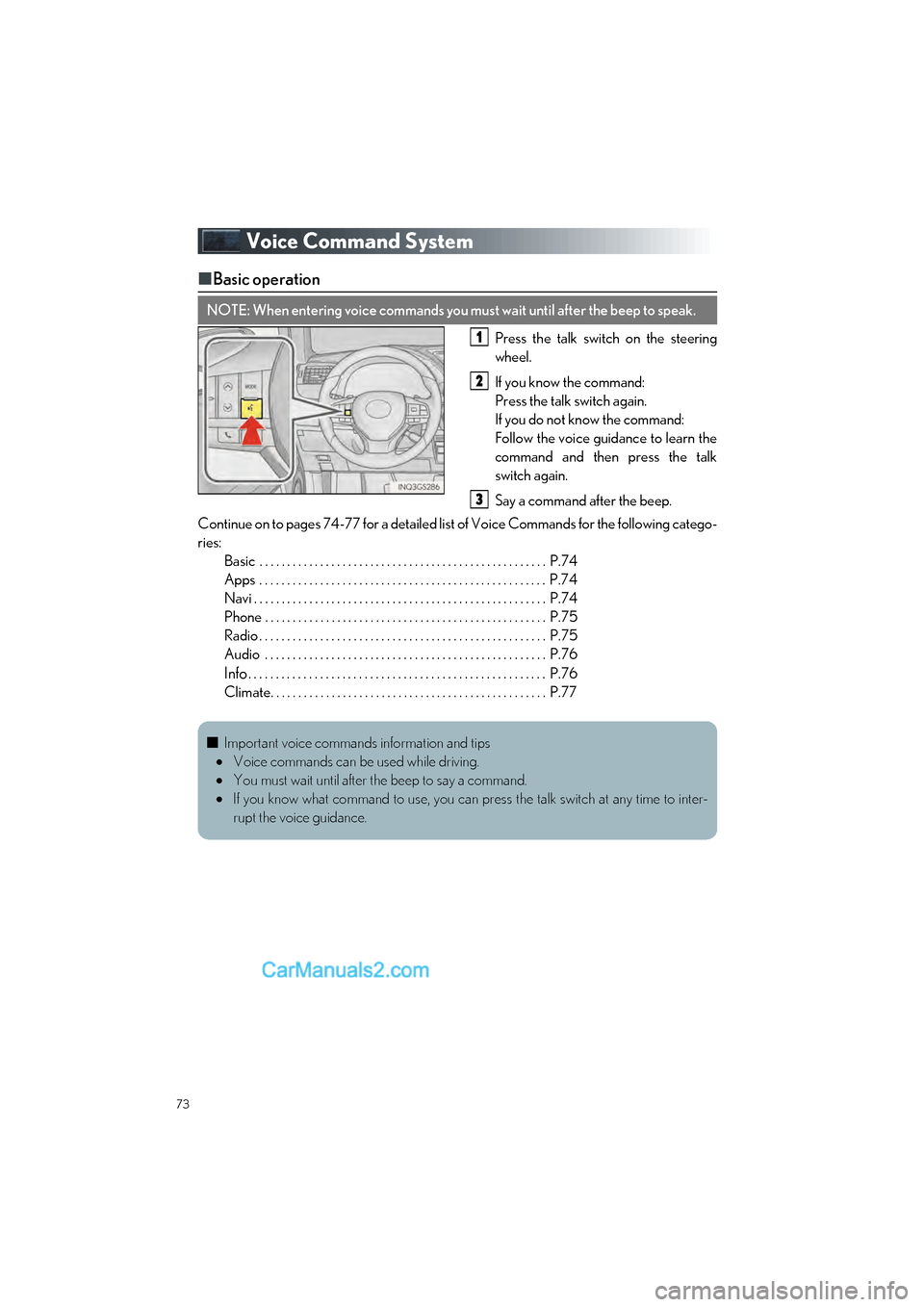
Press the talk switch on the steering
wheel.
If you know the command:
Press the talk switch again.
If you do not know the command:
Follow the voice guidance to learn the
command and then press the talk
switch again.
Say a command after the beep.
Continue on to pages 74-77 for a detailed lis t of Voice Commands for the following catego-
ries: Basic . . . . . . . . . . . . . . . . . . . . . . . . . . . . . . . . . . . . . . . . . . . . . . . . . . . . P.74
Apps . . . . . . . . . . . . . . . . . . . . . . . . . . . . . . . . . . . . . . . . . . . . . . . . . . . . P.74
Navi . . . . . . . . . . . . . . . . . . . . . . . . . . . . . . . . . . . . . . . . . . . . . . . . . . . . . P.74
Phone . . . . . . . . . . . . . . . . . . . . . . . . . . . . . . . . . . . . . . . . . . . . . . . . . . . P.75
Radio . . . . . . . . . . . . . . . . . . . . . . . . . . . . . . . . . . . . . . . . . . . . . . . . . . . . P.75
Audio . . . . . . . . . . . . . . . . . . . . . . . . . . . . . . . . . . . . . . . . . . . . . . . . . . . P.76
Info. . . . . . . . . . . . . . . . . . . . . . . . . . . . . . . . . . . . . . . . . . . . . . . . . . . . . . P.76
Climate. . . . . . . . . . . . . . . . . . . . . . . . . . . . . . . . . . . . . . . . . . . . . . . . . . P.77
NOTE: When entering voice commands you must wait until after the beep to speak.
1
2
3
■ Important voice commands information and tips
Voice commands can be used while driving.
You must wait until after the beep to say a command.
If you know what command to use, you can press the talk switch at any time to inter-
rupt the voice guidance.
Page 77 of 100

76
GS350_200t_QG_OM30G01U_(U)
Audio
*: The Bluetooth® word mark and logos are registered trademarks owned by Bluetooth
SIG, Inc.
Info
*: Vehicles with navigation system
CommandAction
“Play Playlist
“Play Artist
“Play Song
“Play Album
“Turn Music On”Turns the audio system on
“Turn Music Off”Turns the audio system off
“Disc”Selects the selected disc mode
“USB”Selects USB audio mode
“iPod”Selects iPod audio mode
“Bluetooth* Audio”Selects Bluetooth® audio mode
“External”Selects VTR mode
“Auxiliary”Selects AUX audio mode
CommandAction
“Destination Assist”*Connects the system to the Lexus response center
“Show Forecast”Displays weather information
“Show Traffic”Displays traffic information
“Lexus Insider”*Displays the Lexus insider list
Page 79 of 100
78
GS350_200t_QG_OM30G01U_(U)
Portable Audio Device Ports
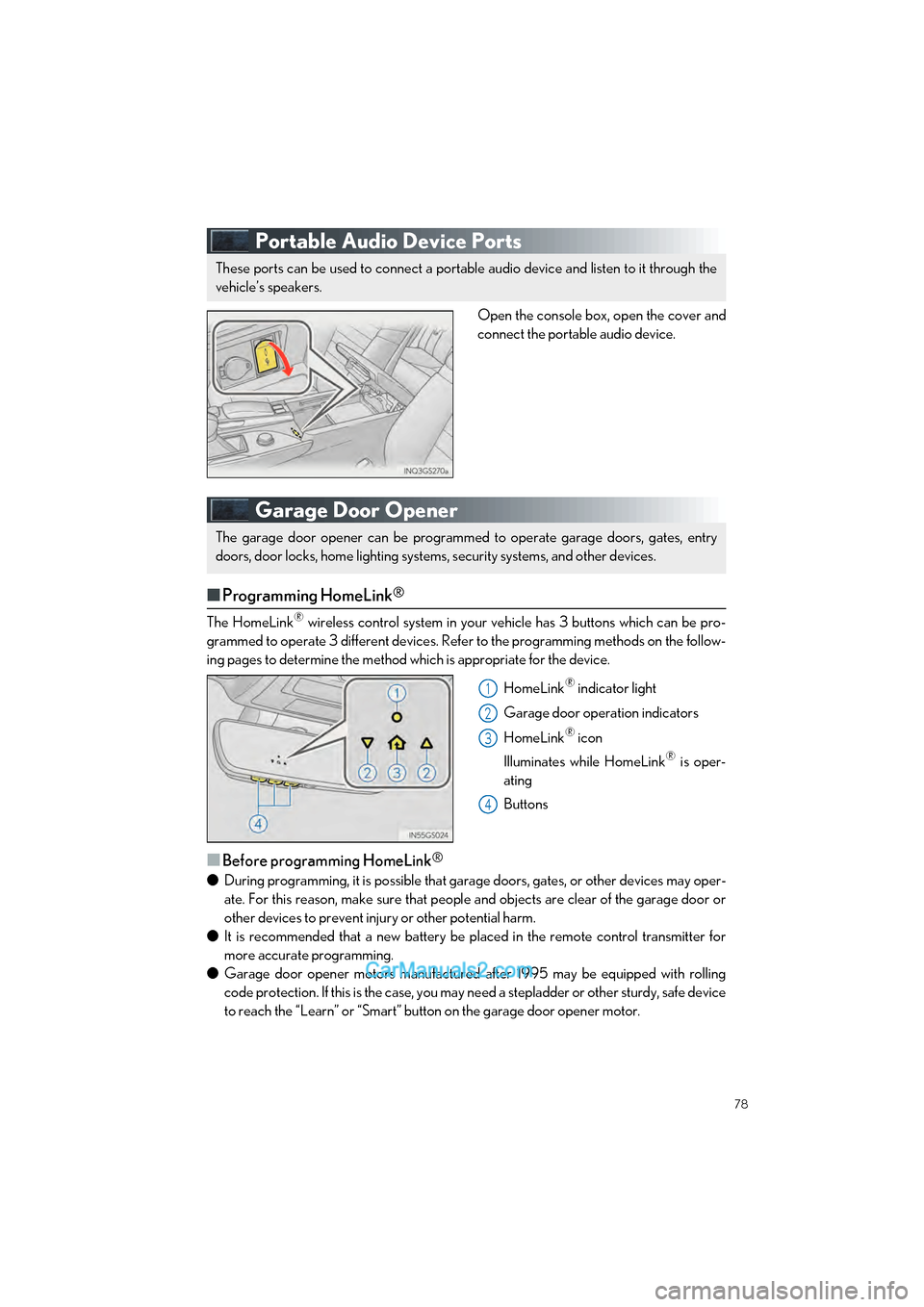
Open the console box, open the cover and
connect the portable audio device.
Garage Door Opener
■Programming HomeLink®
The HomeLink® wireless control system in your vehicle has 3 buttons which can be pro-
grammed to operate 3 different devices. Refe r to the programming methods on the follow-
ing pages to determine the method which is appropriate for the device.
HomeLink
® indicator light
Garage door operation indicators
HomeLink
® icon
Illuminates while HomeLink
® is oper-
ating
Buttons
■Before programming HomeLink®
● During programming, it is possible that garage doors, gates, or other devices may oper-
ate. For this reason, make sure that people and objects are clear of the garage door or
other devices to prevent inju ry or other potential harm.
● It is recommended that a new battery be placed in the remote control transmitter for
more accurate programming.
● Garage door opener motors manufactured after 1995 may be equipped with rolling
code protection. If this is the case, you may need a stepladder or other sturdy, safe device
to reach the “Learn” or “Smart” button on the garage door opener motor.
These ports can be used to connect a portable audio device and listen to it through the
vehicle’s speakers.
The garage door opener can be programmed to operate garage doors, gates, entry
doors, door locks, home lighting system s, security systems, and other devices.
1
2
3
4
Page 86 of 100
85
GS350_200t_QG_OM30G01U_(U)
●Destination Assist
Destination Assist provides you with live assi stance for finding destinations via the Lexus
response center. You can request either a sp ecific business, address, or ask for help
locating your desired destinatio n by category, such as restaurants, gas stations, shopping
centers or other points of interest (POI).
After you tell the agent your choice of destination, its coordinates are sent wirelessly to
your vehicle’s navigation system.
● eDestination
With the eDestination feature, you can go online, and via the Lexus.com owner’s Web
site, select and organize destinations of your choice and then wirelessly send them to
your vehicle’s navigation system.
Up to 200 locations can be stored online and accessed or updated at any time.
Locations can be organized into up to 20 personalized folders.
You must first go online at www.lexus.com/drivers/
to view the Owners site where you
will need to register and log in. After this, personalized folders that contain the locations
to be sent to your vehicle can be created. (See Lexus Enform Guide for more informa-
tion.)
● Lexus Insider
Lexus Insider is an optional service that can send audio messages, or articles, to partici-
pating owners’ vehicles via the navigation system. Potential Lexus Insider subjects might
include, for example, Lexus vehicle technology tips, updates on regional Lexus events, or
audio excerpts from Lexus Magazine articles.
■Subscription
After you have signed the Telematics Subscription Service Agreement and are enrolled,
you can begin receiving services. A variety of subscription terms are available.
Contact your Lexus dealer, call 1-800-25-LEXUS (1-800-255-3987), or select the
“Destination Assist” in your vehicl e for further subscription details.
■Function achieved by using DCM
■
Services
Of the functions included with Lexus Enform Safety Connect, Safety Connect can be
achieved by using DCM.
● Lexus Enform Safety Connect ( P.82)
■LEXUS Enform Remote
■
Services
Lexus Enform Remote is a cellular phone application that lets you view and remotely
control certain aspects of your vehicle.
For details about the functions and services of this application, refer to
http://www.lexus.com/enform/
. For further details, contact your Lexus dealer.
Function of the Lexus Enform Remote is achieved by using an embedded cellular device
in the vehicle (DCM: Data Communication Module).
■Subscription
P.85