change Lexus GS350 2020 User Guide
[x] Cancel search | Manufacturer: LEXUS, Model Year: 2020, Model line: GS350, Model: Lexus GS350 2020Pages: 600, PDF Size: 13.38 MB
Page 107 of 600
GS350_GS F_OM_OM30J07U_(U)
1072. Instrument cluster
2
Instrument cluster
Settings display
Select to change the meter display settings. (P. 543)
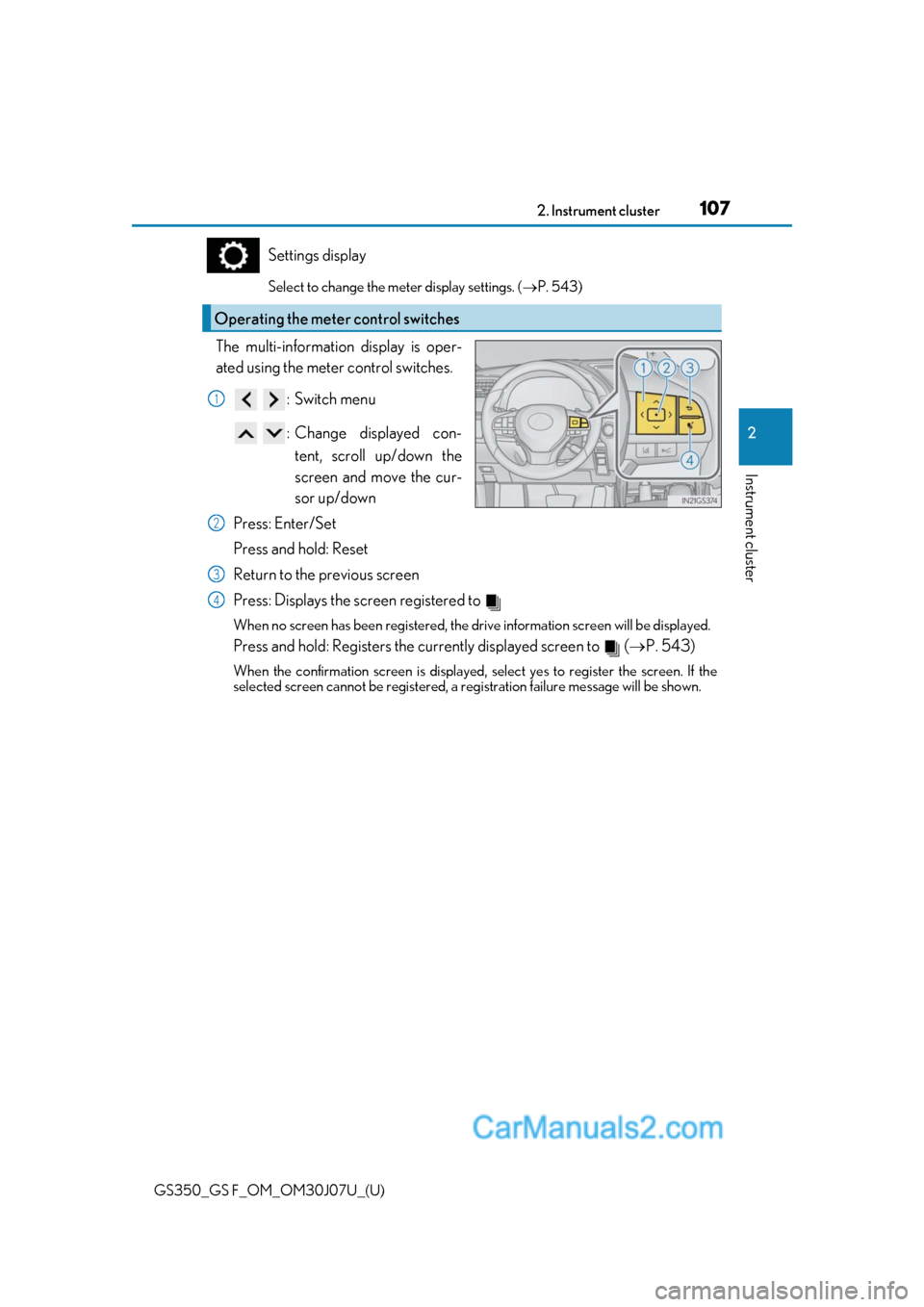
The multi-information display is oper-
ated using the meter control switches.
:Switch menu
: Change displayed con-tent, scroll up/down the
screen and move the cur-
sor up/down
Press: Enter/Set
Press and hold: Reset
Return to the previous screen
Press: Displays the screen registered to
When no screen has been registered, the dr ive information screen will be displayed.
Press and hold: Registers the currently displayed screen to ( P. 543)
When the confirmation screen is displayed, select yes to register the screen. If the
selected screen cannot be registered, a re gistration failure message will be shown.
Operating the meter control switches
1
2
3
4
Page 110 of 600
110
GS350_GS F_OM_OM30J07U_(U)2. Instrument cluster
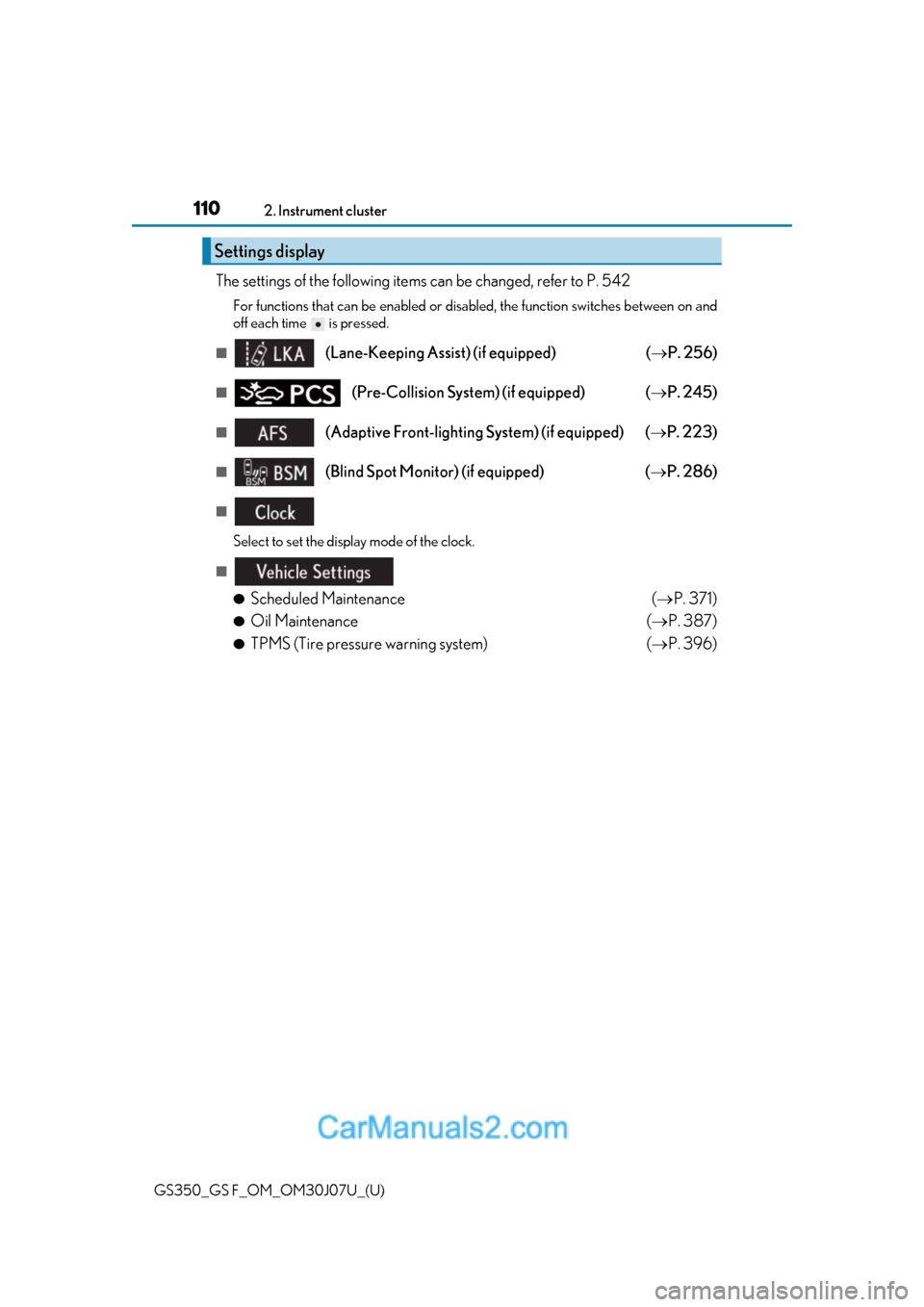
The settings of the following items can be changed, refer to P. 542
For functions that can be enabled or disabled, the function switches between on and
off each time is pressed.
■(Lane-Keeping Assist) (if equipped)
( P. 256)
■(Pre-Collision System) (if equipped) ( P. 245)
■(Adaptive Front-lighting System) (if equipped) ( P. 223)
■(Blind Spot Monitor) (if equipped) ( P. 286)
■
Select to set the display mode of the clock.
■
●
Scheduled Maintenance ( P. 371)
●Oil Maintenance ( P. 387)
●TPMS (Tire pressure warning system) ( P. 396)
Settings display
Page 111 of 600
GS350_GS F_OM_OM30J07U_(U)
1112. Instrument cluster
2
Instrument cluster
■●
Language
Select to change the la nguage on the display.
●Units
Select to change the unit of measure.
●Eco Driving Indicator Light
Select to activate/deactivate the Eco Driving Indicator Light.
● switch
Displays a procedure to register a desired screen to .
You can register 1 screen as a shortcut , which can be displayed by pressing .
●Drive information 1/2/3
Select to select up to 2 items that will be displayed on a Drive information screen,
up to 3 Drive informat ion screens can be set.
●Pop-up display
Select to set the following pop-up displays, which may appear in some situations,
on/off.
• Route guidance of the navigation system-linked display (if equipped)
• Incoming call display of the hands-free phone system
• Instrument panel brightness adjustment display
●Accent color (except F SPORT models)
Select to change the accent colors on the screen, such as the cursor color.
●Needle (F SPORT models)
Select to change the needle color for the tachometer.
●Rev indicator (F SPORT models)
Select to set the rev indicator on/off.
When set to on, proceed to set the engine speed at which the rev indicator will be
displayed.
Selectable engine speed range:
GS350: 2000 rpm to 6800 rpm
●Rev peak (F SPORT models)
Select to set the rev peak on/off.
●Default settings
Registered or changed meter settings will be deleted or returned to their default
setting.
Page 112 of 600
112
GS350_GS F_OM_OM30J07U_(U)2. Instrument cluster
■G-force display
●The G-force values may not be zero even when the vehicle is parked, such as when it is
parked on an incline.
●Depending on the vehicle usage conditions, the brake fluid pressure display may not
reach its maximum reading even though the brake pedal is fully depressed.
●If a battery terminal is disconnected and
reconnected, the steering amount display may
be disabled temporarily. After driving the vehicle for a while , the display will be enabled.
■System check display
After turning the engine switch to IGNITION ON mode, opening image is displayed
while system operation is checked. When the system check is complete, the normal
screen will return.
■Suspension of the settings display
In the following situations, the settings display using the meter control switches will be
suspended.
●When a warning message appears on the multi-information display
●When the vehicle begins to move
■Tire inflation pressure
●It may take a few minutes to display the tire inflation pressure after the engine switch is
turned to IGNITION ON mode. It may also take a few minutes to display the tire infla-
tion pressure after inflation pressure has been adjusted.
●“---” may be displayed if the tire information cannot be determined due to unfavorable
radio wave conditions.
●Tire inflation pressure changes with temperat ure. The displayed values may also be dif-
ferent from the values measured using a tire pressure gauge.
■When disconnecting and reconnecting battery terminals
The drive information will be reset.
■Liquid crystal display
P. 96
WARNING
■Caution for use while driving
●When operating the multi-information display while driving, pay extra attention to the
safety of the area around the vehicle.
●Do not look continuously at the multi-info rmation display while driving as you may fail
to see pedestrians, objects on the road, etc. ahead of the vehicle.
■Cautions during setting up the display
As the engine needs to be operating during setting up the display, ensure that the vehi-
cle is parked in a place with adequate ventil ation. In a closed area such as a garage,
exhaust gases including harmful carbon mo noxide (CO) may collect and enter the
vehicle. This may lead to death or a serious health hazard.
Page 115 of 600

GS350_GS F_OM_OM30J07U_(U)
1152. Instrument cluster
2
Instrument cluster
Settings display
Select to change the meter display settings. (P. 545)
The multi-information display is oper-
ated using the meter control switches.
:Switch menu
: Change displayed con-tent, scroll up/down the
screen and move the cur-
sor up/down
Press: Enter/Set
Press and hold: Reset
Return to the previous screen
Press: Displays the screen registered to
When no screen has been registered, the dr ive information screen will be displayed.
Press and hold: Registers the currently displayed screen to ( P. 545)
When the confirmation screen is displayed, select yes to register the screen. If the
selected screen cannot be registered, a re gistration failure message will be shown.
Items displayed can be switched by pr essing or of the meter control
switches to select and pressing or .
■Current fuel consumption*1
Displays the current rate of fuel consumption
■Average fuel economy (after reset*2/after start/after refuel)*1
Displays the average fuel consumption since the function was reset, the
engine was started, and the vehicle was refueled, respectively
Use the displayed average fuel consumption as a reference.
Operating the meter control switches
1
2
Drive information
3
4
Page 117 of 600
GS350_GS F_OM_OM30J07U_(U)
1172. Instrument cluster
2
Instrument cluster
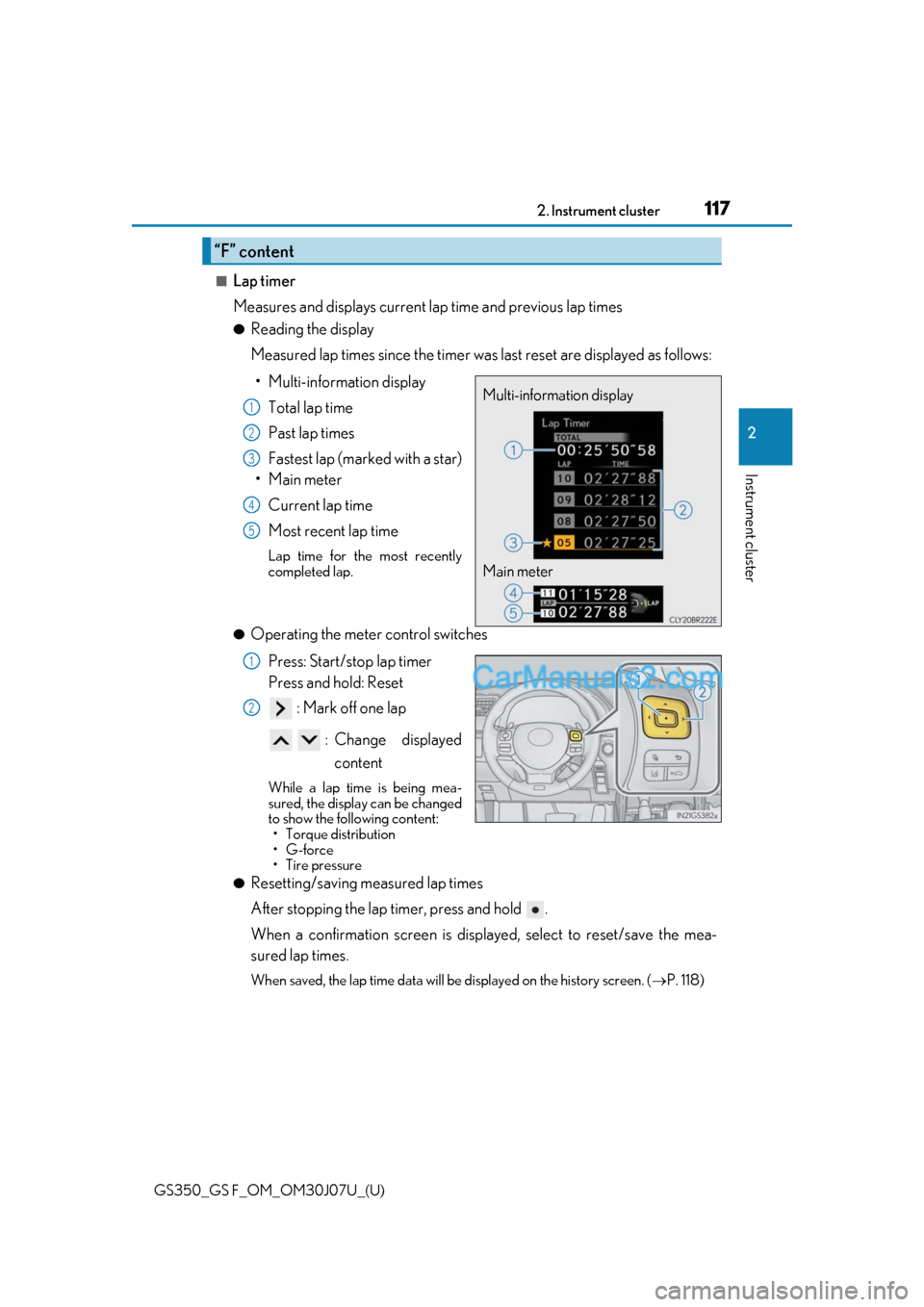
■Lap timer
Measures and displays current lap time and previous lap times
●Reading the display
Measured lap times since the timer was last reset are displayed as follows:
• Multi-information display Total lap time
Past lap times
Fastest lap (marked with a star)
•Main meter
Current lap time
Most recent lap time
Lap time for the most recently
completed lap.
●Operating the meter control switches
Press: Start/stop lap timer
Press and hold: Reset : Mark off one lap
: Change displayed content
While a lap time is being mea-
sured, the display can be changed
to show the following content:• Torque distribution
•G-force
• Tire pressure
●Resetting/saving measured lap times
After stopping the lap timer, press and hold .
When a confirmation screen is displa yed, select to reset/save the mea-
sured lap times.
When saved, the lap time data will be displayed on the history screen. ( P. 118)
“F” content
Multi-information display
Main meter1
2
3
4
5
1
2
Page 122 of 600

122
GS350_GS F_OM_OM30J07U_(U)2. Instrument cluster
The settings of the following items can be changed, refer to P. 542
For functions that can be enabled or disabled, the function switches between on and
off each time is pressed.
■(Lane-Keeping Assist) (if equipped)
( P. 256)
■(Pre-Collision System) (if equipped) ( P. 245)
■(Blind Spot Monitor) (if equipped) ( P. 286)
■( P. 101)
• Display of the indicator can be turned on or off.
• The speed at which the indicator is displayed can be set.
Selectable speed range:
30 mph to 100 mph (50 km/h to 160 km/h)
*
*
: Always observe the legal speed limi t when driving on public roads.
■
●
Scheduled Maintenance ( P. 371)
●TPMS (Tire pressure warning system) (if equipped) ( P. 396)
■
●
Language
Select to change the la nguage on the display.
●Units
Select to change the unit of measure.
●Eco Driving Indicator Light
Select to activate/deactivate the Eco Driving Indicator Light
● switch
Displays a procedure to register a desired screen to .
You can register 1 screen as a shortcut , which can be displayed by pressing .
●Drive information 1/2/3
Select to select up to 2 items that will be displayed on a Drive information screen,
up to 3 Drive informat ion screens can be set.
Settings display
Page 123 of 600
GS350_GS F_OM_OM30J07U_(U)
1232. Instrument cluster
2
Instrument cluster
●Pop-up display
Select to set the following pop-up displays, which may appear in some situations,
on/off.• Route guidance of the navigation system-linked display (if equipped)
• Incoming call display of the hands-free phone system
• Instrument panel brightness adjustment display
• TVD control mode change display
●Rev indicator
Select to set the rev indicator on/off.
When set to on, proceed to set the engine speed at which the rev indicator will be
displayed.
●Rev peak
Select to set the rev peak on/off.
●Drive gauges
The meter display when in SPORT S, SPORT S+ or customized mode can be
selected and set from the Eco drive mode screen*/normal mode screen*/SPORT
S mode screen/SPORT S+ mode screen.
*: Only customized mode can be selected.
●Default settings
Registered or changed meter settings will be deleted or returned to their default
setting.
Page 124 of 600
124
GS350_GS F_OM_OM30J07U_(U)2. Instrument cluster
■Start-up display
When the engine is started, the name of the
vehicle is displayed on the multi-information
display.
While the start-up display is being displaye d, the meter display cannot be changed even
if the drive mode is changed. When the start- up display is finished, the meter display for
the currently selected mode will be displayed.
■Torque distribution display
Torque distribution may not be displayed correctly in some cases, such as when the vehi-
cle passes over road expansion joints.
■G-force display
●The G-force values may not be zero even when the vehicle is parked, such as when it is
parked on an incline.
●The steering amount, accelerator pedal input, and brake fluid pressure displays are dis-
abled until the engine has warmed up (the variable red zone of the tachometer has
retracted to 7300 rpm).
After the engine has warmed up, these displays will be enabled.
●Depending on the vehicle usage conditions, the brake fluid pressure display may not
reach its maximum reading even though the brake pedal is fully depressed.
●If a battery terminal is disconnected and reconnected, the steering amount display may
be disabled temporarily. Afte r driving the vehicle for a while , the display will be enabled.
■Suspension of the settings display
In the following situations, op eration of the settings display will be temporarily sus-
pended.
●When a warning message appears on the multi-information display
●When the vehicle begins to move
■Tire inflation pressure
●It may take a few minutes to display the tire inflation pressure after the engine switch is
turned to IGNITION ON mode. It may also take a few minutes to display the tire infla-
tion pressure after inflation pressure has been adjusted.
●“---” may be displayed if the tire position information cannot be determined due to
unfavorable radio wave conditions.
●Tire inflation pressure changes with temperat ure. The displayed values may also be dif-
ferent from the values measured using a tire pressure gauge.
■When disconnecting and reconnecting battery terminals
The following information data will be reset:
●Lap timer: Measured lap times, history
●G-force: Record of the maximum G-forces
■Using the lap timer
If the engine is stopped while a lap is being timed, the lap timer will stop and the lap time
up to that point will be recorded.
■Liquid crystal display
P. 104
Page 126 of 600
126
GS350_GS F_OM_OM30J07U_(U)2. Instrument cluster
Head-up display
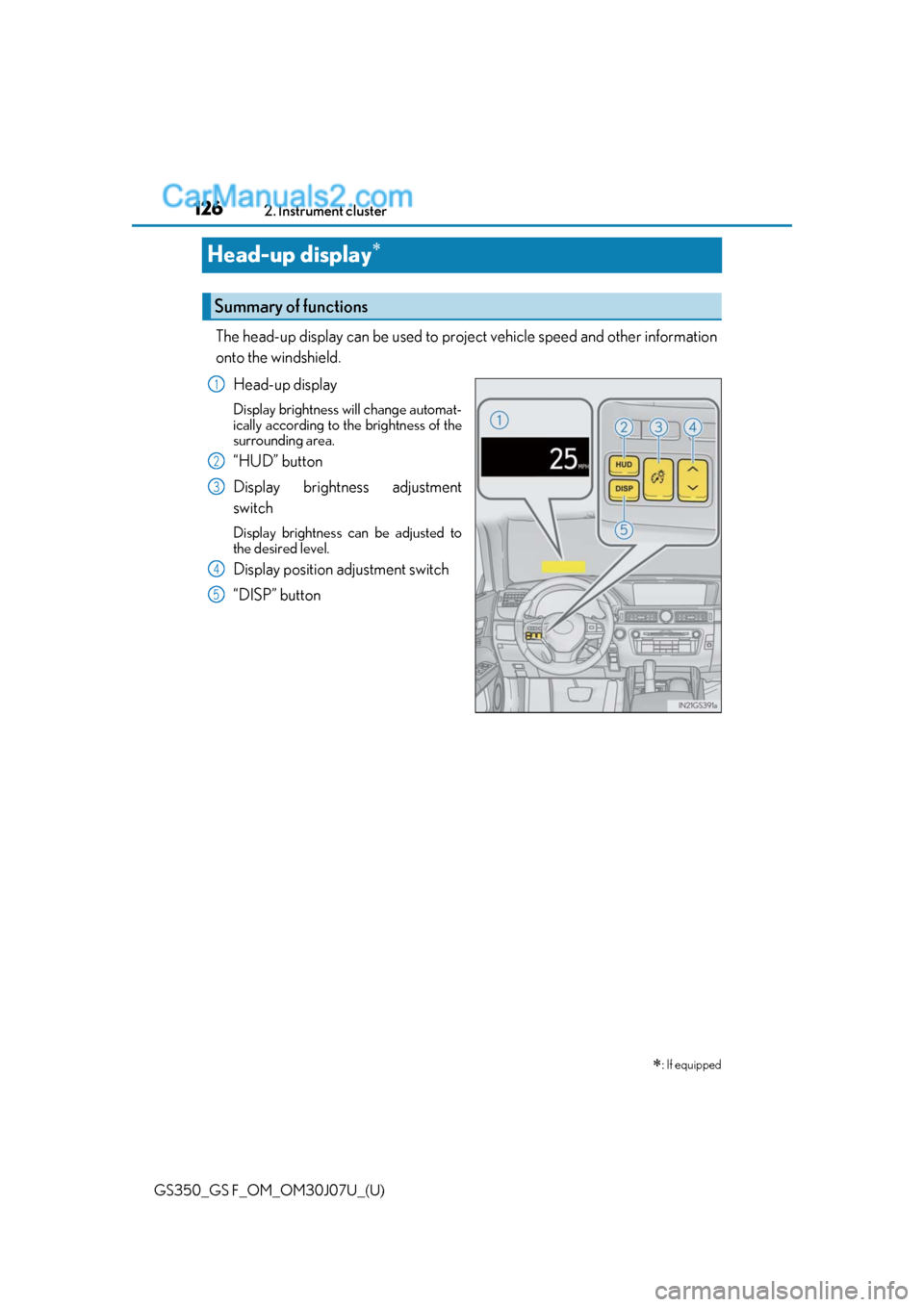
The head-up display can be used to proj
ect vehicle speed and other information
onto the windshield.
Head-up display
Display brightness will change automat-
ically according to the brightness of the
surrounding area.
“HUD” button
Display brightness adjustment
switch
Display brightness can be adjusted to
the desired level.
Display position adjustment switch
“DISP” button
: If equipped
Summary of functions
1
2
3
4
5