change Lexus GS350 2020 Owner's Guide
[x] Cancel search | Manufacturer: LEXUS, Model Year: 2020, Model line: GS350, Model: Lexus GS350 2020Pages: 600, PDF Size: 13.38 MB
Page 127 of 600
GS350_GS F_OM_OM30J07U_(U)
1272. Instrument cluster
2
Instrument cluster
●Vehicle speed
●Tachometer
●Shift position and shift range
Displays the selected shift position or selected shift range ( P. 208)
●Eco Driving Indicator (GS350) ( P. 130)
●Head-up rev indicator (GS F) ( P. 130)
●Audio display*
Displays audio information for approximat ely 3 seconds when the audio system is
operated
●Route guidance display (vehicles with navigation system) ( P. 130)
When approaching an intersec tion while the navigation system is giving route guid-
ance, an arrow will automatically be displa yed to indicate the direction of travel.
●Lexus Enform (if equipped)
Displays “LEXUS Enform” for approximat ely 3 seconds when LEXUS App Suite is
operated
●Lane departure warning display (LKA [Lane-Keeping Assist]) (if equipped)
( P. 443)
●Approach warning display (dynamic radar cruise control with full-speed
range) (if equipped) ( P. 443)
●Pre-collision warning message (PCS [Pre-Collision System])
(if equipped) ( P. 443)
●Speed limit display (vehicles with navigation system) ( P. 131)
*: The default setting is off
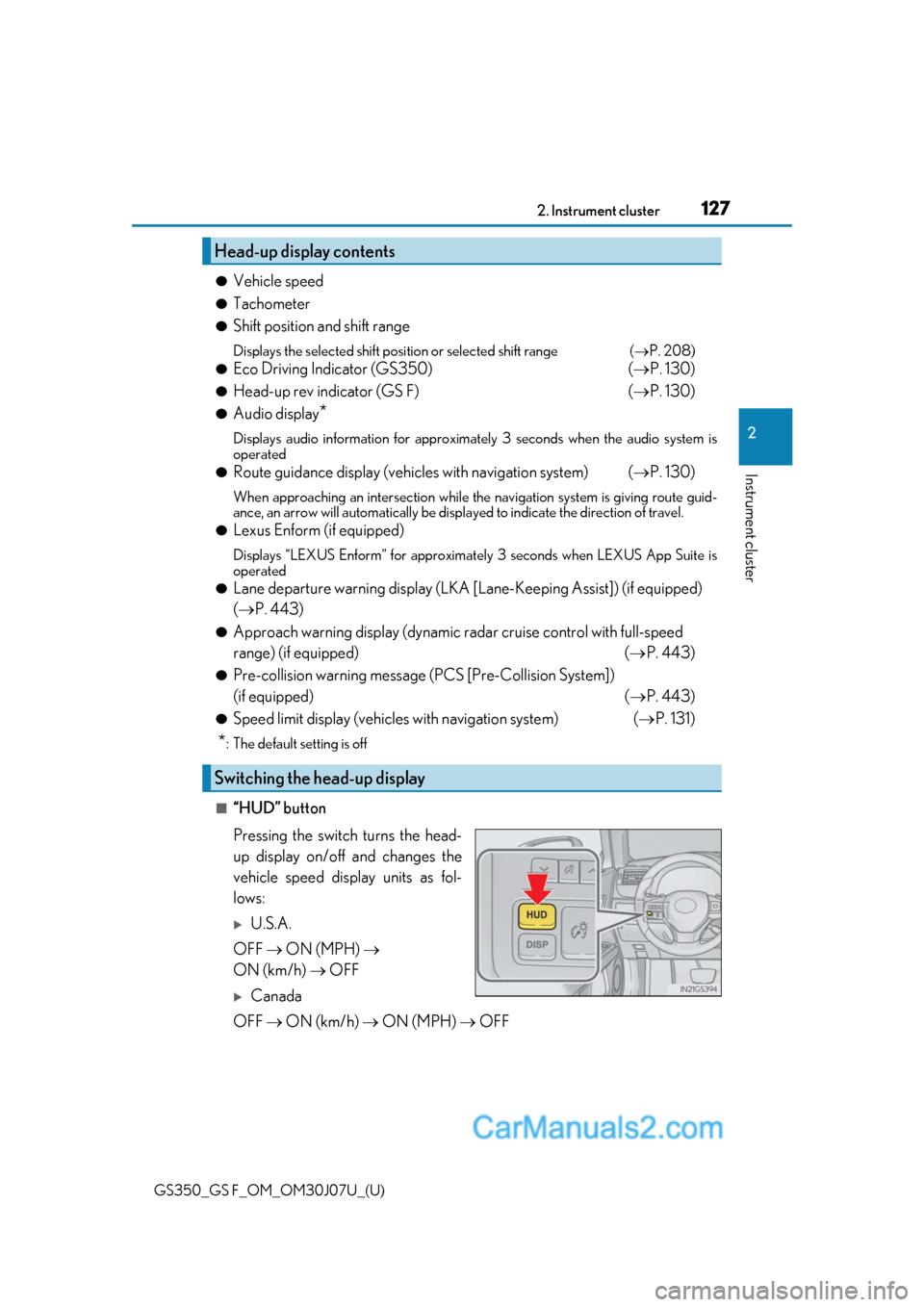
■“HUD” button
Pressing the switch turns the head-
up display on/off and changes the
vehicle speed display units as fol-
lows:
U.S.A.
OFF ON (MPH)
ON (km/h) OFF
Canada
OFF ON (km/h) ON (MPH) OFF
Head-up display contents
Switching the head-up display
Page 128 of 600

128
GS350_GS F_OM_OM30J07U_(U)2. Instrument cluster
■“DISP” button
Pressing the button changes the display items (except vehicle speed).
When any of the following displays ar
e operating, the display items do not
change (except vehicle speed): Audio display/Route guidance display (vehi-
cles with navigation system)/Lexus Enform (if equipped)/Lane departure
warning display (if equipped)/Approach warning display (if equipped)/Pre-
collision warning message (if equipped )/Speed limit display (vehicles with
navigation system).
*: Displayed when the drive gauges displays the SPORT mode screen and the shift lever in M
GS350GS F
Off
Eco Driving Indicator
Tachometer Off
Tachometer
Head-up rev indicator
*
1
2
3
1
2
3
Page 130 of 600

130
GS350_GS F_OM_OM30J07U_(U)2. Instrument cluster
Eco Driving Indicator Zone Display
Suggests the Zone of Eco driving with
current Eco driving ratio based on
acceleration.
Eco driving ratio based on accelera-
tion
If the acceleration exceeds the Zone of
Eco driving, the right side of the Eco
Driving Indicator Zone
Display will illu-
minate.
Zone of Eco driving
Eco Driving Indicator will not oper ate under the following conditions:
●The shift lever is in any position other than D.
●A paddle shift switch is operated.
●Neither normal mode nor Eco drive mode is selected. ( P. 281)
●The vehicle speed is approximately 80 mph (130 km/h) or higher.
While the drive gauges displays the
SPORT mode screen with the shift
lever in M, the display changes to one
of 3 levels in resp onse to the engine
speed, notifying you of when to shift up.
This may also be displayed when shifting
down as well, depending on the engine
speed.
When the vehicle approaches an inter-
section, the direction the vehicle should
go is guided by the arrow.
When the vehicle approaches an inter-
section, the route guidance will start
and the distance* to the intersection
will also be displayed.
*: The distance decreases in increments of 164 ft. (50 m) and the distance indica-
tion will disappear when the vehicle
passes through the intersection.
Eco Driving Indicator (GS350)
1
2
Head-up rev indicator (GS F)
3
Route guidance display (vehicles with navigation system)
Page 131 of 600

GS350_GS F_OM_OM30J07U_(U)
1312. Instrument cluster
2
Instrument cluster
Displays the speed limit for the current
road.
Display of the following screens can be switched on or off.
●Audio display
●Route guidance display (vehicles with navigation system)
■Changing the settings
Continue holding the “DISP” but-
ton until the screen changes, and
repeat the process until the set-
ting you want to change is dis-
played.
Customization can be performed
when the head-up display is on and
the vehicle is trav eling at less than
5 mph (8 km/h).
Press the “DISP” button to switch between on and off.
On and off will be swit ched between each time the button is pressed.
If the button is left alone without being op erated for a short time, setting will be fin-
ished automatically.
Speed limit display (vehicles with navigation system)
Display customization
1
2
Page 132 of 600

132
GS350_GS F_OM_OM30J07U_(U)2. Instrument cluster
■Head-up display
●The head-up display may seem dark and hard
to see when viewed through sunglasses,
especially polarized sunglasses.
Adjust the brightness of the head-up display or remove your sunglasses.
●When the head-up display is turned off, it will remain off even if the engine switch is
turned to IGNITION ON mode after th e engine switch has been turned off.
●The startup image will be displayed on the head-up display after the engine switch has
been turned to IGNITION ON mode while the head-up display switch is set to on.
■Head-up rev indicator
●The head-up display is linked to the rev indicator in the meter.
●Whether or not to display the rev indicator in the head-up display, as well as display tim-
ing, can be changed through the settings for the rev indicator in the meter. ( P. 123)
■When the battery is disconnected
The customize settings of the head-up display will be reset.
■Head-up display automatic position adjustment
If the display position is recorded into memory, the head-up display will be automatically
adjusted to the desired position. ( P. 166)
WARNING
■Before using the head-up display
Check that the position and brightness of the head-up display image does not interfere
with safe driving. Incorrect adjustment of the image’s position or brightness may
obstruct the driver’s view and lead to an accident, resulting in death or serious injury.
NOTICE
■To prevent damage to components
●Do not touch the inside of the head-up disp lay projector or thrust sharp edges or the
like into the projector.
Doing so could cause mechanical malfunctions.
●Do not place any drinks near the head-up dis-play projector. If the projector gets wet, elec-
trical malfunctions may result.
●Do not place anything on or put stickers onto
the head-up display projector.
Doing so could interrupt head-up display
indications.
Page 143 of 600

143
GS350_GS F_OM_OM30J07U_(U)3-2. Opening, closing and
locking the doors and trunk
3
Operation of each component
Doors
◆Smart access system with push-button start
Carry the electronic key to enable this function.
Grip the driver’s door handle to
unlock the door. Grip the passen-
ger’s door handle to unlock all the
doors.
*
Make sure to touch the sensor on the
back of the handle.
The doors cannot be unlocked for 3
seconds after the doors are locked.
*: The door unlock settings can be changed. ( P. 542)
Touch the lock sensor (the indentation on the upper part of the door han-
dle) to lock all the doors.
Check that the door is securely locked.
◆Wireless remote control
Locks all the doors
Check that the door is securely
locked.
Unlocks all the doors
Pressing the button unlocks the
driver’s door. Pressing the button
again within 5 seconds unlocks the
other doors.
Press and hold to open the windows
and moon roof.
*
*
: This setting must be custom ized at your Lexus dealer.
Unlocking and locking the doors from the outside
1
2
1
2
Page 147 of 600

GS350_GS F_OM_OM30J07U_(U)
1473-2. Opening, closing and locking the doors and trunk
3
Operation of each component
■Switching the door unlock function
It is possible to set which doors the entry function unlock s using the wireless remote con-
trol.
Turn the engine switch off.
When the indicator light on the key surface is not on, press and hold , or
for approximately 5 seconds while pressing and holding .
The setting changes each time an operation is performed, as shown below. (When
changing the setting continuously, release the buttons, wait for at least 5 seconds, and
repeat step .)
To prevent unintended triggering of the alarm, unlock the doors using the wireless
remote control and open and close a door once after the settings have been changed. (If
a door is not opened within 60 seconds af ter is pressed, the doors will be locked
again and the alarm will automatically be set.)
In case that the alarm is triggere d, immediately stop the alarm. (P. 79)
■Impact detection door lock release system
In the event that the vehicle is subject to a strong impact, all the doors are unlocked.
Depending on the force of the impact or the type of accident, however, the system may
not operate.
■Using the mechanical key
The doors can also be locked and unlocked with the mechanical key. ( P. 502)
■Conditions affecting the oper ation of the smart access system with push-button start
or wireless remote control
P. 158
■Customization
Settings (e.g. unlocking function using a key) can be changed.
(Customizable features: P. 542)
1
2
2
Multi-information
displayUnlocking functionBeep
Holding the driver’s door handle
unlocks only the driver’s door.
Exterior: Beeps 3 times
Interior: Pings once
Holding a passeng er’s door han-
dle unlocks all the doors.
Holding a door handle unlocks
all the doors.Exterior: Beeps twice
Interior: Pings once
Page 152 of 600

152
GS350_GS F_OM_OM30J07U_(U)3-2. Opening, closing and locking the doors and trunk
■Internal trunk release lever
■If the smart access system with push-button start or the wireless remote control does
not operate properly
●Use the mechanical key to open the trunk. (
P. 502)
●Replace the key battery with a new one if it is depleted. ( P. 411)
■When leaving a key to the vehicle with a parking attendant
P. 140
■Customization
The trunk unlocking operation can be changed. (Customizable features:P. 542)
The trunk lid can be opened by pulling the glow-
in-the-dark lever
located on the inside of the
trunk lid to the side.
The lever will continue to glow for some time
after the trunk lid is closed.
WARNING
Observe the following precautions.
Failure to do so may result in death or serious injury.
■Before driving
●Make sure that the trunk lid is fully closed. If the trunk lid is not fully closed, it may
open unexpectedly while driv ing and hit near-by objects or luggage in the trunk may
be thrown out, causing an accident.
●Do not allow children to play in the trunk.
If a child is accidentally locked in the trun k, they could suffer from heat exhaustion,
suffocation or other injuries.
●Do not allow a child to open or close the trunk lid.
Doing so may cause the trunk lid to open unexpectedly, or cause the child’s hands,
head, or neck to be caught by the closing trunk lid.
■Important points while driving
Never let anyone sit in the trunk. In the even t of sudden braking or a collision, they are
susceptible to death or serious injury.
Page 159 of 600

GS350_GS F_OM_OM30J07U_(U)
1593-2. Opening, closing and locking the doors and trunk
3
Operation of each component
■Note for the entry function
●Even when the electronic key is within the effective range (detection areas), the system
may not operate properly in the following cases:
• The electronic key is too close to the window or outside door handle, near the ground, or in a high place when the doors are locked or unlocked.
• The electronic key is near the ground or in a high place, or too close to the rear
bumper center when the trunk is opened.
• The electronic key is on th e instrument panel, rear pack age tray or floor, or in the
door pockets or glove box when the engine is started or engine switch modes are
changed.
●Do not leave the electronic key on top of th e instrument panel or near the door pockets
when exiting the vehicle. Depending on the radio wave reception conditions, it may be
detected by the antenna outs ide the cabin and the door will become lockable from the
outside, possibly trapping the electronic key inside the vehicle.
●As long as the electronic key is within th e effective range, the doors may be locked or
unlocked by anyone. However, only the door s detecting the electronic key can be used
to unlock the vehicle.
●Even if the electronic key is not inside the vehicle, it may be possible to start the engine
if the electronic key is near the window.
●The doors may unlock or lock if a large amou nt of water splashes on the door handle,
such as in the rain or in a car wash when the electronic ke y is within the effective range.
(The doors will automatically be locked af ter approximately 60 seconds if the doors
are not opened and closed.)
●If the wireless remote control is used to lo ck the doors when the electronic key is near
the vehicle, there is a possibility that the d oor may not be unlocked by the entry func-
tion. (Use the wireless remote control to unlock the doors.)
●Touching the door lock sensor while wearin g gloves may delay or prevent lock opera-
tion.
●If the door handle becomes wet while the el ectronic key is within the effective range,
the door may lock and unlock repeatedly. In that case, follow the following correction
procedures to wash the vehicle:
• Place the electronic key in a location 6 ft. (2 m) or more away from the vehicle. (Take care to ensure that the key is not stolen.)
• Set the electronic key to battery-saving mode to disable the smart access system with push-button start. ( P. 158)
●If the electronic key is inside the vehicle and a door handle becomes wet during a car
wash, a message may be shown on the mult i-information display and a buzzer will
sound outside the vehicle. To turn off the alarm, lock all the doors.
●The lock sensor may not work properly if it comes into contact with ice, snow, mud, etc.
Clean the lock sensor and attempt to operate it again, or use the lock sensor on the
lower part of the door handle.
●A sudden approach to the effective range or door handle may prevent the doors from
being unlocked. In this case, return the door handle to the original position and check
that the doors unlock before pulling the door handle again.
●Gripping the door handle when wearing a glove may not unlock the door.
●If there is another electronic key in the de tection area, it may take slightly longer to
unlock the doors after the door handle is gripped.
Page 160 of 600

160
GS350_GS F_OM_OM30J07U_(U)3-2. Opening, closing and
locking the doors and trunk
■When the vehicle is not driven for extended periods
●To prevent theft of the vehicle, do not leave the electronic key within 6 ft. (2 m) of the
vehicle.
●The smart access system wi th push-button start can be deactivated in advance.
( P. 542)
■To operate the system properly
●Make sure to carry the electr onic key when operating the system. Do not get the elec-
tronic key too close to the vehicle when operating the system from the outside of the
vehicle.
Depending on the position and holding condit ion of the electronic key, the key may not
be detected correctly and the system may no t operate properly. (The alarm may go off
accidentally, or the door lock prev ention function may not operate.)
●Do not leave the electronic key inside the trunk.
The key confinement prevention function ma y not operate, depending on the location
of the key (close to a spare tire, the inside edge of the trunk), conditions (inside a metal
bag, close to metallic objects) and th e radio waves in the surrounding area. ( P. 151)
■If the smart access system with push-button start does not operate properly
●Locking and unlocking the doors and opening the trunk: Use the mechanical key.
( P. 502)
●Starting the engine: P. 503
■Customization
Settings (e. g. smart access system with push-button start) can be changed.
(Customizable features: P. 542)
■If the smart access system with push-button start has been deactivated in a customized
setting
●Locking and unlocking the d oors and opening the trunk:
Use the wireless remote cont rol or mechanical key. (P. 143, 150, 502)
●Starting the engine and changing engine switch modes: P. 503
●Stopping the engine: P. 204