ECO mode Lexus GS450h 2009 User Guide
[x] Cancel search | Manufacturer: LEXUS, Model Year: 2009, Model line: GS450h, Model: Lexus GS450h 2009Pages: 622
Page 152 of 622
151
2-1. Driving procedures
2
When driving
GS_HV_U (OM30B44U)
April 27, 2009 10:09 am
■Electronic key battery depletion
→P. 4 5
■When the electronic key battery is discharged
→P. 4 7 2
■Conditions affecting operation
→P. 4 3
CAUTION
■When starting the hybrid system
Always start the hybrid system while sitting in the driver’s seat. Do not press the
accelerator pedal while starting the hybrid system under any circumstances.
Doing so may cause an accident resulting in death or serious injury.
■Stopping the hybrid system in an emergency
If you want to stop the hybrid system in an emergency while driving the vehicle,
push and hold the “POWER” switch for more than 3 seconds.
However, do not touch the “POWER” switch while driving except in an emergency.
If the hybrid system stops while the vehicle is being driven, this could lead to an
unexpected accident.
NOTICE
■To prevent 12 volt battery discharge
Do not leave the “POWER” switch in ACCESSORY or ON mode for long periods
without the hybrid system on.
■When starting the hybrid system
●Do not race the hybrid system.
●If the hybrid system becomes difficult to start or stalls frequently, have the hybrid
system checked immediately.
GS450h_HV_U.book Page 151 Monday, April 27, 2009 10:10 AM
Page 162 of 622

161
2-2. Instrument cluster
2
When driving
GS_HV_U (OM30B44U)
April 27, 2009 10:09 am
Light sensitive optitron meterTo reduce glare or reflection of the instrument cluster, the cluster glass is
tinted automatically or manually. Y ou can select a setting from 7 modes.
Display the present setting, then
change the mode.
To change the mode, press the but-
ton once and then again within 6
seconds.
Each time you press the button, the
mode changes in the following
order;
1. “AUTO - Norm”
2. “AUTO - Lo”
3. “AUTO - Hi”
4. “MANUAL - 1”
5. “MANUAL - 2”
6. “MANUAL - 3”
7. “ M A N U A L - 4 ”
Mode 1 to 3: The cluster glass tint
will be adjusted automatically
depending on the intensity of sun-
light in the surrounding.
Mode 4 to 7: The cluster glass tint
will be fixed when a certain level of
sunlight is reached in the surround-
ing.
(“Norm” to “Hi”, “1” to “4” referring
to the level of cluster glass tint.)
GS450h_HV_U.book Page 161 Monday, April 27, 2009 10:10 AM
Page 166 of 622
165
2-2. Instrument cluster
2
When driving
GS_HV_U (OM30B44U)
April 27, 2009 10:09 am
CAUTION
■If a safety system warning light does not come on
Should a safety system light such as ABS and the SRS airbag warning light not
come on when you turn to ON mode, this could mean that these systems are not
available to help protect you in an accident, which could result in death or serious
injury. Have the vehicle inspected by your Lexus dealer immediately if this occurs.
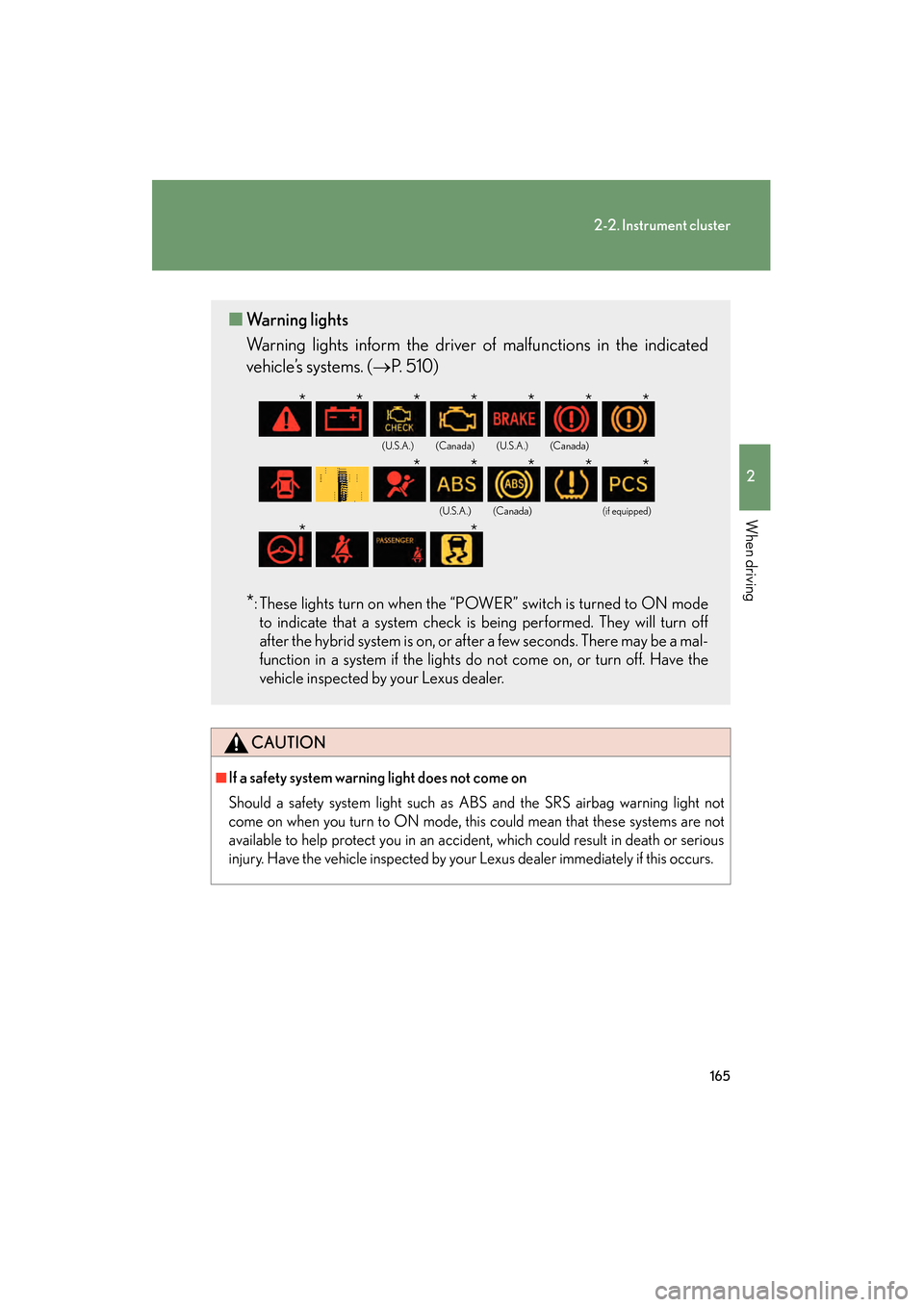
■ Warning lights
Warning lights inform the driver of malfunctions in the indicated
vehicle’s systems. ( →P. 5 1 0 )
*: These lights turn on when the “POWER” switch is turned to ON mode
to indicate that a system check is being performed. They will turn off
after the hybrid system is on, or after a few seconds. There may be a mal-
function in a system if the lights do not come on, or turn off. Have the
vehicle inspected by your Lexus dealer.
(U.S.A.)(Canada)(U.S.A.)(Canada)
(U.S.A.)(Canada)(if equipped)
*******
*****
**
GS450h_HV_U.book Page 165 Monday, April 27, 2009 10:10 AM
Page 169 of 622
168
2-2. Instrument cluster
GS_HV_U (OM30B44U)
April 27, 2009 10:09 am
■System check display
The “LEXUS HYBRID DRIVE” message is displayed 3 seconds after the
“POWER” switch is set to the ON mode. At this time a systems check is conducted,
and the normal display is shown upon successful completion of this check.
NOTICE
■The multi-information display at low temperatures
Allow the interior of the vehicle to warm up before using the liquid crystal informa-
tion display. At extremely low temperatures, the information display monitor may
respond slowly, and display changes may be delayed.
GS450h_HV_U.book Page 168 Monday, April 27, 2009 10:10 AM
Page 172 of 622
171
2-3. Operating the lights and windshield wipers
2
When driving
GS_HV_U (OM30B44U)
April 27, 2009 10:09 am
■Automatic light off system
The headlights and tail lights turn off 30 seconds after all doors are closed if the
“POWER” switch has been switched to ACCESSORY mode or turned OFF while
the headlights are turned on. (The lights turn off immediately if the button on the
key is pressed after all doors are locked.)
To turn the lights on again, switch to ON mode, or turn the light switch off once and
then back to the or position.
■Automatic headlight leveling system
The level of the headlights is automatically adjusted according to the number of
passengers and the loading condition of the vehicle to ensure that the headlights do
not interfere with other road users.
■If the indicator flashes...
It may indicate a malfunction in the system. Contact your Lexus dealer.
■Customization that can be configured at Lexus dealer
Settings (e.g. light sensor sensitivity) can be changed.
(Customizable features →P. 5 9 3 )
NOTICE
■To prevent 12 volt battery discharge
Do not leave the lights on longer than necessary when the hybrid system is off.
GS450h_HV_U.book Page 171 Monday, April 27, 2009 10:10 AM
Page 178 of 622
177
2-3. Operating the lights and windshield wipers
2
When driving
GS_HV_U (OM30B44U)
April 27, 2009 10:09 am
CAUTION
■Caution regarding the use of windshield wipers in “AUTO” mode
The windshield wipers may operate unexpectedly if the sensor is touched or the
windshield is subject to vibration in “AUTO” mode. Take care that your fingers or
anything else do not become caught in the windshield wipers.
NOTICE
■When the windshield is dry
Do not use the wipers, as they may damage the windshield.
■When there is no washer fluid spray from the nozzle
Damage to the washer fluid pump may be caused if the lever is pulled toward you
and held continually.
GS450h_HV_U.book Page 177 Monday, April 27, 2009 10:10 AM
Page 186 of 622
185
2-4. Using other driving systems
2
When driving
GS_HV_U (OM30B44U)
April 27, 2009 10:09 am
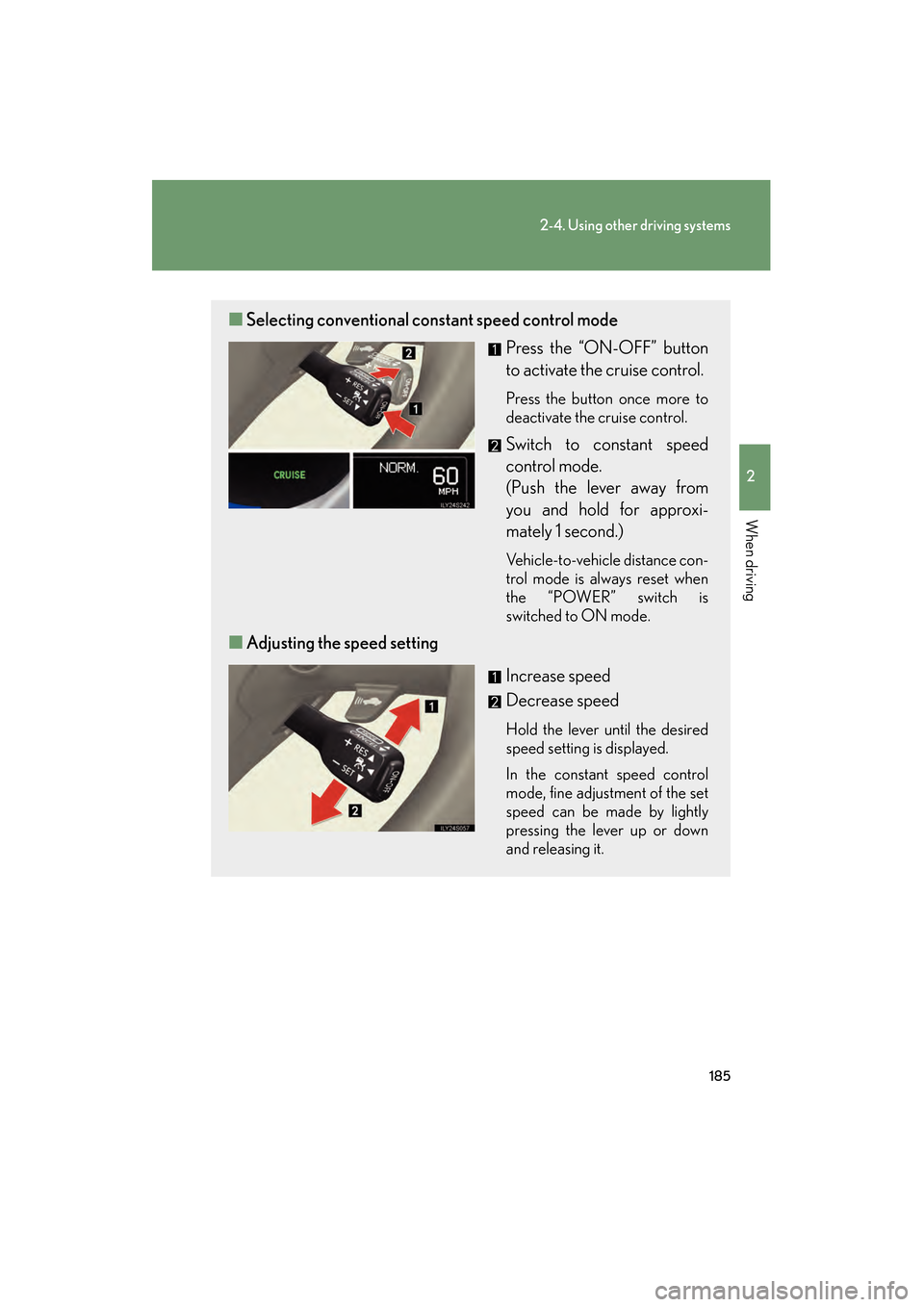
■Selecting conventional cons tant speed control mode
Press the “ON-OFF” button
to activate the cruise control.
Press the button once more to
deactivate the cruise control.
Switch to constant speed
control mode.
(Push the lever away from
you and hold for approxi-
mately 1 second.)
Vehicle-to-vehicle distance con-
trol mode is always reset when
the “POWER” switch is
switched to ON mode.
■Adjusting the speed setting
Increase speed
Decrease speed
Hold the lever until the desired
speed setting is displayed.
In the constant speed control
mode, fine adjustment of the set
speed can be made by lightly
pressing the lever up or down
and releasing it.
GS450h_HV_U.book Page 185 Monday, April 27, 2009 10:10 AM
Page 206 of 622
205
2-4. Using other driving systems
2
When driving
GS_HV_U (OM30B44U)
April 27, 2009 10:09 am
■The intuitive parking assist can be operated when
The “POWER” switch is in the ON mode.
■When the system malfunctions
●If a malfunction occurs and no obstacles have been detected, a warning is dis-
played, and a malfunction beep sounds for 7 seconds.
If an obstacle has been detected, or another malfunction occurs in a different
sensor, the malfunction beeps will not sound.
●In the following circumstances the displayed warning will disappear:
• If you switch the screen to a different mode.
• If you turn off the intuitive parking assist main switch.
• If the vehicle speed exceeds 6 mph (10 km/h). Once the vehicle speed dropsbelow 6 mph (10 km/h), the warning will be displayed again.
●If the malfunction screen is displayed, the detection range of the dual sensors is
shortened. In this case, the necessity for obstacle evasion (whether the obstacle
will come within 0.8 ft. [25 cm] of the vehicle or not) will not be calculated.
GS450h_HV_U.book Page 205 Monday, April 27, 2009 10:10 AM
Page 215 of 622
214
2-4. Using other driving systems
GS_HV_U (OM30B44U)
April 27, 2009 10:09 am
Driving assist systems
To help enhance driving safety and performance, the following systems
operate automatically in response to various driving situations. Be aware,
however, that these systems are supplementary and should not be relied
upon too heavily when operating the vehicle.
■ ABS (Anti-lock Brake System)
Helps to prevent wheel lock when the brakes are applied suddenly, or if
the brakes are applied while driving on a slippery road surface.
■Brake assist
Generates an increased level of braking force after the brake pedal is
depressed, when the system detects a panic stop situation.
■Enhanced VSC (Enhanced Vehicle Stability Control)
Helps the driver to control skidding when swerving suddenly or turning on
slippery road surfaces.
■TRAC (Traction Control)
Helps to maintain drive power and prevents the rear wheels from spinning
when starting the vehicle or accelerating on slippery roads.
■Hill-start assist control
Helps prevent the vehicle from rolling backwards when starting on an
incline or slippery slope. It operates for approximately 5 seconds at maxi-
mum.
■EPS (Electric Power Steering)
Employs an electric motor to reduce the amount of effort needed to turn
the steering wheel.
■Active stabilizer suspensi on system (if equipped)
Reduces sway when cornering according to steering wheel movement
and the selected suspension damping mode, in order to maintain a stable
vehicle posture.
GS450h_HV_U.book Page 214 Monday, April 27, 2009 10:10 AM
Page 243 of 622

242
3-1. Using the touch screen
GS_HV_U (OM30B44U)
April 27, 2009 10:09 am
The initial screenIf the “POWER” switch is set to
ACCESSORY or ON mode, the
initializing screen will be displayed
for a few seconds as the system
starts up.
■To avoid damaging the touch screen
●Touch the screen lightly with your finger. If there is no response, remove your fin-
ger from the screen and try again.
●Remove any dirt on the screen by wiping with a soft cloth. Do not use detergent.
■When using the touch screen
●If the screen is cold, the display may be dark, or the system may seem to be
operating slightly slower than normal.
●The screen may seem dark and hard to see when viewed through sunglasses.
Change your angle of viewing, adjust the display on the “Display” screen or
remove your sunglasses.
GS450h_HV_U.book Page 242 Monday, April 27, 2009 10:10 AM