display Lexus GS450h 2009 Owner's Guide
[x] Cancel search | Manufacturer: LEXUS, Model Year: 2009, Model line: GS450h, Model: Lexus GS450h 2009Pages: 622
Page 169 of 622
168
2-2. Instrument cluster
GS_HV_U (OM30B44U)
April 27, 2009 10:09 am
■System check display
The “LEXUS HYBRID DRIVE” message is displayed 3 seconds after the
“POWER” switch is set to the ON mode. At this time a systems check is conducted,
and the normal display is shown upon successful completion of this check.
NOTICE
■The multi-information display at low temperatures
Allow the interior of the vehicle to warm up before using the liquid crystal informa-
tion display. At extremely low temperatures, the information display monitor may
respond slowly, and display changes may be delayed.
GS450h_HV_U.book Page 168 Monday, April 27, 2009 10:10 AM
Page 184 of 622
183
2-4. Using other driving systems
2
When driving
GS_HV_U (OM30B44U)
April 27, 2009 10:09 am
Dynamic radar cruise control∗
∗: If equipped
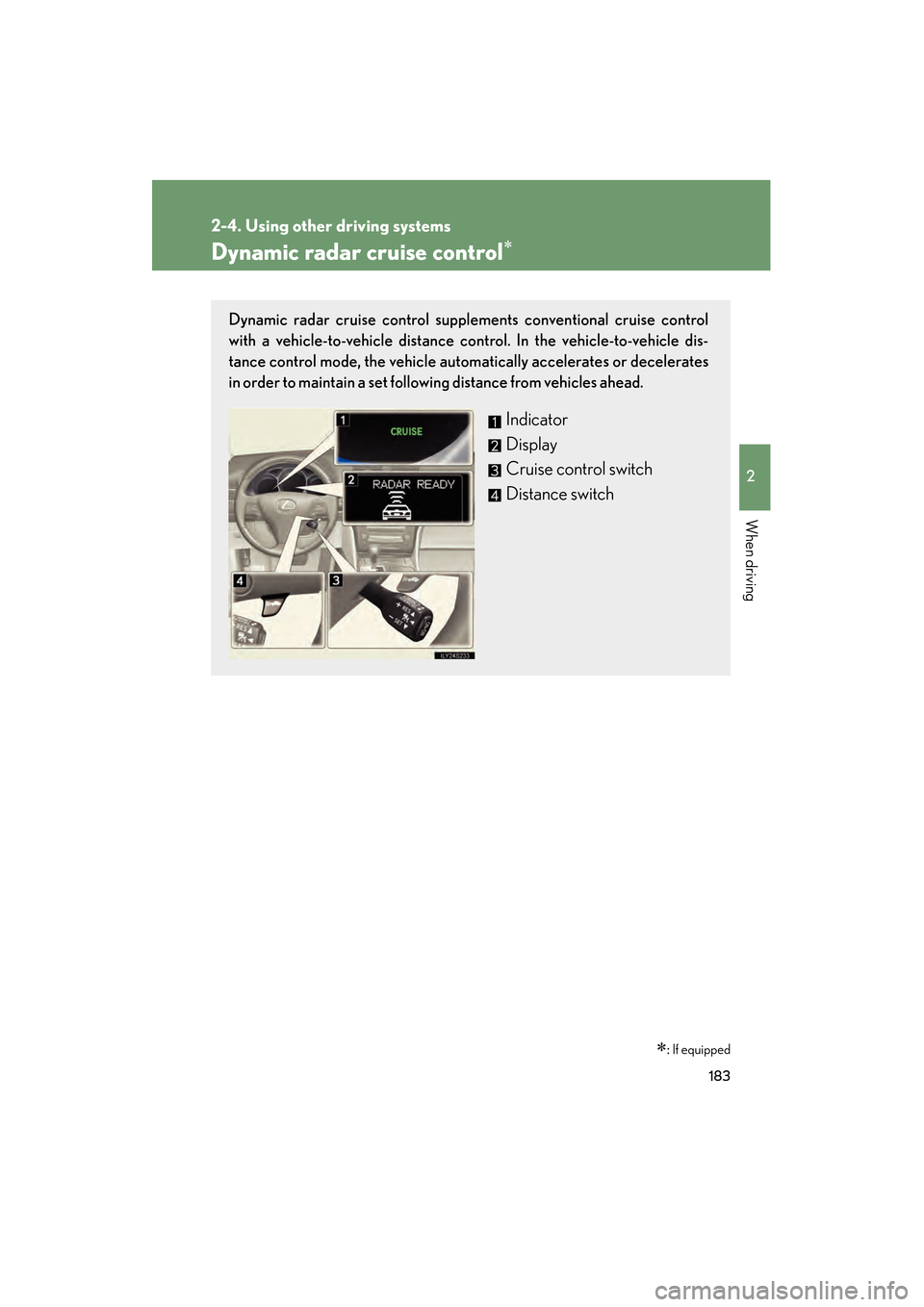
Dynamic radar cruise control supplem ents conventional cruise control
with a vehicle-to-vehicle distance co ntrol. In the vehicle-to-vehicle dis-
tance control mode, the vehicle automatically accelerates or decelerates
in order to maintain a set following distance from vehicles ahead.
Indicator
Display
Cruise control switch
Distance switch
GS450h_HV_U.book Page 183 Monday, April 27, 2009 10:10 AM
Page 186 of 622
185
2-4. Using other driving systems
2
When driving
GS_HV_U (OM30B44U)
April 27, 2009 10:09 am
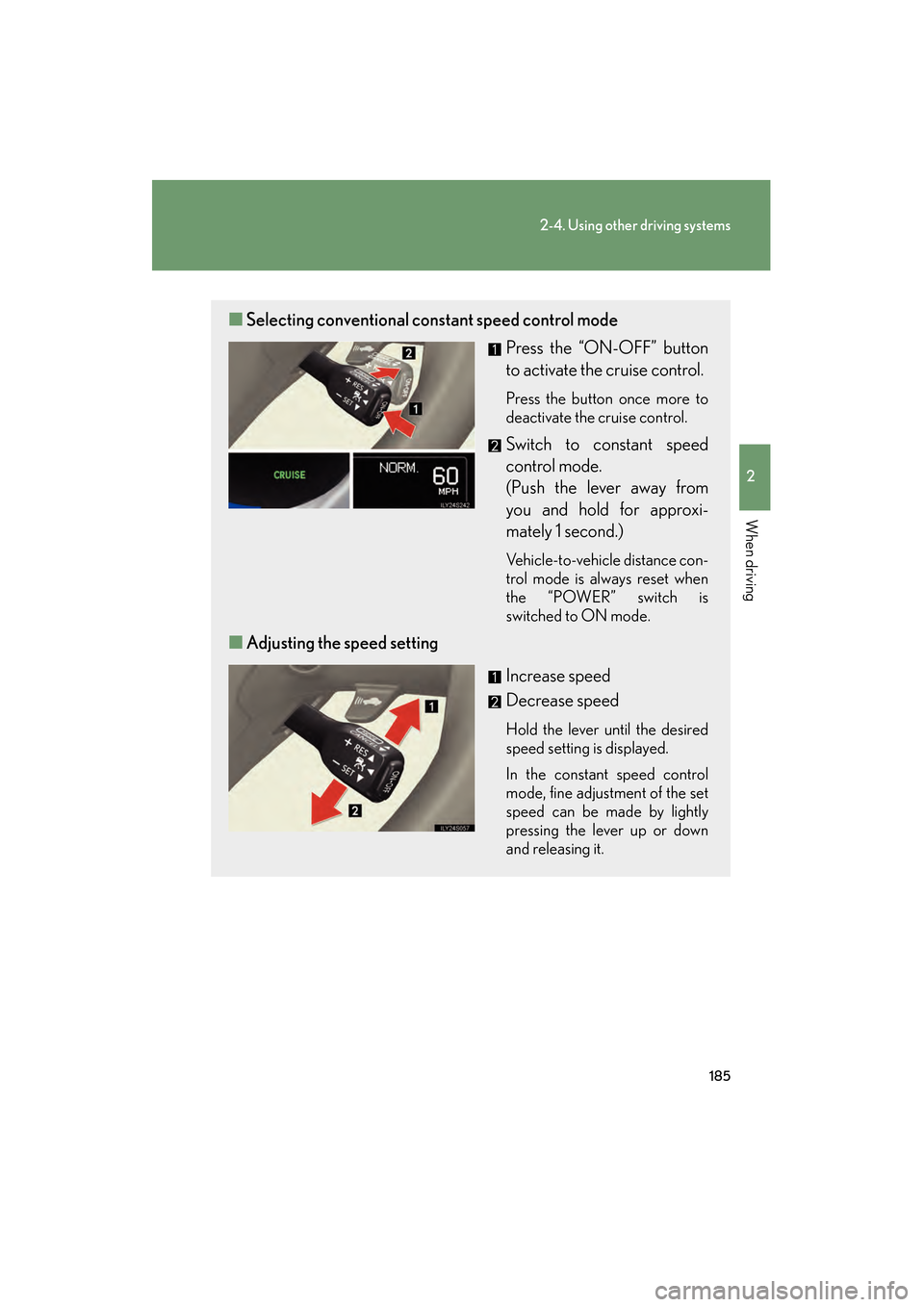
■Selecting conventional cons tant speed control mode
Press the “ON-OFF” button
to activate the cruise control.
Press the button once more to
deactivate the cruise control.
Switch to constant speed
control mode.
(Push the lever away from
you and hold for approxi-
mately 1 second.)
Vehicle-to-vehicle distance con-
trol mode is always reset when
the “POWER” switch is
switched to ON mode.
■Adjusting the speed setting
Increase speed
Decrease speed
Hold the lever until the desired
speed setting is displayed.
In the constant speed control
mode, fine adjustment of the set
speed can be made by lightly
pressing the lever up or down
and releasing it.
GS450h_HV_U.book Page 185 Monday, April 27, 2009 10:10 AM
Page 187 of 622
186
2-4. Using other driving systems
GS_HV_U (OM30B44U)
April 27, 2009 10:09 am
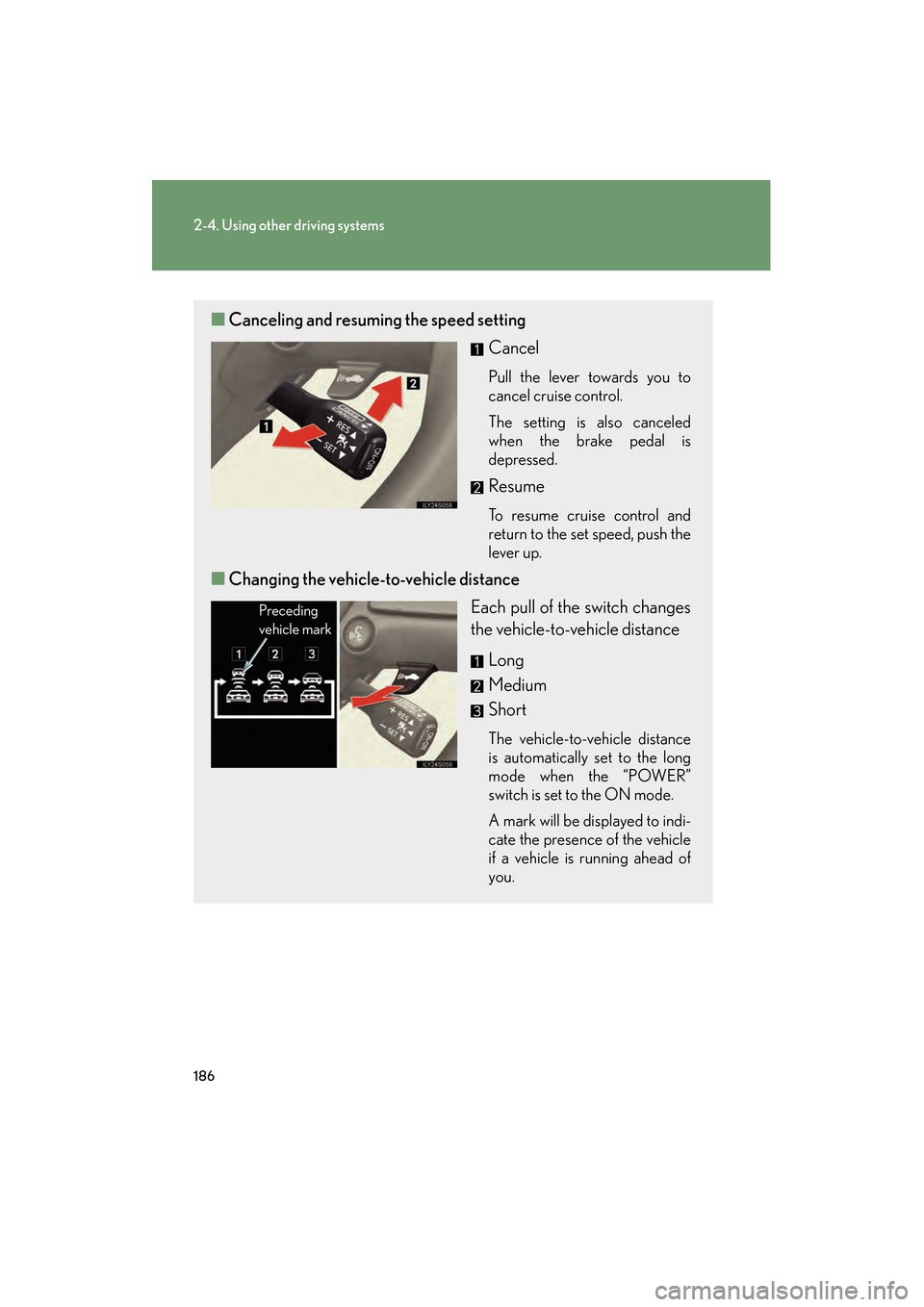
■Canceling and resuming the speed setting
Cancel
Pull the lever towards you to
cancel cruise control.
The setting is also canceled
when the brake pedal is
depressed.
Resume
To resume cruise control and
return to the set speed, push the
lever up.
■Changing the vehicle- to-vehicle distance
Each pull of the switch changes
the vehicle-to-vehicle distance
Long
Medium
Short
The vehicle-to-vehicle distance
is automatically set to the long
mode when the “POWER”
switch is set to the ON mode.
A mark will be displayed to indi-
cate the presence of the vehicle
if a vehicle is running ahead of
you.
Preceding
vehicle mark
GS450h_HV_U.book Page 186 Monday, April 27, 2009 10:10 AM
Page 189 of 622
188
2-4. Using other driving systems
GS_HV_U (OM30B44U)
April 27, 2009 10:09 am
Example of follow-up cruising
When following a vehicle driving slower than the set speed
The system continues follow-up cruising while adjusting for changes in the
speed of the vehicle ahead in order to maintain the vehicle-to-vehicle dis-
tance set by the driver.
Example of acceleration
When there are no longer vehicles driving slower than the set speed in
the lane ahead
When the vehicle ahead of you executes a lane change, the system slowly
accelerates until the set vehicle speed is reached. The system then returns to
fixed speed cruising.
Approach warningWhen your vehicle is too close to a vehicle ahead, and sufficient auto-
matic deceleration via the cruise control is not possible, the display will
flash and a buzzer will sound to alert the driver. An example of this would
be if another driver cuts in front of you while you are following a vehicle.
Apply the brakes to ensure an appropriate vehicle-to-vehicle distance.
■Warning lights and messages for dynamic radar cruise control
Warning lights, messages and buzzers are used to indicate a system malfunction or
to inform the driver of the need for caution while driving. ( →P. 5 2 1 )
■Switching modes
The mode cannot be switched to constant speed control mode if vehicle-to-vehicle
distance control mode has been used. The mode also cannot be switched from
constant speed control to vehicle-to-vehic le control mode. Turn the system off by
pressing the “ON-OFF” button, and turn it on again.
GS450h_HV_U.book Page 188 Monday, April 27, 2009 10:10 AM
Page 196 of 622
195
2-4. Using other driving systems
2
When driving
GS_HV_U (OM30B44U)
April 27, 2009 10:09 am
Intuitive parking assist∗
∗: If equipped
Intuitive parking assist uses sensors in the front and rear of the vehicle to
detect the distance between the vehicle and any obstacles, and informs the
driver of this distance using the mult i-information display, the touch screen,
and warning beeps.
The system may be used at speeds less than about 6 mph (10 km/h).
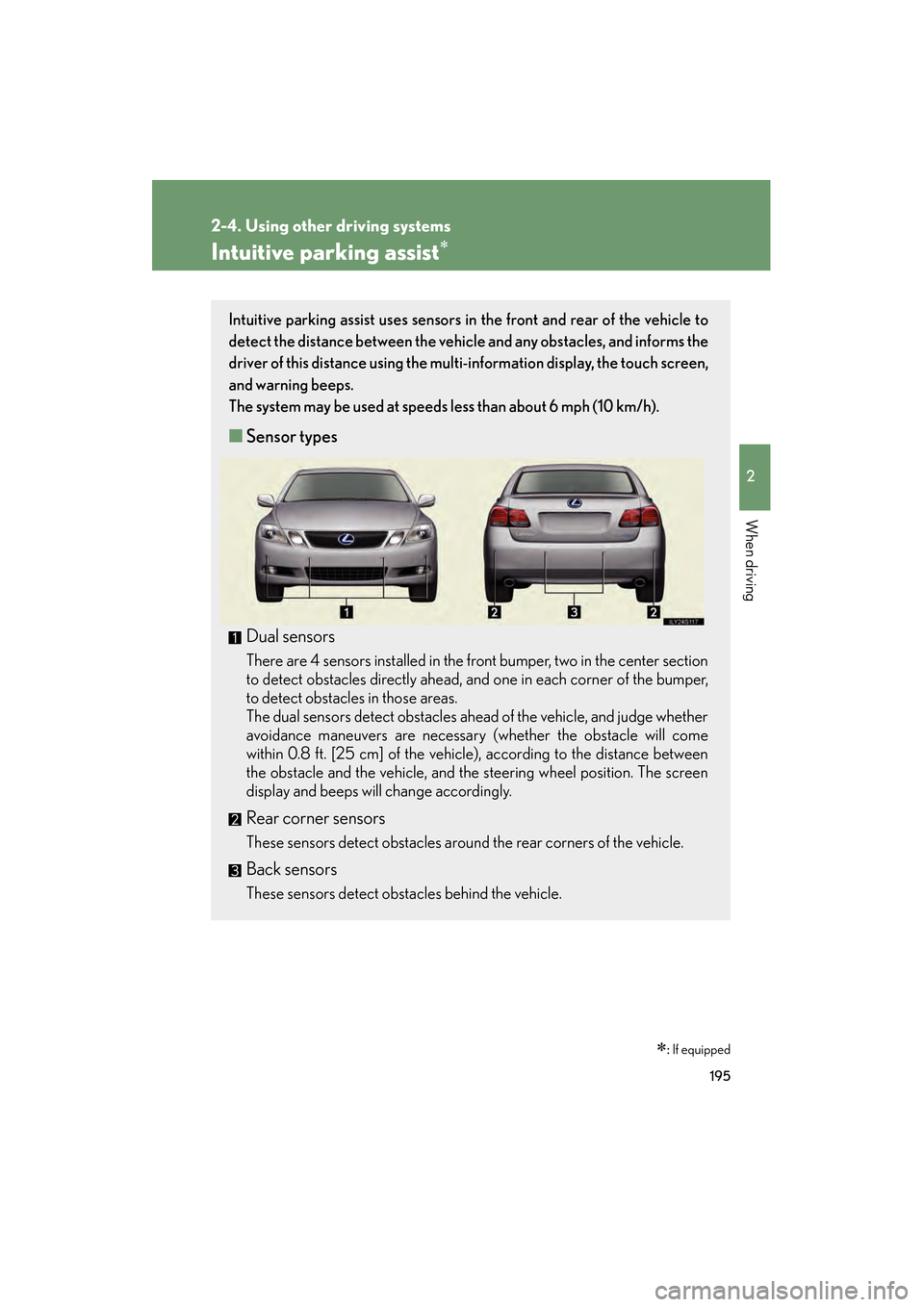
■ Sensor types
Dual sensors
There are 4 sensors installed in the front bumper, two in the center section
to detect obstacles directly ahead, and one in each corner of the bumper,
to detect obstacles in those areas.
The dual sensors detect obstacles ahead of the vehicle, and judge whether
avoidance maneuvers are necessary (whether the obstacle will come
within 0.8 ft. [25 cm] of the vehicle), according to the distance between
the obstacle and the vehicle, and the steering wheel position. The screen
display and beeps will change accordingly.
Rear corner sensors
These sensors detect obstacles around the rear corners of the vehicle.
Back sensors
These sensors detect obstacles behind the vehicle.
GS450h_HV_U.book Page 195 Monday, April 27, 2009 10:10 AM
Page 198 of 622
197
2-4. Using other driving systems
2
When driving
GS_HV_U (OM30B44U)
April 27, 2009 10:09 am
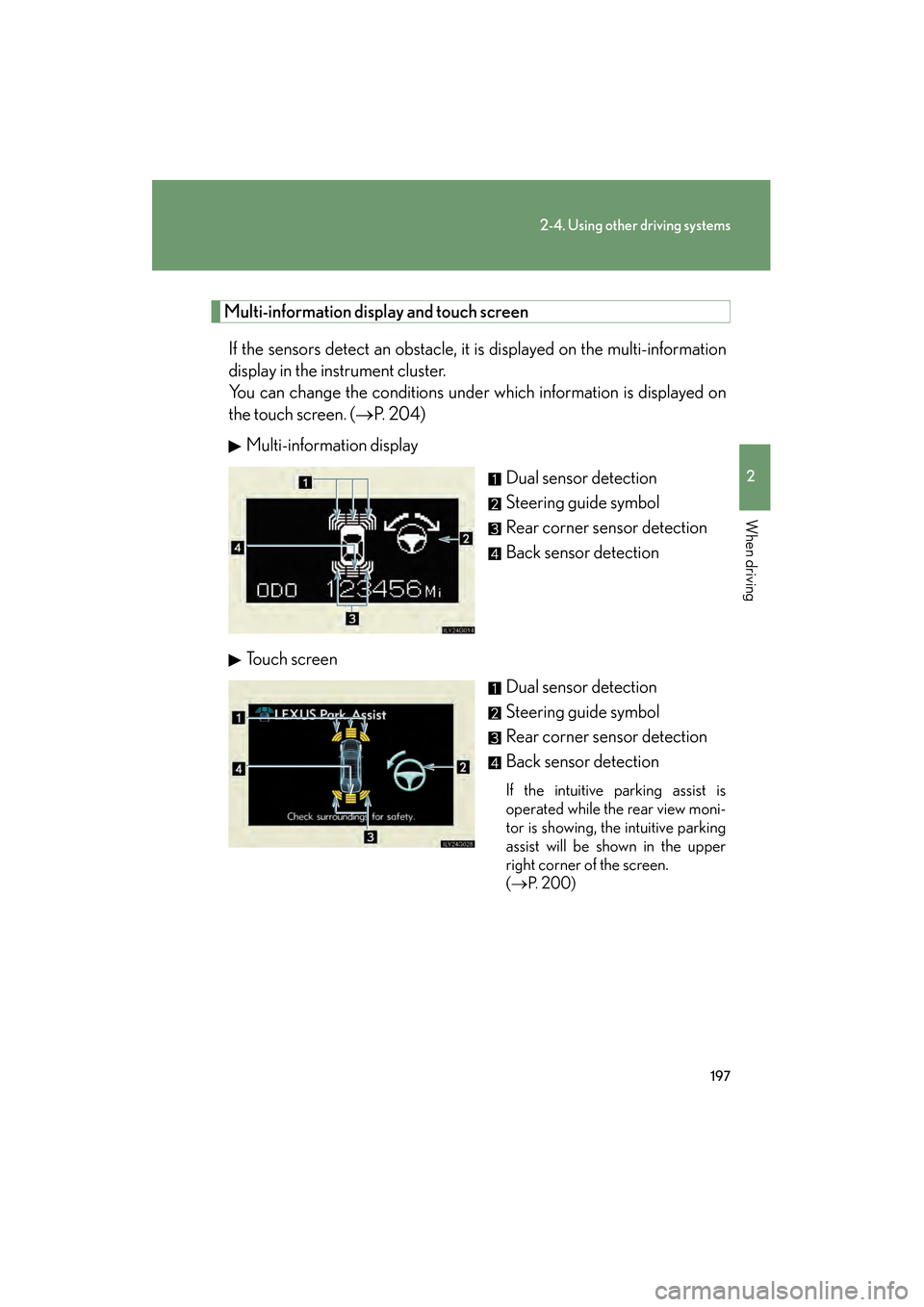
Multi-information display and touch screenIf the sensors detect an obstacle, it is displayed on the multi-information
display in the instrument cluster.
You can change the conditions under which information is displayed on
the touch screen. ( →P. 2 0 4 )
Multi-information display
Dual sensor detection
Steering guide symbol
Rear corner sensor detection
Back sensor detection
To u c h s c r e e n Dual sensor detection
Steering guide symbol
Rear corner sensor detection
Back sensor detection
If the intuitive parking assist is
operated while the rear view moni-
tor is showing, the intuitive parking
assist will be shown in the upper
right corner of the screen.
(→ P. 200)
GS450h_HV_U.book Page 197 Monday, April 27, 2009 10:10 AM
Page 199 of 622
198
2-4. Using other driving systems
GS_HV_U (OM30B44U)
April 27, 2009 10:09 am
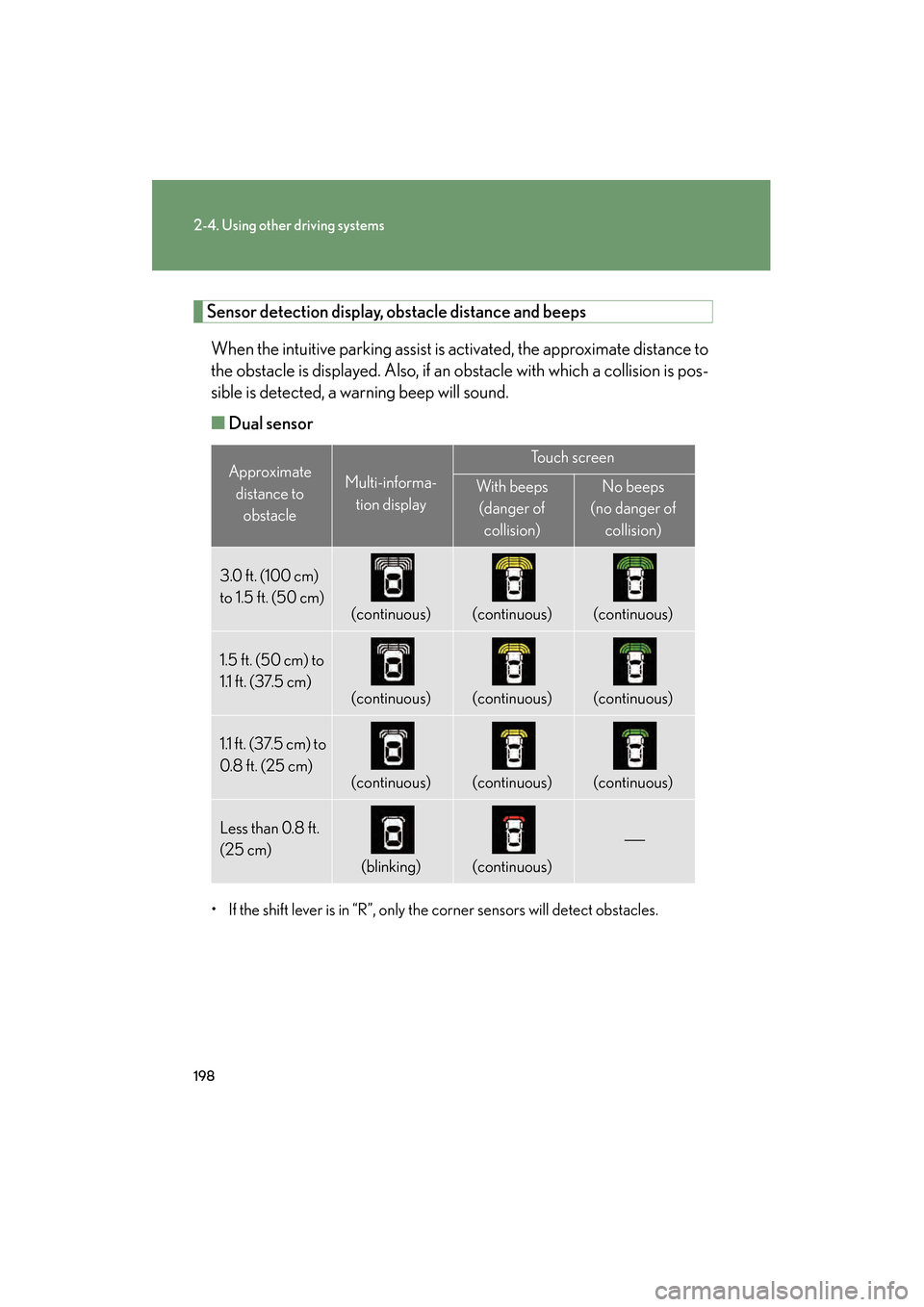
Sensor detection display, obstacle distance and beepsWhen the intuitive parking assist is activated, the approximate distance to
the obstacle is displayed. Also, if an obstacle with which a collision is pos-
sible is detected, a warning beep will sound.
■ Dual sensor
• If the shift lever is in “R”, only the corner sensors will detect obstacles.
Approximate
distance to obstacleMulti-informa-
tion display
To u c h s c r e e n
With beeps(danger of collision)No beeps
(no danger of collision)
3.0 ft. (100 cm)
to 1.5 ft. (50 cm)
(continuous)(continuous)(continuous)
1.5 ft. (50 cm) to
1.1 ft. (37.5 cm)
(continuous)(continuous)(continuous)
1.1 ft. (37.5 cm) to
0.8 f t. (25 cm)
(continuous)(continuous)(continuous)
Less than 0.8 ft.
(25 cm)
(blinking)(continuous)
GS450h_HV_U.book Page 198 Monday, April 27, 2009 10:10 AM
Page 200 of 622
199
2-4. Using other driving systems
2
When driving
GS_HV_U (OM30B44U)
April 27, 2009 10:09 am
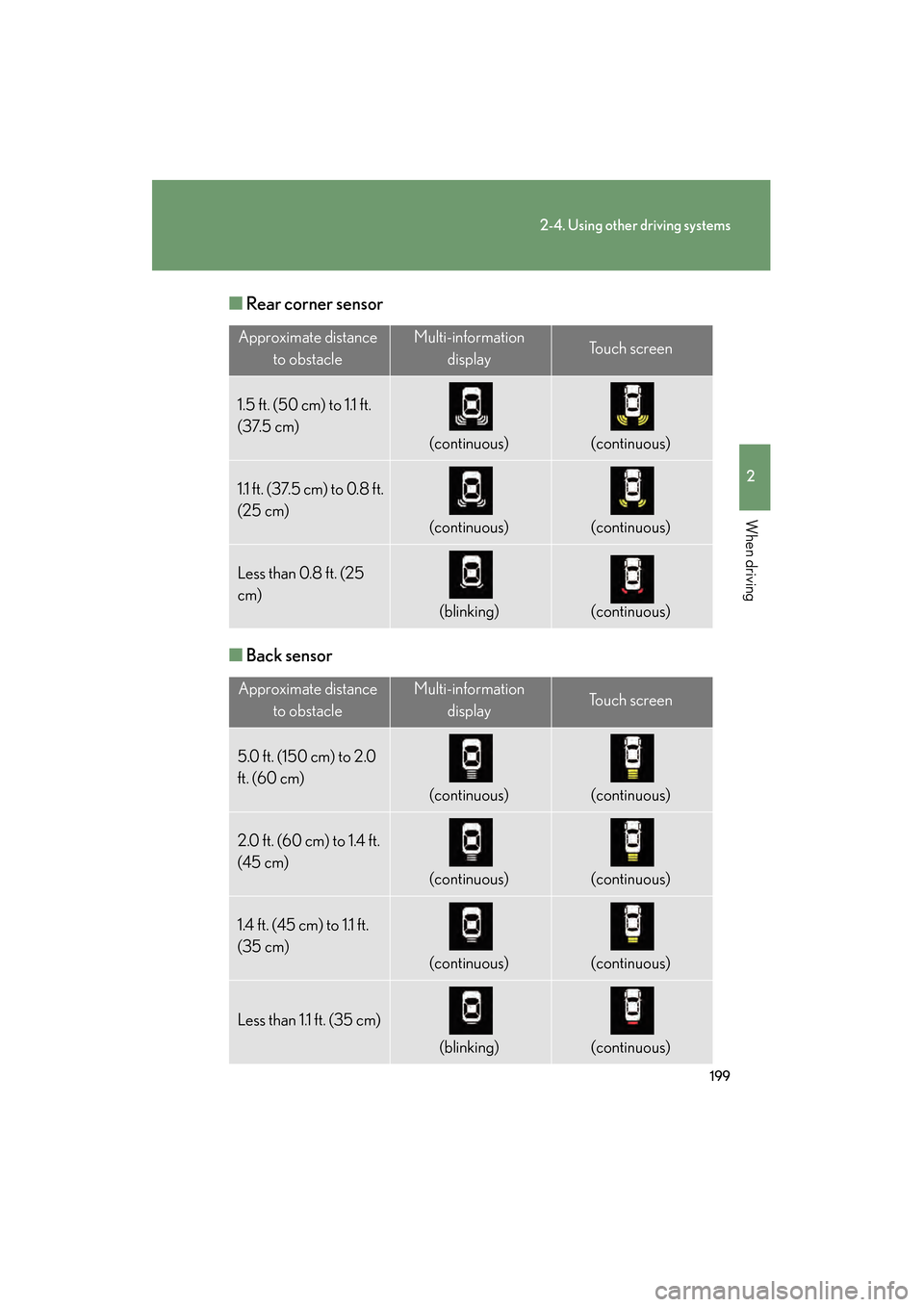
■Rear corner sensor
■ Back sensor
Approximate distance
to obstacleMulti-information displayTo u c h s c r e e n
1.5 ft. (50 cm) to 1.1 ft.
(37.5 cm)
(continuous)(continuous)
1.1 ft. (37.5 cm) to 0.8 ft.
(25 cm)
(continuous)(continuous)
Less than 0.8 ft. (25
cm)
(blinking)(continuous)
Approximate distance to obstacleMulti-information displayTo u c h s c r e e n
5.0 ft. (150 cm) to 2.0
ft. (60 cm)
(continuous)(continuous)
2.0 ft. (60 cm) to 1.4 ft.
(45 cm)
(continuous)(continuous)
1.4 ft. (45 cm) to 1.1 ft.
(35 cm)
(continuous)(continuous)
Less than 1.1 ft. (35 cm)
(blinking)(continuous)
GS450h_HV_U.book Page 199 Monday, April 27, 2009 10:10 AM
Page 201 of 622
200
2-4. Using other driving systems
GS_HV_U (OM30B44U)
April 27, 2009 10:09 am
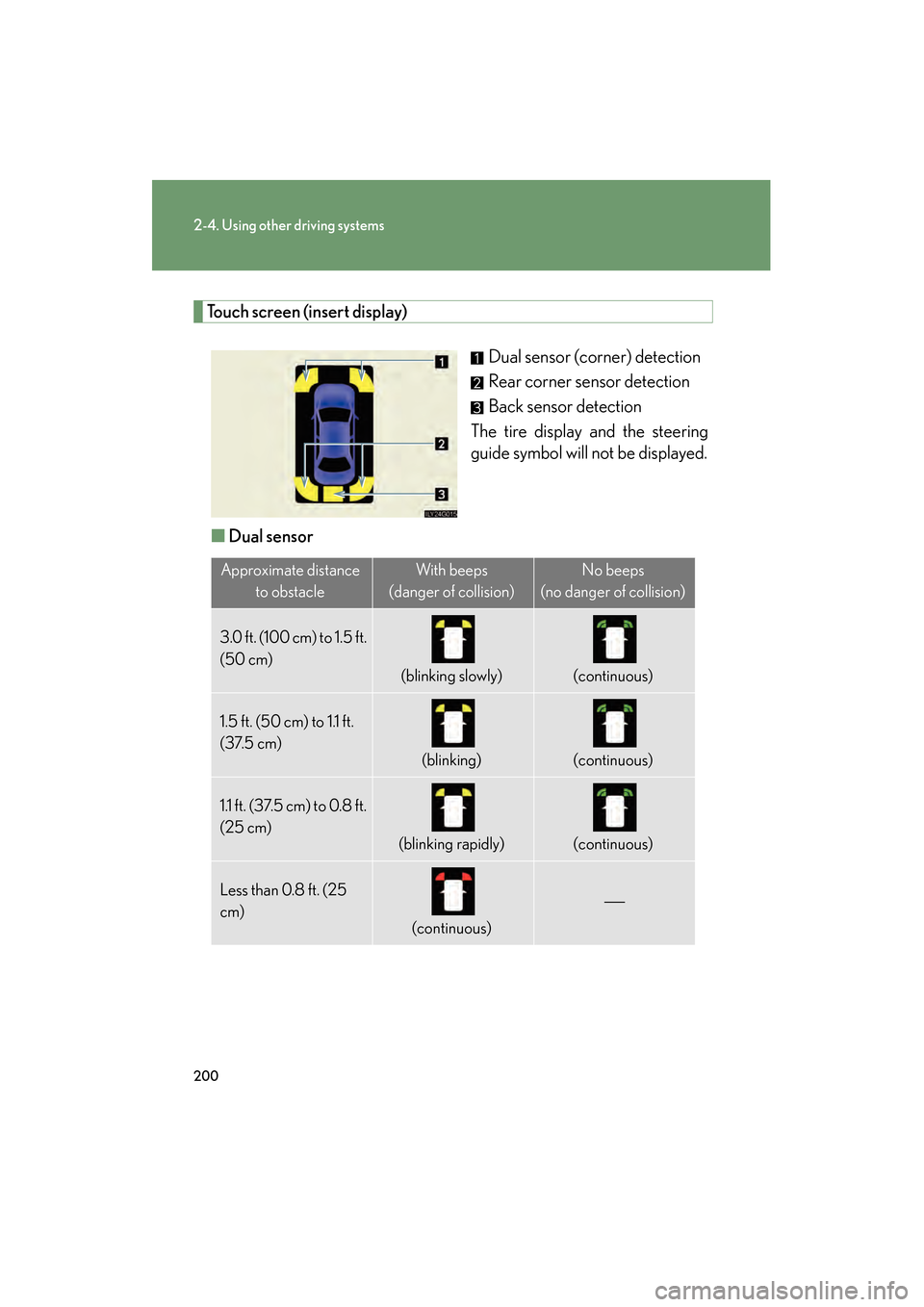
Touch screen (insert display)Dual sensor (corner) detection
Rear corner sensor detection
Back sensor detection
The tire display and the steering
guide symbol will not be displayed.
■ Dual sensor
Approximate distance
to obstacleWi th bee ps
(danger of collision)No beeps
(no danger of collision)
3.0 ft. (100 cm) to 1.5 ft.
(50 cm)
(blinking slowly)(continuous)
1.5 ft. (50 cm) to 1.1 ft.
(37.5 cm)
(blinking)(continuous)
1.1 ft. (37.5 cm) to 0.8 ft.
(25 cm)
(blinking rapidly)(continuous)
Less than 0.8 ft. (25
cm)
(continuous)
GS450h_HV_U.book Page 200 Monday, April 27, 2009 10:10 AM