light Lexus GS450h 2009 Manual PDF
[x] Cancel search | Manufacturer: LEXUS, Model Year: 2009, Model line: GS450h, Model: Lexus GS450h 2009Pages: 622
Page 195 of 622
194
2-4. Using other driving systems
GS_HV_U (OM30B44U)
April 27, 2009 10:09 am
CAUTION
■To ensure the radar sensor functions correctly
Do not do the following to the sensor or grille cover as doing so may cause the sen-
sor not to function correctly and could result in a serious or fatal accident.
●Stick or attach anything to them
●Leave them dirty
●Disassemble, subject them to strong shocks
●Modify or paint them
●Replace them with non-genuine parts
■Handling the radar sensor
Observe the following to ensure the cruise control system can function effectively.
●Keep the sensor and front grille clean at all times.
Clean the sensor and front grille with a soft cloth so you do not mark or damage
them.
●Do not subject the sensor or surrounding area to a strong impact.
If the sensor moves even slightly off position, the system may malfunction. If the
sensor or surrounding area is subject to a strong impact, always have the area
inspected and adjusted by a Lexus dealer.
●Do not disassemble the sensor.
●Do not attach accessories or stickers to the sensor, grille or surrounding area.
●Do not modify or paint the sensor and grille.
GS450h_HV_U.book Page 194 Monday, April 27, 2009 10:10 AM
Page 197 of 622
196
2-4. Using other driving systems
GS_HV_U (OM30B44U)
April 27, 2009 10:09 am
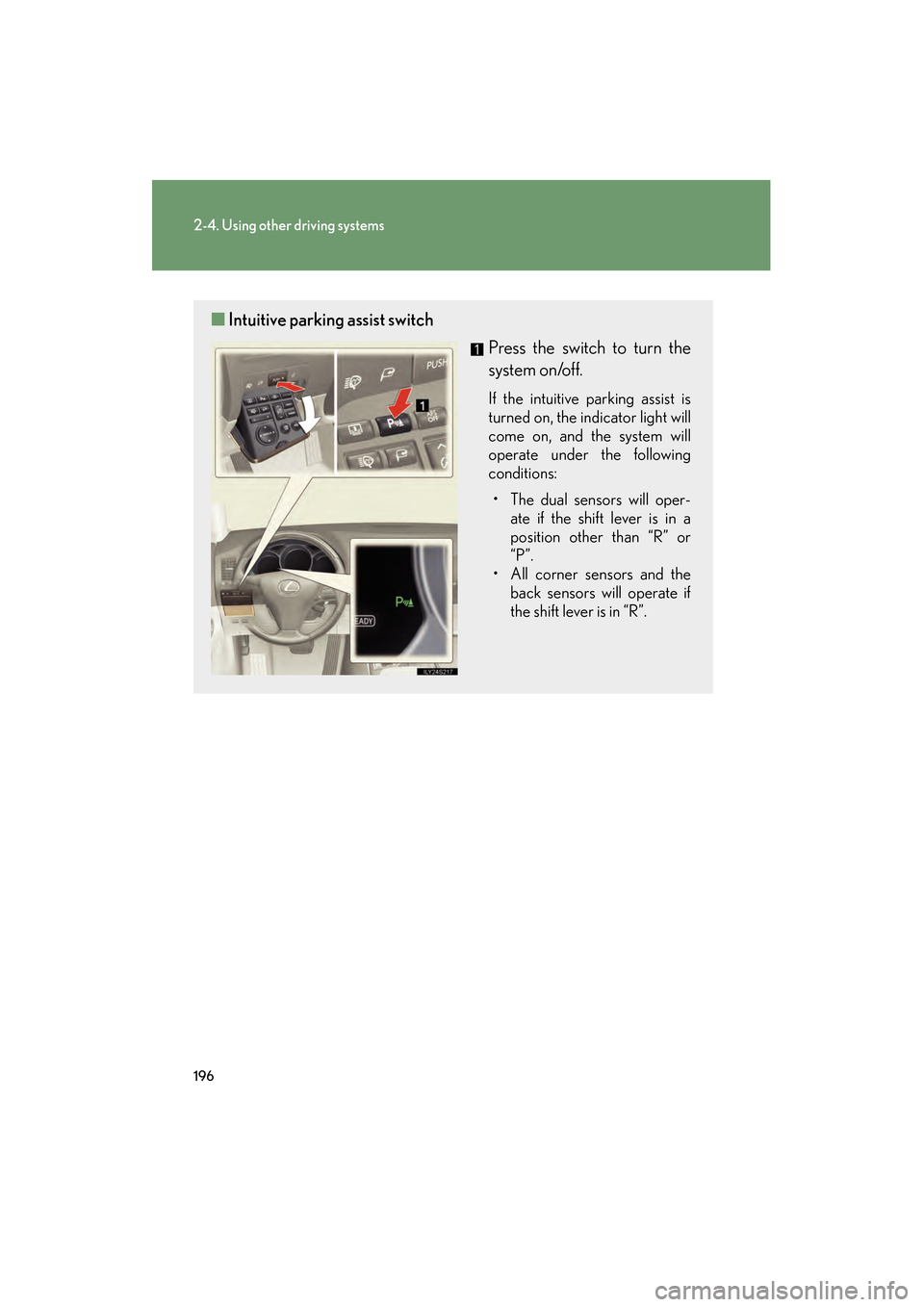
■Intuitive parking assist switch
Press the switch to turn the
system on/off.
If the intuitive parking assist is
turned on, the indicator light will
come on, and the system will
operate under the following
conditions:
• The dual sensors will oper- ate if the shift lever is in a
position other than “R” or
“P”.
• All corner sensors and the back sensors will operate if
the shift lever is in “R”.
GS450h_HV_U.book Page 196 Monday, April 27, 2009 10:10 AM
Page 208 of 622
207
2-4. Using other driving systems
2
When driving
GS_HV_U (OM30B44U)
April 27, 2009 10:09 am
●In the following situations, the intuitive parking assist may not function correctly,
possibly leading to an accident.
• There is ice, snow or mud on the sensors. (Wiping the sensors will resolve thisproblem.)
• The sensor area is frozen. (Thawing the area will resolve this problem.) In especially cold weather, if a sensor is frozen the screen may show an abnor-
mal display, or obstacles may not be detected.
• The vehicle angle is especially wide.
• In harsh sunlight or intense cold weather.
• When driving on bumpy, sloped or gravel roads, or over grass.
• If there is something producing ultrasonic waves nearby, such as another vehicle’s horn, motorcycle engine noise, air braking sound from heavy-duty
vehicles, or another vehicle using the intuitive parking assist.
• In heavy rain, or if water is splashed on the sensors.
• If a commercial fender pole or radio antenna is installed.
• If towing eyelet is installed on your vehicle.
• If moving towards a high curb or a curb corner.
• Objects such as signs may cause the detection distance to shorten.
• The area directly under the bumpers is not detected. Objects lower than the sensors or thin stakes etc. may be detected initially,
but as they draw closer, they may cease to be detected.
• If obstacles draw too close to the sensor.
■Obstacles that may not be detected correctly
The following obstacles may not be detected.
●Thin objects such as wire, fencing or rope.
●Objects that absorb sound waves, such as cotton or snow.
●Objects with sharp corners.
●Objects where the upper section projects out over the lower section.
●Low objects.
■If the display flashes and a message is displayed
→ P. 5 3 1
GS450h_HV_U.book Page 207 Monday, April 27, 2009 10:10 AM
Page 212 of 622
211
2-4. Using other driving systems
2
When driving
GS_HV_U (OM30B44U)
April 27, 2009 10:09 am
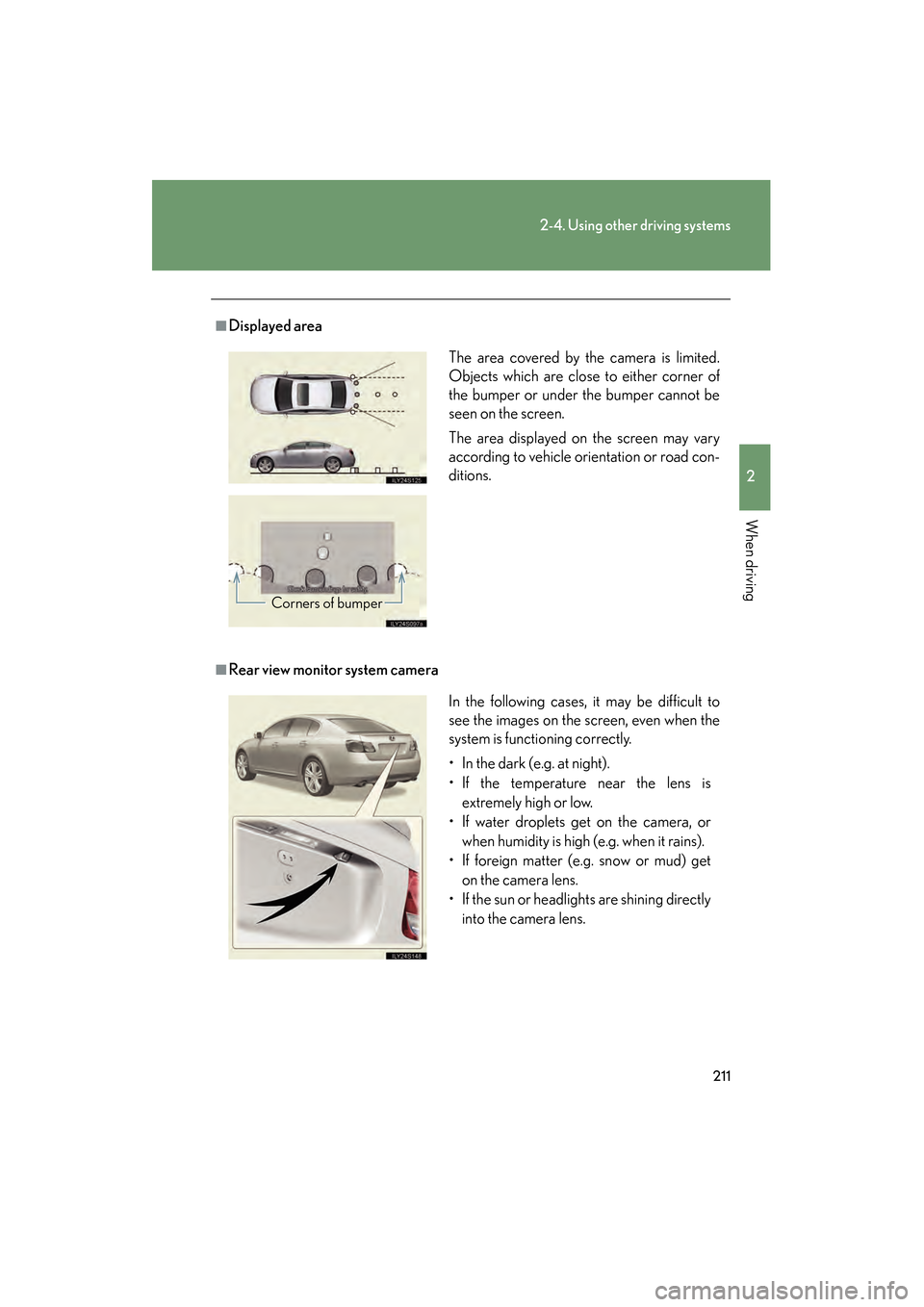
■Displayed area
■Rear view monitor system cameraThe area covered by the camera is limited.
Objects which are close to either corner of
the bumper or under the bumper cannot be
seen on the screen.
The area displayed on the screen may vary
according to vehicle orientation or road con-
ditions.
Corners of bumper
In the following cases, it may be difficult to
see the images on the screen, even when the
system is functioning correctly.
• In the dark (e.g. at night).
• If the temperature near the lens is
extremely high or low.
• If water droplets get on the camera, or when humidity is high (e.g. when it rains).
• If foreign matter (e.g. snow or mud) get
on the camera lens.
• If the sun or headlights are shining directly into the camera lens.
GS450h_HV_U.book Page 211 Monday, April 27, 2009 10:10 AM
Page 213 of 622
212
2-4. Using other driving systems
GS_HV_U (OM30B44U)
April 27, 2009 10:09 am
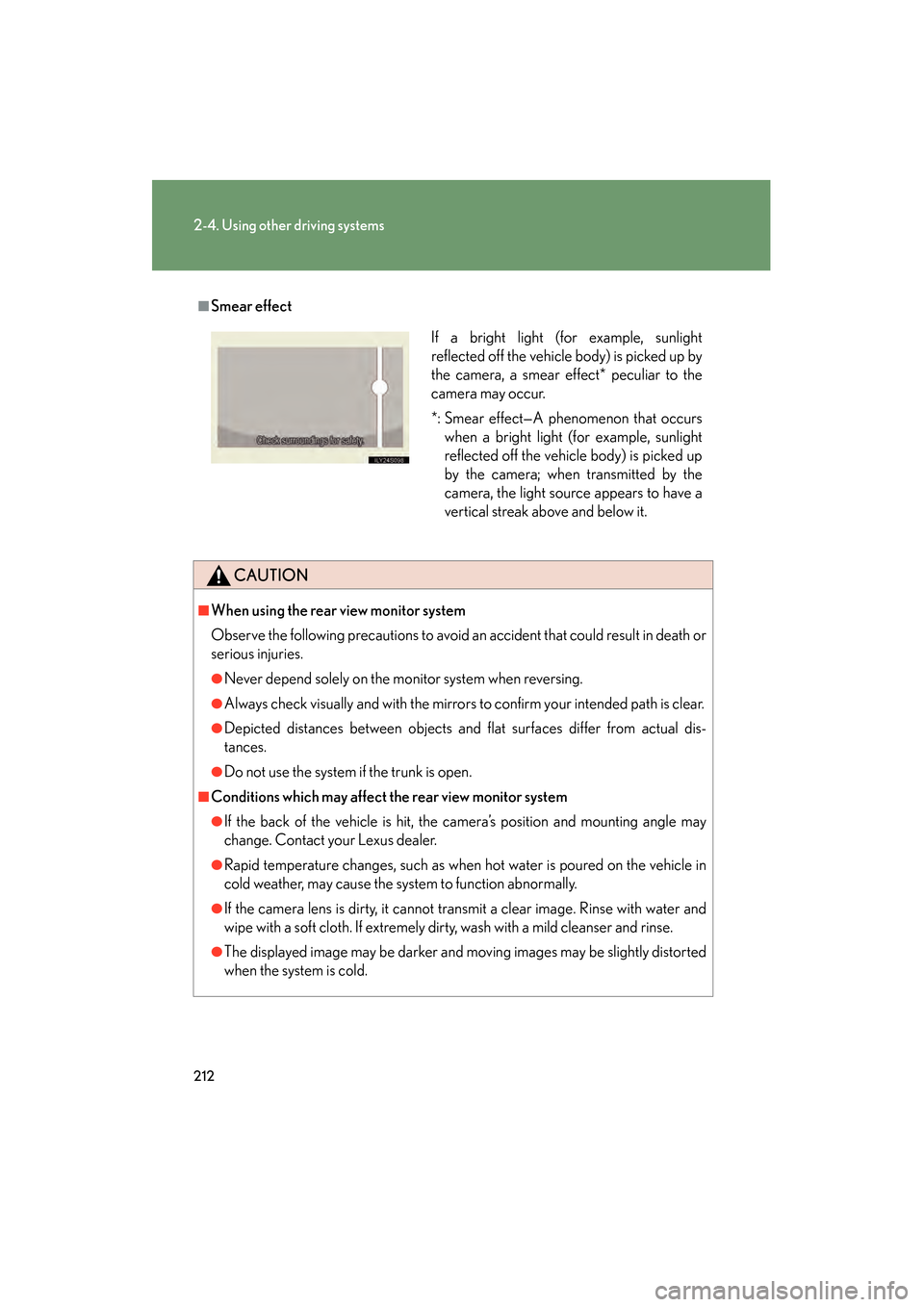
■Smear effect
CAUTION
■When using the rear view monitor system
Observe the following precautions to avoid an accident that could result in death or
serious injuries.
●Never depend solely on the monitor system when reversing.
●Always check visually and with the mirrors to confirm your intended path is clear.
●Depicted distances between objects and flat surfaces differ from actual dis-
tances.
●Do not use the system if the trunk is open.
■Conditions which may affect the rear view monitor system
●If the back of the vehicle is hit, the camera’s position and mounting angle may
change. Contact your Lexus dealer.
●Rapid temperature changes, such as when hot water is poured on the vehicle in
cold weather, may cause the system to function abnormally.
●If the camera lens is dirty, it cannot transmit a clear image. Rinse with water and
wipe with a soft cloth. If extremely dirty, wash with a mild cleanser and rinse.
●The displayed image may be darker and moving images may be slightly distorted
when the system is cold.
If a bright light (for example, sunlight
reflected off the vehicle body) is picked up by
the camera, a smear effect* peculiar to the
camera may occur.
*: Smear effect—A phenomenon that occurswhen a bright light (for example, sunlight
reflected off the vehicle body) is picked up
by the camera; when transmitted by the
camera, the light source appears to have a
vertical streak above and below it.
GS450h_HV_U.book Page 212 Monday, April 27, 2009 10:10 AM
Page 216 of 622
215
2-4. Using other driving systems
2
When driving
GS_HV_U (OM30B44U)
April 27, 2009 10:09 am
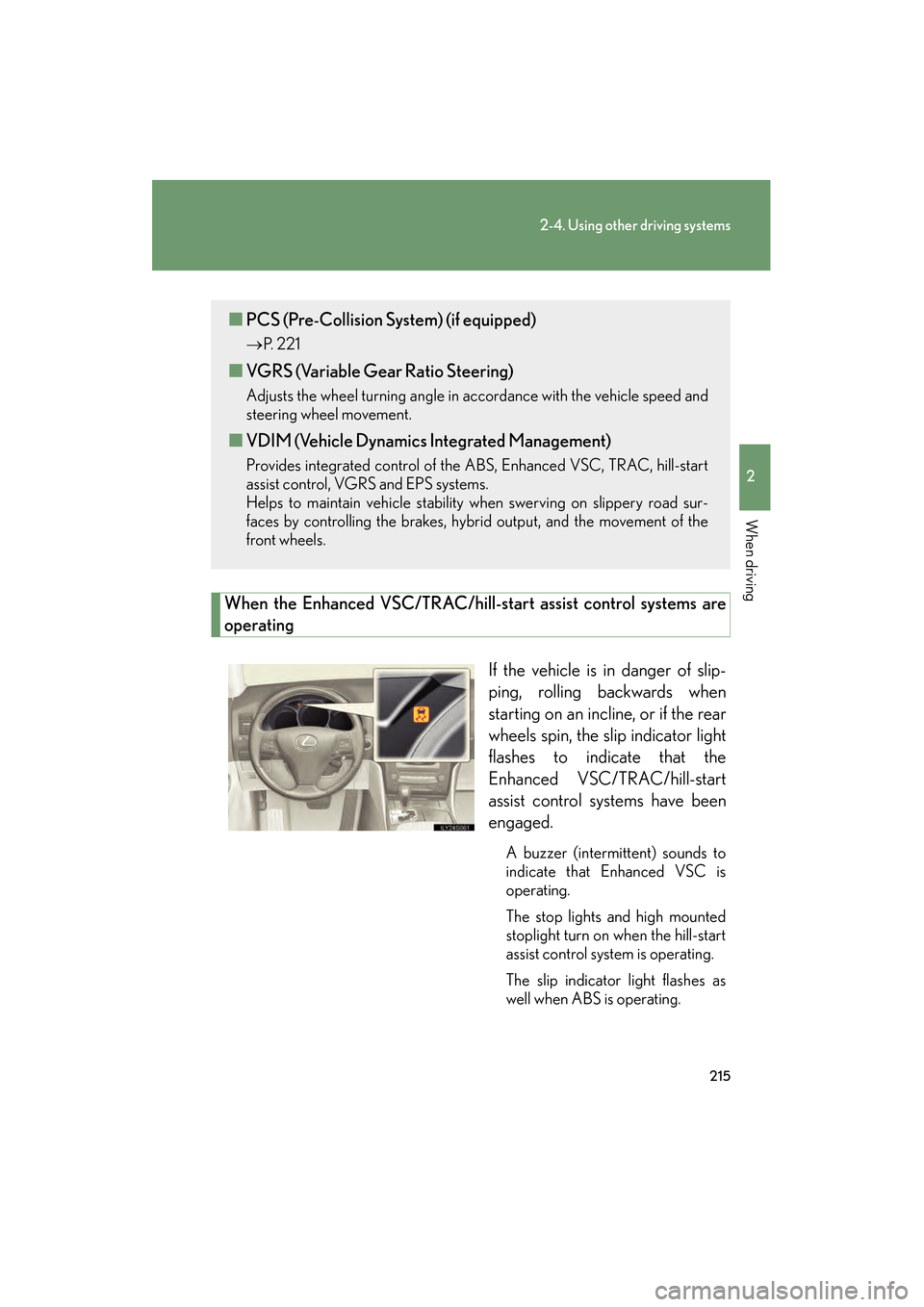
When the Enhanced VSC/TRAC/hill-start assist control systems are
operatingIf the vehicle is in danger of slip-
ping, rolling backwards when
starting on an incline, or if the rear
wheels spin, the slip indicator light
flashes to indicate that the
Enhanced VSC/TRAC/hill-start
assist control systems have been
engaged.
A buzzer (intermittent) sounds to
indicate that Enhanced VSC is
operating.
The stop lights and high mounted
stoplight turn on when the hill-start
assist control system is operating.
The slip indicator light flashes as
well when ABS is operating.
■PCS (Pre-Collision System) (if equipped)
→ P. 221
■VGRS (Variable Gear Ratio Steering)
Adjusts the wheel turning angle in accordance with the vehicle speed and
steering wheel movement.
■VDIM (Vehicle Dynamics Integrated Management)
Provides integrated control of the ABS, Enhanced VSC, TRAC, hill-start
assist control, VGRS and EPS systems.
Helps to maintain vehicle stability when swerving on slippery road sur-
faces by controlling the brakes, hybrid output, and the movement of the
front wheels.
GS450h_HV_U.book Page 215 Monday, April 27, 2009 10:10 AM
Page 218 of 622
217
2-4. Using other driving systems
2
When driving
GS_HV_U (OM30B44U)
April 27, 2009 10:09 am
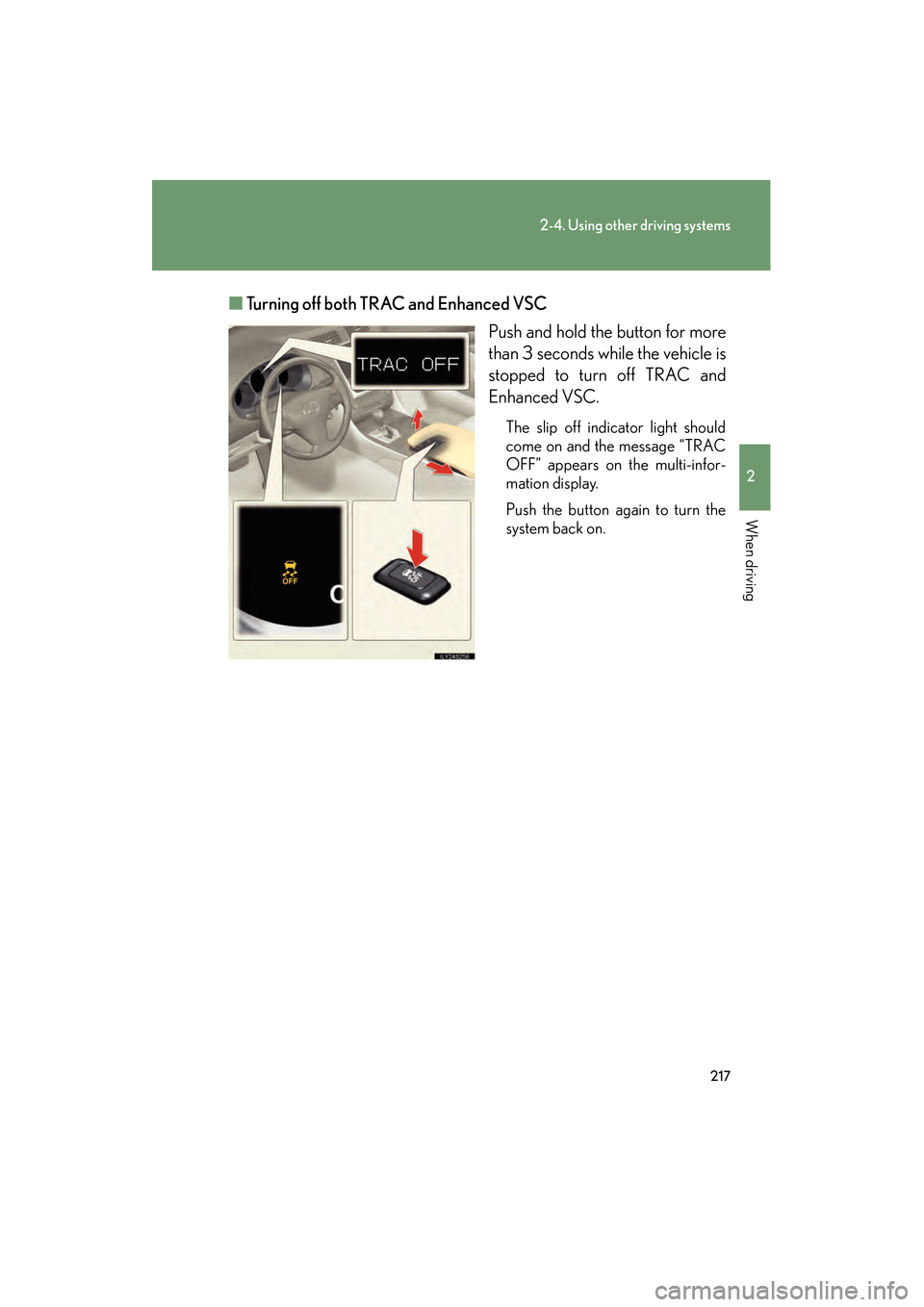
■Turning off both TRAC and Enhanced VSC
Push and hold the button for more
than 3 seconds while the vehicle is
stopped to turn off TRAC and
Enhanced VSC.
The slip off indicator light should
come on and the message “TRAC
OFF” appears on the multi-infor-
mation display.
Push the button again to turn the
system back on.
GS450h_HV_U.book Page 217 Monday, April 27, 2009 10:10 AM
Page 219 of 622

218
2-4. Using other driving systems
GS_HV_U (OM30B44U)
April 27, 2009 10:09 am
■Automatic reactivation of TRAC and Enhanced VSC
Turning the “POWER” switch OFF after turning off the TRAC and Enhanced VSC
systems will automatically re-enable them.
■Automatic TRAC reactivation
If only the TRAC system is turned off, the TRAC system will turn on when the vehi-
cle speed increases.
■Automatic TRAC and Enhanced VSC reactivation
If the TRAC and Enhanced VSC systems are turned off, the systems will not turn on
even when the vehicle speed increases.
■Sounds and vibrations caused by the ABS, brake assist, Enhanced VSC, TRAC,
hill-start assist control and VGRS systems
●A sound may be heard from the engine compartment when the hybrid system is
started or just after the vehicle begins to move. This sound does not indicate that
a malfunction has occurred in any of these systems.
●Any of the following conditions may occur when the above systems are operat-
ing. None of these indicates that a malfunction has occurred.
• Vibrations may be felt through the vehicle body and steering.
• A motor sound may be heard after the vehicle comes to a stop.
• The brake pedal may pulsate slightly after the ABS is activated.
• The brake pedal may move down slightly after the ABS is activated.
■Hill-start assist control operating conditions
This system comes into operation under the following conditions after the brake
pedal has been depressed and the vehicle has come to a stop:
●The shift lever is in the “D” or “S”.
●The system has detected that the vehicle is moving backwards.
■EPS operation sound
When the steering wheel operates, a motor sound (whirring sound) may be heard.
This does not indicate a malfunction.
GS450h_HV_U.book Page 218 Monday, April 27, 2009 10:10 AM
Page 221 of 622
220
2-4. Using other driving systems
GS_HV_U (OM30B44U)
April 27, 2009 10:09 am
CAUTION
■The hill-start assist control may not operate effectively when
●On steep inclines.
●On icy surfaces.
■When the Enhanced VSC is activated
The slip indicator light flashes and a warning buzzer sounds. Always drive carefully.
Reckless driving may cause an accident. Exercise particular care when the indica-
tor light flashes and a buzzer sounds.
■When TRAC and Enhanced VSC are off
Be especially careful and drive at a speed appropriate to the road conditions. As
these are systems to ensure vehicle stability and driving force, do not turn off TRAC
and Enhanced VSC unless necessary.
■Replacing tires
Make sure that all tires are of the same size, brand, tread pattern and total load
capacity. In addition, make sure that the tires are inflated to the specified tire pres-
sure level.
The ABS and Enhanced VSC will not function correctly if different tires are fitted on
the vehicle.
Contact your Lexus dealer for further information when replacing tires or wheels.
■Handling of tires and suspension
Using tires with any kind of problem or modifying the suspension will affect the driv-
ing assist systems, and may cause the system to malfunction.
GS450h_HV_U.book Page 220 Monday, April 27, 2009 10:10 AM
Page 225 of 622
224
2-4. Using other driving systems
GS_HV_U (OM30B44U)
April 27, 2009 10:09 am
■Conditions that may trigger the system even if there is no danger of collision
●When there is an object by the roadside at the entrance to a curve
●When passing an oncoming vehicle on a curve
●When driving over a narrow iron bridge
●When there is a metal object on the road surface
●When driving on an uneven road surface
●When passing an oncoming vehicle on a left-turn
●When your vehicle rapidly closes on the vehicle in front
When the system is activated in the situations described above there is also a possi-
bility that the seat belts will retract quickly and the brakes will be applied with a force
greater than normal. When the seat belt is locked in the retracted position, stop the
vehicle in a safe place, release the seat belt and refasten.
■When there is a malfunction in the system
Warning lights and/or warning messages will turn on or flash. ( →P. 511, 521)
GS450h_HV_U.book Page 224 Monday, April 27, 2009 10:10 AM