bluetooth Lexus GS450h 2013 User Guide
[x] Cancel search | Manufacturer: LEXUS, Model Year: 2013, Model line: GS450h, Model: Lexus GS450h 2013Pages: 862, PDF Size: 19.06 MB
Page 432 of 862
GS450h_U (OM30D01U)
4315-3. Using the audio system
5
Interior features
■About internet radio (vehicles with the navigation system)
●Other applications can be activated while listening to internet radio.
●An iPhone cannot be connected via Bluetooth® and USB connection at the same
time. However, it is possible to recharge an iPhone while using Apps by connecting
via USB. The system uses the connection method that was used last. Therefore, if
connected via USB after Bluetooth
® connection, it is necessary to reconnect the
iPhone via Bluetooth®.
●Services requiring a separate contract can also be used. For details, refer to
http://www.lexus.com/enform/
or call 1-800-255-3987.
●If internet radio has never been listened to by activating “Apps” from the “Informa-
tion” screen, the “Apps” tab will be dimmed.
GS450h_U.book Page 431 Monday, January 23, 2012 10:20 AM
Page 466 of 862
465
GS450h_U (OM30D01U)5-3. Using the audio system
5
Interior features
Listening to Bluetooth® audio
The Bluetooth® audio system enables users to enjoy music played on a
portable player from the vehicle speaker via wireless communication.
This audio system supports Bluetooth
®, a wireless data system capable
of playing portable audio music with out cables. If your portable player
does not support Bluetooth
®, the Bluetooth® audio system will not
function.
Press the “MEDIA” button if a Bluetooth
® audio player has already
been connected.
Select the “BT Audio” tab or press the “MEDIA” button repeatedly until
the “BT Audio” tab is selected.
GS450h_U.book Page 465 Monday, January 23, 2012 10:20 AM
Page 467 of 862
466
GS450h_U (OM30D01U)
5-3. Using the audio system
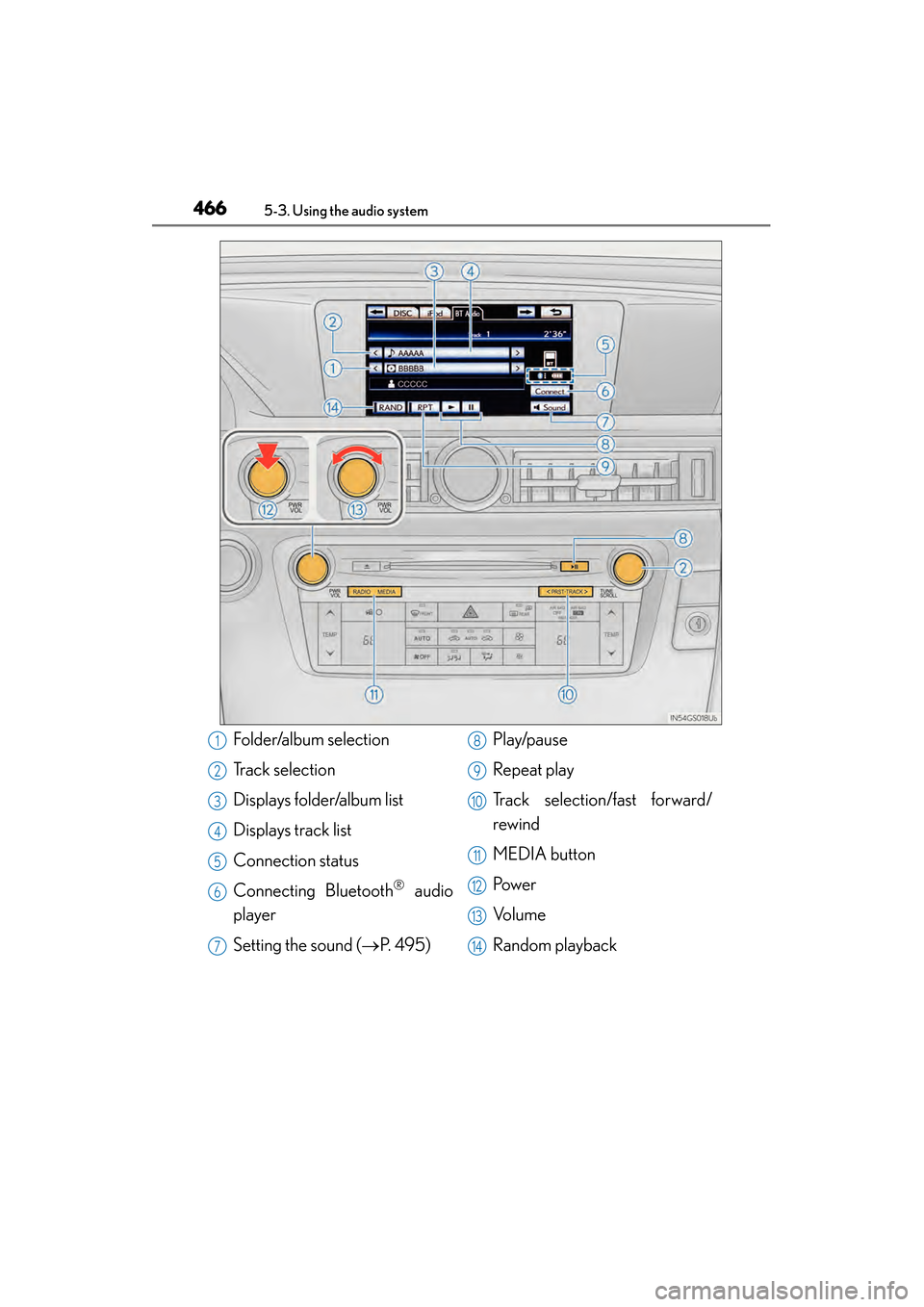
Folder/album selection
Track selection
Displays folder/album list
Displays track list
Connection status
Connecting Bluetooth
® audio
player
Setting the sound ( →P. 495) Play/pause
Repeat play
Track selection/fast forward/
rewind
MEDIA button
Pow e r
Vo l u m e
Random playback
1
2
3
4
5
6
7
8
9
10
11
12
13
14
GS450h_U.book Page 466 Monday, January 23, 2012 10:20 AM
Page 469 of 862
468
GS450h_U (OM30D01U)
5-3. Using the audio system
To use the Bluetooth® audio system, you need to enter your portable
player into the system. Once registered, you can enjoy your music on the
vehicle’s audio system. ( →P. 566)
For the operation procedure for the portable player, consult your player’s
accompanying instruction manual.
■When “Bluetooth* Power” is turned on
When the portable player is on standby for the connection, it will be
automatically connected whenever the power switch is in either
ACCESSORY or ON mode.
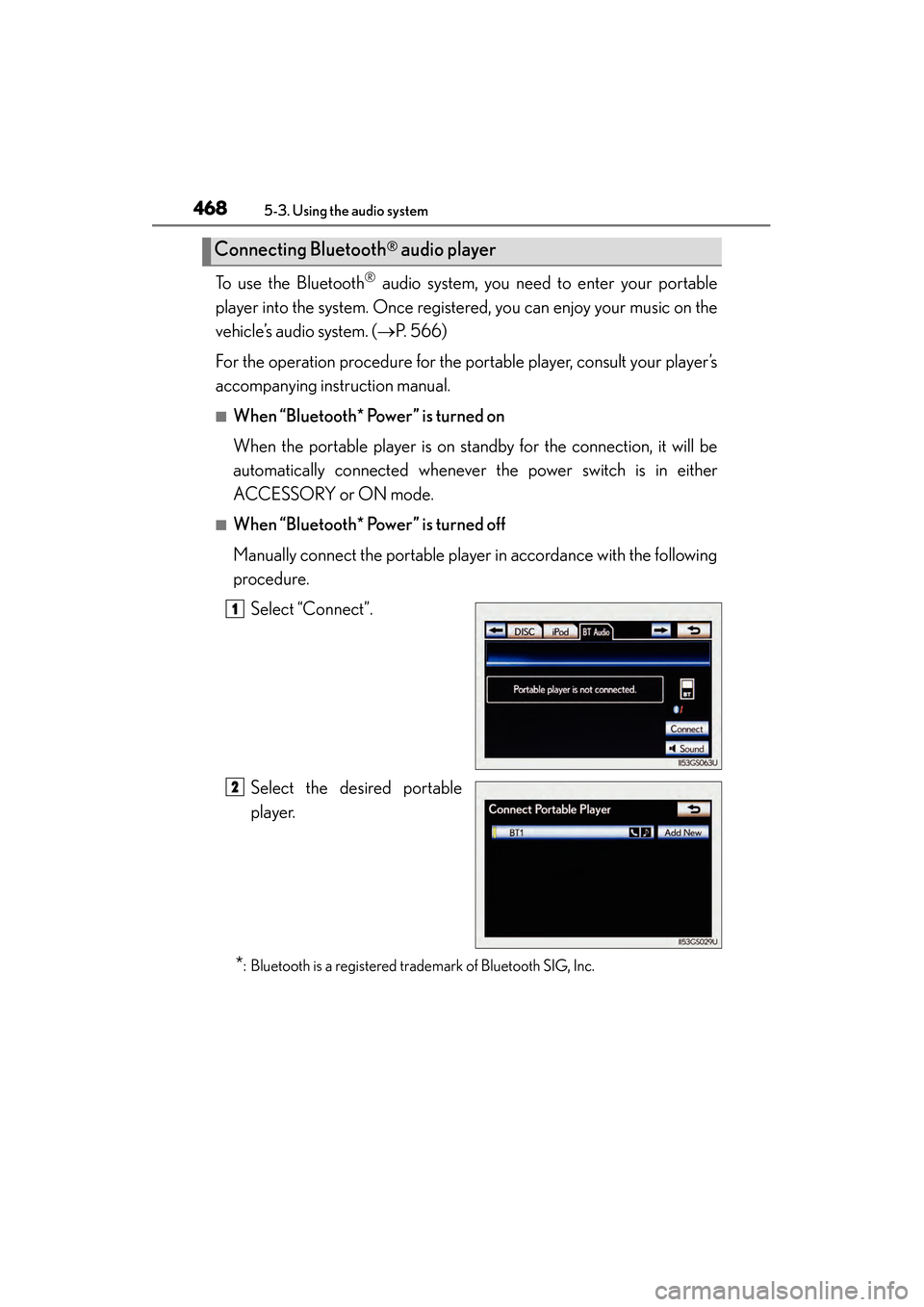
■When “Bluetooth* Power” is turned off
Manually connect the portable player in accordance with the following
procedure. Select “Connect”.
Select the desired portable
player.
*: Bluetooth is a registered trademark of Bluetooth SIG, Inc.
Connecting Bluetooth® audio player
1
2
GS450h_U.book Page 468 Monday, January 23, 2012 10:20 AM
Page 470 of 862
GS450h_U (OM30D01U)
4695-3. Using the audio system
5
Interior features
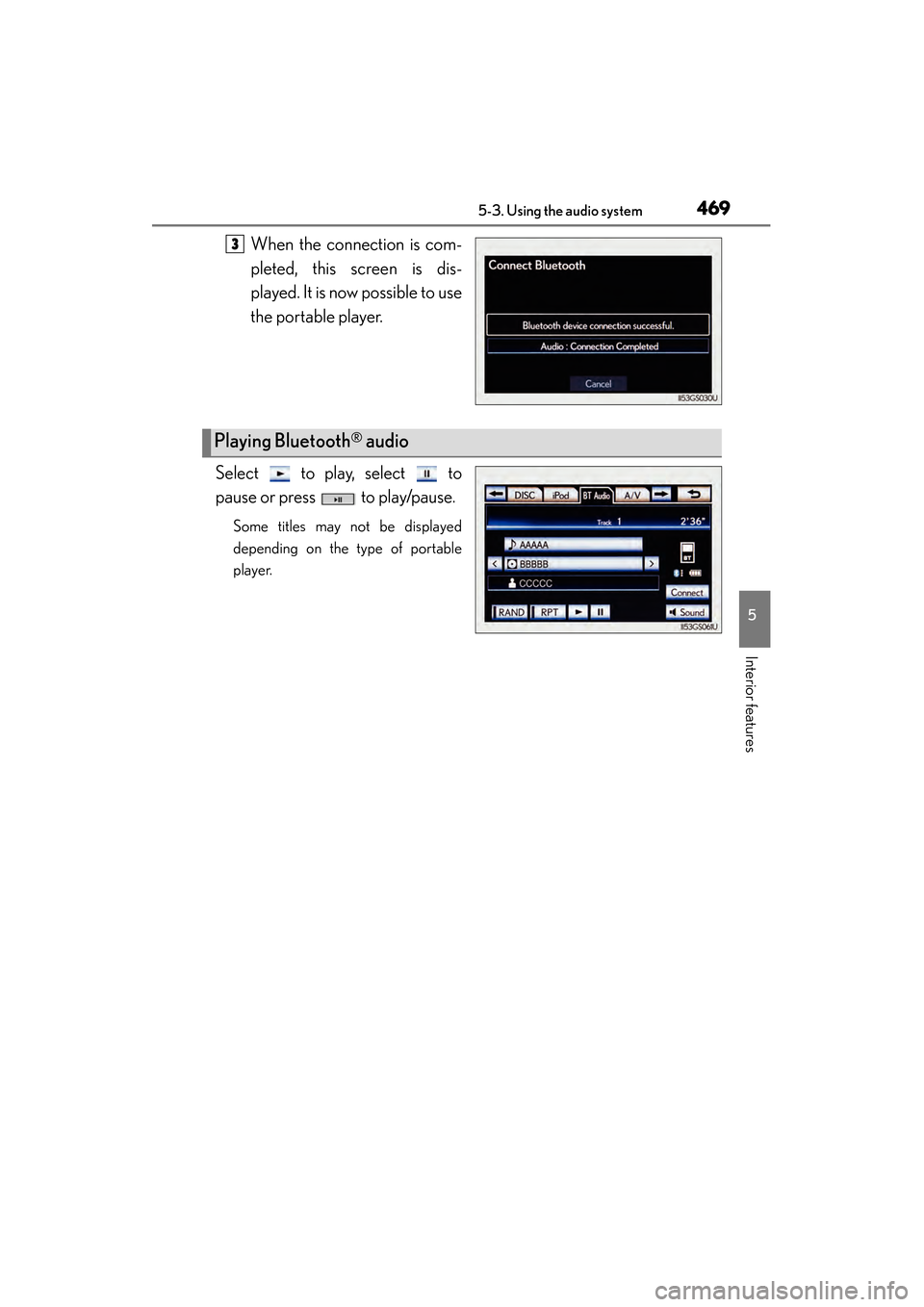
When the connection is com-
pleted, this screen is dis-
played. It is now possible to use
the portable player.
Select to play, select to
pause or press to play/pause.
Some titles may not be displayed
depending on the type of portable
player.
3
Playing Bluetooth® audio
GS450h_U.book Page 469 Monday, January 23, 2012 10:20 AM
Page 473 of 862
472
GS450h_U (OM30D01U)
5-3. Using the audio system
■Playing the tracks on the album in random order
Select “RAND” on the screen.
Each time “RAND” is selected, the mode changes as follows:
album random → all track random → off
■Playing tracks from all th e albums in random order
Select “RAND” repeatedly until “ALB.RAND” appears on the screen.
To cancel, select “RAND” again.
■Repeating a track
Select “RPT” on the screen.
Each time “RPT” is selected, the mode changes as follows:
track repeat → album repeat → off
■Repeating an album
Select “RPT” repeatedly until “ALB.RPT” appears on the screen.
To cancel, select “RPT” again.
■If you select
The display returns to the previous screen.
■Connecting Bluetooth® audio player
●Selecting “Connect Portable Player” on the “Bluetooth*” screen also connects a
Bluetooth® audio player. ( →P. 566)
●When none of the selectable portable players have been registered, a screen con-
firming registration is displayed. The registration method is the same as phone reg-
istration. ( →P. 559)
●When the currently connected portable player is selected, a screen confirming the
selected player’s disconnection is displayed. ( →P. 559)
●If connection fails once, a changing connection method confirmation screen is dis-
played. If connection fails 2 or more times, a message will be displayed. When this
message is displayed, try again.
*: Bluetooth is a registered trademark of Bluetooth SIG. Inc.
Random playback
Repeat play
GS450h_U.book Page 472 Monday, January 23, 2012 10:20 AM
Page 474 of 862
GS450h_U (OM30D01U)
4735-3. Using the audio system
5
Interior features
■When using the Bluetooth® audio system
●In the following conditions, the system may not function.
• The portable player is turned off
• The portable player is not connected
• The portable player battery is low
●There may be a delay if phone connection is carried out during Bluetooth® audio
play.
●Depending on the type of portable player that is connected to the system, opera-
tion may differ slightly and certain functions may not be available.
■Bluetooth® antenna
The antenna is built into the instrument panel. If the portable player is behind the seat
or in the glove box or console box, or is touching or covered by metal objects, con-
nection status may deteriorate.
■Battery charge/signal status
This display may not correspond exactly with the portable player, and this system
does not have a charging function.
■About Bluetooth®
Bluetooth is a registered trademark of
Bluetooth SIG. Inc.
GS450h_U.book Page 473 Monday, January 23, 2012 10:20 AM
Page 475 of 862
474
GS450h_U (OM30D01U)
5-3. Using the audio system
■Compatible models
Portable players must correspond to the following specifications:
●Bluetooth® specification
Ver. 1.1 or higher
(Recommended: Ver. 2.1+EDR or higher)
●Profile
• A2DP (Advanced Audio Distribution Profile) Ver. 1.0 or higher
• AVRCP (Audio/Video Remote Control Profile) Ver. 1.0 or higher (Recommended: Ver. 1.4 or higher)
However, please note that some functions may be limited depending on the type of
portable player. Also, the different screen is displayed depending on which portable
player is connecting.
Please go to the website at http://www.lexus.com/
to find approved portable players
for this system.
■Certification
→ P. 5 1 2
■Reconnecting the portable player
If the portable player is disconnected with a poor reception when the power switch is
in ACCESSORY or ON mode, the system automatically reconnects the portable
player.
If you have switched off the portable player yourself, follow the instructions below to
reconnect:
●Select the portable player again
●Enter the portable player
■When transferring ownership of your vehicle
Be sure to remove the registered portable player from the system. ( →P. 5 6 1 )
CAUTION
■While driving
Do not use the portable player or connect the Bluetooth
® system.
NOTICE
■When leaving the vehicle
Do not leave your portable player in the vehicle. The inside of the vehicle may
become hot, causing damage to the portable player.
GS450h_U.book Page 474 Monday, January 23, 2012 10:20 AM
Page 500 of 862
GS450h_U (OM30D01U)
4995-3. Using the audio system
5
Interior features
Press to turn the front audio system on.
Pressing the button again turns the system off.
Press to change the audio source. The audio source as follows
each time the button is pressed. If no discs are inserted in the player, or if
the external device is not connected, that mode will be skipped.
FM → SAT → Apps → DVD player → iPod or USB memory →
Bluetooth® audio player → AUX → AM
Press “ ∧” on to increase the volume and “ ∨” to decrease the vol-
ume.
Press and hold the button to continue increasing or decreasing the volume.
Turning the power on/off
Changing the audio source
Adjusting the volume
GS450h_U.book Page 499 Monday, January 23, 2012 10:20 AM
Page 501 of 862
500
GS450h_U (OM30D01U)
5-3. Using the audio system
■Select a radio stationPress to select a frequency band.
Press “ ∧” or “ ∨” on to seek the frequency.
To scan for receivable stations, press and hold until you hear a beep.
■Select a preset station
Press to select a frequency band.
Press “ ∧” or “ ∨” on to select a preset station.
■Audio CD
Press to select the DVD player.
Press “ ∧” or “ ∨” on to select a track.
■Bluetooth® audio player
Press to select the Bluetooth
® audio player.
Press “ ∧” or “ ∨” on to select an folder.
Press “ ∧” or “ ∨” on to select a file.
■iPod
Press to select the iPod.
Press “ ∧” or “ ∨” on to select a file.
Selecting a radio station
Selecting a track
1
2
1
2
1
2
1
2
3
1
2
GS450h_U.book Page 500 Monday, January 23, 2012 10:20 AM