change Lexus GS450h 2013 Owner's Guide
[x] Cancel search | Manufacturer: LEXUS, Model Year: 2013, Model line: GS450h, Model: Lexus GS450h 2013Pages: 862, PDF Size: 19.06 MB
Page 191 of 862
190
GS450h_U (OM30D01U)
4-2. Driving procedures
Stop the vehicle.
Shift the shift lever to P.
Set the parking brake. (→P. 207)
Press the power switch.
Release the brake pedal and check that “POWER ON” on the multi-
information display is off.
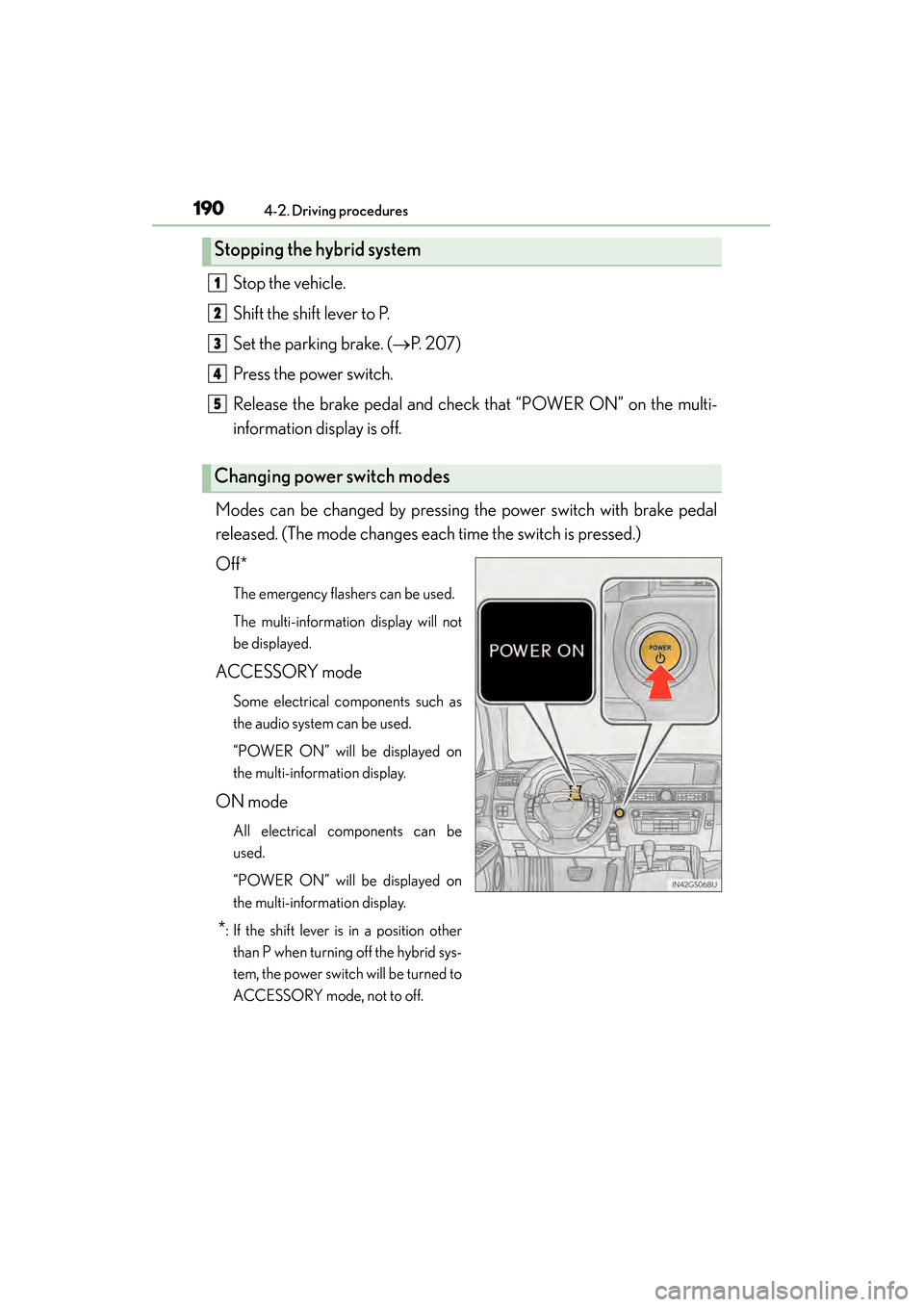
Modes can be changed by pressing the power switch with brake pedal
released. (The mode changes each time the switch is pressed.)
Off*
The emergency flashers can be used.
The multi-information display will not
be displayed.
ACCESSORY mode
Some electrical components such as
the audio system can be used.
“POWER ON” will be displayed on
the multi-information display.
ON mode
All electrical components can be
used.
“POWER ON” will be displayed on
the multi-information display.
*: If the shift lever is in a position other than P when turning off the hybrid sys-
tem, the power switch will be turned to
ACCESSORY mode, not to off.
Stopping the hybrid system
Changing power switch modes
1
2
3
4
5
GS450h_U.book Page 190 Monday, January 23, 2012 10:20 AM
Page 194 of 862
GS450h_U (OM30D01U)
1934-2. Driving procedures
4
Driving
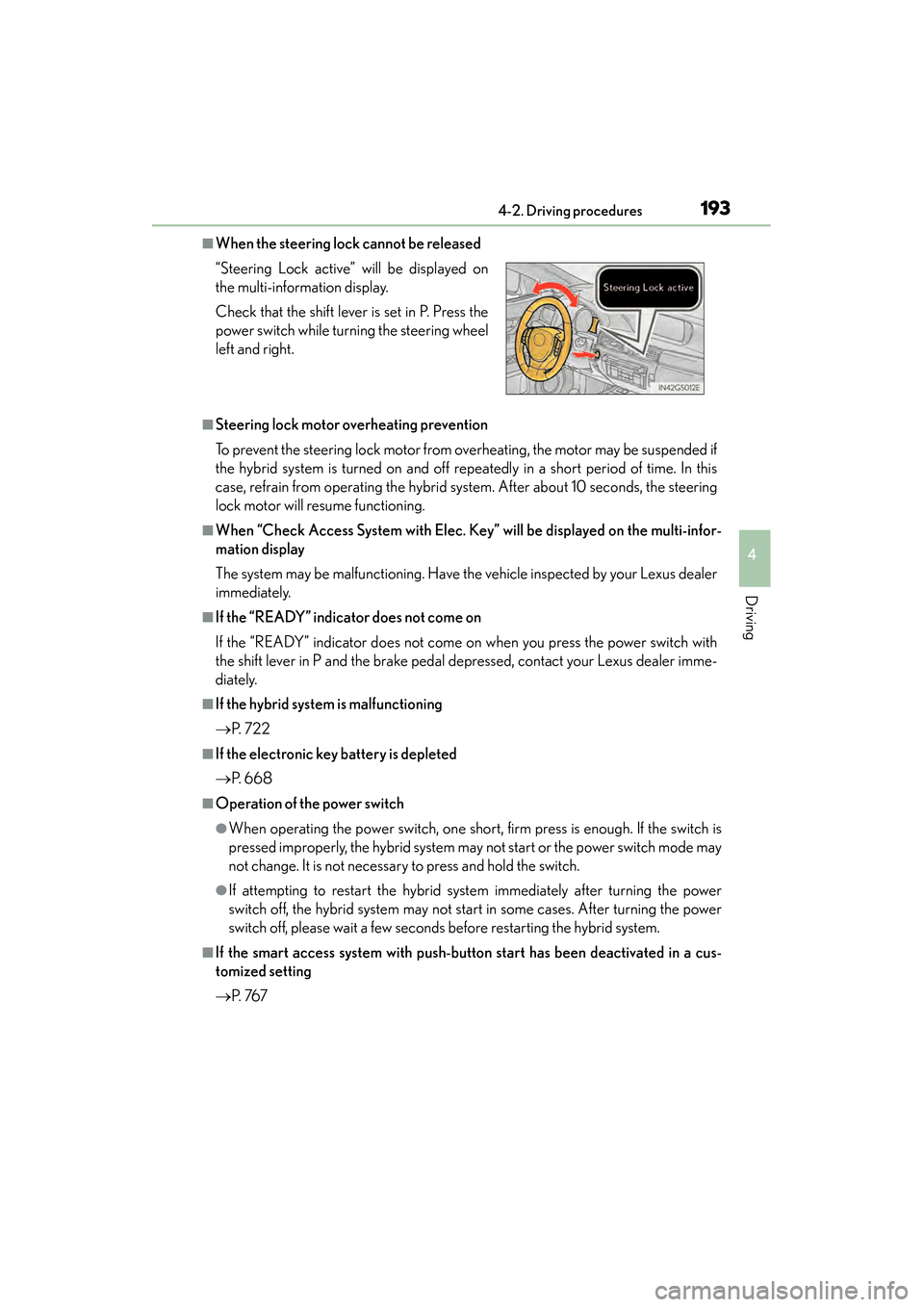
■When the steering lock cannot be released
■Steering lock motor overheating prevention
To prevent the steering lock motor from overheating, the motor may be suspended if
the hybrid system is turned on and off repeatedly in a short period of time. In this
case, refrain from operating the hybrid system. After about 10 seconds, the steering
lock motor will resume functioning.
■When “Check Access System with Elec. Key” will be displayed on the multi-infor-
mation display
The system may be malfunctioning. Have the vehicle inspected by your Lexus dealer
immediately.
■If the “READY” indicator does not come on
If the “READY” indicator does not come on when you press the power switch with
the shift lever in P and the brake pedal depressed, contact your Lexus dealer imme-
diately.
■If the hybrid system is malfunctioning
→P. 7 2 2
■If the electronic key battery is depleted
→P. 668
■Operation of the power switch
●When operating the power switch, one short, firm press is enough. If the switch is
pressed improperly, the hybrid system may not start or the power switch mode may
not change. It is not necessary to press and hold the switch.
●If attempting to restart the hybrid system immediately after turning the power
switch off, the hybrid system may not start in some cases. After turning the power
switch off, please wait a few seconds before restarting the hybrid system.
■If the smart access system with push-button start has been deactivated in a cus-
tomized setting
→P. 76 7
“Steering Lock active” will be displayed on
the multi-information display.
Check that the shift lever is set in P. Press the
power switch while turning the steering wheel
left and right.
GS450h_U.book Page 193 Monday, January 23, 2012 10:20 AM
Page 206 of 862
205
GS450h_U (OM30D01U)4-2. Driving procedures
4
Driving
Tu r n s i g n a l l e v e r
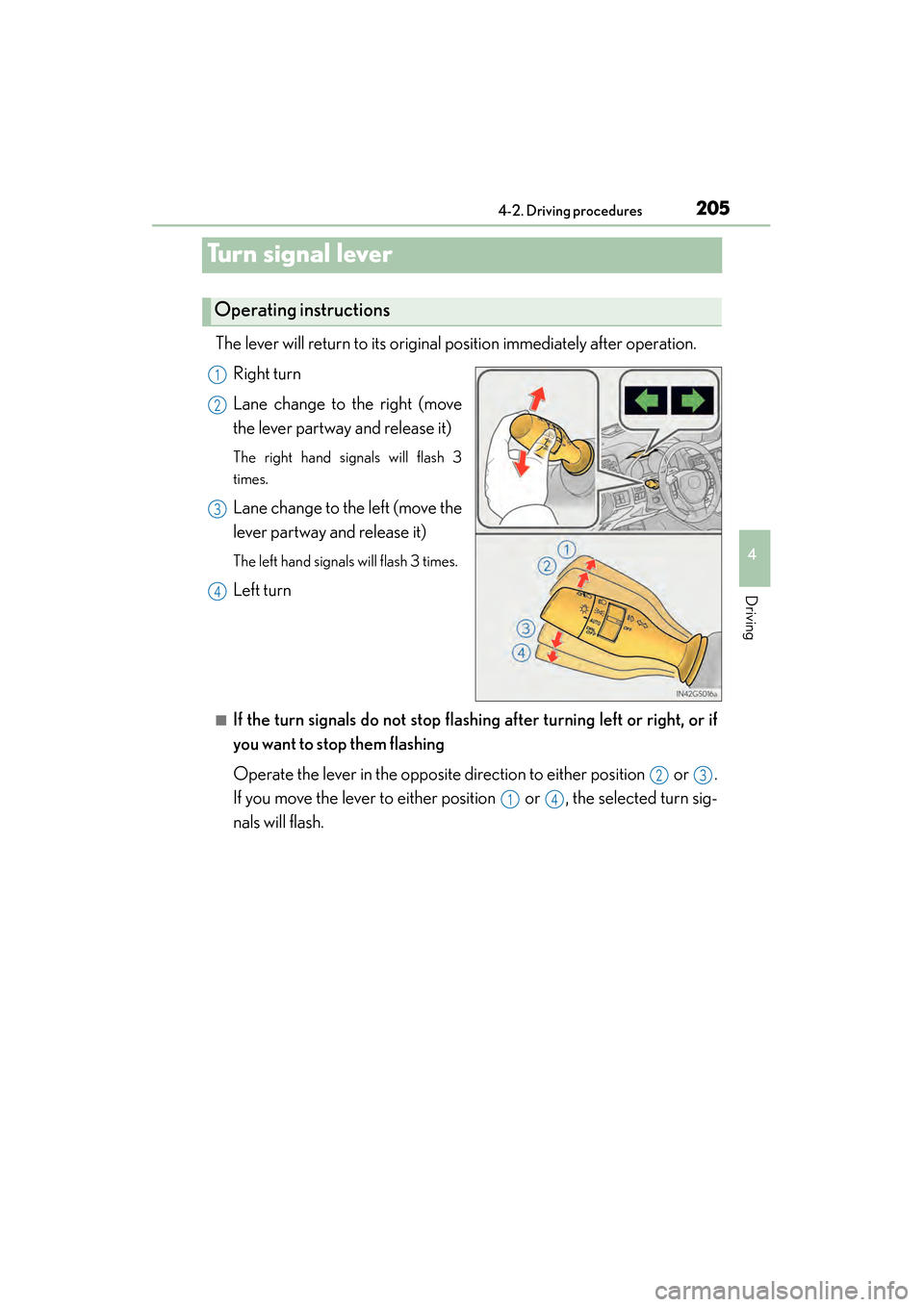
The lever will return to its original position immediately after operation. Right turn
Lane change to the right (move
the lever partway and release it)
The right hand signals will flash 3
times.
Lane change to the left (move the
lever partway and release it)
The left hand signals will flash 3 times.
Left turn
■If the turn signals do not stop flashi ng after turning left or right, or if
you want to stop them flashing
Operate the lever in the opposite direction to either position or .
If you move the lever to either position or , the selected turn sig-
nals will flash.
Operating instructions
1
2
3
4
23
14
GS450h_U.book Page 205 Monday, January 23, 2012 10:20 AM
Page 207 of 862
206
GS450h_U (OM30D01U)
4-2. Driving procedures
■Turn signals can be operated when
The power switch is in ON mode.
■If the indicator flashes faster than usual
Check that a light bulb in the front or rear turn signal lights has not burned out.
■If the turn signals stop flashing before a lane change has been performed
Operate the lever again.
■Customization
The number of times the turn signals flash during a lane change can be changed.
(Customizable feature →P. 807)
GS450h_U.book Page 206 Monday, January 23, 2012 10:20 AM
Page 218 of 862

GS450h_U (OM30D01U)
2174-3. Operating the lights and wipers
4
Driving
■If the “AFS OFF” indicator flashes
It may indicate a malfunction in the system. Contact your Lexus dealer.
■Customization
Settings (e.g. light sensor sensitivity) can be changed.
(Customizable features: →P. 807)
NOTICE
■To prevent 12-volt battery discharge
Do not leave the lights on longer than necessary when the hybrid system is off.
GS450h_U.book Page 217 Monday, January 23, 2012 10:20 AM
Page 221 of 862

220
GS450h_U (OM30D01U)
4-3. Operating the lights and wipers
*1: After temporary operation, the mode will return to AUTO mode.
*2: AUTO mode will be canceled.
When AUTO mode is selected, the sensor sensitivity can be adjusted by
turning the switch ring.Increases the sensitivity
Decreases the sensitivity
Washer/wiper dual operation
Wipers will automatically operate a
couple of times after the washer
squirts.
or or
or
OffTe m p o r a r y operationTe m p o r a r y operationLow speed operationHigh speed operation
Low speed operationOffOffHigh speed operationHigh speedoperation
High speed operationOffLow speedoperationNo changeNo change
AUTO modeIntermittent operation
Off
Te m p o r a r y
operation
*1Low speed
operation
*2High speed
operation
*2
ContinuouslyNo change
Operation
Status
before
operation
6
7
8
GS450h_U.book Page 220 Monday, January 23, 2012 10:20 AM
Page 223 of 862
222
GS450h_U (OM30D01U)
4-3. Operating the lights and wipers
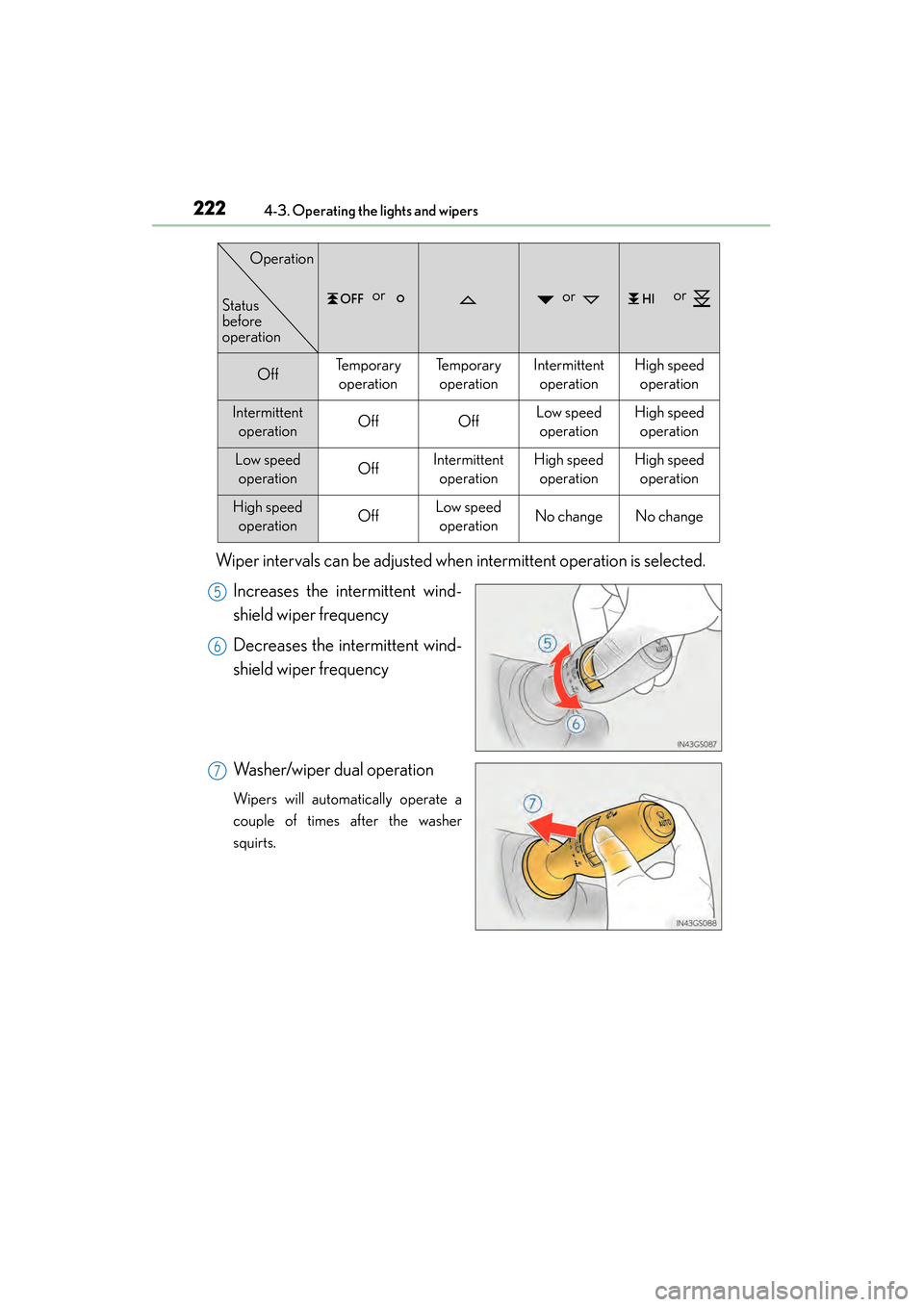
Wiper intervals can be adjusted when intermittent operation is selected.Increases the intermittent wind-
shield wiper frequency
Decreases the intermittent wind-
shield wiper frequency
Washer/wiper dual operation
Wipers will automatically operate a
couple of times after the washer
squirts.
or or or
OffTe m p o r a r y operationTe m p o r a r y operationIntermittent operationHigh speedoperation
Intermittent operationOffOffLow speedoperationHigh speed operation
Low speed operationOffIntermittent operationHigh speedoperationHigh speedoperation
High speed operationOffLow speedoperationNo changeNo change
Status
before
operation
Operation
5
6
7
GS450h_U.book Page 222 Monday, January 23, 2012 10:20 AM
Page 234 of 862
GS450h_U (OM30D01U)
2334-5. Using the driving support systems
4
Driving
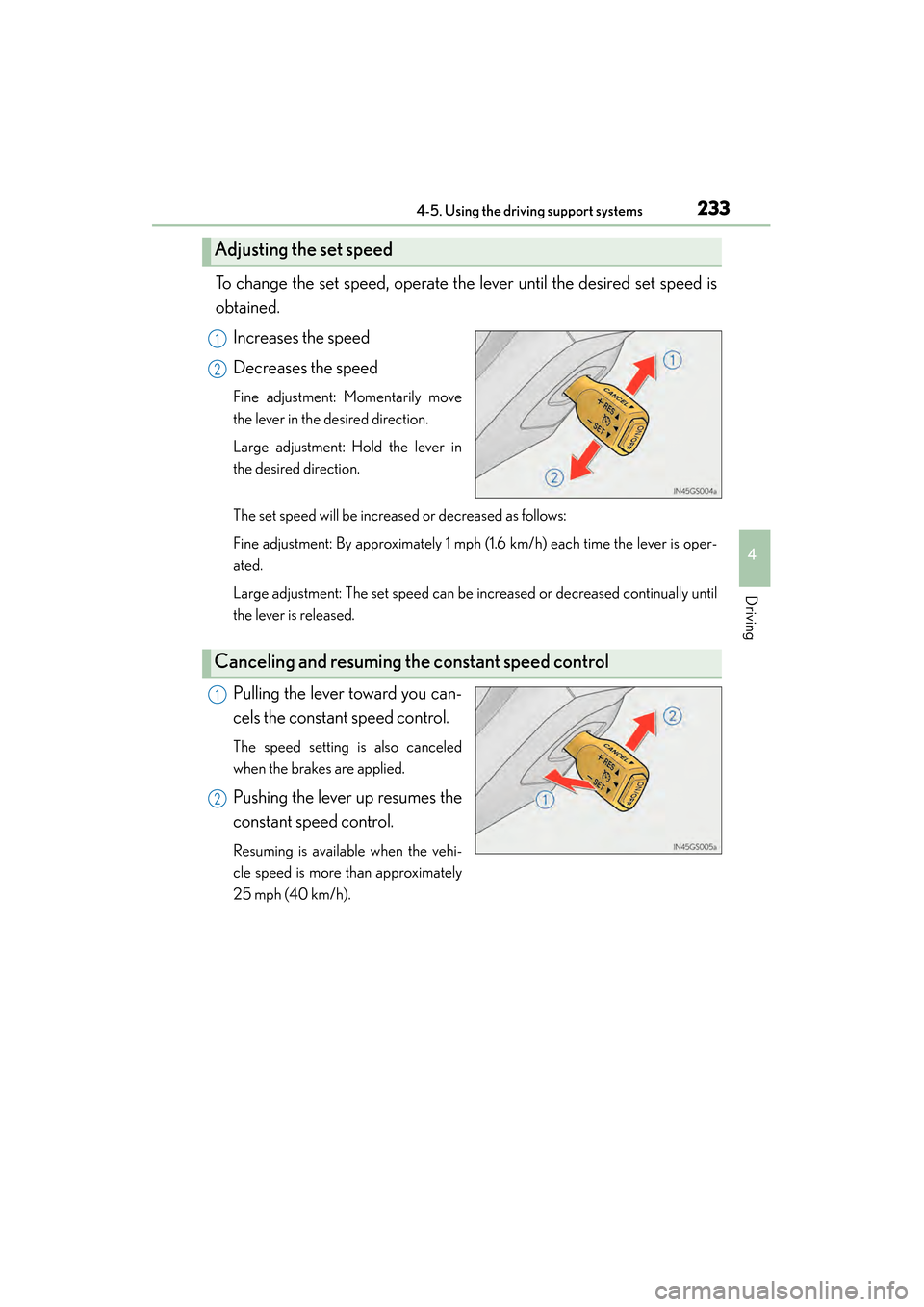
To change the set speed, operate the lever until the desired set speed is
obtained.Increases the speed
Decreases the speed
Fine adjustment: Momentarily move
the lever in the desired direction.
Large adjustment: Hold the lever in
the desired direction.
The set speed will be increased or decreased as follows:
Fine adjustment: By approximately 1 mph (1.6 km/h) each time the lever is oper-
ated.
Large adjustment: The set speed can be increased or decreased continually until
the lever is released.
Pulling the lever toward you can-
cels the constant speed control.
The speed setting is also canceled
when the brakes are applied.
Pushing the lever up resumes the
constant speed control.
Resuming is available when the vehi-
cle speed is more than approximately
25 mph (40 km/h).
Adjusting the set speed
1
2
Canceling and resuming the constant speed control
1
2
GS450h_U.book Page 233 Monday, January 23, 2012 10:20 AM
Page 239 of 862
238
GS450h_U (OM30D01U)
4-5. Using the driving support systems
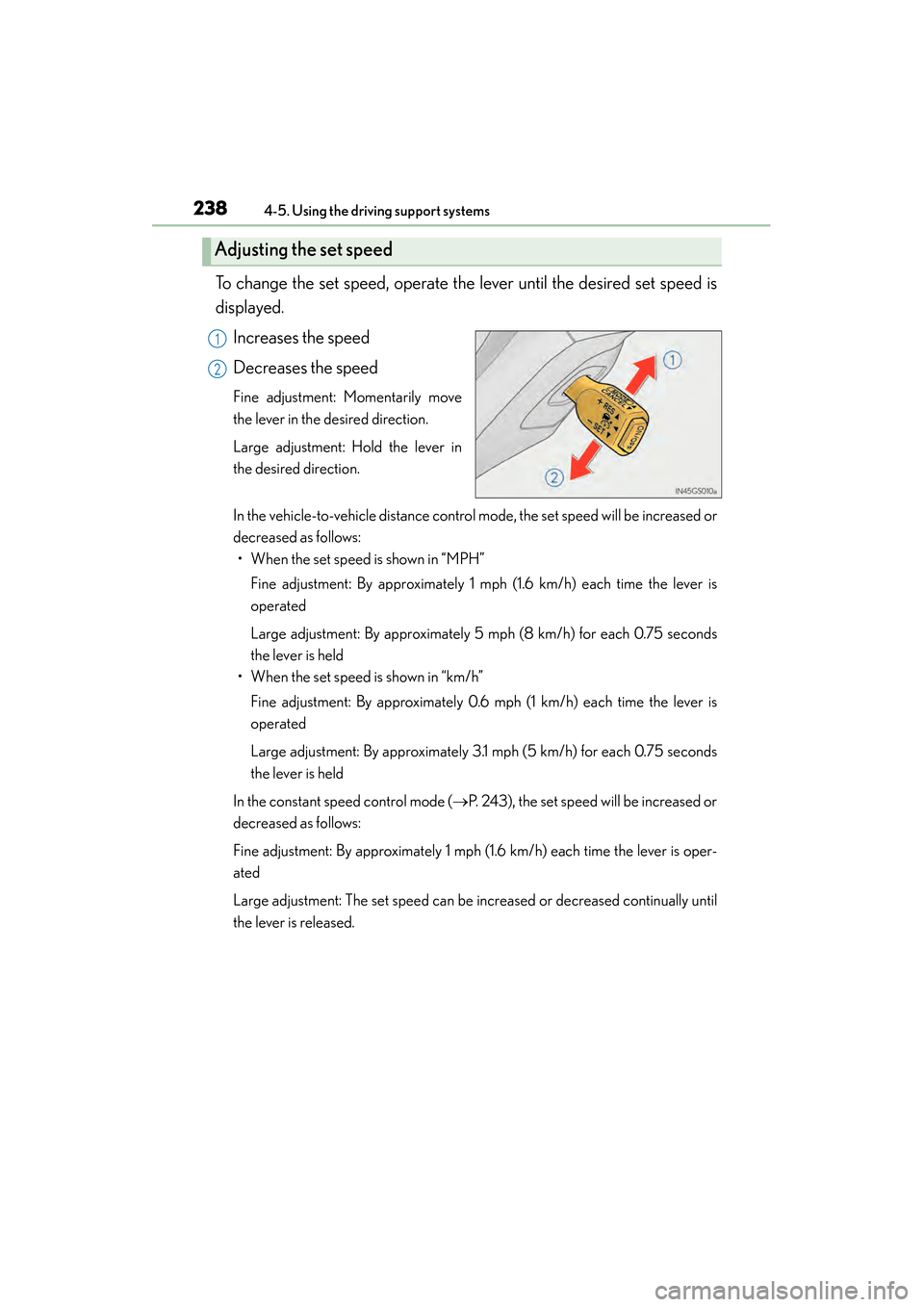
To change the set speed, operate the lever until the desired set speed is
displayed.Increases the speed
Decreases the speed
Fine adjustment: Momentarily move
the lever in the desired direction.
Large adjustment: Hold the lever in
the desired direction.
In the vehicle-to-vehicle distance control mode, the set speed will be increased or
decreased as follows:• When the set speed is shown in “MPH”
Fine adjustment: By approximately 1 mph (1.6 km/h) each time the lever is
operated
Large adjustment: By approximately 5 mph (8 km/h) for each 0.75 seconds
the lever is held
• When the set speed is shown in “km/h”
Fine adjustment: By approximately 0.6 mph (1 km/h) each time the lever is
operated
Large adjustment: By approximately 3.1 mph (5 km/h) for each 0.75 seconds
the lever is held
In the constant speed control mode ( →P. 243), the set speed will be increased or
decreased as follows:
Fine adjustment: By approximately 1 mph (1.6 km/h) each time the lever is oper-
ated
Large adjustment: The set speed can be increased or decreased continually until
the lever is released.
Adjusting the set speed
1
2
GS450h_U.book Page 238 Monday, January 23, 2012 10:20 AM
Page 240 of 862
GS450h_U (OM30D01U)
2394-5. Using the driving support systems
4
Driving
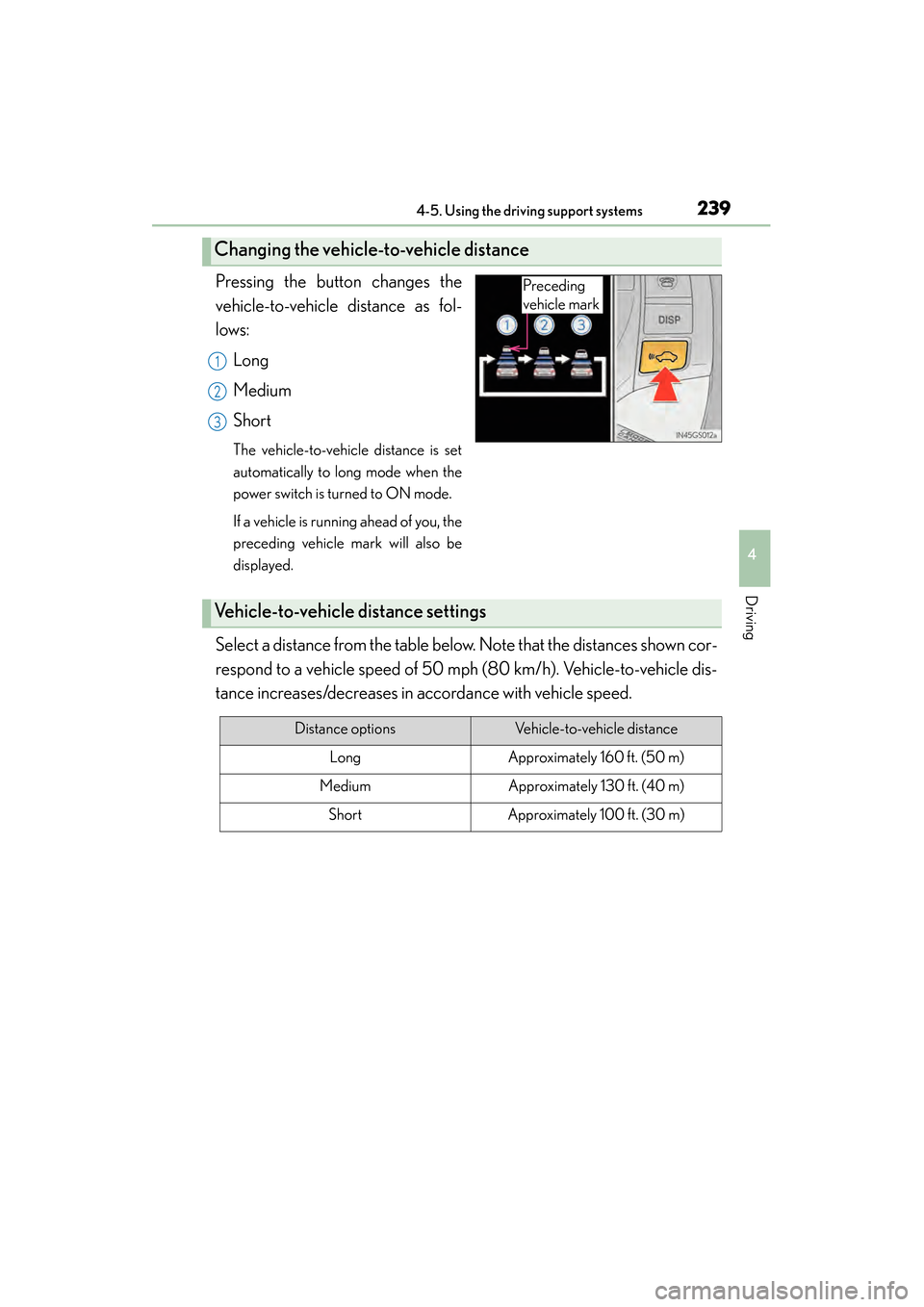
Pressing the button changes the
vehicle-to-vehicle distance as fol-
lows:Long
Medium
Short
The vehicle-to-vehicle distance is set
automatically to long mode when the
power switch is turned to ON mode.
If a vehicle is running ahead of you, the
preceding vehicle mark will also be
displayed.
Select a distance from the table below. Note that the distances shown cor-
respond to a vehicle speed of 50 mph (80 km/h). Vehicle-to-vehicle dis-
tance increases/decreases in accordance with vehicle speed.
Changing the vehicle-to-vehicle distance
Preceding
vehicle mark
1
2
3
Vehicle-to-vehicle distance settings
Distance optionsVehicle-to-vehicle distance
LongApproximately 160 ft. (50 m)
MediumApproximately 130 ft. (40 m)
ShortApproximately 100 ft. (30 m)
GS450h_U.book Page 239 Monday, January 23, 2012 10:20 AM