parking Lexus GS450h 2013 Owner's Guide
[x] Cancel search | Manufacturer: LEXUS, Model Year: 2013, Model line: GS450h, Model: Lexus GS450h 2013Pages: 862, PDF Size: 19.06 MB
Page 212 of 862
GS450h_U (OM30D01U)
2114-2. Driving procedures
4
Driving
■When the parking brake is set automatically while the system is holding the brakes
The parking brake will not be released automatically. Release the parking brake by
operating the parking brake switch, making sure that the parking brake indicator
light goes off. (→P. 2 0 7 )
■When there is a malfunction in the system
Warning lights and/or warning messages will turn on or flash. ( →P. 7 1 3 , 7 2 5 )
CAUTION
■When the vehicle is on a steep incline
When using the brake hold system on a steep incline exercise caution. The brake
hold function may not hold the vehicle in such a situation.
■When stopped on a slippery road
The system cannot stop the vehicle when the gripping ability of the tires has been
exceeded. Do not use the system when stopped on a slippery road.
NOTICE
■When parking the vehicle
The brake hold system is not designed for use when parking the vehicle for a long
period of time. Turning the power switch off while the system is holding the brake
may release the brake, which would cause the vehicle to move. When operating
the power switch, depress the brake pedal, set the parking brake and shift the shift
lever to P.
GS450h_U.book Page 211 Monday, January 23, 2012 10:20 AM
Page 214 of 862
213
GS450h_U (OM30D01U)4-3. Operating the lights and wipers
4
Driving
Headlight switch
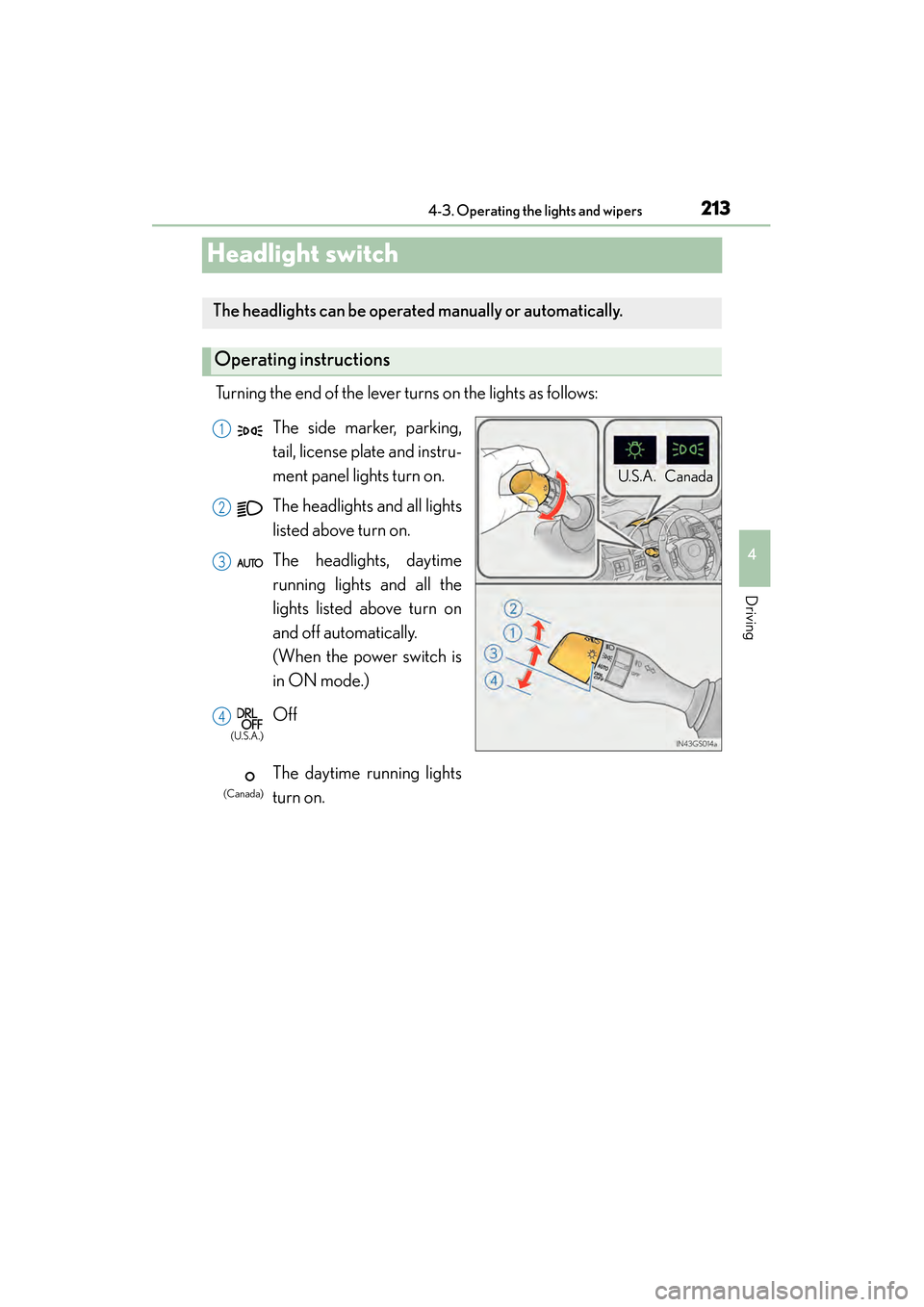
Turning the end of the lever turns on the lights as follows:
The headlights can be operated manually or automatically.
Operating instructions
U. S .A . Can ad a
(U.S.A.)
(Canada)
The side marker, parking,
tail, license plate and instru-
ment panel lights turn on.
The headlights and all lights
listed above turn on.
The headlights, daytime
running lights and all the
lights listed above turn on
and off automatically.
(When the power switch is
in ON mode.)
Off
The daytime running lights
turn on.1
2
3
4
GS450h_U.book Page 213 Monday, January 23, 2012 10:20 AM
Page 217 of 862
216
GS450h_U (OM30D01U)
4-3. Operating the lights and wipers
■Daytime running light system
●To make your vehicle more visible to other drivers, the parking lights turn on auto-
matically (at an increased intensity) whenever the hybrid system is started and the
parking brake is released. Daytime running lights are not designed for use at night.
●Compared to turning on the headlights, the daytime running light system offers
greater durability and consumes less electricity, so it can help improve fuel econ-
omy.
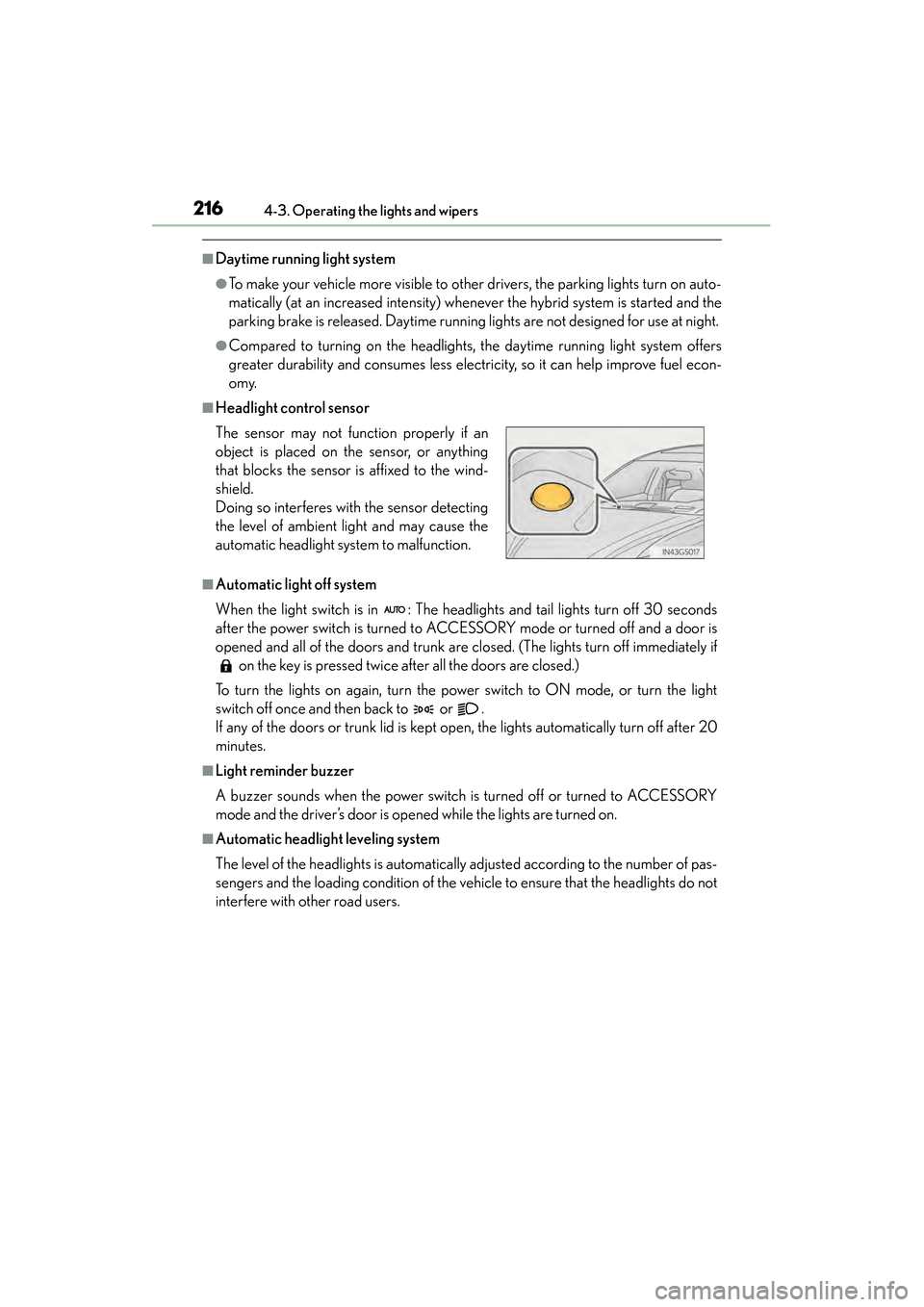
■Headlight control sensor
■Automatic light off system
When the light switch is in : The headlights and tail lights turn off 30 seconds
after the power switch is turned to ACCESSORY mode or turned off and a door is
opened and all of the doors and trunk are closed. (The lights turn off immediately if on the key is pressed twice after all the doors are closed.)
To turn the lights on again, turn the power switch to ON mode, or turn the light
switch off once and then back to or .
If any of the doors or trunk lid is kept open, the lights automatically turn off after 20
minutes.
■Light reminder buzzer
A buzzer sounds when the power switch is turned off or turned to ACCESSORY
mode and the driver’s door is opened while the lights are turned on.
■Automatic headlight leveling system
The level of the headlights is automatically adjusted according to the number of pas-
sengers and the loading condition of the vehi cle to ensure that the headlights do not
interfere with other road users. The sensor may not function properly if an
object is placed on the sensor, or anything
that blocks the sensor is affixed to the wind-
shield.
Doing so interferes with the sensor detecting
the level of ambient light and may cause the
automatic headlight system to malfunction.
GS450h_U.book Page 216 Monday, January 23, 2012 10:20 AM
Page 262 of 862
261
GS450h_U (OM30D01U)4-5. Using the driving support systems
4
Driving
Intuitive parking assist∗
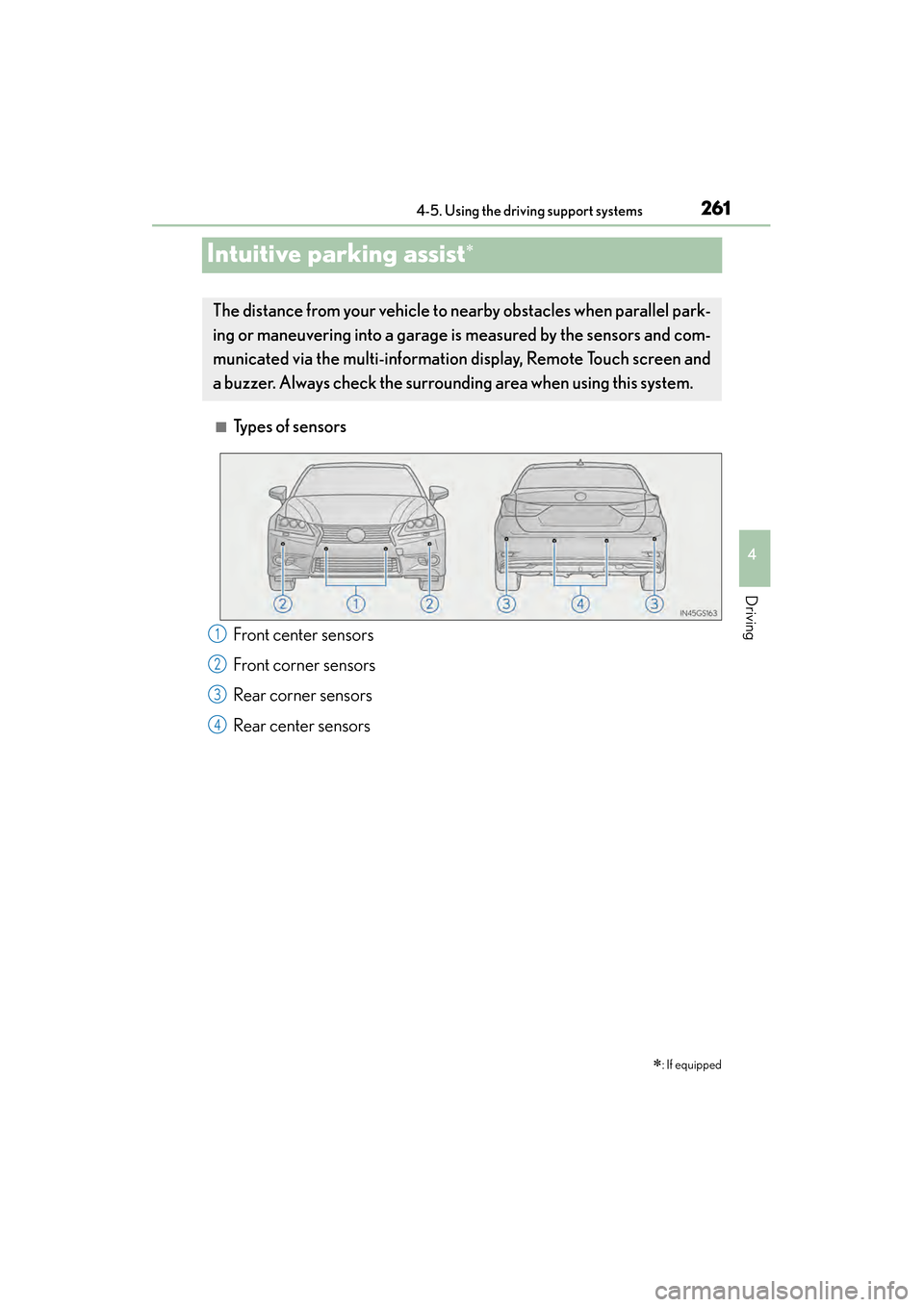
■Types of sensors ∗
: If equipped
The distance from your vehicle to nearby obstacles when parallel park-
ing or maneuvering into a garage is measured by the sensors and com-
municated via the multi-information display, Remote Touch screen and
a buzzer. Always check the surrounding area when using this system.
Front center sensors
Front corner sensors
Rear corner sensors
Rear center sensors1
2
3
4
sec_04-05.fm Page 261 Monday, January 23, 2012 11:41 AM
Page 263 of 862
262
GS450h_U (OM30D01U)
4-5. Using the driving support systems
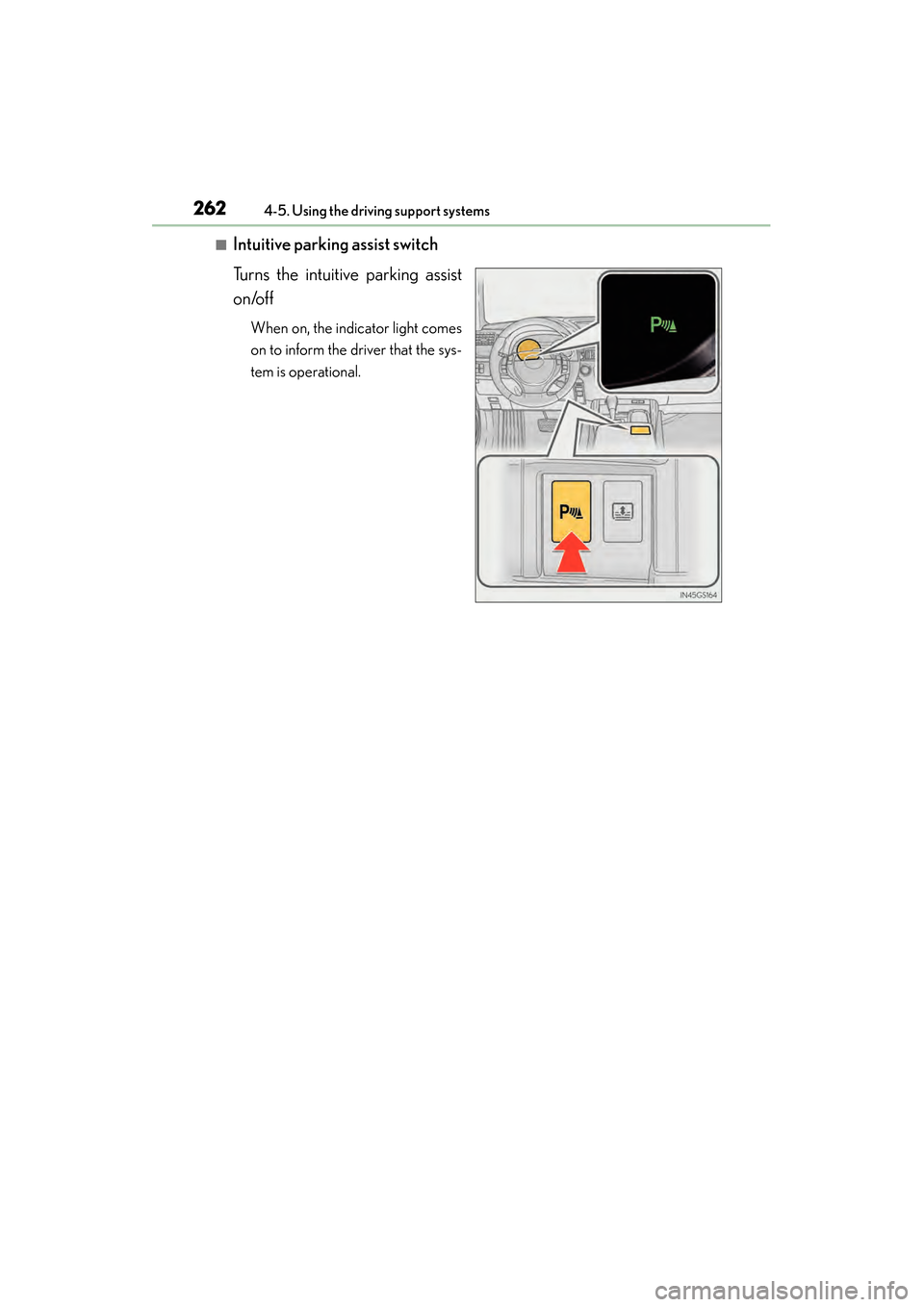
■Intuitive parking assist switch
Turns the intuitive parking assist
on/off
When on, the indicator light comes
on to inform the driver that the sys-
tem is operational.
GS450h_U.book Page 262 Monday, January 23, 2012 10:20 AM
Page 270 of 862
GS450h_U (OM30D01U)
2694-5. Using the driving support systems
4
Driving
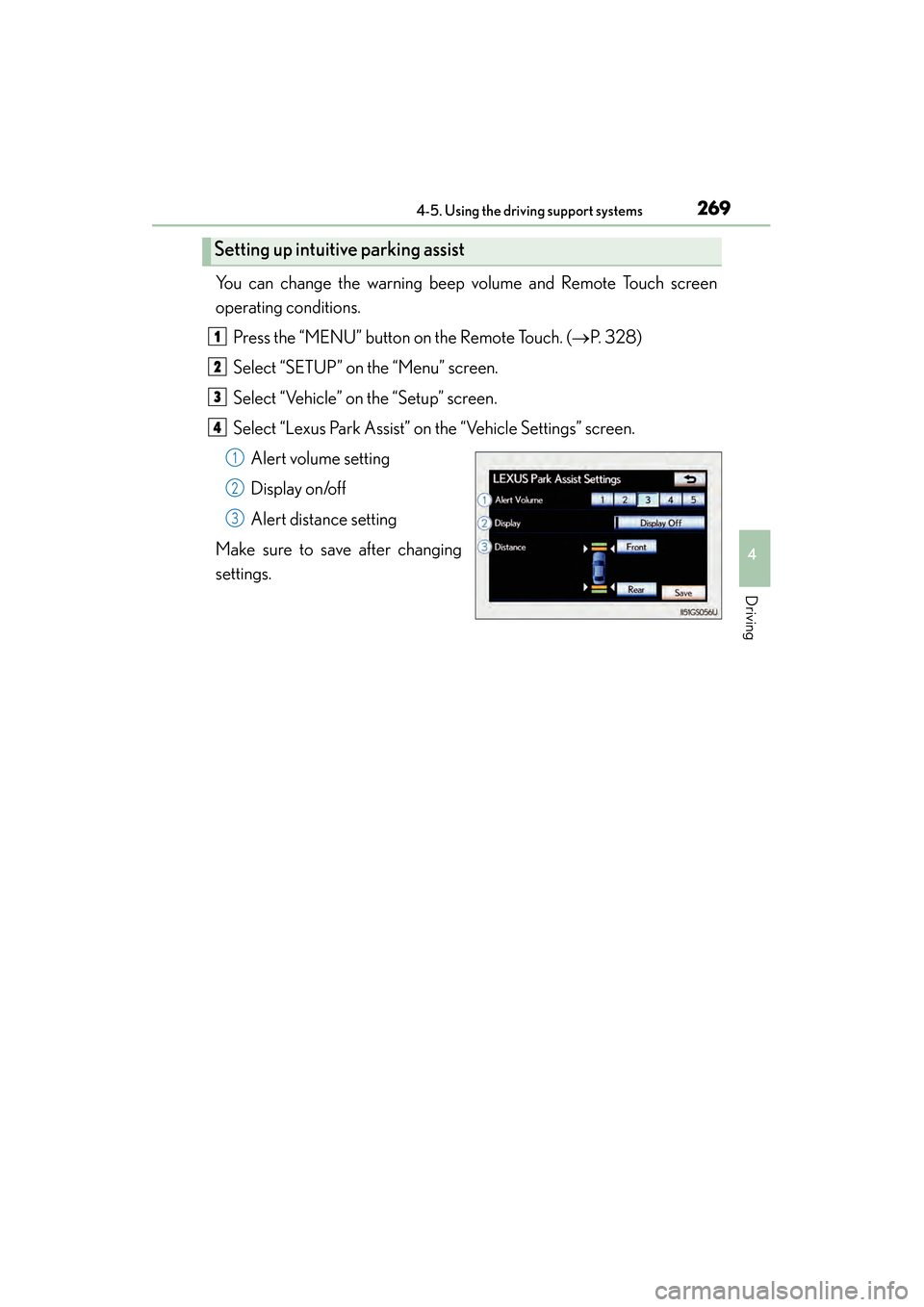
You can change the warning beep volume and Remote Touch screen
operating conditions.Press the “MENU” button on the Remote Touch. ( →P. 328)
Select “SETUP” on the “Menu” screen.
Select “Vehicle” on the “Setup” screen.
Select “Lexus Park Assist” on the “Vehicle Settings” screen.
Alert volume setting
Display on/off
Alert distance setting
Make sure to save after changing
settings.
Setting up intuitive parking assist
1
2
3
4
1
2
3
GS450h_U.book Page 269 Monday, January 23, 2012 10:20 AM
Page 271 of 862

270
GS450h_U (OM30D01U)
4-5. Using the driving support systems
■Alert volume setting
The alert volume can be adjusted.Select “1” to “5” on the “LEXUS Park Assist Settings”.
Select “Save”.
■Display on/off setting
On or off can be selected for intuitive parking assist display.Select “Display Off”.
When the “Display Off” indicator is turned on, the display of intuitive parking
assist will be off. Select “Display Off” again to turn the display of intuitive park-
ing assist on.
Select “Save”.
■Alert distance setting
Front or rear center sensors display and tone indication can be set.Select “Front” or “Rear”.
Long distance or short distance can be selected.
Select “Save”.
■The intuitive parking assist can be operated when
●Front center sensors:
• The power switch is in ON mode.
• The shift lever is in a position other than P or R.
• The vehicle speed is less than about 6 mph (10 km/h).
●Front corner sensors:
• The power switch is in ON mode.
• The shift lever is in a position other than P.
• The vehicle speed is less than about 6 mph (10 km/h).
●Rear corner and rear center sensors:
• The power switch is in ON mode.
• The shift lever is in R.
1
2
1
2
1
2
sec_04-05.fm Page 270 Monday, January 30, 2012 10:26 AM
Page 272 of 862
GS450h_U (OM30D01U)
2714-5. Using the driving support systems
4
Driving
■Intuitive parking assist display
When an obstacle is detected while the rear view monitor system, is in use, the warn-
ing indicator will appear in the top right of the screen even if the display setting has
been set to off.
■Sensor detection information
●The sensor’s detection areas are limited to the areas around the vehicle’s front cor-
ner and rear bumpers.
●Certain vehicle conditions and the surrounding environment may affect the ability
of the sensor to correctly detect obstacles. Particular instances where this may
occur are listed below.
• There is dirt, snow or ice on the sensor. (Wiping the sensors will resolve thisproblem.)
• The sensor is frozen. (Thawing the area will resolve this problem.) In especially cold weather, if a sensor is frozen the screen may show an abnor-
mal display, or obstacles may not be detected.
• The sensor is covered in any way.
• The vehicle is leaning considerably to one side.
• On an extremely bumpy road, on an incline, on gravel, or on grass.
• The vicinity of the vehicle is noisy due to vehicle horns, motorcycle engines, air brakes of large vehicles, or other loud noises producing ultrasonic waves.
• There is another vehicle equipped with parking assist sensors in the vicinity.
• The sensor is coated with a sheet of spray or heavy rain.
• The vehicle is equipped with a fender pole or wireless antenna.
• Towing eyelets are installed.
• The bumper or sensor receives a strong impact.
• The vehicle is approaching a tall or curved curb.
• In harsh sunlight or intense cold weather.
• The area directly under the bumpers is not detected.
• If obstacles draw too close to the sensor.
• A non-genuine Lexus suspension (lowered suspension etc.) is installed.
• People may not be detected if they are wearing certain types of clothing.
In addition to the examples above, there are instances in which, because of their
shape, signs and other objects may be judged by the sensor to be closer than they
are.
GS450h_U.book Page 271 Monday, January 23, 2012 10:20 AM
Page 274 of 862

GS450h_U (OM30D01U)
2734-5. Using the driving support systems
4
Driving
CAUTION
■When using the intuitive parking assist
Observe the following precautions.
Failing to do so may result in the vehicle being unable to be driven safely and possi-
bly cause an accident.
●Do not use the sensor at speeds in excess of 6 mph (10 km/h).
●The sensors’ detection areas and reaction times are limited. When moving for-
ward or reversing, check the areas surrounding the vehicle (especially the sides
of the vehicle) for safety, and drive slowly, using the brake to control the vehicle’s
speed.
●Do not install accessories within the sensors’ detection areas.
NOTICE
■When using intuitive parking assist-sensor
In the following situations, the system may not function correctly due to a sensor
malfunction etc. Have the vehicle checked by your Lexus dealer.
●The intuitive parking assist operation display flashes, and a beep sounds when no
obstacles are detected.
●If the area around a sensor collides with something, or is subjected to strong
impact.
●If the bumper collides with something.
●If the display shows continuously without a beep.
●If a display error occurs, first check the sensor.
If the error occurs even if there is no ice, snow or mud on the sensor, it is likely that
the sensor is malfunctioning.
■Notes when washing the vehicle
Do not apply intensive bursts of water or steam to the sensor area.
Doing so may result in the sensor malfunctioning.
GS450h_U.book Page 273 Monday, January 23, 2012 10:20 AM
Page 275 of 862
274
GS450h_U (OM30D01U)
4-5. Using the driving support systems
Rear view monitor system
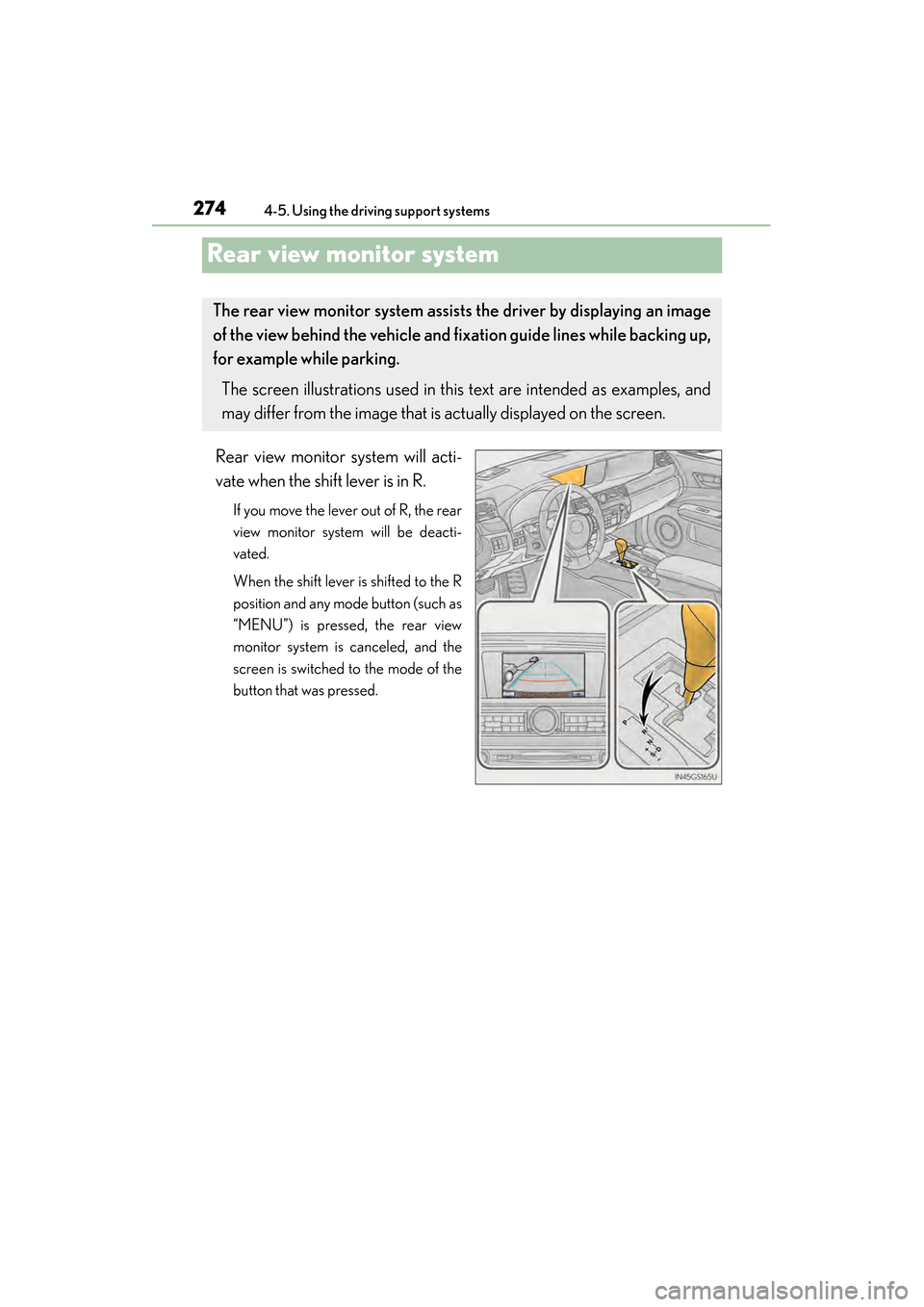
Rear view monitor system will acti-
vate when the shift lever is in R.
If you move the lever out of R, the rear
view monitor system will be deacti-
vated.
When the shift lever is shifted to the R
position and any mode button (such as
“MENU”) is pressed, the rear view
monitor system is canceled, and the
screen is switched to the mode of the
button that was pressed.
The rear view monitor system assists the driver by displaying an image
of the view behind the vehicle and fixation guide lines while backing up,
for example while parking.
The screen illustrations used in this text are intended as examples, and
may differ from the image that is actually displayed on the screen.
GS450h_U.book Page 274 Monday, January 23, 2012 10:20 AM