audio Lexus GS450h 2013 Service Manual
[x] Cancel search | Manufacturer: LEXUS, Model Year: 2013, Model line: GS450h, Model: Lexus GS450h 2013Pages: 862, PDF Size: 19.06 MB
Page 408 of 862
GS450h_U (OM30D01U)
4075-3. Using the audio system
5
Interior features
THIS SOFTWARE IS PROVIDED BY THE OpenSSL PROJECT “AS IS” AND
ANY EXPRESSED OR IMPLIED WARRANTIES, INCLUDING, BUT NOT
LIMITED TO, THE IMPLIED WARRANTIES OF MERCHANTABILITY AND
FITNESS FOR A PARTICULAR PURPOSE ARE DISCLAIMED. IN NO EVENT
SHALL THE OpenSSL PROJECT OR ITS CONTRIBUTORS BE LIABLE FOR
ANY DIRECT, INDIRECT, INCIDENTAL, SPECIAL, EXEMPLARY, OR
CONSEQUENTIAL DAMAGES (INCLUDING, BUT NOT LIMITED TO,
PROCUREMENT OF SUBSTITUTE GOODS OR SERVICES; LOSS OF USE,
DATA, OR PROFITS; OR BUSINESS INTERRUPTION) HOWEVER CAUSED
AND ON ANY THEORY OF LIABILITY, WHETHER IN CONTRACT, STRICT
LIABILITY, OR TORT (INCLUDING NEGLIGENCE OR OTHERWISE)
ARISING IN ANY WAY OUT OF THE USE OF THIS SOFTWARE, EVEN IF
ADVISED OF THE POSSIBILITY OF SUCH DAMAGE.
This product includes cryptographic software written by Eric Young
([email protected]
). This product includes software written by Tim Hudson
([email protected]
).
Original SSLeay License
Copyright © 1995-1998 Eric Young ([email protected]
) All rights reserved.
This package is an SSL implementation written by Eric Young ([email protected]
).
The implementation was written so as to conform with Netscapes SSL. This library is
free for commercial and non-commercial use as long as the following conditions are
aheared to. The following conditions apply to all code found in this distribution, be it
the RC4, RSA, lhash, DES, etc., code; not just the SSL code. The SSL documentation
included with this distribution is covered by the same copyright terms except that the
holder is Tim Hudson ([email protected]
). Copyright remains Eric Young’s, and as
such any Copyright notices in the code are not to be removed. If this package is used
in a product, Eric Young should be given attribution as the author of the parts of the
library used. This can be in the form of a textual message at program startup or in
documentation (online or textual) provided with the package.
GS450h_U.book Page 407 Monday, January 23, 2012 10:20 AM
Page 409 of 862
408
GS450h_U (OM30D01U)
5-3. Using the audio system
Redistribution and use in source and binary forms, with or without modification, are
permitted provided that the following conditions are met:
1. Redistributions of source code must retain the copyright notice, this list ofconditions and the following disclaimer.
2. Redistributions in binary form must reproduce the above copyright notice, this list of conditions and the following disclaimer in the documentation and/or other
materials provided with the distribution.
3. All advertising materials mentioning features or use of this software must display the following acknowledgement: “This product includes cryptographic software
written by Eric Young ([email protected]
)” The word ‘cryptographic’ can be left
out if the rouines from the library being used are not cryptographic related :-).
4. If you include any Windows specific code (or a derivative thereof) from the apps directory (application code) you must include an acknowledgement: “This
product includes software written by Tim Hudson ([email protected]
)”
THIS SOFTWARE IS PROVIDED BY ERIC YOUNG “AS IS” AND ANY
EXPRESS OR IMPLIED WARRANTIES, INCLUDING, BUT NOT LIMITED TO,
THE IMPLIED WARRANTIES OF MERCHANTABILITY AND FITNESS FOR A
PARTICULAR PURPOSE ARE DISCLAIMED. IN NO EVENT SHALL THE
AUTHOR OR CONTRIBUTORS BE LIABLE FOR ANY DIRECT, INDIRECT,
INCIDENTAL, SPECIAL, EXEMPLARY, OR CONSEQUENTIAL DAMAGES
(INCLUDING, BUT NOT LIMITED TO, PROCUREMENT OF SUBSTITUTE
GOODS OR SERVICES; LOSS OF USE, DATA, OR PROFITS; OR BUSINESS
INTERRUPTION) HOWEVER CAUSED AND ON ANY THEORY OF
LIABILITY, WHETHER IN CONTRACT, STRICT LIABILITY, OR TORT
(INCLUDING NEGLIGENCE OR OTHERWISE) ARISING IN ANY WAY OUT
OF THE USE OF THIS SOFTWARE, EVEN IF ADVISED OF THE POSSIBILITY
OF SUCH DAMAGE.
The licence and distribution terms for any publically available version or derivative of
this code cannot be changed. i.e. this code cannot simply be copied and put under
another distribution licence [including the GNU Public Licence.
GS450h_U.book Page 408 Monday, January 23, 2012 10:20 AM
Page 410 of 862

409
GS450h_U (OM30D01U)5-3. Using the audio system
5
Interior features
Using the radio
Press the “RADIO” button to display the radio control screen.
Select the “AM”, “FM”, “SAT” or “Apps” tab or press the “RADIO” but-
ton repeatedly to select the desired tab.
GS450h_U.book Page 409 Monday, January 23, 2012 10:20 AM
Page 411 of 862
410
GS450h_U (OM30D01U)
5-3. Using the audio system
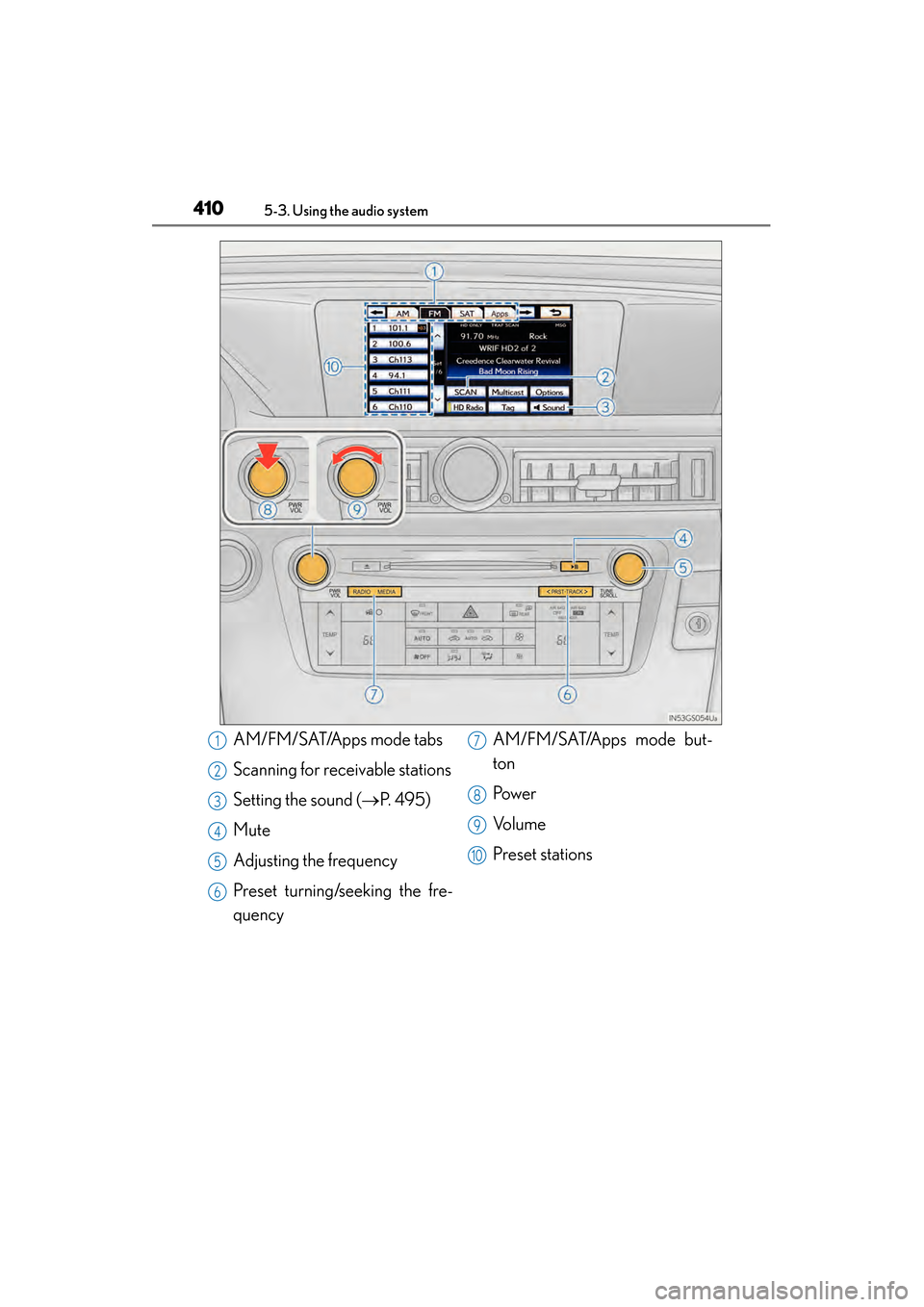
AM/FM/SAT/Apps mode tabs
Scanning for receivable stations
Setting the sound (→P. 495)
Mute
Adjusting the frequency
Preset turning/seeking the fre-
quency AM/FM/SAT/Apps mode but-
ton
Pow e r
Vo l u m e
Preset stations1
2
3
4
5
6
7
8
9
10
GS450h_U.book Page 410 Monday, January 23, 2012 10:20 AM
Page 412 of 862
GS450h_U (OM30D01U)
4115-3. Using the audio system
5
Interior features
■Seek tuning
Press and hold “<” or “>” on the “PRST•TRACK” button.
■Manual tuning
Turn the “TUNE/SCROLL” knob.
■Preset stations
Select the desired preset stations (1 - 6).
Change the page by using “∧” or “∨ ” on the screen.
Press “<” or “>” on the “PRST•TRACK” button.
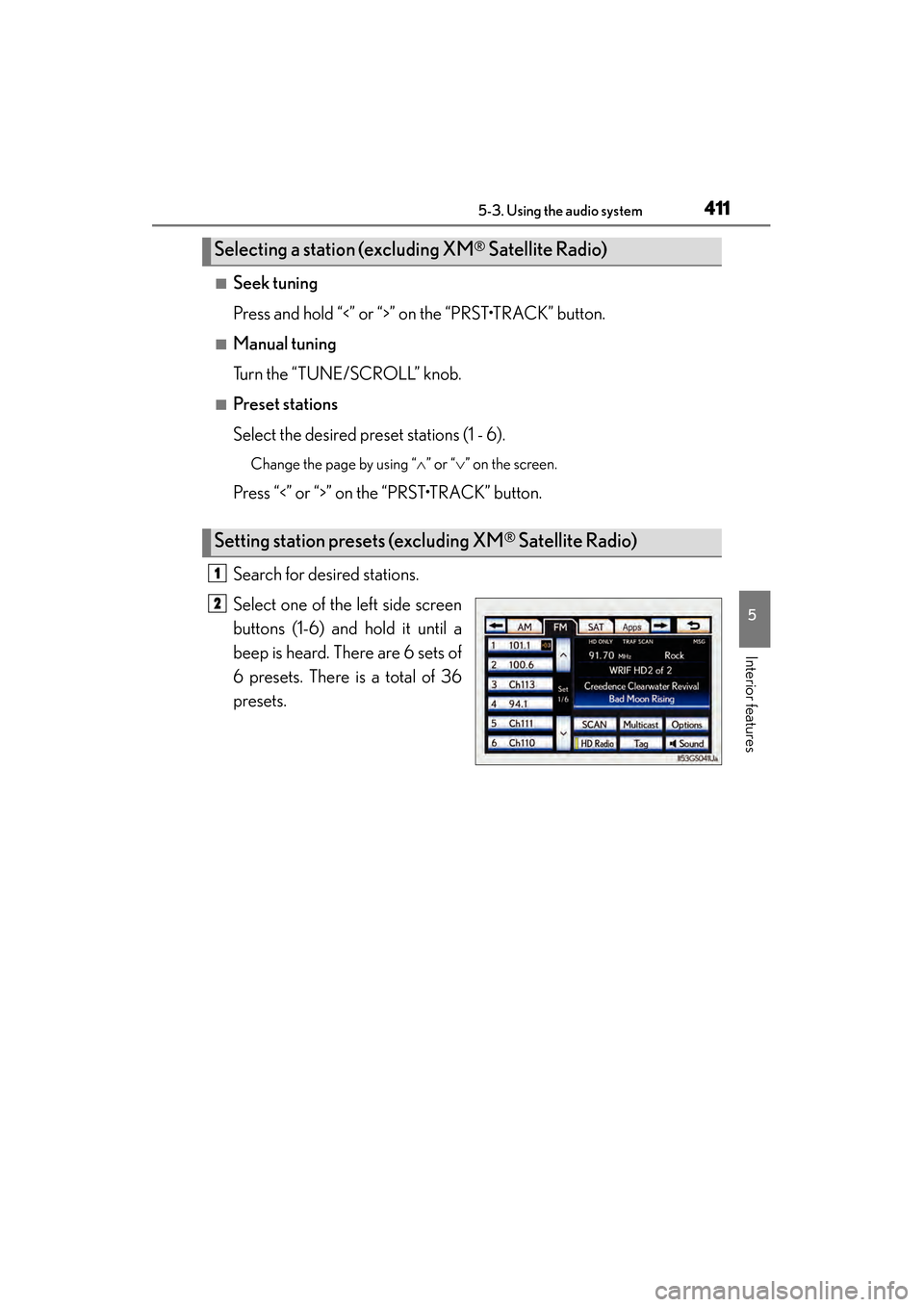
Search for desired stations.
Select one of the left side screen
buttons (1-6) and hold it until a
beep is heard. There are 6 sets of
6 presets. There is a total of 36
presets.
Selecting a station (excluding XM® Satellite Radio)
Setting station presets (excluding XM® Satellite Radio)
1
2
GS450h_U.book Page 411 Monday, January 23, 2012 10:20 AM
Page 413 of 862
412
GS450h_U (OM30D01U)
5-3. Using the audio system
Scanning all radio stations within rangeSelect “SCAN” on the screen.
“SCAN” appears on the screen.
The radio will find the next station and stay there for 10 seconds if “All” or “HD
Only” is selected, or 5 seconds if “Analog” is selected, and then scan again.
(→ P. 4 1 4 )
Select “SCAN” once again when the desired station is reached.
This feature allows your radio to receive station identification information
and program information (classical, jazz, etc.) from radio stations which
broadcast this information.
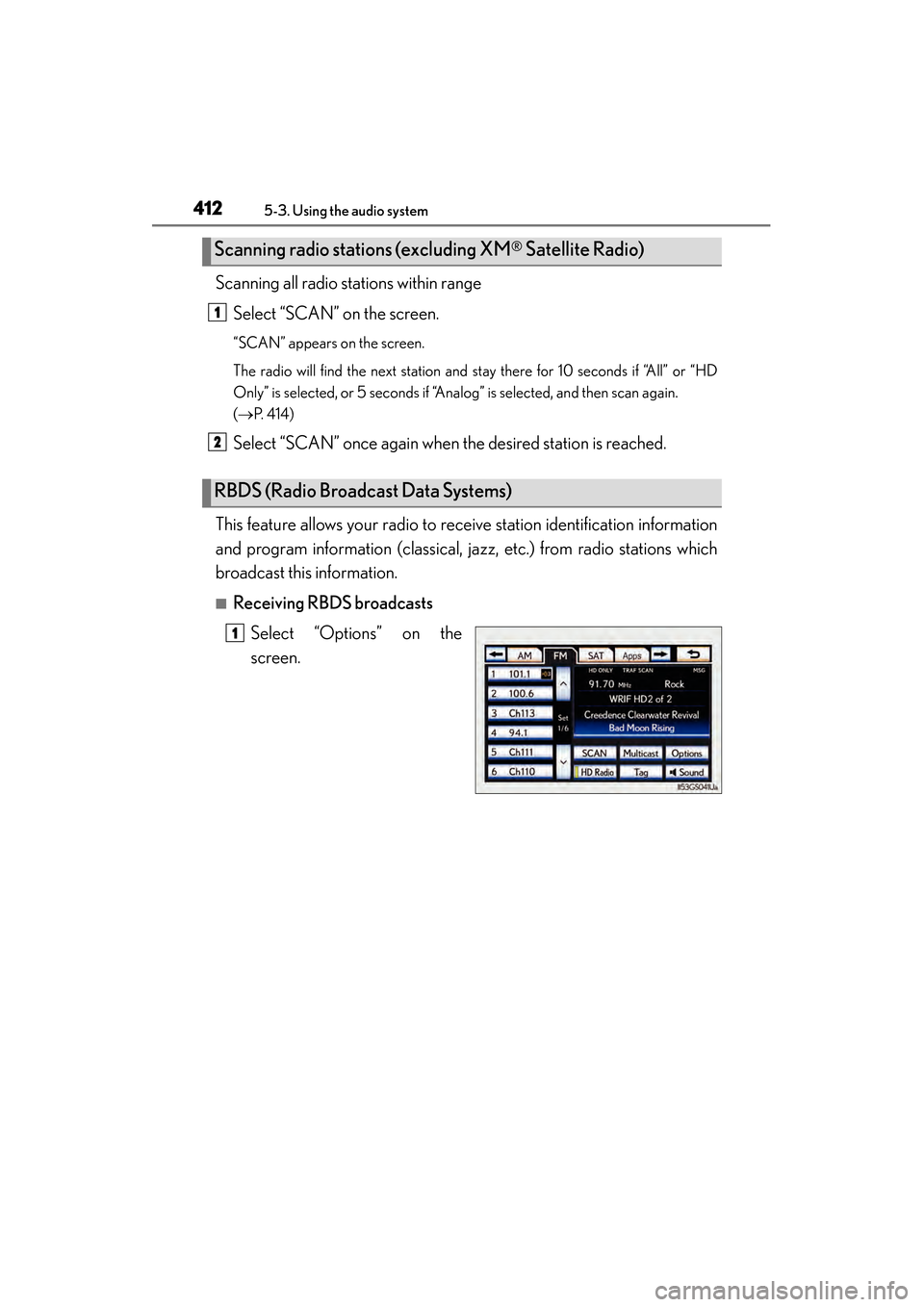
■Receiving RBDS broadcasts Select “Options” on the
screen.
Scanning radio stations (excluding XM® Satellite Radio)
RBDS (Radio Broadcast Data Systems)
1
2
1
GS450h_U.book Page 412 Monday, January 23, 2012 10:20 AM
Page 414 of 862
GS450h_U (OM30D01U)
4135-3. Using the audio system
5
Interior features
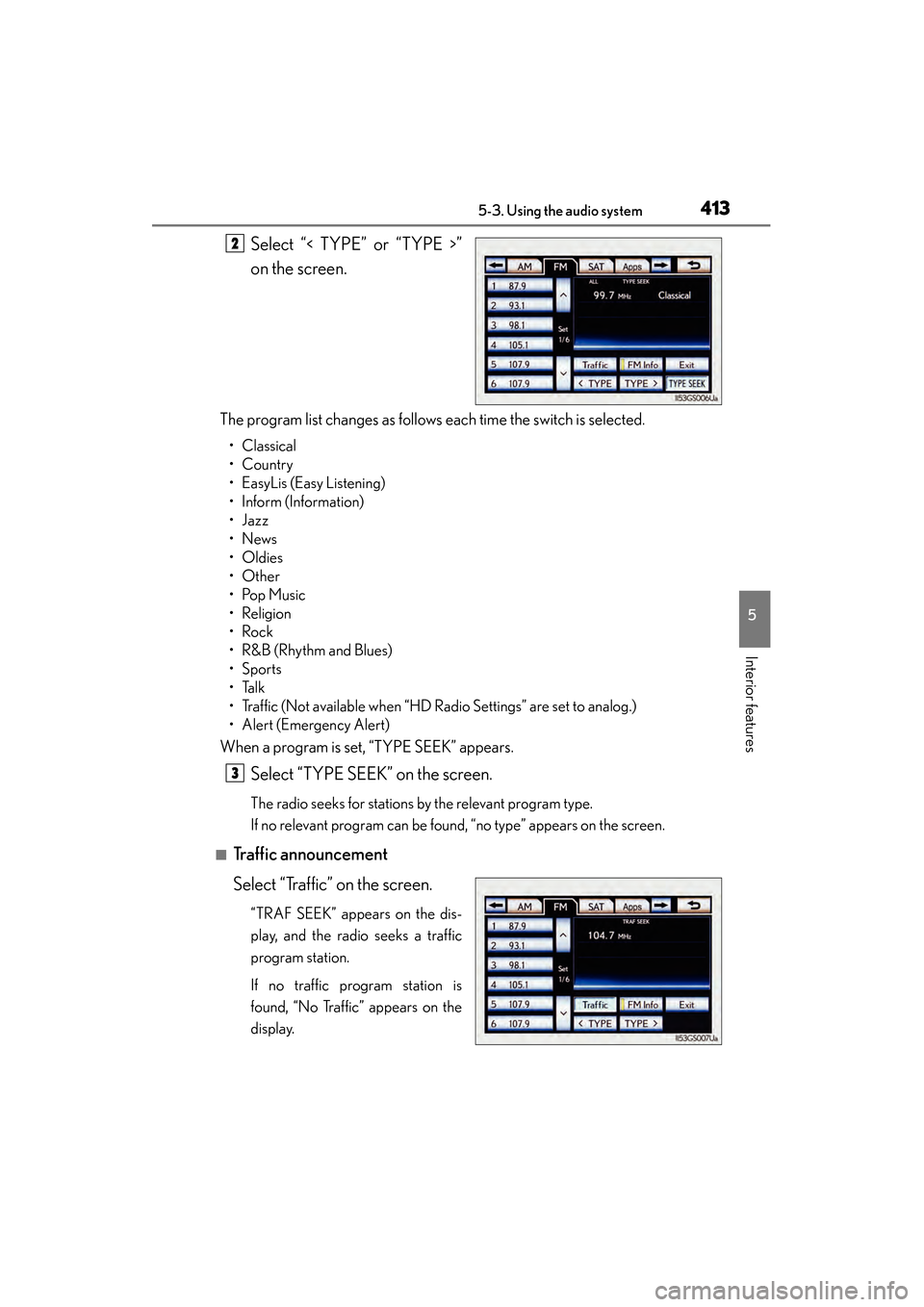
Select “< TYPE” or “TYPE >”
on the screen.
The program list changes as follows each time the switch is selected.
• Classical
•Country
• EasyLis (Easy Listening)
• Inform (Information)
•Jazz
•News
•Oldies
•Other
•Pop Music
•Religion
•Rock
•R&B (Rhythm and Blues)
•Sports
•Talk
• Traffic (Not available when “HD Radio Settings” are set to analog.)
• Alert (Emergency Alert)
When a program is set, “TYPE SEEK” appears.
Select “TYPE SEEK” on the screen.
The radio seeks for stations by the relevant program type.
If no relevant program can be found, “no type” appears on the screen.
■Traffic announcement
Select “Traffic” on the screen.
“TRAF SEEK” appears on the dis-
play, and the radio seeks a traffic
program station.
If no traffic program station is
found, “No Traffic” appears on the
display.
2
3
GS450h_U.book Page 413 Monday, January 23, 2012 10:20 AM
Page 415 of 862
414
GS450h_U (OM30D01U)
5-3. Using the audio system
■Settings HD Radio™ system
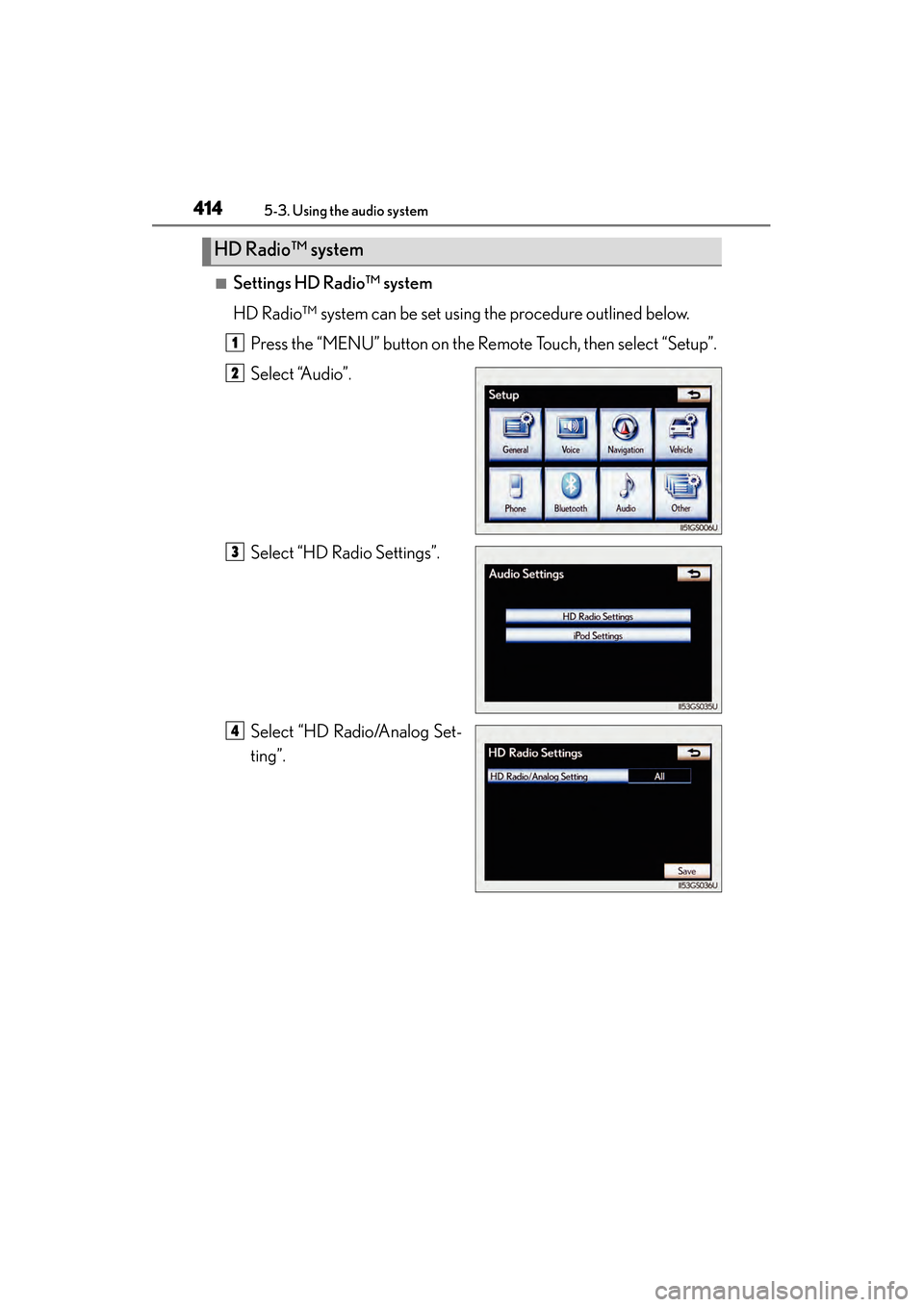
HD Radio™ system can be set using the procedure outlined below.Press the “MENU” button on the Remote Touch, then select “Setup”.
Select “Audio”.
Select “HD Radio Settings”.
Select “HD Radio/Analog Set-
ting”.
HD Radio™ system
1
2
3
4
GS450h_U.book Page 414 Monday, January 23, 2012 10:20 AM
Page 416 of 862
GS450h_U (OM30D01U)
4155-3. Using the audio system
5
Interior features
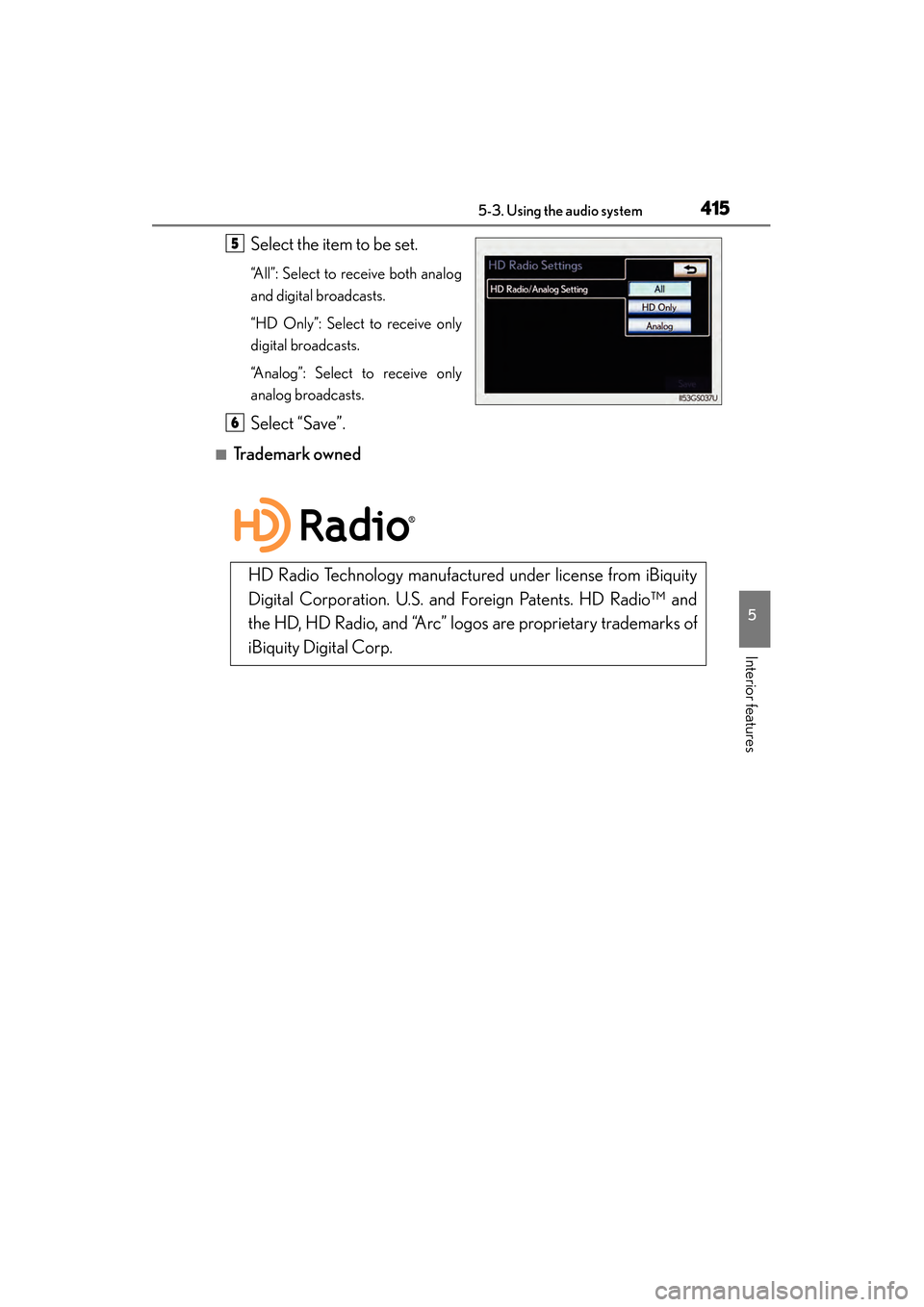
Select the item to be set.
“All”: Select to receive both analog
and digital broadcasts.
“HD Only”: Select to receive only
digital broadcasts.
“Analog”: Select to receive only
analog broadcasts.
Select “Save”.
■Trademark owned
5
6
HD Radio Technology manufactured under license from iBiquity
Digital Corporation. U.S. and Foreign Patents. HD Radio™ and
the HD, HD Radio, and “Arc” logos are proprietary trademarks of
iBiquity Digital Corp.
GS450h_U.book Page 415 Monday, January 23, 2012 10:20 AM
Page 417 of 862
416
GS450h_U (OM30D01U)
5-3. Using the audio system
HD Radio™ Technology is the digital evolution of analog AM/FM radio.
Your radio product has a special receiver which allows it to receive digital
broadcasts (where available) in addition to the analog broadcasts it
already receives.
Digital broadcasts have better sound quality than analog broadcasts as
digital broadcasts provide free, crystal clear audio with no static or distor-
tion. For more information, and a guide to available radio stations and pro-
gramming, refer to www.hdradio.com
.
HD Radio™ Technology
GS450h_U.book Page 416 Monday, January 23, 2012 10:20 AM