change time Lexus GS450h 2014 User Guide
[x] Cancel search | Manufacturer: LEXUS, Model Year: 2014, Model line: GS450h, Model: Lexus GS450h 2014Pages: 890, PDF Size: 40.62 MB
Page 211 of 890
210
GS450h_OM_OM30D52U_(U)
4-2. Driving procedures
■Turn signals can be operated when
The power switch is in ON mode.
■If the indicator flashes faster than usual
Check that a light bulb in the front or rear turn signal lights has not burned out.
■If the turn signals stop flashing before a lane change has been performed
Operate the lever again.
■Customization
The number of times the turn signals flash during a lane change can be changed.
(Customizable feature →P. 8 3 3 )
GS450h_OM_OM30D52U_(U).book Page 210 Monday, July 29, 2013 12:07 PM
Page 225 of 890
224
GS450h_OM_OM30D52U_(U)
4-3. Operating the lights and wipers
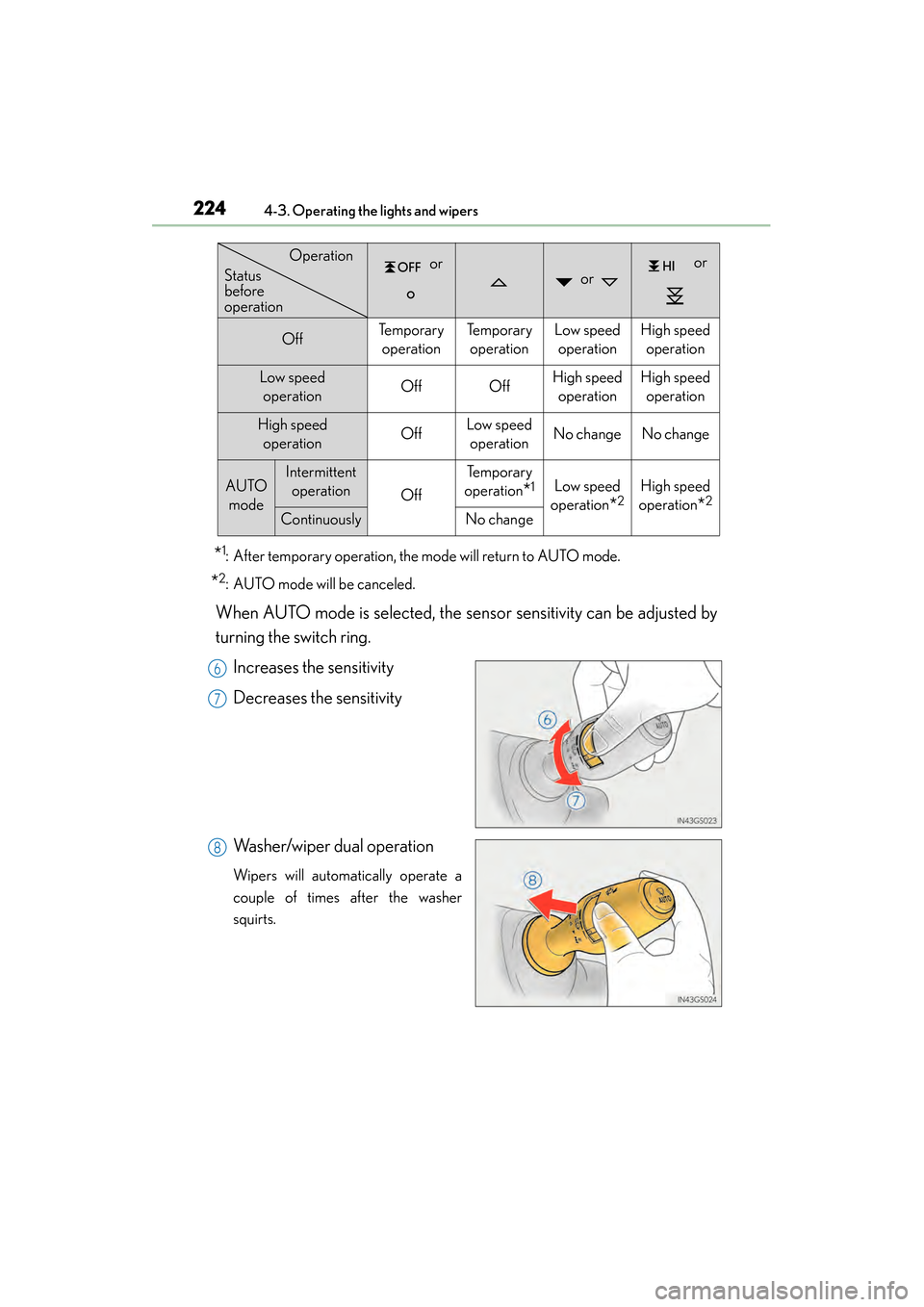
*1: After temporary operation, the mode will return to AUTO mode.
*2: AUTO mode will be canceled.
When AUTO mode is selected, the sensor sensitivity can be adjusted by
turning the switch ring.Increases the sensitivity
Decreases the sensitivity
Washer/wiper dual operation
Wipers will automatically operate a
couple of times after the washer
squirts.
or or
or
OffTe m p o r a r y operationTe m p o r a r y operationLow speed operationHigh speed operation
Low speed operationOffOffHigh speed operationHigh speedoperation
High speed operationOffLow speedoperationNo changeNo change
AUTO modeIntermittent operation
Off
Te m p o r a r y
operation
*1Low speed
operation
*2High speed
operation
*2
ContinuouslyNo change
Operation
Status
before
operation
6
7
8
GS450h_OM_OM30D52U_(U).book Page 224 Monday, July 29, 2013 12:07 PM
Page 227 of 890
226
GS450h_OM_OM30D52U_(U)
4-3. Operating the lights and wipers
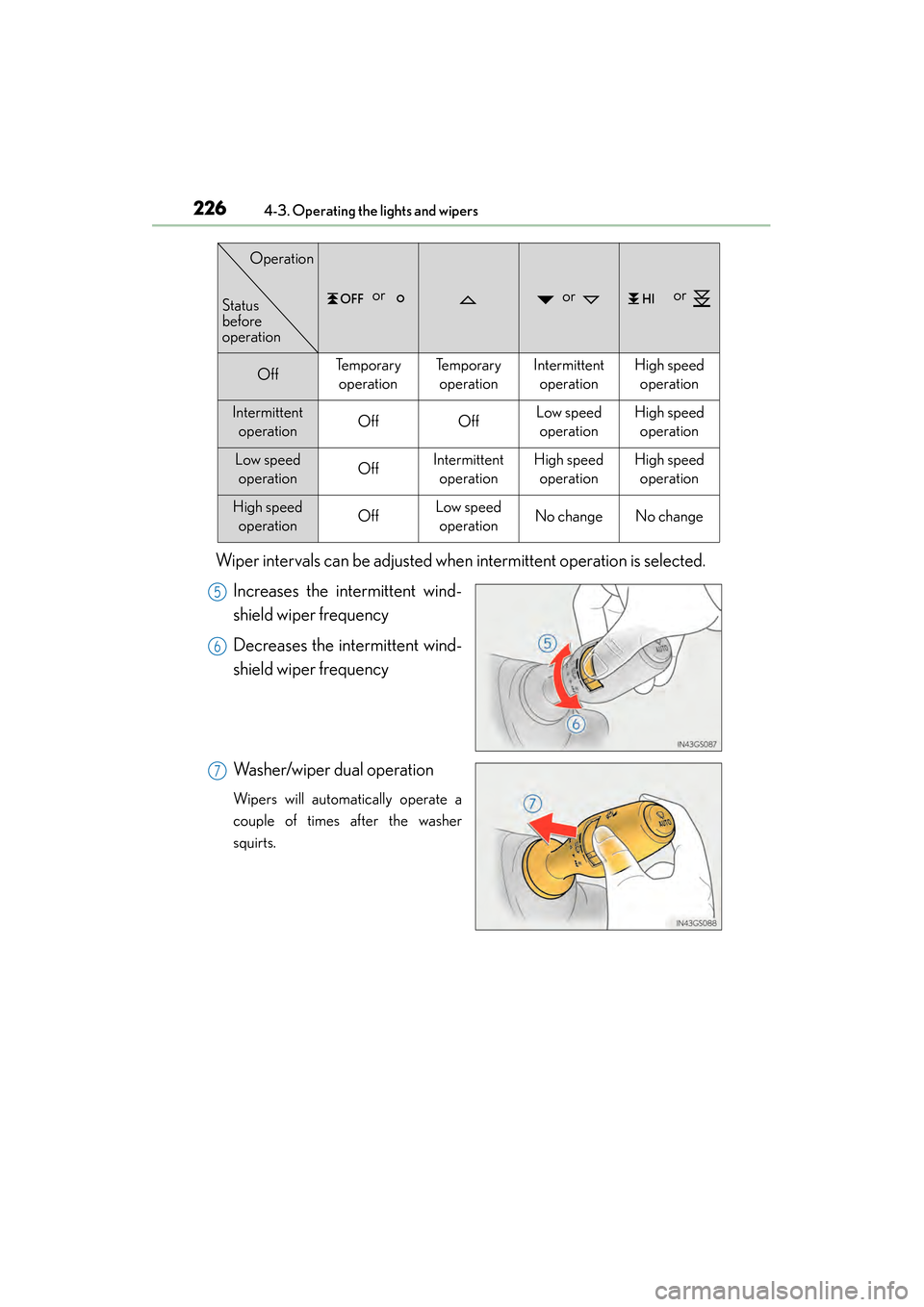
Wiper intervals can be adjusted when intermittent operation is selected.Increases the intermittent wind-
shield wiper frequency
Decreases the intermittent wind-
shield wiper frequency
Washer/wiper dual operation
Wipers will automatically operate a
couple of times after the washer
squirts.
or or or
OffTe m p o r a r y operationTe m p o r a r y operationIntermittent operationHigh speedoperation
Intermittent operationOffOffLow speedoperationHigh speed operation
Low speed operationOffIntermittent operationHigh speedoperationHigh speedoperation
High speed operationOffLow speedoperationNo changeNo change
Status
before
operation
Operation
5
6
7
GS450h_OM_OM30D52U_(U).book Page 226 Monday, July 29, 2013 12:07 PM
Page 228 of 890
GS450h_OM_OM30D52U_(U)
2274-3. Operating the lights and wipers
4
Driving
■The windshield wiper and washer can be operated when
The power switch is in ON mode.
■Dripping prevention wiper sweep
After washing and wiping operation several times, the wipers operate one more time
after a short delay to prevent dripping.
However, the last sweep will not happen while the vehicle is moving.
■Effects of vehicle speed on wiper operation
●Intermittent windshield wipers interval changes when the vehicle is stopped.
●With low speed operation selected, wiper operation will be switched from low
speed to intermittent operation only when the vehicle is stationary.
GS450h_OM_OM30D52U_(U).book Page 227 Monday, July 29, 2013 12:07 PM
Page 238 of 890
GS450h_OM_OM30D52U_(U)
2374-5. Using the driving support systems
4
Driving
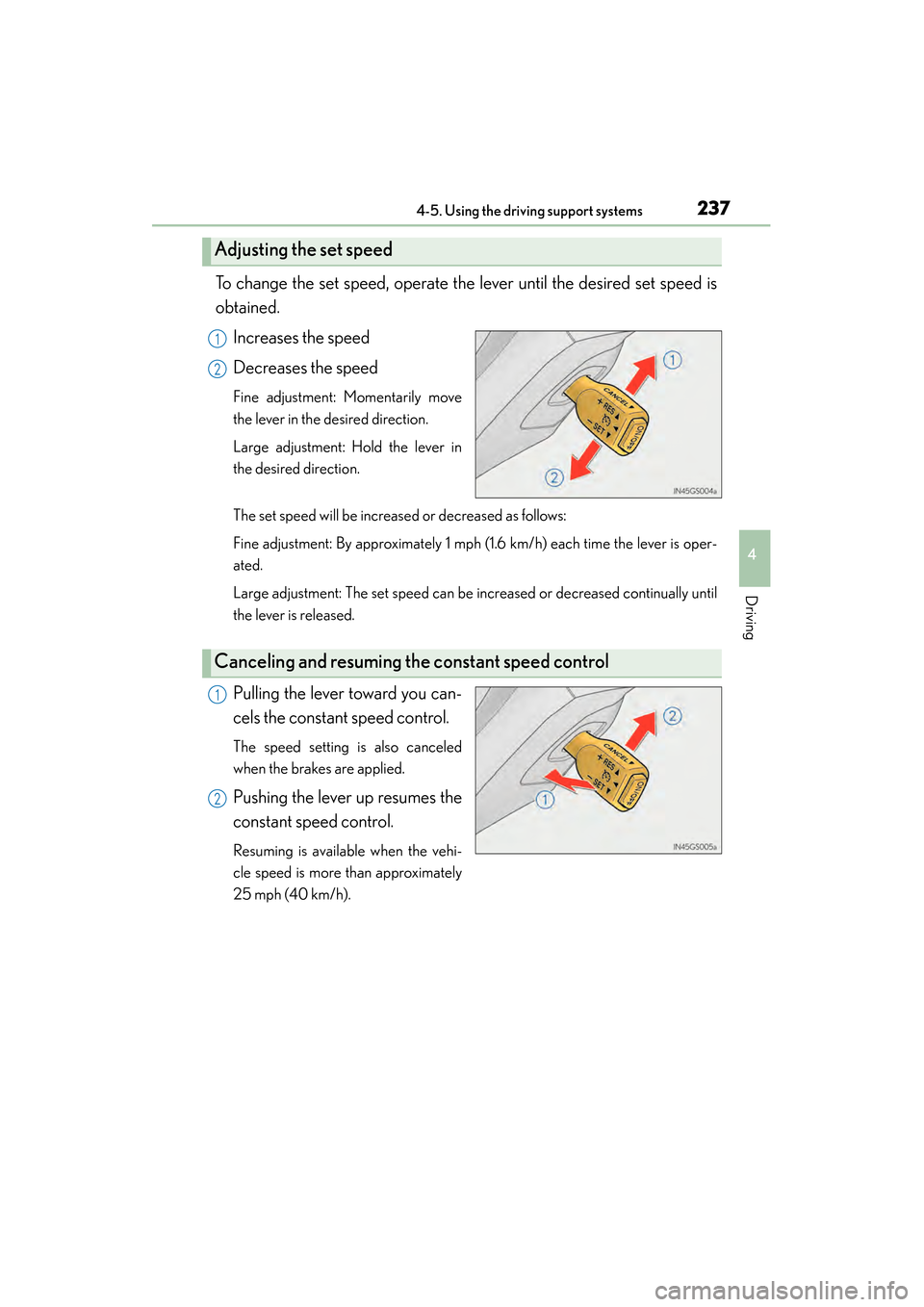
To change the set speed, operate the lever until the desired set speed is
obtained.Increases the speed
Decreases the speed
Fine adjustment: Momentarily move
the lever in the desired direction.
Large adjustment: Hold the lever in
the desired direction.
The set speed will be increased or decreased as follows:
Fine adjustment: By approximately 1 mph (1.6 km/h) each time the lever is oper-
ated.
Large adjustment: The set speed can be increased or decreased continually until
the lever is released.
Pulling the lever toward you can-
cels the constant speed control.
The speed setting is also canceled
when the brakes are applied.
Pushing the lever up resumes the
constant speed control.
Resuming is available when the vehi-
cle speed is more than approximately
25 mph (40 km/h).
Adjusting the set speed
1
2
Canceling and resuming the constant speed control
1
2
GS450h_OM_OM30D52U_(U).book Page 237 Monday, July 29, 2013 12:07 PM
Page 243 of 890
242
GS450h_OM_OM30D52U_(U)
4-5. Using the driving support systems
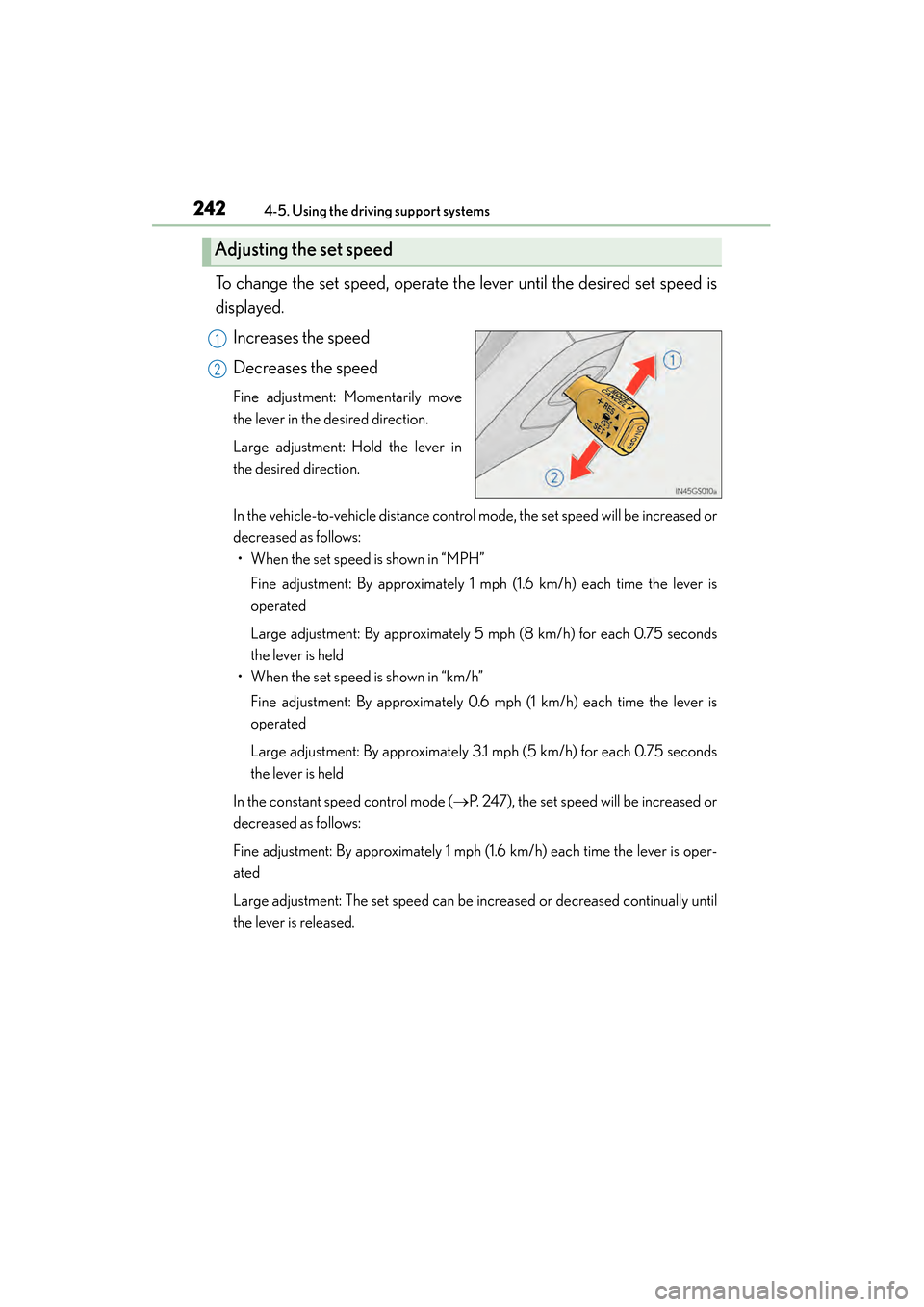
To change the set speed, operate the lever until the desired set speed is
displayed.Increases the speed
Decreases the speed
Fine adjustment: Momentarily move
the lever in the desired direction.
Large adjustment: Hold the lever in
the desired direction.
In the vehicle-to-vehicle distance control mode, the set speed will be increased or
decreased as follows:• When the set speed is shown in “MPH”
Fine adjustment: By approximately 1 mph (1.6 km/h) each time the lever is
operated
Large adjustment: By approximately 5 mph (8 km/h) for each 0.75 seconds
the lever is held
• When the set speed is shown in “km/h”
Fine adjustment: By approximately 0.6 mph (1 km/h) each time the lever is
operated
Large adjustment: By approximately 3.1 mph (5 km/h) for each 0.75 seconds
the lever is held
In the constant speed control mode ( →P. 247), the set speed will be increased or
decreased as follows:
Fine adjustment: By approximately 1 mph (1.6 km/h) each time the lever is oper-
ated
Large adjustment: The set speed can be increased or decreased continually until
the lever is released.
Adjusting the set speed
1
2
GS450h_OM_OM30D52U_(U).book Page 242 Monday, July 29, 2013 12:07 PM
Page 258 of 890
GS450h_OM_OM30D52U_(U)
2574-5. Using the driving support systems
4
Driving
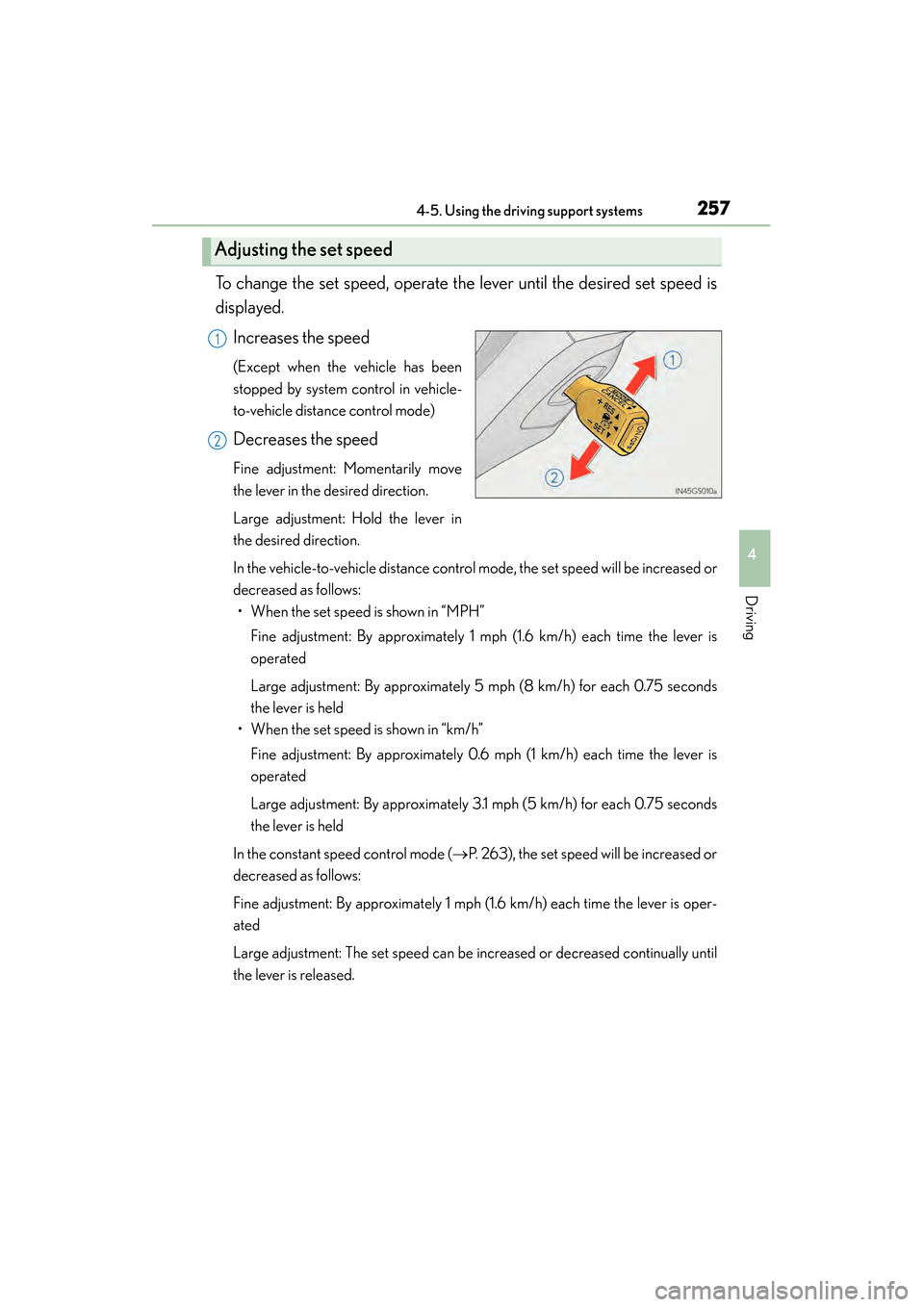
To change the set speed, operate the lever until the desired set speed is
displayed.Increases the speed
(Except when the vehicle has been
stopped by system control in vehicle-
to-vehicle distance control mode)
Decreases the speed
Fine adjustment: Momentarily move
the lever in the desired direction.
Large adjustment: Hold the lever in
the desired direction.
In the vehicle-to-vehicle distance control mode, the set speed will be increased or
decreased as follows:• When the set speed is shown in “MPH”
Fine adjustment: By approximately 1 mph (1.6 km/h) each time the lever is
operated
Large adjustment: By approximately 5 mph (8 km/h) for each 0.75 seconds
the lever is held
• When the set speed is shown in “km/h”
Fine adjustment: By approximately 0.6 mph (1 km/h) each time the lever is
operated
Large adjustment: By approximately 3.1 mph (5 km/h) for each 0.75 seconds
the lever is held
In the constant speed control mode ( →P. 263), the set speed will be increased or
decreased as follows:
Fine adjustment: By approximately 1 mph (1.6 km/h) each time the lever is oper-
ated
Large adjustment: The set speed can be increased or decreased continually until
the lever is released.
Adjusting the set speed
1
2
GS450h_OM_OM30D52U_(U).book Page 257 Monday, July 29, 2013 12:07 PM
Page 278 of 890
GS450h_OM_OM30D52U_(U)
2774-5. Using the driving support systems
4
Driving
■If there are lane markers on only one side of the vehicle
The lane keeping assist function will not operate. Also, the lane departure warning
will not operate for the side on which lane markers could not be recognized.
■Conditions in which the function may not operate correctly
In the following conditions, the LKA system functions may not operate, or it may not
be possible to ensure adequate performance. Also, the camera sensor may be
unable to recognize lane lines causing the lane departure warning function to oper-
ate incorrectly, or the lane keeping assist function may not operate properly. How-
ever, this does not indicate a malfunction.
●When driving through an area with no lane markers, such as a tollbooth, a crossing
or before a ticket checkpoint
●When driving on a sharp curve
●When lanes are extremely narrow or extremely wide
●When the vehicle leans to one side an unusual amount due to a heavy load or
improper tire inflation pressure
●When the following distance between your vehicle and the vehicle ahead is
extremely short
●When the lane markers are yellow (These may be more difficult for the system to
recognize compared to white markers.)
●When the lane markers are broken, “Botts’ dots”, “Raised pavement marker” or
stones
●When lane markers are obscured or partially obscured by sand, dirt, etc.
●When there are shadows on the road running parallel with lane markers, or if a
shadow covers the lane markers
●When driving on a particularly bright road surface, such as concrete
●When driving on a road surface that is bright due to reflected light
●When driving in a location where the light level changes rapidly, such as the
entrance to or exit from a tunnel
●When sunlight or the headlights of oncoming vehicles are shining directly into the
camera lens
●When driving on roads that are branching or merging
●When driving on a road surface that is wet due to rain, previous rainfall, standing
water, etc.
●When the vehicle experiences strong up-and-down motion such as when driving
on an extremely rough road or on a seam in the pavement
●When headlight brightness at nighttime is reduced due to dirt on the lenses, or
when the headlights are misaligned
●When driving with a strong crosswind
GS450h_OM_OM30D52U_(U).book Page 277 Monday, July 29, 2013 12:07 PM
Page 281 of 890
280
GS450h_OM_OM30D52U_(U)
4-5. Using the driving support systems
NOTICE
■Camera sensor (→P. 2 7 1 )
Observe the following to ensure that the LKA system functions correctly.
●Keep the windshield clean at all times.
Performance could be affected if the windshield is dirty, or if raindrops, conden-
sation or ice are adhering to the windshield.
●When adjusting the rear view mirror, make sure that it does not block the camera
lens.
●Do not attach window tinting to the windshield.
●Do not install an antenna in front of the camera lens.
●If the windshield is fogged up, use the windshield defogger to remove fog from
the windshield.
When it is cold, using the heater with air blowing to the feet may allow the upper
part of the windshield to fog up. This will have a negative effect on the images.
●Do not place anything on the dashboard.
The camera sensor may recognize the image reflected on the windshield as lane
markers by mistake.
●Do not scratch the camera lens, or let it get dirty.
When cleaning the inside of the windshield, be careful not to get any glass
cleaner etc. on the lens. Also, do not touch the lens.
For lens repair, contact your Lexus dealer.
●Do not change the installation position or direction of the camera sensor or
remove it. The direction of the camera sensor is precisely adjusted.
●Do not subject the camera sensor to strong impact or force, and do not disas-
semble the camera sensor.
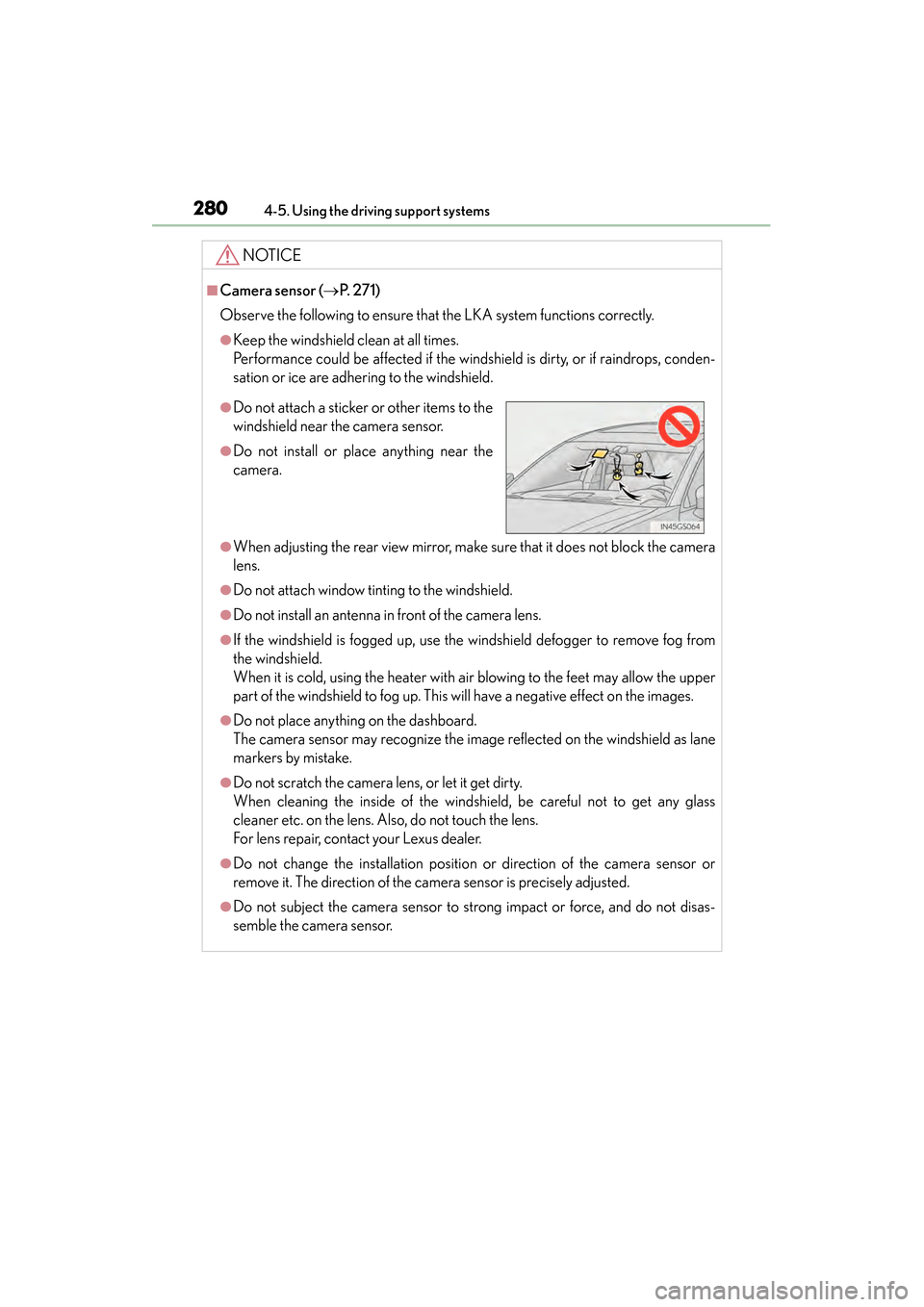
●Do not attach a sticker or other items to the
windshield near the camera sensor.
●Do not install or place anything near the
camera.
GS450h_OM_OM30D52U_(U).book Page 280 Monday, July 29, 2013 12:07 PM
Page 356 of 890
GS450h_OM_OM30D52U_(U)
3555-1. Remote Touch screen
5
Interior features
■When using the Remote Touch screen
●If the screen is cold, the display may be dark, or the system may seem to be operat-
ing slightly slower than normal.
●When the screen is viewed through polarized sunglasses, a rainbow pattern may
appear on the screen due to optical characteristics of the screen. If this is disturb-
ing, please operate the screen without polarized sunglasses.
●Dimmed screen buttons cannot be operated.
■Changing between day mode and night mode
The display condition is not changed to night mode even if the headlight switch is
turned on when the vehicle is in a bright area such as daytime.
■To t u r n o f f t h e d i s p l a y
The display goes off when “Screen Off” is selected. To turn the screen back on, press
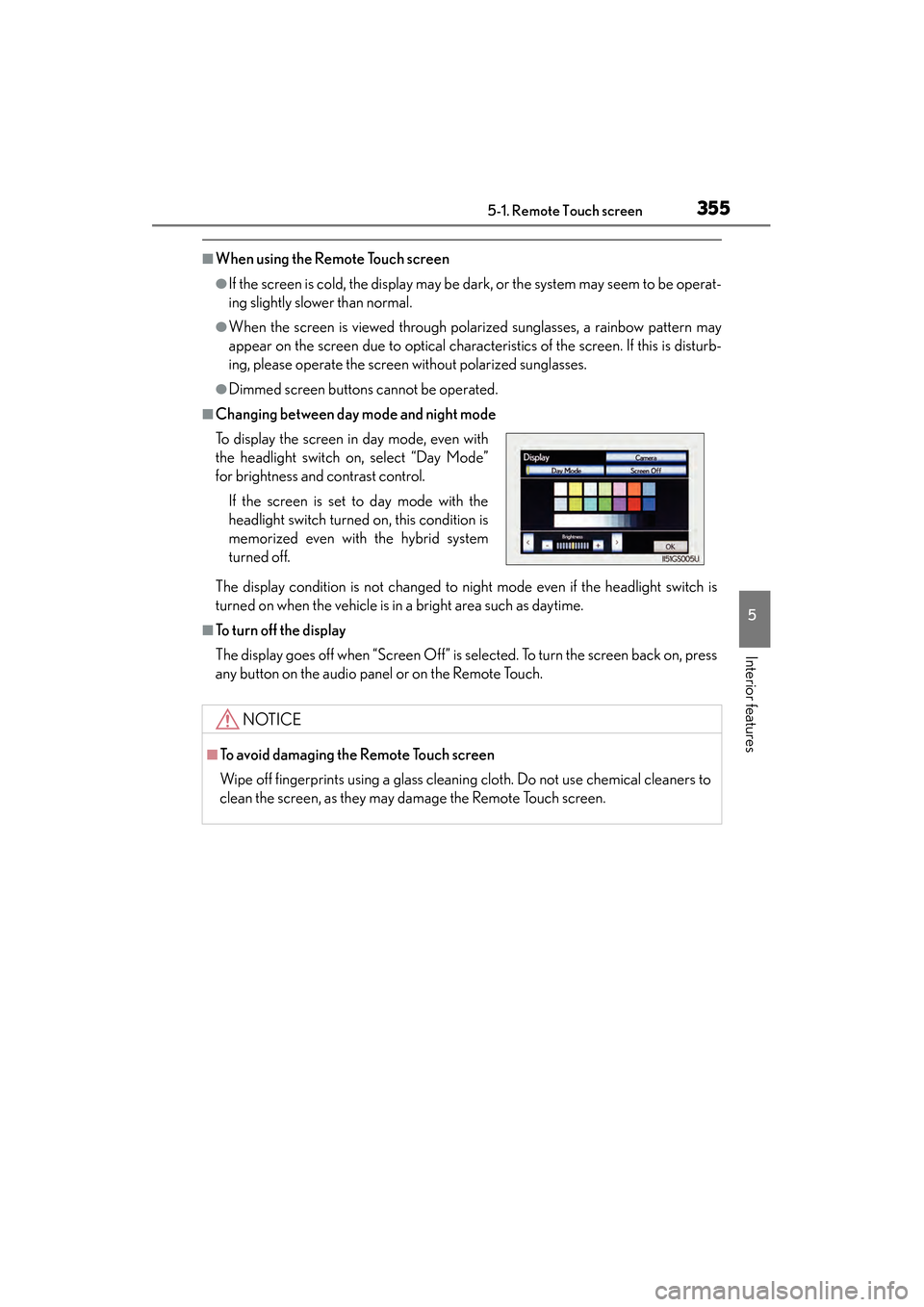
any button on the audio panel or on the Remote Touch. To display the screen in day mode, even with
the headlight switch on, select “Day Mode”
for brightness and contrast control.
If the screen is set to day mode with the
headlight switch turned on, this condition is
memorized even with the hybrid system
turned off.
NOTICE
■To avoid damaging the Remote Touch screen
Wipe off fingerprints using a glass cleaning cloth. Do not use chemical cleaners to
clean the screen, as they may damage the Remote Touch screen.
GS450h_OM_OM30D52U_(U).book Page 355 Monday, July 29, 2013 12:07 PM