bluetooth Lexus GS450h 2014 Owner's Guide
[x] Cancel search | Manufacturer: LEXUS, Model Year: 2014, Model line: GS450h, Model: Lexus GS450h 2014Pages: 890, PDF Size: 40.62 MB
Page 540 of 890
539
GS450h_OM_OM30D52U_(U)5-4. Using the hands-free phone system (for cellular phone)
5
Interior features
Using a Bluetooth® phone
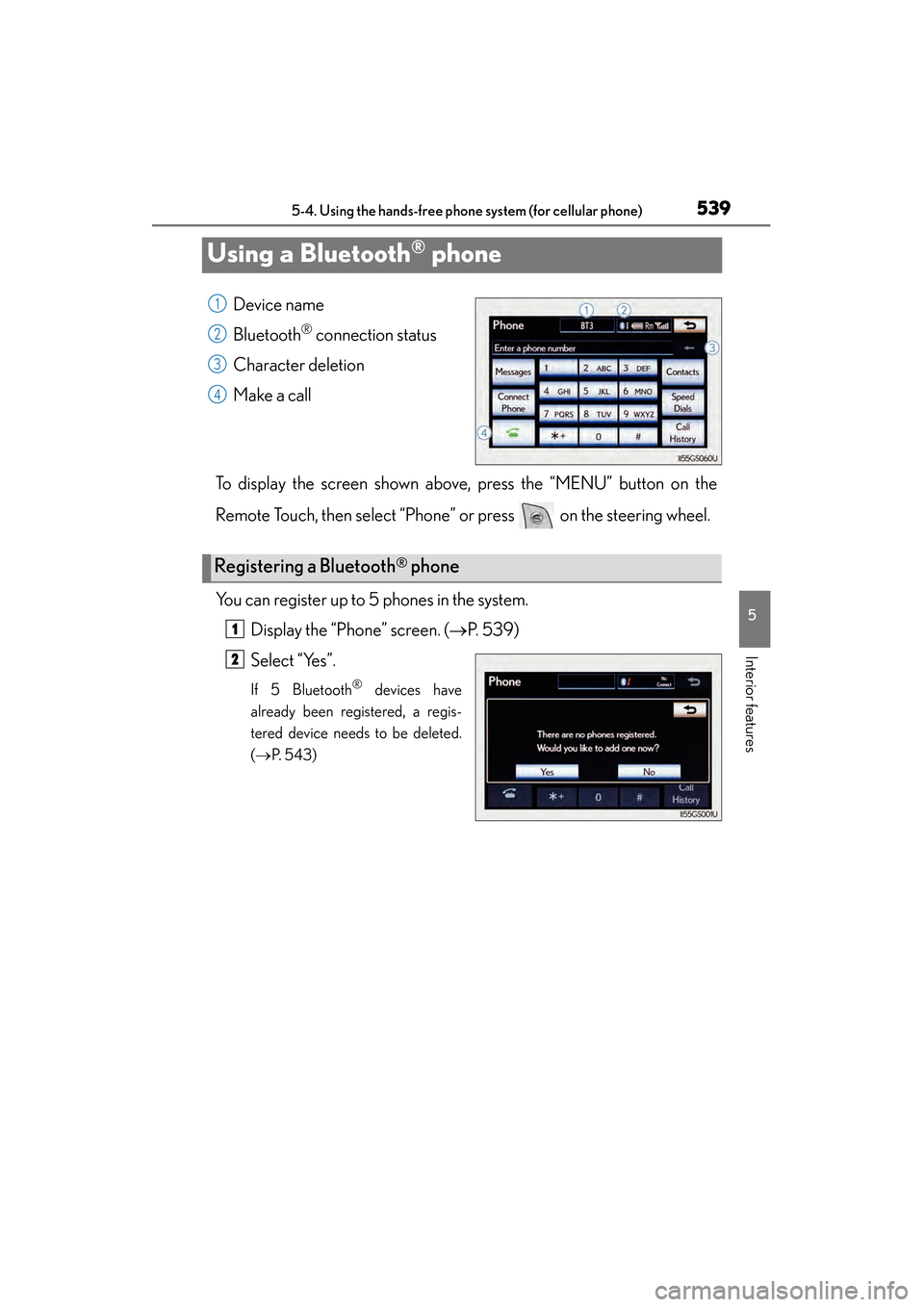
Device name
Bluetooth
® connection status
Character deletion
Make a call
To display the screen shown above, press the “MENU” button on the
Remote Touch, then select “Phone” or press on the steering wheel.
You can register up to 5 phones in the system. Display the “Phone” screen. ( →P. 5 3 9 )
Select “Yes”.
If 5 Bluetooth® devices have
already been registered, a regis-
tered device needs to be deleted.
( → P. 5 4 3 )
1
2
3
4
Registering a Bluetooth® phone
1
2
GS450h_OM_OM30D52U_(U).book Page 539 Monday, July 29, 2013 12:07 PM
Page 541 of 890
540
GS450h_OM_OM30D52U_(U)
5-4. Using the hands-free phone system (for cellular phone)
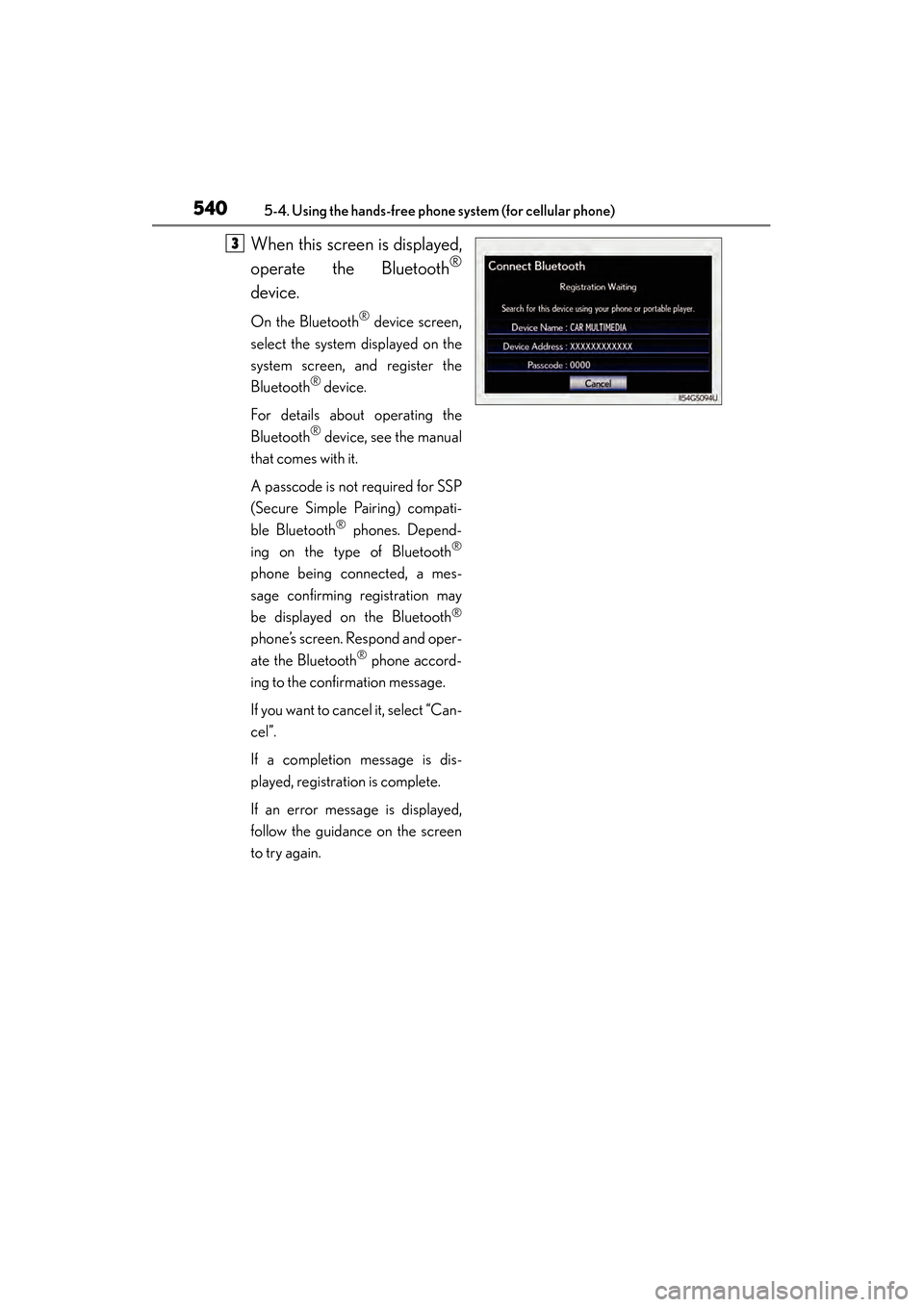
When this screen is displayed,
operate the Bluetooth
®
device.
On the Bluetooth® device screen,
select the system displayed on the
system screen, and register the
Bluetooth
® device.
For details about operating the
Bluetooth
® device, see the manual
that comes with it.
A passcode is not required for SSP
(Secure Simple Pairing) compati-
ble Bluetooth
® phones. Depend-
ing on the type of Bluetooth®
phone being connected, a mes-
sage confirming registration may
be displayed on the Bluetooth
®
phone’s screen. Respond and oper-
ate the Bluetooth
® phone accord-
ing to the confirmation message.
If you want to cancel it, select “Can-
cel”.
If a completion message is dis-
played, registration is complete.
If an error message is displayed,
follow the guidance on the screen
to try again.
3
GS450h_OM_OM30D52U_(U).book Page 540 Monday, July 29, 2013 12:07 PM
Page 542 of 890
GS450h_OM_OM30D52U_(U)
5415-4. Using the hands-free phone system (for cellular phone)
5
Interior features
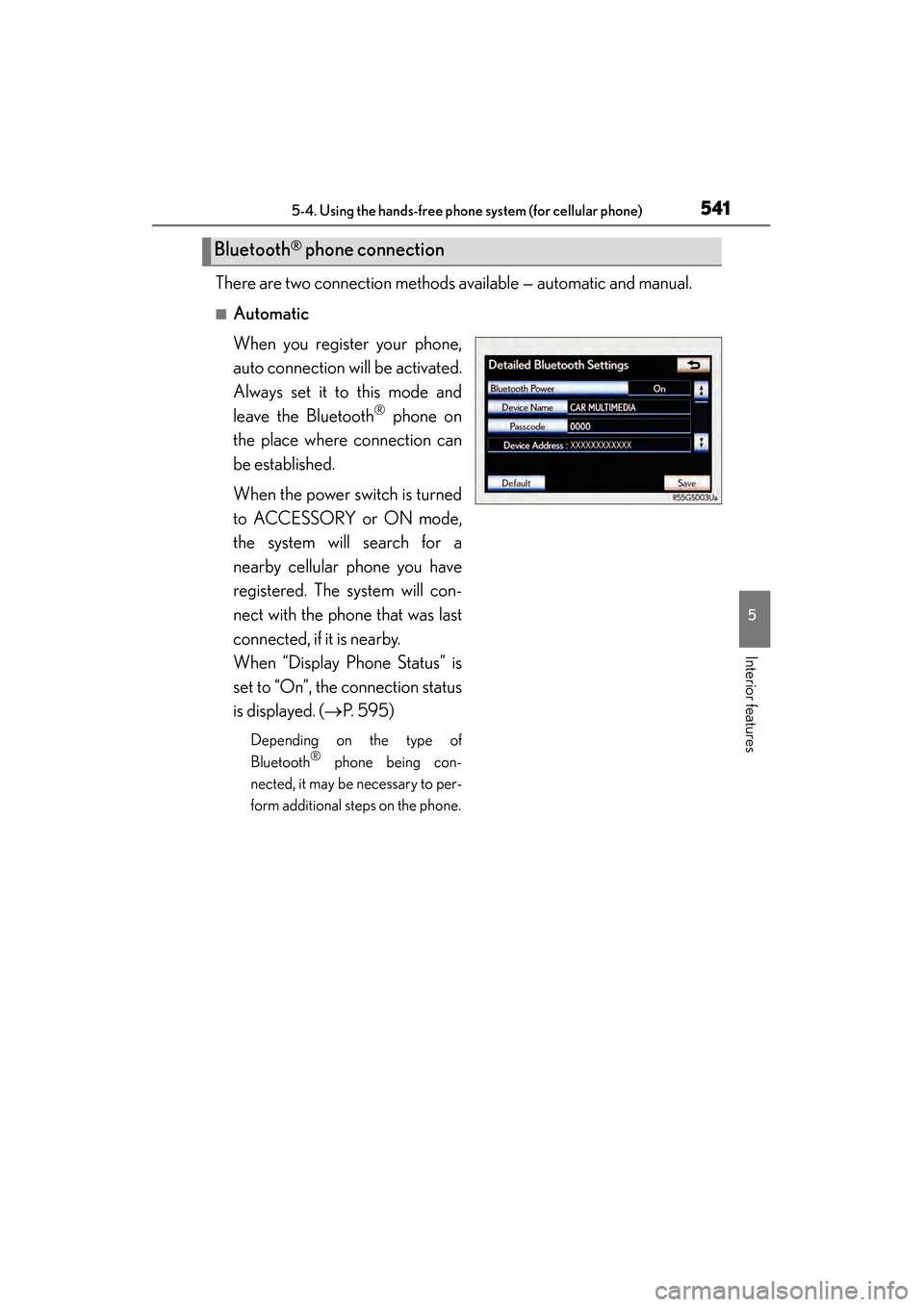
There are two connection methods available — automatic and manual.
■Automatic
When you register your phone,
auto connection will be activated.
Always set it to this mode and
leave the Bluetooth
® phone on
the place where connection can
be established.
When the power switch is turned
to ACCESSORY or ON mode,
the system will search for a
nearby cellular phone you have
registered. The system will con-
nect with the phone that was last
connected, if it is nearby.
When “Display Phone Status” is
set to “On”, the connection status
is displayed. (→ P. 595)
Depending on the type of
Bluetooth® phone being con-
nected, it may be necessary to per-
form additional steps on the phone.
Bluetooth® phone connection
GS450h_OM_OM30D52U_(U).book Page 541 Monday, July 29, 2013 12:07 PM
Page 543 of 890
542
GS450h_OM_OM30D52U_(U)
5-4. Using the hands-free phone system (for cellular phone)
■Manual
When the auto connection has failed or “Bluetooth* Power” is turned
off, you must connect Bluetooth
® manually.
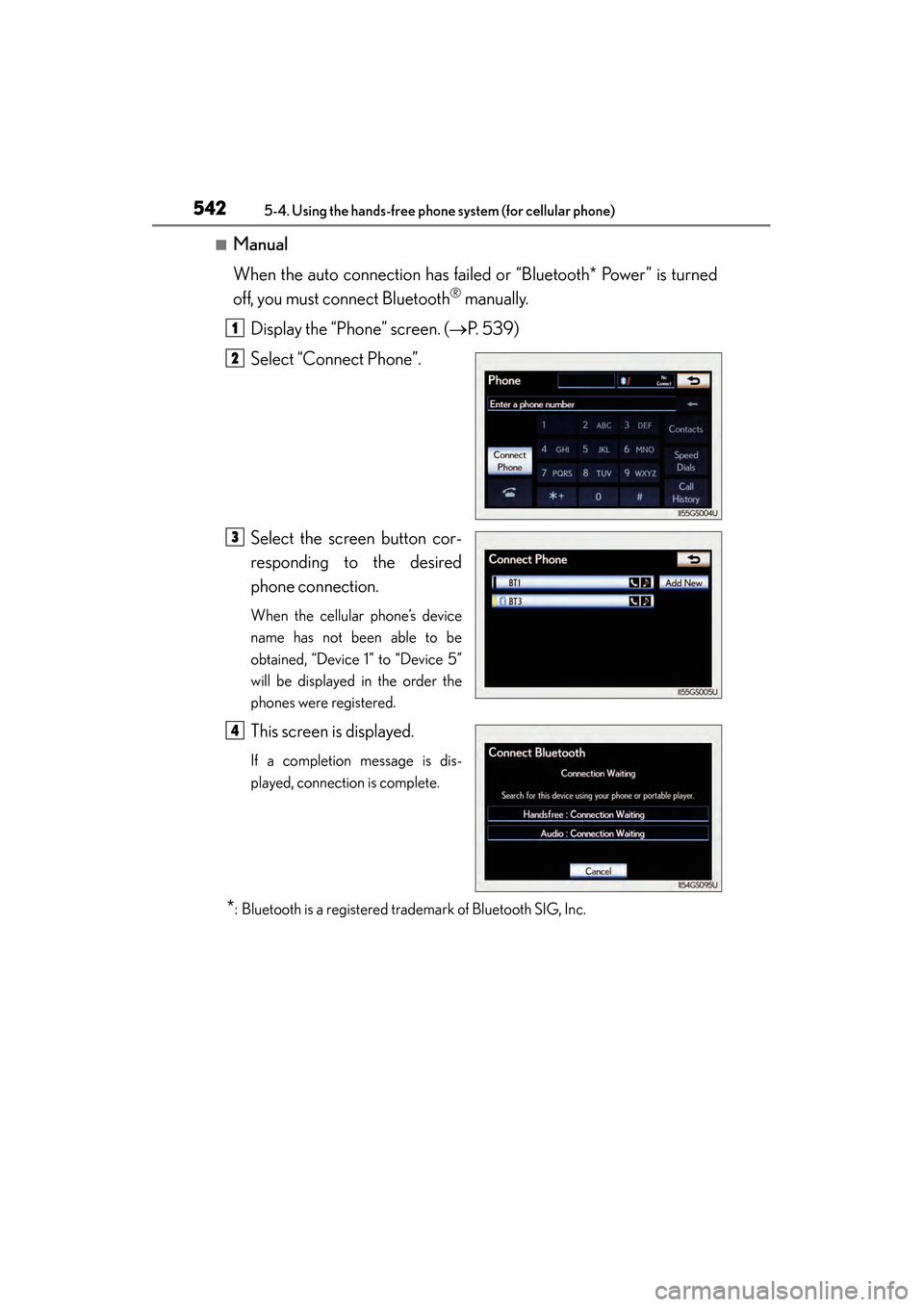
Display the “Phone” screen. ( →P. 5 3 9 )
Select “Connect Phone”.
Select the screen button cor-
responding to the desired
phone connection.
When the cellular phone’s device
name has not been able to be
obtained, “Device 1” to “Device 5”
will be displayed in the order the
phones were registered.
This screen is displayed.
If a completion message is dis-
played, connection is complete.
*: Bluetooth is a registered trademark of Bluetooth SIG, Inc.
1
2
3
4
GS450h_OM_OM30D52U_(U).book Page 542 Monday, July 29, 2013 12:07 PM
Page 544 of 890
GS450h_OM_OM30D52U_(U)
5435-4. Using the hands-free phone system (for cellular phone)
5
Interior features
■Reconnecting to the Bluetooth® phone
If the system cannot connect due to poor signal strength with the power switch in
ACCESSORY or ON mode, the system will automatically attempt to reconnect.
If the phone is turned off, the system will not attempt to reconnect. In this case, it must
be connected manually, or the phone must be re-selected or re-entered.
■Connecting the phone while Bluetooth® audio is playing
●Bluetooth® audio will stop temporarily.
●It may take time to connect.
■Connecting the phone while another Bluetooth® device is connected
When another Bluetooth
® device is currently connected, a confirmation message
will be displayed. To disconnect the Bluetooth® device, select “Yes”.
■Connecting the phone while 5 Bluetooth® devices have already been registered
When 5 Bluetooth
® devices have already been registered, a registered device
needs to be deleted. Select “Yes” to delete one or more.
Select the device to be deleted, then select “Remove”, and “Yes”.
■If the Bluetooth® phone has a Bluetooth® audio function
When the Bluetooth
® phone to be registered has a Bluetooth® audio function, this
audio function will be registered automatically at the same time and confirmation
message may be displayed. If this screen is displayed, select “Yes” to connect the
audio function or select “No” to cancel the connection.
GS450h_OM_OM30D52U_(U).book Page 543 Monday, July 29, 2013 12:07 PM
Page 545 of 890
544
GS450h_OM_OM30D52U_(U)
5-4. Using the hands-free phone system (for cellular phone)
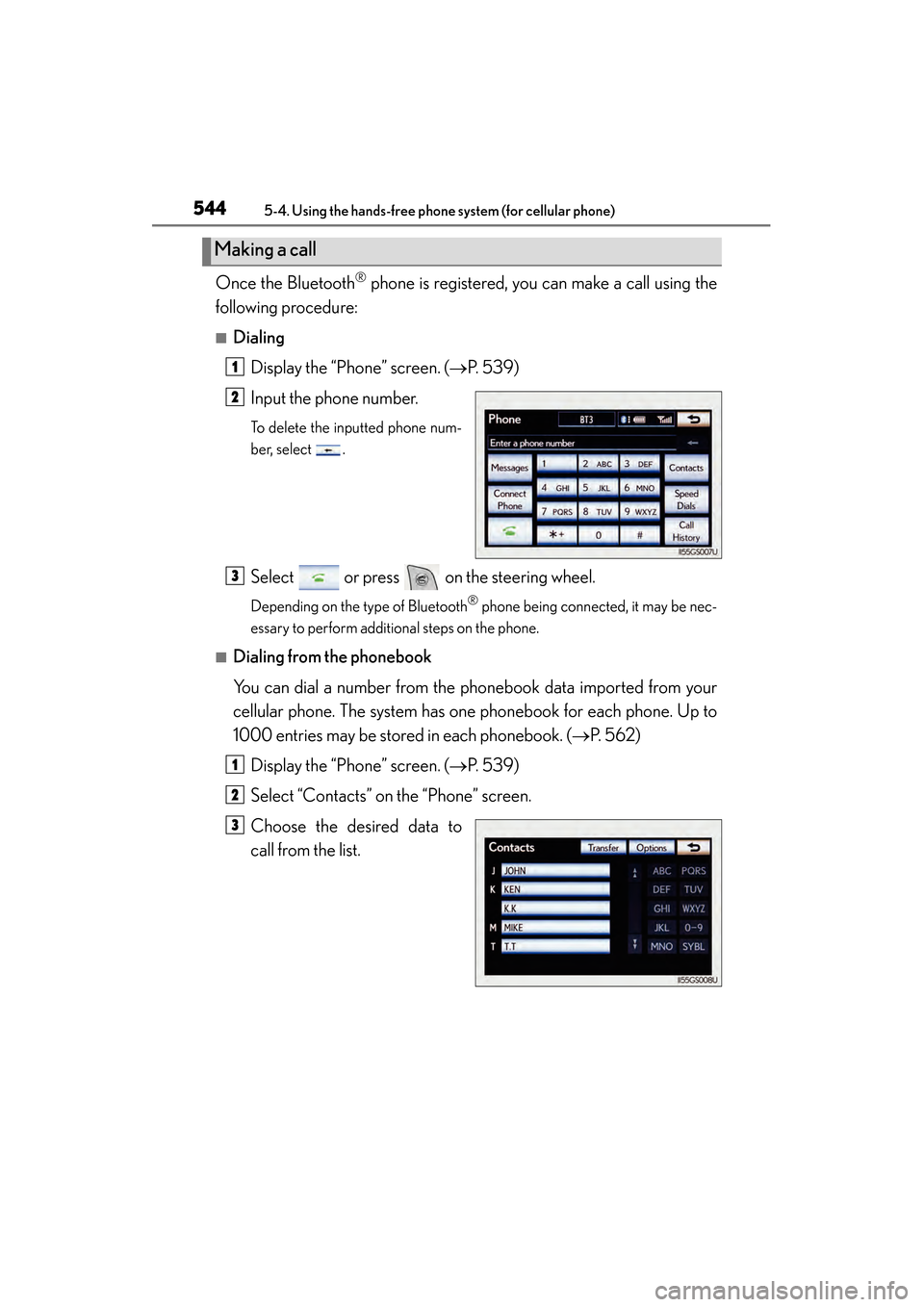
Once the Bluetooth® phone is registered, you can make a call using the
following procedure:
■Dialing
Display the “Phone” screen. ( →P. 5 3 9 )
Input the phone number.
To delete the inputted phone num-
ber, select .
Select or press on the steering wheel.
Depending on the type of Bluetooth® phone being connected, it may be nec-
essary to perform additional steps on the phone.
■Dialing from the phonebook
You can dial a number from the phonebook data imported from your
cellular phone. The system has one phonebook for each phone. Up to
1000 entries may be stored in each phonebook. ( →P. 562)
Display the “Phone” screen. ( →P. 5 3 9 )
Select “Contacts” on the “Phone” screen.
Choose the desired data to
call from the list.
Making a call
1
2
3
1
2
3
GS450h_OM_OM30D52U_(U).book Page 544 Monday, July 29, 2013 12:07 PM
Page 547 of 890
546
GS450h_OM_OM30D52U_(U)
5-4. Using the hands-free phone system (for cellular phone)
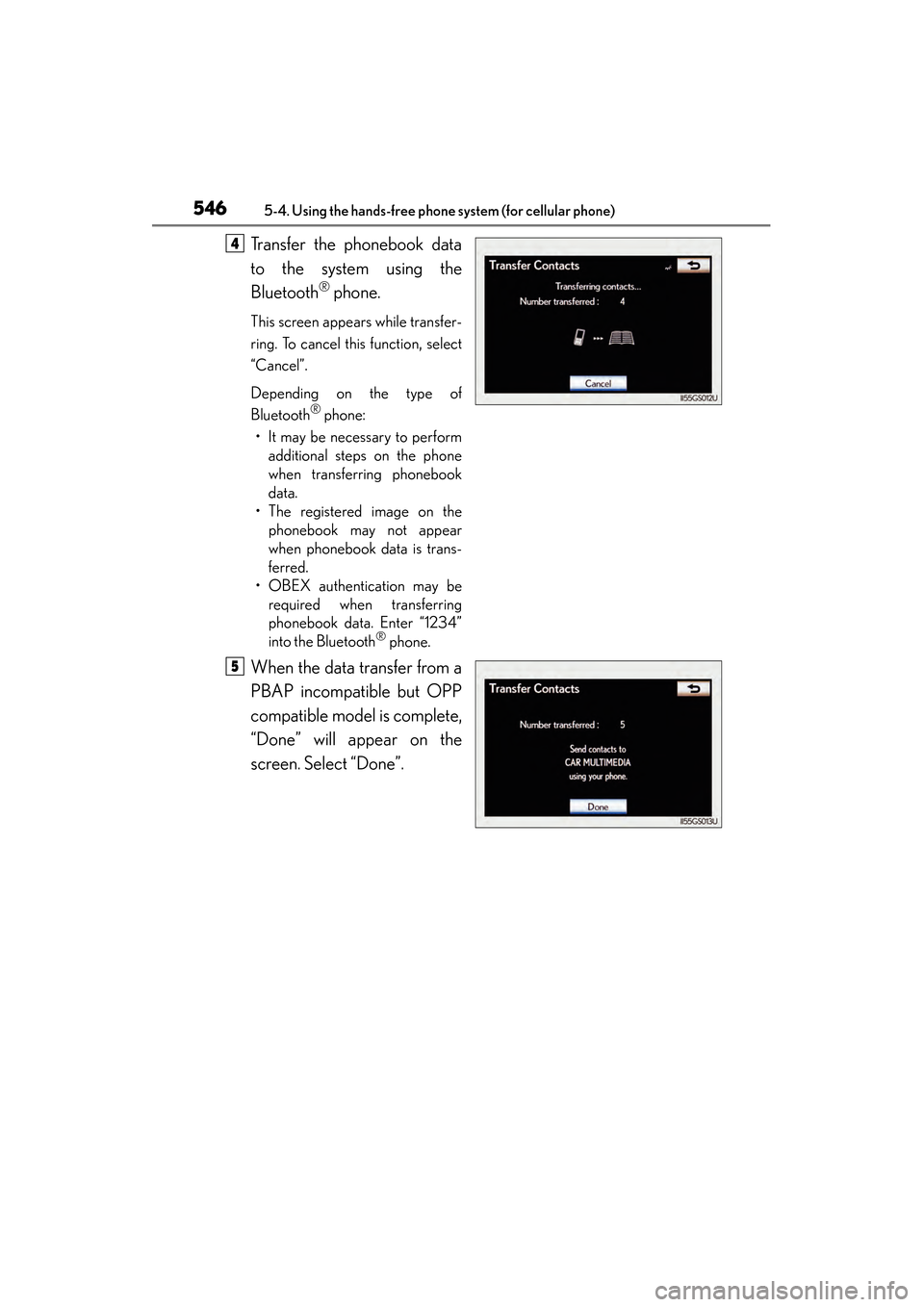
Transfer the phonebook data
to the system using the
Bluetooth
® phone.
This screen appears while transfer-
ring. To cancel this function, select
“Cancel”.
Depending on the type of
Bluetooth
® phone:
• It may be necessary to perform additional steps on the phone
when transferring phonebook
data.
• The registered image on the phonebook may not appear
when phonebook data is trans-
ferred.
• OBEX authentication may be required when transferring
phonebook data. Enter “1234”
into the Bluetooth
® phone.
When the data transfer from a
PBAP incompatible but OPP
compatible model is complete,
“Done” will appear on the
screen. Select “Done”.
4
5
GS450h_OM_OM30D52U_(U).book Page 546 Monday, July 29, 2013 12:07 PM
Page 552 of 890
GS450h_OM_OM30D52U_(U)
5515-4. Using the hands-free phone system (for cellular phone)
5
Interior features
■Call history list
●If you make a call to or receive a call from a number registered in the phone book,
the name is displayed in the call history.
●If you make multiple calls to the same number, only the last call made is displayed in
the call history.
●Number-withheld calls are also memorized in the system.
■When driving
The functions “Dialing”, “Dialing from the phonebook”, and “Dialing from history”
(except for call using the 25 most recently called numbers shown by “All” tab) are
unavailable.
■When calling by registered name in the phonebook
●When “Call
book’s voice command recognition cannot be used. Check the Bluetooth® con-
nection and if the contacts have been transferred to the system.
●Short or abbreviated names in the phonebook may not be recognized. Change
names in the phonebook to full names.
●Sometimes a voice recognition result confirmation screen will be displayed. After
confirming the result, say “Yes” or “No”.
●When the system recognizes multiple names from the phonebook, a name candi-
date list will be displayed on the screen. If the desired name is not displayed on the
top of the screen, say the number of the name from the candidate list (number 1 and
number 2) to select a name from the candidate list.
●When a contact has multiple phone numbers registered in the phonebook, a candi-
date list will be displayed. If the desired phone number is not displayed on the top of
the screen, say the number of the desired phone number from the candidate list
(number 1 and number 2) to select a phone number from the candidate list.
GS450h_OM_OM30D52U_(U).book Page 551 Monday, July 29, 2013 12:07 PM
Page 557 of 890
556
GS450h_OM_OM30D52U_(U)
5-4. Using the hands-free phone system (for cellular phone)
■Call waiting
When a connected call is interrupted by the third party, the incoming
call message will be displayed.
●To talk with the other party: Select or press on the steer-
ing wheel.
●To refuse the call: Select or press on the steering wheel.
Everytime you select or press on the steering wheel after a
call is interrupted, you will be switched to the other party.
If your cellular phone is not accepted in HFP Ver. 1.5, this function can-
not be used.
■Incoming call
●The ring tone that has been set in the “Phone Sound Settings” screen sounds when
there is an incoming call. ( →P. 5 6 1 )
●Depending on the type of Bluetooth® phone, both the system and Bluetooth®
phone may sound simultaneously when there is an incoming call.
■Transferring calls
●It is not possible to transfer from hands-free to a cellular phone while driving.
●If you transfer from a cellular phone to hands-free, the hands-free screen will be
displayed, and you can operate the system using the screen.
●Transfer method and operation may vary according to the cellular phone used.
●For operation of the cellular phone in use, see the phone’s manual.
■Repeated tone symbols
When the “p” pause tone is used, after waiting 2 seconds the tone data up until the
next pause tone will be automatically sent. When the “w” pause tone is used, the tone
data up until the next pause tone will be automatically sent after user operation.
■While driving
Key input is unavailable.
■Voice recognition during a call
“Send Tones” can be operated by voice recognition. ( →P. 3 7 5 )
■Interrupt call operation
Interrupt call operation may differ from depending on your phone company and the
cellular phone.
GS450h_OM_OM30D52U_(U).book Page 556 Monday, July 29, 2013 12:07 PM
Page 558 of 890
GS450h_OM_OM30D52U_(U)
5575-4. Using the hands-free phone system (for cellular phone)
5
Interior features
Received messages can be forwarded from the connected Bluetooth®
phone, enabling checking and replying (Quick reply).
■Checking a messageDisplay the “Phone” screen. ( →P. 5 3 9 )
Select “Messages” on the “Phone” screen.
Depending on the type of Bluetooth® phone being connected, it may be nec-
essary to perform additional steps on the phone.
When “Message Transfer” is set to “Off”, a confirmation screen will be dis-
played. Select “Yes”.
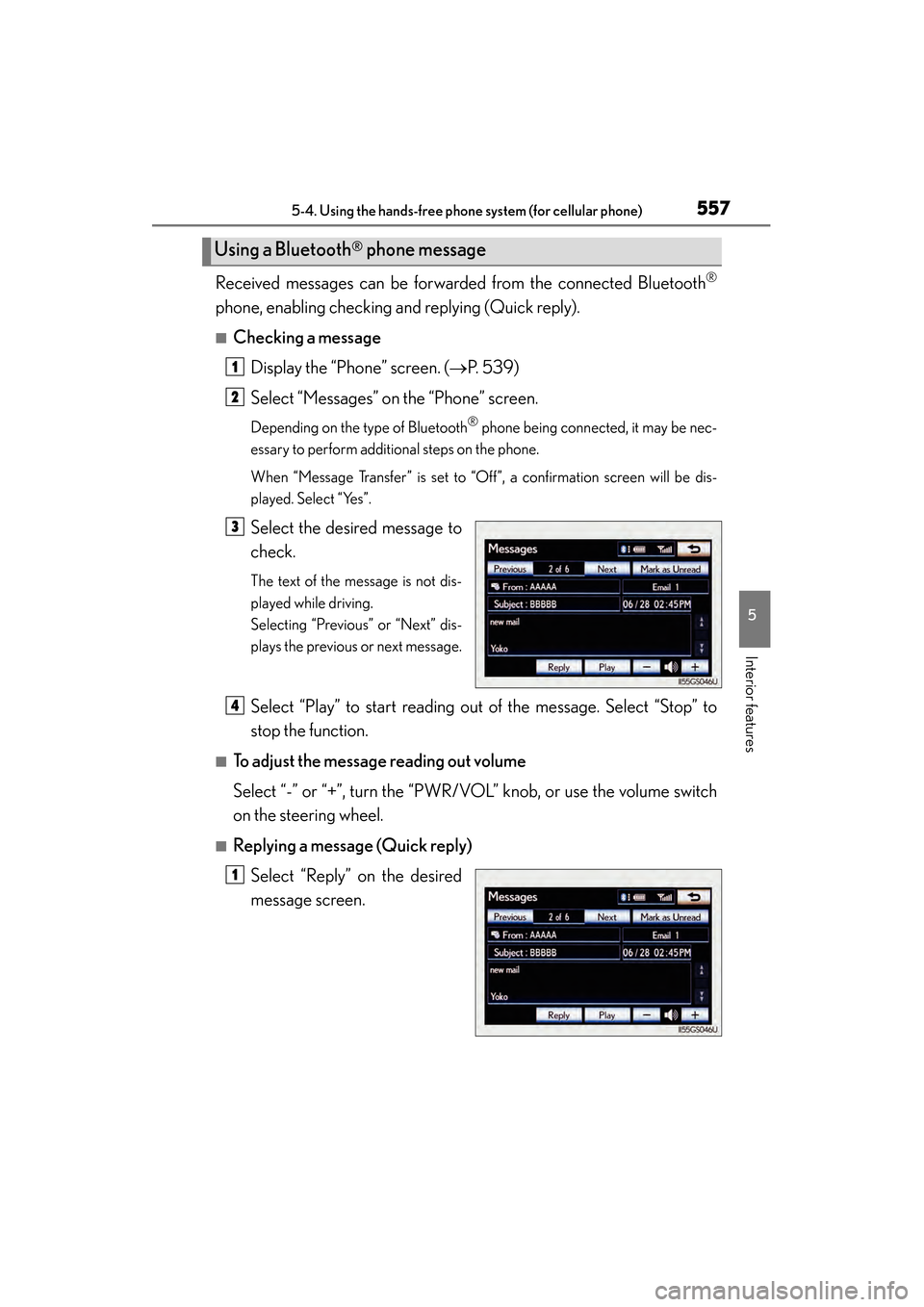
Select the desired message to
check.
The text of the message is not dis-
played while driving.
Selecting “Previous” or “Next” dis-
plays the previous or next message.
Select “Play” to start reading out of the message. Select “Stop” to
stop the function.
■To adjust the message reading out volume
Select “-” or “+”, turn the “PWR/VOL” knob, or use the volume switch
on the steering wheel.
■Replying a message (Quick reply)
Select “Reply” on the desired
message screen.
Using a Bluetooth® phone message
1
2
3
4
1
GS450h_OM_OM30D52U_(U).book Page 557 Monday, July 29, 2013 12:07 PM