bluetooth Lexus GS450h 2014 Workshop Manual
[x] Cancel search | Manufacturer: LEXUS, Model Year: 2014, Model line: GS450h, Model: Lexus GS450h 2014Pages: 890, PDF Size: 40.62 MB
Page 585 of 890
584
GS450h_OM_OM30D52U_(U)
5-4. Using the hands-free phone system (for cellular phone)
Setting the Bluetooth®
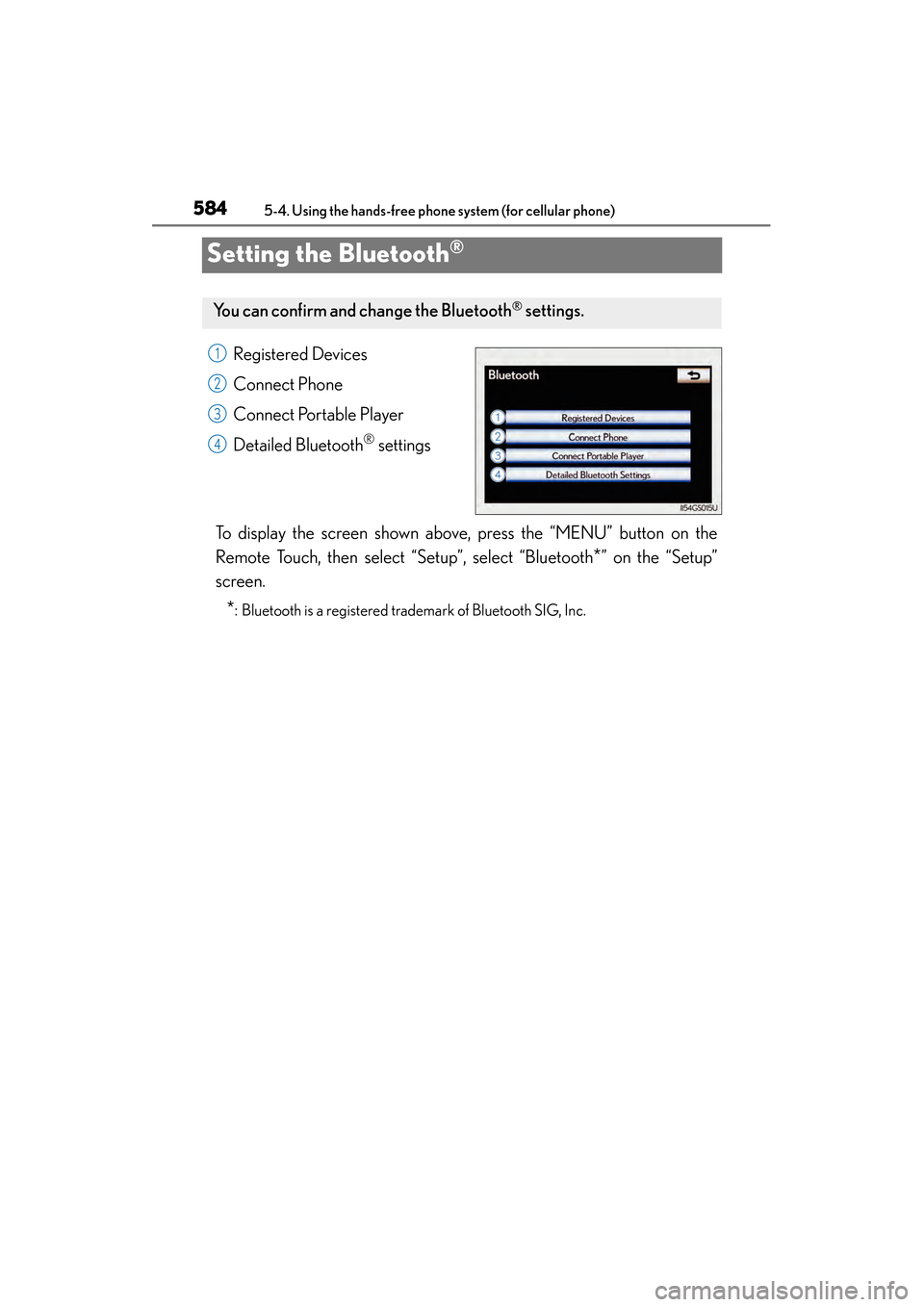
Registered Devices
Connect Phone
Connect Portable Player
Detailed Bluetooth
® settings
To display the screen shown above, press the “MENU” button on the
Remote Touch, then select “Setup”, select “Bluetooth
*” on the “Setup”
screen.
*: Bluetooth is a registered trademark of Bluetooth SIG, Inc.
You can confirm and ch ange the Bluetooth® settings.
1
2
3
4
GS450h_OM_OM30D52U_(U).book Page 584 Monday, July 29, 2013 12:07 PM
Page 586 of 890
GS450h_OM_OM30D52U_(U)
5855-4. Using the hands-free phone system (for cellular phone)
5
Interior features
■Registering a Bluetooth® devices
Bluetooth
® devices compatible with phones (HFP) and portable play-
ers (AVP) can be registered simultaneously. Phones (HFP) and porta-
ble players (AVP) (maximum of 5) can be registered.
Display the “Bluetooth
*” screen. (→P. 584)
Select “Registered Devices” on the “Bluetooth
*” screen.
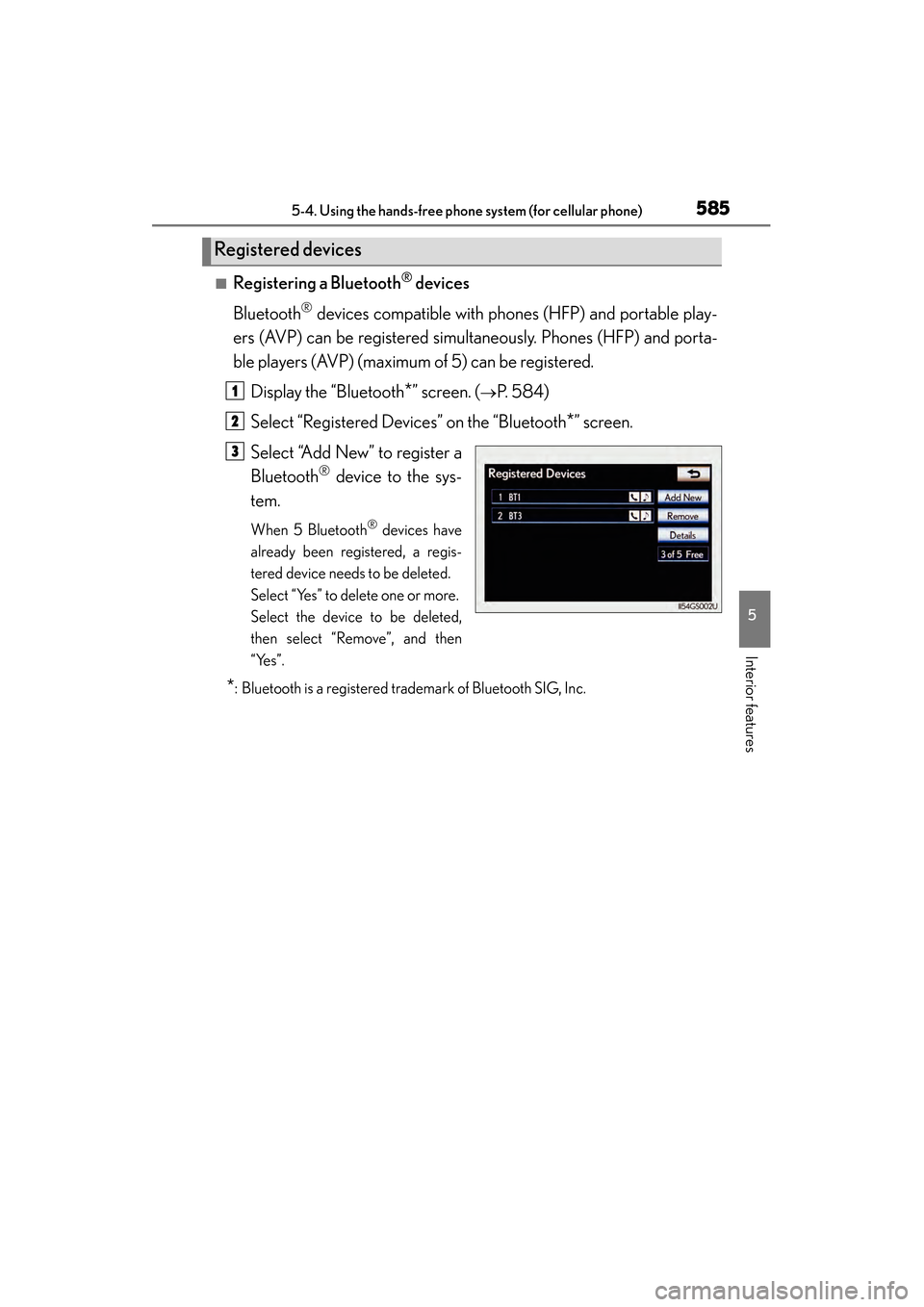
Select “Add New” to register a
Bluetooth
® device to the sys-
tem.
When 5 Bluetooth® devices have
already been registered, a regis-
tered device needs to be deleted.
Select “Yes” to delete one or more.
Select the device to be deleted,
then select “Remove”, and then
“Yes”.
*: Bluetooth is a registered trademark of Bluetooth SIG, Inc.
Registered devices
1
2
3
GS450h_OM_OM30D52U_(U).book Page 585 Monday, July 29, 2013 12:07 PM
Page 587 of 890
586
GS450h_OM_OM30D52U_(U)
5-4. Using the hands-free phone system (for cellular phone)
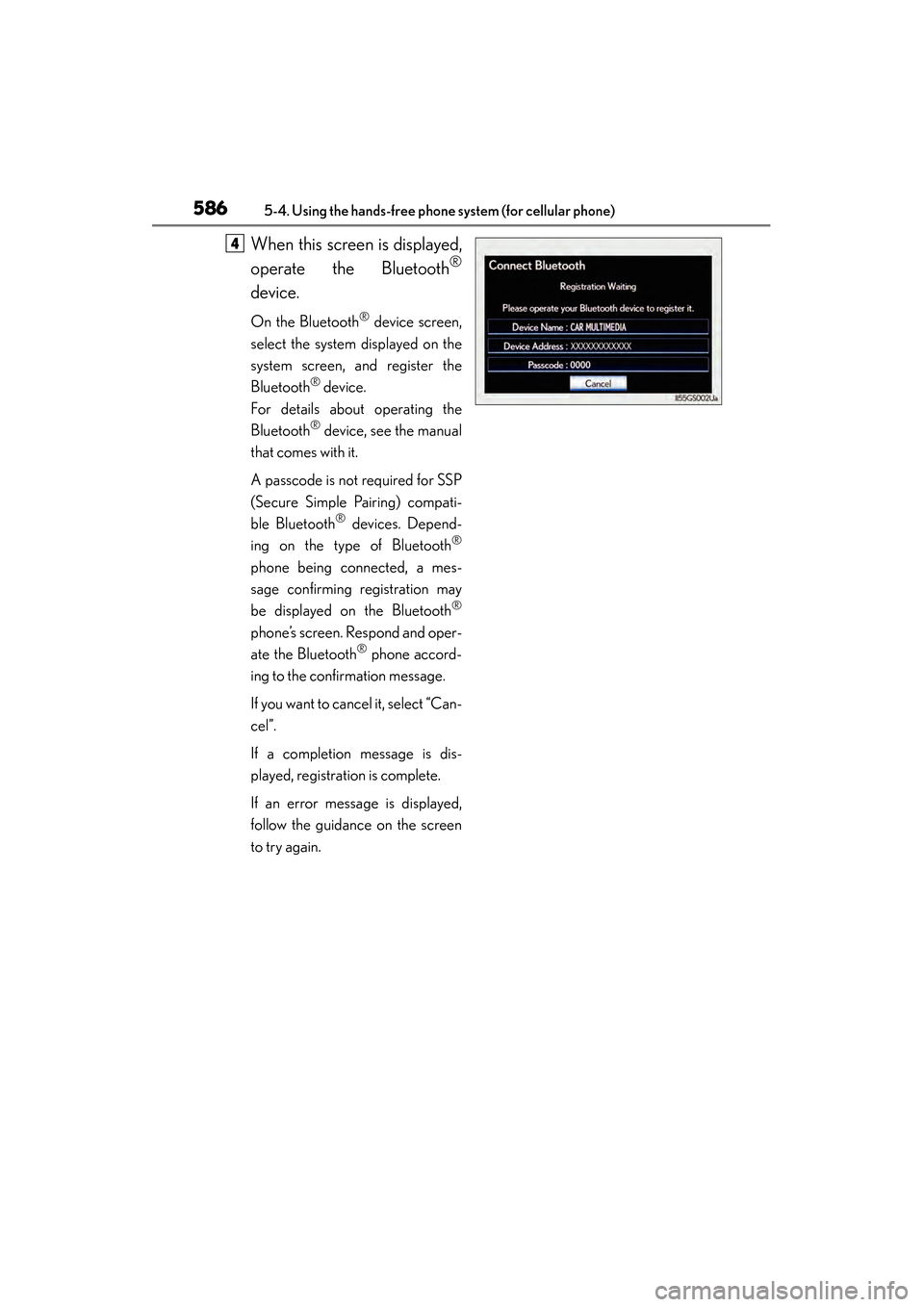
When this screen is displayed,
operate the Bluetooth
®
device.
On the Bluetooth® device screen,
select the system displayed on the
system screen, and register the
Bluetooth
® device.
For details about operating the
Bluetooth
® device, see the manual
that comes with it.
A passcode is not required for SSP
(Secure Simple Pairing) compati-
ble Bluetooth
® devices. Depend-
ing on the type of Bluetooth®
phone being connected, a mes-
sage confirming registration may
be displayed on the Bluetooth
®
phone’s screen. Respond and oper-
ate the Bluetooth® phone accord-
ing to the confirmation message.
If you want to cancel it, select “Can-
cel”.
If a completion message is dis-
played, registration is complete.
If an error message is displayed,
follow the guidance on the screen
to try again.
4
GS450h_OM_OM30D52U_(U).book Page 586 Monday, July 29, 2013 12:07 PM
Page 588 of 890
GS450h_OM_OM30D52U_(U)
5875-4. Using the hands-free phone system (for cellular phone)
5
Interior features
■Removing a Bluetooth® device
Display the “Bluetooth
*” screen. (→P. 584)
Select “Registered Devices” on the “Bluetooth
*” screen.
Select “Remove” on the “Registered Devices” screen.
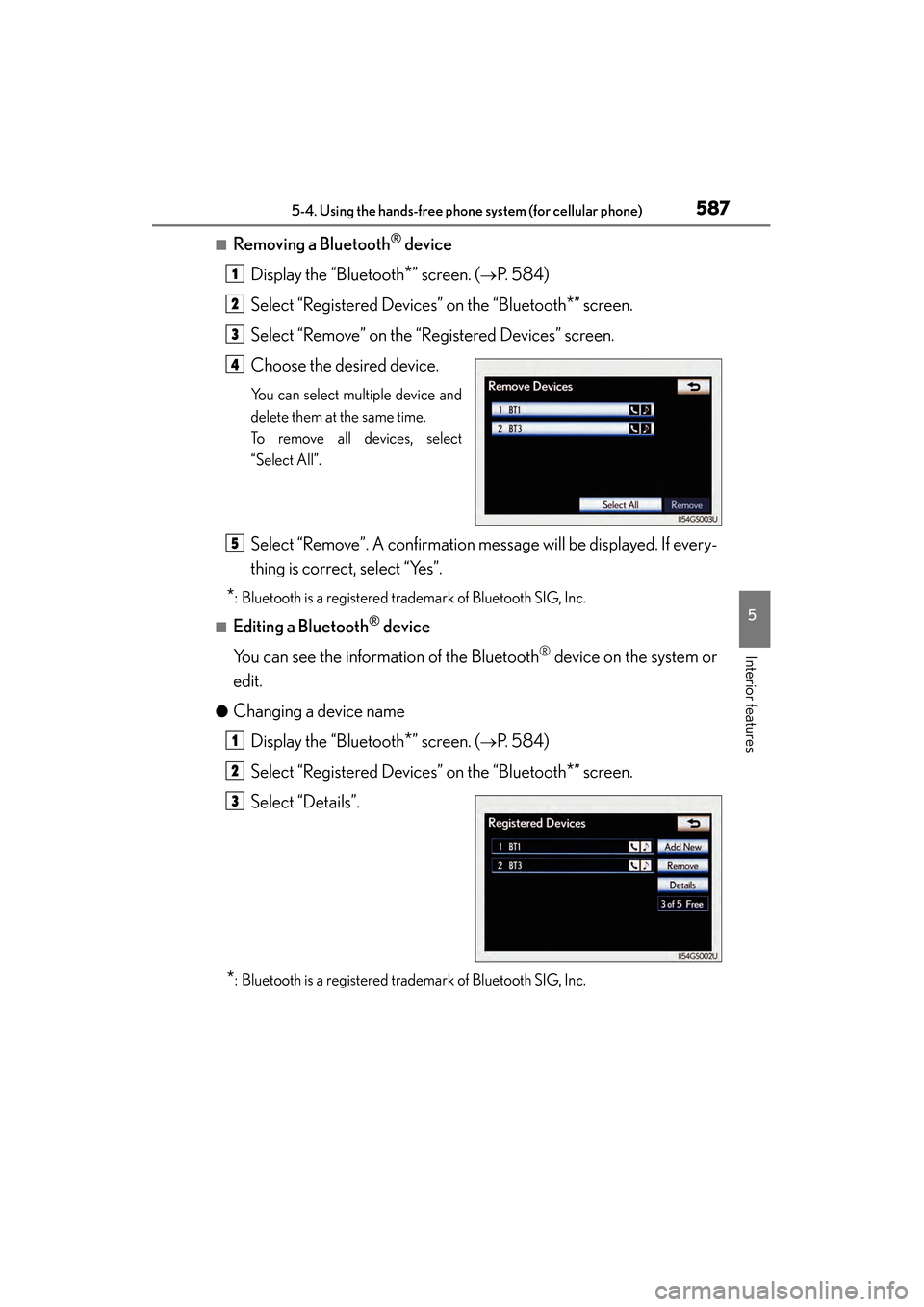
Choose the desired device.
You can select multiple device and
delete them at the same time.
To remove all devices, select
“Select All”.
Select “Remove”. A confirmation message will be displayed. If every-
thing is correct, select “Yes”.
*: Bluetooth is a registered trademark of Bluetooth SIG, Inc.
■Editing a Bluetooth® device
You can see the information of the Bluetooth
® device on the system or
edit.
●Changing a device name
Display the “Bluetooth
*” screen. (→P. 584)
Select “Registered Devices” on the “Bluetooth
*” screen.
Select “Details”.
*: Bluetooth is a registered trademark of Bluetooth SIG, Inc.
1
2
3
4
5
1
2
3
GS450h_OM_OM30D52U_(U).book Page 587 Monday, July 29, 2013 12:07 PM
Page 590 of 890
GS450h_OM_OM30D52U_(U)
5895-4. Using the hands-free phone system (for cellular phone)
5
Interior features
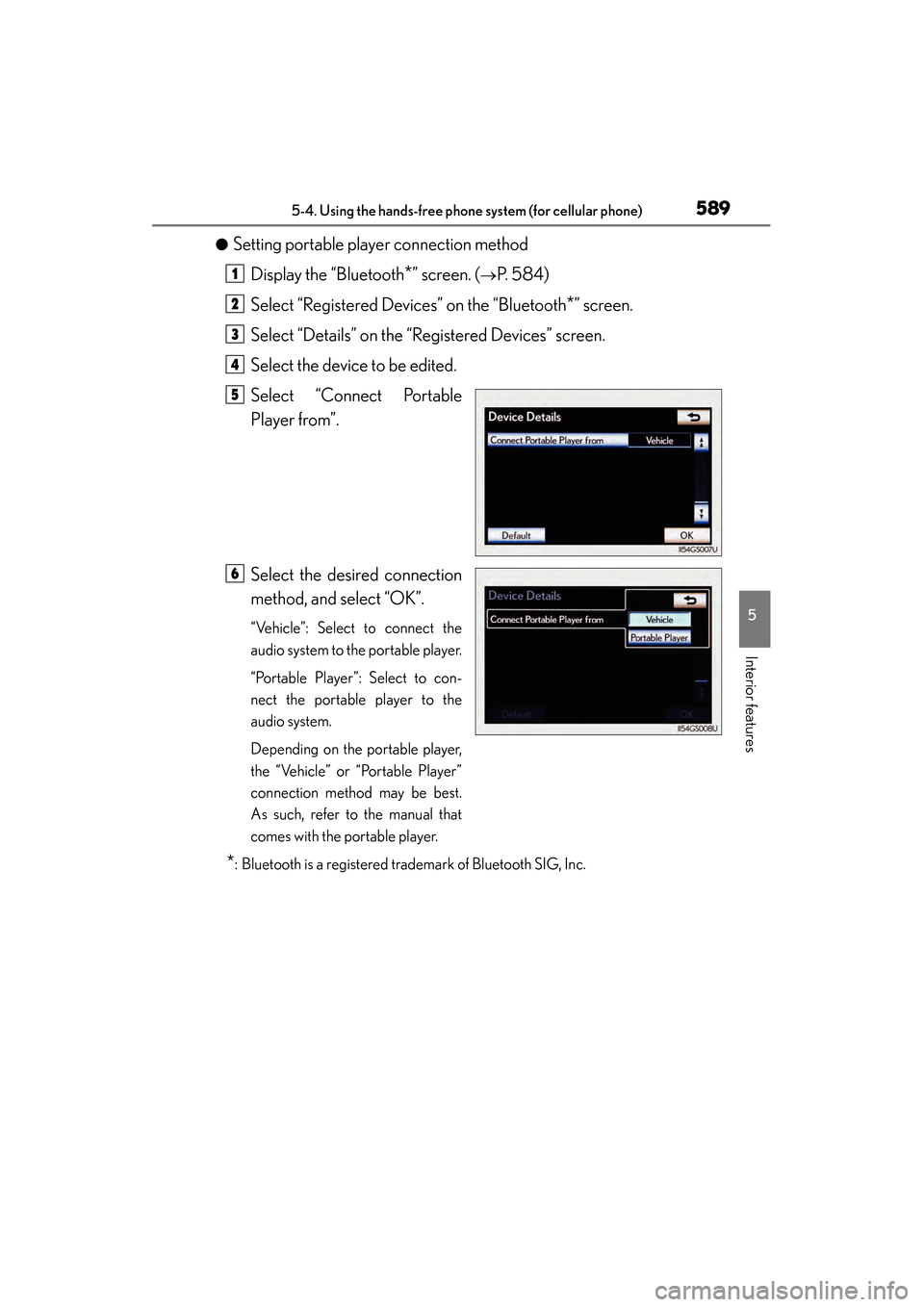
●Setting portable player connection methodDisplay the “Bluetooth
*” screen. (→P. 584)
Select “Registered Devices” on the “Bluetooth
*” screen.
Select “Details” on the “Registered Devices” screen.
Select the device to be edited.
Select “Connect Portable
Player from”.
Select the desired connection
method, and select “OK”.
“Vehicle”: Select to connect the
audio system to the portable player.
“Portable Player”: Select to con-
nect the portable player to the
audio system.
Depending on the portable player,
the “Vehicle” or “Portable Player”
connection method may be best.
As such, refer to the manual that
comes with the portable player.
*: Bluetooth is a registered trademark of Bluetooth SIG, Inc.
1
2
3
4
5
6
GS450h_OM_OM30D52U_(U).book Page 589 Monday, July 29, 2013 12:07 PM
Page 591 of 890
590
GS450h_OM_OM30D52U_(U)
5-4. Using the hands-free phone system (for cellular phone)
■Editing the “Device Name”
If you change a device name, the name registered in your cellular phone is not
changed.
■About “Device Address”
The address peculiar to the system. It cannot be changed. If you have registered two
Bluetooth
® phones with the same device name and you cannot distinguish one from
the other, refer to this address.
■“My Phone Number”:
The phone number of the Bluetooth
® phone is displayed on the screen. Depending
on the type of phone, the phone number may not be displayed.
■“Profiles”:
The compatibility profile of the Bluetooth
® device is displayed on the screen.
■“Connect Portable Player from”:
There are 2 portable player connection settings available; “Vehicle” and “Portable
Player”.
■When you delete a Bluetooth® phone
The phonebook data will be deleted at the same time.
GS450h_OM_OM30D52U_(U).book Page 590 Monday, July 29, 2013 12:07 PM
Page 592 of 890
GS450h_OM_OM30D52U_(U)
5915-4. Using the hands-free phone system (for cellular phone)
5
Interior features
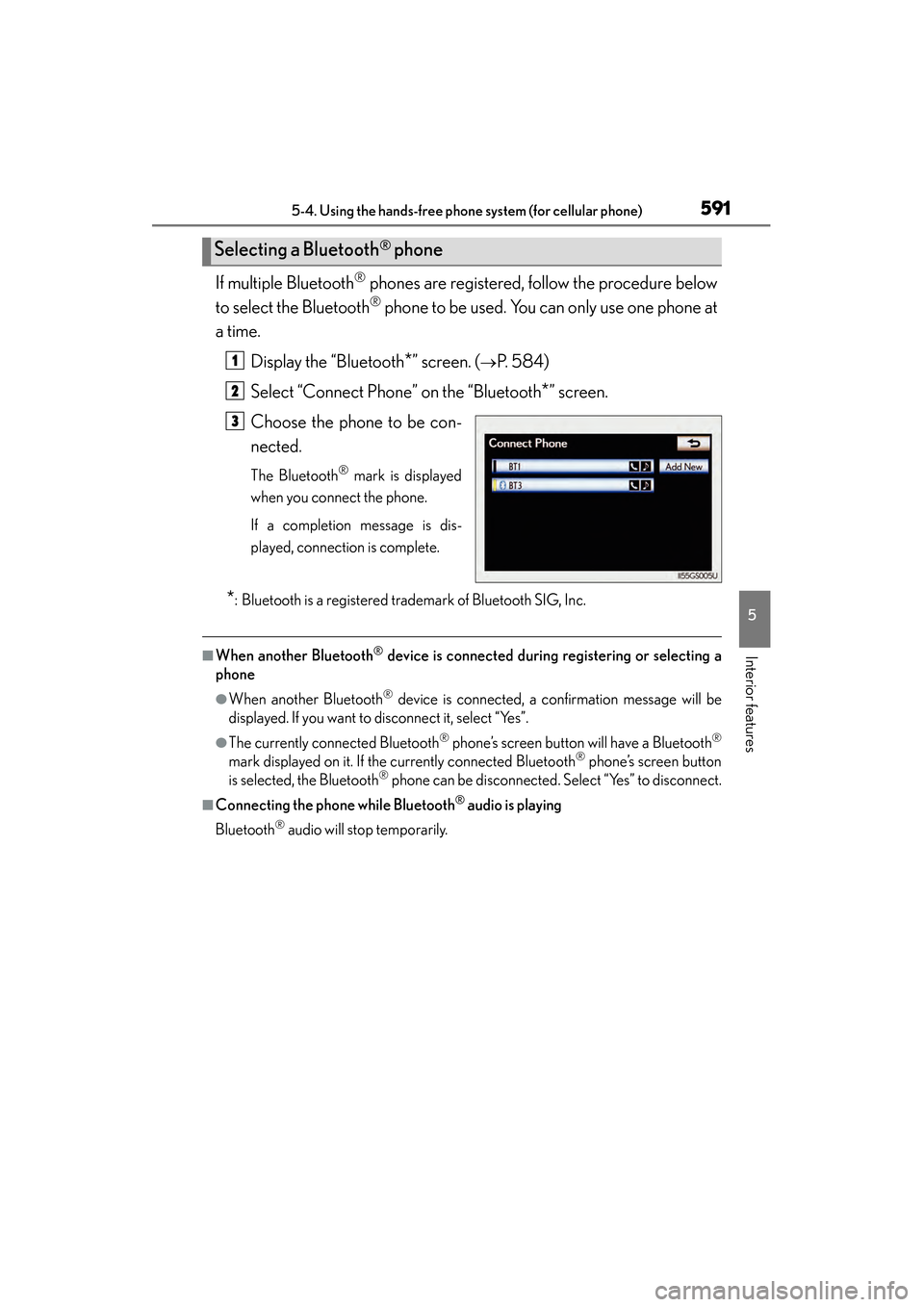
If multiple Bluetooth® phones are registered, follow the procedure below
to select the Bluetooth
® phone to be used. You can only use one phone at
a time.
Display the “Bluetooth
*” screen. (→P. 584)
Select “Connect Phone” on the “Bluetooth
*” screen.
Choose the phone to be con-
nected.
The Bluetooth® mark is displayed
when you connect the phone.
If a completion message is dis-
played, connection is complete.
*: Bluetooth is a registered trademark of Bluetooth SIG, Inc.
■When another Bluetooth® device is connected during registering or selecting a
phone
●When another Bluetooth® device is connected, a confirmation message will be
displayed. If you want to disconnect it, select “Yes”.
●The currently connected Bluetooth® phone’s screen button will have a Bluetooth®
mark displayed on it. If the currently connected Bluetooth® phone’s screen button
is selected, the Bluetooth® phone can be disconnected. Select “Yes” to disconnect.
■Connecting the phone while Bluetooth® audio is playing
Bluetooth
® audio will stop temporarily.
Selecting a Bluetooth® phone
1
2
3
GS450h_OM_OM30D52U_(U).book Page 591 Monday, July 29, 2013 12:07 PM
Page 593 of 890
592
GS450h_OM_OM30D52U_(U)
5-4. Using the hands-free phone system (for cellular phone)
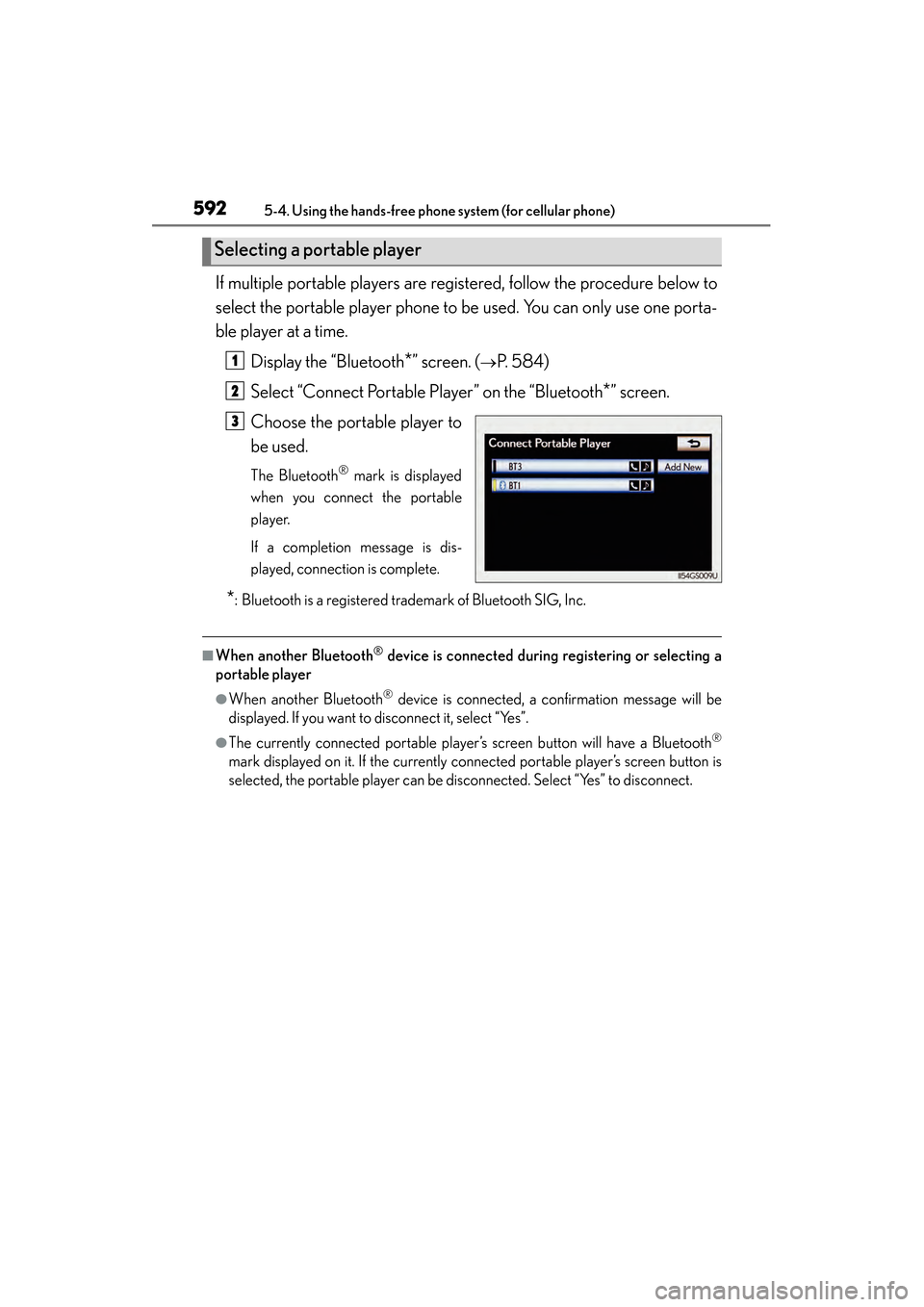
If multiple portable players are registered, follow the procedure below to
select the portable player phone to be used. You can only use one porta-
ble player at a time.Display the “Bluetooth
*” screen. (→P. 584)
Select “Connect Portable Player” on the “Bluetooth
*” screen.
Choose the portable player to
be used.
The Bluetooth® mark is displayed
when you connect the portable
player.
If a completion message is dis-
played, connection is complete.
*: Bluetooth is a registered trademark of Bluetooth SIG, Inc.
■When another Bluetooth® device is connected during registering or selecting a
portable player
●When another Bluetooth® device is connected, a confirmation message will be
displayed. If you want to disconnect it, select “Yes”.
●The currently connected portable player’s screen button will have a Bluetooth®
mark displayed on it. If the currently connected portable player’s screen button is
selected, the portable player can be disconnected. Select “Yes” to disconnect.
Selecting a portable player
1
2
3
GS450h_OM_OM30D52U_(U).book Page 592 Monday, July 29, 2013 12:07 PM
Page 594 of 890
GS450h_OM_OM30D52U_(U)
5935-4. Using the hands-free phone system (for cellular phone)
5
Interior features
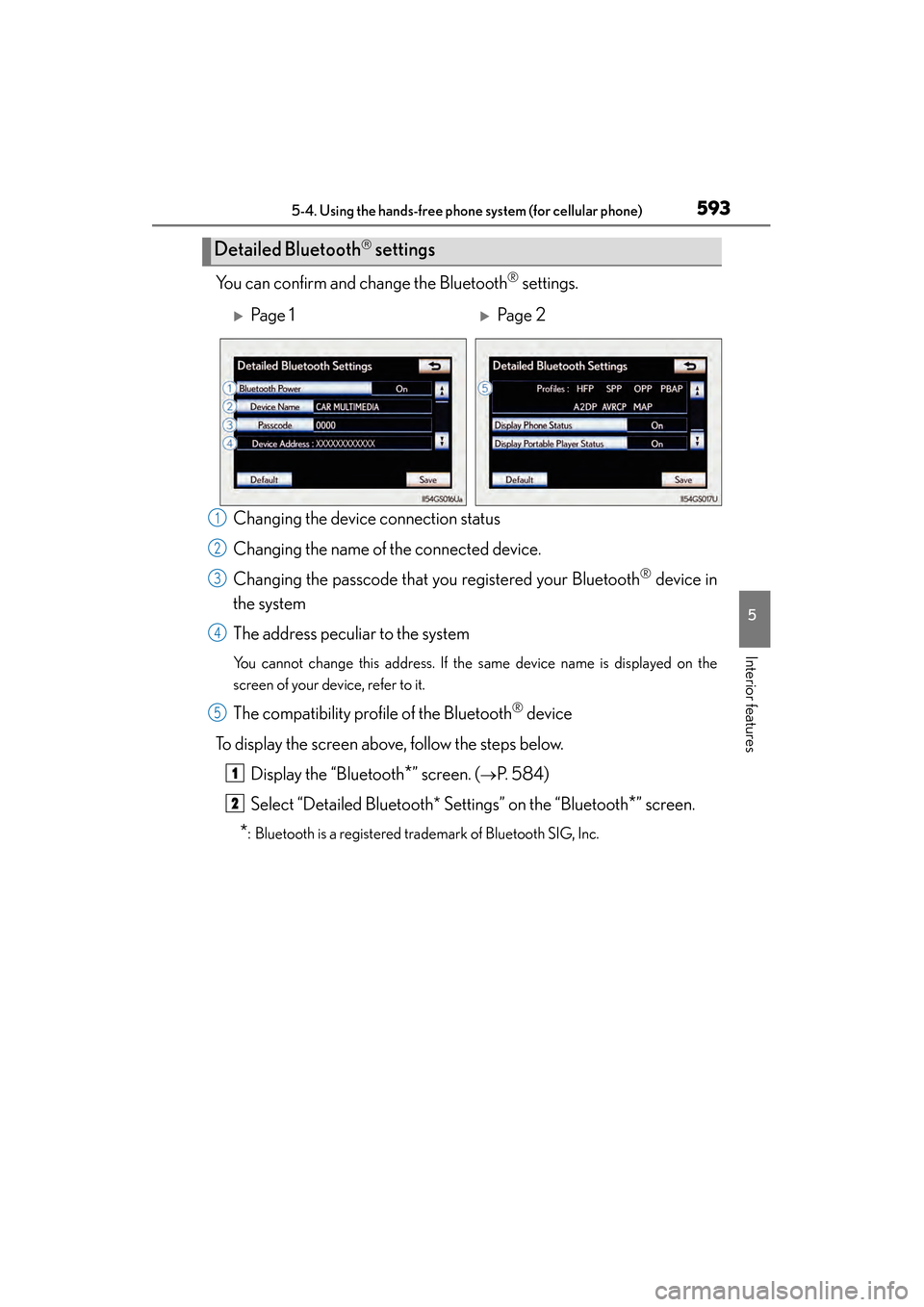
You can confirm and change the Bluetooth® settings.
Changing the device connection status
Changing the name of the connected device.
Changing the passcode that you registered your Bluetooth
® device in
the system
The address peculiar to the system
You cannot change this address. If the same device name is displayed on the
screen of your device, refer to it.
The compatibility profile of the Bluetooth® device
To display the screen above, follow the steps below. Display the “Bluetooth
*” screen. (→P. 584)
Select “Detailed Bluetooth* Settings” on the “Bluetooth
*” screen.
*: Bluetooth is a registered trademark of Bluetooth SIG, Inc.
Detailed Bluetooth settings
XPa g e 1XPa g e 2
1
2
3
4
5
1
2
GS450h_OM_OM30D52U_(U).book Page 593 Monday, July 29, 2013 12:07 PM
Page 595 of 890
594
GS450h_OM_OM30D52U_(U)
5-4. Using the hands-free phone system (for cellular phone)
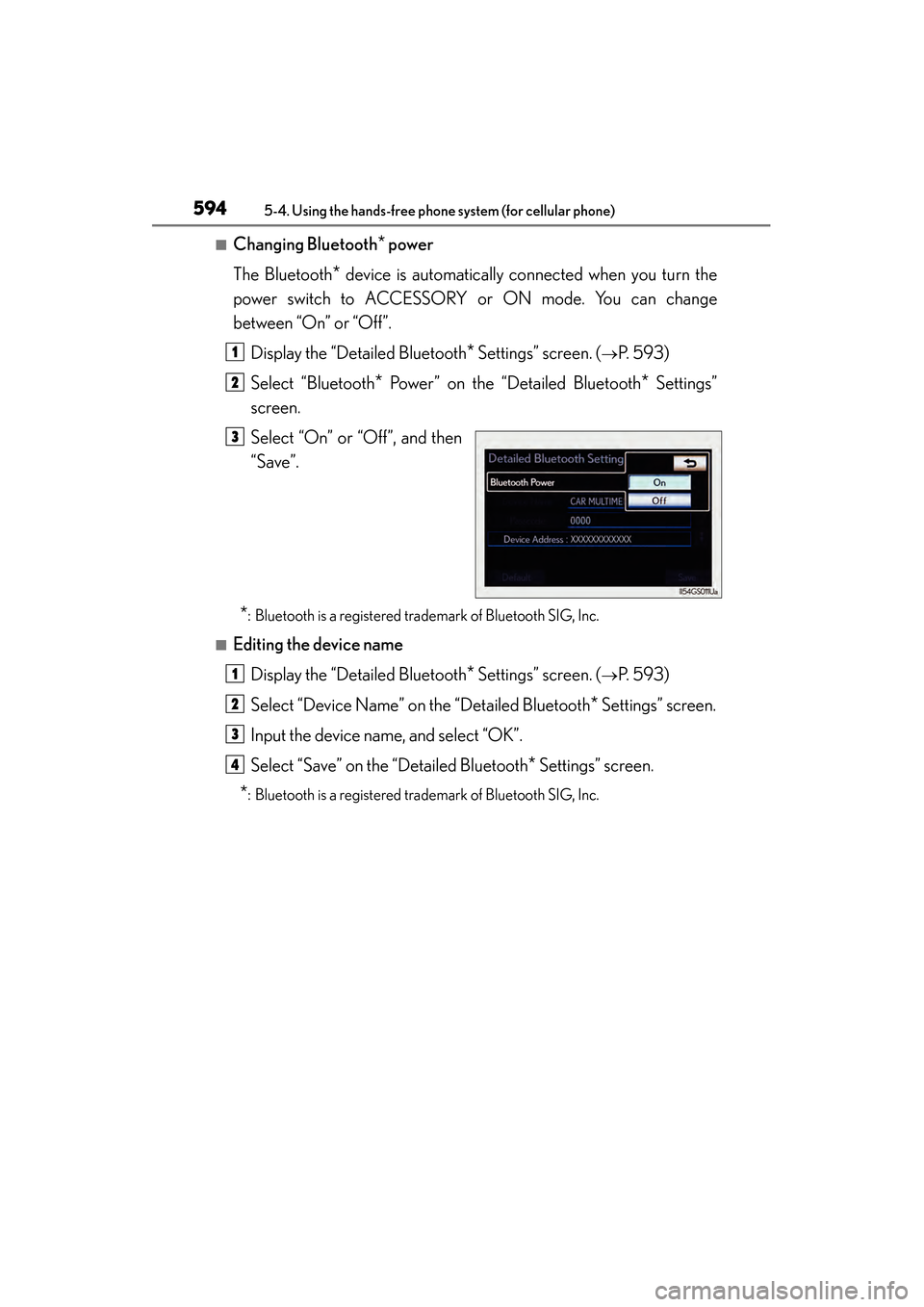
■Changing Bluetooth* power
The Bluetooth
* device is automatically connected when you turn the
power switch to ACCESSORY or ON mode. You can change
between “On” or “Off”.
Display the “Detailed Bluetooth
* Settings” screen. (→P. 593)
Select “Bluetooth
* Power” on the “Detailed Bluetooth* Settings”
screen.
Select “On” or “Off”, and then
“Save”.
*: Bluetooth is a registered trademark of Bluetooth SIG, Inc.
■Editing the device name
Display the “Detailed Bluetooth
* Settings” screen. (→P. 593)
Select “Device Name” on the “Detailed Bluetooth
* Settings” screen.
Input the device name, and select “OK”.
Select “Save” on the “Detailed Bluetooth
* Settings” screen.
*: Bluetooth is a registered trademark of Bluetooth SIG, Inc.
1
2
3
1
2
3
4
GS450h_OM_OM30D52U_(U).book Page 594 Monday, July 29, 2013 12:07 PM