radio Lexus GS450h 2014 Service Manual
[x] Cancel search | Manufacturer: LEXUS, Model Year: 2014, Model line: GS450h, Model: Lexus GS450h 2014Pages: 890, PDF Size: 40.62 MB
Page 453 of 890
452
GS450h_OM_OM30D52U_(U)
5-3. Using the audio system
■XM Radio Services — Descriptions (vehicles with a navigation system)
●Radio and Entertainment
XM offers more than 170 satellite radio channels of commercial-free music and
premier sports, news, talk, and entertainment. XM is broadcast via satellites to mil-
lions of listeners across the continental United States. XM subscribers listen to
XM on satellite radio receivers for the car, home, and portable use. More informa-
tion about XM is available online at www.siriusxm.com
. (U.S.A.)
or www.xmradio.ca
(Canada)
●Infotainment and Data services
XM offers a variety of advanced Infotainment and data services.
■XM Radio Services — Subscription Instructions (vehicles with a navigation system)
For XM Services requiring a subscription (such as XM Radio, and some Infotain-
ment & data services), the following paragraph shall be included.
Required XM Radio and some Infotainment & data services monthly subscriptions
sold separately after trial period. Subscription fee is consumer only. All fees and
programming subject to change. Subscriptions are subject to the Customer
Agreement available at www.siriusxm.com
. (U.S.A.) or www.xmradio.ca (Canada)
XM service only available in the 48 contiguous United States and 10 Canadian
provinces. © 2011 Sirius XM Radio Inc. Sirius, XM and all related marks and logos
are trademarks of Sirius XM Radio Inc. All other marks, channel names and logos
are the property of their respective owners.
For more information, program schedules, and to subscribe or extend subscrip-
tion after complimentary trial period; more information is available at:
XU.S.A. Customers:
Visit www.siriusxm.com
or call 1-877-515-3987
XCanadian Customers:
Visit ww w.xmradio.ca
or call 1-877-438-9677
●Radio ID
You will need the radio ID when activating XM® service or reporting a problem. If
“CH 000” is selected using the “TUNE/SCROLL” knob, the ID code, which is 8
alphanumeric characters, will be displayed. If another channel is selected, the ID
code will no longer be displayed. The channel (000) alternates between displaying
the radio ID and the specific radio code.
GS450h_OM_OM30D52U_(U).book Page 452 Monday, July 29, 2013 12:07 PM
Page 454 of 890
GS450h_OM_OM30D52U_(U)
4535-3. Using the audio system
5
Interior features
■XM Radio Services — Legal Disclaimers and Warnings (vehicles with a navigation
system)
Fees and Taxes — Subscription fee, taxes, one time activation fee, and other fees
may apply. Subscription fee is consumer only. All fees and programming subject to
change. Subscriptions subject to Customer Agreement available
at www.siriusxm.com
. (U.S.A.) or www.xmradio.ca (Canada) XM service only
available in the 48 contiguous United States and Canada
*.
*Canada — some deterioration of service may occur in extreme northern lati-
tudes. This is beyond the control of XM Satellite Radio.
Explicit Language Notice — Channels with frequent explicit language are indi-
cated with an “XL” preceding the channel name. Channel blocking is available for
XM Satellite Radio receivers by notifying XM at;
XU.S.A. Customers:
Visit www.siriusxm.com
or calling 1-877-515-3987
XCanadian Customers:
Visit ww w.xmradio.ca
or calling 1-877-438-9677
It is prohibited to copy, decompile, disassemble, reverse engineer, hack, manipulate,
or otherwise make available any technology or software incorporated in receivers
compatible with the XM Satellite Radio System or that support the XM website, the
Online Service or any of its content. Furthermore, the AMBE
® voice compression
software included in this product is protected by intellectual property rights includ-
ing patent rights, copyrights, and trade secrets of Digital Voice Systems, Inc.
Note: this applies to XM receivers only and not XM Ready devices.
GS450h_OM_OM30D52U_(U).book Page 453 Monday, July 29, 2013 12:07 PM
Page 455 of 890
454
GS450h_OM_OM30D52U_(U)
5-3. Using the audio system
■If the satellite radio does not operate normally
If a problem occurs with the XM
® tuner, a message will appear on the screen. Refer
to the table below to identify the problem, and take the suggested corrective action.
Contact the XM
® Listener Care Center at 1-877-515-3987 (U.S.A.) or 1-877-
438-9677 (Canada).
Ck Antenna
The XM® antenna is not connected. Check whether the
XM® antenna cable is attached securely.
There is a short-circuit in the antenna or the surrounding
antenna cable. See a Lexus certified dealer.
Ch Unauth
You have not subscribed to XM® Satellite Radio. The
radio is being updated with the latest encryption code.
Contact XM
® Satellite Radio for subscription informa-
tion. When a contract is canceled, you can choose “CH
000” and all free-to-air channels.
The premium channel you selected is not authorized.
Wait for about 2 seconds until the radio returns to the
previous channel or “CH 001”. If it does not change
automatically, select another channel. To listen to the
premium channel, contact XM
® Satellite Radio.
No Signal
The XM® signal is too weak at the current location. Wait
until your vehicle reaches a location with a stronger sig-
nal.
LoadingThe unit is acquiring audio or program information. Wait
until the unit has received the information.
Ch Off AirThe channel you selected is not broadcasting any pro-
gramming. Select another channel.
-----
There is no song/program title or artist name/feature
associated with the channel at that time. No action is
required.
Ch Unavail
The channel you selected is no longer available. Wait for
about 2 seconds until the radio returns to the previous
channel or “CH 001”. If it does not change automatically,
select another channel.
GS450h_OM_OM30D52U_(U).book Page 454 Monday, July 29, 2013 12:07 PM
Page 456 of 890
GS450h_OM_OM30D52U_(U)
4555-3. Using the audio system
5
Interior features
■About internet radio (vehicles with the navigation system)
●Other applications can be activated while listening to internet radio.
●An iPhone cannot be connected via Bluetooth® and USB connection at the same
time. However, it is possible to recharge an iPhone while using Apps by connecting
via USB. The system uses the connection method that was used last. Therefore, if
connected via USB after Bluetooth
® connection, it is necessary to reconnect the
iPhone via Bluetooth®.
●Services requiring a separate contract can also be used. For details, refer to
http://www.lexus.com/enform/
or call 1-800-255-3987.
●If internet radio has never been listened to by activating “Apps” from the “Informa-
tion” screen, the “Apps” tab will be dimmed.
GS450h_OM_OM30D52U_(U).book Page 455 Monday, July 29, 2013 12:07 PM
Page 457 of 890
456
GS450h_OM_OM30D52U_(U)
5-3. Using the audio system
■Certifications for the radio tuner
This equipment has been tested and found to comply with the limits for a class B dig-
ital device, pursuant to Part 15 of the FCC Rules. These limits are designed to pro-
vide reasonable protection against harmful interference in a residential installation.
This equipment generates, uses and can radiate radio frequency energy and, if not
installed and used in accordance with the instructions, may cause harmful interfer-
ence to radio communications. However, there is no guarantee that interference will
not occur in a particular installation.
If this equipment does cause harmful interference to radio or television reception,
which can be determined by turning the equipment off and on, the user is encour-
aged to try to correct the interference by one or more of the following measures:
●Reorienting or relocate the receiving antenna.
●Increasing the separation between the equipment and receiver.
●Consult the equipment into an outlet on a circuit different from that to which the
receiver is connected.
●Consulting the dealer or an experienced radio/TV technician for help.
■Certifications for XM® Satellite Radio
This device complies with RSS-310 of Industry Canada. Operation is subject to the
condition that this device does not cause harmful interference.
This device complies with Industry Canada licence-exempt RSS standard(s). Oper-
ation is subject to the following two condit ions: (1) this device may not cause interfer-
ence, and (2) this device must accept any interference, including interference that
may cause undesired operation of the device.
Cet appareil est conforme au CNR-310 d’Industrie Canada. Son exploitation est
autorisée sous réserve que l’appareil ne cause pas de brouillage préjudiciable.
Le présent appareil est conforme aux CNR d’Industrie Canada applicables aux
appareils radio exempts de licence. L’exploitation est autorisée aux deux conditions
suivantes : (1) l’appareil ne doit pas produire de brouillage, et (2) l’utilisateur de
l’appareil doit accepter tout brouillage radioélectrique subi, même si le brouillage
est susceptible d’en compromettre le fonctionnement.
GS450h_OM_OM30D52U_(U).book Page 456 Monday, July 29, 2013 12:07 PM
Page 499 of 890
498
GS450h_OM_OM30D52U_(U)
5-3. Using the audio system
■Certification
→P. 5 3 6
■Reconnecting the portable player
If the portable player is disconnected with a poor reception when the power switch is
in ACCESSORY or ON mode, the system automatically reconnects the portable
player.
If you have switched off the portable player yourself, follow the instructions below to
reconnect:
●Select the portable player again
●Enter the portable player
■When transferring ownership of your vehicle
Be sure to remove the registered portable player from the system. ( →P. 5 8 7 )
CAUTION
■While driving
Do not use the portable player or connect the Bluetooth
® system.
■Caution regarding interference with electronic devices
●Your audio unit is fitted with Bluetooth® antennas. People with implantable car-
diac pacemakers, cardiac resynchronization therapy-pacemakers or implantable
cardioverter defibrillators should maintain a reasonable distance between them-
selves and the Bluetooth
® antennas. The radio waves may affect the operation of
such devices.
●Before using Bluetooth® devices, users of any electrical medical device other
than implantable cardiac pacemakers, cardiac resynchronization therapy-pace-
makers or implantable cardioverter defibrillators should consult the manufac-
turer of the device for information about its operation under the influence of radio
waves. Radio waves could have unexpected effects on the operation of such
medical devices.
NOTICE
■When leaving the vehicle
Do not leave your portable player in the vehicle. The inside of the vehicle may
become hot, causing damage to the portable player.
GS450h_OM_OM30D52U_(U).book Page 498 Monday, July 29, 2013 12:07 PM
Page 525 of 890
524
GS450h_OM_OM30D52U_(U)
5-3. Using the audio system
Press to change the audio source. The audio source as follows
each time the button is pressed. If no discs are inserted in the player, or if
the external device is not connected, that mode will be skipped.
FM → SAT → Apps → DVD player → iPod or USB memory →
Bluetooth® audio player → AUX → AM
Press “ ∧” on to increase the volume and “ ∨” to decrease the vol-
ume.
Press and hold the button to continue increasing or decreasing the volume.
■Select a radio station Press to select a frequency band.
Press “ ∧” or “ ∨” on to seek the frequency.
To scan for receivable stations, press and hold until you hear a beep.
■Select a preset station
Press to select a frequency band.
Press “ ∧” or “ ∨” on to select a preset station.
Changing the audio source
Adjusting the volume
Selecting a radio station
1
2
1
2
GS450h_OM_OM30D52U_(U).book Page 524 Monday, July 29, 2013 12:07 PM
Page 528 of 890
527
GS450h_OM_OM30D52U_(U)5-3. Using the audio system
5
Interior features
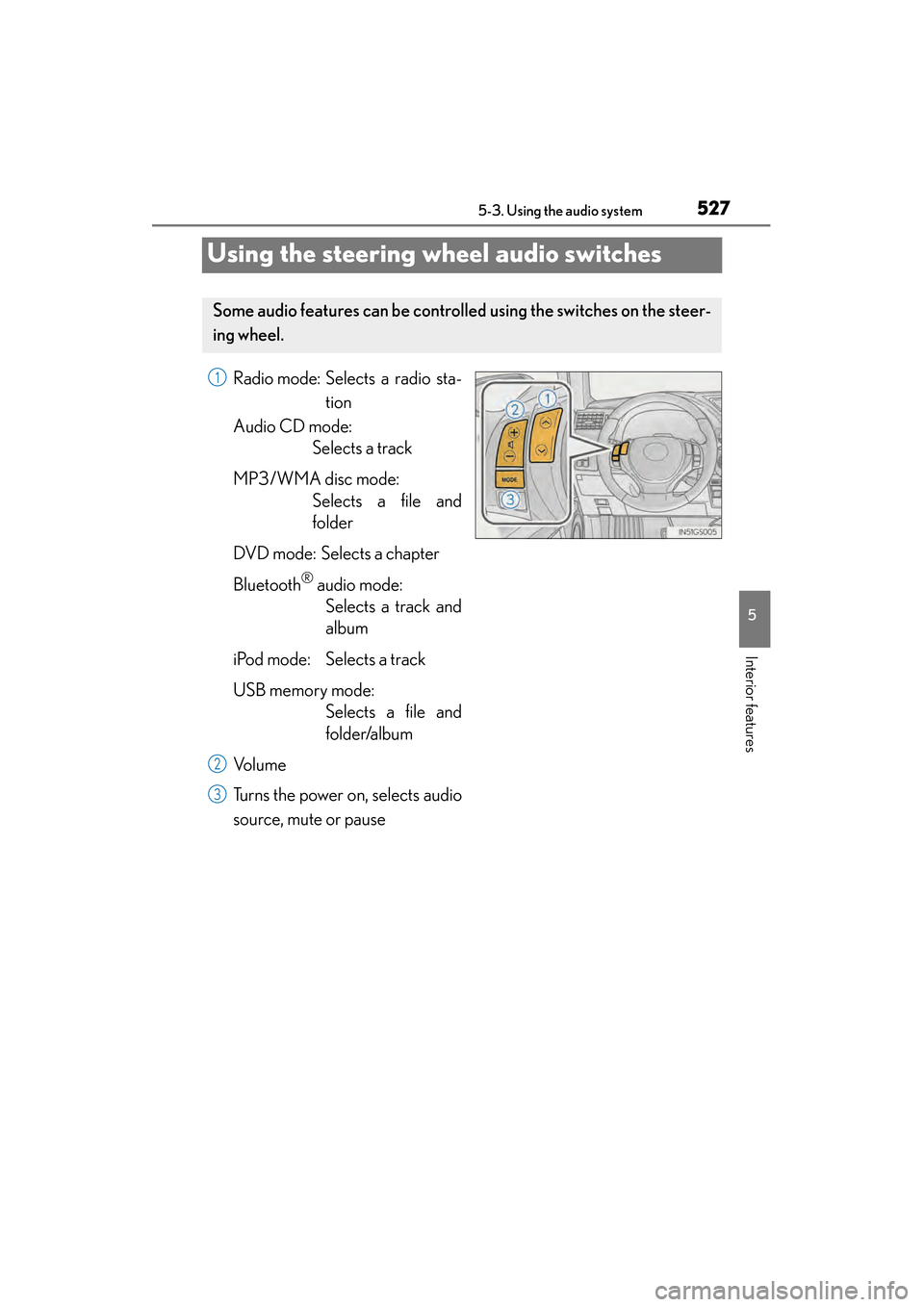
Using the steering wheel audio switches
Radio mode: Selects a radio sta- tion
Audio CD mode: Selects a track
MP3/WMA disc mode: Selects a file and
folder
DVD mode: Selects a chapter
Bluetooth
® audio mode: Selects a track and
album
iPod mode: Selects a track
USB memory mode: Selects a file and
folder/album
Vo l u m e
Turns the power on, selects audio
source, mute or pause
Some audio features can be controll ed using the switches on the steer-
ing wheel.
1
2
3
GS450h_OM_OM30D52U_(U).book Page 527 Monday, July 29, 2013 12:07 PM
Page 529 of 890
528
GS450h_OM_OM30D52U_(U)
5-3. Using the audio system
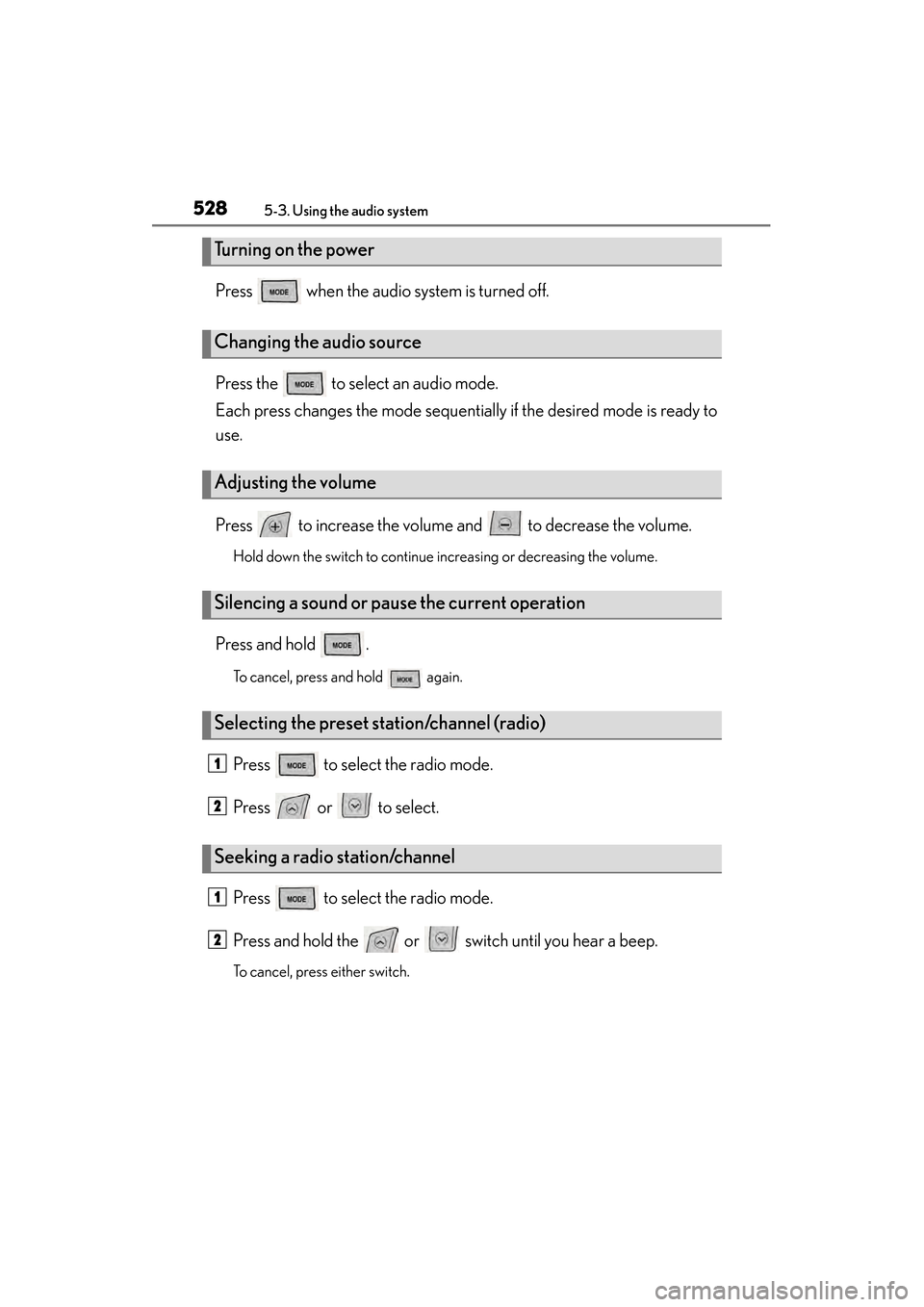
Press when the audio system is turned off.
Press the to select an audio mode.
Each press changes the mode sequentially if the desired mode is ready to
use.
Press to increase the volume and to decrease the volume.
Hold down the switch to continue increasing or decreasing the volume.
Press and hold .
To cancel, press and hold again.
Press to select the radio mode.
Press or to select.
Press to select the radio mode.
Press and hold the or switch until you hear a beep.
To cancel, press either switch.
Turning on the power
Changing the audio source
Adjusting the volume
Silencing a sound or pause the current operation
Selecting the preset station/channel (radio)
Seeking a radio station/channel
1
2
1
2
GS450h_OM_OM30D52U_(U).book Page 528 Monday, July 29, 2013 12:07 PM
Page 535 of 890
534
GS450h_OM_OM30D52U_(U)
5-4. Using the hands-free phone system (for cellular phone)
■When using the hands-free system
●The audio system is muted when making a call.
●If both parties speak at the same time, it may be difficult to hear.
●If the incoming call volume is overly loud, an echo may be heard.
●Try to face toward the microphone as much as possible when speaking.
●In the following circumstances, it may be difficult to hear the other party:
• When driving on unpaved roads
• When driving at high speeds
• If a window is open
• If the air conditioning is blowing directly on the microphone
• If the air conditioning is set to high
• There is an effect from the network of the cellular phone
■Conditions under which the system will not operate
●If using a cellular phone that does not support Bluetooth®
●If the cellular phone is turned off
●If you are outside service range
●If the cellular phone is not connected
●If the cellular phone’s battery is low
■Bluetooth® antenna
The antenna is built into the instrument panel. If the cellular phone is behind the seat
or in the console box, or touching or covered by metal objects, connection status
may deteriorate.
■Battery charge/Signal status
●This display may not correspond exactly with the cellular phone itself.
●When the cellular phone is not connected, “No connect” is displayed.
●When the cellular phone is out of the service area or in a place inaccessible by
radio waves, “No Service” is displayed.
■When using Bluetooth® audio and hands-free system at the same time
The following problems may occur.
●The Bluetooth® connection may be cut.
●Noise may be heard on the Bluetooth® audio playback.
GS450h_OM_OM30D52U_(U).book Page 534 Monday, July 29, 2013 12:07 PM