steering Lexus GS450h 2017 User Guide
[x] Cancel search | Manufacturer: LEXUS, Model Year: 2017, Model line: GS450h, Model: Lexus GS450h 2017Pages: 600, PDF Size: 149.98 MB
Page 49 of 600
491-1. For safe use
1
For safety and security
GS450h_300h_OM_OM30F92E_(EE)
■If the SRS airbags deploy (inflate)
●Slight abrasions, burns, bruising etc., may be sustained from SRS airbags, due to the extremely high speed deployment (inflation) by hot gases.
●A loud noise and white powder will be emitted.
●Parts of the airbag module (steering wheel hub, airbag cover and inflator) as well as theseats, the glove box, parts of the front and re ar pillars, and roof side rails may be hot for several minutes. The airbag itself may also be hot.
●The windshield may crack.
●Vehicles with ERA-GLONASS: If the SRS ai rbags deploy, the system is designed to send an emergency call* to the Public Safety Answer ing Point (PSAP), notifying them
of the vehicle’s location (without needing to push the “SOS” button) and an agent will attempt to speak with the occupants to ascertain the level of emergency and assistancerequired. If the occupants are unable to communicate, the agent automatically treats
the call as an emergency and helps to di spatch the necessary emergency services. ( P. 384)
*: In some cases, the call cannot be made. (P. 386)
■SRS airbag deployment conditions (SRS front airbags)
●The SRS front airbags will deploy in the event of an impact that exceeds the set thresh- old level (the level of force corresponding to an approximately 20 - 30 km/h [12 - 18mph] frontal collision with a fixed wall that does not move or deform).
However, this threshold velocity will be cons iderably higher in the following situations:
• If the vehicle strikes an object, such as a parked vehicle or sign pole, which can move or deform on impact
• If the vehicle is involved in an underride collision, such as a collision in which the front of the vehicle “underrides”, or goes under, the bed of a truck
●Depending on the type of collision, it is possib le that only the seat belt pretensioners will activate.
■SRS airbag deployment conditions (SRS side and curtain shield airbags)
●The SRS side and curtain shield airbags w ill deploy in the event of an impact that exceeds the set threshold level (the level of force corresponding to the impact forceproduced by an approximately 1500 kg [3300 lb.] vehicle colliding with the vehicle
cabin from a direction perpendicular to the vehicle orientation at an approximate speed of 20 - 30 km/h [12 - 18 mph]).
●The SRS side and curtain shield airbags may also deploy in the event of a severe frontal
collision.
Page 52 of 600
521-1. For safe use
GS450h_300h_OM_OM30F92E_(EE)
■When to contact any authorized Lexus retailer or Lexus authorized repairer, or any reliable repairer
In the following cases, the vehicle will requ ire inspection and/or repair. Contact any
authorized Lexus retailer or Le xus authorized repairer, or any reliable repairer as soon as possible.
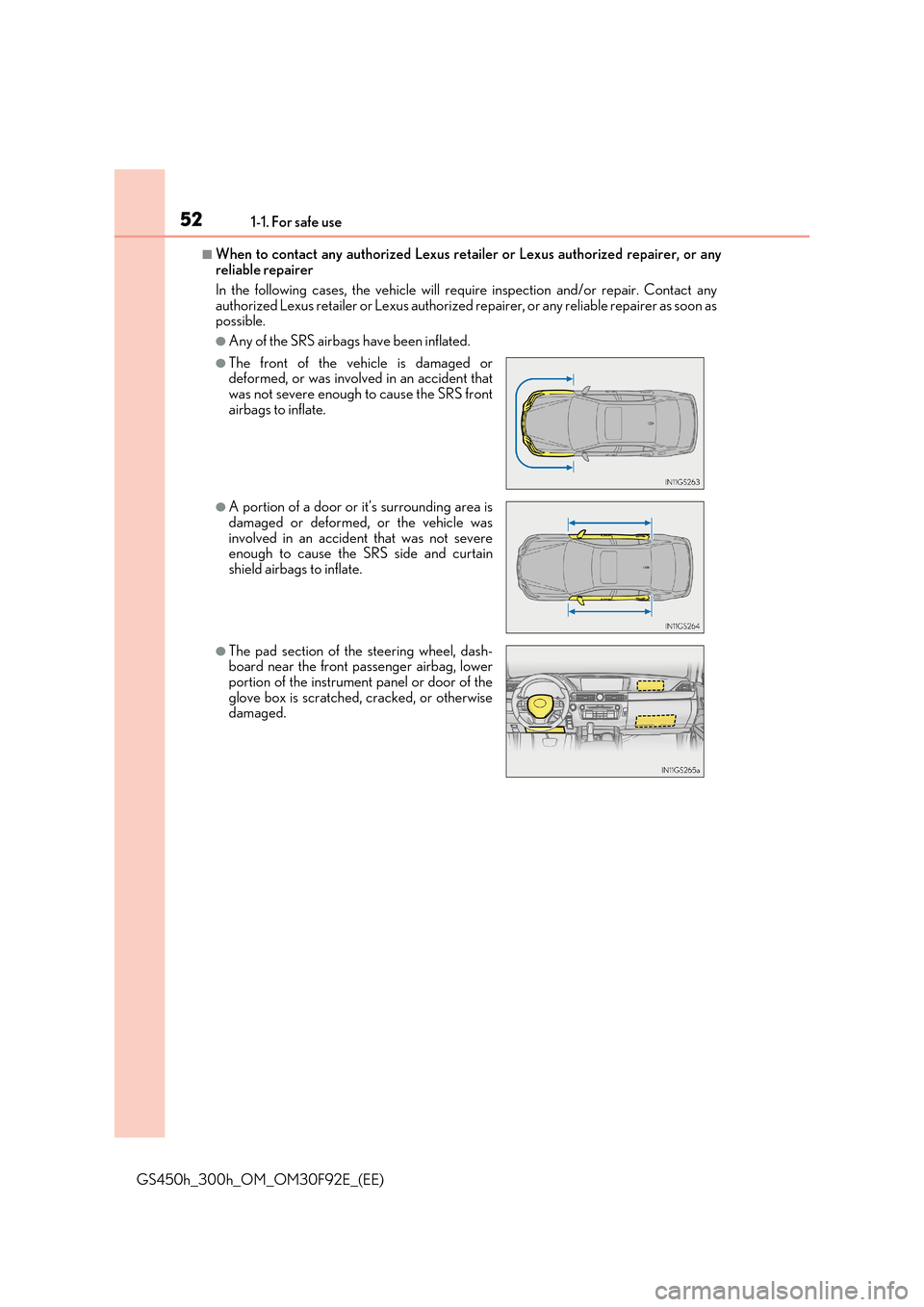
●Any of the SRS airbags have been inflated.
●The front of the vehicle is damaged ordeformed, or was involved in an accident that
was not severe enough to cause the SRS front airbags to inflate.
●A portion of a door or it’s surrounding area isdamaged or deformed, or the vehicle was
involved in an accident that was not severe enough to cause the SRS side and curtainshield airbags to inflate.
●The pad section of the steering wheel, dash-board near the front passenger airbag, lowerportion of the instrument panel or door of the
glove box is scratched, cracked, or otherwise damaged.
Page 99 of 600
992. Instrument cluster
2
Instrument cluster
GS450h_300h_OM_OM30F92E_(EE)
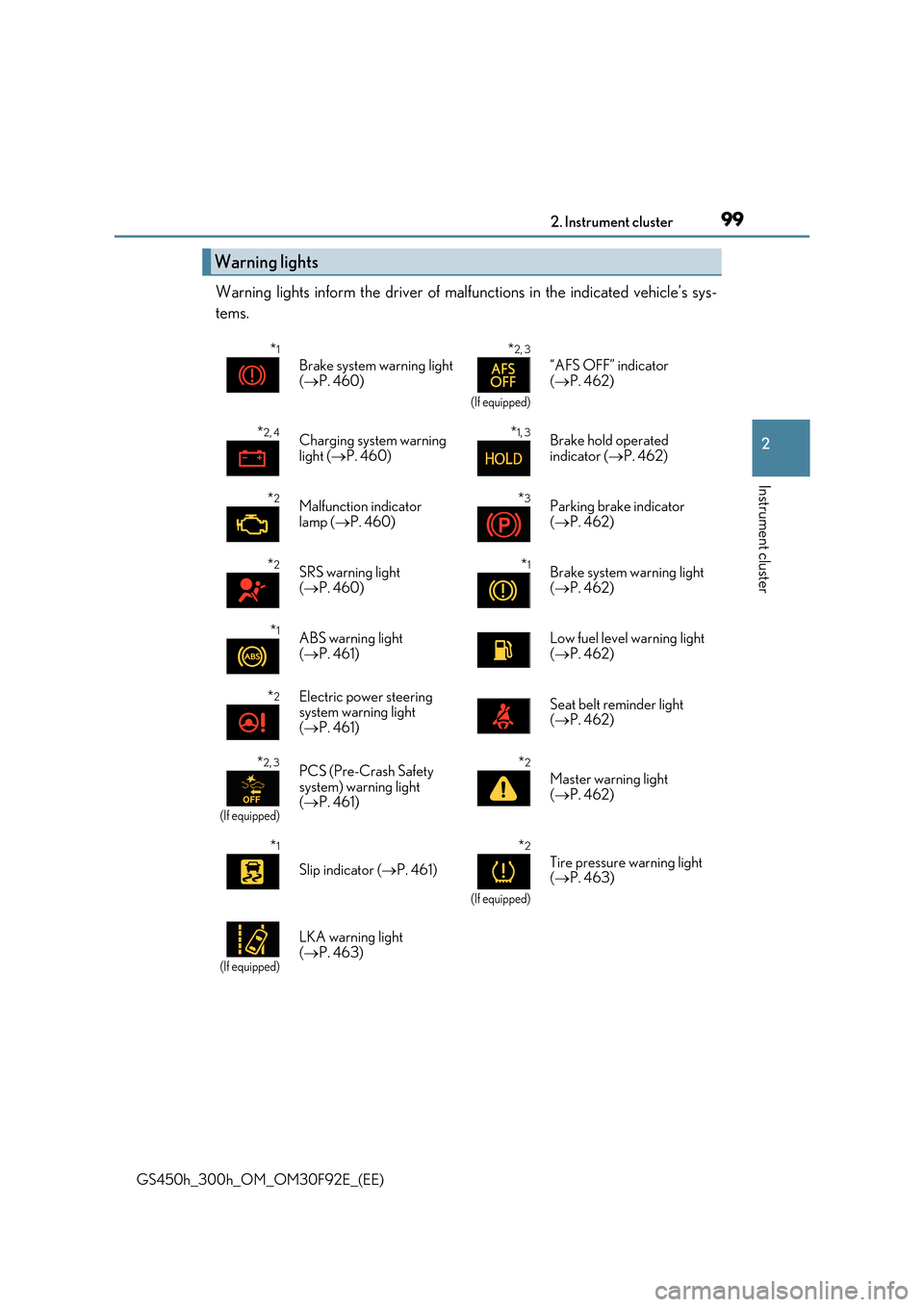
Warning lights inform the driver of malfunctions in the indicated vehicle’s sys-
tems.
Warning lights
*1
Brake system warning light
( P. 460)
*2, 3
(If equipped)
“AFS OFF” indicator
( P. 462)
*2, 4Charging system warning
light ( P. 460)
*1, 3Brake hold operated
indicator ( P. 462)
*2Malfunction indicator lamp ( P. 460)
*3Parking brake indicator ( P. 462)
*2SRS warning light ( P. 460)
*1Brake system warning light ( P. 462)
*1ABS warning light
( P. 461)
Low fuel level warning light
( P. 462)
*2Electric power steering system warning light
( P. 461)
Seat belt reminder light ( P. 462)
*2, 3
(If equipped)
PCS (Pre-Crash Safety system) warning light ( P. 461)
*2
Master warning light
( P. 462)
*1
Slip indicator (P. 461)
*2
(If equipped)
Tire pressure warning light ( P. 463)
(If equipped)
LKA warning light ( P. 463)
Page 114 of 600
1142. Instrument cluster
GS450h_300h_OM_OM30F92E_(EE)
■Energy monitor
P. 126
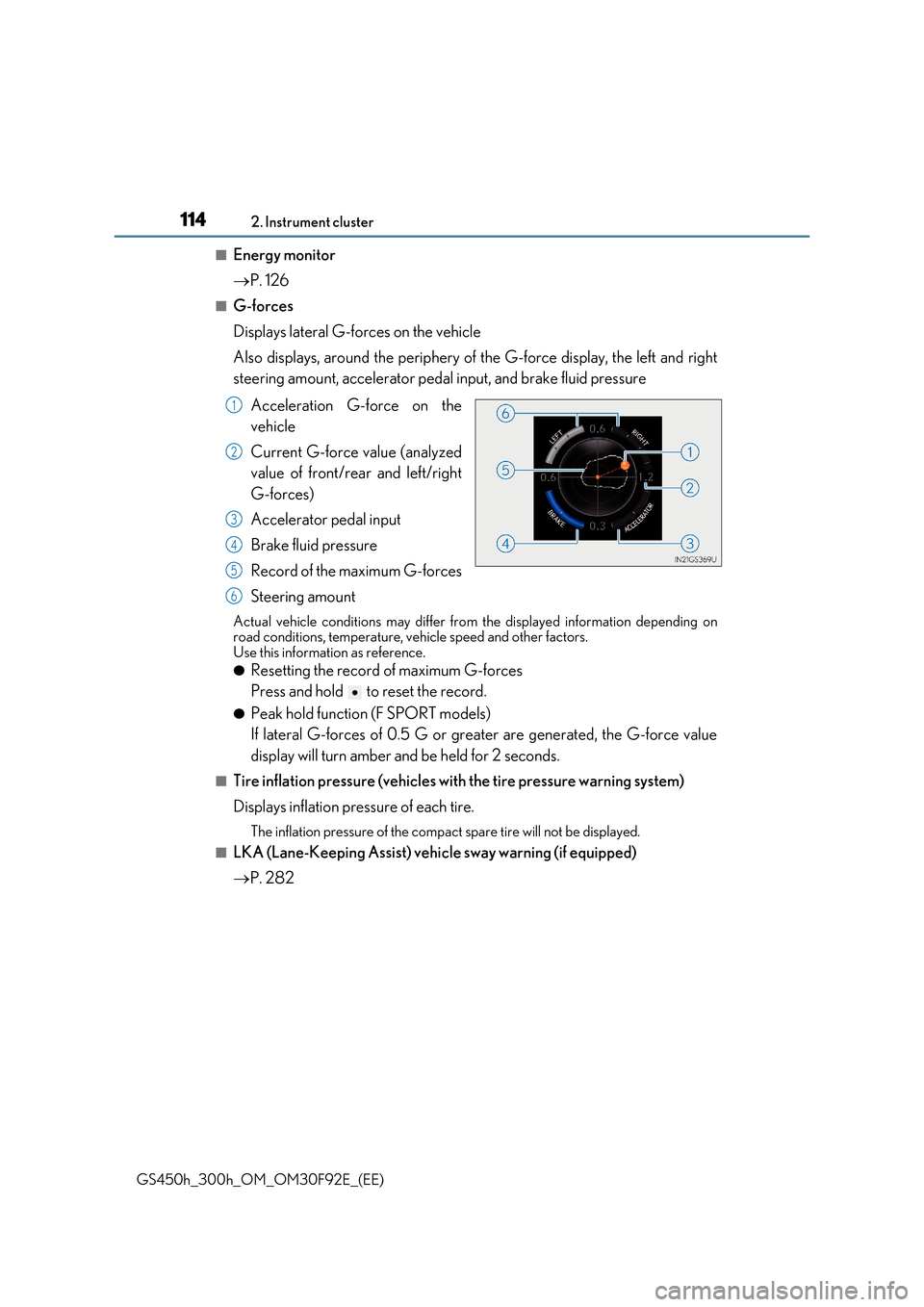
■G-forces
Displays lateral G-forces on the vehicle
Also displays, around the periphery of the G-force display, the left and right
steering amount, accelerator pedal input, and brake fluid pressure
Acceleration G-force on the
vehicle
Current G-force value (analyzed
value of front/rear and left/right
G-forces)
Accelerator pedal input
Brake fluid pressure
Record of the maximum G-forces
Steering amount
Actual vehicle conditions may differ from the displayed information depending on road conditions, temperature, vehicle speed and other factors.Use this information as reference.
●Resetting the record of maximum G-forces
Press and hold to reset the record.
●Peak hold function (F SPORT models)
If lateral G-forces of 0.5 G or grea ter are generated, the G-force value
display will turn amber and be held for 2 seconds.
■Tire inflation pressure (vehicles with the tire pressure warning system)
Displays inflation pressure of each tire.
The inflation pressure of the compac t spare tire will not be displayed.
■LKA (Lane-Keeping Assist) vehicle sway warning (if equipped)
P. 282
1
2
3
4
5
6
Page 117 of 600
1172. Instrument cluster
2
Instrument cluster
GS450h_300h_OM_OM30F92E_(EE)
■G-force display
●The G-force values may not be zero even when the vehicle is parked, such as when it is parked on an incline.
●Depending on the vehicle usage conditions, the brake fluid pressure display may not
reach its maximum reading even though the brake pedal is fully depressed.
●If a 12-volt battery terminal is disconnected and reconnected, the steering amount dis- play may be disabled temporarily. After driv ing the vehicle for a while, the display will
be enabled.
●Depending on the condition of the vehicle, the brake fluid pressure display may change even when the brake pedal is not depressed.
■System check display
After turning the power switch to ON mode , opening image is displayed while system operation is checked. When the system check is complete, the normal screen will return.
■Suspension of the settings display
In the following situations, the settings disp lay using the meter control switches will be suspended.
●When a warning message appears on the multi-information display
●When the vehicle begins to move
■Tire inflation pressure (if equipped)
●It may take a few minutes to display the tire inflation pressure after the power switch is turned to ON mode. It may also take a few minutes to display the tire inflation pressureafter inflation pressure has been adjusted.
●“---” may be displayed if the tire information cannot be determined due to unfavorableradio wave conditions.
●Tire inflation pressure changes with temperature. The displayed values may also be dif-
ferent from the values measured using a tire pressure gauge.
■When disconnecting and reconnecting 12-volt battery terminals
The drive information will be reset.
■Liquid crystal display
P. 109
Page 133 of 600
133
3
Operation of
each component
GS450h_300h_OM_OM30F92E_(EE)
3-1. Key information
Keys .................................................. 134
3-2. Opening, closing and locking
the doors and trunk
Doors ............................................... 139
Trunk .................................................146
Smart entry & start system ...... 153
3-3. Adjusting the seats
Front seats.......................................175
Driving position memory ......... 178
Head restraints ............................ 183
3-4. Adjusting the steering
wheel and mirrors
Steering wheel ............................. 186
Inside rear view mirror ............. 188
Outside rear view mirrors....... 190
3-5. Opening, closing the
windows and moon roof
Power windows ........................... 193
Moon roof ...................................... 196
Page 176 of 600
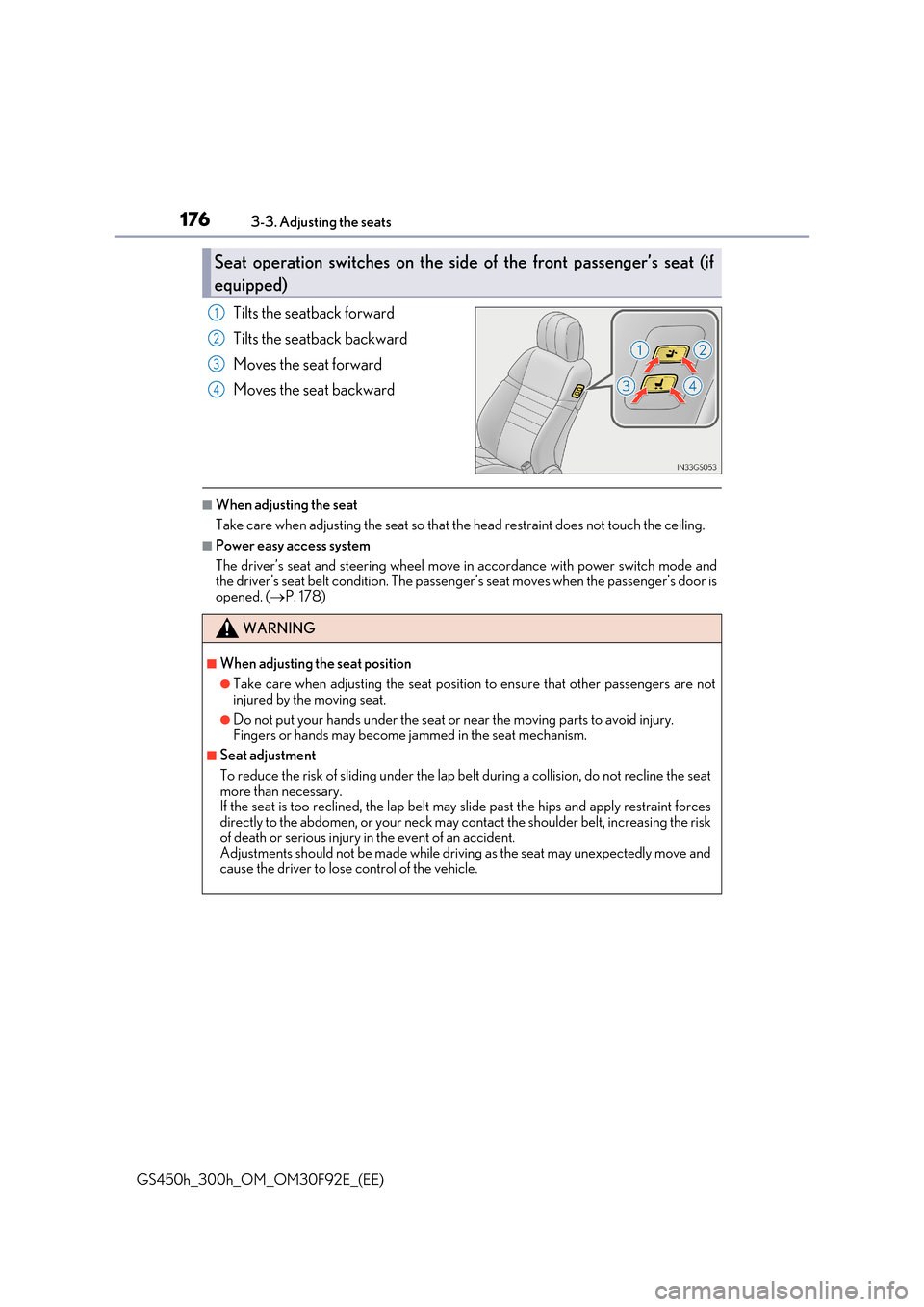
1763-3. Adjusting the seats
GS450h_300h_OM_OM30F92E_(EE)
Tilts the seatback forward
Tilts the seatback backward
Moves the seat forward
Moves the seat backward
■When adjusting the seat
Take care when adjusting the seat so that the head restraint does not touch the ceiling.
■Power easy access system
The driver’s seat and steering wheel move in accordance with power switch mode and the driver’s seat belt condition. The passeng er’s seat moves when the passenger’s door is
opened. ( P. 178)
Seat operation switches on the side of the front passenger’s seat (if
equipped)
1
2
3
4
WARNING
■When adjusting the seat position
●Take care when adjusting the seat position to ensure that other passengers are not injured by the moving seat.
●Do not put your hands under the seat or near the moving parts to avoid injury.Fingers or hands may become jammed in the seat mechanism.
■Seat adjustment
To reduce the risk of sliding under the lap be lt during a collision, do not recline the seat more than necessary.If the seat is too reclined, th e lap belt may slide past the hips and apply restraint forces
directly to the abdomen, or your neck may contact the shoulder belt, increasing the risk of death or serious injury in the event of an accident.Adjustments should not be made while driving as the seat may unexpectedly move and
cause the driver to lose control of the vehicle.
Page 178 of 600
1783-3. Adjusting the seats
GS450h_300h_OM_OM30F92E_(EE)
Driving position memory
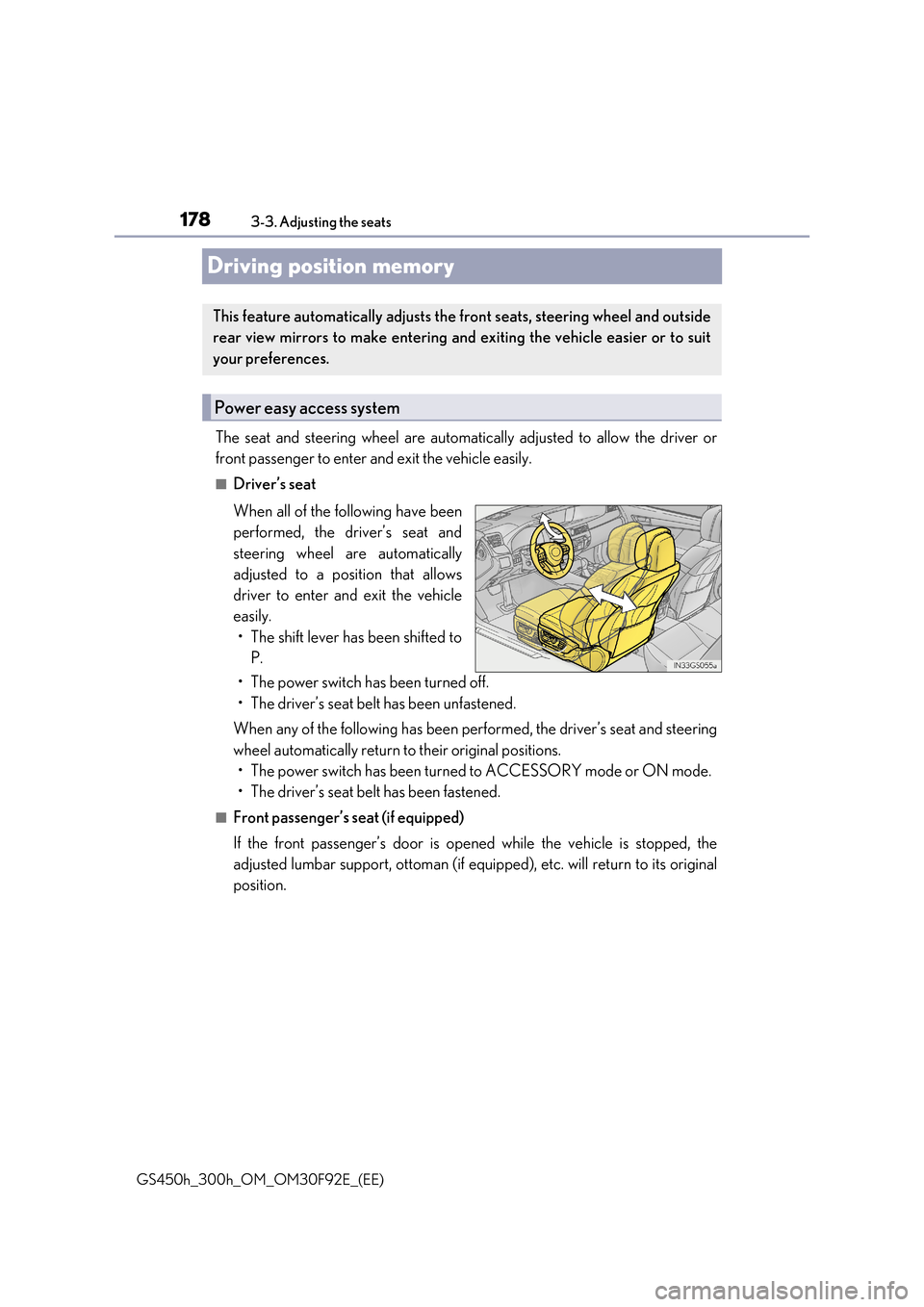
The seat and steering wheel are automatically adjusted to allow the driver or
front passenger to enter and exit the vehicle easily.
■Driver’s seat
When all of the following have been
performed, the driver’s seat and
steering wheel are automatically
adjusted to a position that allows
driver to enter and exit the vehicle
easily.
• The shift lever has been shifted to
P.
• The power switch has been turned off.
• The driver’s seat belt has been unfastened.
When any of the following has been performed, the driver’s seat and steering
wheel automatically return to their original positions.
• The power switch has been turned to ACCESSORY mode or ON mode.
• The driver’s seat belt has been fastened.
■Front passenger’s seat (if equipped)
If the front passenger’s door is opened while the vehicle is stopped, the
adjusted lumbar support, ottoman (if equipped), etc. will return to its original
position.
This feature automatically adjusts the front seats, steering wheel and outside
rear view mirrors to make entering and exiting the vehicle easier or to suit
your preferences.
Power easy access system
Page 179 of 600
1793-3. Adjusting the seats
3
Operation of each component
GS450h_300h_OM_OM30F92E_(EE)
■Operation of the power easy access system
When exiting the vehicle, the power easy access system may not operate if the seat is already close to the rearmost position, etc.
■Customization
The seat movement amount settings of the power easy access system can be custom- ized. (Customizable features: P. 561)
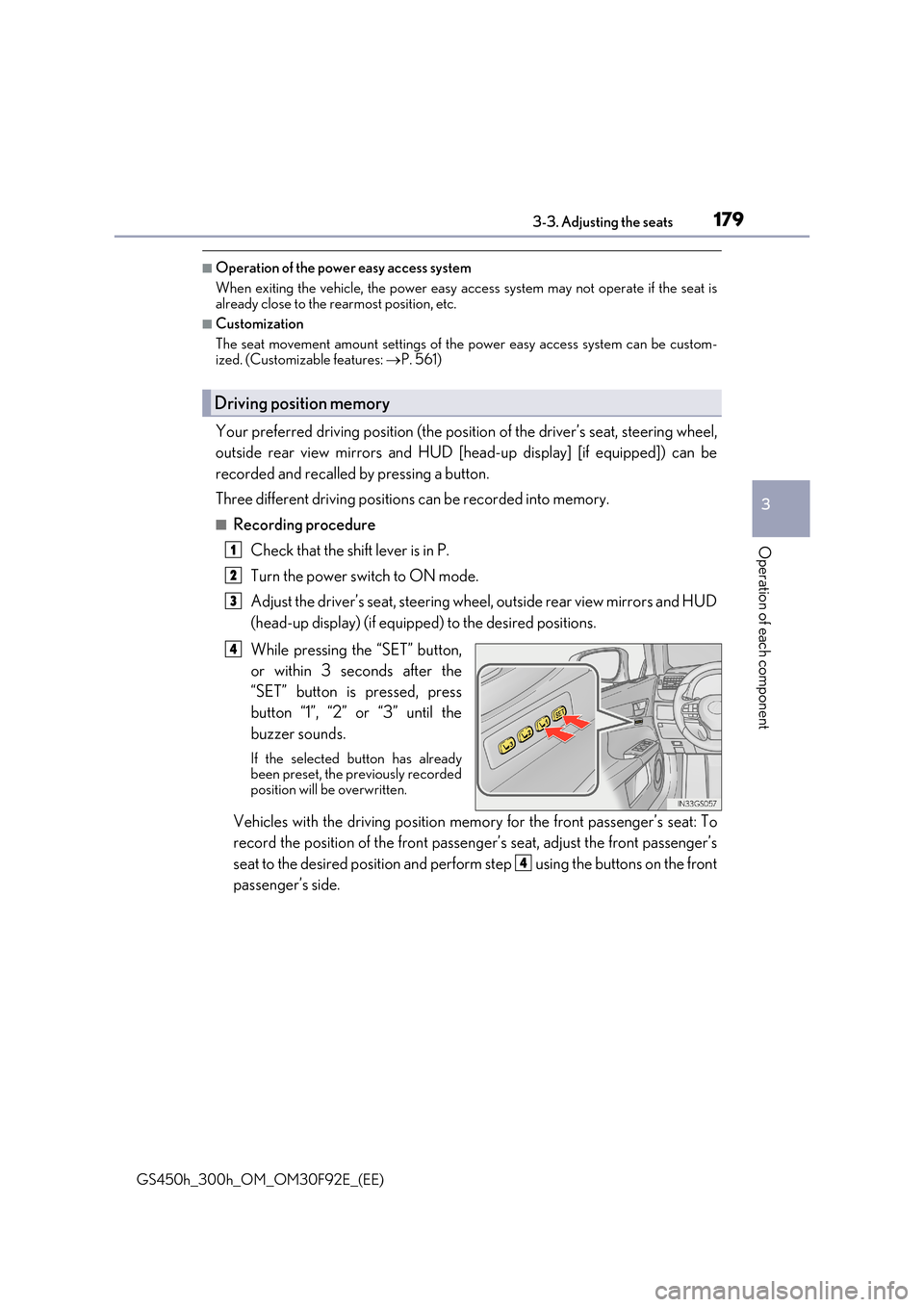
Your preferred driving position (the position of the driver’s seat, steering wheel,
outside rear view mirrors and HUD [head-up display] [if equipped]) can be
recorded and recalled by pressing a button.
Three different driving positions can be recorded into memory.
■Recording procedure
Check that the shift lever is in P.
Turn the power switch to ON mode.
Adjust the driver’s seat, steering wheel, outside rear view mirrors and HUD
(head-up display) (if equipped) to the desired positions.
While pressing the “SET” button,
or within 3 seconds after the
“SET” button is pressed, press
button “1”, “2” or “3” until the
buzzer sounds.
If the selected button has already been preset, the previously recordedposition will be overwritten.
Vehicles with the driving position memory for the front passenger’s seat: To
record the position of the front passeng er’s seat, adjust the front passenger’s
seat to the desired position and perfor m step using the buttons on the front
passenger’s side.
Driving position memory
1
2
3
4
4
Page 180 of 600
1803-3. Adjusting the seats
GS450h_300h_OM_OM30F92E_(EE)
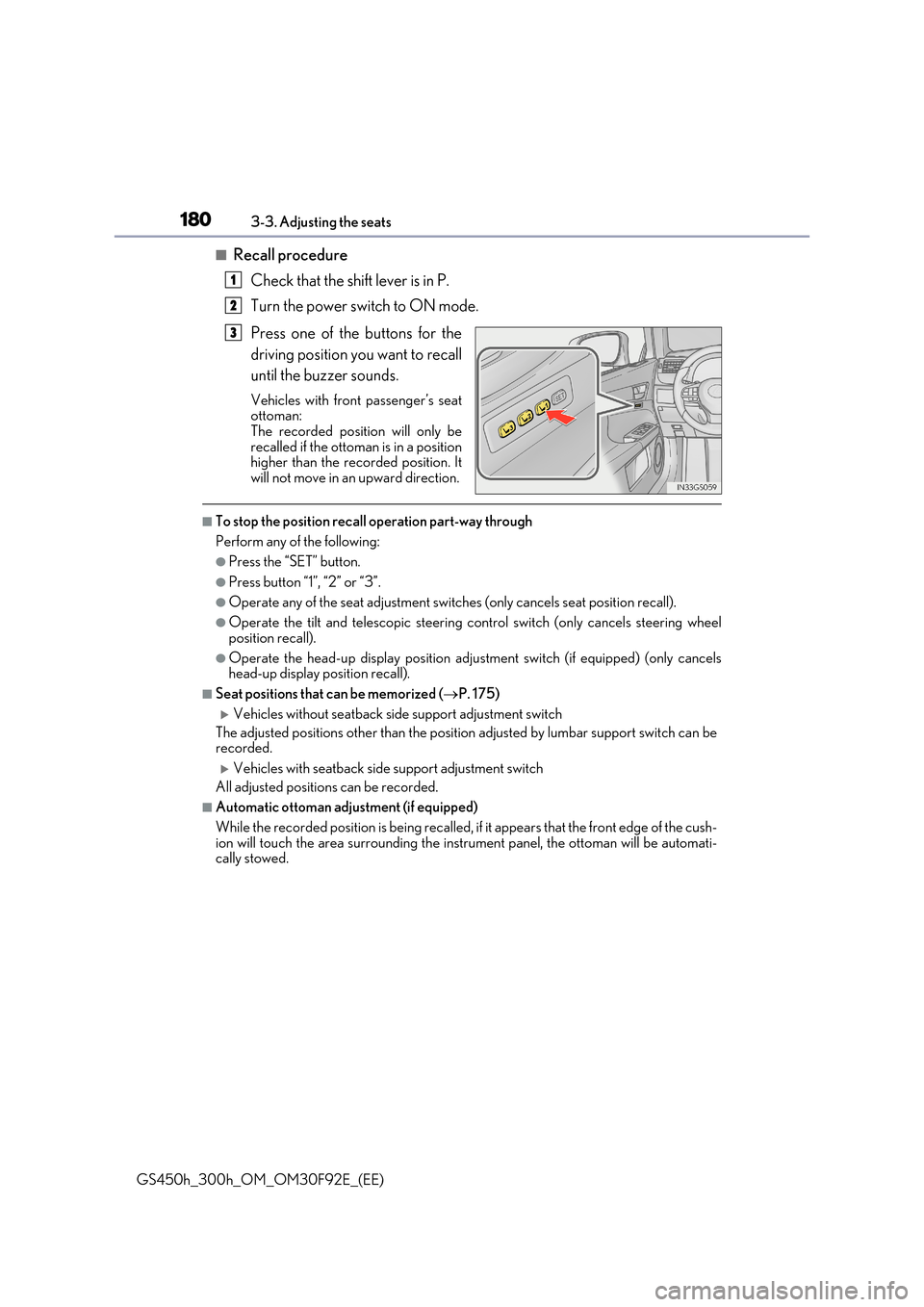
■Recall procedure
Check that the shift lever is in P.
Turn the power switch to ON mode.
Press one of the buttons for the
driving position you want to recall
until the buzzer sounds.
Vehicles with front passenger’s seat ottoman:
The recorded position will only be recalled if the ottoman is in a positionhigher than the recorded position. It
will not move in an upward direction.
■To stop the position recall operation part-way through
Perform any of the following:
●Press the “SET” button.
●Press button “1”, “2” or “3”.
●Operate any of the seat adjustment switches (only cancels seat position recall).
●Operate the tilt and telescopic steering control switch (only cancels steering wheel
position recall).
●Operate the head-up display position adju stment switch (if equipped) (only cancels head-up display position recall).
■Seat positions that can be memorized ( P. 175)
Vehicles without seatback side support adjustment switch
The adjusted positions other than the position adjusted by lumbar support switch can be recorded.
Vehicles with seatback side support adjustment switch
All adjusted positions can be recorded.
■Automatic ottoman adjustment (if equipped)
While the recorded position is being recalled, if it appears that the front edge of the cush-
ion will touch the area surrounding the instrument panel, the ottoman will be automati- cally stowed.
1
2
3