wheel Lexus GS450h 2017 Workshop Manual
[x] Cancel search | Manufacturer: LEXUS, Model Year: 2017, Model line: GS450h, Model: Lexus GS450h 2017Pages: 600, PDF Size: 149.98 MB
Page 289 of 600
2894-5. Using the driving support systems
4
Driving
GS450h_300h_OM_OM30F92E_(EE)
■Hands off steering wheel alert
For Israel: When the system determines that the driver has removed the hands from the steering wheel while the steering assist function or lane centering function is operating, a
warning message is displayed on the multi- information display and the buzzer sounds.
Except for Israel: When the system determines that the driver has removed the hands from the steering wheel while the steering assist function or lane centering function is
operating, a warning message is displa yed on the multi-information display. If the driver continues to keep the hands off of the steering wheel, the buzzer sounds, awarning message is displayed and the function is temporarily canceled. This alert also
operates in the same way when the vehicle is driven with the steering wheel lightly gripped. However, depending on the road conditions, etc., the function may not cancel.
■White (yellow) lines are on ly on one side of road
The LKA system will not operate for the side on which white (yellow) lines could not be recognized.
■Conditions in which functi ons may not operate properly
In the following situations, the camera sensor may not detect white (yellow) lines and var- ious functions may not operate normally.
●There are shadows on the road that run paralle l with, or cover, the white (yellow) lines.
●The vehicle is driven in an area without white (yellow) lines, such as in front of a tollgate or checkpoint, or at an intersection, etc.
●The white (yellow) lines are cracked, “Raised pavement marker” or stones are present.
●The white (yellow) lines cannot be seen or are difficult to see due to sand, etc.
●The vehicle is driven on a road surface that is wet due to rain, puddles, etc.
●The traffic lines are yellow (which may be more difficult to recognize than lines that are
white).
●The white (yellow) lines cross over a curb, etc.
●The vehicle is driven on a bright surface, such as concrete.
●The vehicle is driven on a surface that is bright due to reflected light, etc.
●The vehicle is driven in an area where the brightness changes suddenly, such as at the
entrances and exits of tunnels, etc.
●Light from the headlights of an oncoming vehicle, the sun, etc. enters the camera.
●The vehicle is driven where the road diverges, merges, etc.
●The vehicle is driven on a slope.
Page 290 of 600
2904-5. Using the driving support systems
GS450h_300h_OM_OM30F92E_(EE)
●The vehicle is driven on a road which tilts left or right, or a winding road.
●The vehicle is driven on an unpaved or rough road.
●The vehicle is driven around a sharp curve.
●The traffic lane is excessively narrow or wide.
●The vehicle is extremely tilted due to carrying heavy luggage or having improper tire pressure.
●The distance to the preceding vehicle is extremely short.
●The vehicle is moving up and down a large amount due to road conditions during driv-ing (poor roads or road seams).
●The headlight lenses are dirty and emit a faint amount of light at night, or the beam axis has deviated.
●The vehicle is struck by a crosswind.
●The vehicle has just changed lanes or crossed an intersection.
●Snow tires, etc. are equipped.
■Warning message
Warning messages are used to indicate a syst em malfunction or to inform the driver of the need for caution while driving. ( P. 466)
■Customization
The following settings can be changed.
For how to change settings, refer to P. 561.
FunctionSetting details
Lane departure alert functionAdjust alert sensitivity
Adjust alert type
Steering assist functionTurn steering wheel assistance on and off
Vehicle sway warning functionTurn function on and off
Adjust alert sensitivity
Lane centering functionTurn function on and off
Page 295 of 600
2954-5. Using the driving support systems
4
Driving
GS450h_300h_OM_OM30F92E_(EE)
●Side road speed signs may be detected and displayed (if positioned in sight of the cam-era sensor) while the vehicle is traveling on the main road.
●Roundabout exit road speed signs may be detected and displayed (if positioned in sight
of the camera sensor) while traveling on a roundabout.
●On some models: The speed information displayed on the meter and that displayed on the navigation system may be different due to the navigation system using map data.
■When driving vehicle in country with different speed unit
Since RSA recognizes signs based on the set unit of the meter, it is necessary to changethe set unit of the meter. Adjust the set unit of the meter to the speed unit of signs in the
current location. (P. 565)
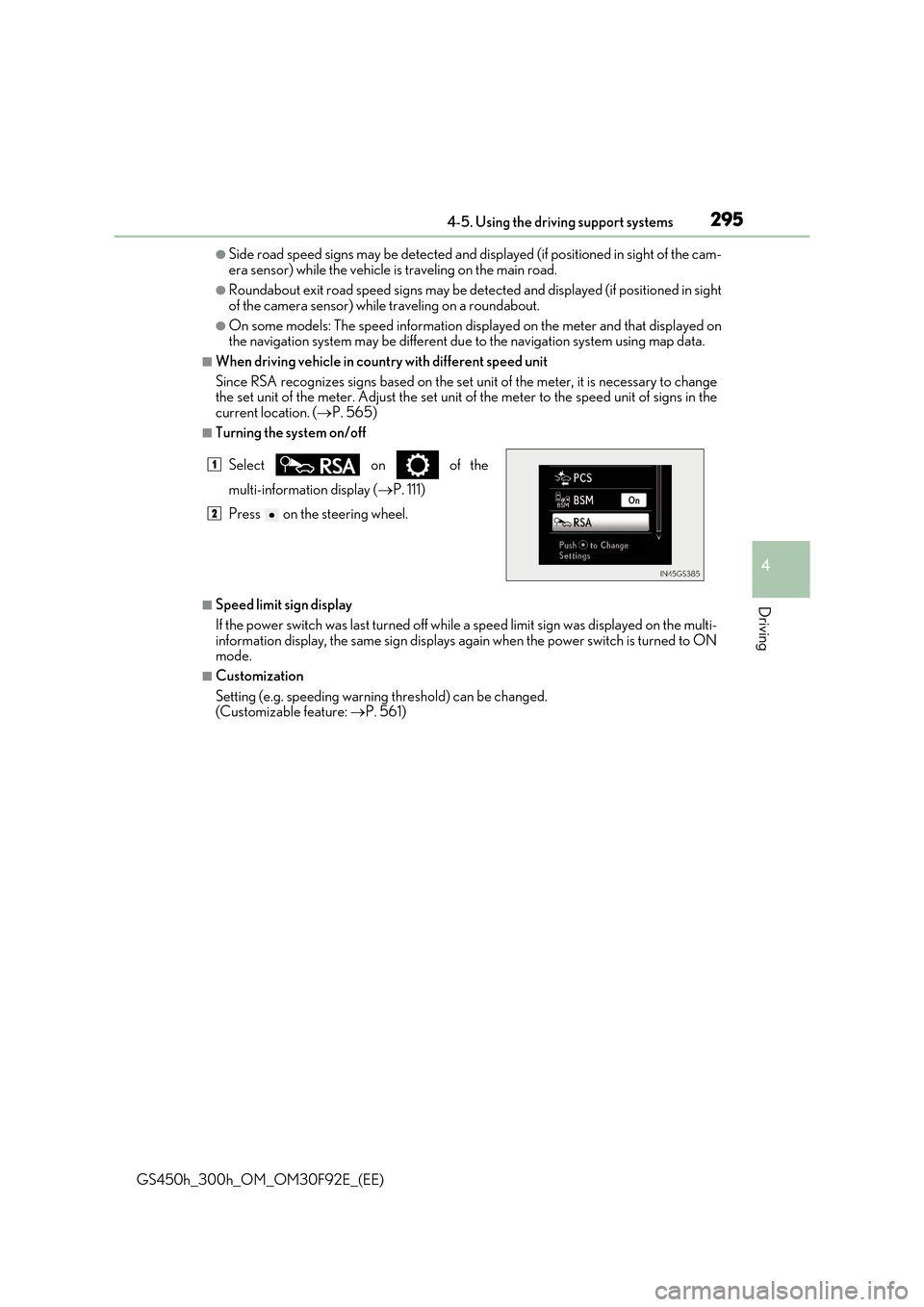
■Turning the system on/off
■Speed limit sign display
If the power switch was last turned off while a speed limit sign was displayed on the multi-
information display, the same sign displays again when the power switch is turned to ON mode.
■Customization
Setting (e.g. speeding warning threshold) can be changed. (Customizable feature: P. 561)
Select on of the
multi-information display (P. 111)
Press on the steering wheel.
1
2
Page 307 of 600
3074-5. Using the driving support systems
4
Driving
GS450h_300h_OM_OM30F92E_(EE)
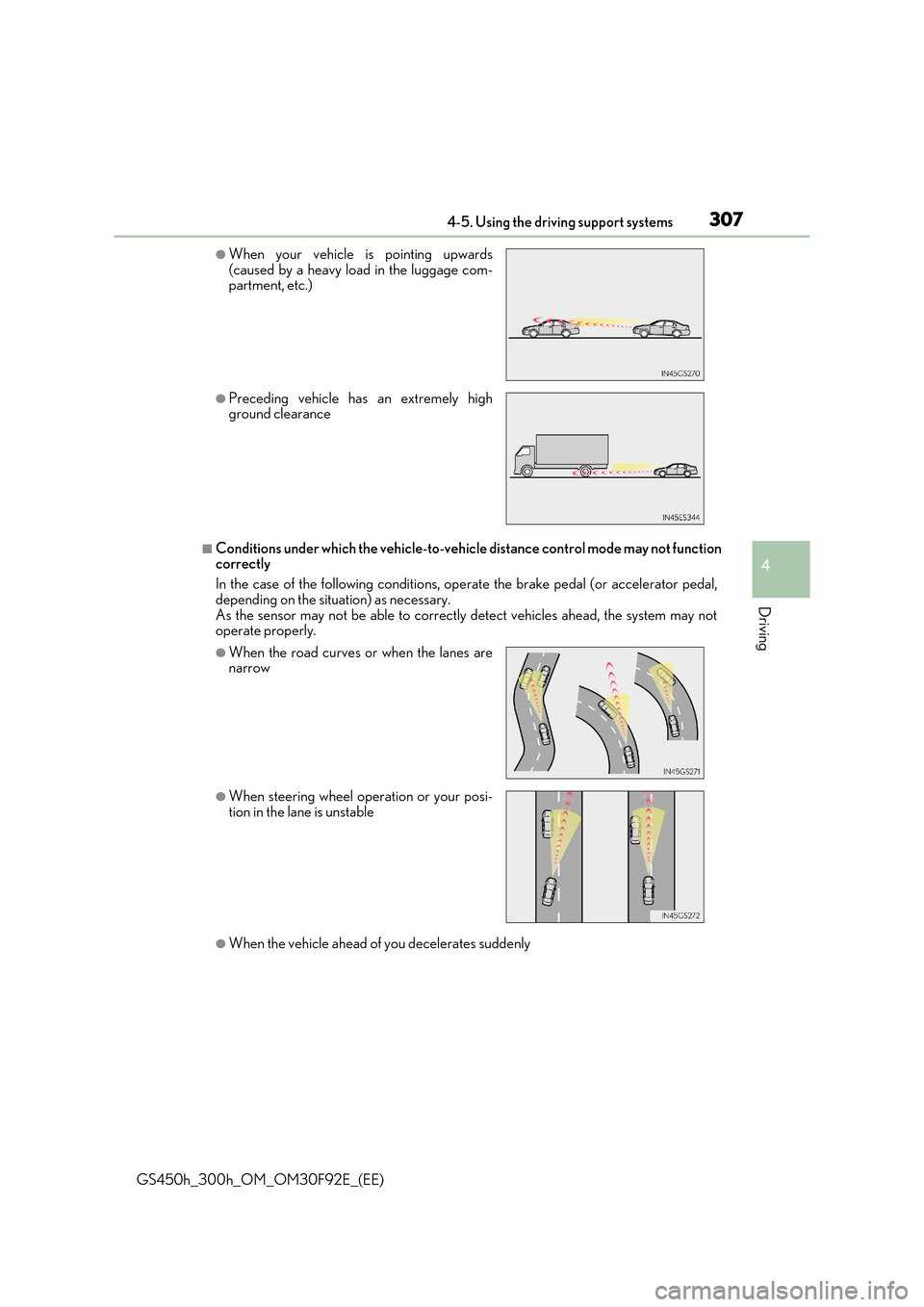
■Conditions under which the vehicle-to-vehicle distance control mode may not function correctly
In the case of the following conditions, operate the brake pedal (or accelerator pedal,
depending on the situation) as necessary. As the sensor may not be able to correctly detect vehicles ahead, the system may notoperate properly.
●When the vehicle ahead of you decelerates suddenly
●When your vehicle is pointing upwards(caused by a heavy load in the luggage com-partment, etc.)
●Preceding vehicle has an extremely highground clearance
●When the road curves or when the lanes arenarrow
●When steering wheel operation or your posi-tion in the lane is unstable
Page 324 of 600
3244-5. Using the driving support systems
GS450h_300h_OM_OM30F92E_(EE)
Driving assist systems
◆ECB (Electronically Controlled Brake System)
The electronically controlled system generates braking force corresponding
to the brake operation
◆ABS (Anti-lock Brake System)
Helps to prevent wheel lock when the br akes are applied suddenly, or if the
brakes are applied while driving on a slippery road surface
◆Brake assist
Generates an increased level of braking force after the brake pedal is
depressed when the system detects a panic stop situation
◆VSC (Vehicle Stability Control)
Helps the driver to control skidding when swerving suddenly or turning on
slippery road surfaces
◆TRC (Traction Control)
Helps to maintain drive power and prevent the drive wheels from spinning
when starting the vehicle or accelerating on slippery roads
◆VGRS (Variable Gear Ratio Steering) (if equipped)
Adjusts the front wheel turning angle in accordance with the vehicle speed
and steering wheel movement
To help enhance driving safety and performance, the following systems oper-
ate automatically in response to various driving situations. Be aware, however,
that these systems are suppl ementary and should not be relied upon too heav-
ily when operating the vehicle.
Page 325 of 600
3254-5. Using the driving support systems
4
Driving
GS450h_300h_OM_OM30F92E_(EE)
◆DRS (Dynamic Rear Steering) (if equipped)
Contributes to the turning characteristics and responsiveness of the vehicle
by slightly adjusting the rear wheel angle of the vehicle in accordance with
steering wheel movement
◆Hill-start assist control
Helps to prevent the vehicle from rolling backward when starting on an
incline.
◆EPS (Electric Power Steering)
Employs an electric motor to reduce the amount of effort needed to turn the
steering wheel
◆AVS (Adaptive Variable Susp ension system) (if equipped)
By independently controlling the damp ing force of the shock absorbers for
each of the 4 wheels according to the road and driving conditions, this system
helps riding comfort with a high level of stability, and helps good vehicle pos-
ture
When SPORT S+ mode is selected by the driving mode select switch, the
damping force is suitable for sporty driving ( P. 312)
◆LDH (Lexus Dynamic Handling system) (if equipped)
Provides independent control of the VGRS, DRS and EPS. Contributes to
turning characteristics at low speeds, responsiveness at medium speeds and
safety at high speeds by controlling the steering angle of the front and rear
wheels in accordance with the steering wheel operation and vehicle speed
◆VDIM (Vehicle Dynamics Integrated Management)
Provides integrated control of the ABS, brake assist, TRC, VSC, hill-start
assist control, EPS, VGRS (if equipped) and DRS (if equipped) systems
Helps to maintain vehicle stability when swerving on slippery road surfaces by
controlling the brakes, hybrid system output, steering assist, steering ratio and
rear wheel angle
◆Emergency brake signal
When the brakes are applie d suddenly, the stop lights automatically flash to
alert the vehicle behind
Page 326 of 600
3264-5. Using the driving support systems
GS450h_300h_OM_OM30F92E_(EE)
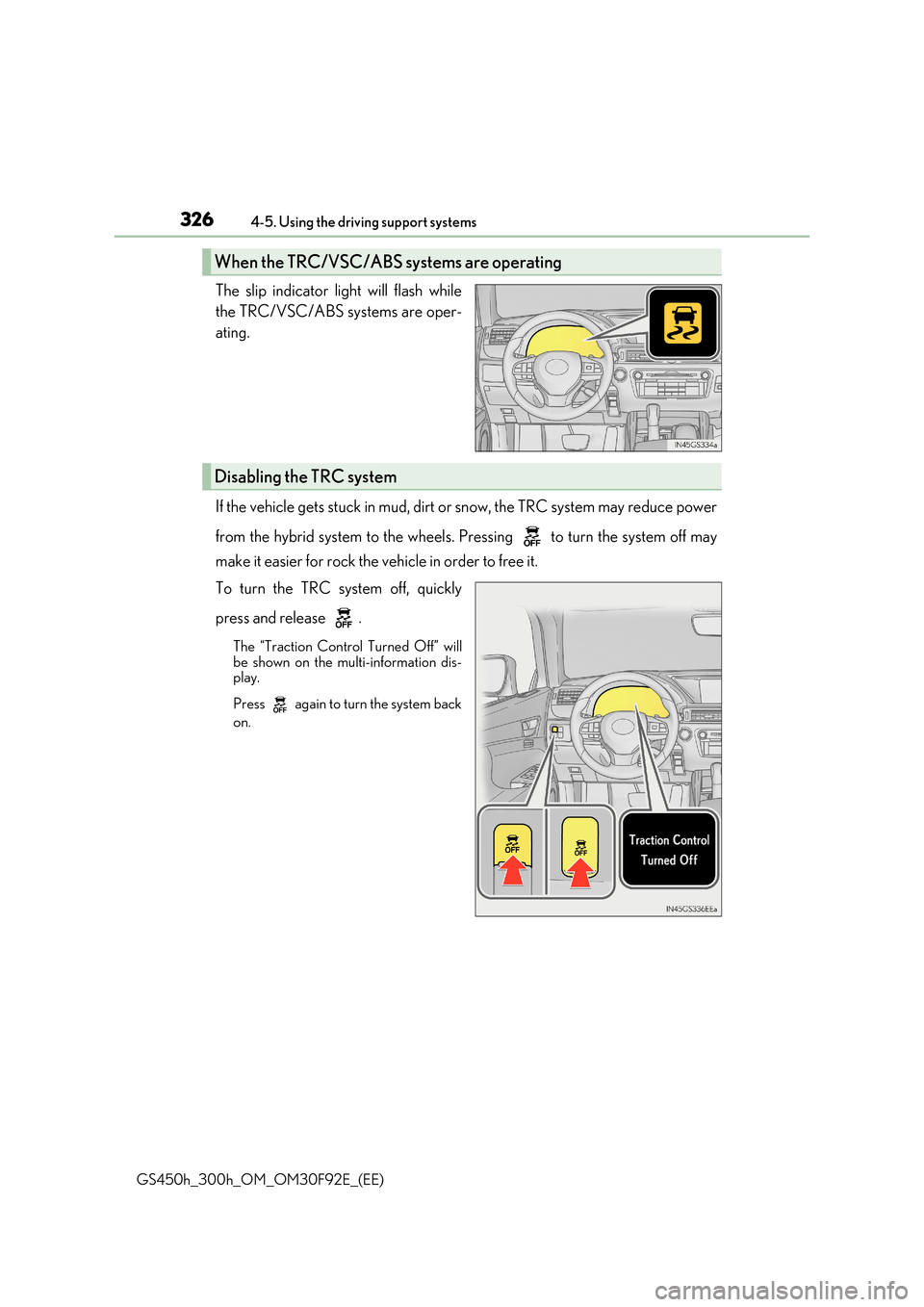
The slip indicator light will flash while
the TRC/VSC/ABS systems are oper-
ating.
If the vehicle gets stuck in mud, dirt or snow, the TRC system may reduce power
from the hybrid system to the wheels. Pressing to turn the system off may
make it easier for rock the vehicle in order to free it.
To turn the TRC system off, quickly
press and release .
The “Traction Control Turned Off” will be shown on the multi-information dis-play.
Press again to turn the system back
on.
When the TRC/VSC/ABS sy stems are operating
Disabling the TRC system
Page 327 of 600
3274-5. Using the driving support systems
4
Driving
GS450h_300h_OM_OM30F92E_(EE)
■Turning off both TRC and VSC systems
To turn the TRC and VSC systems off, press and hold for more than 3 seconds while the vehicle is stopped.
The VSC OFF indicator light will come on an d the “Traction Control Turned Off” will
be shown on the multi-information display.*
Press again to turn the systems back on.
*: On vehicles with PCS (Pre-Crash Safety system), pre-crash brake assist and pre-
crash braking will also be disabled. The PCS (Pre-Crash Safety system) warning
light will come on and a message will be di splayed on the multi-information display.
( P. 466)
■When the message is displayed on the multi-information display showing that TRC has
been disabled even if has not been pressed
TRC and hill-start assist control cannot be operated. Contact any authorized Lexus
retailer or Lexus authorized repa irer, or any reliable repairer.
■VGRS is disabled when
VGRS may stop operating in the following situations.
In this event, the steering wheel may move fr om its straight forward position, but it will return when the system restarts.
●The steering wheel is operated for an extended period of time while the vehicle is
stopped or is moving very slowly.
●When force is continuously applied for a long time with the steering wheel turned as far as it will go.
The center position of the steering wheel may change when VGRS is disabled. How- ever, the position will return to normal after VGRS is reactivated.
■When the 12-volt battery is disconnected
The steering wheel may move from its straight forward position, but this will be corrected automatically when driving.
Page 328 of 600
3284-5. Using the driving support systems
GS450h_300h_OM_OM30F92E_(EE)
■Sounds and vibrations caused by the ABS, brake assist, VSC, Hill-start assist control, TRC and VGRS systems
Any of the following conditions may occur when the above systems are operating. None
of these indicates that a malfunction has occurred.
●Vibrations may be felt through the vehicle body and steering.
●A motor sound may be heard after the vehicle comes to a stop.
■ECB operation sound
ECB operating sound may be heard in the follow ing cases, but it does not indicate that a malfunction has occurred.
●Operating sound heard from the engine compartment when the brake pedal is oper-ated.
●Motor sounds of the brake system heard from the front part of the vehicle when the
driver’s door is opened.
●Operating sound heard from the engine compartment when one or two minutes passed after the stop of the hybrid system.
■EPS, VGRS and DRS operation sound
When the steering wheel is operated, a motor sound (whirring sound) may be heard. This does not indicate a malfunction.
■Automatic reactivation of TRC and VSC systems
After turning the TRC and VSC systems off, the systems will be automatically re-enabled in the following situations:
●When the power switch is turned off
●If only the TRC system is turned off, the TR C will turn on when vehicle speed increases If both TRC and VSC systems are turned off, automatic re-enabling will not occur when
vehicle speed increases.
■Reduced effectiveness of the EPS system
The effectiveness of the EPS system is reduced to prevent the system from overheating when there is frequent steering input over an extended period of time. The steeringwheel may feel heavy as a result. Should this occur, refrain from excessive steering input
or stop the vehicle and turn the hybrid system off. The EPS system should return to nor- mal within 10 minutes.
■Operating conditions of hill-start assist control
When the following four conditions are met, the hill-start assist control will operate;
●The shift lever is in a position other than N or P (when starting off forward/backward on an upward incline).
●The vehicle is stopped.
●The accelerator pedal is not depressed.
●The parking brake is not engaged.
Page 330 of 600
3304-5. Using the driving support systems
GS450h_300h_OM_OM30F92E_(EE)
WARNING
■When the VSC is activated
The slip indicator light flashes. Always drive carefully. Reckless driving may cause an accident. Exercise particular care when the indicator light flashes.
■When the TRC/VSC systems are turned off
Be especially careful and drive at a speed appropriate to the road conditions. As these are the systems to help ensure vehicle stability and driving force, do not turn the TRC/
VSC systems off unless necessary.
■Replacing tires
Make sure that all tires are of the specified size, brand, tread pattern and total load
capacity. In addition, make sure that the tires are inflated to the recommended tire infla- tion pressure level.
The ABS, TRC and VSC systems will not function correctly if different tires are installed
on the vehicle. Contact any authorized Lexus retailer or Lexus authorized repairer, or any reliable repairer for further information when replacing tires or wheels.
■Handling of tires and the suspension
Using tires with any kind of problem or modi fying the suspension will affect the driving assist systems, and may cause a system to malfunction.