Eco Lexus GX460 2010 Owner's Manual
[x] Cancel search | Manufacturer: LEXUS, Model Year: 2010, Model line: GX460, Model: Lexus GX460 2010Pages: 830, PDF Size: 17.01 MB
Page 553 of 830
552
3-7. Other interior features
GX460_CANADA (OM60F29U)
■The seat heaters/ventilators can be used when
The “ENGINE START STOP” switch is in IGNITION ON mode.
■When not in use
Turn the dial until the indicator light turns off.
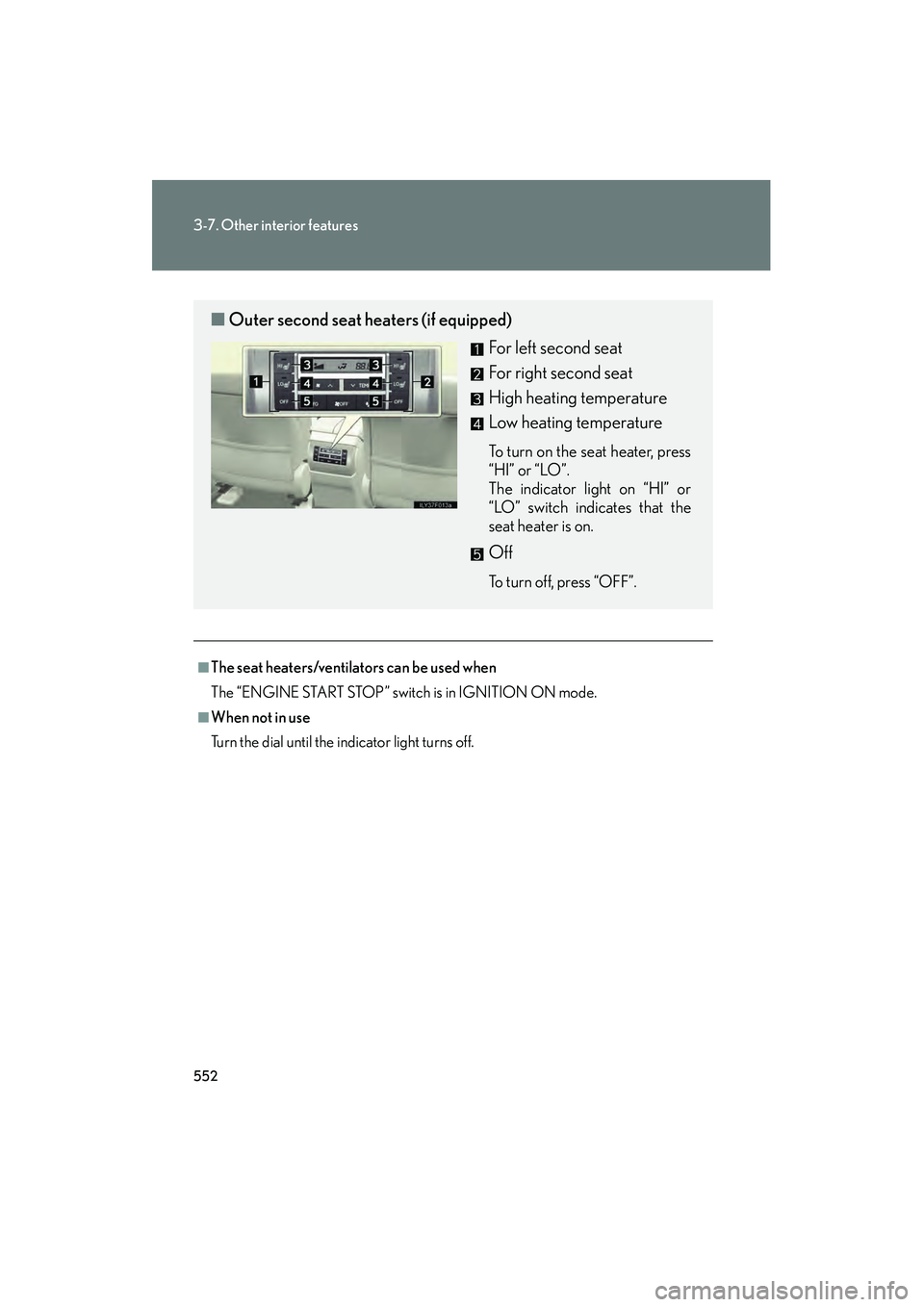
■Outer second seat heaters (if equipped)
For left second seat
For right second seat
High heating temperature
Low heating temperature
To turn on the seat heater, press
“HI” or “LO”.
The indicator light on “HI” or
“LO” switch indicates that the
seat heater is on.
Off
To turn off, press “OFF”.
GX460_CANADA.book Page 552 Thursday, February 4, 2010 11:54 AM
Page 556 of 830
555
3-7. Other interior features
3
Interior features
GX460_CANADA (OM60F29U)
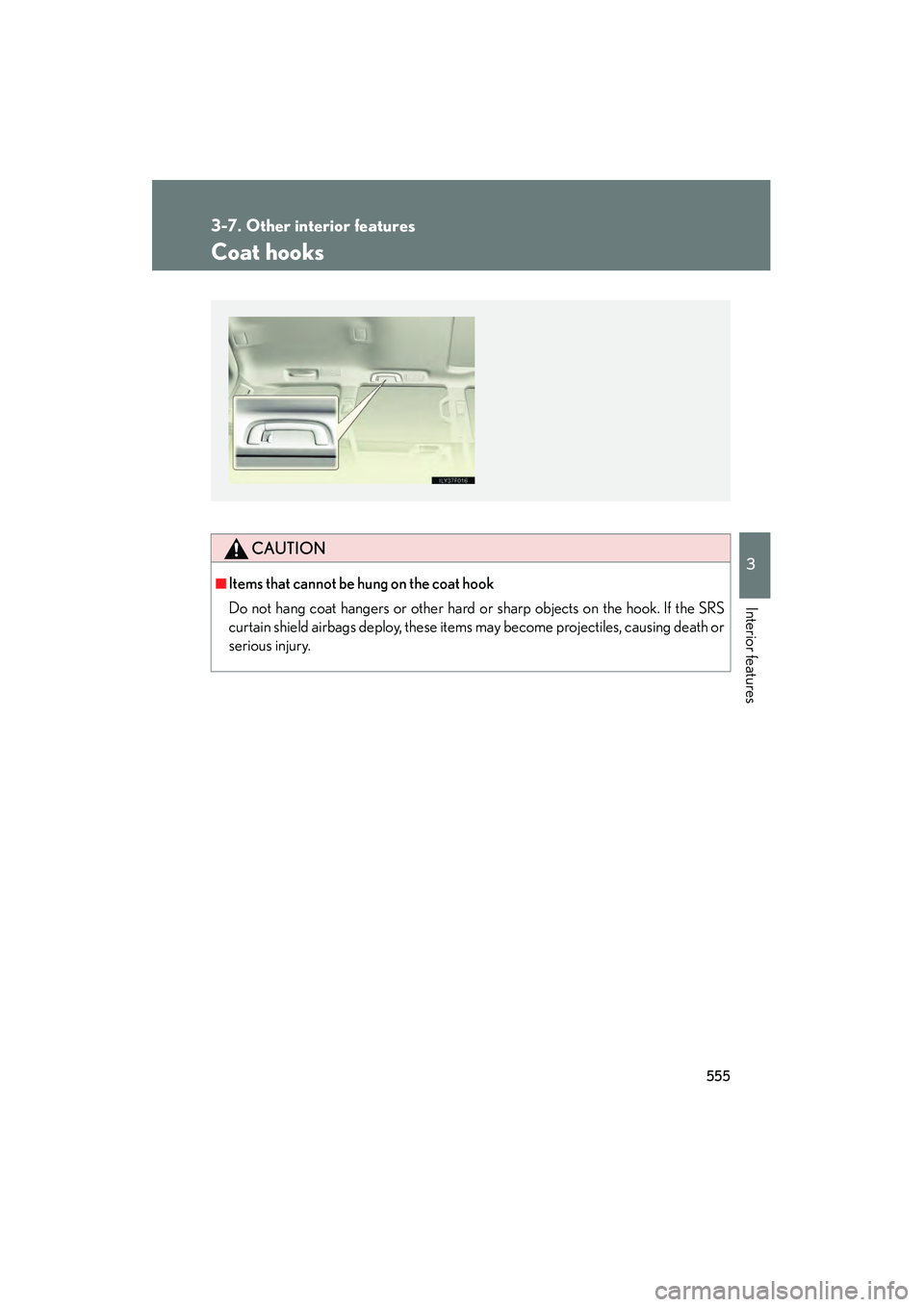
Coat hooks
CAUTION
■Items that cannot be hung on the coat hook
Do not hang coat hangers or other hard or sharp objects on the hook. If the SRS
curtain shield airbags deploy, these items may become projectiles, causing death or
serious injury.
GX460_CANADA.book Page 555 Thursday, February 4, 2010 11:54 AM
Page 557 of 830
556
3-7. Other interior features
GX460_CANADA (OM60F29U)
Floor mats
CAUTION
Observe the following precautions.
Failure to do so may cause the driver’s floor mat to slip, possibly interfering with the
pedals while driving. An unexpectedly high speed may result or it may become diffi-
cult to stop the vehicle, leading to a serious accident.
■When installing the driver’s floor mat
●Do not use floor mats designed for other models or different model year vehicles,
even if they are Lexus Genuine floor mats.
●Only use floor mats designed for the driver’s seat.
●Always install the floor mat securely using the retaining hooks (clips) provided.
●Do not use two or more floor mats on top of each other.
●Do not place the floor mat bottom-side up or upside-down.
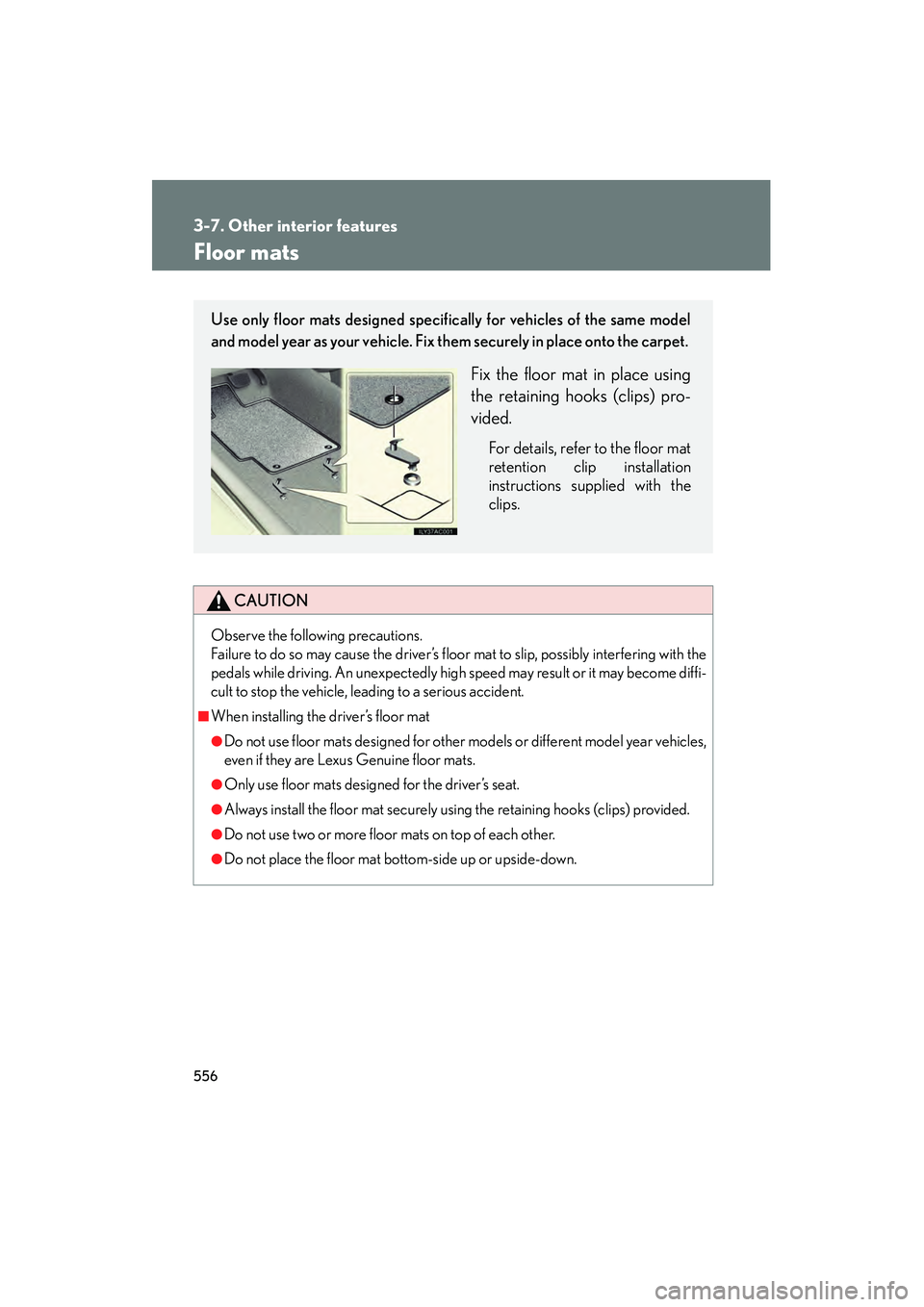
Use only floor mats designed specifically for vehicles of the same model
and model year as your vehicle. Fix them securely in place onto the carpet.
Fix the floor mat in place using
the retaining hooks (clips) pro-
vided.
For details, refer to the floor mat
retention clip installation
instructions supplied with the
clips.
sec_03_07.fm Page 556 Monday, February 15, 2010 10:35 AM
Page 565 of 830

564
3-7. Other interior features
GX460_CANADA (OM60F29U)Pull the case until it locks.
Check that the lock release button
can be seen.
STEP2
Lock release button
■Adjusting the sub cover (vehicles with third seats)
Fasten the button when the second seats are
in the rear-most position.
Unfasten the buttons before sliding the sec-
ond seats forward.
GX460_CANADA.book Page 564 Thursday, February 4, 2010 11:54 AM
Page 569 of 830
568
3-7. Other interior features
GX460_CANADA (OM60F29U)■
Programming HomeLink
®
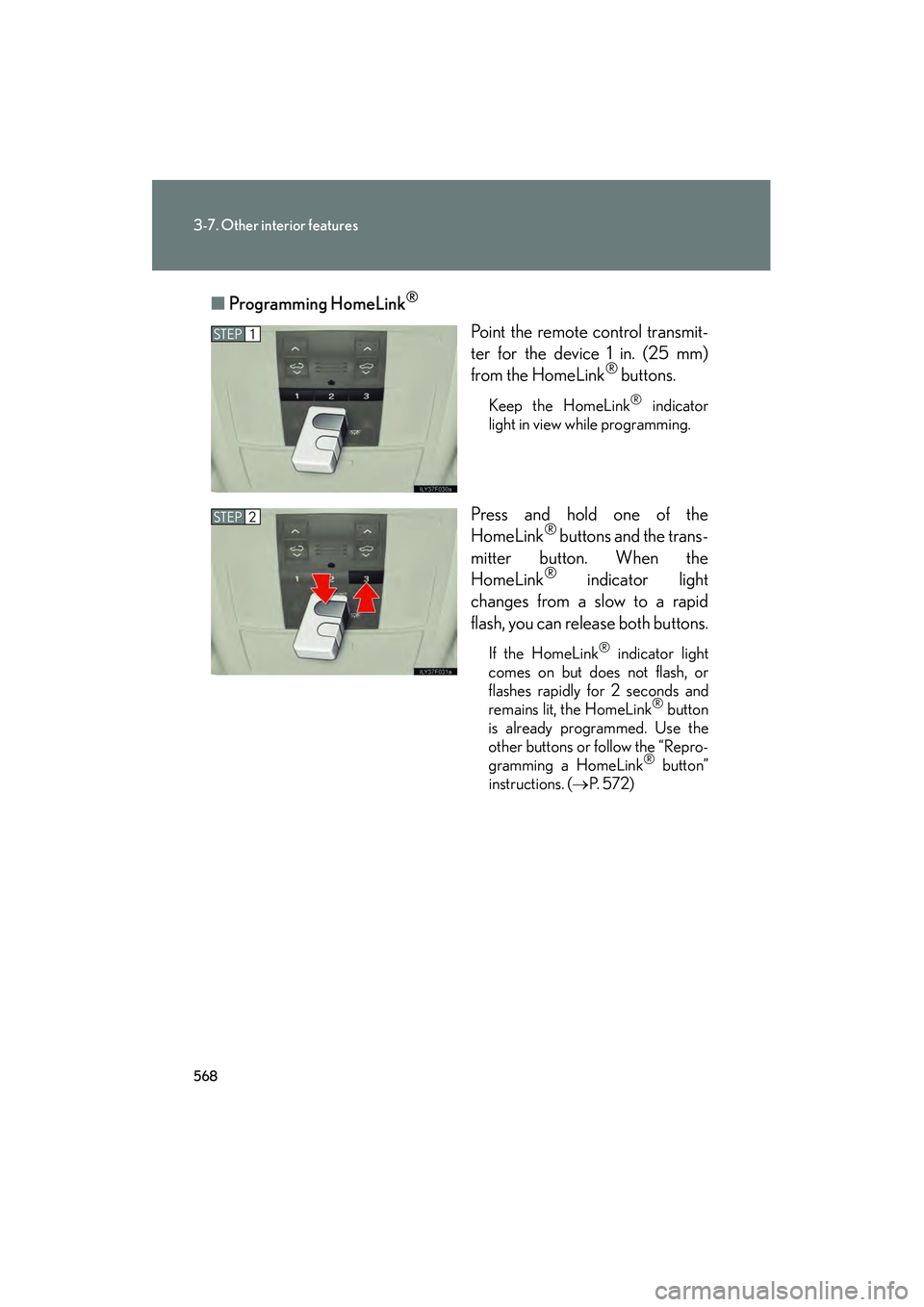
Point the remote control transmit-
ter for the device 1 in. (25 mm)
from the HomeLink
® buttons.
Keep the HomeLink® indicator
light in view while programming.
Press and hold one of the
HomeLink® buttons and the trans-
mitter button. When the
HomeLink
® indicator light
changes from a slow to a rapid
flash, you can release both buttons.
If the HomeLink® indicator light
comes on but does not flash, or
flashes rapidly for 2 seconds and
remains lit, the HomeLink
® button
is already programmed. Use the
other buttons or follow the “Repro-
gramming a HomeLink
® button”
instructions. ( →P. 5 7 2 )
STEP1
STEP2
GX460_CANADA.book Page 568 Thursday, February 4, 2010 11:54 AM
Page 570 of 830

569
3-7. Other interior features
3
Interior features
GX460_CANADA (OM60F29U)Test the HomeLink
® operation by
pressing the newly programmed
button.
If a HomeLink® button has been
programmed for a garage door,
check to see if the garage door
opens and closes. If the garage
door does not operate, see if your
garage transmitter is of the rolling
code type. Press and hold the pro-
grammed HomeLink
® button. The
remote control transmitter is of the
rolling code type if the HomeLink
®
indicator light flashes rapidly for 2
seconds and then remains lit. If
your transmitter is the rolling code
type, proceed to the heading “Pro-
gramming a rolling code system”.
Repeat the steps above to program another device for any of the
remaining HomeLink® buttons.
STEP3
STEP4
GX460_CANADA.book Page 569 Thursday, February 4, 2010 11:54 AM
Page 571 of 830
570
3-7. Other interior features
GX460_CANADA (OM60F29U)■
Programming a rolling code system (for U.S. owners)
If your device is rolling code equipped, follow the steps under the
heading “Programming HomeLink
®” before proceeding with the
steps listed below.
Locate the learn button on the ceiling mounted garage door
opener motor. The exact location and color of the button may
vary by brand of garage door opener.
Refer to the operation manual supplied with the garage door opener
for the location of the learn button.
Press the learn button.
Following this step, you have 30 seconds in which to initiate step 3
below.
Press and release the vehicle’s programmed HomeLink® button
for 2 seconds and release it. Repeat this step once again. The
garage door may open.
If the garage door opens, the programming process is complete. If the
door does not open, press and release the button a third time. This third
press and release will complete the programming process by opening
the garage door.
The ceiling mounted garage door op ener motor should now recognize
the HomeLink
® signal and operate the garage door.
Repeat the steps above to program another rolling code system
for any of the remaining HomeLink® buttons.
STEP1
STEP2
STEP3
STEP4
GX460_CANADA.book Page 570 Thursday, February 4, 2010 11:54 AM
Page 572 of 830
571
3-7. Other interior features
3
Interior features
GX460_CANADA (OM60F29U)■
Programming an entry gate (for U.S. owners)/Programming a
device in the Canadian market
Place the remote control transmit ter 1 in. (25 mm) away from the
HomeLink
® buttons.
Keep the HomeLink® indicator light in view while programming.
Press and hold the selected HomeLink® button.
Repeatedly press and release (cycle) the remote control trans-
mitter for 2 seconds each until step 4 is completed.
When the HomeLink
® indicator light starts to flash rapidly,
release the buttons.
Test the HomeLink
® operation by pressing the newly pro-
grammed button. Check to see if the gate/device operates cor-
rectly.
Repeat the steps above to program another device for each of
the remaining HomeLink
® buttons.
■ Programming other devices
To program other devices such as home security systems, home door
locks or lighting, contact your Lexus dealer for assistance.
■ Reprogramming a button
The individual HomeLink
® buttons cannot be erased but can be
reprogrammed. To reprogram a button, follow the “Reprogramming a
HomeLink
® button” instructions.
STEP1
STEP2
STEP3
STEP4
STEP5
STEP6
GX460_CANADA.book Page 571 Thursday, February 4, 2010 11:54 AM
Page 573 of 830
572
3-7. Other interior features
GX460_CANADA (OM60F29U)
Operating HomeLink®
Press the appropriate HomeLink® button. The HomeLink® indicator
light should come on.
The HomeLink® compatible transceiver in your vehicle continues to send a
signal for up to 20 seconds as long as the button is pressed.
Reprogramming a HomeLink® button
Press and hold the desired HomeLink
® button. After 20 seconds, the
HomeLink® indicator light will start flashing slowly. Keep pressing the
HomeLink® button and then follow the “Programming HomeLink® (for
U.S. owners)” instructions. ( →P. 567)
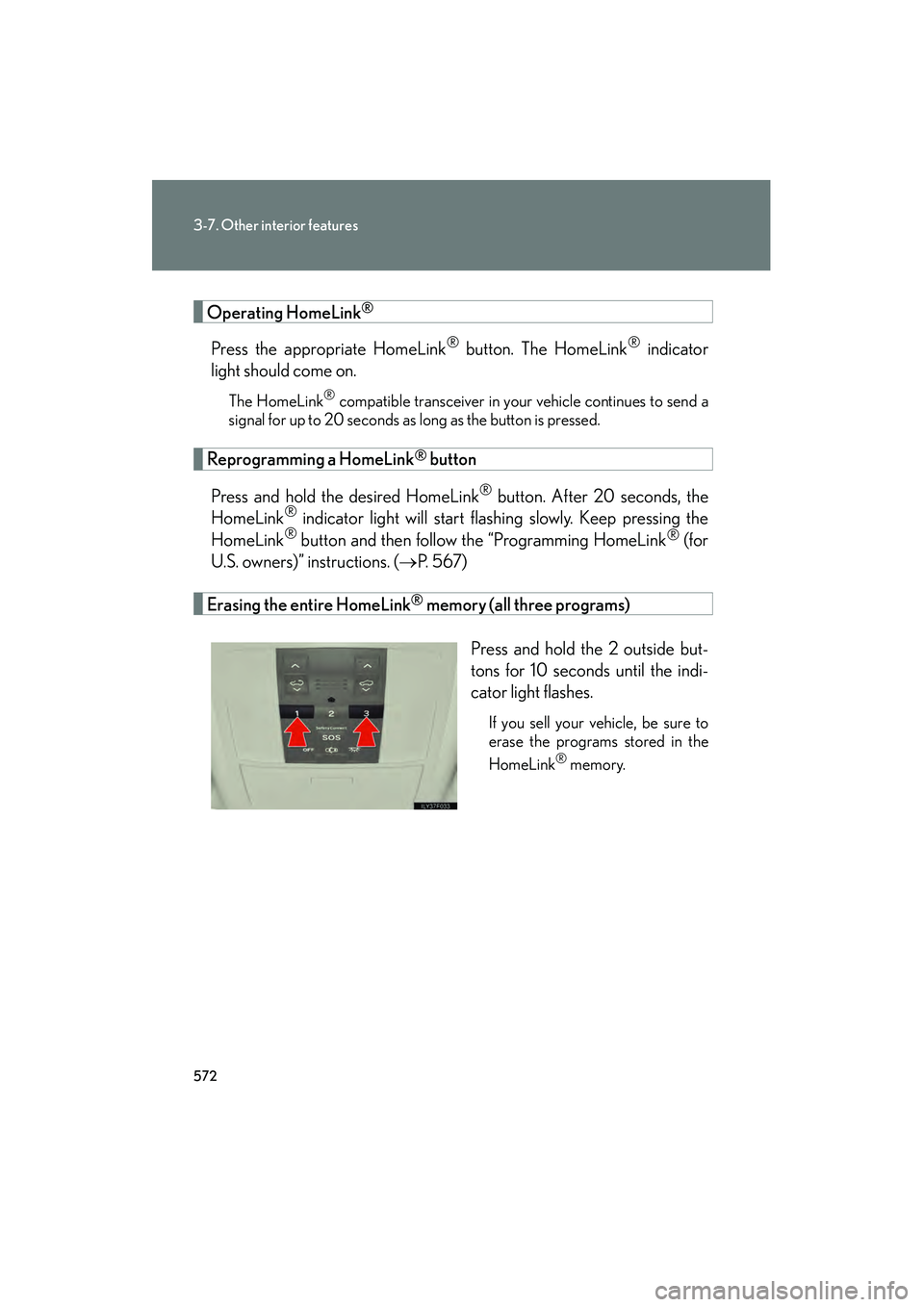
Erasing the entire HomeLink® memory (all three programs)
Press and hold the 2 outside but-
tons for 10 seconds until the indi-
cator light flashes.
If you sell your vehicle, be sure to
erase the programs stored in the
HomeLink
® memory.
GX460_CANADA.book Page 572 Thursday, February 4, 2010 11:54 AM
Page 576 of 830

575
3-7. Other interior features
3
Interior features
GX460_CANADA (OM60F29U)
Compass
The compass on the inside rear view mirror indicates the direction in which
the vehicle is heading.
■Operation
To turn the compass on or off,
press “AUTO” for more than 3
seconds.
■ Displays and directions
DisplayDirection
“N”North
“NE”Northeast
“E”East
“SE”Southeast
“S”South
“SW”Southwest
“W”We s t
“NW”Northwest
GX460_CANADA.book Page 575 Thursday, February 4, 2010 11:54 AM