Eco Lexus GX460 2017 Owner's Guide
[x] Cancel search | Manufacturer: LEXUS, Model Year: 2017, Model line: GX460, Model: Lexus GX460 2017Pages: 644, PDF Size: 20.93 MB
Page 85 of 644
83
GX 460 _O M_ OM6 0F 6 8U _(U )2. Instrument cluster
2
Instrument cluster
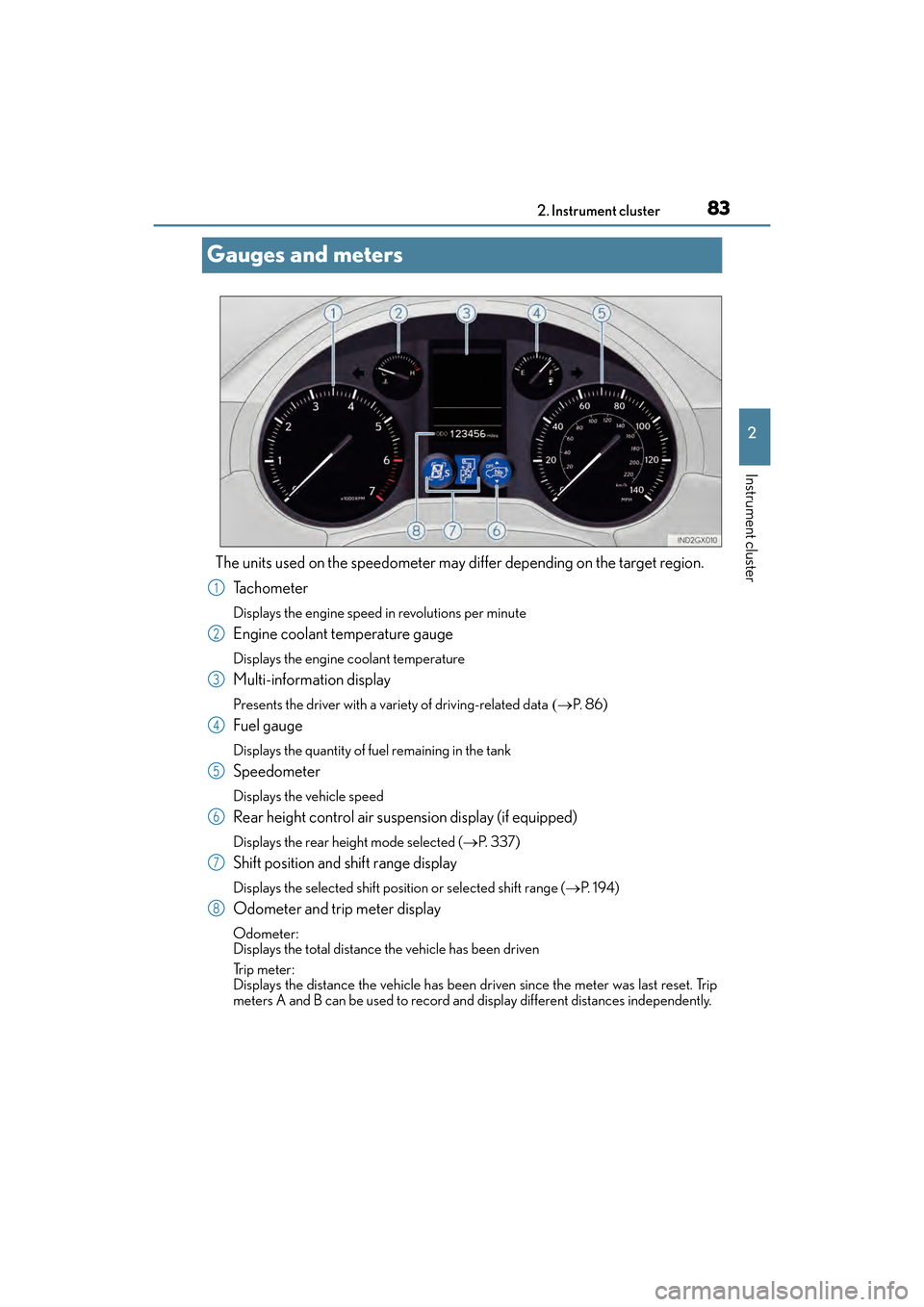
Gauges and meters
The units used on the speedometer may di
ffer depending on the target region.
Ta c h o m e t e r
Displays the engine speed in revolutions per minute
Engine coolant temperature gauge
Displays the engine coolant temperature
Multi-information display
Presents the driver with a variety of driving-related data (→P. 8 6 )
Fuel gauge
Displays the quantity of fuel remaining in the tank
Speedometer
Displays the vehicle speed
Rear height control air suspension display (if equipped)
Displays the rear height mode selected ( →P. 3 3 7 )
Shift position and shift range display
Displays the selected shift position or selected shift range ( →P. 1 9 4 )
Odometer and trip meter display
Odometer:
Displays the total distance the vehicle has been driven
Tr i p m e t e r :
Displays the distance the vehicle has been driven since the meter was last reset. Trip
meters A and B can be used to record and display different distances independently.
1
2
3
4
5
6
7
8
GX460_OM_OM60F68U_(U).book Page 83 Wednesday, June 8, 2016 6:37 PM
Page 87 of 644
GX 460 _O M_ OM6 0F 6 8U _(U )
852. Instrument cluster
2
Instrument cluster
■The meters and display illuminate when
The engine switch is in IGNITION ON mode.
■Instrument cluster brightness adjustment
The instrument cluster brightness levels when the tail lights are on and off can be
adjusted.
■The brightness of the instrument cluster lights
When the tail lights are on, the brightness wi ll change. However, when the surroundings
are bright (daytime, etc.) turning on the tail lights will not change the instrument cluster
brightness.
In addition, the brightness of the instrument cluster lights is automatically adjusted based
on the light sensor detecting ho w bright the surroundings are.
■When disconnecting and reconnecting battery terminals
The trip meter data will be reset.
If the trip meter was displayed last, the odometer will be displayed after resetting.
■Customization
Setting of sensitivity of the ambient light se nsor used for dimming the meter lights can be
changed. (Customizable features: → P. 5 9 4 )
NOTICE
■To prevent damage to the engine and its components
●Do not let the indicator needle of the tachometer enter the red zone, which indicates
the maximum engine speed.
●The engine may be overheating if the engine coolant temperature gauge is in the red
zone (H). In this case, immediately stop the vehicle in a safe place, and check the
engine after it has cooled completely. ( →P. 5 6 4 )
GX460_OM_OM60F68U_(U).book Page 85 Wednesday, June 8, 2016 6:37 PM
Page 90 of 644

88
GX 460 _O M_ OM6 0F 6 8U _(U )2. Instrument cluster
■Average fuel consumption and Eco
Driving Indicator Zone Display
(→ P. 9 0 )
Displays the average fuel consumption since the function was reset
• The function can be reset by pressing th e “ENTER” switch for longer than 1 second
when the average fuel consumption is displayed.
• Use the displayed average fuel consumption as a reference.
■Average vehicle speed
Displays the average vehicle speed since the engine was started or the func-
tion was reset
The function can be reset by pressing the “ENTER” switch for longer than 1 second
when the average vehicle speed is displayed.
■Elapsed time
Displays the elapsed time since the function was last reset
The function can be reset by pressing the “ENTER” switch for longer than 1 second
when the elapsed time is displayed.
■Display off
A blank screen is displayed
■Multi-terrain Select (if equipped) ( →P. 3 0 8 )
■Intuitive parking assist (if equipped) ( →P. 2 4 4 )
■BSM (Blind Spot Monitor) (if equipped) ( →P. 3 5 7 )
■Second start mode ( →P. 1 9 5 )
Electronic features control contents
GX460_OM_OM60F68U_(U).book Page 88 Wednesday, June 8, 2016 6:37 PM
Page 92 of 644
90
GX 460 _O M_ OM6 0F 6 8U _(U )2. Instrument cluster
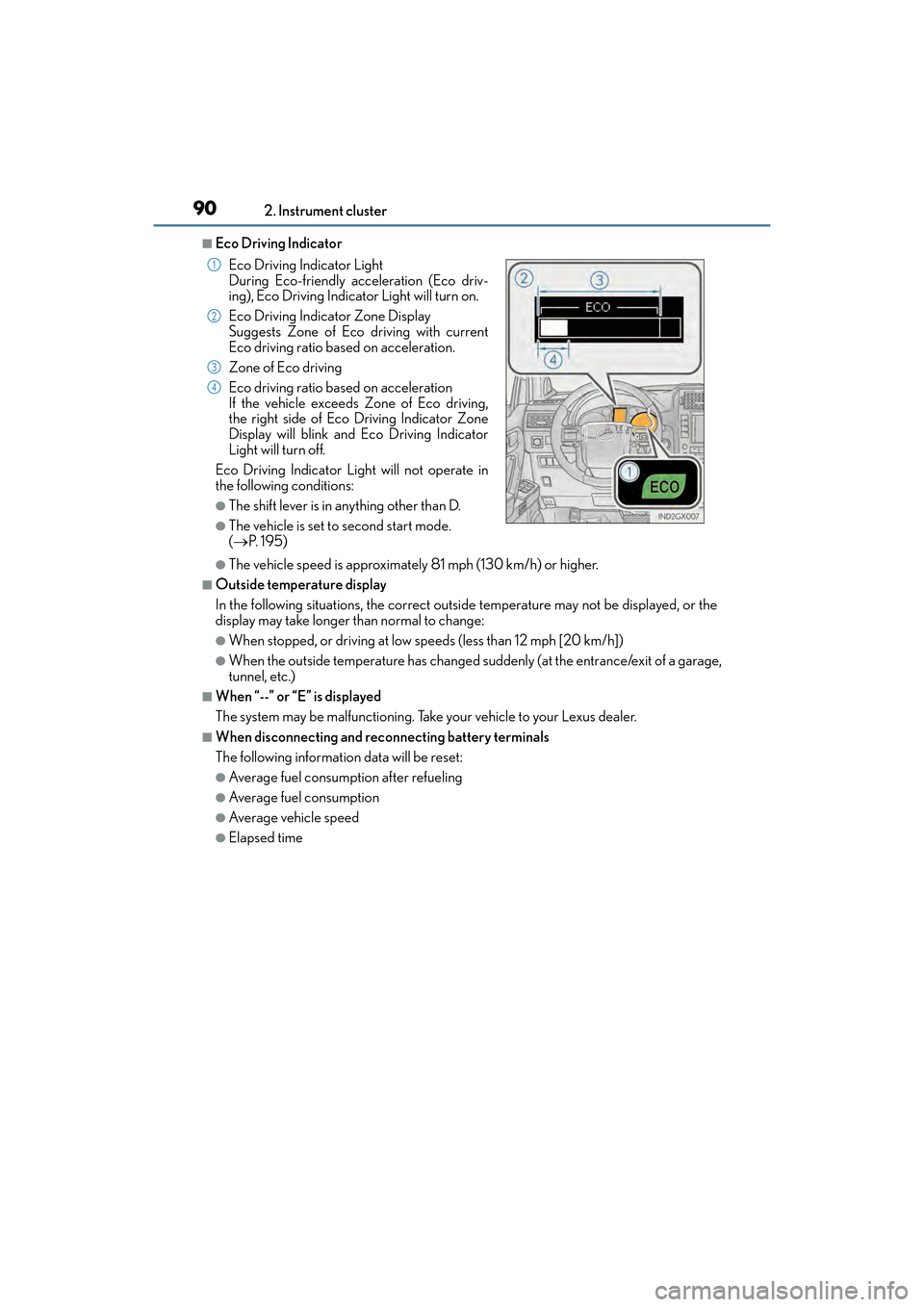
■Eco Driving Indicator
●The vehicle speed is approximately 81 mph (130 km/h) or higher.
■Outside temperature display
In the following situations, the correct outside temperature may not be displayed, or the
display may take longer than normal to change:
●When stopped, or driving at low speeds (less than 12 mph [20 km/h])
●When the outside temperature has changed suddenly (at the entrance/exit of a garage,
tunnel, etc.)
■When “--” or “E” is displayed
The system may be malfunctioning. Take your vehicle to your Lexus dealer.
■When disconnecting and reconnecting battery terminals
The following information data will be reset:
●Average fuel consumption after refueling
●Average fuel consumption
●Average vehicle speed
●Elapsed time Eco Driving Indicator Light
During Eco-friendly acceleration (Eco driv-
ing), Eco Driving Indicator
Light will turn on.
Eco Driving Indicator Zone Display
Suggests Zone of Eco driving with current
Eco driving ratio based on acceleration.
Zone of Eco driving
Eco driving ratio based on acceleration
If the vehicle exceeds Zone of Eco driving,
the right side of Eco Driving Indicator Zone
Display will blink and Eco Driving Indicator
Light will turn off.
Eco Driving Indicator Light will not operate in
the following conditions:
●The shift lever is in anything other than D.
●The vehicle is set to second start mode.
( → P. 1 9 5 )
1
2
3
4
GX460_OM_OM60F68U_(U).book Page 90 Wednesday, June 8, 2016 6:37 PM
Page 94 of 644
92
GX 460 _O M_ OM6 0F 6 8U _(U )2. Instrument cluster
Fuel consumption information
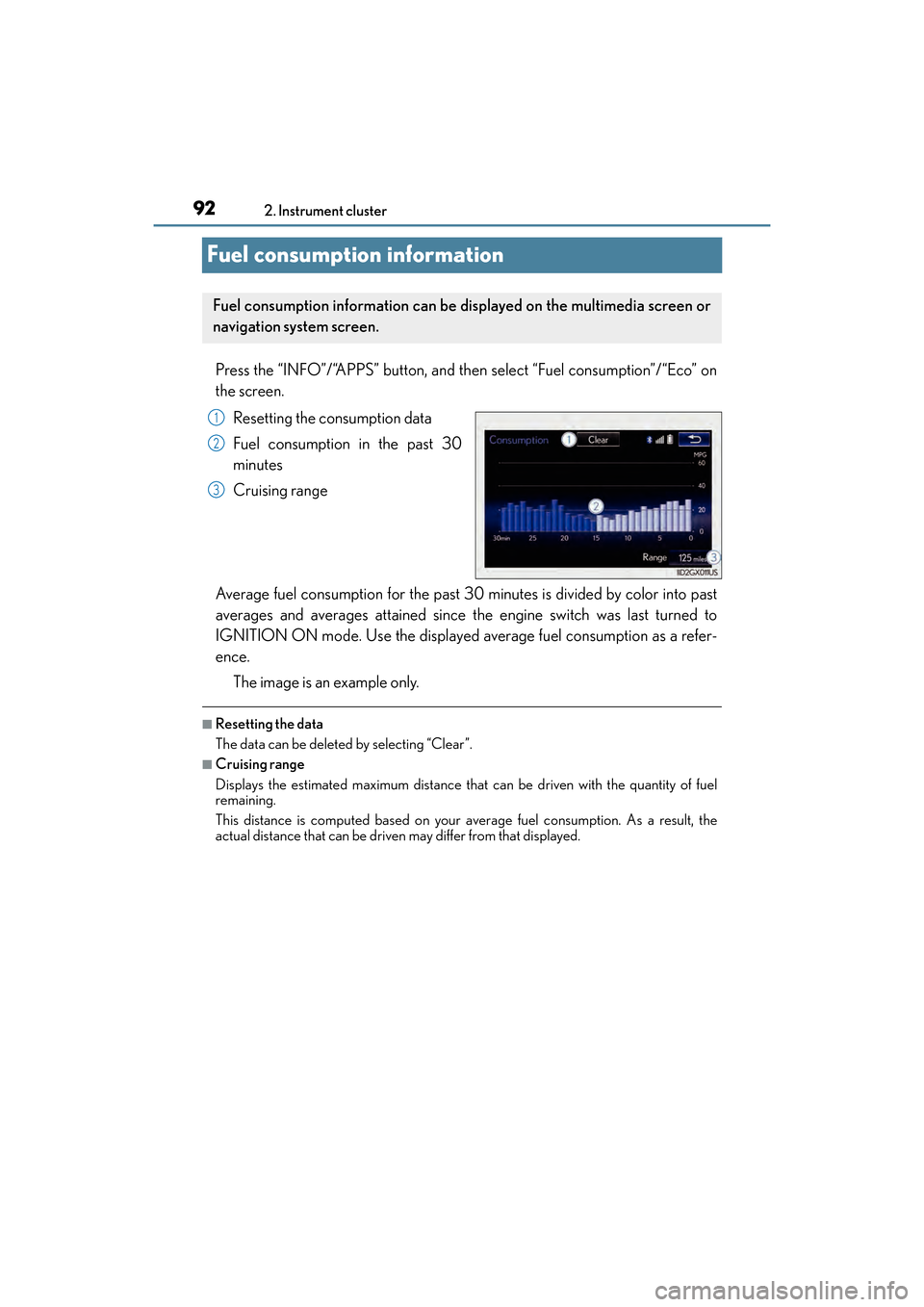
Press the “INFO”/“APPS” button, and then select “Fuel consumption”/“Eco” on
the screen.
Resetting the consumption data
Fuel consumption in the past 30
minutes
Cruising range
Average fuel consumption for the past 30 minutes is divided by color into past
averages and averages attained since the engine switch was last turned to
IGNITION ON mode. Use the displayed average fuel consumption as a refer-
ence. The image is an example only.
■Resetting the data
The data can be deleted by selecting “Clear”.
■Cruising range
Displays the estimated maximum distance that can be driven with the quantity of fuel
remaining.
This distance is computed based on your average fuel consumption. As a result, the
actual distance that can be driven may differ from that displayed.
Fuel consumption information can be displayed on the multimedia screen or
navigation system screen.
1
2
3
GX460_OM_OM60F68U_(U).book Page 92 Wednesday, June 8, 2016 6:37 PM
Page 97 of 644
GX 460 _O M_ OM6 0F 6 8U _(U )
953-1. Key information
3
Operation of each component
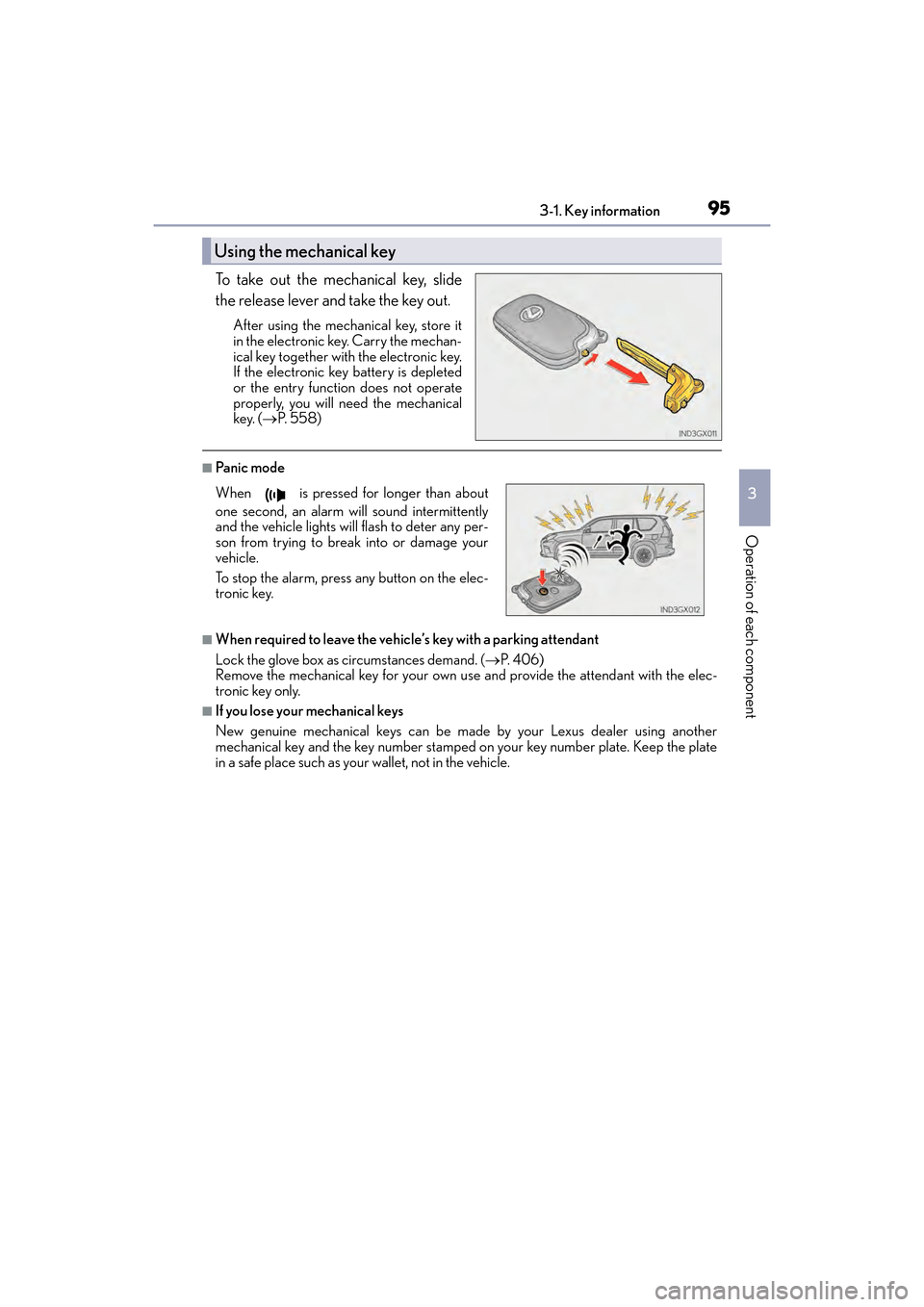
To take out the mechanical key, slide
the release lever and take the key out.
After using the mechanical key, store it
in the electronic key. Carry the mechan-
ical key together with the electronic key.
If the electronic key battery is depleted
or the entry function does not operate
properly, you will need the mechanical
key. (→P. 5 5 8 )
■Pa ni c m o d e
■When required to leave the vehicle’s key with a parking attendant
Lock the glove box as circumstances demand. ( →P. 4 0 6 )
Remove the mechanical key for your own use and provide the attendant with the elec-
tronic key only.
■If you lose your mechanical keys
New genuine mechanical keys can be made by your Lexus dealer using another
mechanical key and the key number stamped on your key number plate. Keep the plate
in a safe place such as your wallet, not in the vehicle.
Using the mechanical key
When is pressed for longer than about
one second, an alarm will sound intermittently
and the vehicle lights will flash to deter any per-
son from trying to break into or damage your
vehicle.
To stop the alarm, press any button on the elec-
tronic key.
GX460_OM_OM60F68U_(U).book Page 95 Wednesday, June 8, 2016 6:37 PM
Page 98 of 644
96
GX 460 _O M_ OM6 0F 6 8U _(U )3-1. Key information
■When riding in an aircraft
When bringing an electronic key onto an aircraft, make sure you do not press any but-
tons on the electronic key while inside the aircraft cabin. If you are carrying an electronic
key in your bag etc., ensure that the buttons are not likely to be pressed accidentally.
Pressing a button may cause the electronic key to emit radio waves that could interfere
with the operation of the aircraft.
■Electronic key battery depletion
●The standard battery life is 1 to 2 years.
●If the battery becomes low, an alarm will sound in the cabin when the engine is stopped.
(
→ P. 5 3 9 )
●As the electronic key always receives radio waves, the battery will become depleted
even if the electronic key is not used. The following symptoms indicate that the elec-
tronic key battery may be depleted. Replace the battery when necessary. ( →P. 4 9 2 )
• The smart access system with push-button start or the wireless remote control does not operate.
• The detection area becomes smaller.
• The LED indicator on the key surface does not turn on.
●To avoid serious deterioration, do not leave the electronic key within 3 ft. (1 m) of the
following electrical appliances that produce a magnetic field:
•TVs
• Personal computers
• Cellular phones, cordless phones and battery chargers
• Recharging cellular phones or cordless phones
• Table lamps
• Induction cookers
■Replacing the battery
→ P. 4 9 2
■Certification for the wireless remote control
XFor vehicles sold in the U.S.A., Hawaii, Guam, Saipan and Puerto Rico
GX460_OM_OM60F68U_(U).book Page 96 Wednesday, June 8, 2016 6:37 PM
Page 100 of 644

98
GX 460 _O M_ OM6 0F 6 8U _(U )3-2. Opening, closing and locking the doors
Side doors
◆Smart access system with push-button start
Carry the electronic key to enable this function.
Grip the driver’s door handle to
unlock the door. Grip the passen-
ger’s door handle to unlock all the
doors.
*
Make sure to touch the sensor on the
back of the handle.
The doors cannot be unlocked for
3 seconds after the doors are locked.
*: The door unlock settings can bechanged. ( →P. 1 0 3 )
Touch the lock sensor (the indentation on the upper part or lower part of
the front door handle) to lock the doors.
Check that the door is securely locked.
◆Wireless remote control
Locks all the doors
Check that the door is securely
locked.
Unlocks all the doors
Pressing the button unlocks the
driver’s door. Pressing the button
again within 3 seconds unlocks the
other doors.
Press and hold to open the windows
and moon roof.
*
*
: These settings must be customized at your Lexus dealer.
The vehicle can be locked and unlock ed using the entry function, wireless
remote control, key or door lock switch.
Locking and unlocking the doors from the outside
1
2
1
2
GX460_OM_OM60F68U_(U).book Page 98 Wednesday, June 8, 2016 6:37 PM
Page 101 of 644
GX 460 _O M_ OM6 0F 6 8U _(U )
993-2. Opening, closing and locking the doors
3
Operation of each component
■Operation signals
Doors: A buzzer sounds and the emergency flashers flash to indicate that the doors have
been locked/unlocked. (Locked: once; Unlocked: twice)
Windows and moon roof: A buzzer sounds to indicate that the windows and moon roof
are operating.
■Security feature
If a door or the glass hatch is not opened within approximately 60 seconds after the vehi-
cle is unlocked, the security feature automatically locks the vehicle again.
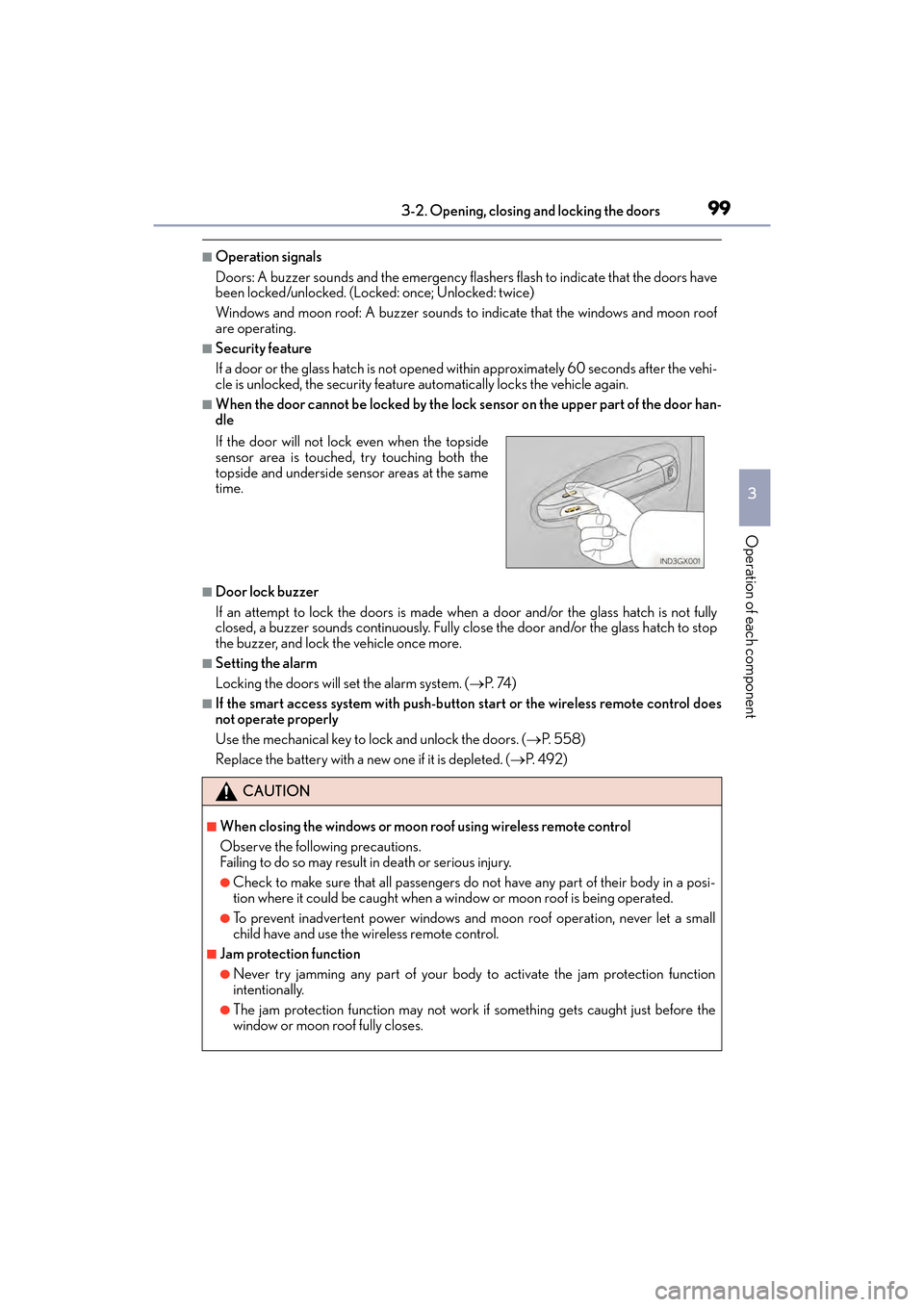
■When the door cannot be locked by the lock sensor on the upper part of the door han-
dle
■Door lock buzzer
If an attempt to lock the doors is made when a door and/or the glass hatch is not fully
closed, a buzzer sounds continuously. Fully close the door and/or the glass hatch to stop
the buzzer, and lock the vehicle once more.
■Setting the alarm
Locking the doors will set the alarm system. ( →P. 74 )
■If the smart access system with push-button start or the wireless remote control does
not operate properly
Use the mechanical key to lock and unlock the doors. ( →P. 5 5 8 )
Replace the battery with a new one if it is depleted. ( →P. 4 9 2 )
If the door will not lock even when the topside
sensor area is touched, try touching both the
topside and underside sensor areas at the same
time.
CAUTION
■When closing the windows or moon roof using wireless remote control
Observe the following precautions.
Failing to do so may result in death or serious injury.
●Check to make sure that all passengers do not have any part of their body in a posi-
tion where it could be caught when a wi
ndow or moon roof is being operated.
●To prevent inadvertent power windows and moon roof operation, never let a small
child have and use the wireless remote control.
■Jam protection function
●Never try jamming any part of your body to activate the jam protection function
intentionally.
●The jam protection function may not work if something gets caught just before the
window or moon roof fully closes.
GX460_OM_OM60F68U_(U).book Page 99 Wednesday, June 8, 2016 6:37 PM
Page 104 of 644
102
GX 460 _O M_ OM6 0F 6 8U _(U )3-2. Opening, closing and locking the doors
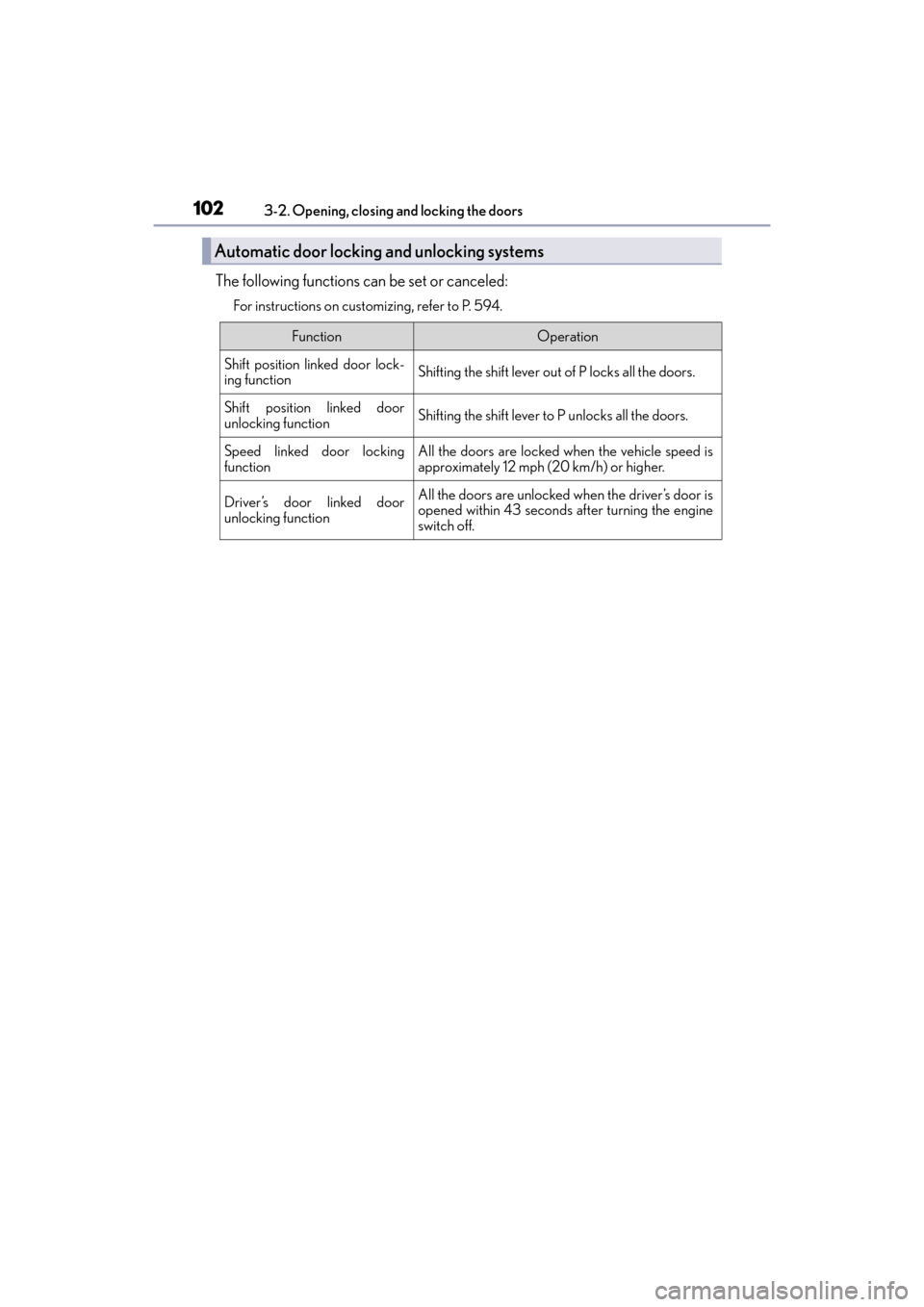
The following functions can be set or canceled:
For instructions on customizing, refer to P. 594.
Automatic door locking and unlocking systems
FunctionOperation
Shift position linked door lock-
ing functionShifting the shift lever out of P locks all the doors.
Shift position linked door
unlocking functionShifting the shift lever to P unlocks all the doors.
Speed linked door locking
functionAll the doors are locked when the vehicle speed is
approximately 12 mph (20 km/h) or higher.
Driver’s door linked door
unlocking functionAll the doors are unlocked when the driver’s door is
opened within 43 seconds after turning the engine
switch off.
GX460_OM_OM60F68U_(U).book Page 102 Wednesday, June 8, 2016 6:37 PM