Eco Lexus GX460 2017 Service Manual
[x] Cancel search | Manufacturer: LEXUS, Model Year: 2017, Model line: GX460, Model: Lexus GX460 2017Pages: 644, PDF Size: 20.93 MB
Page 105 of 644
GX 460 _O M_ OM6 0F 6 8U _(U )
1033-2. Opening, closing and locking the doors
3
Operation of each component
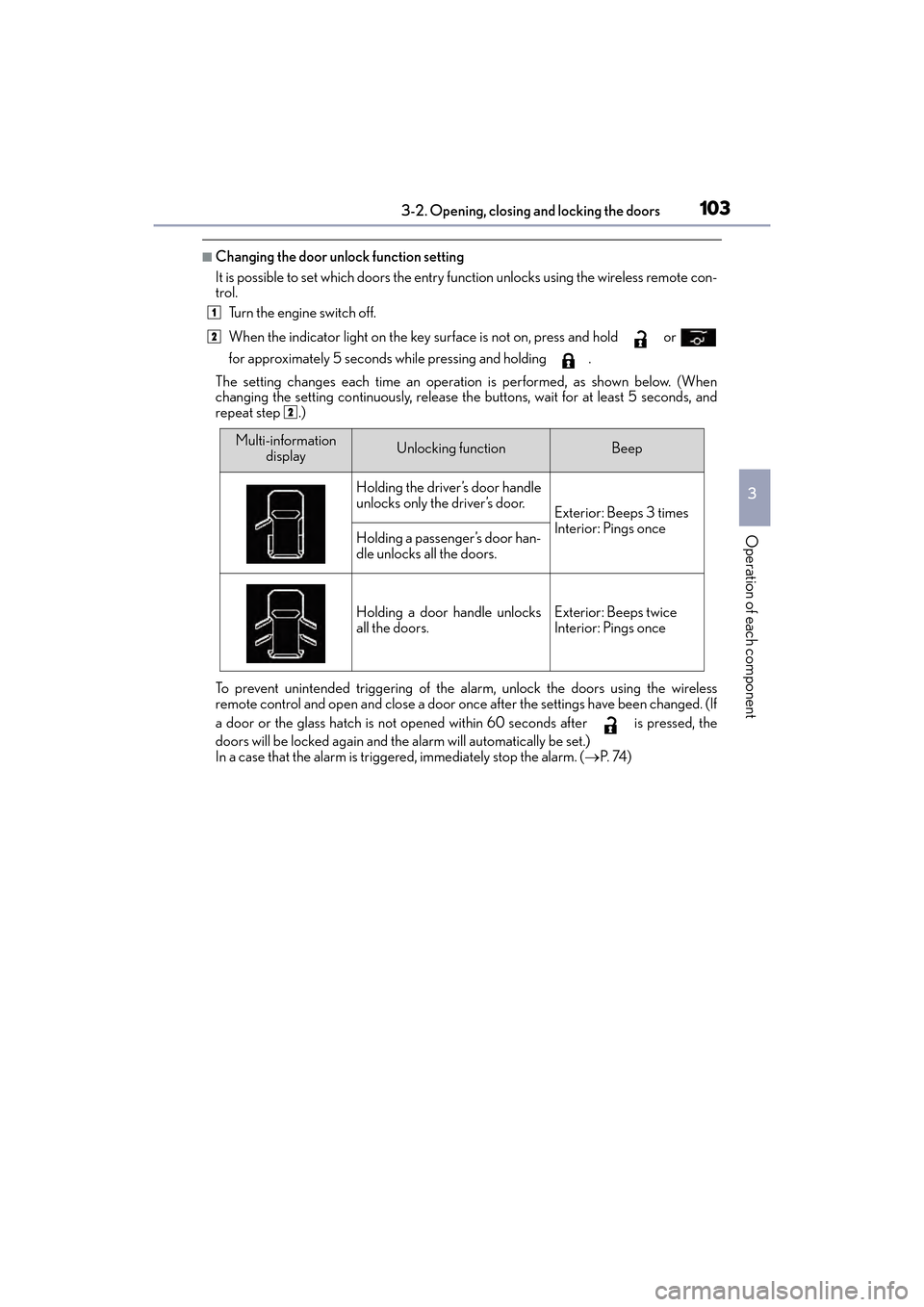
■Changing the door unlock function setting
It is possible to set which doors the entry function unlocks using the wireless remote con-
trol. Turn the engine switch off.
When the indicator light on the key su rface is not on, press and hold or
for approximately 5 seconds while pressing and holding .
The setting changes each time an operation is performed, as shown below. (When
changing the setting continuously, release th e buttons, wait for at least 5 seconds, and
repeat step .)
To prevent unintended triggering of the alarm, unlock the doors using the wireless
remote control and open and close a door once after the settings have been changed. (If
a door or the glass hatch is not opened within 60 seconds after is pressed, the
doors will be locked again and the alarm will automatically be set.)
In a case that the alarm is triggered, immediately stop the alarm. ( →P. 74 )
1
2
2
Multi-information
displayUnlocking functionBeep
Holding the driver’s door handle
unlocks only the driver’s door.
Exterior: Beeps 3 times
Interior: Pings once
Holding a passenger’s door han-
dle unlocks all the doors.
Holding a door handle unlocks
all the doors.Exterior: Beeps twice
Interior: Pings once
GX460_OM_OM60F68U_(U).book Page 103 Wednesday, June 8, 2016 6:37 PM
Page 107 of 644

105
GX 460 _O M_ OM6 0F 6 8U _(U )3-2. Opening, closing and locking the doors
3
Operation of each component
Back door
◆Smart access system with push-button start
Carry the electronic key to enable this function.
Locks all the doors
Check that the door is securely
locked.
Unlocks all the doors
The doors cannot be unlocked for 3
seconds after the doors are locked.
◆Wireless remote control
→P. 9 8
◆Door lock switch
Locks all the doors
Unlocks all the doors
The back door can be locked/unlocked and opened by the following proce-
dures.
Locking and unlocking the ba ck door from the outside
1
2
Locking and unlocking the back door from the inside
1
2
GX460_OM_OM60F68U_(U).book Page 105 Wednesday, June 8, 2016 6:37 PM
Page 111 of 644
GX 460 _O M_ OM6 0F 6 8U _(U )
1093-2. Opening, closing and locking the doors
3
Operation of each component
CAUTION
●Do not pull on the back door damper stay to close the back door, and do not hang on
the back door damper stay.
Doing so may cause hands to be caught or the back door damper stay to break, caus-
ing an accident.
●If a bicycle carrier or similar heavy object is attached to the back door, it may sud-
denly shut again after being opened, causing someone’s hands, head or neck to be
caught and injured. When installing an accessory part to the back door, using a genu-
ine Lexus part is recommended.
NOTICE
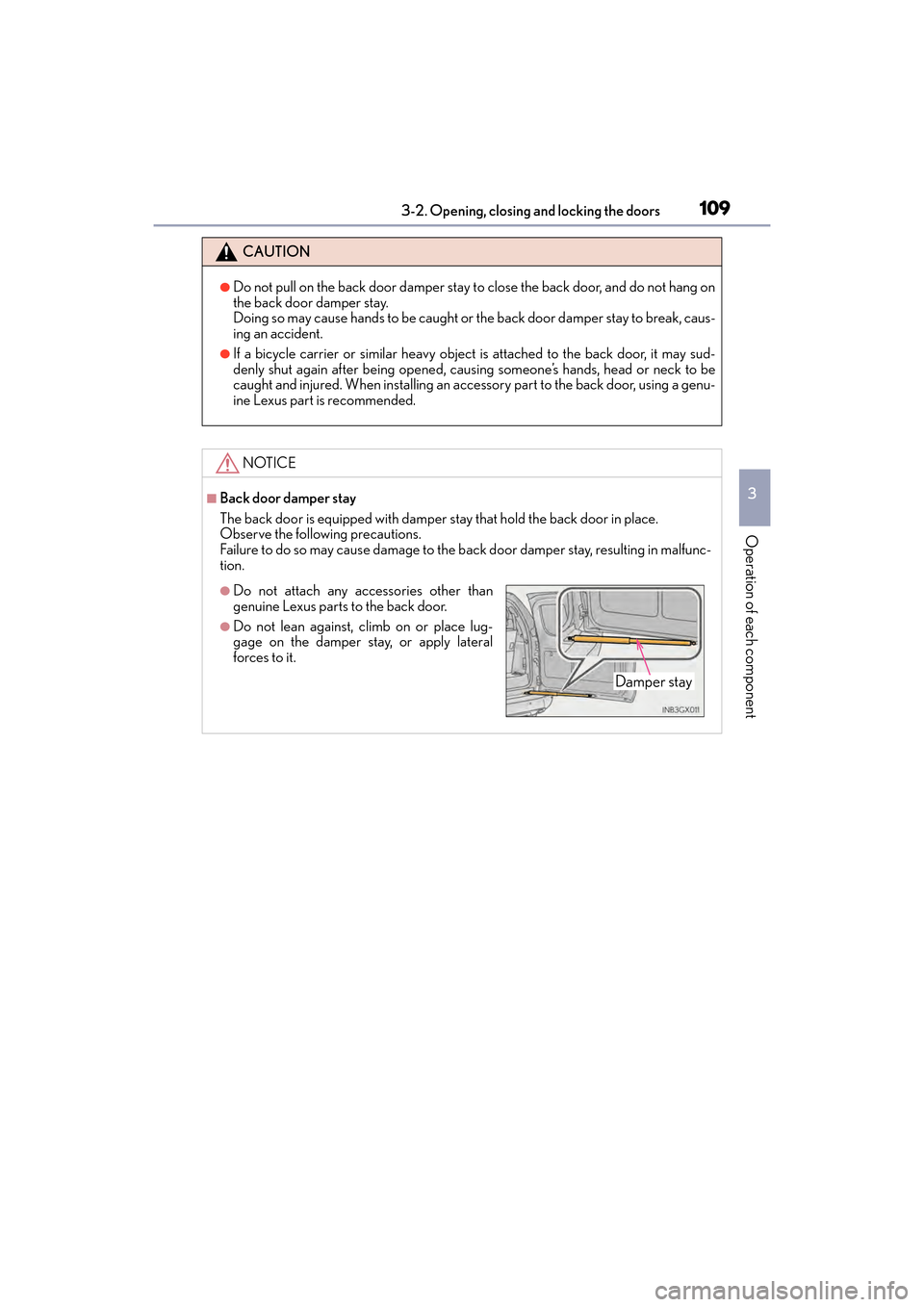
■Back door damper stay
The back door is equipped with damper stay that hold the back door in place.
Observe the following precautions.
Failure to do so may cause damage to the b ack door damper stay, resulting in malfunc-
tion.
●Do not attach any accessories other than
genuine Lexus parts to the back door.
●Do not lean against, climb on or place lug-
gage on the damper stay, or apply lateral
forces to it.
Damper stay
GX460_OM_OM60F68U_(U).book Page 109 Wednesday, June 8, 2016 6:37 PM
Page 113 of 644

GX 460 _O M_ OM6 0F 6 8U _(U )
1113-2. Opening, closing and locking the doors
3
Operation of each component
■When opening the glass hatch
●Open the glass hatch slowly and carefully.
●Use the glass hatch opener or wireless remote control when the back door is closed.
■Operation signals (when opening with the wireless remote control)
A buzzer sounds once to indicate that the glass hatch have been opened.
■Opening the glass hatch while the rear window wiper is in operation
Rear window wiper operation will stop moving. Operation will recommence after the
glass hatch has been closed.
■Function to prevent the glass hatch being locked with the electronic key inside
●When all doors are being locked, closing th e glass hatch with the electronic key left
inside the luggage compartment will sound an alarm.
In this case, the glass hatch can be opened using the entry function.
●Even when the spare electronic key is put in the luggage compartment with all the
doors locked, the key confinement prevention function can be activated so the glass
hatch can be opened. In order to prevent theft, take all electronic keys with you when
leaving the vehicle.
●Even when the electronic key is put in the luggage compartment with all the doors are
locked, the key may not be detected depending on the places and the surrounding
radio wave conditions. In this case, the key confinement prevention function cannot be
activated, causing the doors to lock when the glass hatch is closed. Make sure to check
where the key is before closing the glass hatch.
■After closing the glass hatch
Check that the glass hatch is firmly locked. If it is not firmly locked, the rear window wiper
and washer will not operate correctly.
■Customization
The glass hatch opening operation can be changed. (Customizable features: →P. 5 9 4 )
GX460_OM_OM60F68U_(U).book Page 111 Wednesday, June 8, 2016 6:37 PM
Page 118 of 644
116
GX 460 _O M_ OM6 0F 6 8U _(U )3-2. Opening, closing and locking the doors
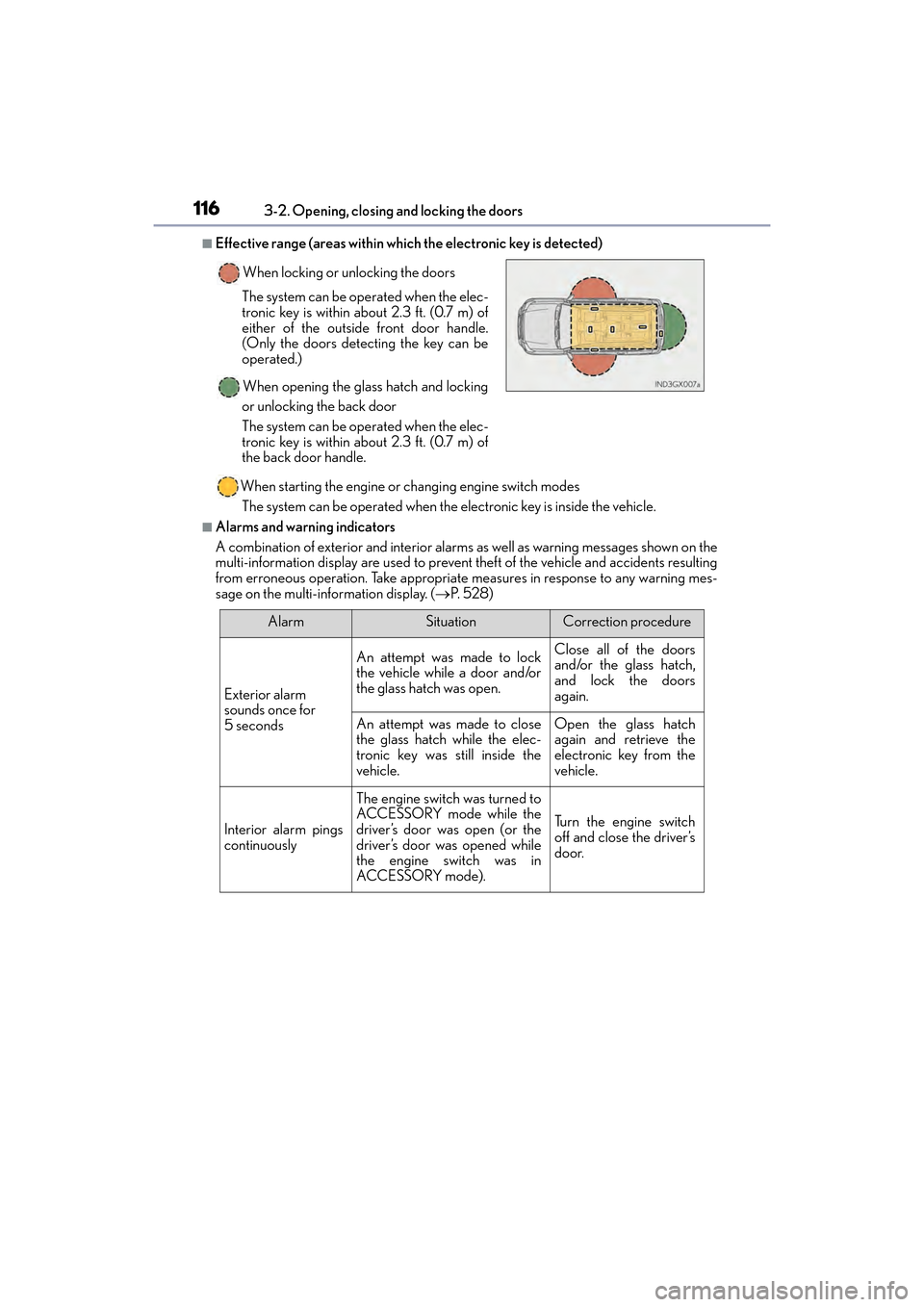
■Effective range (areas within which the electronic key is detected)
When starting the engine or changing engine switch modesThe system can be operated when the electronic key is inside the vehicle.
■Alarms and warning indicators
A combination of exterior and interior alarms as well as warning messages shown on the
multi-information display are used to prevent theft of the vehicle and accidents resulting
from erroneous operation. Take appropriate measures in response to any warning mes-
sage on the multi-information display. ( →P. 5 2 8 )
When locking or unlocking the doors
The system can be operated when the elec-
tronic key is within about 2.3 ft. (0.7 m) of
either of the outside front door handle.
(Only the doors detecting the key can be
operated.)
When opening the glass hatch and locking
or unlocking the back door
The system can be operated when the elec-
tronic key is within about 2.3 ft. (0.7 m) of
the back door handle.
AlarmSituationCorrection procedure
Exterior alarm
sounds once for
5 seconds
An attempt was made to lock
the vehicle while a door and/or
the glass hatch was open.Close all of the doors
and/or the glass hatch,
and lock the doors
again.
An attempt was made to close
the glass hatch while the elec-
tronic key was still inside the
vehicle.Open the glass hatch
again and retrieve the
electronic key from the
vehicle.
Interior alarm pings
continuously
The engine switch was turned to
ACCESSORY mode while the
driver’s door was open (or the
driver’s door was opened while
the engine switch was in
ACCESSORY mode).
Tu r n t h e e n g i n e s w i t c h
off and close the driver’s
door.
GX460_OM_OM60F68U_(U).book Page 116 Wednesday, June 8, 2016 6:37 PM
Page 120 of 644
118
GX 460 _O M_ OM6 0F 6 8U _(U )3-2. Opening, closing and locking the doors
■Note for the entry function
●Even when the electronic key is within the effective range (detection areas), the system
may not operate properly in the following cases:
• The electronic key is too close to the
window or outside door handle, near the
ground, or in a high place when the doors are locked or unlocked.
• The electronic key is near the ground or in a high place, or too close to the rear
bumper center when the glass hatch is opened.
• The electronic key is on the instrument panel, luggage cover or floor, or in the door pockets or glove box when the engine is started or engine switch modes are
changed.
●Do not leave the electronic key on top of the instrument panel or near the door pockets
when exiting the vehicle. Depending on the radio wave reception conditions, it may be
detected by the antenna outside the cabin and the doors will become lockable from the
outside, possibly trapping the electronic key inside the vehicle.
●As long as the electronic key is within th e effective range, the doors may be locked or
unlocked by anyone. However, only the doors detecting the electronic key can be used
to unlock the vehicle.
●Even if the electronic key is not inside the vehicle, it may be possible to start the engine
if the electronic key is near the window.
●The doors may lock or unlock if a large amou nt of water splashes on the door handle,
such as in the rain or in a car wash, when th e electronic key is within the effective range.
(The doors will automatically be locked after approximately 60 seconds if the doors or
the glass hatch are not opened and closed.)
●If the wireless remote control is used to lock the doors when the electronic key is near
the vehicle, there is a possibility that the door may not be unlocked by the entry func-
tion. (Use the wireless remote control to unlock the doors.)
●Touching the door lock sensor while wearing gloves may prevent lock operation.
●If the door handle becomes wet while the electronic key is within the effective range,
the door may lock and unlock repeatedly. Place the electronic key in a location 6 ft. (2
m) or more away from the vehicle. (Take care to ensure that the key is not stolen.)
●If the electronic key is inside the vehicle and a door handle becomes wet during a car
wash, a message may be shown on the multi-information display and a buzzer will
sound outside the vehicle. To turn off the alarm, lock all the doors.
●The lock sensor may not work properly if it comes into contact with ice, snow, mud, etc.
Clean the lock sensor and attempt to operate it again, or use the lock sensor on the
lower part of the door handle.
●Fingernails may scrape against the door during operation of the door handle.
Be careful not to injure fingernails or damage the surface of the door.
●A sudden approach to the effective range or door handle may prevent the doors from
being unlocked. In this case, return the door handle to the original position and check
that the doors unlock before pulling the door handle again.
●Unlocking the vehicle may take more time if another electronic key is within the effec-
tive range.
GX460_OM_OM60F68U_(U).book Page 118 Wednesday, June 8, 2016 6:37 PM
Page 125 of 644
GX 460 _O M_ OM6 0F 6 8U _(U )
1233-3. Adjusting the seats
3
Operation of each component
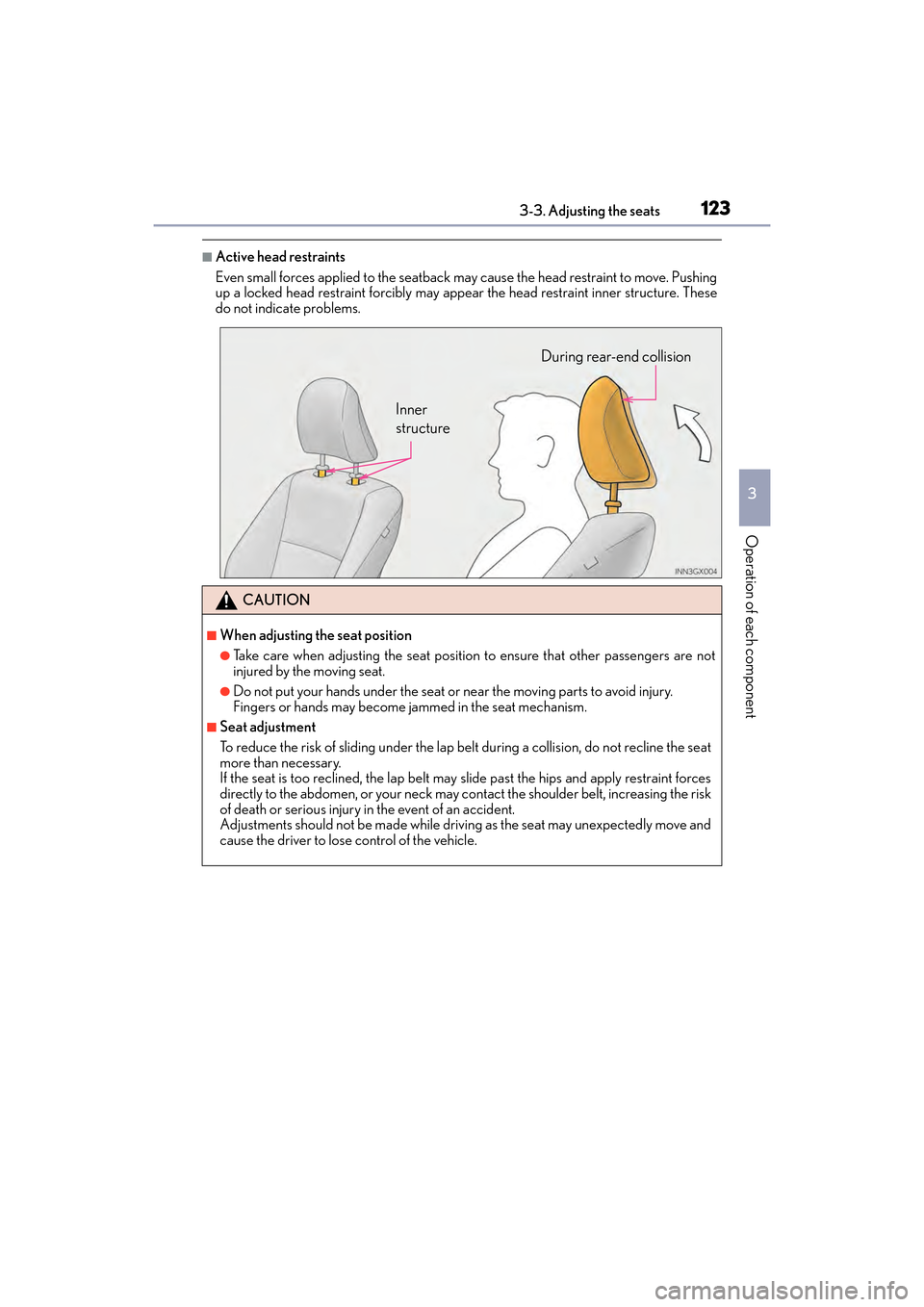
■Active head restraints
Even small forces applied to the seatback may cause the head restraint to move. Pushing
up a locked head restraint forcibly may appe ar the head restraint inner structure. These
do not indicate problems.
CAUTION
■When adjusting the seat position
●Take care when adjusting the seat position to ensure that other passengers are not
injured by the moving seat.
●Do not put your hands under the seat or near the moving parts to avoid injury.
Fingers or hands may become jammed in the seat mechanism.
■Seat adjustment
To reduce the risk of sliding under the lap be lt during a collision, do not recline the seat
more than necessary.
If the seat is too reclined, th e lap belt may slide past the hips and apply restraint forces
directly to the abdomen, or your neck may contact the shoulder belt, increasing the risk
of death or serious injury in the event of an accident.
Adjustments should not be made while drivin g as the seat may unexpectedly move and
cause the driver to lose control of the vehicle.
Inner
structure During rear-end collision
GX460_OM_OM60F68U_(U).book Page 123 Wednesday, June 8, 2016 6:37 PM
Page 126 of 644
124
GX 460 _O M_ OM6 0F 6 8U _(U )3-3. Adjusting the seats
Rear seats
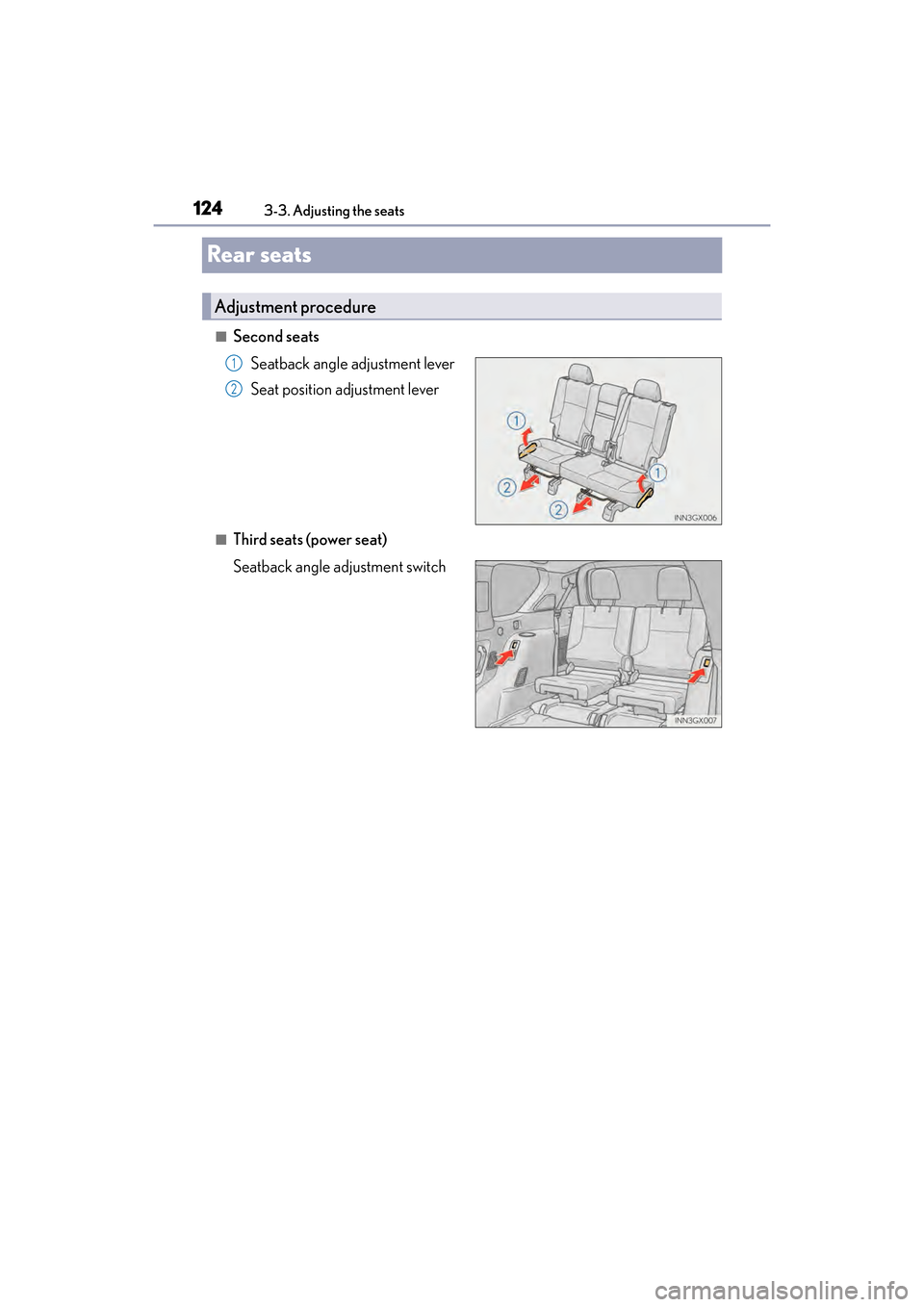
■Second seats
Seatback angle adjustment lever
Seat position adjustment lever
■Third seats (power seat)
Seatback angle adjustment switch
Adjustment procedure
1
2
GX460_OM_OM60F68U_(U).book Page 124 Wednesday, June 8, 2016 6:37 PM
Page 127 of 644
GX 460 _O M_ OM6 0F 6 8U _(U )
1253-3. Adjusting the seats
3
Operation of each component
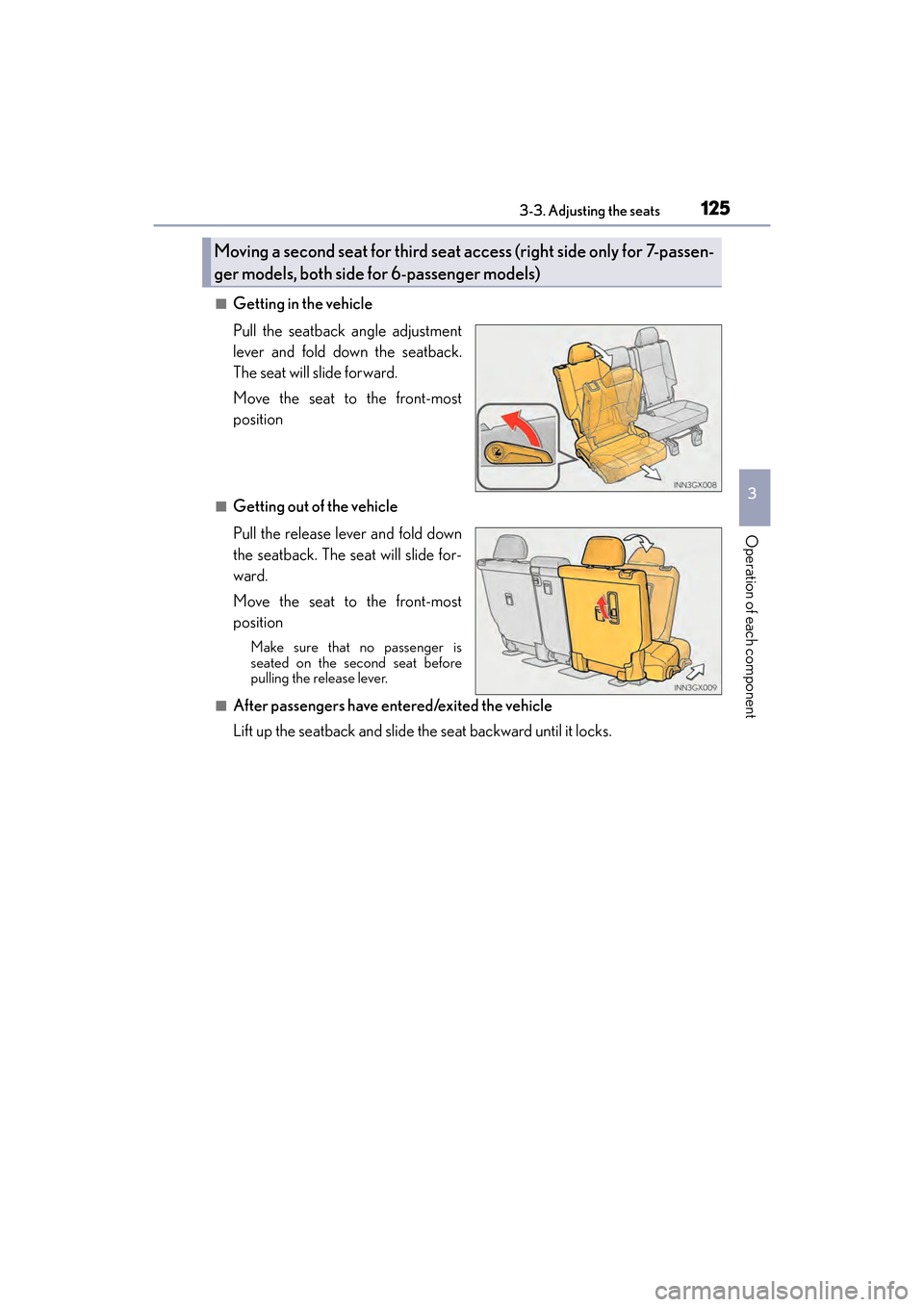
■Getting in the vehicle
Pull the seatback angle adjustment
lever and fold down the seatback.
The seat will slide forward.
Move the seat to the front-most
position
■Getting out of the vehicle
Pull the release lever and fold down
the seatback. The seat will slide for-
ward.
Move the seat to the front-most
position
Make sure that no passenger is
seated on the second seat before
pulling the release lever.
■After passengers have entered/exited the vehicle
Lift up the seatback and slide the seat backward until it locks.
Moving a second seat for third seat access (right side only for 7-passen-
ger models, both side for 6-passenger models)
GX460_OM_OM60F68U_(U).book Page 125 Wednesday, June 8, 2016 6:37 PM
Page 128 of 644
126
GX 460 _O M_ OM6 0F 6 8U _(U )3-3. Adjusting the seats
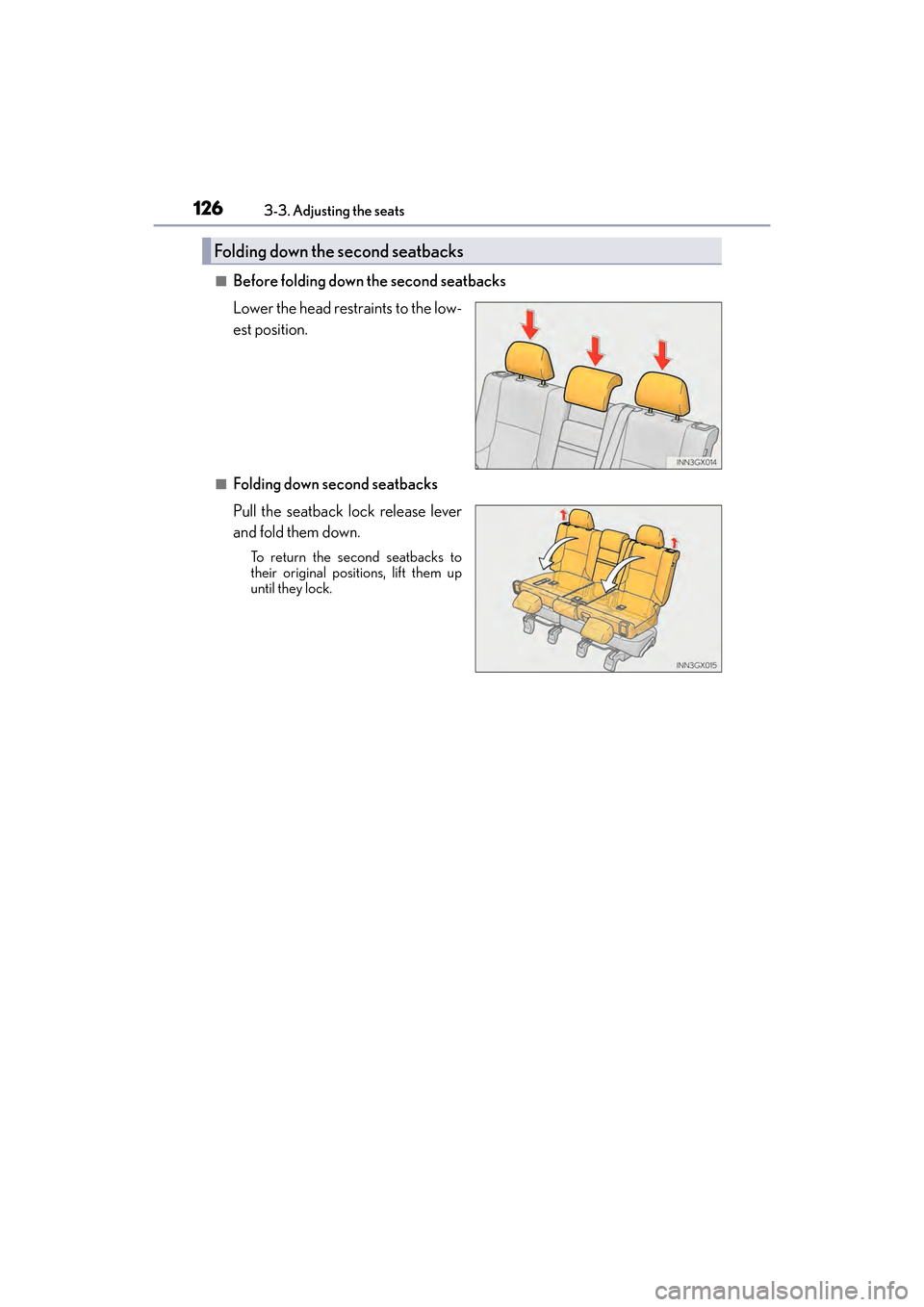
■Before folding down the second seatbacks
Lower the head restraints to the low-
est position.
■Folding down second seatbacks
Pull the seatback lock release lever
and fold them down.
To return the second seatbacks to
their original positions, lift them up
until they lock.
Folding down the second seatbacks
GX460_OM_OM60F68U_(U).book Page 126 Wednesday, June 8, 2016 6:37 PM